File integrity monitoring
File integrity monitoring is performed by comparing the cryptographic checksum and other attributes of a known file against those of the modified file.
First, the Wazuh agent scans the system periodically at a specified interval, then it sends the checksums of the monitored files and registry keys (for Windows systems) to the Wazuh server. The server stores checksums and checks for modifications by comparing newly received checksums against historical checksums for those files and/or registry keys. An alert is generated if the checksum (or another file attribute) changes. Wazuh also supports near real-time file integrity monitoring.
The file integrity monitoring module is used to meet a sub-requirement of PCI DSS 11, which requires regular testing of the security of systems and networks. This requirement aims to ensure that system components, processes, and bespoke and custom software are tested frequently, so that security controls continue to reflect a changing environment. Some environmental changes may include the modification or deletion of critical files. This module helps to monitor these file changes and assist in achieving PCI DSS compliance.
Use cases
PCI DSS 11.5.2 requires the deployment of a change-detection mechanism (for example, file integrity monitoring tools) to alert personnel of unauthorized modification (including changes, additions, and deletions) of critical system files, configuration files, or content files; and to configure the software to perform critical file comparisons at least weekly.
In the following sections, we look at configuring Wazuh to do the following:
Detect changes in a file.
Perform critical file comparisons at specified intervals.
Detect file deletion.
Detect changes in a file
For this use case, we configure Wazuh to detect changes to files in the /root/credit_cards directory and to record the user who made them.
On the agent
First, we need to check whether the Audit daemon is installed on our system.
In Red Hat-based systems, Auditd is commonly installed by default. If it's not installed, we need to install it using the following command:
# yum install audit
For Debian-based systems, use the following command:
# apt install auditd
Determine the full file path for the file or directory to be monitored. In this case, we are monitoring the directory
/root/credit_cardsfor changes. You can create these files and directories if they do not exist:# ls -l /root/credit_cards/
total 4
-rw-r--r--. 1 root root 14 May 16 14:53 cardholder_data.txt
You can also check the content of the
cardholder_data.txtfile# cat /root/credit_cards/cardholder_data.txt
User1 = card4
Add the following configuration to the syscheck block of the agent configuration file (
/var/ossec/etc/ossec.conf). This will enable real-time monitoring of the directory and ensure that when a file in the directory is modified. Wazuh generates an alert with the details of the user who made the changes on the monitored files and the program name or process used to carry them out:<syscheck> <directories check_all="yes" whodata="yes">/root/credit_cards</directories> </syscheck>
Restart the Wazuh agent to apply the changes.
# systemctl restart wazuh-agent
You can check if the Audit rule for monitoring the selected folder is applied. To check that, you need to execute the following command:
auditctl -l | grep wazuh_fimCheck in the command output that the rule was added:
auditctl -w /root/credit_cards -p wa -k wazuh_fimProceed to modify the file. In this case, we added new content:
nano /root/credit_cards/cardholder_data.txtYou can see an alert indicating that a file in the monitored directory was modified.
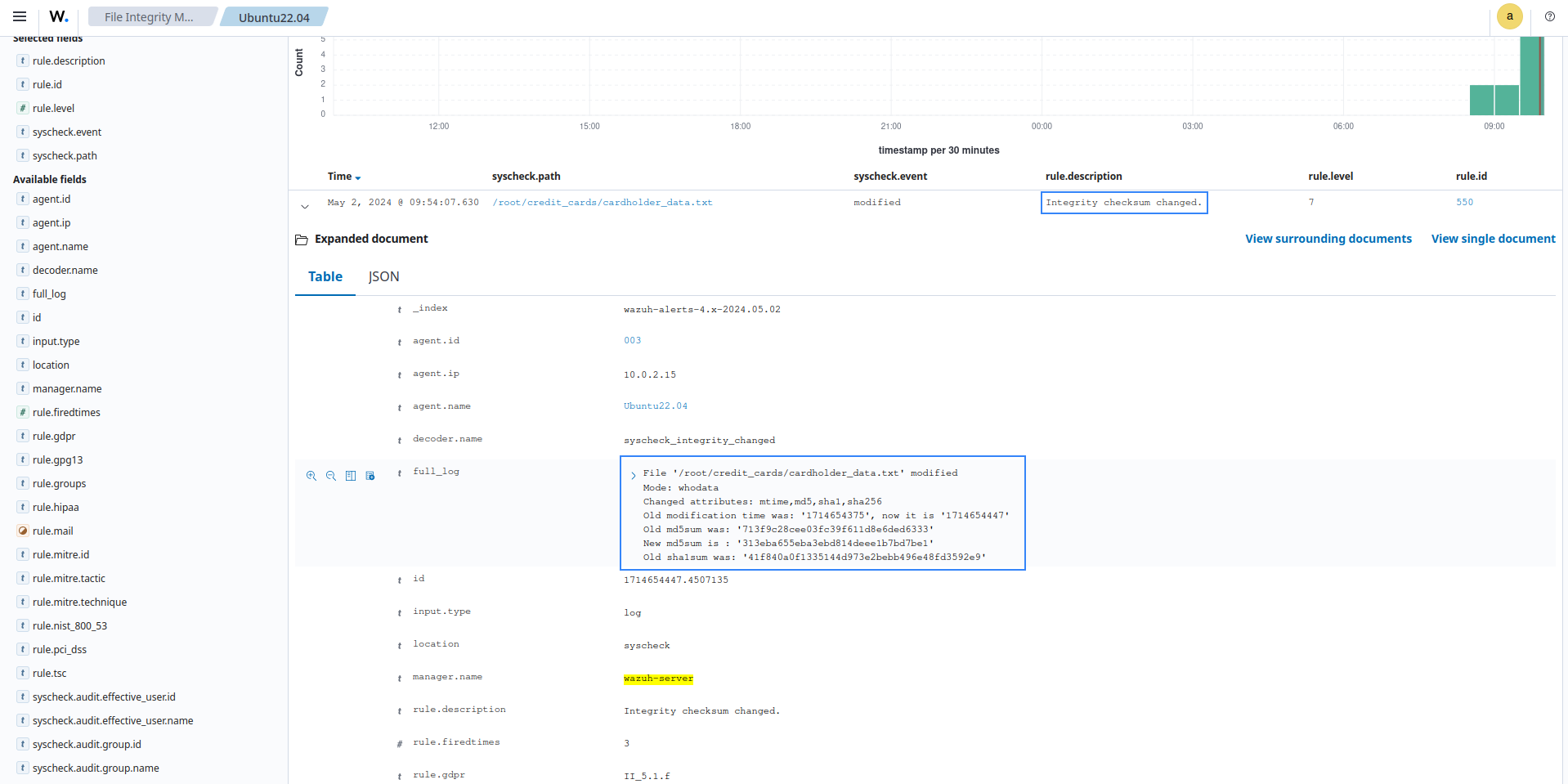
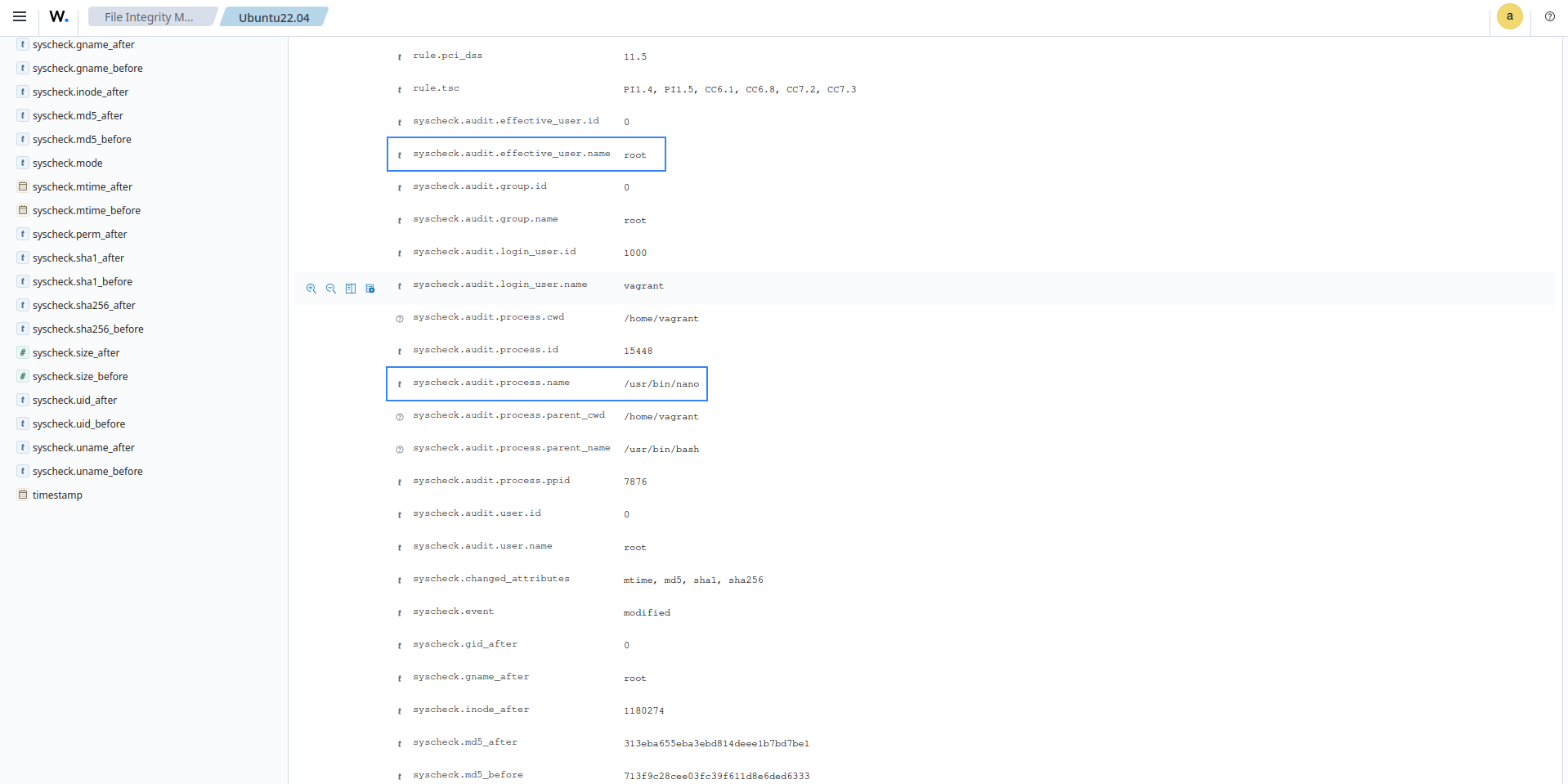
In the alert details, you can see that the PCI DSS requirement has been met. The alerts show the differences in the file checksum, the file modified, the modification time, the
whodatashowing the process and user that made the modification, and other details.
Perform critical file comparisons at specified intervals
In this use case, we configure SysCheck to detect changes to monitored files within specific time intervals and to show the differences between the last and current checks. To illustrate this, in the steps below, we configure SysCheck to scan every 1 hour and generate an alert for every detected file change.
Syscheck runs scans every 12 hours by default. The scan frequency set applies to all monitored files/directories, except directories with real-time monitoring enabled.
Depending on the number of files/directories configured for scans and the frequency of syscheck scans, you may observe increased CPU and memory usage. Please use the frequency option carefully.
On the agent
Determine the full file path for the file to be monitored. In this case, we are monitoring the file
/root/credit_cards/cardholder_data.txtfor changes.Showing changes in a file is currently limited to text files.
In the agent configuration file (
/var/ossec/etc/ossec.conf), update the frequency option of thesyscheckblock to your desired scan interval in seconds. In this case, our desired scan interval is every 1 hour (3600 seconds):<frequency>3600</frequency>
Add the following configuration to the
syscheckblock of the agent configuration file (/var/ossec/etc/ossec.conf). This will enable monitoring of the file and ensure that, when it is modified, Wazuh generates an alert with the differences.<syscheck> <directories check_all="yes" report_changes="yes" >/root/credit_cards/cardholder_data.txt</directories> </syscheck>
Note
If you prefer that the changes be monitored in real-time, you can use the configuration below to monitor the directory where the file is saved and disregard the need to modify the frequency.
<syscheck>
   <directories check_all="yes" report_changes="yes" realtime="yes" >/root/credit_cards</directories>
</syscheck>
Restart the Wazuh agent to apply the changes.
# systemctl restart wazuh-agent
Proceed to modify the file. In this case, we removed some content. An alert is generated on the next Syscheck scan about the modified file.
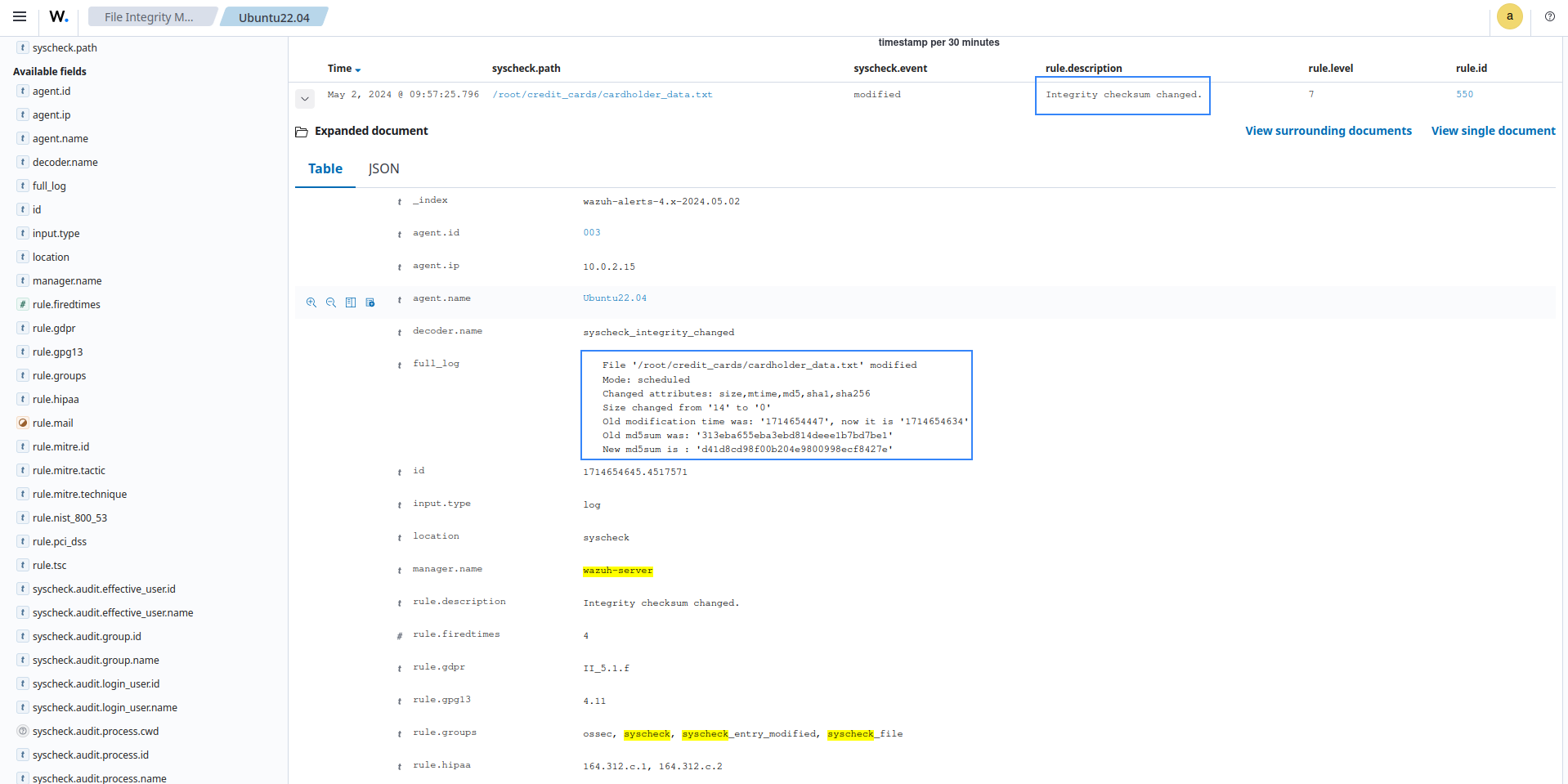
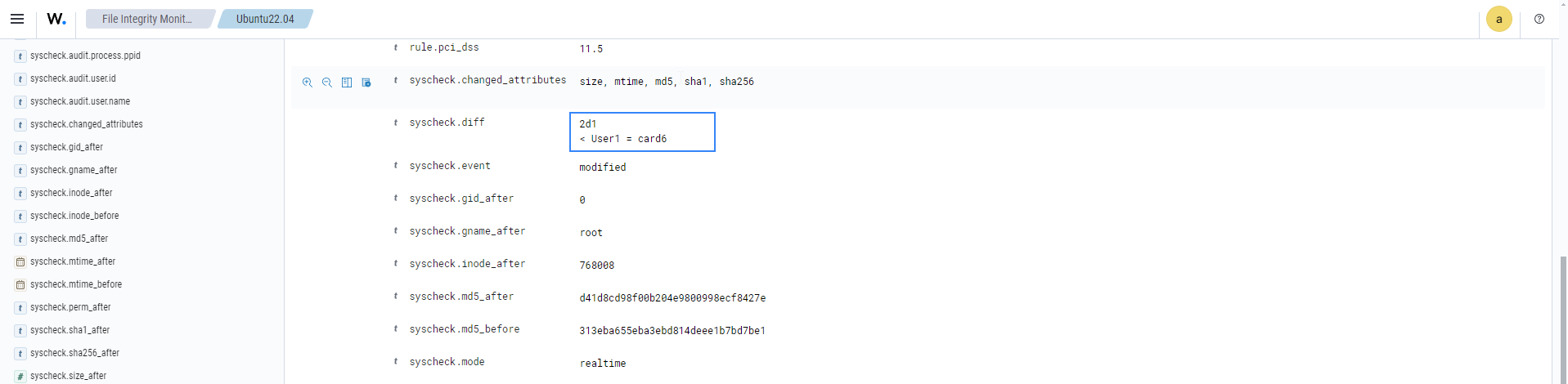
In the alert details, you can see the changes made in
syscheck.diff, the file modified, the PCI DSS requirement met, the differences in the file checksum, the modification time, and other details.
Detect file deletion
In this scenario, Syscheck detects when a file in a monitored directory is deleted. To illustrate this, the steps below configure Syscheck to monitor the /root/credit_cards/ directory for changes.
On the agent
Determine the full file path for the file or directory to be monitored. In this case, we are monitoring the
/root/credit_cardsdirectory.We add the following configuration to the syscheck block of the agent configuration file (
/var/ossec/etc/ossec.conf). This will enable monitoring of the file and ensure that Wazuh generates an alert if the file is deleted.<syscheck> <directories check_all="yes" realtime="yes" >/root/credit_cards</directories> </syscheck>
Restart the Wazuh agent to apply the changes.
# systemctl restart wazuh-agent
Proceed to delete a file from the directory. In this case, we deleted the file
cardholder_data.txt. You can see an alert generated for the file deleted.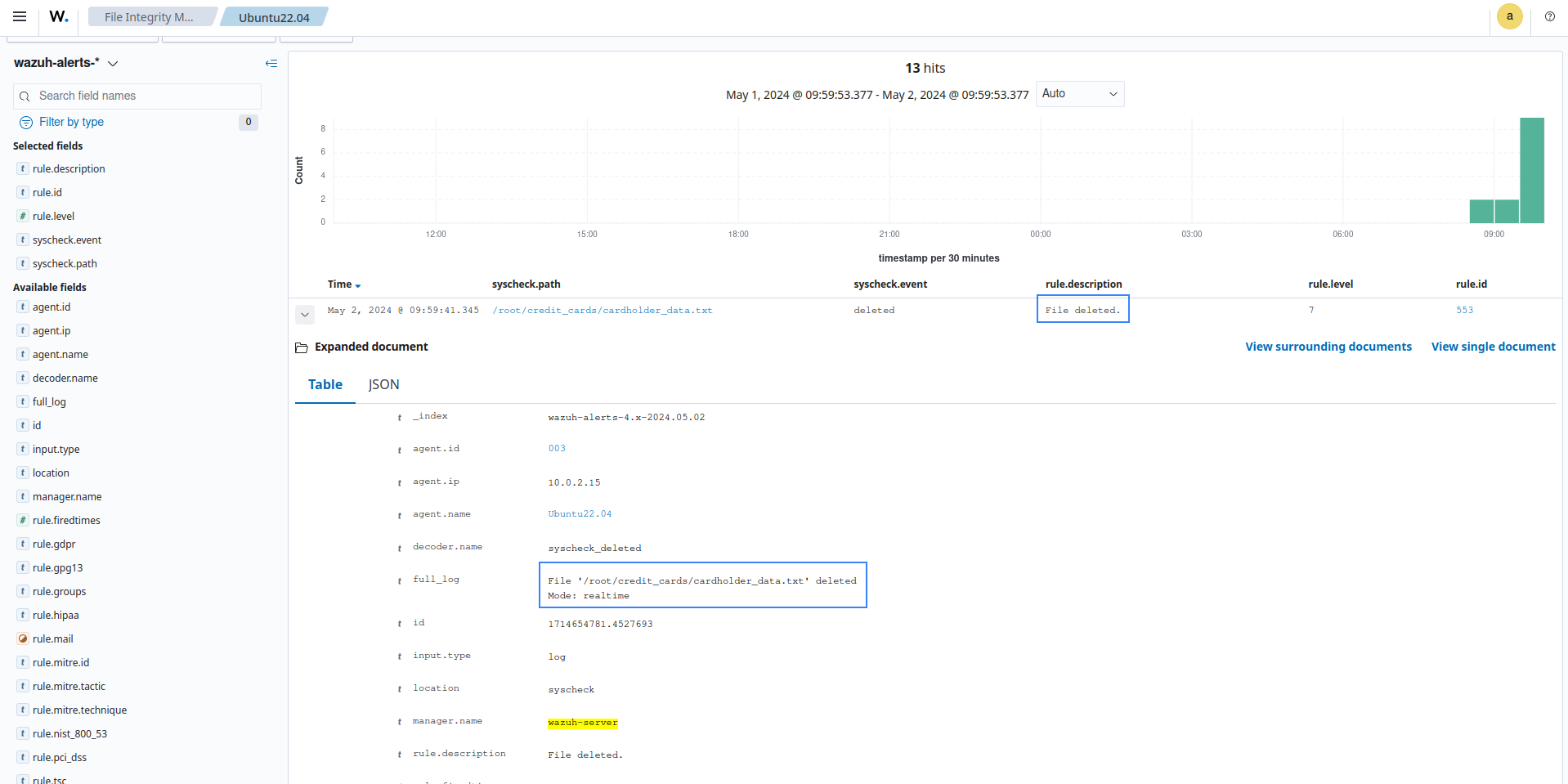
In the alert details, you can see the file deleted, the PCI DSS requirement met, the deletion time, and other details.
You can track these activities from the PCI DSS module dashboard. The dashboard will show all activities that trigger a PCI DSS requirement, including FIM changes.