AI Analyst
The Wazuh AI Analyst service provides Wazuh Cloud users with insights into their security posture and offers recommendations on how to remediate threats detected within their Wazuh Cloud subscription.
This service is an automated AI-powered security analysis solution that integrates Wazuh Cloud with AI models. It leverages machine learning capabilities to process security data and deliver actionable insights to help improve organizational security.
The service provides organizations with:
Automated security analysis without manual intervention.
Insights aggregated from multiple security data sources.
Structured recommendations to improve security posture.
Regular assessments of security posture through scheduled analyses.
The service periodically sends emails and reports. You can download these reports from the Wazuh Cloud Console.
AI Analyst email
Users receive periodic emails with key performance indicators and a summary of their security posture. Each email includes:
A histogram showing the number of protected endpoints.
The volume of alerts received by the Wazuh server.
The number of active vulnerabilities.
A summary of the current security posture.
The AI Analyst report attached as a PDF.
AI Analyst report
The report includes AI-generated insights based on data from the user's Wazuh Cloud subscription. It contains the following sections:
Overall assessment
Alert analysis
Vulnerability analysis
Endpoint analysis
Overall assessment
A summary generated by the AI, providing an overall evaluation of the organization's security posture during the reporting period.
Alert analysis
Wazuh analyzes log data collected across the monitored infrastructure. Each log is evaluated against predefined security rules, each tagged with a criticality level. This section presents alert data analysis by MITRE technique and alert level, along with a summary of recommended actions.
Vulnerability analysis
Software vulnerabilities are weaknesses in code that attackers can exploit to gain unauthorized access or alter application behavior. Vulnerable software applications are commonly targeted by attackers to compromise endpoints and gain a persistent presence on targeted networks.
Endpoint analysis
Highlights the ten most active endpoints based on alert volume. This helps identify areas with elevated security activity.
Generating the report
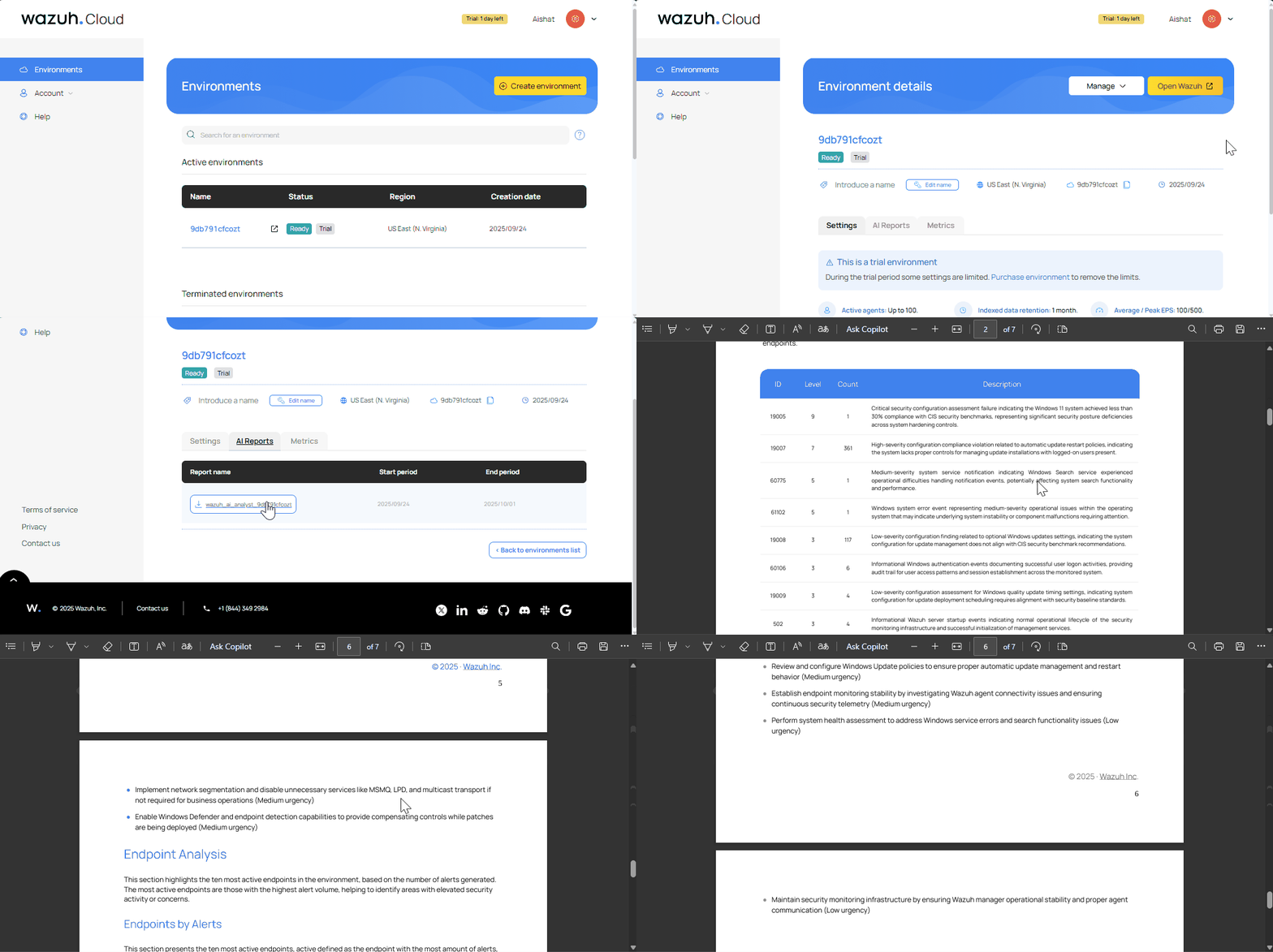
Follow the steps below to generate the AI analyst report for your environment:
Log in to the Wazuh Cloud Console.
Go to the Environments page and select your specific environment.
Navigate to the AI Reports tab.
Click on the available report to view and download the report as a PDF file.
Data privacy and security FAQ
Is data used to train AI models?
No, your data is not used to train AI models. Customer data is not used for model training or improvement, as stated in Anthropic's terms of service under AWS Bedrock. Data is only used to generate your security analysis reports and is not retained or used for any other purposes.
Can data leak to third parties?
The service implements multiple layers of security to prevent data leaks:
Encrypted data transmission.
Enterprise-grade security controls in AWS Bedrock.
Isolated processing environments for Claude.
No permanent data storage during processing.
Restricted access to authorized Wazuh service components only.
How should I use the recommendations in the AI Analyst report?
Treat AI-generated recommendations as advisory. Users are responsible for:
Reviewing and validating all AI-generated recommendations.
Acting based on internal security policies and risk assessments.
Consulting with security professionals when necessary.
The service is subject to the limitations and disclaimers outlined in AWS service terms (Section 50) and Anthropic's commercial terms of service
Service operations FAQ
How often are reports generated?
Reports are generated based on your Wazuh Cloud subscription and configuration settings.
Can I customize the analysis parameters?
Not currently. The service uses predefined parameters optimized for comprehensive security assessment.
How long are reports retained?
Reports remain available in the Wazuh Console per your subscription's data retention policy. Emails are sent to designated technical contacts and may be retained indefinitely.
What data is included in the analysis?
The analysis includes:
Security alerts and MITRE ATT&CK mappings
Vulnerability scan results
High-priority rule triggers
Endpoint activity patterns
Operating system and package vulnerability data
Can I opt out of the AI Analyst service?
Yes. You can disable the service through your Wazuh Cloud subscription settings. Contact your administrator or Wazuh Support for assistance.