Wazuh agent
The Wazuh agent is the endpoint component that collects security data and responds to threats. It runs on Linux, Windows, and macOS, on laptops, desktops, servers, cloud instances, containers, and virtual machines.
The Wazuh agent collects system and application data and sends it to the Wazuh manager through an encrypted and authenticated channel. It also provides threat prevention, detection, and response capabilities on monitored endpoints.
Wazuh agent architecture
The Wazuh agent has a modular architecture. Each module handles its own tasks, such as monitoring the file system, reading log files, collecting inventory data, checking the configuration, or looking for malware. You can manage Wazuh agent modules through configuration settings, adapting the solution to your specific use cases.
The diagram below shows the Wazuh agent architecture and modules.
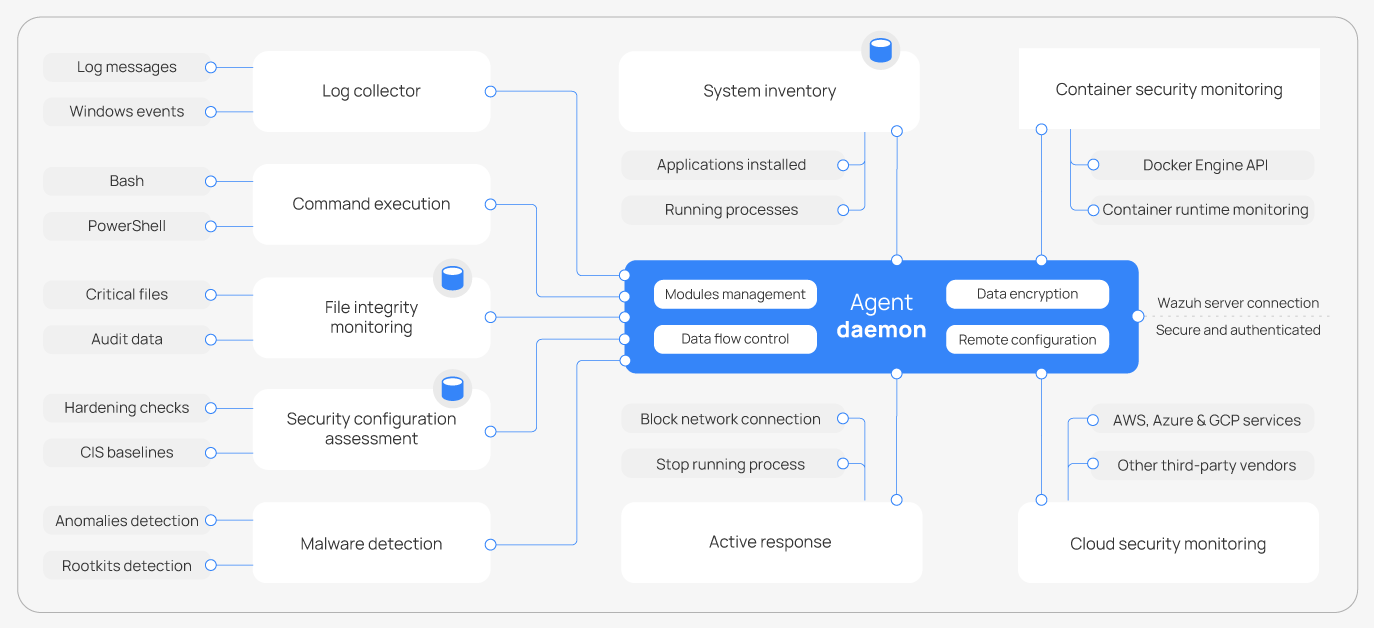
Wazuh agent modules
All agent modules are configurable and perform different security tasks. This modular architecture allows you to configure each module according to your security needs. The following list summarizes the purposes of the Wazuh agent modules.
Log data collection: Reads flat log files and Windows events, collecting operating system and application log messages. It supports XPath filters for Windows events and recognizes multi-line formats such as Linux Audit logs.
Command monitoring: Runs authorized commands periodically, collecting their output and reporting it to the Wazuh manager. You can use this module for different purposes, such as monitoring available disk space or getting a list of recently logged-in users.
File integrity monitoring (FIM): Monitors the file system, reporting when files are created, deleted, or modified. It keeps track of changes in file attributes, permissions, ownership, and content. When an event occurs, it captures who, what, and when details in real time.
Security Configuration Assessment (SCA): Provides continuous configuration assessment, using out-of-the-box checks based on the Center for Internet Security (CIS) benchmarks. You can also create custom SCA checks to monitor and enforce your security policies.
System inventory: Periodically runs scans to collect inventory data such as the operating system version, network interfaces, running processes, installed applications, and open ports. The Wazuh agent stores the inventory locally to detect changes and synchronizes it with the Wazuh manager. The Wazuh manager keeps the inventory state in the Wazuh indexer.
Malware detection: Uses a non-signature-based approach to detect anomalies and the possible presence of rootkits. It also looks for hidden processes, hidden files, and hidden ports while monitoring system calls.
Active Response: Retrieves response tasks from the Wazuh manager and runs the matching action. Examples include blocking a network connection, stopping a running process, or deleting a malicious file. You can also create custom responses, for example, running a binary in a sandbox, capturing network traffic, or scanning a file with an antivirus.
Container security: Listens to the Docker daemon on the monitored endpoint and forwards every Docker event it reports to the Wazuh manager. These events include changes to containers, images, networks, and volumes.
Cloud security monitoring: Collects logs from cloud providers such as Amazon Web Services, Microsoft Azure, and Google Cloud through their native APIs. Sources include AWS CloudTrail, Google Cloud Pub/Sub, and Microsoft Entra ID audit logs. These logs record infrastructure changes, such as a new user, a modified security group, or a stopped cloud instance.
Communication with the Wazuh manager
The Wazuh agent communicates with the Wazuh manager to send collected data and security events. It also sends operational data, including its configuration and status. The Wazuh agent retrieves pending tasks from the Wazuh manager through the same channel, including upgrades, configuration changes, and Active Response commands.
The Wazuh agent communicates with the Wazuh manager through the HTTPS agent API on port 1517. TLS encrypts the communication, and the Wazuh agent authenticates requests using a signed bearer token. The Wazuh agent sends events in batches and queues them locally when the Wazuh manager is unreachable. Local queuing helps prevent event loss during temporary connection failures and reduces repeated connection attempts.
Wazuh 4.x agents use the legacy AES-encrypted TCP or UDP channel on port 1514. The <legacy> block of the <remote> section in the Wazuh manager configuration controls this channel, and the configuration the installer generates enables it.
Install and enroll the Wazuh agent before its first connection to the Wazuh manager. Enrollment provides the Wazuh agent with a unique authentication key. The Wazuh agent uses this key to generate the bearer tokens that authenticate its requests.
Next step
To install the Wazuh agent, see the Wazuh agent installation guide.