Use cases
Wazuh generates findings for container and image activity on a monitored Docker host, so a pull, a run, or a removal that nobody authorized is visible without reading the daemon log. This use case demonstrates how to use Wazuh to monitor Docker runtime activities.
Monitoring Docker runtime activities
Wazuh monitors Docker events and generates findings for activities involving containers and images. This use case assumes Docker is installed on an Ubuntu 24.04 endpoint and that a Wazuh agent is installed and enrolled on it. Complete the steps in Configuration including all prerequisite dependencies, to install Docker, enroll the Wazuh agent, and enable the Wazuh Docker integration and listener module.
Simulate events
Perform the following steps to simulate Docker runtime events:
Pull the
httpdimage from Docker Hub:$ sudo docker pull httpd
Run a test container from the
httpdimage:$ sudo docker run -d --name test-container httpd
Pause
test-container:$ sudo docker pause test-container
Resume
test-container:$ sudo docker unpause test-container
Stop
test-container:$ sudo docker stop test-container
Remove
test-container:$ sudo docker rm test-container
Remove the
httpdimage:$ sudo docker rmi httpd
View the findings on the Wazuh dashboard
On the Wazuh dashboard, navigate to the Findings tab of the Wazuh Docker dashboard to view the findings. The following findings are generated once the interval elapses after you perform the actions above.
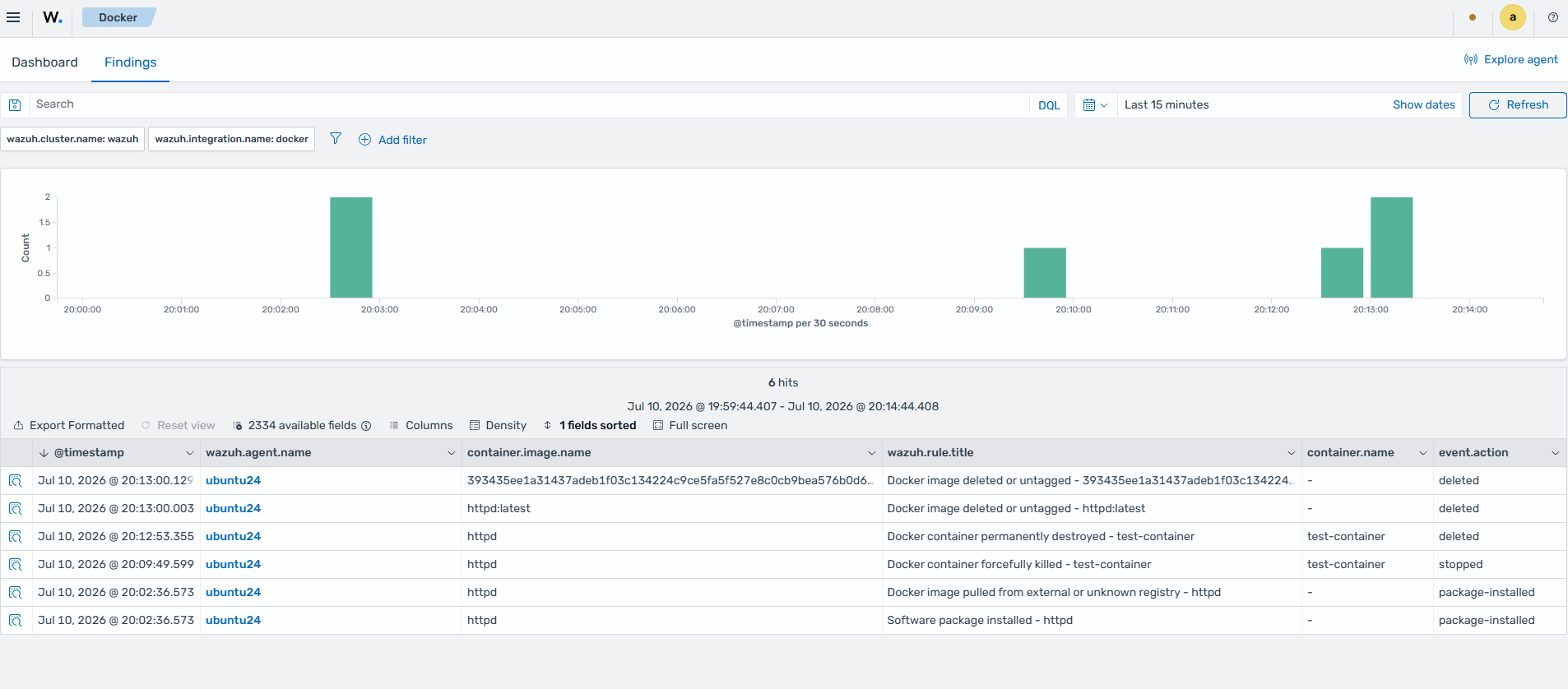
Each action generates the following finding:
Pulling the
httpdimage: Software package installed, low.Pausing
test-container: Docker container paused, low.Resuming
test-container: Docker container unpaused, informational.Stopping
test-container: Docker container forcefully killed, medium.Removing
test-container: Docker container permanently destroyed, medium.Removing the
httpdimage: Docker image deleted or untagged, low, once for the tag and once for the image.
Running test-container generates events for the creation and start of the container, but no finding. Starting a container is routine activity, so no Docker detection rule matches it. You can view these events on the Dashboard tab of the Docker dashboard.
Below, we show the full data of a finding triggered when a Docker container is paused:
{
  "_index": ".ds-wazuh-findings-v5-system-activity-000001",
  "_id": "B_HCPfxbpDlU3SUzBbtujg",
  "_source": {
    "container": {
      "image": {
        "name": "httpd"
      },
      "name": "test-container",
      "id": "25b38855313abd96c44db7da461d6e408da11412217c7036ec651cbfb4db8eac"
    },
    "orchestrator": {
      "resource": {
        "type": "container"
      }
    },
    "@timestamp": "2026-10-13T13:39:25.942Z",
    "related": {
      "hash": [
        "25b38855313abd96c44db7da461d6e408da11412217c7036ec651cbfb4db8eac"
      ]
    },
    "data_stream": {
      "namespace": "default",
      "type": "logs",
      "dataset": "docker.events"
    },
    "wazuh": {
      "cluster": {
        "node": "node01",
        "name": "wazuh"
      },
      "protocol": {
        "location": "Wazuh-Docker",
        "queue": 49
      },
      "agent": {
        "host": {
          "hostname": "ip-10-72-1-37",
          "os": {
            "name": "Ubuntu",
            "type": "linux",
            "version": "24.04.5 LTS (Noble Numbat)",
            "platform": "ubuntu"
          },
          "architecture": "x86_64"
        },
        "name": "doc-container-sec-r5-linux-agent-1",
        "groups": [
          "default"
        ],
        "id": "001",
        "version": "v5.0.0"
      },
      "integration": {
        "name": "docker",
        "decoders": [
          "decoder/core-wazuh-message/0",
          "decoder/docker/0"
        ],
        "category": "system-activity"
      },
      "rule": {
        "level": "low",
        "compliance": {
          "iso_27001": [
            "A.8.15",
            "A.8.8",
            "A.6.8"
          ],
          "hipaa": [
            "164.308.a.1.ii.D",
            "164.308.a.5.ii.B",
            "164.312.b"
          ],
          "pci_dss": [
            "10.2.1.7",
            "11.5.1"
          ],
          "tsc": [
            "CC7.2",
            "CC7.3"
          ],
          "nis2": [
            "21.2.a",
            "21.2.e"
          ],
          "nist_800_171": [
            "3.3.1",
            "3.4.1"
          ],
          "fedramp": [
            "AU-6",
            "CM-7",
            "IR-4"
          ],
          "nist_800_53": [
            "AU-6",
            "CM-7",
            "IR-4"
          ],
          "cmmc": [
            "AU.L2-3.3.1",
            "CM.L2-3.4.1",
            "IR.L2-3.6.1"
          ],
          "gdpr": [
            "IV_32.1.a",
            "IV_33.1"
          ]
        },
        "mitre": {
          "technique": {
            "name": [
              "Disable or Modify Tools"
            ],
            "id": [
              "T1685"
            ]
          },
          "tactic": {
            "name": [
              "Defense Impairment"
            ],
            "id": [
              "TA0112"
            ]
          }
        },
        "id": "ef88e4c2-8e5e-54d4-8c46-2d4ed62a6ba0",
        "title": "Docker container paused - test-container",
        "tags": [
          "low",
          "docker",
          "attack.defense-impairment",
          "attack.t1685"
        ],
        "status": "stable"
      },
      "event": {
        "id": "73370a34-66e7-4d1b-bdb1-a58430d8c720"
      },
      "space": {
        "name": "standard"
      }
    },
    "event": {
      "original": "{\"integration\": \"docker\", \"docker\": {\"Type\": \"container\", \"Action\": \"pause\", \"Actor\": {\"ID\": \"25b38855313abd96c44db7da461d6e408da11412217c7036ec651cbfb4db8eac\", \"Attributes\": {\"image\": \"httpd\", \"name\": \"test-container\"}}, \"scope\": \"local\", \"time\": 1791898758, \"timeNano\": 1791898758179941757}}",
      "code": "pause",
      "kind": "event",
      "start": "2026-10-13T13:39:18.000000Z",
      "action": "modified",
      "index": ".ds-wazuh-events-v5-system-activity-000001",
      "category": [
        "process"
      ],
      "type": [
        "change"
      ],
      "dataset": "docker.events",
      "doc_id": "Jo99NaEBC3YbHnD1jHHO",
      "outcome": "success"
    }
  }
}
Monitoring container runtime logs
Docker saves the output of each container to /var/lib/docker/containers/<CONTAINER_ID>/<CONTAINER_ID>-json.log on Linux endpoints. In this use case, you forward the logs of a web container to the Wazuh manager and detect an SQL injection attempt against it. Wazuh decodes the container logs with its built-in Docker container logs decoder, so you do not need a custom decoder.
Configure the Wazuh agent
Perform the following steps on the Docker host.
Add the following configuration within the
<ossec_config>block of the/var/ossec/etc/ossec.conffile to forward the container logs to the Wazuh manager:<localfile> <log_format>syslog</log_format> <location>/var/lib/docker/containers/*/*-json.log</location> </localfile>
The
*wildcards in<location>match the log file of every container, because each path contains the ID of its container.Restart the Wazuh agent to apply the changes:
$ sudo systemctl restart wazuh-agent
Simulate the attack
Run a web container named
test-containerfrom thenginximage on the Docker host:$ sudo docker run --name test-container -p 80:80 -d nginx
Wait 30 seconds. The Wazuh agent checks periodically for new files that match the wildcard, and it forwards only the lines written after it starts reading the log file of the new container.
Run the following command on the Wazuh manager to simulate an SQL injection attack. Replace
<DOCKER_HOST_IP>with the IP address of the Docker host:$ curl -XGET "http://<DOCKER_HOST_IP>/?id=select+*+from+users"
The request targets the root path, which the web server serves, because the SQL injection detection rule ignores requests that return HTTP 404.
View the findings on the Wazuh dashboard
On the Wazuh dashboard, navigate to Threat Hunting and click the Findings tab. Wazuh generates the high-level SQL injection strings in URI finding a few minutes after the attack.
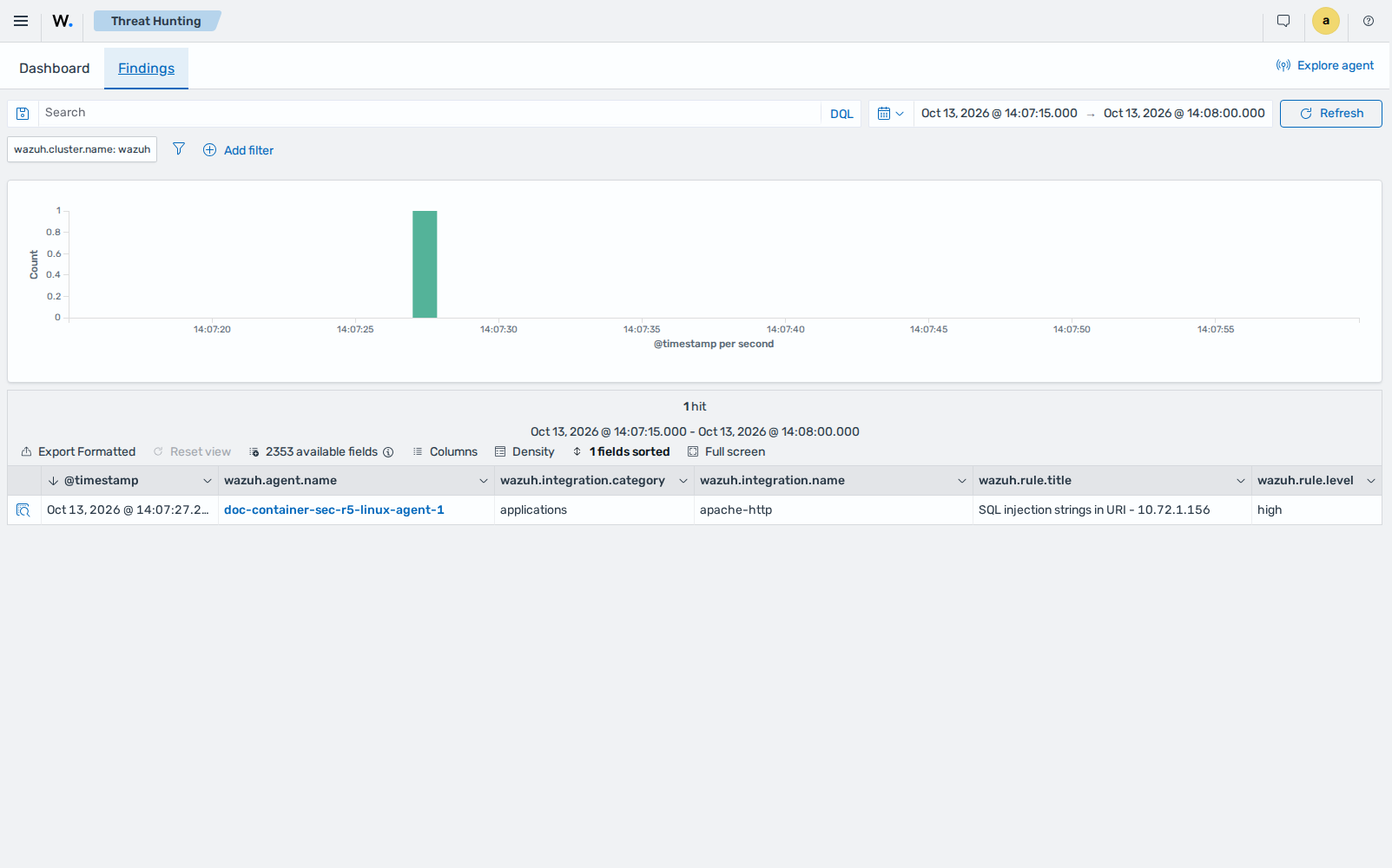
Below, we show the full data of the finding. The wazuh.protocol.location field shows the log file of the container where the event was generated.
{
  "_index": ".ds-wazuh-findings-v5-applications-000001",
  "_id": "gsc4esuJL3xdYQqSq4ka9Q",
  "_source": {
    "container": {
      "runtime": "docker"
    },
    "@timestamp": "2026-10-13T14:07:27.257Z",
    "related": {
      "ip": [
        "10.72.1.156"
      ]
    },
    "log": {
      "logger": "stdout"
    },
    "service": {
      "type": "apache"
    },
    "wazuh": {
      "cluster": {
        "node": "node01",
        "name": "wazuh"
      },
      "protocol": {
        "location": "/var/lib/docker/containers/18cab179d81f46a364eb946452b52fb99bc550c78b75019fd22cdc154aefe1c6/18cab179d81f46a364eb946452b52fb99bc550c78b75019fd22cdc154aefe1c6-json.log",
        "queue": 49
      },
      "agent": {
        "host": {
          "hostname": "ip-10-72-1-37",
          "os": {
            "name": "Ubuntu",
            "type": "linux",
            "version": "24.04.5 LTS (Noble Numbat)",
            "platform": "ubuntu"
          },
          "architecture": "x86_64"
        },
        "name": "doc-container-sec-r5-linux-agent-1",
        "groups": [
          "default"
        ],
        "id": "001",
        "version": "v5.0.0"
      },
      "integration": {
        "name": "apache-http",
        "decoders": [
          "decoder/core-wazuh-message/0",
          "decoder/docker-container-logs/0",
          "decoder/apache-access/0"
        ],
        "category": "applications"
      },
      "rule": {
        "sigma_id": "5513deaf-f49a-46c2-a6c8-3f111b5cb453",
        "level": "high",
        "compliance": {
          "iso_27001": [
            "A.8.15",
            "A.8.8",
            "A.6.8"
          ],
          "hipaa": [
            "164.308.a.1.ii.D",
            "164.308.a.6",
            "164.312.b"
          ],
          "pci_dss": [
            "6.3",
            "11.4"
          ],
          "tsc": [
            "A1.2",
            "CC7.2",
            "CC7.3"
          ],
          "nis2": [
            "21.2.a",
            "21.2.e",
            "23"
          ],
          "nist_800_171": [
            "3.3.1",
            "3.3.2",
            "3.6.1",
            "3.14.6",
            "3.14.7"
          ],
          "fedramp": [
            "AU-6",
            "IR-4",
            "SI-4"
          ],
          "nist_800_53": [
            "SI-2",
            "SI-3",
            "SI-4"
          ],
          "cmmc": [
            "AU.L2-3.3.1",
            "IR.L2-3.6.1",
            "SI.L2-3.14.1"
          ],
          "gdpr": [
            "IV_25.1",
            "IV_32.1.a",
            "IV_33.1"
          ]
        },
        "mitre": {
          "technique": {
            "name": [
              "Exploit Public-Facing Application"
            ],
            "id": [
              "T1190"
            ]
          },
          "tactic": {
            "name": [
              "Initial Access"
            ],
            "id": [
              "TA0001"
            ]
          }
        },
        "id": "15ae4a03-9a19-554d-8c3b-272ead9e7b40",
        "title": "SQL injection strings in URI - 10.72.1.156",
        "tags": [
          "high",
          "apache-http",
          "attack.initial-access",
          "attack.t1190"
        ],
        "status": "test"
      },
      "event": {
        "id": "1a987d35-c5db-42cf-8bc4-9ec9208d2caa"
      },
      "space": {
        "name": "standard"
      }
    },
    "http": {
      "request": {
        "method": "GET"
      },
      "response": {
        "status_code": 200,
        "body": {
          "bytes": 896
        }
      },
      "version": "1.1"
    },
    "source": {
      "address": "10.72.1.156",
      "ip": "10.72.1.156"
    },
    "event": {
      "original": "10.72.1.156 - - [13/Oct/2026:14:07:18 +0000] \"GET /?id=select+*+from+users HTTP/1.1\" 200 896 \"-\" \"curl/8.5.0\" \"-\"",
      "kind": "event",
      "start": "2026-10-13T14:07:18.000Z",
      "action": "http-request",
      "index": ".ds-wazuh-events-v5-applications-000001",
      "category": [
        "web"
      ],
      "type": [
        "access"
      ],
      "dataset": "apache-access",
      "doc_id": "Wo-XNaEBC3YbHnD1MHJK",
      "outcome": "success"
    },
    "user_agent": {
      "original": "curl/8.5.0"
    },
    "url": {
      "path": "/",
      "original": "/?id=select+*+from+users",
      "query": "id=select+*+from+users"
    }
  }
}
Detecting suspicious activity in Docker containers
A user with access to the Docker host can run commands inside a running container, copy files out of it, export its file system, or start a container that shares the network of the Docker host. Wazuh generates a finding for each of these actions through the Docker integration, with no additional configuration. In this use case, you perform these actions on the Docker host and view the findings.
Simulate the activity
Perform the following steps on the Docker host.
Run a web container named
web-containerfrom thenginximage:$ sudo docker run -d --name web-container nginx
Run a command inside
web-container:$ sudo docker exec web-container cat /etc/passwd
Copy a file from
web-containerto the Docker host:$ sudo docker cp web-container:/etc/passwd /tmp/web-container-passwd
Export the file system of
web-containerto an archive:$ sudo docker export web-container -o /tmp/web-container.tar
Create an image from
web-container:$ sudo docker commit web-container web-container-modified
Run a container that shares the network of the Docker host:
$ sudo docker run -d --name host-net-container --network host nginx
View the findings on the Wazuh dashboard
On the Wazuh dashboard, navigate to Cloud security > Docker and click the Findings tab. Each action generates the following findings:
Pulling the
nginximage, when it is not already on the Docker host: Software package installed, low.Running a command inside
web-container: Command executed inside Docker container, medium.Copying a file to the Docker host: File copied between Docker container and host, medium.
Exporting the file system: Docker container filesystem exported, high.
Creating an image: Docker image committed from running container, medium. Docker pauses the container during the commit, so the Docker container paused and Docker container unpaused findings also appear.
Running a container on the host network: Docker container connected to host network, high.
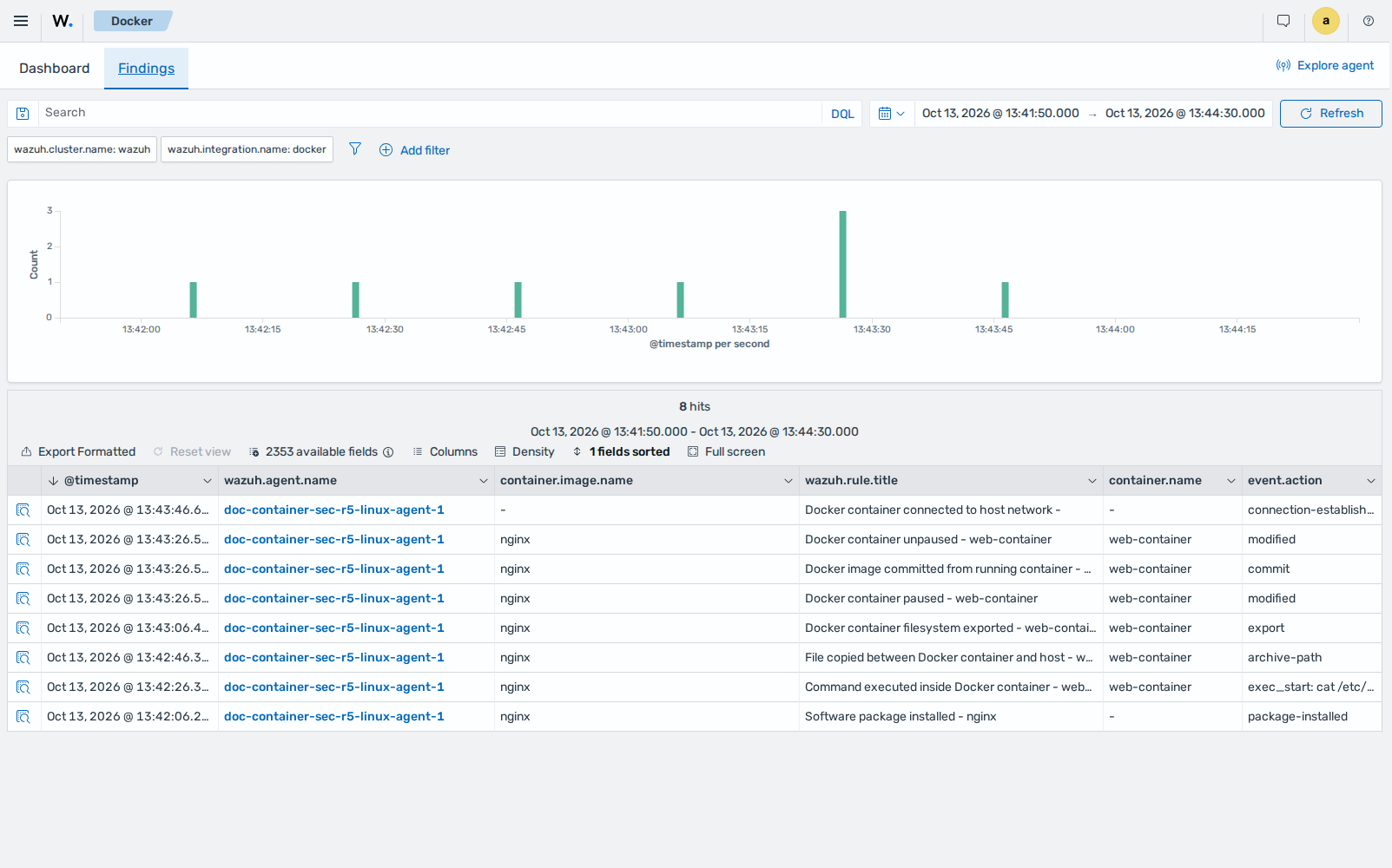
Below, we show the full data of the finding generated when the file system of a container is exported:
{
  "_index": ".ds-wazuh-findings-v5-system-activity-000001",
  "_id": "ReILUMjS0HAbw-5r8NZlMw",
  "_source": {
    "container": {
      "image": {
        "name": "nginx"
      },
      "name": "web-container",
      "id": "8bd39b3c77d72afb14d82d2aa9f03c92b4622f90df9f088ffb5b7f997d22a7ac"
    },
    "orchestrator": {
      "resource": {
        "type": "container"
      }
    },
    "@timestamp": "2026-10-13T13:43:06.435Z",
    "related": {
      "hash": [
        "8bd39b3c77d72afb14d82d2aa9f03c92b4622f90df9f088ffb5b7f997d22a7ac"
      ]
    },
    "data_stream": {
      "namespace": "default",
      "type": "logs",
      "dataset": "docker.events"
    },
    "wazuh": {
      "cluster": {
        "node": "node01",
        "name": "wazuh"
      },
      "protocol": {
        "location": "Wazuh-Docker",
        "queue": 49
      },
      "agent": {
        "host": {
          "hostname": "ip-10-72-1-37",
          "os": {
            "name": "Ubuntu",
            "type": "linux",
            "version": "24.04.5 LTS (Noble Numbat)",
            "platform": "ubuntu"
          },
          "architecture": "x86_64"
        },
        "name": "doc-container-sec-r5-linux-agent-1",
        "groups": [
          "default"
        ],
        "id": "001",
        "version": "v5.0.0"
      },
      "integration": {
        "name": "docker",
        "decoders": [
          "decoder/core-wazuh-message/0",
          "decoder/docker/0"
        ],
        "category": "system-activity"
      },
      "rule": {
        "level": "high",
        "compliance": {
          "iso_27001": [
            "A.8.32",
            "A.8.15",
            "A.8.8",
            "A.6.8"
          ],
          "hipaa": [
            "164.308.a.1.ii.D",
            "164.308.a.5.ii.B",
            "164.308.a.6.ii",
            "164.312.b"
          ],
          "pci_dss": [
            "10.2.1.2",
            "10.2.1.7",
            "10.4",
            "11.5.1"
          ],
          "tsc": [
            "A1.2",
            "CC6.8",
            "CC7.2",
            "CC7.3"
          ],
          "nis2": [
            "21.2.a",
            "21.2.b",
            "21.2.e",
            "23"
          ],
          "nist_800_171": [
            "3.1.2",
            "3.3.1",
            "3.3.2",
            "3.13.3"
          ],
          "fedramp": [
            "AU-6",
            "IR-4",
            "SI-4"
          ],
          "nist_800_53": [
            "AU-6",
            "IR-4",
            "SI-4",
            "AC-6"
          ],
          "cmmc": [
            "AU.L2-3.3.1",
            "IR.L2-3.6.1",
            "SI.L2-3.14.1"
          ],
          "gdpr": [
            "II_5.1.b",
            "IV_32.1.a",
            "IV_33.1",
            "IV_34.1"
          ]
        },
        "mitre": {
          "technique": {
            "name": [
              "Data from Local System",
              "Data Staged"
            ],
            "id": [
              "T1005",
              "T1074"
            ]
          },
          "tactic": {
            "name": [
              "Collection",
              "Exfiltration"
            ],
            "id": [
              "TA0009",
              "TA0010"
            ]
          }
        },
        "id": "6c764458-3631-5d48-952e-35a97d75a838",
        "title": "Docker container filesystem exported - web-container",
        "tags": [
          "high",
          "docker",
          "attack.collection",
          "attack.exfiltration",
          "attack.t1005",
          "attack.t1074"
        ],
        "status": "stable"
      },
      "event": {
        "id": "7d6300f3-5523-4962-87d2-2baf65d8df48"
      },
      "space": {
        "name": "standard"
      }
    },
    "event": {
      "original": "{\"integration\": \"docker\", \"docker\": {\"Type\": \"container\", \"Action\": \"export\", \"Actor\": {\"ID\": \"8bd39b3c77d72afb14d82d2aa9f03c92b4622f90df9f088ffb5b7f997d22a7ac\", \"Attributes\": {\"image\": \"nginx\", \"maintainer\": \"NGINX Docker Maintainers <docker-maint@nginx.com>\", \"name\": \"web-container\"}}, \"scope\": \"local\", \"time\": 1791898985, \"timeNano\": 1791898985327957968}}",
      "code": "export",
      "kind": "event",
      "start": "2026-10-13T13:43:05.000000Z",
      "action": "export",
      "index": ".ds-wazuh-events-v5-system-activity-000001",
      "dataset": "docker.events",
      "doc_id": "iI-ANaEBC3YbHnD16HHK"
    }
  }
}
Clean up
Run the following commands on the Docker host to remove the containers, the image, and the files this use case creates:
$ sudo docker rm -f web-container host-net-container
$ sudo docker rmi web-container-modified
$ sudo rm /tmp/web-container-passwd /tmp/web-container.tar