Content Manager module
The Content Manager module manages detection content used by Wazuh. It synchronizes threat intelligence content from the Wazuh Cyber Threat Intelligence (CTI) service, manages user-created content, and deploys content to the Wazuh manager and Security Analytics module.
The module is installed as part of the Wazuh indexer and exposes a REST API under /_plugins/_content_manager/.
The Content Manager module:
Synchronizes content from the Wazuh Cyber Threat Intelligence (CTI) service.
Manages Sigma rules, decoders, integrations, KVDBs, and security policies.
Validates content before deployment.
Promotes content between development stages.
Synchronizes Security Analytics detectors and rules.
Runs logtest validations.
Loads content into the Wazuh indexer.
Content spaces
The Content Manager module organizes content into four spaces that support content development and promotion workflows.
Space |
Description |
|---|---|
Standard |
Official content synchronized from the Wazuh CTI service. |
Draft |
Working area for newly created or modified content. |
Test |
Validation area used before production deployment. |
Custom |
Production-ready user content. |
User-generated (custom) content is promoted through the Draft -> Test -> Custom spaces as illustrated in the diagram below:
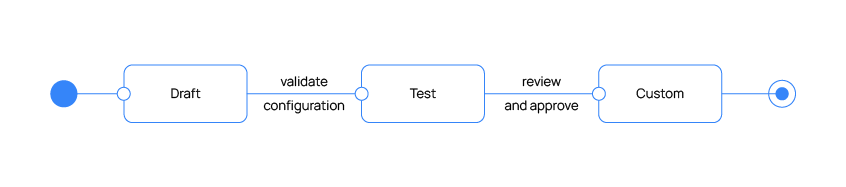
This workflow allows content to be validated before it is deployed to production environments.
CTI synchronization
The Content Manager module automatically synchronizes content from the Wazuh CTI service. The synchronization process downloads and updates the following:
Rules
Decoders
Integrations
KVDBs
Policies
By default, synchronization runs every 60 minutes. The plugins.content_manager.catalog.sync_interval setting changes the interval.
When new content becomes available, the Content Manager module updates the local content repository and automatically synchronizes related Security Analytics resources.
Security Analytics integration
The Content Manager module automatically synchronizes Security Analytics resources created from the Wazuh CTI content. This includes:
Sigma rules
Security Analytics detectors
Security Analytics integrations
When CTI content changes, Content Manager updates the corresponding Security Analytics resources automatically.
Note
By default, a Security Analytics detector can reference up to 50 Sigma rules. Detector creation or updates that exceed this limit are rejected. The limit also applies to the detectors that the Content Manager module creates from Wazuh CTI integrations. The plugins.security_analytics.max_rules_per_detector setting changes this limit. See the settings reference of the Security Analytics module.
Content management
The Content Manager module also provides APIs for creating, updating, and deleting the following resources:
Rules
Decoders
Integrations
KVDBs
Policies
User-created content is stored in the Draft space and can be promoted through the standard content workflow.
Content validation
Before content is promoted, the Content Manager module validates the configuration against the Wazuh manager. Validation helps identify:
Syntax errors
Invalid references
Configuration inconsistencies
Content that fails validation cannot be promoted.
Log test
The Content Manager module provides log test capabilities through the Wazuh indexer. Logtest allows you to:
Validate decoder behavior.
Verify rule matching.
Test event processing before deployment.
Content promotion
Content promotion is the process of moving content between spaces. Before promotion, the Content Manager generates a preview of the proposed changes. The preview identifies:
New resources
Updated resources
Deleted resources
After validation succeeds, Content Manager applies the changes to the target space and synchronizes any affected Security Analytics resources.
Promotion workflow

Rollback protection
The Content Manager module automatically protects promotions from partial failures. If an error occurs during promotion, previously applied changes are reverted, and the original content state is restored. This prevents incomplete promotions from leaving content in an inconsistent state.
Update notifications
The Content Manager module sends a daily telemetry ping to the Wazuh CTI service. The ping carries the cluster UUID and the installed Wazuh version. It does not send rules, events, or logs. The ping is enabled by default. To turn it off, set plugins.content_manager.telemetry.enabled to false.
The setting does not turn off update notifications. The Wazuh dashboard checks for newer Wazuh releases through GET /_plugins/_content_manager/version/check, which answers whether the ping is on or off. Content updates follow the schedule described in CTI synchronization.
Configuration
The Content Manager module settings are configured in the /etc/wazuh-indexer/opensearch.yml file using the plugins.content_manager prefix. Changes take effect after you restart the Wazuh indexer. You can also change the settings marked dynamic at runtime through the Cluster Settings API.
Setting |
Type |
Default |
Description |
|---|---|---|---|
|
Integer |
|
Interval, in minutes, between scheduled CTI synchronizations. Valid range: 10-1440. Dynamic. |
|
Boolean |
|
Synchronizes content when the Wazuh indexer starts. |
|
Boolean |
|
Runs the scheduled CTI synchronization. When |
|
Boolean |
|
Allows on-demand updates through |
|
Boolean |
|
Creates Security Analytics detectors from Wazuh CTI integrations during synchronization. |
|
Boolean |
|
Sends the daily telemetry ping. It does not turn off update notifications in the Wazuh dashboard. Dynamic. |
|
Integer |
|
Maximum number of user-created integrations in the Draft space. Minimum 0. Dynamic. |
|
Integer |
|
Maximum number of user-created decoders in the Draft space. Minimum 0. Dynamic. |
|
Integer |
|
Maximum number of user-created Sigma rules in the Draft space. Minimum 0. Dynamic. |
|
Integer |
|
Maximum number of user-created KVDBs in the Draft space. Minimum 0. Dynamic. |
|
Integer |
|
Maximum number of user-created filters in each space. Minimum 0. Dynamic. |
A create request that would exceed a max_* limit is rejected with 400 Bad Request.
REST API
The Content Manager API is available under /_plugins/_content_manager/ on the Wazuh indexer. The API supports:
Subscription management
Content synchronization
Content management operations
Policy management
Promotion workflows
Logtest execution
Content validation
For a complete list of endpoints, see the Wazuh indexer API reference documentation.