Detect account manipulation
Account manipulation refers to the creation, modification, or deletion of user accounts or credentials within an organization's IT infrastructure. Monitoring this activity is critical, since unauthorized account manipulation can grant attackers access to sensitive systems and data.
To maintain persistence on a victim endpoint, adversaries can alter the SSH authorized_keys file in Linux. The .ssh directory within a user's home directory holds this file. For example, for a user named smith, you can find the authorized_keys file located at /home/smith/.ssh/authorized_keys. This file defines the public keys the user can use to log in, with each line representing a single key.
You can configure the Wazuh FIM module to monitor the authorized_keys file and trigger a finding whenever a user or process modifies its public keys. This lets you act before a system compromise occurs.
Use case description
Endpoint |
Description |
|---|---|
CentOS Stream 9 |
The FIM module detects SSH key modification on this endpoint. |
Configuration
Perform the following steps to configure the FIM module to monitor SSH key modification.
Edit the
/var/ossec/etc/ossec.confconfiguration file and addauthorized_keysfor monitoring inside the<ossec_config>block:<syscheck> <directories whodata="yes">/home/*/.ssh/authorized_keys</directories> </syscheck>
Restart the Wazuh agent to apply the configuration:
# systemctl restart wazuh-agent
Test the configuration
Log in to the CentOS Stream 9 endpoint as the user whose authorized_keys file you change, not as root, and run the following commands from the user's home directory. The configuration monitors /home/*/.ssh/authorized_keys, so a change to the /root/.ssh/authorized_keys file of the root user doesn't generate a finding.
Create the
.sshdirectory with the correct permissions, then generate an SSH key pair for user authentication and save it as.ssh/test_key:$ mkdir -m 700 -p ~/.ssh && ssh-keygen -f ~/.ssh/test_key
Run the following command to append your
test_key.pubpublic key to theauthorized_keysfile of the user:$ cat ~/.ssh/test_key.pub >> ~/.ssh/authorized_keys && chmod 600 ~/.ssh/authorized_keys
Visualize the finding
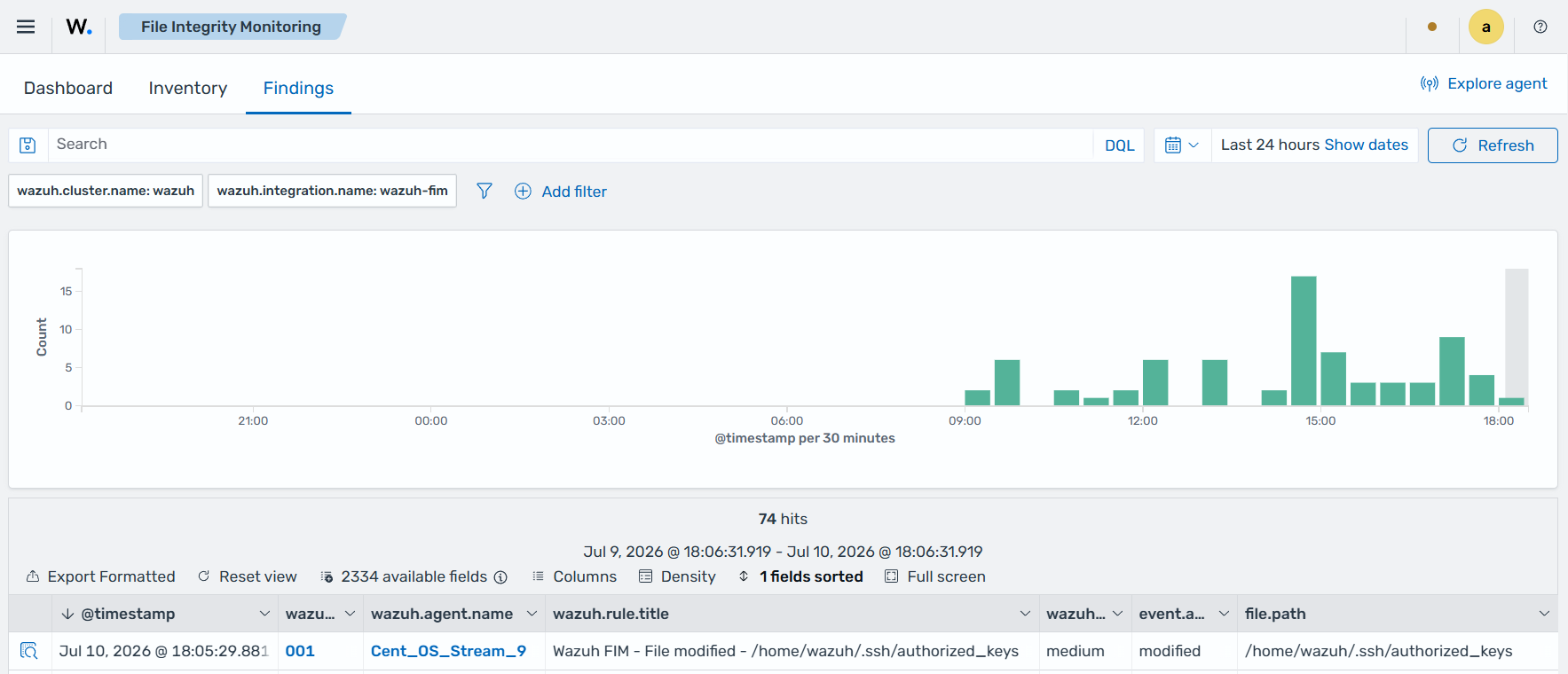
Navigate to Endpoint security → File Integrity Monitoring → Findings on the Wazuh dashboard to view the finding generated when the FIM module detects changes to the authorized_keys file.