Log data analysis
Log messages from devices, systems, and applications often carry evidence of an attack. The Wazuh Logcollector module receives logs through text files or Windows event logs. It can also directly receive logs via remote syslog, which is useful for firewalls and other such devices.
Wazuh agents use the Logcollector module to collect events from monitored endpoints and applications. The Wazuh agents forward these events to the Wazuh manager, where the normalization engine processes them. The Wazuh manager then sends the normalized data to the Wazuh indexer for rule matching and indexing. This processed data supports threat detection, prevention, and active response.
The Logcollector module helps to meet the following PCI DSS requirement:
Requirement 10 - Log and Monitor All Access to System Components and Cardholder Data: This control mandates logging and monitoring user activities by employees, contractors, consultants, vendors, third parties, and other authorized users for a specified period.
To help meet this requirement, the Wazuh agent uses the Logcollector module to collect endpoint logs or receive syslog messages from network and other syslog-enabled devices. The Wazuh manager normalization engine decodes the logs to extract the relevant fields, then forwards the normalized events to the Wazuh indexer. The detection engine in the Wazuh indexer evaluates them against the ruleset and triggers a finding when an event matches a rule. Refer to rules for more information.
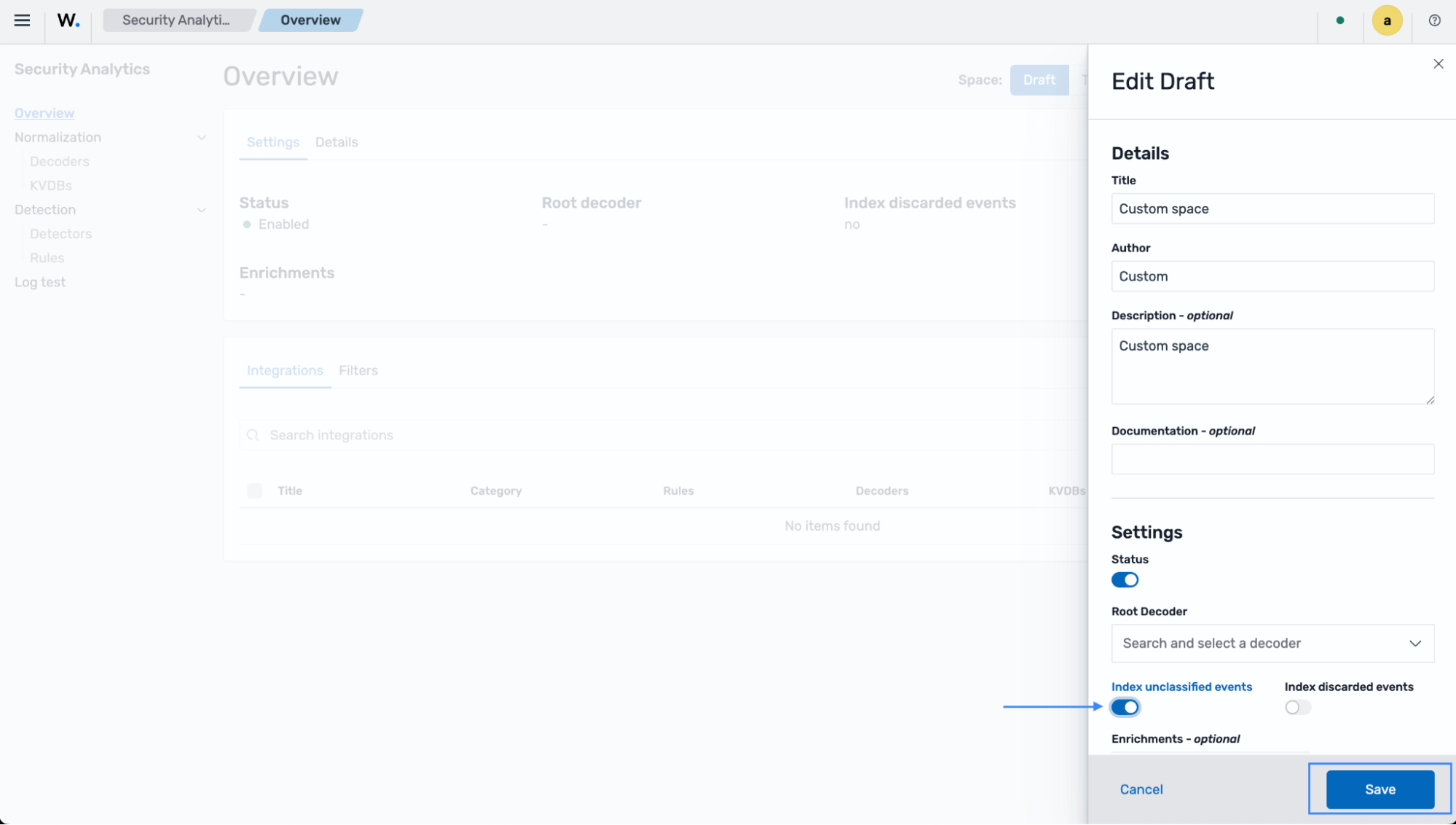
Wazuh indexes decoded events whether or not they trigger a finding. To also keep the events that no integration decodes, see enabling unclassified events storage.
Use cases
Below are PCI DSS requirements that the Wazuh Logcollector module can meet.
PCI DSS requirement 10.2.1.4
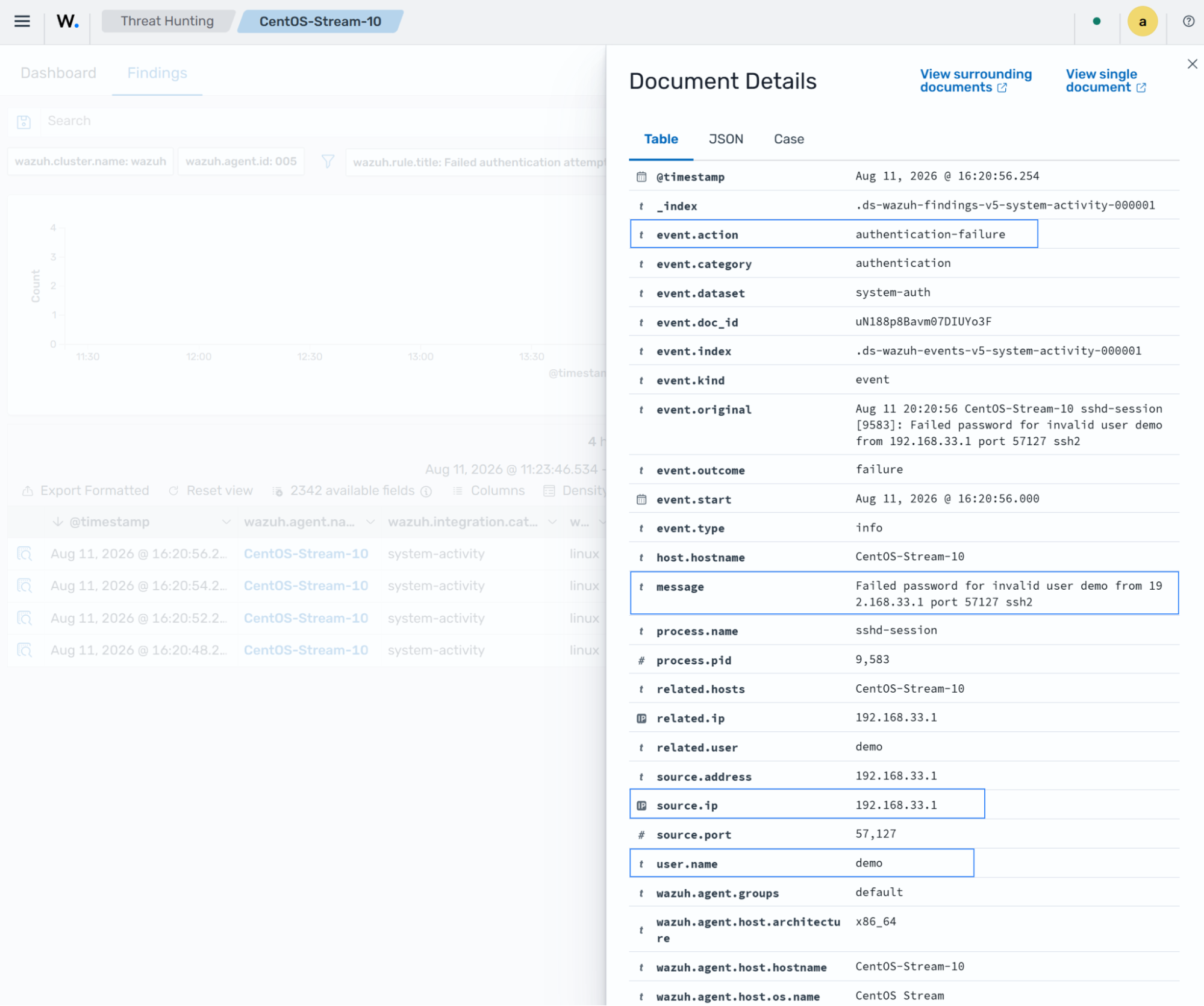
PCI DSS requirement 10.2.1.4 mandates that audit logs capture invalid logical access attempts. Requirement 10.2.2 mandates that audit logs record the following details for each auditable event:
User identification
Type of event
Date and time
Success and failure indication
Origination of the event
Identity or name of affected data, system component, resource, or service (for example, name and protocol)
The following Wazuh rule helps achieve this requirement:
SSH authentication failure
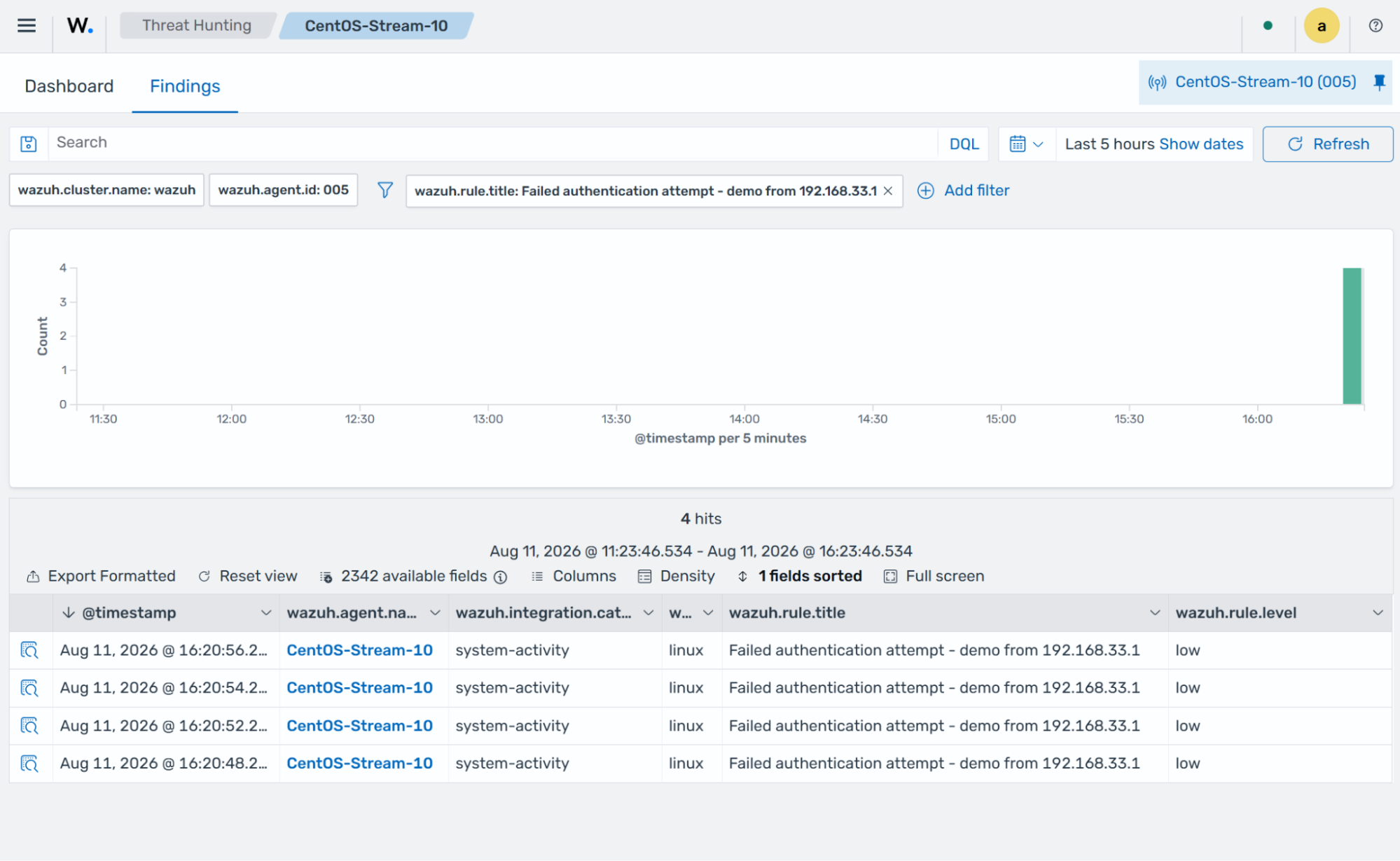
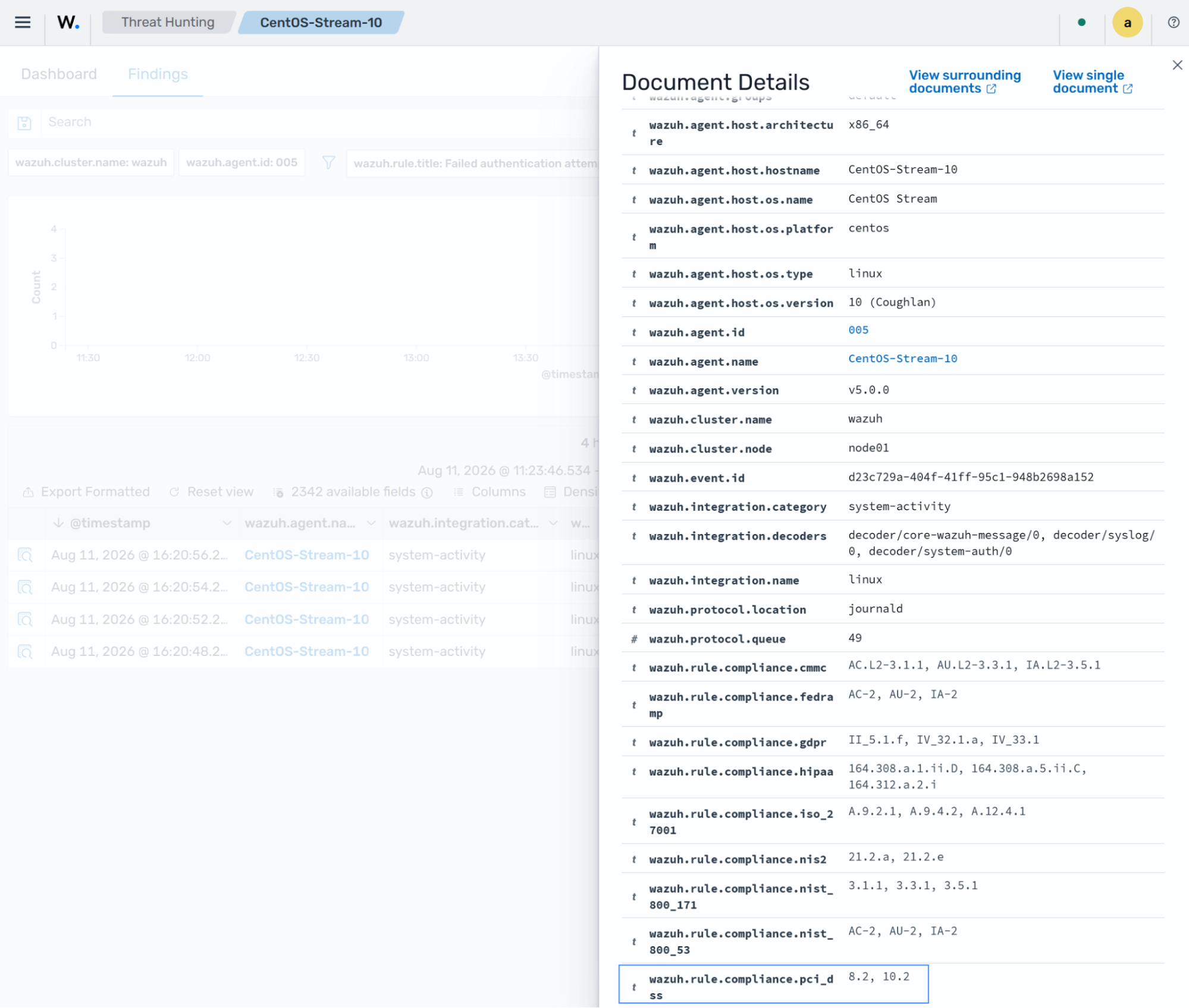
This rule triggers a finding when a non-existent user tries to log in to a system via SSH. The generated finding contains the information listed above. On Ubuntu, a second rule, Failed authentication attempt - <user>, also triggers for the same login. The screenshot below shows the finding generated on the dashboard.
PCI DSS requirement 10.2.1.7
PCI DSS requirement 10.2.1.7 mandates that audit logs capture the creation and deletion of system-level objects.
The following Wazuh rule helps achieve this requirement:
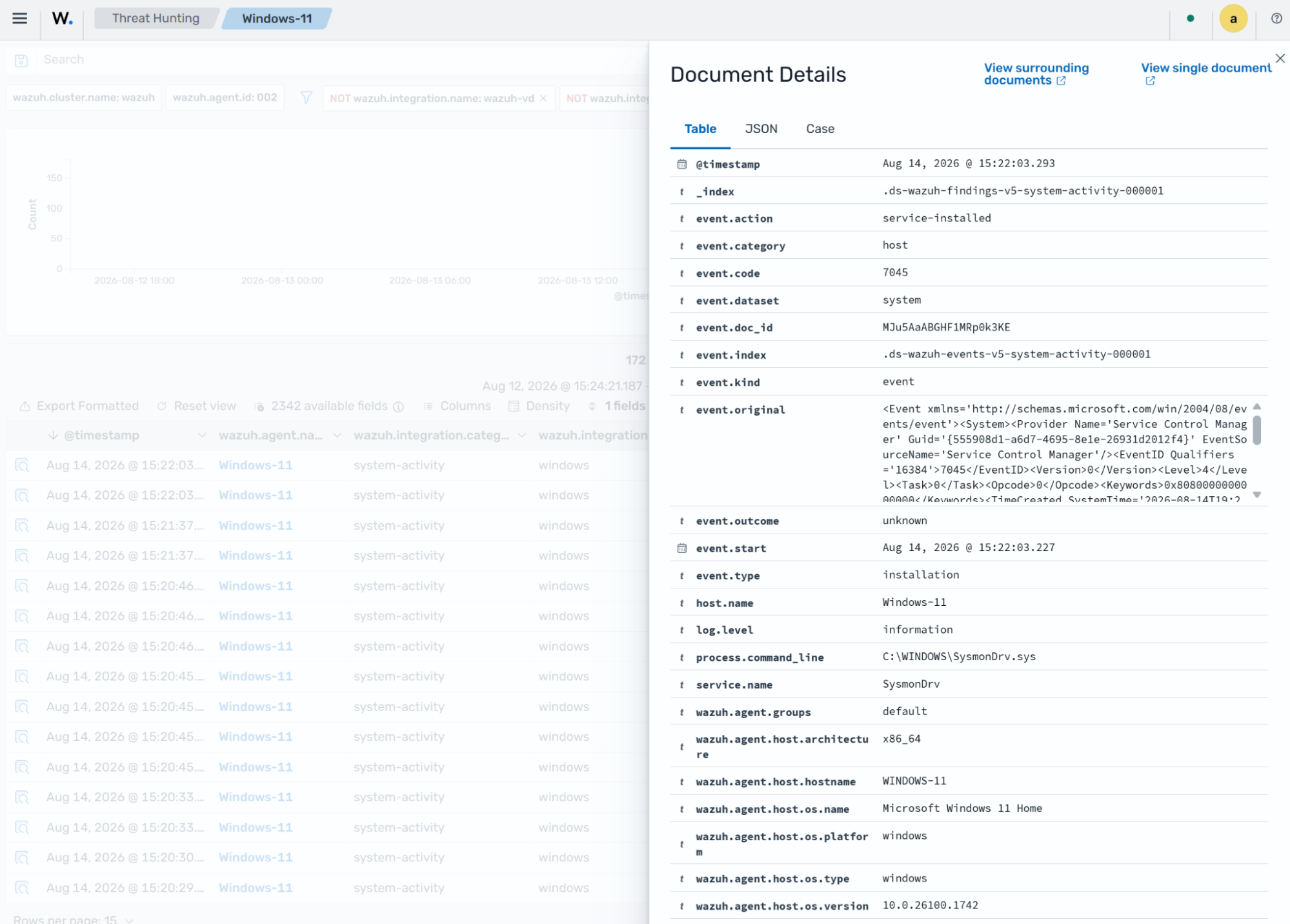
System service installed
This rule triggers a finding after the detection engine analyzes the system logs from a Windows endpoint and determines that a new service was created. In the finding, you can see the service name, event type, installation time, and other information.
PCI DSS requirement 10.5.1
PCI DSS requirement 10.5.1 mandates that you retain audit log history for at least 12 months, with the most recent 3 months immediately available for analysis. To meet it, keep events and findings for at least 365 days with custom retention policies, and turn on the storage of unclassified events so that Wazuh also keeps the events that no integration decodes.
By default, Wazuh deletes an events backing index once it has rolled over and is older than 1 hour, and a findings backing index once it has rolled over and is older than 90 days. See Data stream lifecycle for the defaults. Don't edit the default policies. Wazuh rewrites them when the Wazuh indexer cluster restarts or is upgraded.
Keep events and findings for at least 12 months
Run the following steps on a Wazuh indexer node to create custom retention policies for events and findings. The commands use jq. Install it first if the node doesn't have it, for example with apt install jq or yum install jq.
Copy the default events policy. In the copy, set the minimum age for deletion to 365 days and the template priority to 1, so that new event indices use it:
curl -sk -u <WAZUH_INDEXER_USERNAME>:<WAZUH_INDEXER_PASSWORD> \
  'https://localhost:9200/_plugins/_ism/policies/stream-events-policy' \
  | jq '{policy: (.policy
      | del(.policy_id, .last_updated_time, .schema_version, .error_notification)
      | .description = "Custom events policy: keeps events for at least 365 days."
      | .states[0].transitions[0].conditions.min_index_age = "365d"
      | .ism_template[].priority = 1)}' > custom-events-policy.json
Store the copy as
custom-events-policy:# curl -sk -u <WAZUH_INDEXER_USERNAME>:<WAZUH_INDEXER_PASSWORD> -X PUT \ 'https://localhost:9200/_plugins/_ism/policies/custom-events-policy' \ -H 'Content-Type: application/json' -d @custom-events-policy.json
Move the existing events indices to
custom-events-policy:# curl -sk -u <WAZUH_INDEXER_USERNAME>:<WAZUH_INDEXER_PASSWORD> -X POST \ 'https://localhost:9200/_plugins/_ism/change_policy/.ds-wazuh-events-v5-*' \ -H 'Content-Type: application/json' -d '{"policy_id": "custom-events-policy"}'
Check that every events index uses
custom-events-policy. The change applies at the next ISM run, every 5 minutes by default, and can take two runs or more. Don't restart the Wazuh indexer cluster until every index showscustom-events-policyand a step name:# curl -sk -u <WAZUH_INDEXER_USERNAME>:<WAZUH_INDEXER_PASSWORD> \ 'https://localhost:9200/_plugins/_ism/explain/.ds-wazuh-events-v5-*' \ | jq -r 'to_entries[] | select(.value | type == "object") | [.key, .value.policy_id, (.value.step.name // "pending")] | @tsv'
Repeat steps 1 to 4 for findings. In the commands, replace
stream-events-policywithstream-findings-policy,custom-events-policywithcustom-findings-policy, including thecustom-events-policy.jsonfile name, and.ds-wazuh-events-v5-*with.ds-wazuh-findings-v5-*. You can also change the policy description to mention findings.
Enable the storage of unclassified events
Wazuh indexes decoded events in wazuh-events-v5-<category> whether or not a rule matches. An event is unclassified when the decoder that matched it belongs to an integration in the Unclassified category, such as wazuh-core. Wazuh drops these events unless you turn on Index unclassified events.
Unclassified event indexing is configured per space. When it's turned on, Wazuh stores unclassified events in the wazuh-events-v5-unclassified index. The Wazuh agents' events are processed in the Standard space by default. A space also has an Index discarded events setting, which applies to events that a decoder marks as discarded. When it's turned on, Wazuh replaces the content of each discarded event with the wazuh.space.event_discarded: true marker before indexing it. Events that a filter rejects are always dropped. You don't need it for this requirement. See Space for more information about both settings.
Navigate to Ruleset Management > Overview. Select Standard in Space, then select Actions > Edit.
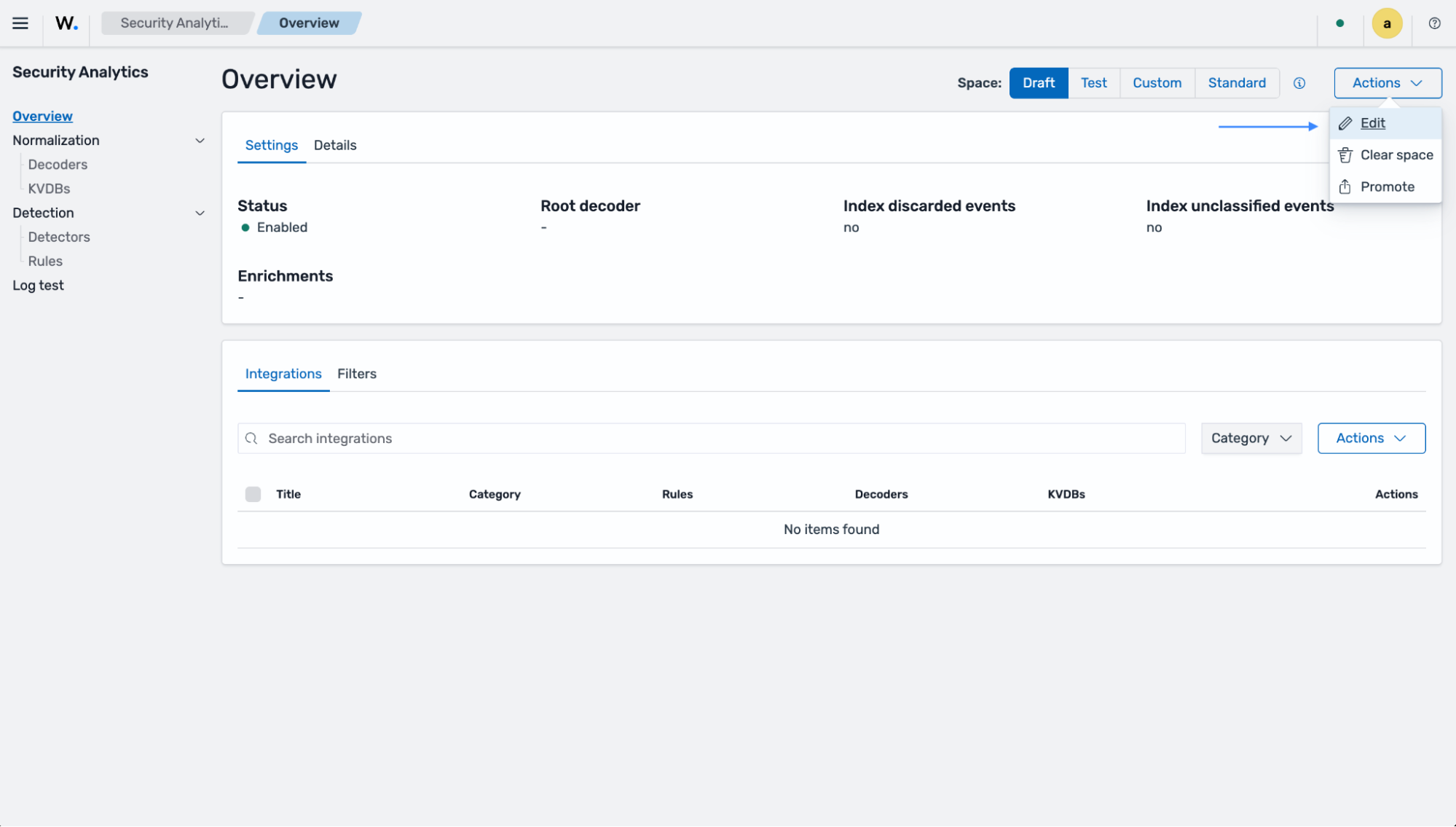
Toggle on Index unclassified events, and click Save.