Upgrade agents remotely
You can upgrade Wazuh agents remotely from the Wazuh manager. The Wazuh manager sends a Wazuh signed package (WPK) file to each enrolled agent. The WPK file contains the files required to upgrade the Wazuh agent to the selected version. This streamlines the upgrade process across your installation and eliminates the need to access each agent individually.
WPK files are archive files used for distributing and installing updates or new versions of the Wazuh agent on various operating systems. Wazuh provides access to an updated WPK repository for each new release. The following tables list the available WPK files.
WPK List
Linux
Distribution |
Version |
Architecture |
WPK Package |
|---|---|---|---|
Linux (deb) |
5.0.0 |
x86_64/AMD64 |
|
Linux (deb) |
5.0.0 |
ARM64 |
|
Linux (rpm) |
5.0.0 |
x86_64/AMD64 |
|
Linux (rpm) |
5.0.0 |
ARM64 |
Windows
Distribution |
Version |
Architecture |
WPK Package |
|---|---|---|---|
Windows |
5.0.0 |
32/64bit |
macOS
Distribution |
Version |
Architecture |
WPK Package |
|---|---|---|---|
macOS |
5.0.0 |
Intel 64 |
|
macOS |
5.0.0 |
ARM64 |
Note
Direct upgrades to Wazuh agent 5.0.0 are not supported from Wazuh agent 4.14.0 or earlier. Upgrade the Wazuh agent in this order: 4.14.0 or earlier > 4.14.x > 5.0.0.
Upgrade the Wazuh agent using a WPK file
Follow these steps to upgrade a Wazuh agent using a WPK file:
Download the WPK package that matches the operating system and architecture of the Wazuh agent to the
/var/wazuh-manager/var/upgrade/directory on the Wazuh manager. This example uses the Linux AMD64 WPK package:# wget -P /var/wazuh-manager/var/upgrade/ https://packages-staging.xdrsiem.wazuh.info/pre-release/5.x/wpk/linux/deb/amd64/wazuh_agent_v5.0.0_linux_amd64.deb.wpk
The command output looks similar to this:
--2026-10-05 08:56:09--  https://packages-staging.xdrsiem.wazuh.info/pre-release/5.x/wpk/linux/deb/amd64/wazuh_agent_v5.0.0_linux_amd64.deb.wpk
Resolving packages-staging.xdrsiem.wazuh.info (packages-staging.xdrsiem.wazuh.info)... 13.249.228.114, 13.249.228.54, 13.249.228.126, ...
Connecting to packages-staging.xdrsiem.wazuh.info (packages-staging.xdrsiem.wazuh.info)|13.249.228.114|:443... connected.
HTTP request sent, awaiting response... 200 OK
Length: 14473792 (14M) [binary/octet-stream]
Saving to: '/var/wazuh-manager/var/upgrade/wazuh_agent_v5.0.0_linux_amd64.deb.wpk'
2026-10-05 08:56:11 (9.58 MB/s) - '/var/wazuh-manager/var/upgrade/wazuh_agent_v5.0.0_linux_amd64.deb.wpk' saved [14473792/14473792]
Note
In a multi-node Wazuh manager cluster, the WPK file must exist in
/var/wazuh-manager/var/upgrade/on every Wazuh manager node.Run the
agent_upgradetool and specify the agent ID of the Wazuh agent you want to upgrade. Pass the WPK file name with the-foption. This example upgrades agent002which has Wazuh agent 4.14.5 installed.# /var/wazuh-manager/bin/agent_upgrade -a 002 -f wazuh_agent_v5.0.0_linux_amd64.deb.wpk
The command output looks similar to this:
Upgrade tasks created for 1 agent(s).
Note: Agents will execute upgrades autonomously. Use agent logs to track progress.
It is possible to specify multiple agent IDs using this method:
# /var/wazuh-manager/bin/agent_upgrade -a 002 003 -f wazuh_agent_v5.0.0_linux_amd64.deb.wpk
The command output looks similar to this:
Upgrade tasks created for 2 agent(s).
Note: Agents will execute upgrades autonomously. Use agent logs to track progress.
The Wazuh manager does not wait for the result. To follow the upgrade, check the
/var/ossec/logs/upgrade.logfile on the Wazuh agent.Verify the Wazuh agent version from the Wazuh dashboard.
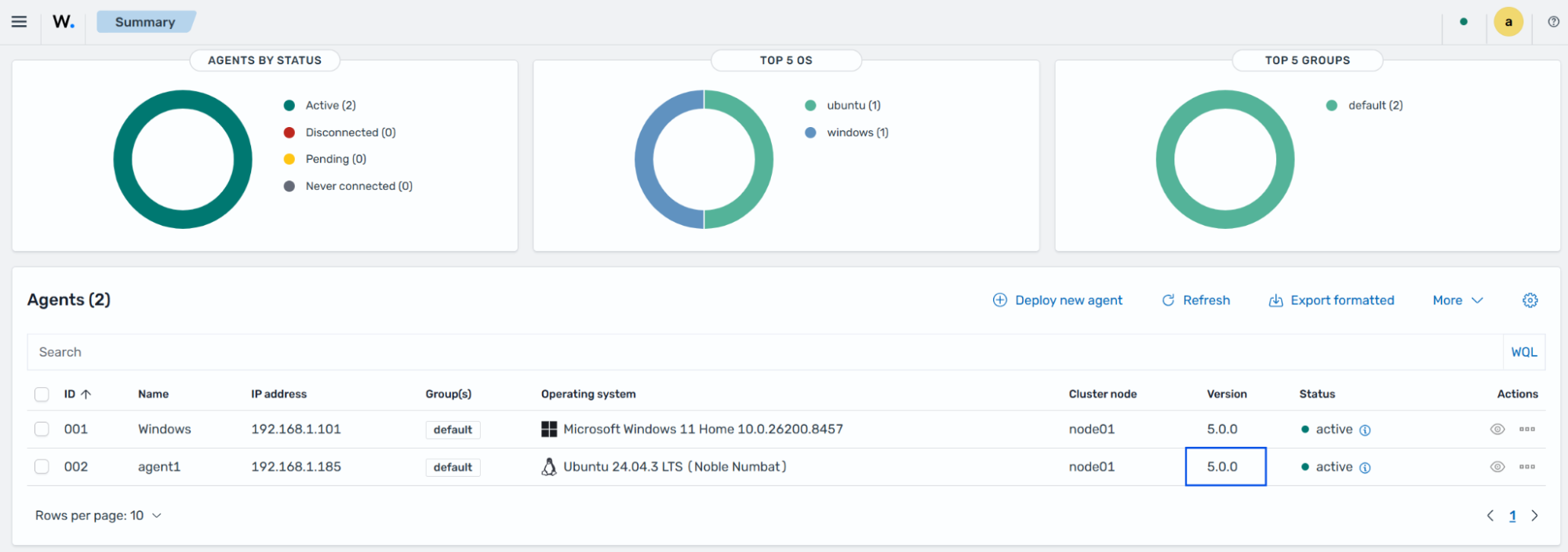
Verify the version from the Wazuh agent endpoint:
# /var/ossec/bin/wazuh-control info
The command output looks similar to this:
WAZUH_VERSION="v5.0.0"
WAZUH_REVISION="rc1"
WAZUH_TYPE="agent"