Proof of Concept guide
In this section of the documentation, we provide a set of use cases to explore different Wazuh capabilities. We describe how to configure Wazuh for threat prevention, detection, and response. Each use case represents a real-world scenario that users can deploy using specific configurations.
Preparing your lab environment
The Wazuh platform consists of two main parts:
Security agents: Lightweight software deployed on the endpoints you want to monitor.
Central components (Wazuh manager, indexer, and dashboard): These components collect, analyze, and visualize data from agents.
We recommend using virtual machines for your lab. Take a snapshot of the environment immediately after the initial setup. The snapshot lets you quickly restore a clean state before starting each new use case, preventing previous tests from interfering with new ones.
The diagram below shows the recommended lab architecture for testing the use cases in this guide.
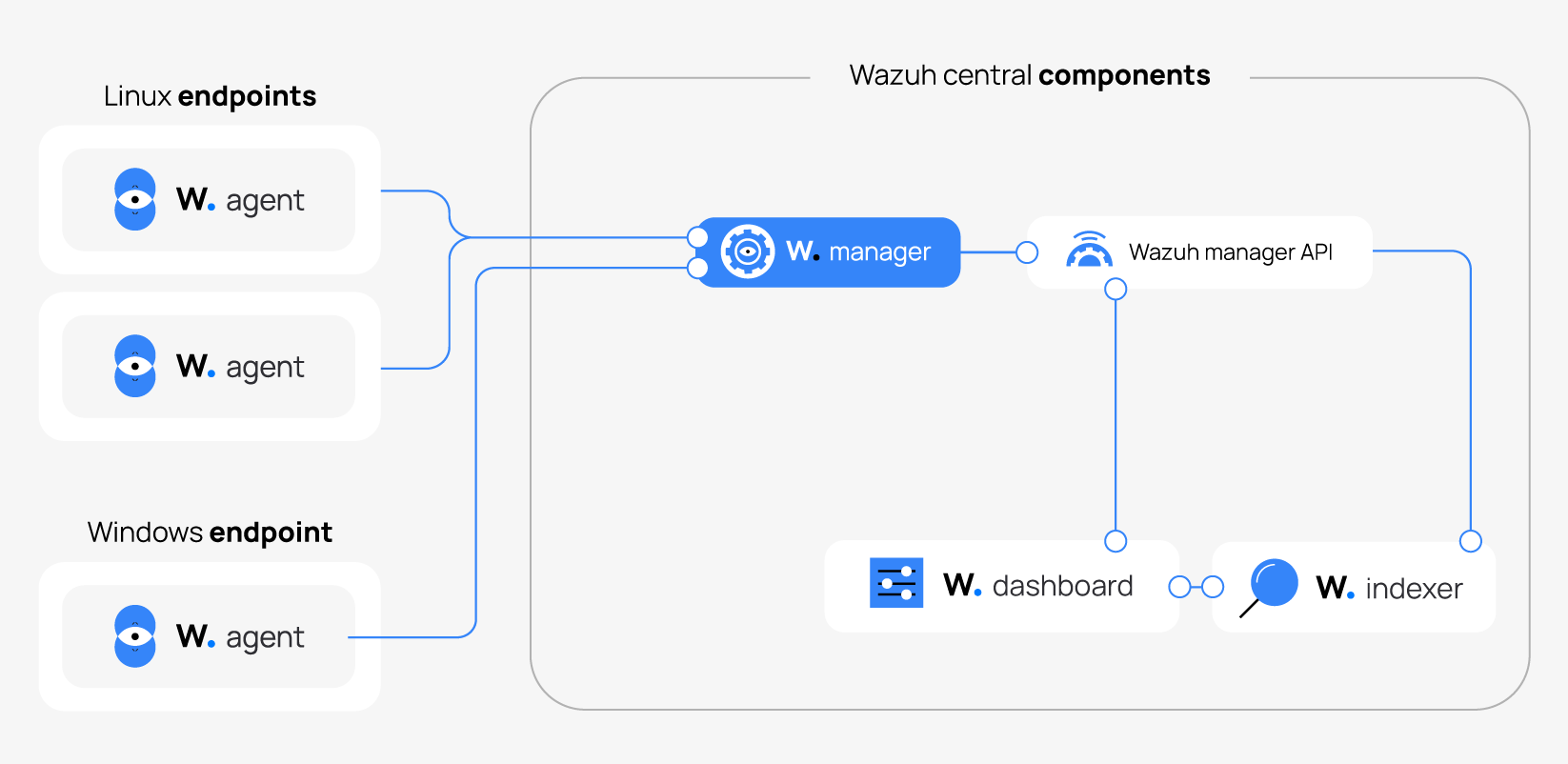
Wazuh central components
For the use cases in this guide, all Wazuh central components (manager, indexer, and dashboard) run on a single system. A single-node deployment is sufficient and recommended for a small-scale lab environment. To install the Wazuh central components on a single endpoint, use one of the following options:
The Quickstart guide: Using this guide, you can install all the components on the same system in approximately 5 minutes.
Our preconfigured virtual machine: Wazuh provides a pre-built virtual machine image in Open Virtual Appliance (OVA) format. You can import it into VirtualBox or other OVA-compatible virtualization systems.
Endpoints
The use cases in this guide use the following endpoints. The Wazuh agent monitors the Ubuntu and Windows endpoints, which act as the victims of the simulated attacks. The RHEL endpoint acts as the attacker and doesn't need a Wazuh agent.
Endpoint |
Operating system (64-bit) |
CPU cores |
RAM |
Disk |
|---|---|---|---|---|
Ubuntu |
Ubuntu 24.04 LTS |
1 vCPU |
2 GB |
10 GB |
RHEL |
Red Hat Enterprise Linux 9.0 |
1 vCPU |
2 GB |
10 GB |
Windows |
Windows 11 |
2 vCPU |
4 GB |
25 GB |
Prerequisites
Complete the following before you start the use cases:
Install the Wazuh agent on the Ubuntu and Windows endpoints. Follow the installation guide, then check that both agents show as Active in Agents management > Summary of the Wazuh dashboard.
Make sure all the endpoints have internet access. Some use cases download software or connect to external services.
Use cases
- File integrity monitoring
- Vulnerability detection
- Security configuration assessment
- Monitoring Docker events
- Detecting an SQL injection attack
- Monitoring AWS infrastructure
- Network IDS integration
- Detecting a Cross-Site Scripting (XSS) attack
- Detecting hidden processes
- Blocking a known malicious actor