How it works
The Wazuh agent performs SCA scans using policy files. Each policy file defines the security configuration checks to run on monitored endpoints. During a scan, the Wazuh agent evaluates endpoint settings against the rules defined in each policy to determine whether they follow the expected security configuration.
By default, the Wazuh agent runs scans for every policy (.yaml or .yml files) present in the ruleset directory. This directory can be found in the following locations on every operating system that runs the Wazuh agent:
Linux and Unix-based agents:
/var/ossec/ruleset/sca.Windows agents:
C:\Program Files (x86)\ossec-agent\ruleset\sca.macOS agents:
/Library/Ossec/ruleset/sca.
After each scan, the following happens:
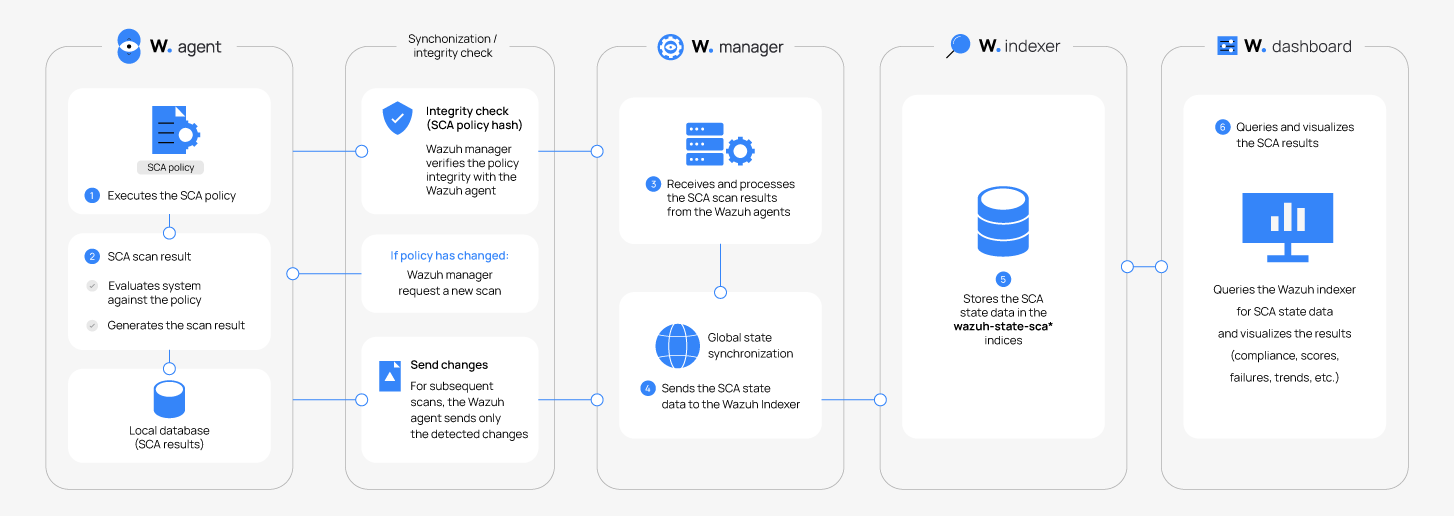
The Wazuh agent synchronizes the SCA results with the Wazuh manager.
The Wazuh manager processes the scan results and sends the SCA state data to the Wazuh indexer where it is stored in the
wazuh-states-scaindex.The Wazuh dashboard queries this index to provide centralized visibility into endpoint compliance status and security configuration findings.
To optimize synchronization, the Wazuh agent tracks the current state of each SCA check and sends only the updates required to keep the manager synchronized. When no changes are detected between scans, the agent sends a scan summary instead of generating new SCA events.
The sequence diagram below depicts the integrity and alerting flow.
Understanding SCA scan results
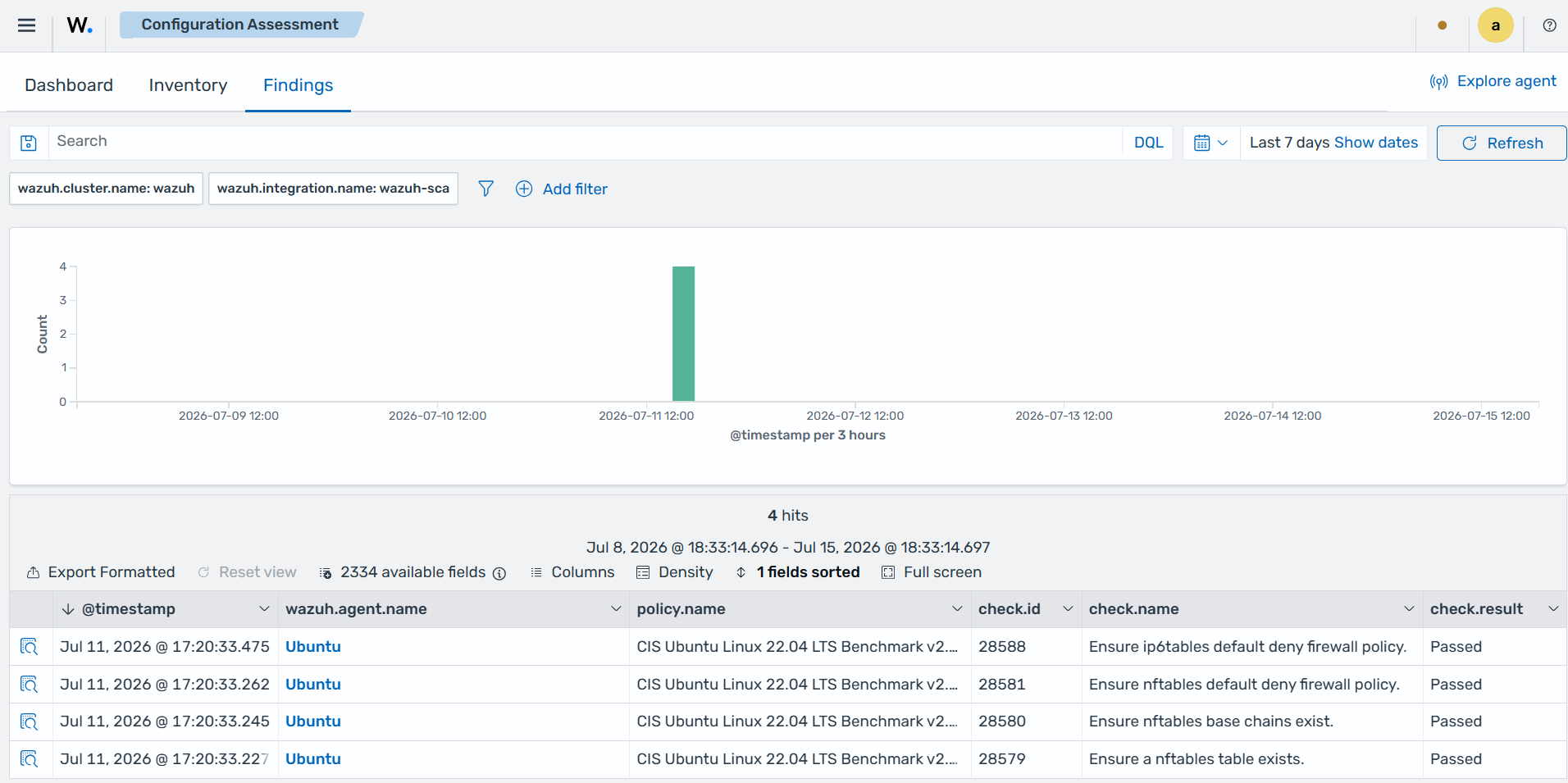
SCA scan results appear as findings with SCA scan data when a check's status changes between scans. Wazuh agents send only the events necessary to keep the SCA state synchronized, which avoids potential event flooding. The exception is a policy update, described in Integrity of policy files.
Any given check event has three possible results:
Passed: The endpoint configuration satisfies the conditions defined in the check.
Failed: The endpoint configuration does not satisfy the conditions defined in the check.
Not applicable: The check cannot be evaluated, for example, because a required file, command output, or registry value is unavailable or it does not apply to the operating system or software.
The set of rules and the check's condition field (all, any, or none) determine this result.
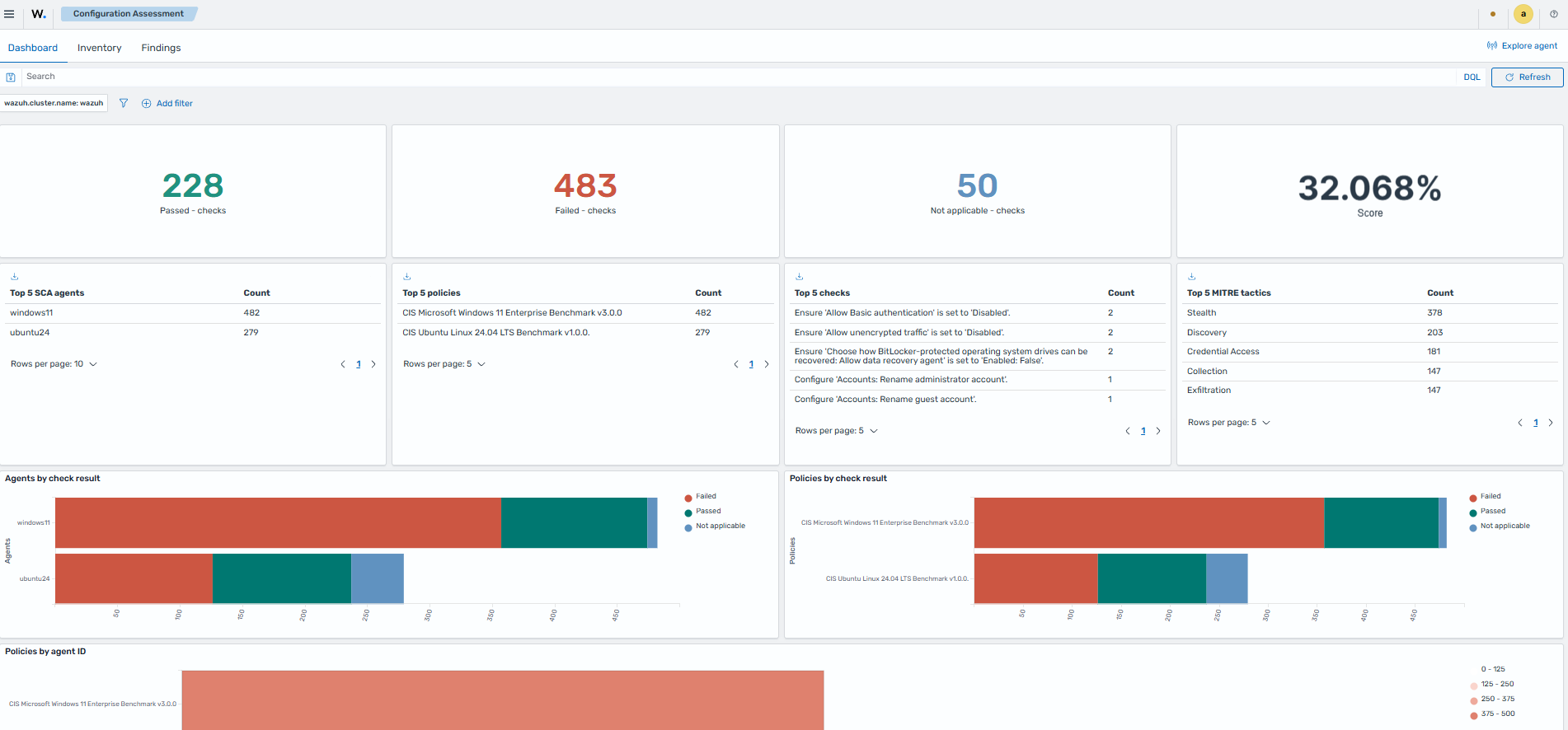
The Wazuh dashboard shows the Overall score of each SCA policy. The score is the percentage of applicable checks that passed. It equals the passed checks divided by the sum of passed and failed checks. Checks with the Not applicable result don't count toward the score. For example, 119 passed checks and 118 failed checks give a score of 50.211%.
On the Wazuh dashboard, navigate to Endpoint security > Configuration Assessment to view the scan summaries for the Wazuh agents.
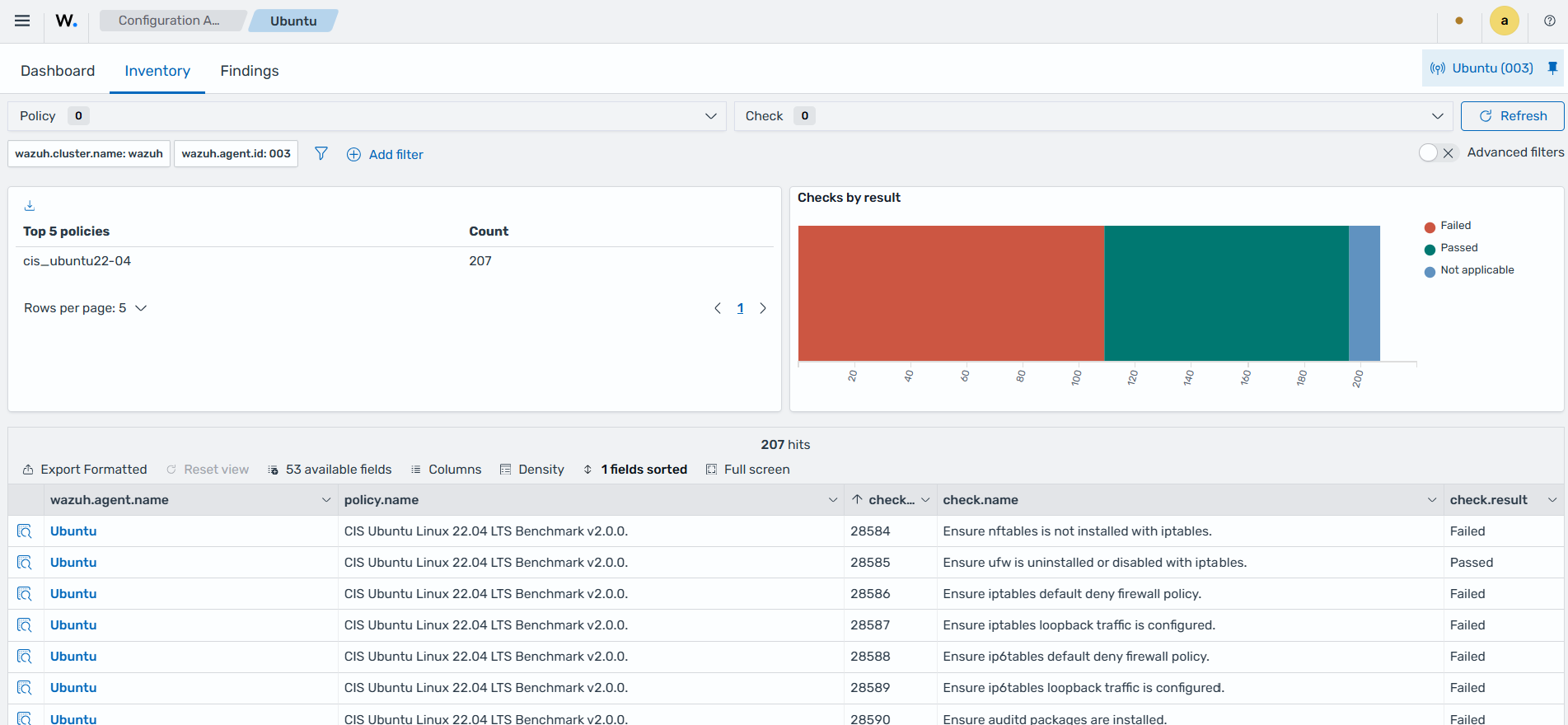
The Inventory tab under the Configuration Assessment dashboard provides the current SCA state for monitored endpoints. It displays the SCA policies evaluated on each endpoint and their individual checks, and the check result.
The Findings tab under the Configuration Assessment dashboard displays the SCA findings generated when the result of a check changes between scans.
Example: Firewall check on an Ubuntu 24.04 endpoint
On the Wazuh dashboard, navigate to Endpoint security > Configuration Assessment > Inventory and select the Ubuntu 24.04 endpoint to view its SCA results. The policy name on the Wazuh dashboard is CIS Ubuntu Linux 24.04 LTS Benchmark v1.0.0. and is stored in the /var/ossec/ruleset/sca/cis_ubuntu24-04.yml file. The highlighted result shows check 35622, which verifies that the ufw service is enabled and active.
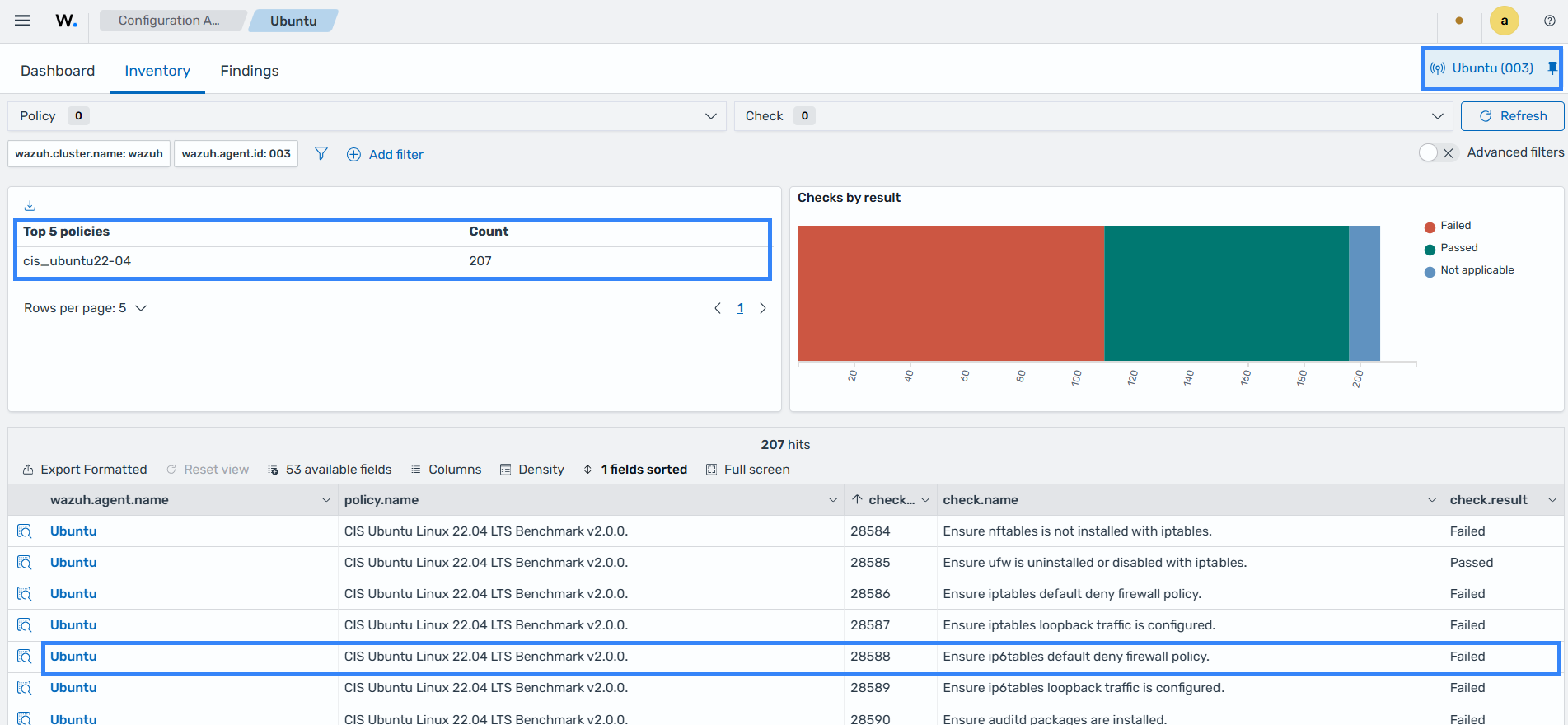
You can expand each scan result to display additional information. On the Wazuh dashboard, navigate to the Endpoint security > Configuration Assessment > Inventory. Click on Inspect details to see more information on the scan result.
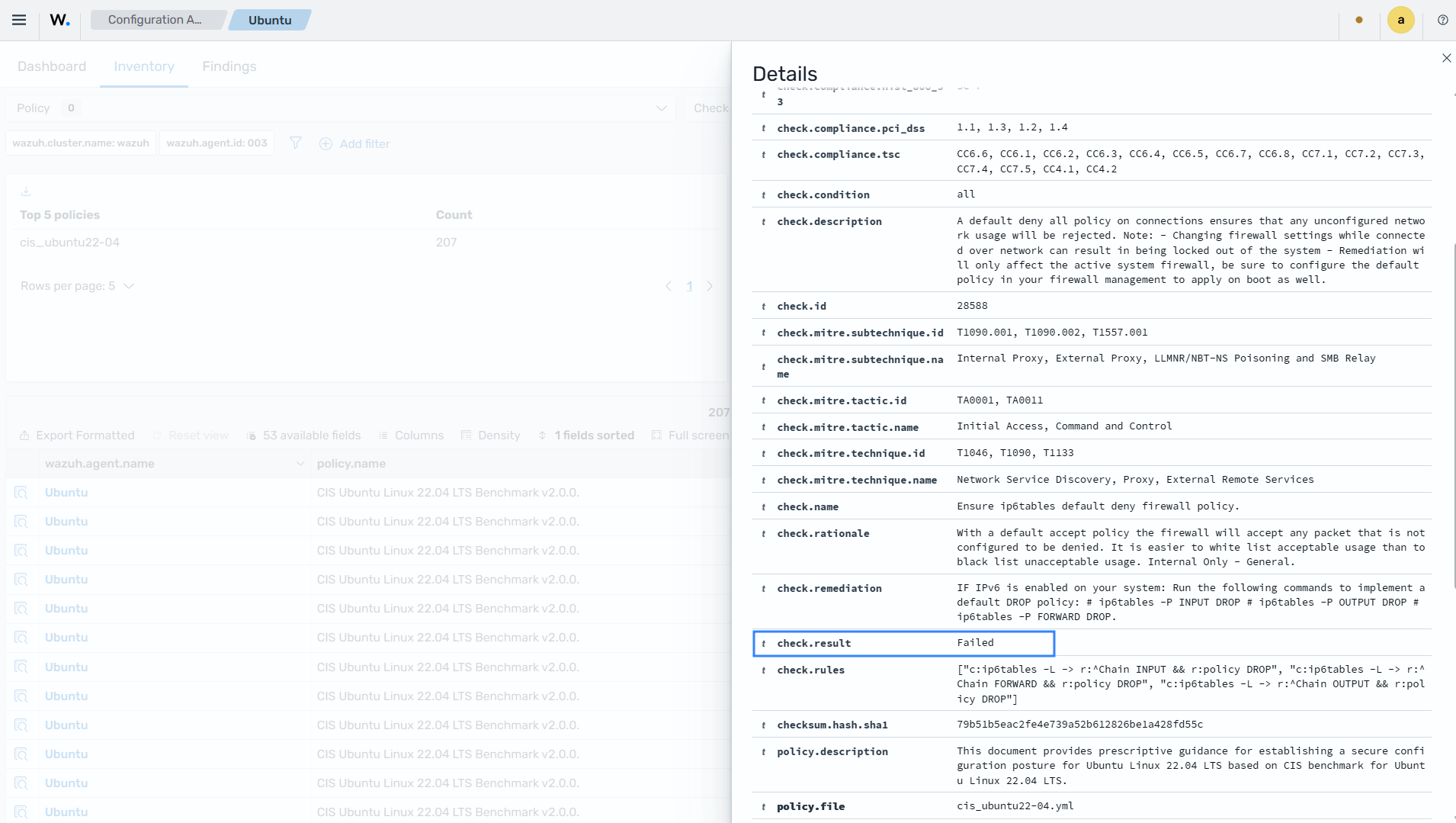
The YAML definition for check 35622 is shown below.
- id: 35622
  name: "Ensure ufw service is enabled."
  description: "UncomplicatedFirewall (ufw) is a frontend for iptables. ufw provides a framework for managing netfilter, as well as a command-line and available graphical user interface for manipulating the firewall. Note: - When running ufw enable or starting ufw via its initscript, ufw will flush its chains. This is required so ufw can maintain a consistent state, but it may drop existing connections (eg ssh). ufw does support adding rules before enabling the firewall. - Run the following command before running ufw enable. # ufw allow proto tcp from any to any port 22 - The rules will still be flushed, but the ssh port will be open after enabling the firewall. Please note that once ufw is 'enabled', ufw will not flush the chains when adding or removing rules (but will when modifying a rule or changing the default policy) - By default, ufw will prompt when enabling the firewall while running under ssh. This can be disabled by using ufw --force enable."
  rationale: "The ufw service must be enabled and running in order for ufw to protect the system."
  impact: "Changing firewall settings while connected over network can result in being locked out of the system."
  remediation: |
    Run the following command to unmask the `ufw` daemon:

    ```
    # systemctl unmask ufw.service
    ```

    Run the following command to enable and start the `ufw` daemon:

    ```
    # systemctl --now enable ufw.service active
    ```

    Run the following command to enable ufw:

    ```
    # ufw enable.
    ```
  references:
    - 'http://manpages.ubuntu.com/manpages/precise/en/man8/ufw.8.html'
  compliance:
    cmmc: ["AC.L2-3.1.20", "CM.L2-3.4.7", "SC.L2-3.13.1", "SC.L2-3.13.6"]
    fedramp: ["SC-7"]
    gdpr: ["IV_32.1.a", "IV_32.1.b", "IV_32.1.c", "IV_32.1.d", "IV_32.2", "IV_32.3", "IV_32.4"]
    hipaa: ["164.312.e.1", "164.312.b", "164.308.a.8"]
    iso_27001: ["A.8.20", "A.8.21", "A.8.15"]
    nis2: ["21.2.e", "21.2.i", "21.2.a"]
    nist_800_171: ["3.1.20", "3.4.7", "3.13.1", "3.13.6"]
    nist_800_53: ["SC-7"]
    pci_dss: ["1.2.1", "1.4.1"]
    tsc: ["CC6.6", "CC6.1", "CC6.2", "CC6.3", "CC6.4", "CC6.5", "CC6.7", "CC6.8", "CC7.1", "CC7.2", "CC7.3", "CC7.4", "CC7.5", "CC4.1", "CC4.2"]
  mitre:
    tactic:
      id:
        - "TA0001"
        - "TA0003"
        - "TA0007"
        - "TA0011"
      name:
        - "Initial Access"
        - "Persistence"
        - "Discovery"
        - "Command and Control"
    technique:
      id:
        - "T1046"
        - "T1090"
        - "T1133"
      name:
        - "Network Service Discovery"
        - "Proxy"
        - "External Remote Services"
    subtechnique:
      id:
        - "T1090.001"
        - "T1090.002"
      name:
        - "Internal Proxy"
        - "External Proxy"
  condition: all
  rules:
    - "c:systemctl is-enabled ufw.service -> r:^enabled"
    - "c:systemctl is-active ufw -> r:^active"
    - 'c:ufw status -> r:Status:\s+active'
Evaluating each check updates its state document in the wazuh-states-sca index. The following document is the state of check 35624 (Ensure ufw default deny firewall policy), another ufw check of the same policy, on the same endpoint, before the remediation:
{
  "_index": "wazuh-states-sca",
  "_id": "wazuh_001_df2a260fa770213aae66425d556cabefcb127024",
  "_score": 0.0,
  "_source": {
    "checksum": {
      "hash": {
        "sha1": "177b0f068287c3476071f2d5b123c1830de3b1bf"
      }
    },
    "wazuh": {
      "cluster": {
        "name": "wazuh"
      },
      "agent": {
        "host": {
          "hostname": "ip-10-89-1-225",
          "os": {
            "name": "Ubuntu",
            "type": "linux",
            "version": "24.04.5 LTS (Noble Numbat)",
            "platform": "ubuntu"
          },
          "architecture": "x86_64"
        },
        "name": "Ubuntu24",
        "groups": [
          "default"
        ],
        "id": "001",
        "version": "v5.0.0"
      }
    },
    "check": {
      "result": "Failed",
      "reason": "Rules not satisfied (condition 'all'):\nc:ufw status verbose -> r:^Default: && r:deny\\s+\\(incoming\\)|reject\\s+\\(incoming\\)\nc:ufw status verbose -> r:^Default: && r:deny\\s+\\(outgoing\\)|reject\\s+\\(outgoing\\)\nc:ufw status verbose -> r:^Default: && r:deny\\s+\\(routed\\)|reject\\s+\\(routed\\)",
      "remediation": "Run the following commands to implement a default deny policy:\n\n```\n# ufw default deny incoming\n# ufw default deny outgoing\n# ufw default deny routed.\n```\n",
      "condition": "all",
      "compliance": {
        "iso_27001": [
          "A.8.20",
          "A.8.21",
          "A.8.15"
        ],
        "hipaa": [
          "164.312.e.1",
          "164.312.b",
          "164.308.a.8"
        ],
        "pci_dss": [
          "1.2.1",
          "1.4.1"
        ],
        "tsc": [
          "CC6.6",
          "CC6.1",
          "CC6.2",
          "CC6.3",
          "CC6.4",
          "CC6.5",
          "CC6.7",
          "CC6.8",
          "CC7.1",
          "CC7.2",
          "CC7.3",
          "CC7.4",
          "CC7.5",
          "CC4.1",
          "CC4.2"
        ],
        "nis2": [
          "21.2.e",
          "21.2.i",
          "21.2.a"
        ],
        "nist_800_171": [
          "3.1.20",
          "3.4.7",
          "3.13.1",
          "3.13.6"
        ],
        "fedramp": [
          "SC-7"
        ],
        "nist_800_53": [
          "SC-7"
        ],
        "cmmc": [
          "AC.L2-3.1.20",
          "CM.L2-3.4.7",
          "SC.L2-3.13.1",
          "SC.L2-3.13.6"
        ],
        "gdpr": [
          "IV_32.1.a",
          "IV_32.1.b",
          "IV_32.1.c",
          "IV_32.1.d",
          "IV_32.2",
          "IV_32.3",
          "IV_32.4"
        ]
      },
      "name": "Ensure ufw default deny firewall policy.",
      "description": "A default deny policy on connections ensures that any unconfigured network usage will be rejected. Note: Any port or protocol without a explicit allow before the default deny will be blocked.",
      "mitre": {
        "subtechnique": {
          "name": [
            "Internal Proxy",
            "External Proxy"
          ],
          "id": [
            "T1090.001",
            "T1090.002"
          ]
        },
        "technique": {
          "name": [
            "Network Service Discovery",
            "Proxy",
            "External Remote Services"
          ],
          "id": [
            "T1046",
            "T1090",
            "T1133"
          ]
        },
        "tactic": {
          "name": [
            "Initial Access",
            "Persistence",
            "Discovery",
            "Command and Control"
          ],
          "id": [
            "TA0001",
            "TA0003",
            "TA0007",
            "TA0011"
          ]
        }
      },
      "rules": [
        "c:dpkg -s ufw -> r:Status: install ok installed",
        "c:ufw status verbose -> r:^Default: && r:deny\\s+\\(incoming\\)|reject\\s+\\(incoming\\)",
        "c:ufw status verbose -> r:^Default: && r:deny\\s+\\(outgoing\\)|reject\\s+\\(outgoing\\)",
        "c:ufw status verbose -> r:^Default: && r:deny\\s+\\(routed\\)|reject\\s+\\(routed\\)"
      ],
      "id": "35624",
      "rationale": "With a default accept policy the firewall will accept any packet that is not configured to be denied. It is easier to allow list acceptable usage than to deny list unacceptable usage."
    },
    "state": {
      "document_version": 2,
      "modified_at": "2026-11-05T13:04:09.874Z"
    },
    "policy": {
      "file": "cis_ubuntu24-04.yml",
      "references": [
        "https://www.cisecurity.org/cis-benchmarks/"
      ],
      "name": "CIS Ubuntu Linux 24.04 LTS Benchmark v1.0.0.",
      "description": "This document provides prescriptive guidance for establishing a secure configuration posture for Ubuntu Linux 24.04 LTS based on CIS benchmark for Ubuntu Linux 24.04 LTS.",
      "id": "cis_ubuntu24-04"
    }
  }
}
Remediation
On this endpoint, check 35622 is Failed because ufw is inactive, so the output of the command ufw status is Status: inactive. Check 35622 needs the ufw service to be enabled and active, and ufw status to show Status: active. The remediation in the scan result quotes the CIS benchmark text. Some of its commands, such as systemctl --now enable ufw.service active and ufw enable., aren't valid as written, so use the steps below instead of pasting them.
The steps below adapt the remediation that Wazuh suggests so that the endpoint keeps its connection to the Wazuh manager:
Run the following commands on the monitored endpoint. They allow SSH, DNS, and the Wazuh agent connections to the Wazuh manager, then set the default deny policy and turn on
ufw. Replace<WAZUH_MANAGER_IP>with the IP address of your Wazuh manager, and add an allow rule for any other connection the endpoint needs. Without these allow rules, the default deny policy cuts the endpoint off from the Wazuh manager and from remote access:# ufw allow in 22/tcp # ufw allow out 53 # ufw allow out to <WAZUH_MANAGER_IP> # ufw default deny incoming # ufw default deny outgoing # ufw default deny routed # ufw --force enable
Restart the Wazuh agent to trigger a new SCA scan:
# systemctl restart wazuh-agent
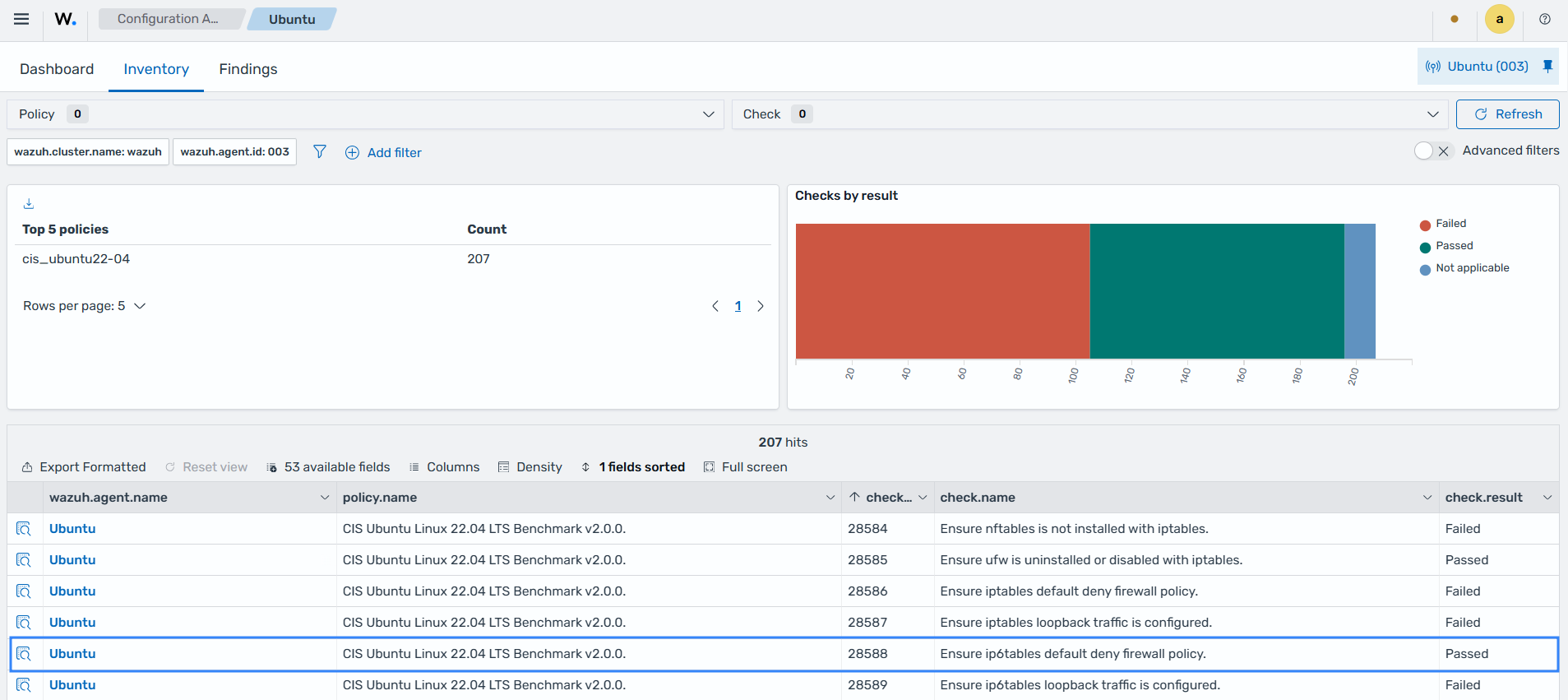
The scan result for check 35622 changes to Passed at the next SCA synchronization, usually 5 to 15 minutes after the restart, as shown in the image below:
Integrity mechanisms
Wazuh uses two integrity mechanisms to keep the SCA states on the Wazuh agent and the Wazuh manager synchronized. These mechanisms ensure the integrity of the policy files and scan results.
Integrity of policy files
This integrity mechanism keeps policy files and scan results aligned. When it detects a change in a policy file, SCA invalidates the results stored in the database for that policy and requests a new scan to generate new results.
When the hash of a policy file changes, Wazuh performs the following recovery steps:
The Wazuh manager flushes its stored data for that SCA policy.
The Wazuh agent sends the new scan results of the SCA policy.
The Wazuh manager processes the new scan results, updates the SCA state in its local database and synchronizes the updated state with the Wazuh indexer.
Note
When a policy file changes, Wazuh generates findings for every check in the policy, not only for checks whose result changed. This is the exception to the usual behavior: the Wazuh manager has flushed its data for the policy, so resending every result makes sure that no check result is missing.
Integrity of the scan results
To illustrate how Wazuh maintains the integrity of scan results, consider an example where the Wazuh agent and Wazuh manager databases differ. This scenario can happen when there's a network issue.
The table below shows an example of the SCA state stored in the Wazuh agent and Wazuh manager databases.
Check ID |
Agent-side state |
Manager-side state |
|---|---|---|
1000 |
Passed |
Passed |
1001 |
Failed |
Failed |
1002 |
Failed |
Missing |
1003 |
Passed |
Passed |
Each side computes a SHA256 hash over the check results it stores for the policy. In this example, the hashes are:
Wazuh agent:   1642AB1DC478052AC3556B5E700CD82ADB69728008301882B9CBEE0696FF2C84
Wazuh manager: B43037CA28D95A69B6F9E03FCD826D2B253A6BB1B6AD28C4AE57A3A766ACE610
Since the two hashes don't match, the Wazuh manager requests the latest scan data from the Wazuh agent and refreshes its database with the newly received status information.