Decoders
Decoders normalize raw events into structured documents that conform to the Wazuh Common Schema (WCS). When an event is accepted by a decoder, it applies a series of transformations to extract values, normalize fields, and map data to the appropriate schema fields.
All events enter the decoder tree through the root decoder and then move through a branch of child decoders. Each child decoder performs a more specialized layer of parsing, field extraction, and normalization, progressively refining the event until it reaches its final structured form.
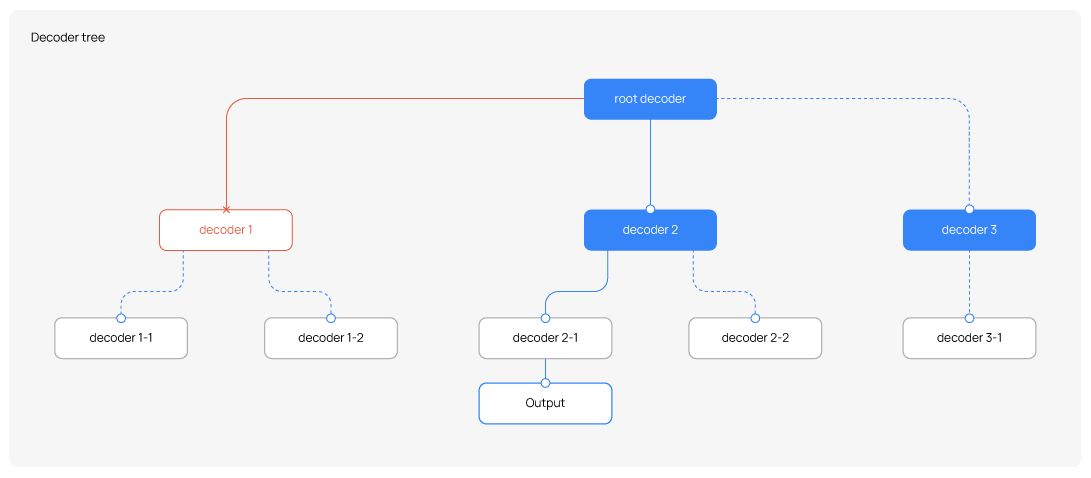
The above image shows a logical decoder tree.
Custom decoders
Custom decoders are managed through the draft, test, and custom spaces on the Wazuh Ruleset Management dashboard. They are organized within integrations, which serve as containers for grouping related decoders, rules, KVDBs, and supporting content. To create a decoder in an integration, test it with Log test, and promote it, see Create a security analytics detection workflow.
A decoder is an asset that takes a raw event and normalizes it into the Wazuh Common Schema (WCS) using a small domain-specific language (DSL): check, parse, and normalize with map operations. Each operation in those stages is defined using literal values, field references, and helper functions. Decoders are arranged in a tree, starting from a root decoder, and each decoder can accept or reject an event based on its conditions before mapping fields.
Each decoder defines the:
checkstage: Boolean conditions that decide whether the decoder applies to the event. Write the conditions as a list, such as- _json.action: string_equal("ALLOW"), or as one conditional expression string, such as"$dns.response_code == NOERROR". Both forms appear in the examples in this document.parse|<field>stage: An ordered list of parser patterns that the normalization engine tries against the value of<field>. Parser expressions describes their syntax.normalizestage: one or more blocks that runcheck/parse|/mapin order to populate WCS fields. Themapblock is a transformation stage inside a decoder's normalize section that sets or modifies event fields (using literals, field references, or functions) without affecting whether the event is accepted.
Conceptually, a decoder asset looks like this:
name: decoder/custom-mylog/0
enabled: true
check:
  - event.original: contains("MyProduct")
normalize:
  - map:
      - _json: parse_json($event.original)
  - check:
      - _json.some_field: exists()
    map:
      - event.category: "network"
      - source.ip: $_json.src_ip
Identifying the input field and format
Most decoders start from event.original for raw log text or JSON, or some field a previous decoder has already created (e.g., _message, _json). You decide which helper function to use based on the event format, as described in the Helper functions reference:
parse_json()for JSON logs.parse_key_value()fork=vstyle logs.parse_csv()orparse_dsv()for delimited logs.regex_extract()if you want custom regex capture into fields.
Example: Parse a JSON firewall log that arrives as a string in event.original:
name: decoder/custom-firewall-json/0
enabled: true

normalize:
  - map:
      - _json: parse_json($event.original)
Here _json is a temporary variable used as scratch space during decoding and will later be cleaned in pre-enrichment. A scratch space refers to temporary fields (names starting with _) that decoders use to store intermediate values during event processing, which are later cleaned up before indexing. Temporary variables are any fields whose names start with _, like _raw_message or _parsed_ts. They are not part of the Wazuh Common Schema. Decoders can read and write these fields as an event moves through the decoder tree, so different decoders can share intermediate parsing results or flags.
At pre-enrichment, there is a mandatory cleanup step that removes all temporary fields, ensuring the final event contains only WCS-compliant fields for indexing.
Adding a check stage to target the right events
The check stage is used to target the right events. It uses filter helpers such as contains() and starts_with() to determine whether the decoder should process the event.
Example:
check:
  - event.original: contains("firewall")
  - event.original: starts_with("{")
normalize:
  - map:
      - _json: parse_json($event.original)
The above example shows that check lines use a filter helper (contains, starts_with). Both conditions must evaluate to true for the decoder to accept the event.
Normalizing parsed data into WCS fields
The normalize stage maps parsed fields to Wazuh Common Schema fields using mapping helpers, transforms, or direct references.
Example:
normalize:
  - map:
      - event.kind: "event"
      - event.category: "network"
      - event.type: "connection"
      - network.transport: $_json.transport
      - source.ip: $_json.src_ip
      - source.port: to_int($_json.src_port)
      - destination.ip: $_json.dst_ip
      - destination.port: to_int($_json.dst_port)
      - event.outcome: $_json.action
In the above example, we use:
Direct references, such as
$_json.src_ip.Map helpers like
to_int()to convert a number, such as a float, to an integer. To convert a string, such as a port parsed from text, useparse_long().
Conditional normalize blocks
A normalize array can have multiple blocks, each with its own check and map, evaluated in order. For example, this treats action=ALLOW and action=DENY differently:
normalize:
  - check:
      - _json.action: string_equal("ALLOW")
    map:
      - event.outcome: "success"

  - check:
      - _json.action: string_equal("DENY")
    map:
      - event.outcome: "failure"
Here, string_equal is a filter helper used as a condition inside normalize.
Practical example
The following log is a sample from a network device:
FW: conn src=10.0.0.5 src_port=34567 dst=192.168.1.10 dst_port=443 proto=tcp action=ALLOW
The following decoder YAML parses the key-value fields from the log and maps them to WCS fields:
name: decoder/custom-fw-kv/0
enabled: true
metadata:
  description: "Custom firewall key=value logs"
  version: "1.0.0"

check:
  - event.original: starts_with("FW:")
  - event.original: contains("conn ")

parse|event.original:
  - "FW: conn <_kv_text>"

normalize:
  - map:
      - _kv: parse_key_value($_kv_text, '=', ' ', "'", '\\')
      - event.kind: "event"
      - event.category: "network"
      - event.type: "connection"

      - source.ip: $_kv.src
      - source.port: parse_long($_kv.src_port)
      - destination.ip: $_kv.dst
      - destination.port: parse_long($_kv.dst_port)
      - network.transport: downcase($_kv.proto)

  - check:
      - _kv.action: string_equal("ALLOW")
    map:
      - event.outcome: "success"

  - check:
      - _kv.action: string_equal("DENY")
    map:
      - event.outcome: "failure"
In the above example:
parse|event.originalis a parser stage that uses the patternFW: conn <_kv_text>to capture thekey=valuetext in the temporary field_kv_text.parse_key_valueis a transformation helper that splits the log'sk=vpairs. In this context, "k=vpairs" means the key=value fragments inside the log line, likesrc=10.0.0.5,src_port=34567,dst=192.168.1.10, etc.starts_with,contains, andstring_equalare filter helpers.parse_longis a transformation helper that converts the port strings to integers, anddowncaseis a map helper that normalizes casing.Scratch fields,
_kv_textand_kvare temporary storage that is removed by the pre-enrichment cleanup.
Parser expressions
A parse|<field> stage lists one or more parser expressions. The normalization engine tries them in order against the value of <field> and keeps the first one that matches the whole value. If none matches, the stage fails and the decoder rejects the event. Inside a normalize block, a failed parse stage only skips the rest of that block.
A parser expression combines literal text with field expressions in angle brackets. Literal text must match exactly and is case-sensitive. The field expressions are:
<field>captures a value into a WCS field. The type of the field selects the parser, so<source.ip>matches only an IPv4 or IPv6 address.<_name>captures a value into a temporary field. Temporary field names start with_, use thetextparser by default, and are removed by the pre-enrichment cleanup. A name that is neither a WCS field nor a temporary field makes the decoder fail to load.<field/argument>passes arguments to the parser. For a date field, the argument is the date format, for example<event.start/ANSIC>. For a temporary field, the first argument names the parser, for example<_port/long>or<_ts/date/RFC3164>.<?field>makes a single field optional.(?...)makes a group optional. For example,(?:<source.port>)matches an optional colon followed by a port, so[<source.ip>(?:<source.port>)]matches both[203.0.113.50]and[203.0.113.50:34567]. A group can't contain another group, and two groups can't follow each other.<~>matches text and discards it.
The parsers you can name for a temporary field are long, double, float, integer, short, byte, unsigned_long, half_float, scaled_float, bool, text, literal, quoted, between, alphanumeric, binary, ip, uri, fqdn, file, useragent, date, json, xml, csv, dsv, kv, and ignore.
The predefined date formats are ANSIC, UnixDate, RubyDate, RFC822, RFC822Z, RFC850, RFC1123, RFC1123Z, RFC3339, RFC3164, SYSLOG, ISO8601, ISO8601Z, HTTPDATE, NGINX_ERROR, and POSTGRES. You can also give a format string with % specifiers, such as %Y-%m-%d %T.
In literal text, escape <, ?, (, ), and \ with a backslash. In the arguments of a field expression, escape /, >, and \.
The Apache error log decoder in Create custom decoders uses this expression:
[<event.start/ANSIC>] [<log.logger>:<log.level>] [pid <process.pid>(?:tid <process.thread.id>)] <message>
It matches the bracketed timestamp as an ANSIC date, the module and the level separated by a colon, the process ID with an optional thread ID, and the rest of the line as the message.