Architecture
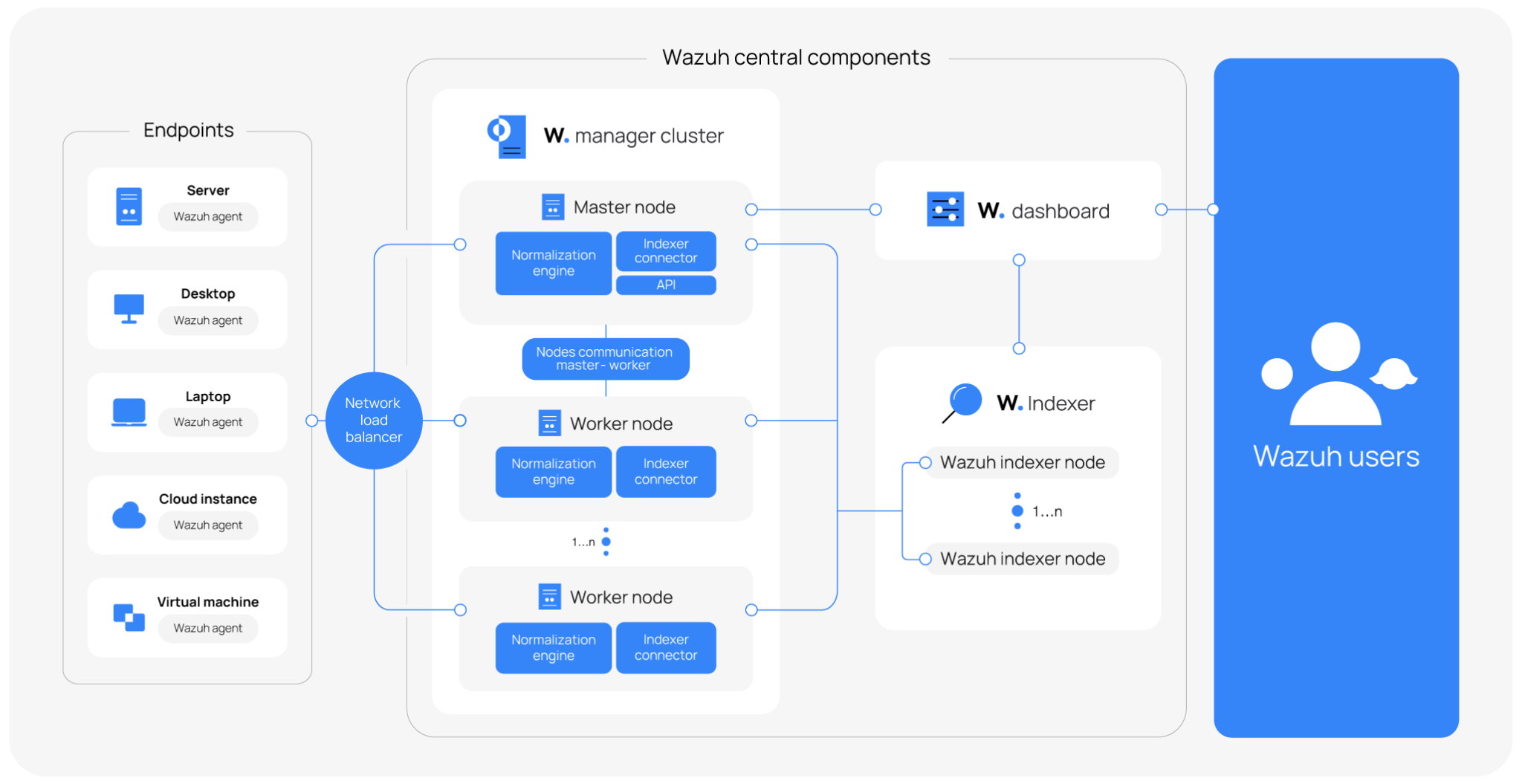
The Wazuh architecture is composed of a multi-platform Wazuh agent and three central components: the Wazuh manager, the Wazuh indexer, and the Wazuh dashboard.
The Wazuh agent is deployed on endpoints to collect and forward security data to the Wazuh manager, where it is transformed and enriched.
The Wazuh manager transforms data received from Wazuh agents into standardized schema documents. It decodes and enriches the data with threat intelligence, then forwards the processed output to the Wazuh indexer and other configured destinations.
The Wazuh indexer is a highly scalable, full-text search and analytics engine. It serves as the central data store for the Wazuh platform, indexing and storing security alerts, events, vulnerability data, and system inventory generated by Wazuh agents. The Wazuh indexer includes a set of purpose-built plugins that provide access control, reporting, and content management capabilities including rules, decoders, integrations, key-value databases (KVDBs), and Indicators of Compromise (IoCs). It provides near real-time search and analytics capabilities, enabling security teams to investigate threats, monitor compliance, and gain visibility into their infrastructure.
The Wazuh dashboard queries the indexed data from the Wazuh indexer. It provides the user interface for configuring the Wazuh manager and visualizing analyzed security data. It also supports the management of the Wazuh agent configuration, health status, notifications, and alerting integrations.
Wazuh also supports agentless monitoring for systems and devices where installing the Wazuh agent is not possible. Network devices such as firewalls, switches, routers, and access points can actively forward log data via SSH or via an API.
The Wazuh central components can be deployed in different ways, depending on scalability and availability needs:
All-in-one deployment: All Wazuh components (manager, indexer, and dashboard) are installed on a single server. This deployment is best suited for labs and small environments with a limited number of monitored endpoints.
Single-node deployment: The Wazuh manager, Wazuh indexer, and Wazuh dashboard are each deployed on separate servers. Recommended for medium environments that require higher performance than an all-in-one setup.
Multi-node deployment: Typically, one instance of the Wazuh dashboard and multiple instances of the Wazuh manager (Wazuh manager cluster) and indexer (Wazuh indexer cluster) are deployed on their individual servers, respectively. The number of instances varies depending on your needs. This deployment is recommended for large environments with high event throughput, or when fault tolerance and high availability are required.
Visit the installation guide to learn how to deploy the Wazuh central components and the Wazuh agent.
The diagram below represents a Wazuh deployment architecture. It shows how the Wazuh manager and the Wazuh indexer nodes can be configured as clusters, providing load balancing and high availability.
Component communication
This section describes how the Wazuh agent communicates with the Wazuh central components. For each communication path, it specifies the default port, transport protocol, encryption, and authentication method.
Wazuh 5.0 changes the agent-manager communication transport. A Wazuh 5.0 agent communicates with the Wazuh manager over HTTPS on port 1517/TCP. The Wazuh manager also maintains the legacy AES-encrypted TCP/UDP communication channel on port 1514 and the TLS enrollment service on port 1515/TCP for Wazuh 4.x agents.
Wazuh agent - Wazuh manager
The Wazuh agent collects security data from monitored endpoints and forwards it to the Wazuh manager, where the normalization engine transforms and enriches the data. A Wazuh 5.0 agent uses an HTTPS channel for communication with the Wazuh manager. The channel carries enrollment, event reporting, state synchronization, control messages, and file downloads. The Wazuh manager serves this channel on port 1517/TCP. The listener requires a Transport Layer Security (TLS) certificate and private key.
A Wazuh 5.0 agent enrolls through the same HTTPS channel using the POST /enroll endpoint. The endpoint acts as a bridge to the enrollment service, authenticates the request, and relays it to that service. After enrollment, the Wazuh agent authenticates subsequent requests using a bearer token.
For Wazuh 4.x agents, the Wazuh manager provides the agent communication service on port 1514/TCP or 1514/UDP. The service receives AES-encrypted messages, including keepalive messages and event data. Wazuh 4.x agents enroll through the enrollment service on port 1515/TCP over TLS. These legacy services remain enabled by default to support Wazuh 4.x agents.
Wazuh manager - Wazuh indexer
The Wazuh manager forwards processed events and vulnerability data to the Wazuh indexer for indexing, storage, and search. It uses TLS certificates to secure communications between the Wazuh manager and the Wazuh indexer. The Wazuh indexer connector handles this communication. It is a shared library that replaces Filebeat in Wazuh 5.0. The Wazuh indexer listens on port 9200/TCP by default.
The Wazuh indexer indexes and stores the received documents, enabling the querying, correlation, and near real-time analytics that the Wazuh dashboard presents.
Wazuh manager - Wazuh manager
In a multi-node deployment, Wazuh manager nodes form a cluster and communicate with each other over port 1516/TCP by default. A Wazuh manager cluster consists of one master node and one or more worker nodes. All nodes use the shared key configured in the <cluster><key> setting of the Wazuh manager configuration file to authenticate cluster communication.
The master node coordinates cluster operations. It handles Wazuh agent enrollment and deletion requests and manages the shared configuration groups. The master node synchronizes the following data with the worker nodes:
Wazuh agent registration information
Shared configuration
When an enrollment request arrives at a worker node, the worker forwards it to the master node. The master validates the request, assigns the agent ID, and generates the agent key. The worker returns the enrollment response to the Wazuh agent, while the cluster synchronizes the agent registration data with the worker nodes.
Wazuh dashboard - Wazuh manager
The Wazuh dashboard queries the Wazuh manager API to retrieve information and perform management operations. It displays configuration and status information about the Wazuh manager and enrolled Wazuh agents. It also performs operations such as agent enrollment, group assignment, and remote upgrades. The Wazuh manager API listens on port 55000/TCP by default and exposes a REST interface over HTTPS.
The Wazuh manager API uses JSON Web Tokens (JWTs) for authentication. The Wazuh dashboard sends the API username and password to the POST /security/user/authenticate endpoint, which returns a signed JWT. The dashboard includes the token in the Authorization header of subsequent API requests. Tokens expire after 900 seconds by default.
Role-Based Access Control (RBAC) authorizes each authenticated request based on the user's assigned permissions. RBAC supports permissions for specific resources and actions and operates in white-list mode by default. In white-list mode, the API denies actions that the user's roles do not explicitly permit. In a Wazuh manager cluster, the Distributed API (DAPI) layer coordinates API requests across cluster nodes.
Wazuh dashboard - Wazuh indexer
The Wazuh dashboard queries the Wazuh indexer to retrieve indexed security data for its visualizations, tables, and alerts. It sends search, aggregation, and management requests to the Wazuh indexer REST API over HTTPS on port 9200/TCP by default. The Wazuh indexer processes each request and returns the matching documents, which the Wazuh dashboard renders. This communication is encrypted with TLS and authenticated with Wazuh indexer credentials.
Required ports
Wazuh components communicate through several services, each with a specific default port. The following table lists these default ports. You can change the ports as required.
Component |
Default port |
Transport and encryption |
Purpose |
|---|---|---|---|
Wazuh manager |
1517/TCP |
HTTPS, TLS |
Wazuh 5.x agent enrollment and connection |
1514/TCP or 1514/UDP |
Wazuh message protocol, AES encryption |
Wazuh 4.x agent connection |
|
1515/TCP |
Wazuh message protocol, AES encryption |
Wazuh 4.x agent enrollment |
|
1516/TCP |
Wazuh cluster protocol |
Wazuh manager cluster communication |
|
55000/TCP |
HTTPS, TLS |
Wazuh manager API |
|
Wazuh indexer |
9200/TCP |
HTTPS, TLS |
Wazuh indexer API |
9300 - 9400/TCP |
TLS |
Wazuh indexer cluster communication |
|
Wazuh dashboard |
443/TCP |
HTTPS |
Wazuh web user interface |
Note
Wazuh 5.x agents communicate exclusively through port 1517. Ports 1514 and 1515 serve Wazuh 4.x agents.
Wazuh CTI
The Wazuh Cyber Threat Intelligence (CTI) service is a publicly accessible platform that provides cyber threat intelligence and security content. Wazuh maintains and regularly updates this content as new intelligence becomes available. The Wazuh CTI API publishes content for the following use cases:
Detection content: Rules, decoders, integrations, key-value databases (KVDBs), and routing policies.
Indicators of compromise (IoCs): IP addresses, file hashes, and URLs used to enrich events with threat context during event processing.
Vulnerability intelligence: Common Vulnerabilities and Exposures (CVE) information that the Vulnerability Scanner module uses to identify vulnerabilities affecting monitored endpoints.
Wazuh aggregates vulnerability intelligence from trusted sources, including operating system vendors and major vulnerability databases. It normalizes the data into a common structure and enriches it with information about affected products and versions. The Wazuh CTI website provides public access to vulnerability intelligence without requiring registration or a Wazuh installation. You can search for vulnerabilities by CVE ID, affected application, CVSS score, severity, and publication date.
For more information, see the Wazuh CTI documentation.