How it works
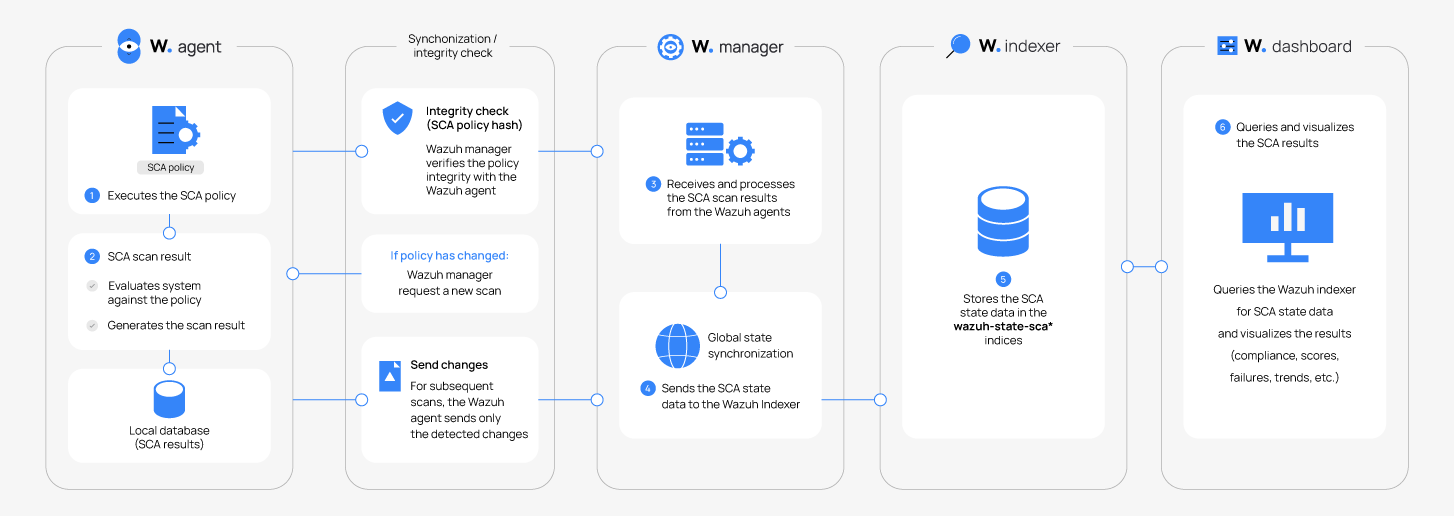
The Wazuh agent performs SCA scans using policy files. Each policy file defines the security configuration checks to run on monitored endpoints. During a scan, the Wazuh agent evaluates endpoint settings against the rules defined in each policy to determine whether they follow the expected security configuration.
By default, the Wazuh agent runs scans for every policy (.yaml or .yml files) present in the ruleset directory. This directory can be found in the following locations on every operating system that runs the Wazuh agent:
Linux and Unix-based agents:
/var/ossec/ruleset/sca.Windows agents:
C:\Program Files (x86)\ossec-agent\ruleset\sca.macOS agents:
/Library/Ossec/ruleset/sca.
After each scan, the following happens:
The Wazuh agent synchronizes the SCA results with the Wazuh manager.
The Wazuh manager processes the scan results and sends the SCA state data to the Wazuh indexer where it is stored in the
wazuh-states-sca-*index.The Wazuh dashboard queries this index to provide centralized visibility into endpoint compliance status and security configuration findings.
To optimize synchronization, the Wazuh agent tracks the current state of each SCA check and sends only the updates required to keep the manager synchronized. When no changes are detected between scans, the agent sends a scan summary instead of generating new SCA events.
The sequence diagram below depicts the integrity and alerting flow.
Understanding SCA scan results
SCA scan results appear as findings with SCA scan data when a check's status changes between scans. Wazuh agents send only the events necessary to keep the SCA state synchronized, which avoids potential event flooding.
Any given check event has three possible results:
Passed: The endpoint configuration satisfies the conditions defined in the check.
Failed: The endpoint configuration does not satisfy the conditions defined in the check.
Not applicable: The check cannot be evaluated, for example, because a required file, command output, or registry value is unavailable or it does not apply to the operating system or software.
The set of rules and the check result aggregator determine this result.
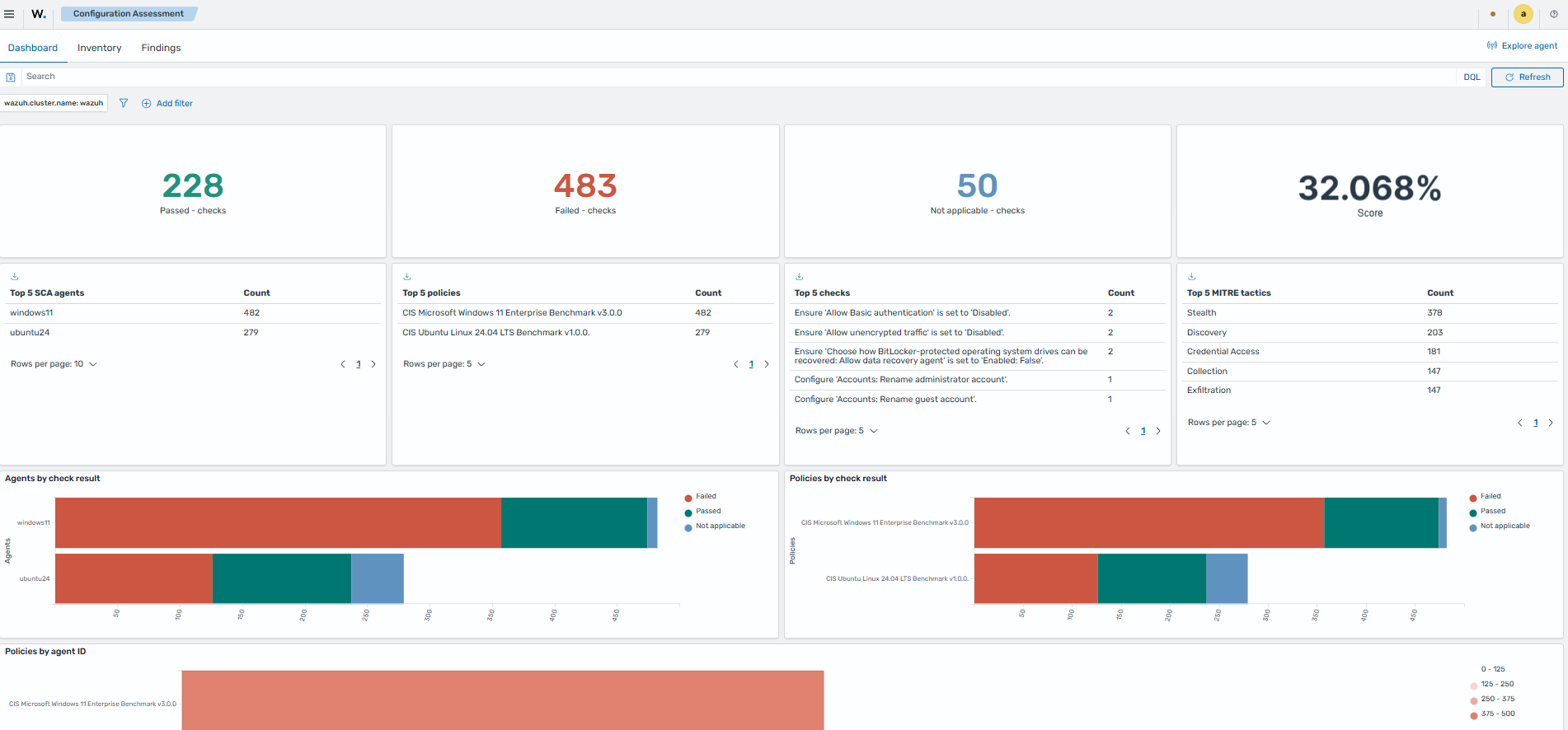
On the Wazuh dashboard, navigate to Endpoint Security > Configuration assessment to view the scan summaries for the Wazuh agents.
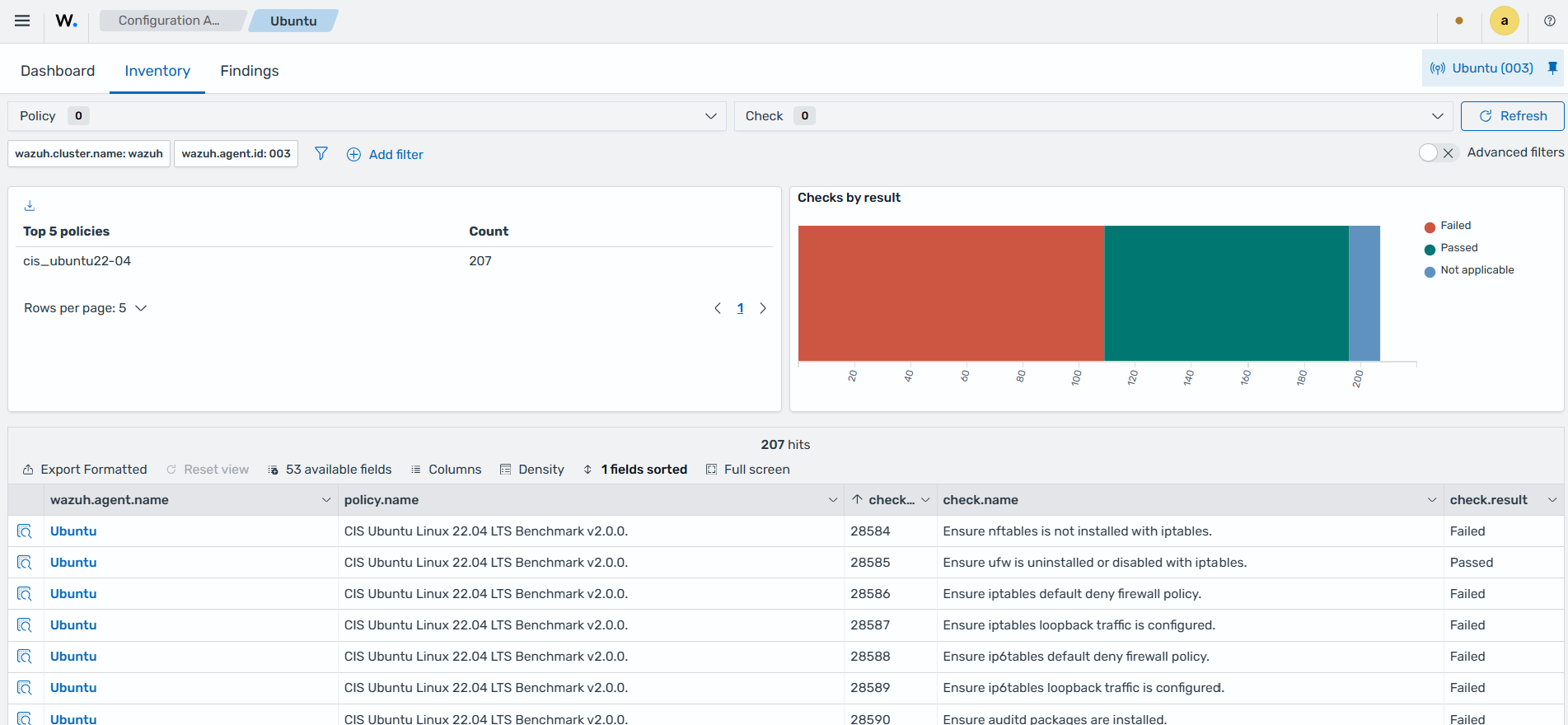
The Inventory tabs under the Configurations Assessment dashboard, provides the current SCA state for monitored endpoints. It displays the SCA policies evaluated on each endpoint and their individual checks, and the check result.
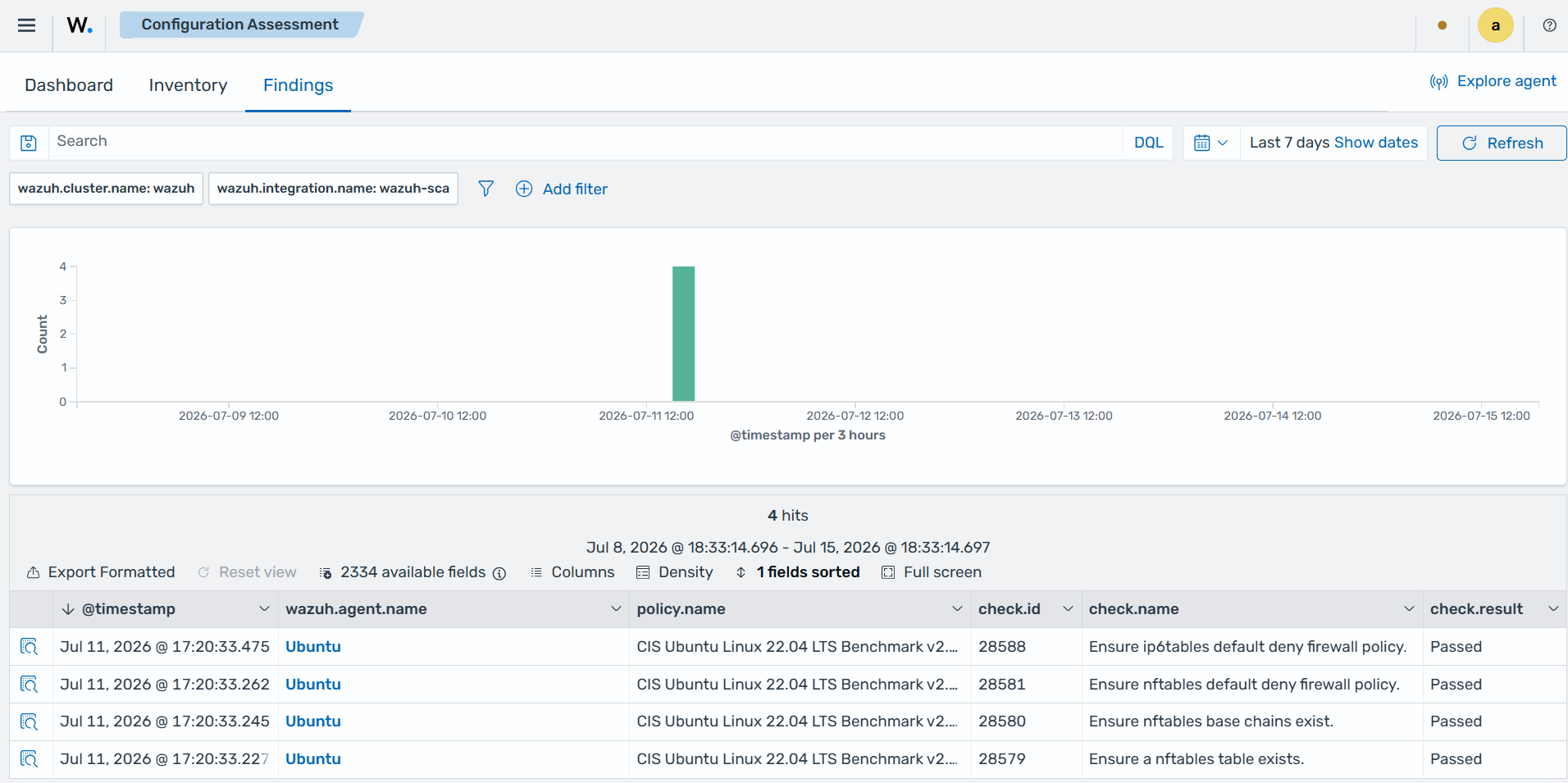
The Findings tabs under the Configurations Assessment dashboard, displays the SCA findings generated when the result of a check changes between scans.
Example: Firewall check on an Ubuntu 22.04 endpoint
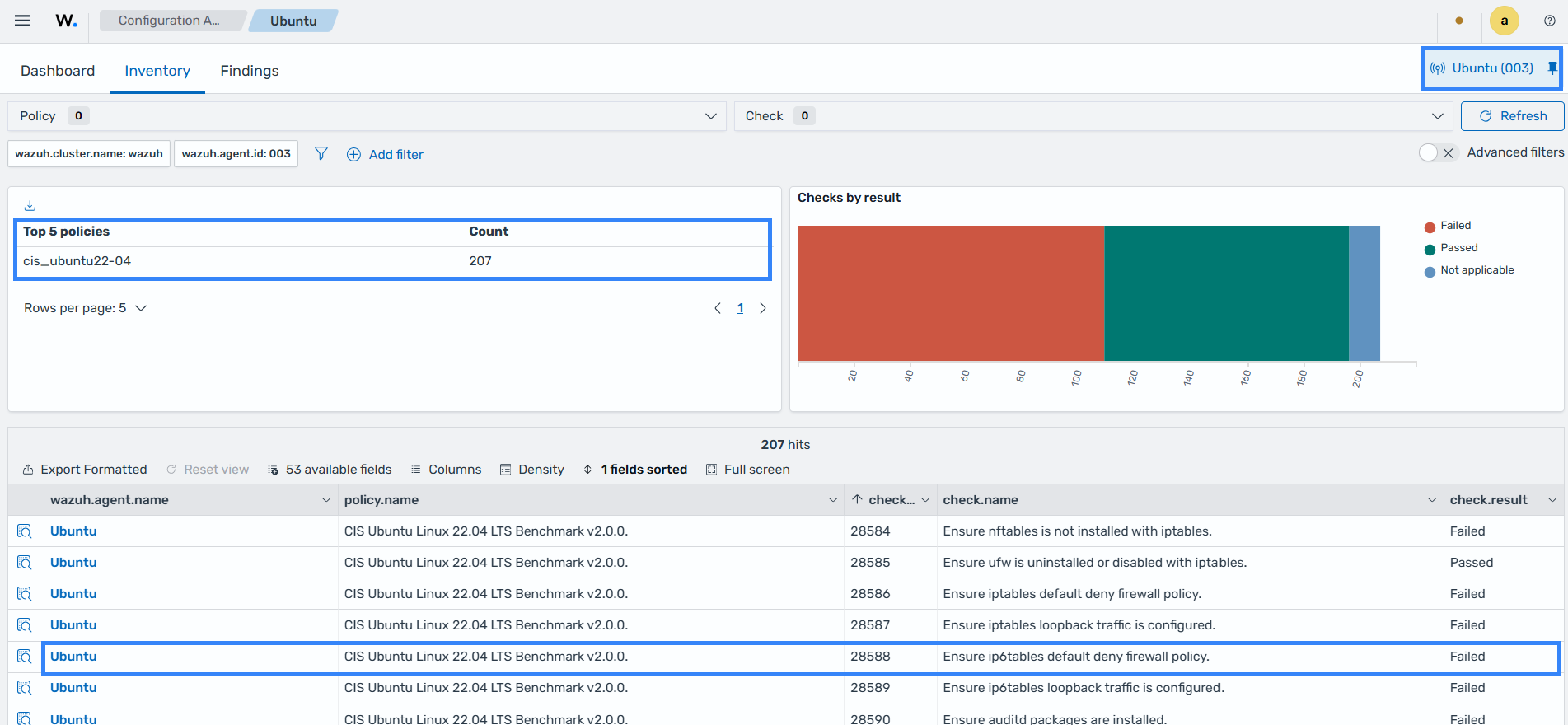
On the Wazuh dashboard, navigate to Endpoint security > Configuration assessment > Inventory and select the Ubuntu 22.04 endpoint to view its SCA results. The policy name on the Wazuh dashboard is CIS Ubuntu Linux 22.04 LTS Benchmark v2.0.0 and is stored in the /var/ossec/ruleset/sca/cis_ubuntu22-04.yml file. The highlighted result shows check 28588, which verifies that a default deny policy is configured for the IPv6 firewall.
You can expand each scan result to display additional information. On the Wazuh dashboard, navigate to the Endpoint security > Configuration assessment > Inventory. Click on Inspect details to see more information on the scan result.
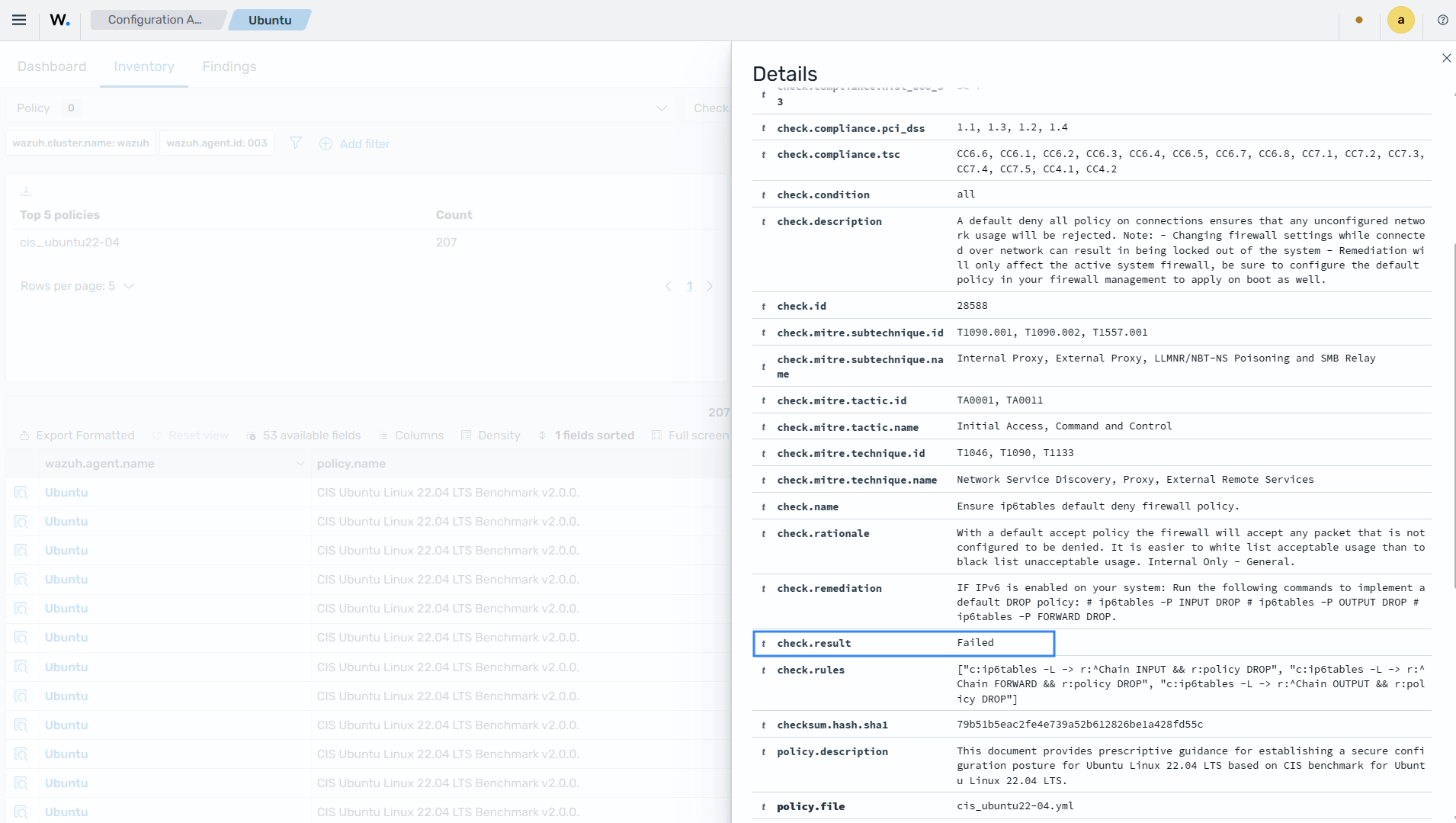
The YAML definition for this SCA check for 28588 is shown below.
- id: 28588
  name: "Ensure ip6tables default deny firewall policy."
  description: "A default deny all policy on connections ensures that any unconfigured network usage will be rejected. Note: - Changing firewall settings while connected over network can result in being locked out of the system - Remediation will only affect the active system firewall, be sure to configure the default policy in your firewall management to apply on boot as well."
  rationale: "With a default accept policy the firewall will accept any packet that is not configured to be denied. It is easier to white list acceptable usage than to black list unacceptable usage. Internal Only - General."
  remediation: "IF IPv6 is enabled on your system: Run the following commands to implement a default DROP policy: # ip6tables -P INPUT DROP # ip6tables -P OUTPUT DROP # ip6tables -P FORWARD DROP."
  compliance:
    cmmc: ["AC.L2-3.1.20", "CM.L2-3.4.7", "SC.L2-3.13.1", "SC.L2-3.13.6"]
    fedramp: ["SC-7"]
    gdpr: ["IV_32.1.a", "IV_32.1.b", "IV_32.1.c", "IV_32.1.d", "IV_32.2", "IV_32.3", "IV_32.4"]
    hipaa: ["164.312(e)(1)", "164.312(b)"]
    iso_27001: ["A.13.1.1", "A.13.1.2", "A.12.4.1"]
    nis2: ["21.2.e", "21.2.i", "21.2.a"]
    nist_800_171: ["3.1.20", "3.4.7", "3.13.1", "3.13.6"]
    nist_800_53: ["SC-7"]
    pci_dss: ["1.1", "1.3", "1.2", "1.4"]
    tsc: ["CC6.6", "CC6.1", "CC6.2", "CC6.3", "CC6.4", "CC6.5", "CC6.7", "CC6.8", "CC7.1", "CC7.2", "CC7.3", "CC7.4", "CC7.5", "CC4.1", "CC4.2"]
  mitre:
    tactic:
      id:
        - "TA0001"
        - "TA0011"
      name:
        - "Initial Access"
        - "Command and Control"
    technique:
      id:
        - "T1046"
        - "T1090"
        - "T1133"
      name:
        - "Network Service Discovery"
        - "Proxy"
        - "External Remote Services"
    subtechnique:
      id:
        - "T1090.001"
        - "T1090.002"
        - "T1557.001"
      name:
        - "Internal Proxy"
        - "External Proxy"
        - "LLMNR/NBT-NS Poisoning and SMB Relay"
  condition: all
  rules:
    - "c:ip6tables -L -> r:^Chain INPUT && r:policy DROP"
    - "c:ip6tables -L -> r:^Chain FORWARD && r:policy DROP"
    - "c:ip6tables -L -> r:^Chain OUTPUT && r:policy DROP"
# 4.3.3.2 Ensure ip6tables loopback traffic is configured. (Automated)
- id: 28589
  name: "Ensure ip6tables loopback traffic is configured."
  description: "Configure the loopback interface to accept traffic. Configure all other interfaces to deny traffic to the loopback network (::1). Note: - Changing firewall settings while connected over network can result in being locked out of the system - Remediation will only affect the active system firewall, be sure to configure the default policy in your firewall management to apply on boot as well."
  rationale: "Loopback traffic is generated between processes on machine and is typically critical to operation of the system. The loopback interface is the only place that loopback network (::1) traffic should be seen, all other interfaces should ignore traffic on this network as an anti-spoofing measure. Internal Only - General."
  remediation: "Run the following commands to implement the loopback rules: # ip6tables -A INPUT -i lo -j ACCEPT # ip6tables -A OUTPUT -o lo -j ACCEPT # ip6tables -A INPUT -s ::1 -j DROP."
  compliance:
    cmmc: ["AC.L2-3.1.20", "CM.L2-3.4.7", "SC.L2-3.13.1", "SC.L2-3.13.6"]
    fedramp: ["SC-7"]
    gdpr: ["IV_32.1.a", "IV_32.1.b", "IV_32.1.c", "IV_32.1.d", "IV_32.2", "IV_32.3", "IV_32.4"]
    hipaa: ["164.312(e)(1)", "164.312(b)"]
    iso_27001: ["A.13.1.1", "A.13.1.2", "A.12.4.1"]
    nis2: ["21.2.e", "21.2.i", "21.2.a"]
    nist_800_171: ["3.1.20", "3.4.7", "3.13.1", "3.13.6"]
    nist_800_53: ["SC-7"]
    pci_dss: ["1.1", "1.3", "1.2", "1.4"]
    tsc: ["CC6.6", "CC6.1", "CC6.2", "CC6.3", "CC6.4", "CC6.5", "CC6.7", "CC6.8", "CC7.1", "CC7.2", "CC7.3", "CC7.4", "CC7.5", "CC4.1", "CC4.2"]
  mitre:
    tactic:
      id:
        - "TA0001"
        - "TA0011"
      name:
        - "Initial Access"
        - "Command and Control"
    technique:
      id:
        - "T1046"
        - "T1090"
        - "T1133"
      name:
        - "Network Service Discovery"
        - "Proxy"
        - "External Remote Services"
    subtechnique:
      id:
        - "T1090.001"
        - "T1090.002"
        - "T1557.001"
      name:
        - "Internal Proxy"
        - "External Proxy"
        - "LLMNR/NBT-NS Poisoning and SMB Relay"
  condition: all
  rules:
    - 'c:ip6tables -L INPUT -v -n -> r:.*ACCEPT.*all.*lo.*[*!+-].*::/0.*::/0'
    - 'c:ip6tables -L INPUT -v -n -> r:.*DROP.*all.*[*!+-].*[*!+-].*::1.*::/0'
    - 'c:ip6tables -L OUTPUT -v -n -> r:.*ACCEPT.*all.*[*!+-].*lo.*::/0.*::/0'
# 4.3.3.3 Ensure ip6tables outbound and established connections are configured. (Manual) - Not Implemented
# 4.3.3.4 Ensure ip6tables firewall rules exist for all open ports. (Automated) Not Implemented
Evaluating this check generates the following event:
{
  "_index": "wazuh-states-sca",
  "_id": "wazuh_003_b127c9987a3963a172ffef149db2fed2d1c64c13",
  "_score": 0,
  "_source": {
    "check": {
      "compliance": {
        "cmmc": [
          "AC.L2-3.1.20",
          "CM.L2-3.4.7",
          "SC.L2-3.13.1",
          "SC.L2-3.13.6"
        ],
        "fedramp": [
          "SC-7"
        ],
        "gdpr": [
          "IV_32.1.a",
          "IV_32.1.b",
          "IV_32.1.c",
          "IV_32.1.d",
          "IV_32.2",
          "IV_32.3",
          "IV_32.4"
        ],
        "hipaa": [
          "164.312(e)(1)",
          "164.312(b)"
        ],
        "iso_27001": [
          "A.13.1.1",
          "A.13.1.2",
          "A.12.4.1"
        ],
        "nis2": [
          "21.2.e",
          "21.2.i",
          "21.2.a"
        ],
        "nist_800_171": [
          "3.1.20",
          "3.4.7",
          "3.13.1",
          "3.13.6"
        ],
        "nist_800_53": [
          "SC-7"
        ],
        "pci_dss": [
          "1.1",
          "1.3",
          "1.2",
          "1.4"
        ],
        "tsc": [
          "CC6.6",
          "CC6.1",
          "CC6.2",
          "CC6.3",
          "CC6.4",
          "CC6.5",
          "CC6.7",
          "CC6.8",
          "CC7.1",
          "CC7.2",
          "CC7.3",
          "CC7.4",
          "CC7.5",
          "CC4.1",
          "CC4.2"
        ]
      },
      "condition": "all",
      "description": "A default deny all policy on connections ensures that any unconfigured network usage will be rejected. Note: - Changing firewall settings while connected over network can result in being locked out of the system - Remediation will only affect the active system firewall, be sure to configure the default policy in your firewall management to apply on boot as well.",
      "id": "28588",
      "mitre": {
        "subtechnique": {
          "id": [
            "T1090.001",
            "T1090.002",
            "T1557.001"
          ],
          "name": [
            "Internal Proxy",
            "External Proxy",
            "LLMNR/NBT-NS Poisoning and SMB Relay"
          ]
        },
        "tactic": {
          "id": [
            "TA0001",
            "TA0011"
          ],
          "name": [
            "Initial Access",
            "Command and Control"
          ]
        },
        "technique": {
          "id": [
            "T1046",
            "T1090",
            "T1133"
          ],
          "name": [
            "Network Service Discovery",
            "Proxy",
            "External Remote Services"
          ]
        }
      },
      "name": "Ensure ip6tables default deny firewall policy.",
      "rationale": "With a default accept policy the firewall will accept any packet that is not configured to be denied. It is easier to white list acceptable usage than to black list unacceptable usage. Internal Only - General.",
      "remediation": "IF IPv6 is enabled on your system: Run the following commands to implement a default DROP policy: # ip6tables -P INPUT DROP # ip6tables -P OUTPUT DROP # ip6tables -P FORWARD DROP.",
      "result": "Failed",
      "rules": [
        "[\"c:ip6tables -L -> r:^Chain INPUT && r:policy DROP\"",
        "\"c:ip6tables -L -> r:^Chain FORWARD && r:policy DROP\"",
        "\"c:ip6tables -L -> r:^Chain OUTPUT && r:policy DROP\"]"
      ]
    },
    "checksum": {
      "hash": {
        "sha1": "79b51b5eac2fe4e739a52b612826be1a428fd55c"
      }
    },
    "policy": {
      "description": "This document provides prescriptive guidance for establishing a secure configuration posture for Ubuntu Linux 22.04 LTS based on CIS benchmark for Ubuntu Linux 22.04 LTS.",
      "file": "cis_ubuntu22-04.yml",
      "id": "cis_ubuntu22-04",
      "name": "CIS Ubuntu Linux 22.04 LTS Benchmark v2.0.0.",
      "references": [
        "[\"https://www.cisecurity.org/cis-benchmarks/\"]"
      ]
    },
    "state": {
      "document_version": 1,
      "modified_at": "2026-07-11T15:53:19.503Z"
    },
    "wazuh": {
      "agent": {
        "groups": [
          "default"
        ],
        "host": {
          "architecture": "x86_64",
          "hostname": "server",
          "os": {
            "name": "Ubuntu",
            "platform": "ubuntu",
            "type": "linux",
            "version": "22.04.3 LTS (Jammy Jellyfish)"
          }
        },
        "id": "003",
        "name": "Ubuntu",
        "version": "v5.0.0"
      },
      "cluster": {
        "name": "wazuh"
      }
    }
  },
  "fields": {
    "state.modified_at": [
      "2026-07-11T15:53:19.503Z"
    ]
  }
}
Remediation
The scan result above is Failed because the rule didn't find Chain INPUT * policy DROP, Chain FORWARD * policy DROP, and Chain OUTPUT * policy DROP in the output of the command ip6tables -L.
The steps below show how to apply the remediation that Wazuh suggests to harden the endpoint:
Run the following recommended commands on the monitored endpoint to apply the firewall rules:
# ip6tables -P INPUT DROP
# ip6tables -P OUTPUT DROP
# ip6tables -P FORWARD DROP
Save the firewall rules:
# ip6tables-save > /etc/ip6tables.conf
Restart the Wazuh agent to trigger a new SCA scan:
# systemctl restart wazuh-agent
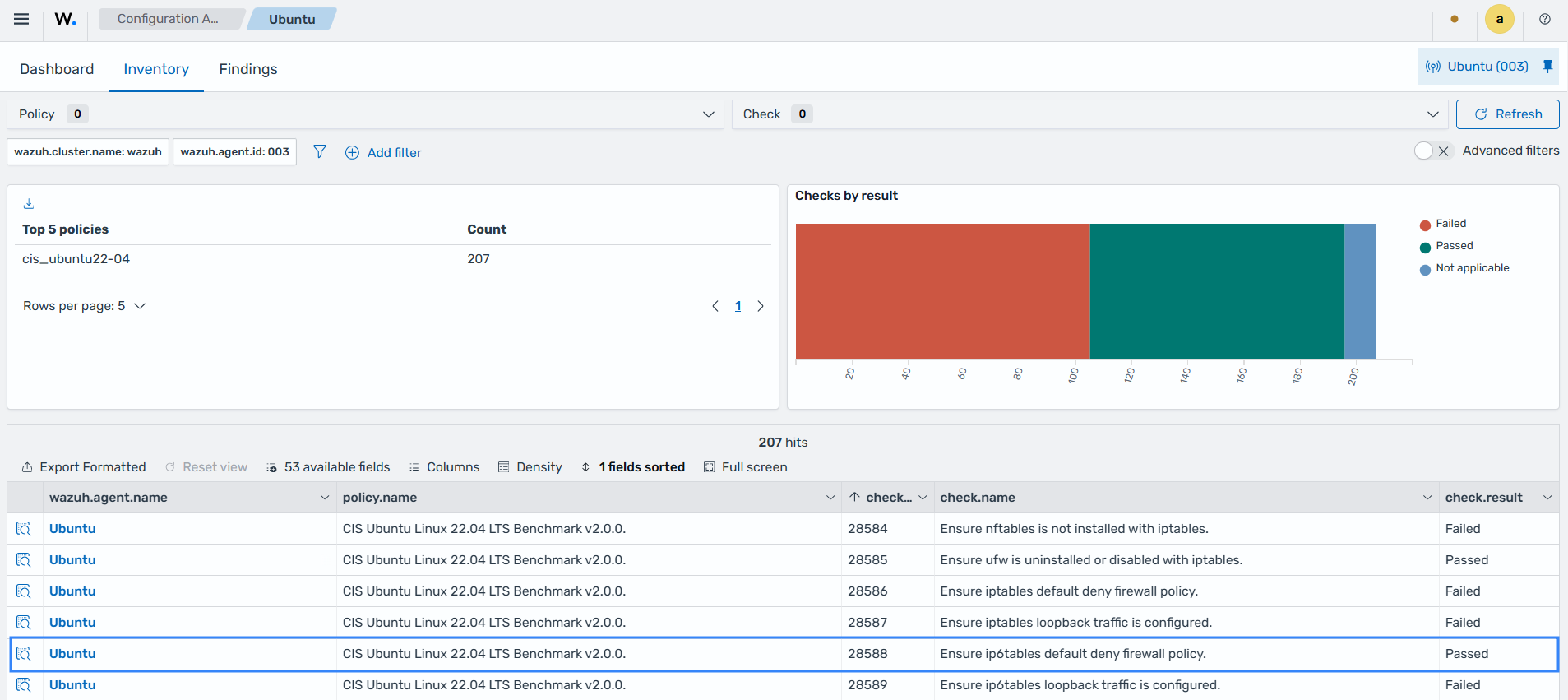
The scan result for check 28588 changes to Passed as shown in the image below:
Integrity mechanisms
Wazuh uses two integrity mechanisms to keep agent-side and server-side SCA states in synchronization. These mechanisms ensure the integrity of the policy files and the scan results.
Integrity of policy files
This integrity mechanism keeps policy files and scan results aligned. When it detects a change in a policy file, SCA invalidates the results stored in the database for that policy and requests a new scan to generate new results.
When the hash of a policy file changes, Wazuh performs the following recovery steps:
The Wazuh manager flushes its stored data for that SCA policy.
The Wazuh agent sends the new scan results of the SCA policy.
The Wazuh manager processes the new scan results, updates the SCA state in its local database and synchronizes the updated state with the Wazuh indexer.
Note
Wazuh triggers findings for every check in a policy when the policy is updated. This avoids false negatives.
Integrity of the scan results
To illustrate how Wazuh maintains the integrity of scan results, consider an example where the agent-side and server-side databases differ. This scenario can happen when there's a network issue.
The table below shows an example of the SCA state stored in the Wazuh agent and Wazuh manager databases.
Check ID |
Agent-side state |
Manager-side state |
|---|---|---|
1000 |
Passed |
Passed |
1001 |
Failed |
Failed |
1002 |
Failed |
Missing |
1003 |
Passed |
Passed |
For these databases, the corresponding SHA256 hashes are:
Wazuh agent:   1642AB1DC478052AC3556B5E700CD82ADB69728008301882B9CBEE0696FF2C84
Wazuh manager: B43037CA28D95A69B6F9E03FCD826D2B253A6BB1B6AD28C4AE57A3A766ACE610
Since the two hashes don't match, the Wazuh manager requests the latest scan data from the Wazuh agent and refreshes its database with the newly received status information.