Request the client key
You can obtain the Wazuh agent key from the Wazuh dashboard or by sending a request to the Wazuh manager API. The default API port is 55000/TCP.
To obtain the Wazuh agent key from the Wazuh dashboard, follow these steps:
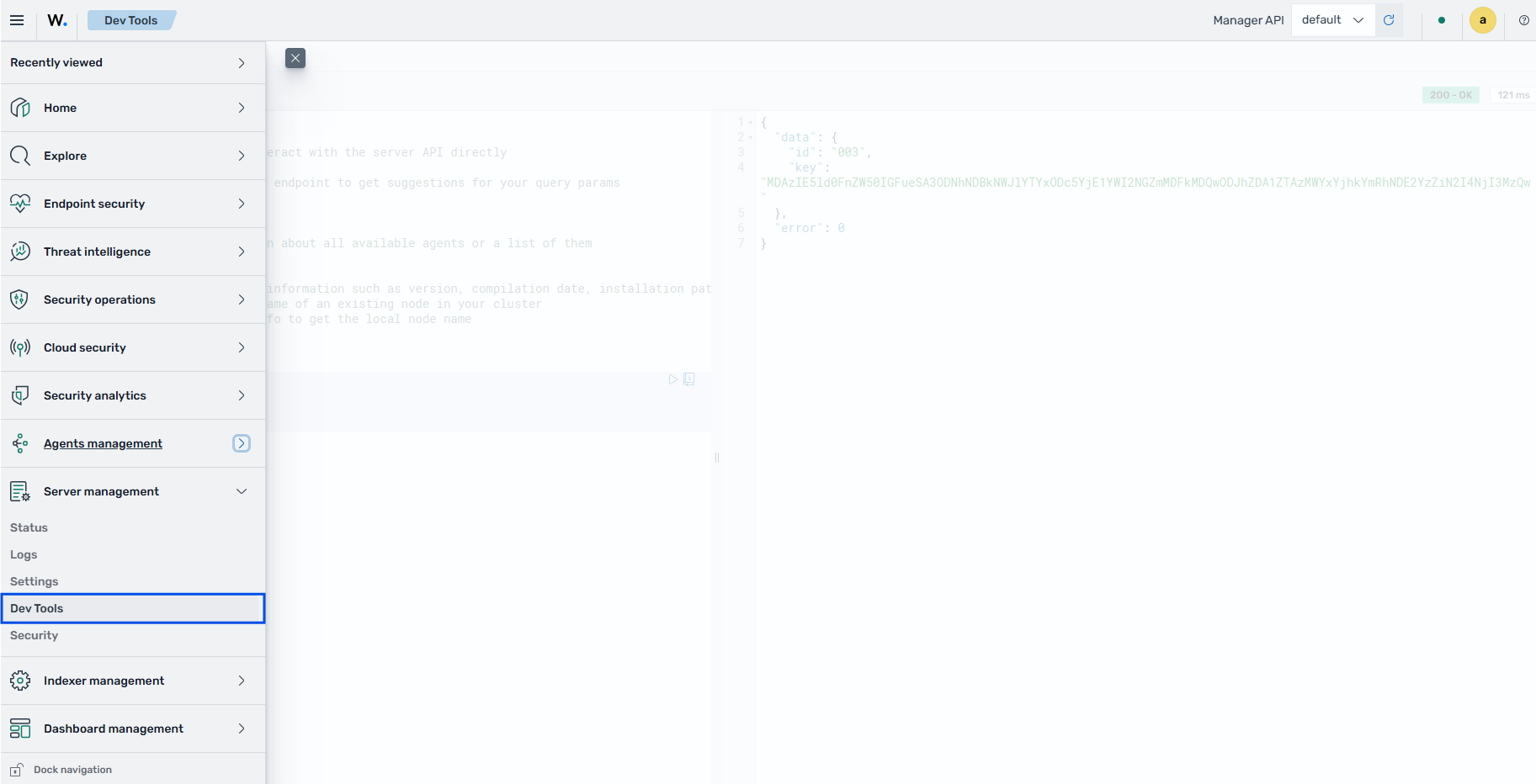
On the Wazuh dashboard, click the upper-left menu icon, then go to Server management > Dev Tools.
Send a POST request to the
/agentsendpoint. Replace<WAZUH_AGENT_NAME>with the name of the new Wazuh agent.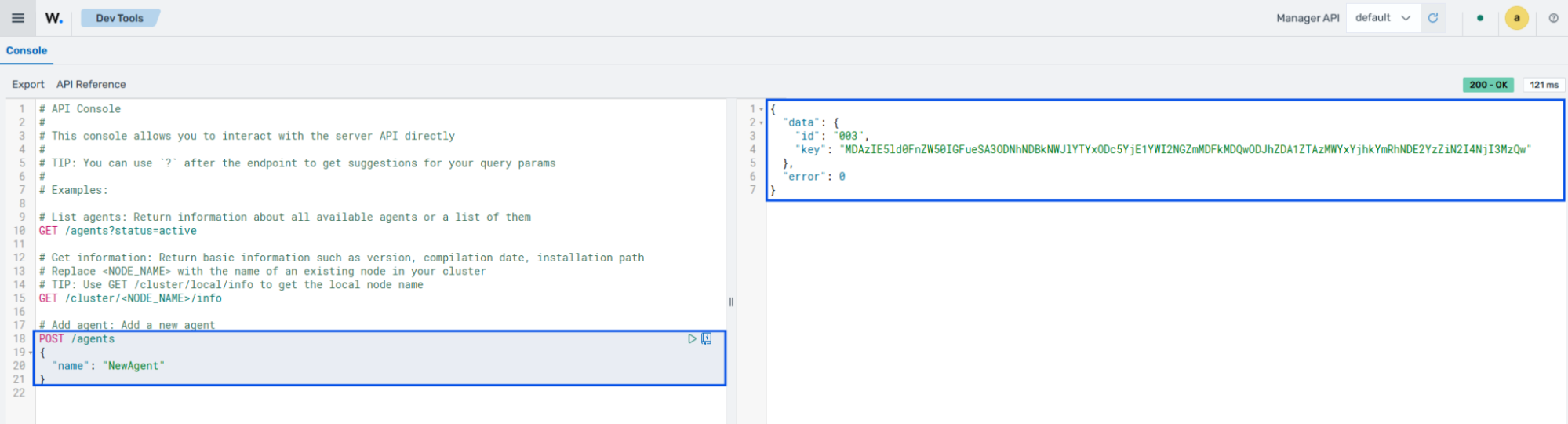
Alternatively, request the Wazuh agent key from any endpoint that has connectivity to the Wazuh manager API. The endpoint that sends the enrollment request must reach the Wazuh manager on the configured API port.
The following sections show how to request the Wazuh agent key on different operating systems:
Linux/Unix and macOS
Generate a JSON Web Token (JWT) to authenticate to the Wazuh manager API. The default Wazuh manager API credentials are
wazuh:wazuh. Replace<WAZUH_MANAGER_IP_ADDRESS>with the Wazuh manager IP address or fully qualified domain name (FQDN):# TOKEN=$(curl -u <USER>:<PASSWORD> -k -X POST "https://<WAZUH_MANAGER_IP_ADDRESS>:55000/security/user/authenticate?raw=true")
Confirm that the command generated the token successfully:
# echo $TOKEN
The output looks like this:
eyJhbGciOiJFUzUxMiIsInR5cCI6IkpXVCJ9.eyJpc3MiOiJ3YXp1aCIsImF1ZCI6IldhenVoIEFQSSBSRVNUIiwibmJmIjoxNzc5NzgyODEwLCJleHAiOjE3Nzk3ODM3MTAsInN1YiI6IndhenVoIiwicnVuX2FzIjpmYWxzZSwicmJhY19yb2xlcyI6WzFdLCJyYmFjX21vZGUiOiJ3aGl0ZSJ9.AQllTgzTgO5OFHirdIipFb3YX9IR401FYXBN035nwYZgSvDzXmqwEqJcw8DYxNZjvs5d6DkeZ2apoVE8LICfT3tMAN2pwELT7UUA9X8cj2VnpFN3yu1rDIkKx8p3lCAgQ9XJbVVEEdR-_DcwkMRe7PtqZzkLR8KyjEKI-H0fzn5YmXM7
Note
You can reset the password for the Wazuh manager API user if you forget it.
Request the client key and agent ID. Replace
<WAZUH_AGENT_NAME>with the Wazuh agent name:# curl -k -X POST -d '{"name":"<WAZUH_AGENT_NAME>"}' "https://<WAZUH_MANAGER_IP>:55000/agents?pretty=true" -H "Content-Type:application/json" -H "Authorization: Bearer $TOKEN"
The output includes the client key and agent ID:
{
   "data": {
      "id": "001",
      "key": "MDA0IFRUZXN0IGFueSA2MTJiYzkyZjExNDc3NzgxMWQxODRmNTlkOTNmMDM5N2UyYjFiNjkxYWM3YzNhYmQyYTA5Y2VlODE1NTFhMDM5"
   },
   "error": 0
}
From Windows
Follow these steps to send a Wazuh agent enrollment request from a Windows endpoint through the Wazuh manager API.
Open PowerShell with administrative privileges.
If the Wazuh manager API uses publicly trusted certificates, move to step 3. If the Wazuh manager API uses a self-signed SSL/TLS certificate, run the following function in PowerShell to ignore certificate validation errors:
function Ignore-SelfSignedCerts {
    add-type @"
        using System.Net;
        using System.Security.Cryptography.X509Certificates;
        public class PolicyCert : ICertificatePolicy {
            public PolicyCert() {}
            public bool CheckValidationResult(
                ServicePoint sPoint, X509Certificate cert,
                WebRequest wRequest, int certProb) {
                return true;
            }
        }
"@
    [System.Net.ServicePointManager]::CertificatePolicy = new-object PolicyCert
    [System.Net.ServicePointManager]::SecurityProtocol = [System.Net.SecurityProtocolType]::Tls12;
}
Ignore-SelfSignedCerts
Note
This function exists only in the PowerShell session where you run it.
Encode the Wazuh manager API credentials in Base64 and assign it to the
$base64AuthInfovariable. The default Wazuh manager API credentials arewazuh:wazuh. Replace<WAZUH_MANAGER_API_USERNAME>and<WAZUH_MANAGER_API_PASSWORD>with the Wazuh manager API credentials:> $base64AuthInfo=[Convert]::ToBase64String([Text.Encoding]::ASCII.GetBytes(("{0}:{1}" -f "<WAZUH_MANAGER_API_USERNAME>", "<WAZUH_MANAGER_API_PASSWORD>")))
Request a JSON Web Token (JWT). Replace
<WAZUH_MANAGER_IP>the Wazuh manager IP address or fully qualified domain name (FQDN):> Invoke-WebRequest -UseBasicParsing -Headers @{Authorization=("Basic {0}" -f $base64AuthInfo)} -Method POST -Uri https://<WAZUH_MANAGER_IP>:55000/security/user/authenticate | Select-Object -Expand Content
Output
{"data": {"token": "eyJhbGciOiJFUzUxMiIsInR5cCI6IkpXVCJ9.eyJpc3MiOiJ3YXp1aCIsImF1ZCI6IldhenVoIEFQSSBSRVNUIiwibmJmIjoxNzc5NzgzODMzLCJleHAiOjE3Nzk3ODQ3MzMsInN1YiI6IndhenVoIiwicnVuX2FzIjpmYWxzZSwicmJhY19yb2xlcyI6WzFdLCJyYmFjX21vZGUiOiJ3aGl0ZSJ9.AVzjN7xNZof5BN-MT40oUMrvRGq5dCUeu3EzkrEwCVVT_7GM74iWYBbY-FNZcqUCYKa4bj_C-vzsURsf97N2yJyqAMI5nCmijHNekuSXiStZD9b8EQqcs-yg1fI4KWpHQxMGK-BnvbFhJV9WwHS4seNZLlUwnyx1iJC0DBebR1y84YU3"}, "error": 0}
Note
You can reset the password for the Wazuh manager API user if you forget it.
Create variables to store the generated token and the agent name.
Replace
<TOKEN_GENERATED>with the token generated in step 4:> $TOKEN = "<TOKEN_GENERATED>"
Replace
<WAZUH_AGENT_NAME>with the desired Wazuh agent name:
> $AgentName = @{"name"="<WAZUH_AGENT_NAME>"} | ConvertTo-Json
These environment variables will be used in subsequent requests made to the Wazuh manager.
Request the client key and agent ID. Replace
<WAZUH_MANAGER_IP>with the IP address or fully qualified domain name (FQDN) of the Wazuh manager.> Invoke-WebRequest -UseBasicParsing -Headers @{Authorization=("Bearer {0}" -f $TOKEN)} -Method POST -ContentType "application/json" -Uri https://<WAZUH_MANAGER_IP>:55000/agents -Body $AgentName
The output looks like this:
StatusCode        : 200
StatusDescription : OK
Content           : {"data": {"id": "005", "key": "MDA1IFRlc3QyIGFueSAwOTFhZWIyN2IyMDM0Y2U5NzVkNTQxMzNhNTUxZmVmZmRjYmI3
                    Yjk1Y2E0ODk0MzY4OWJhNGJmNGE0Mjk4NDE0"}, "error": 0}
RawContent        : HTTP/1.1 200 OK
                    strict-transport-security: max-age=63072000; includeSubdomains
                    x-frame-options: deny
                    x-xss-protection: 0
                    x-content-type-options: nosniff
                    content-security-policy: none
                    referrer-po...
Forms             :
Headers           : {[strict-transport-security, max-age=63072000; includeSubdomains], [x-frame-options, deny],
                    [x-xss-protection, 0], [x-content-type-options, nosniff]...}
Images            : {}
InputFields       : {}
Links             : {}
ParsedHtml        :
RawContentLength  : 150