Proof of Concept guide
In this section of the documentation, we provide a set of use cases to explore different Wazuh capabilities. We describe how Wazuh can be configured for threat prevention, detection, and response. Each use case represents a real-world scenario that users can deploy using specific configurations.
Preparing your lab environment
The Wazuh platform consists of two main parts:
Security agents: Lightweight software deployed on the endpoints you want to monitor.
Central components (Wazuh manager, indexer, and dashboard): These components collect, analyze, and visualize data from agents.
We recommend using virtual machines for your lab. Take a snapshot of the environment immediately after the initial setup. This allows you to quickly restore a clean state before starting each new use case, preventing previous tests from interfering with new ones.
The diagram below shows the recommended lab architecture for testing the use cases in this guide.
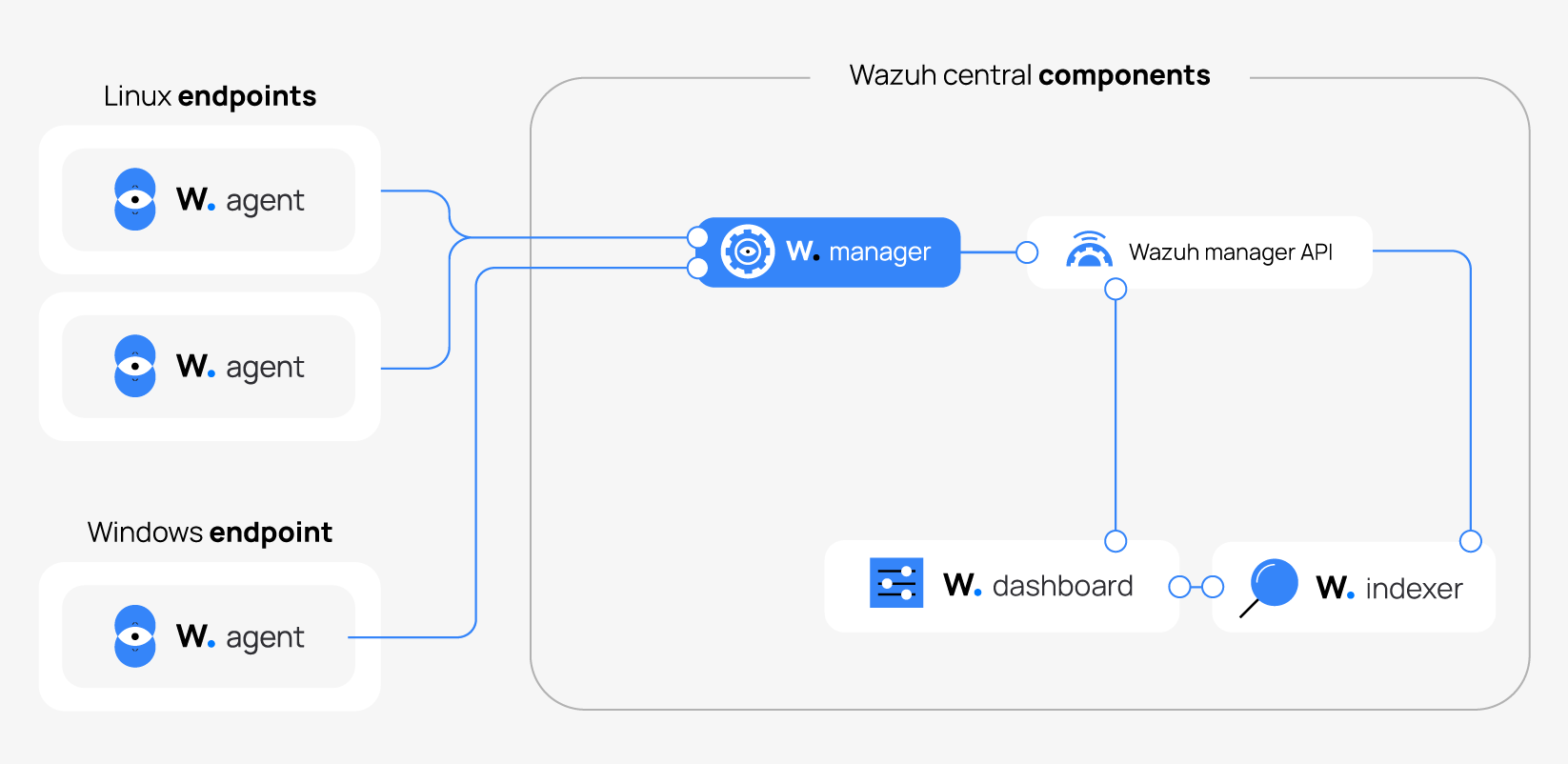
Wazuh central components
For the use cases in this guide, all Wazuh central components (manager, indexer, and dashboard) run on a single system. A single-node deployment is sufficient and recommended for a small-scale lab environment. To install the Wazuh central components on a single endpoint, use one of the following options:
The Quickstart guide: Using this guide, you can install all the components on the same system in approximately 5 minutes.
Our preconfigured virtual machine: Wazuh provides a pre-built virtual machine image in Open Virtual Appliance (OVA) format. You can import it to VirtualBox or other OVA-compatible virtualization systems.
Monitored endpoints
The Wazuh agent monitors the following endpoints. Depending on the use case, the endpoints act as victims of an attack or as malicious actors (attackers).
Endpoint |
Operating system (64-bit) |
CPU cores |
RAM |
Disk |
|---|---|---|---|---|
Ubuntu |
Ubuntu 24.04 LTS |
1 vCPU |
2 GB |
10 GB |
RHEL |
Red Hat Enterprise Linux 9.0 |
1 vCPU |
2 GB |
10 GB |
Windows |
Windows 11 |
2 vCPU |
4 GB |
25 GB |
Refer to our installation guide for information on how to install the Wazuh agent on these endpoints. You need internet access to perform some integrations and download the software used in these use cases.
Use cases
- File integrity monitoring
- Vulnerability detection
- Security configuration assessment
- Monitoring Docker events
- Detecting an SQL injection attack
- Detecting a Cross-Site Scripting (XSS) attack
- Monitoring AWS infrastructure
- Network IDS integration
- Detecting hidden processes
- Blocking a known malicious actor