Monitoring Docker environments
To maintain the security and compliance of your Docker environment, you must proactively monitor your Docker host and containers. The Docker host is the backbone of your container infrastructure and manages container deployment and resource allocation. By monitoring the Docker host, you can keep track of resource usage, unauthorized access attempts, performance issues, and other security concerns.
However, it is not enough to monitor only the Docker host. You also need to monitor the containers themselves. Container monitoring provides insight into the activities of your containers, such as network connections, file system changes, and process executions. These activities help you detect suspicious behavior, identify malware or malicious processes, and respond to security incidents in real time.
By monitoring both the Docker host and the containers, you can proactively detect and respond to security threats. This ensures the security and compliance of your Docker environment with regulatory standards. The Wazuh Docker listener module runs on the agent deployed on the Docker host to collect and forward Docker-related logs to the Wazuh manager.
Configuration
The Wazuh Docker listener module allows the Wazuh agent to capture Docker events and forward them to the Wazuh manager. The following sections describe how to install the Python Docker module and enable the Wazuh Docker listener module.
Perform the following steps to monitor your Docker environment with Wazuh.
Prerequisites
Install the Wazuh agent on the Docker host and enroll it on a Wazuh manager.
Install Python and pip:
$ sudo apt install -y python3 python3-pip
$ sudo yum install -y python3 python3-pip
$ sudo dnf install -y python3 python3-pip
Install Docker:
$ curl -sSL https://get.docker.com/ -o get-docker.sh
$ sudo sh get-docker.sh
Install Python Docker library and other dependencies:
$ sudo apt remove python3-urllib3
$ sudo pip3 install docker==7.1.0 urllib3==1.26.20 requests==2.32.2 --ignore-installed --break-system-packages
$ sudo yum remove python3-urllib3
$ sudo pip3 install docker==7.1.0 urllib3==1.26.20 requests==2.32.2 --ignore-installed --break-system-packages
$ sudo dnf remove python3-urllib3
$ sudo pip3 install docker==7.1.0 urllib3==1.26.20 requests==2.32.2 --ignore-installed --break-system-packages
Note
The above commands modify the default externally managed Python environment. See the PEP 668 description for more information. To prevent the modification, create a virtual environment and install the dependencies inside it. Then update the Docker
/var/ossec/wodles/docker/DockerListenerscript shebang with your virtual environment interpreter, for example,#!<VIRTUAL_ENVIRONMENT_PATH>/bin/python3.The
urllib3andrequestsversions are pinned to the versions compatible with the Wazuh Docker listener. The command removes thepython3-urllib3package and every package that depends on it, then installs the pinned version. On Ubuntu 24.04, that removes ten packages, includingcloud-initandubuntu-server.Start and enable the Docker service:
$ sudo systemctl start docker.service
$ sudo systemctl enable docker.service
Enable the Wazuh Docker listener module
Perform the following steps on the Docker host to configure the Wazuh agent to forward Docker events to the Wazuh manager.
Add the following configuration within an
<ossec_config>block in the Wazuh agent/var/ossec/etc/ossec.confconfiguration file to enable the Wazuh Docker listener module:<wodle name="docker-listener"> <interval>1m</interval> <attempts>5</attempts> <run_on_start>yes</run_on_start> <disabled>no</disabled> </wodle>
Where:
<interval>sets how long to wait before restarting the Docker listener after it exits due to an unexpected error or other issues. In this example, it is1m(1 minute).<attempts>sets how many times the Wazuh agent tries to run the Docker listener if it fails. In this example, it is5.<run_on_start>runs the Docker listener immediately when the Wazuh agent starts. The valueyesenables this behavior.<disabled>enables or disables the Docker listener. The valuenoenables it.
Refer to Wazuh Docker listener module configuration options for more information about the available options.
Restart the Wazuh agent to apply the changes:
$ sudo systemctl restart wazuh-agent
Verify that the Docker listener module started:
$ sudo grep docker /var/ossec/logs/ossec.log
The command output looks similar to this:
2026/07/10 13:38:10 wazuh-modulesd:docker-listener: INFO: Module docker-listener started.
2026/07/10 13:38:10 wazuh-modulesd:docker-listener: INFO: Starting to listening Docker events.
2026/07/10 13:38:19 wazuh-modulesd:docker-listener: INFO: Wodle started.
2026/07/10 13:38:20 wazuh-modulesd:docker-listener: INFO: Docker service was started.
Enable the Wazuh Docker integration
Perform the following steps on the Wazuh dashboard to enable the Wazuh Docker integration.
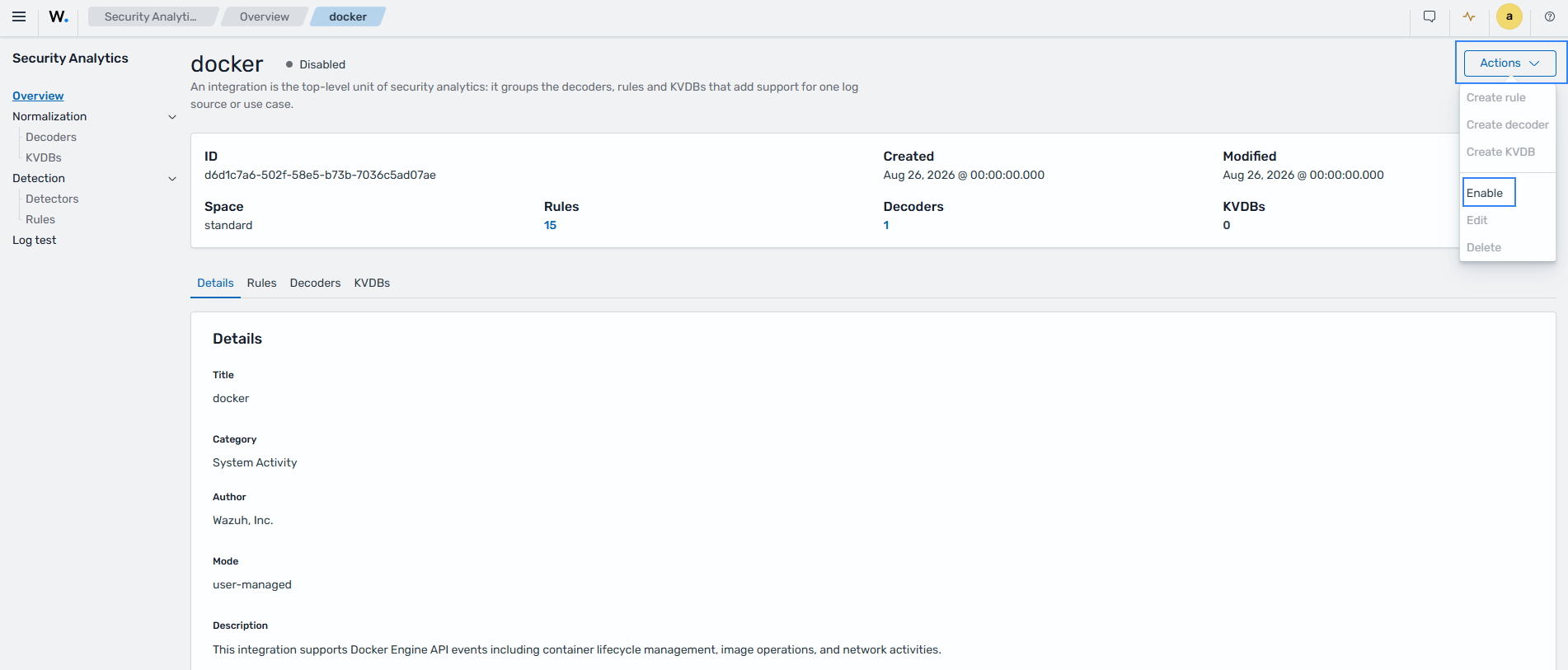
Navigate to Ruleset management > Overview.
Enter
dockerinto the search box and click docker.Click on Actions and select Enable.
Docker dashboard
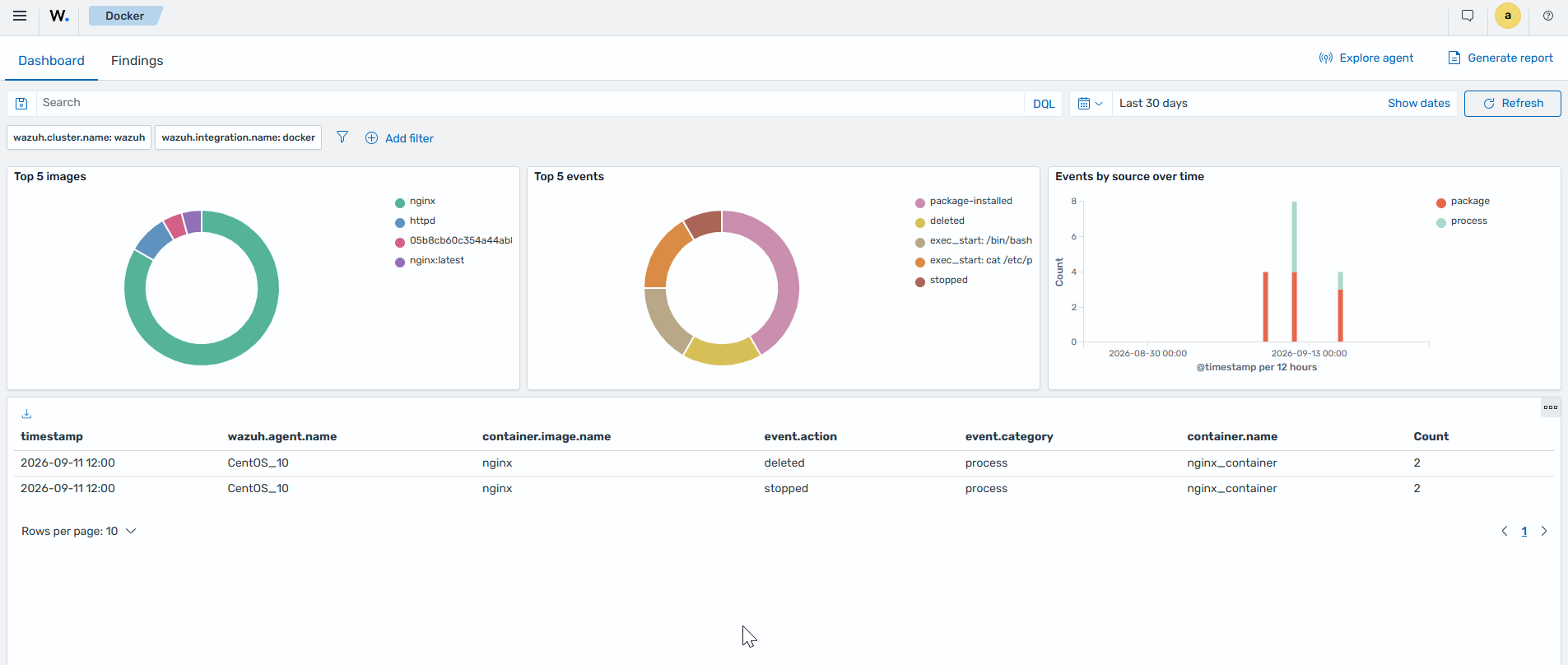
The Docker dashboard offers a centralized and user-friendly interface that allows you to monitor the security of your Dockerized infrastructure. It provides real-time insights that help system administrators and security teams review container events, detect and respond to threats. To view the Docker dashboard, navigate to Cloud security > Docker.
Wazuh Docker listener module configuration options
The Wazuh Docker listener module has main options and scheduling options.
Main options
The main options enable or disable the Wazuh Docker listener module. They also set how many times the listener retries after a failure.
Parameter |
Description |
Default value |
Allowed values |
|---|---|---|---|
|
Enables or disables the Wazuh Docker listener module. |
|
|
|
The number of attempts to execute the listener in case it fails. |
|
A positive number |
Scheduling options
The scheduling options allow you to configure when the Wazuh Docker listener module executes. The available scheduling options are run_on_start, interval, day, wday, and time.
Parameter |
Description |
Default value |
Allowed values |
|---|---|---|---|
|
Runs the Wazuh Docker listener module immediately when the Wazuh agent starts. |
|
|
|
How long to wait before restarting the Docker listener after it exits due to unexpected error or other issues. |
|
A positive number with a suffix
character indicating a time unit:
|
|
Day of the month on which to restart the
Docker listener after it exits. This option is
not compatible with the |
|
Day of the month [1..31] |
|
Day of the week on which to restart the Docker
listener after it exits. This option is not
compatible with the |
|
Day of the week: |
|
Time of the day to restart the Docker listener
after it exits. Must be represented in the
format |
|
Time of day [hh:mm] |