Detecting an SQL injection attack
You can use Wazuh to detect SQL injection attacks in web server logs by analyzing patterns such as select, union, and other common SQL injection patterns. SQL injection is an attack in which a threat actor inserts malicious code into strings transmitted to a database server for parsing and execution. A successful SQL injection attack gives unauthorized access to confidential information contained in the database. In this use case, you simulate an SQL injection attack against an Ubuntu endpoint and detect it with Wazuh.
Infrastructure
Endpoint |
Description |
|---|---|
Ubuntu 24.04 |
Victim endpoint running an Apache 2.4.54 web server or later. |
RHEL 9.0 |
Attacker endpoint that launches the SQL injection attack. |
Configuration
Ubuntu endpoint
Perform the following steps to install Apache and configure the Wazuh agent to monitor the Apache logs.
Update the local packages and install the Apache web server:
$ sudo apt update
$ sudo apt install apache2
If the firewall is enabled, modify it to allow external access to web ports. Skip this step if the firewall is disabled:
$ sudo ufw app list
$ sudo ufw allow 'Apache'
$ sudo ufw status
Check the status of the Apache service to verify that the web server is running:
$ sudo systemctl status apache2
Use the
curlcommand or openhttp://<UBUNTU_IP>in a browser to view the Apache landing page and verify the installation:$ curl http://<UBUNTU_IP>
Add the following lines to the Wazuh agent
/var/ossec/etc/ossec.conffile. This allows the Wazuh agent to monitor the access logs of your Apache server:<ossec_config> <localfile> <log_format>apache</log_format> <location>/var/log/apache2/access.log</location> </localfile> </ossec_config>
Restart the Wazuh agent to apply the configuration changes:
$ sudo systemctl restart wazuh-agent
Attack emulation
Replace <UBUNTU_IP> with the appropriate IP address and run the following command from the attacker endpoint:
$ curl -v "http://<UBUNTU_IP>?id=1%20UNION%20SELECT%201,2,3--"
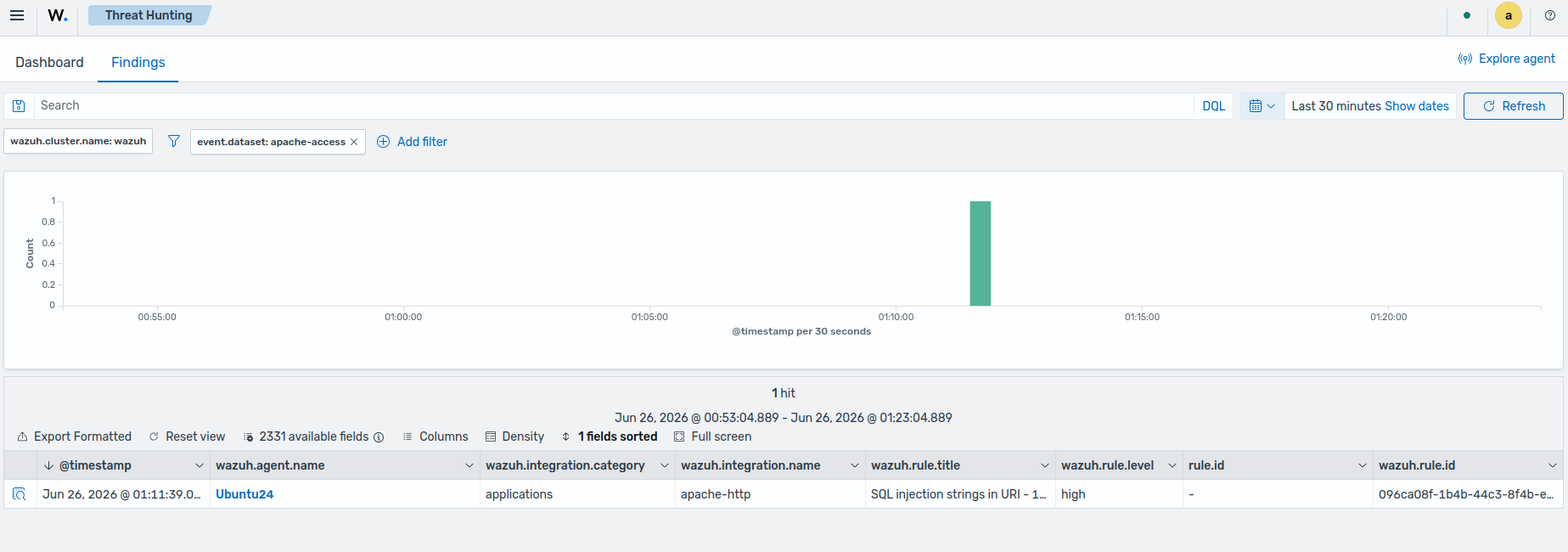
The default Wazuh ruleset detects the SQL injection attempt, so no custom rules are required. The expected result is a finding with an event.dataset of apache-access.
Visualize the findings
You can visualize the findings on the Wazuh dashboard. Perform the following:
Go to Threat intelligence > Threat Hunting and select Findings.
Click + Add filter. Then filter by event.dataset.
In the Operator field, select is.
Input
apache-access.