Key-Value Databases (KVDBs)
Key-Value Databases (KVDBs) allow the Wazuh data analysis engine to store reusable key-value maps that decoders and other assets can query during event processing. They are intended for lookup data that changes independently of the parsing logic, such as normalization tables, default field sets, blocklists, or reference tables.
During event processing, decoders and rules can call KVDB helper functions to look up, match, or merge data from a named database. The database name is passed as an argument to the helper function. The lookup happens inline as part of the normalization or filtering stage of the processing pipeline.
A KVDB is a named dictionary of key and value entries where:
Each key is a string
Each value is a JSON value
This keeps large or frequently updated lookup data outside the decoder itself, making assets easier to maintain and reuse.
The following table shows the Wazuh KVDB transformation functions, used in the map/normalize stage:
Function |
Signature |
Purpose |
Example |
|---|---|---|---|
|
|
Retrieves the value of a given key from the specified KVDB. If the key exists, its value is stored in the target field. |
normalize:
  - map:
      - event.category: kvdb_get('event_categories', $event.code)
|
|
|
Retrieves an array value stored under the given key in the specified KVDB and assigns it to the target field. |
|
|
|
Look up a key's value in the specified KVDB. If the key exists and the value type is compatible with the target field, it performs a shallow merge for objects or concatenation for arrays. |
normalize:
  - map:
      - event: kvdb_get_merge('event_defaults_by_code', $event.code)
|
|
|
Performs a deep (recursive) merge of the KVDB value into the target field, rather than a shallow merge. Useful when the stored value contains nested objects that should be fully merged into the event document. |
|
|
|
Decodes a hexadecimal bitmask into an array of human-readable values using a reference table stored in a KVDB entry. |
normalize:
  - map:
      - auditd.permissions: kvdb_decode_bitmask('audit_db', 'permission_flags', $auditd.mask)
|
The following table shows the Wazuh KVDB filter functions, used in the check stage:
Function |
Signature |
Purpose |
Example |
|---|---|---|---|
|
|
Checks whether the string value stored in the target field exists as a key in the specified KVDB. The filter succeeds (passes the event) if the key is found. |
check:
  - source.ip: kvdb_match('known_malicious_ips')
|
|
|
The inverse of |
check:
  - wazuh.agent.id: kvdb_not_match('unauthorized_agents')
|
Example
Creating a KVDB
The following example demonstrates how to set up a KVDB on the Wazuh dashboard. In this example, we create a KVDB and use it to enrich an event when the source IP address matches a known entry.
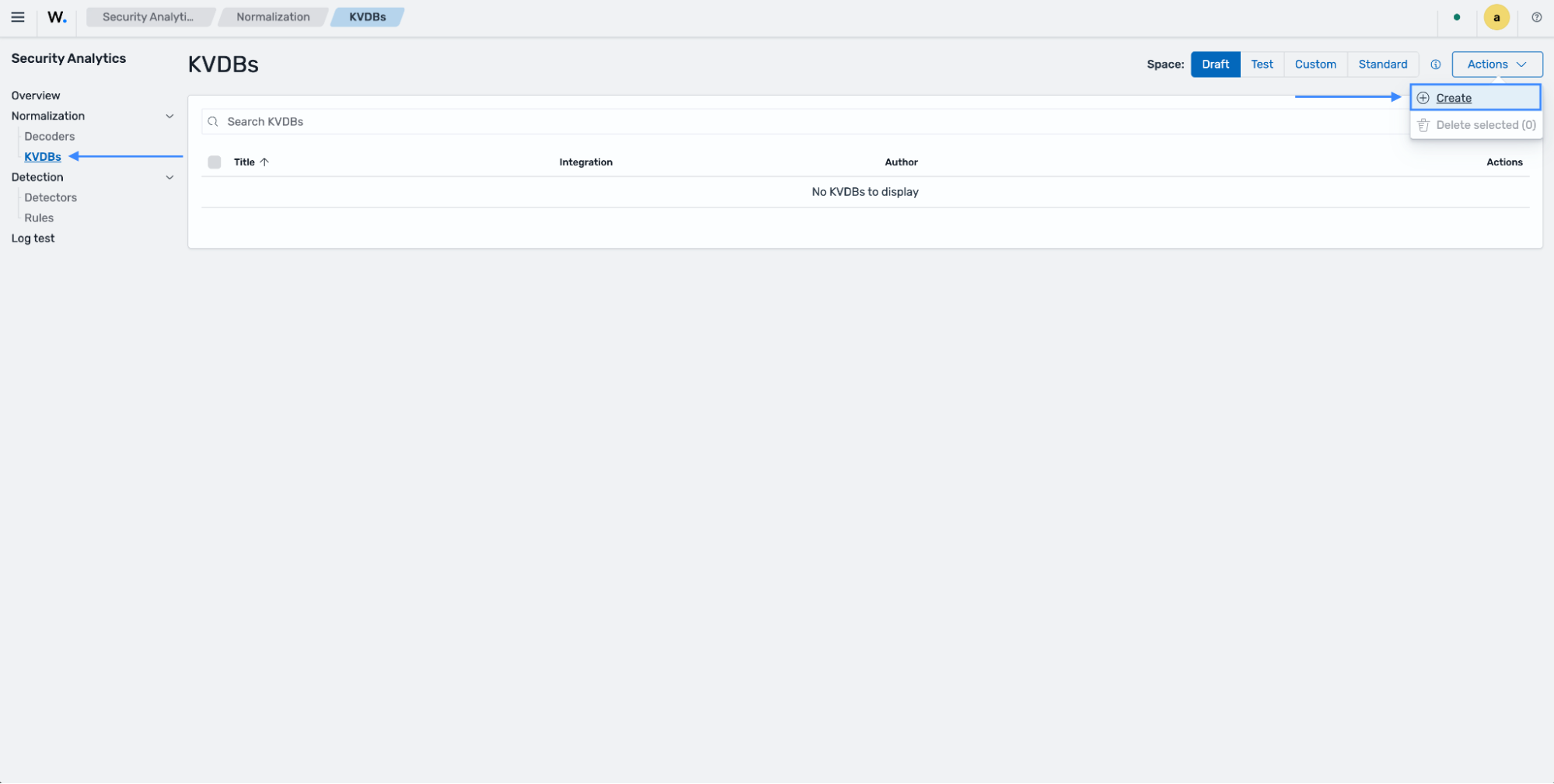
Navigate to Security Analytics > KVDBs. Ensure you are in the Draft space, click on Actions, and select Create.
Specify the Integration, Title and Author. Add a
keyandvaluewithin the Content section.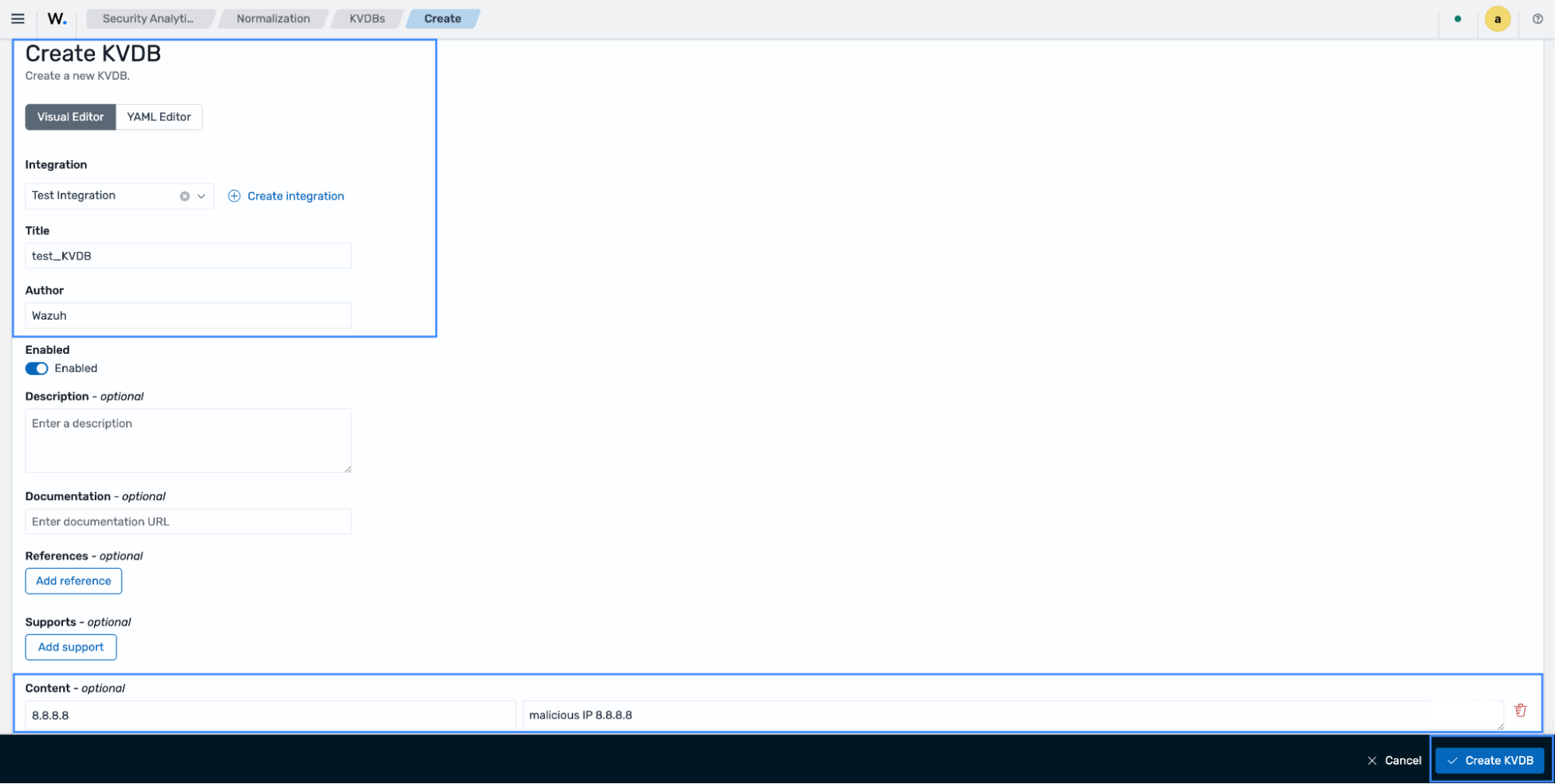
The Content key and value in this example are
8.8.8.8andmalicious ip 8.8.8.8respectively.Click on Create KVDB.
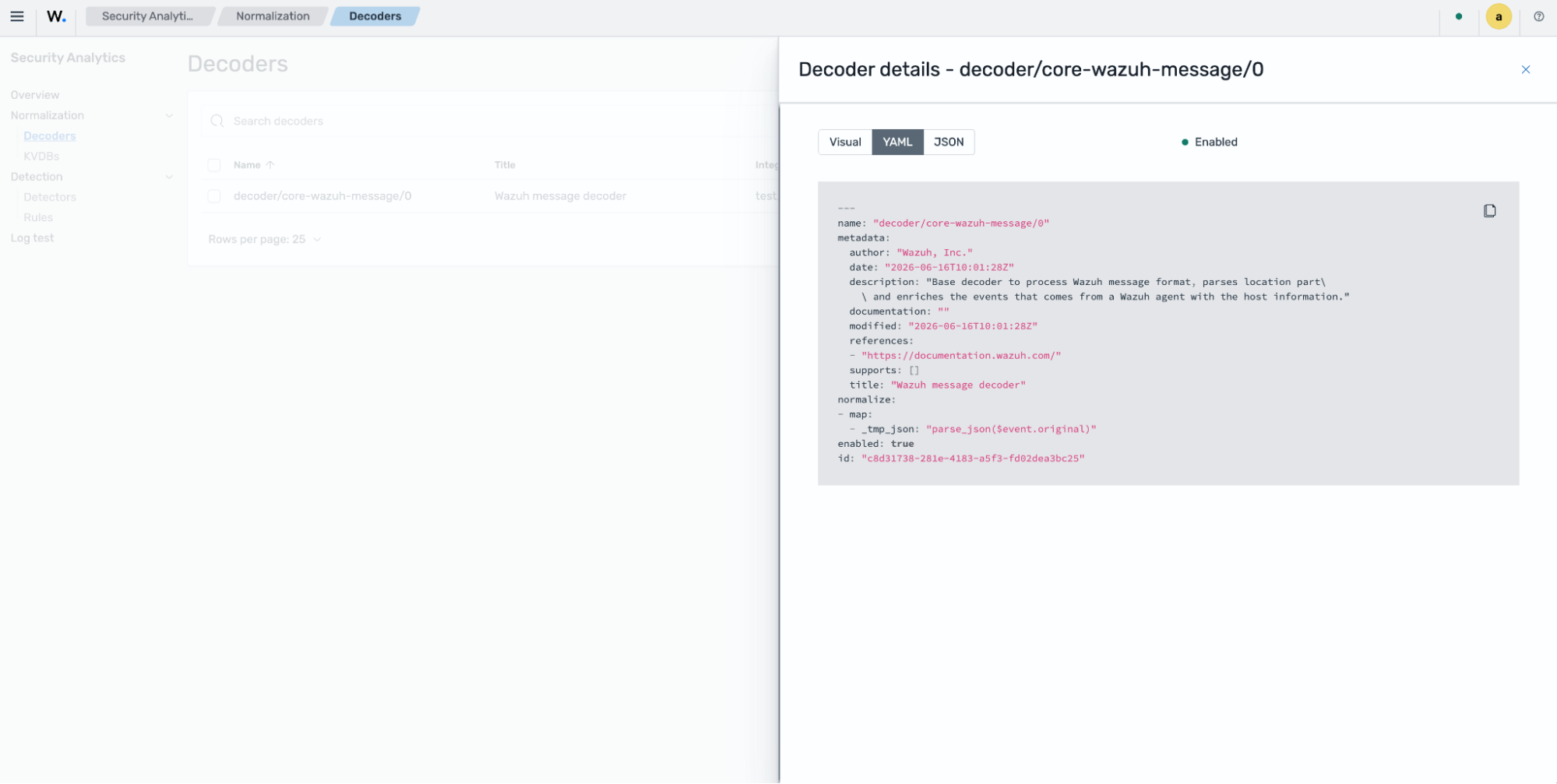
Navigate to Security Analytics > Normalization > Decoders > Actions and click on Create. Paste the following content, specify your integration, and click Create Decoder.
---
name: "decoder/core-wazuh-message/0"
metadata:
  author: "Wazuh, Inc."
  date: "2026-06-16T10:01:28Z"
  description: "Base decoder to process Wazuh message format, parses location part\
    \ and enriches the events that comes from a Wazuh agent with the host information."
  documentation: ""
  modified: "2026-06-16T10:01:28Z"
  references:
  - "https://documentation.wazuh.com/"
  supports: []
  title: "Wazuh message decoder"
normalize:
- map:
  - _tmp_json: "parse_json($event.original)"
enabled: true
id: "c8d31738-281e-4183-a5f3-fd02dea3bc25"
This will be the root decoder.
Where:
name: "decoder/core-wazuh-message/0"- Logical identifier of the decoder asset; it is what gets recorded inwazuh.integration.decoderswhen this decoder accepts an event.id: "c8d31738-281e-4183-a5f3-fd02dea3bc25"- Stable UUID used by the content system (CMSync, policies, indexer) to uniquely track this decoder version, independent of its human-readable name.enabled: true- Marks the decoder as active in the operational graph; if set to false, the decoder is present in content but skipped during policy graph construction, so it never evaluates events.metadata.author: "Wazuh, Inc."- Informational field indicating who created or maintains the decoder asset; it has no impact on runtime behavior.metadata.date: "2026-06-16T10:01:28Z"- Creation timestamp of this decoder asset version, used for documentation and content management, not for event processing logic.metadata.modified: "2026-06-16T10:01:28Z"- Last modification timestamp of the decoder definition; helps tooling and humans understand version freshness.metadata.description- Human-readable summary describing the decoder's purpose: here, that it parses the Wazuh message format's location part and enriches agent-originated events with host information. This text is purely descriptive.metadata.documentation- Optional field intended to hold a URL or extended text with detailed docs for the asset; empty in this snippet, so it contributes nothing at runtime.metadata.references- List of external references (here, Wazuh documentation URL) associated with the decoder, again only for human/contextual use.metadata.supports- Array for declaring supported platforms, products, or variants if needed; empty means no specific constraints are declared.metadata.title: "Wazuh message decoder"- Human-friendly title for UI and documentation; not involved in evaluation.
Create another decoder using the same integration you assigned in the previous root decoder and the following command:
---
name: "decoder/test-aws-route53-resolver-logs/0"
metadata:
  author: "Wazuh, Inc."
  date: "2026-06-16T14:00:01Z"
  description: "Decoder for AWS Route53 Resolver Query Logs provided in JSON format."
  documentation: ""
  modified: "2026-06-18T07:45:34Z"
  references:
  - "https://docs.aws.amazon.com/Route53/latest/DeveloperGuide/resolver-query-logs.html#resolver-query-logs-values"
  supports: []
  title: "AWS Route53 Resolver Query Logs JSON decoder."
parents:
- "decoder/core-wazuh-message/0"
definitions:
  netiana_map:
    icmp: "1"
    tcp: "6"
    udp: "17"
check:
- _tmp_json: "keys_exist_in_list([\"version\", \"account_id\", \"region\", \"vpc_id\"\
    , \"query_timestamp\", \"query_name\", \"query_type\", \"query_class\", \"rcode\"\
    , \"answers\", \"srcaddr\", \"srcport\", \"transport\", \"srcids\", \"firewall_rule_action\"\
    , \"firewall_rule_group_id\", \"firewall_domain_list_id\"])"
normalize:
- map:
  - cloud.instance.id: "$_tmp_json.srcids.instance"
  - _tmp.firewall_action: "$_tmp_json.firewall_rule_action"
  - rule.ruleset: "$_tmp_json.firewall_rule_group_id"
  - rule.id: "$_tmp_json.firewall_domain_list_id"
  - cloud.provider: "aws"
  - cloud.account.id: "$_tmp_json.account_id"
  - cloud.instance.id: "$_tmp_json.srcids.instance"
  - cloud.region: "$_tmp_json.region"
  - dns.question.name: "$_tmp_json.query_name"
  - dns.question.class: "$_tmp_json.query_class"
  - dns.question.type: "$_tmp_json.query_type"
  - dns.response_code: "$_tmp_json.rcode"
  - event.kind: "event"
  - event.action: "dns-query"
  - event.category: "array_append(network)"
  - event.start: "parse_date($_tmp_json.query_timestamp, ISO8601Z)"
  - event.type: "array_append(protocol)"
  - network.transport: "downcase($_tmp_json.transport)"
  - network.iana_number: "get_key_in($netiana_map, $network.transport)"
  - network.protocol: "dns"
  - source.address: "$_tmp_json.srcaddr"
  - source.ip: "$_tmp_json.srcaddr"
  - source.port: "parse_long($_tmp_json.srcport)"
  - network.type: "ip_version($source.ip)"
  - related.ip: "array_append($source.ip)"
  - threat.feed.description: "kvdb_get('test_KVDB', $source.ip)"
- check: "string_equal($_tmp.firewall_action, BLOCK)"
  map:
  - event.action: "dns-response"
  - event.type: "array_append(denied)"
  - event.outcome: "failure"
- check: "string_equal($_tmp.firewall_action, ALERT)"
  map:
  - event.kind: "alert"
  - event.category: "array_append(intrusion_detection)"
- check: "$dns.response_code == NOERROR"
  map:
  - event.outcome: "success"
- check: "$dns.response_code != NOERROR"
  map:
  - event.outcome: "failure"
- check: "exists($_tmp_json.answers.0)"
  map:
  - _tmp.answer.data: "$_tmp_json.answers.0.Rdata"
  - _tmp.answer.type: "$_tmp_json.answers.0.Type"
  - _tmp.answer.class: "$_tmp_json.answers.0.Class"
  - dns.answers: "array_append($_tmp.answer)"
- check: "exists($_tmp_json.answers.1)"
  map:
  - _tmp.answer.data: "$_tmp_json.answers.1.Rdata"
  - _tmp.answer.type: "$_tmp_json.answers.1.Type"
  - _tmp.answer.class: "$_tmp_json.answers.1.Class"
  - dns.answers: "array_append($_tmp.answer)"
- check: "exists($_tmp_json.answers.2)"
  map:
  - _tmp.answer.data: "$_tmp_json.answers.2.Rdata"
  - _tmp.answer.type: "$_tmp_json.answers.2.Type"
  - _tmp.answer.class: "$_tmp_json.answers.2.Class"
  - dns.answers: "array_append($_tmp.answer)"
- check: "exists($_tmp_json.answers.3)"
  map:
  - _tmp.answer.data: "$_tmp_json.answers.3.Rdata"
  - _tmp.answer.type: "$_tmp_json.answers.3.Type"
  - _tmp.answer.class: "$_tmp_json.answers.3.Class"
  - dns.answers: "array_append($_tmp.answer)"
- check: "exists($_tmp_json.answers.4)"
  map:
  - _tmp.answer.data: "$_tmp_json.answers.4.Rdata"
  - _tmp.answer.type: "$_tmp_json.answers.4.Type"
  - _tmp.answer.class: "$_tmp_json.answers.4.Class"
  - dns.answers: "array_append($_tmp.answer)"
- check: "exists($_tmp_json.answers.5)"
  map:
  - _tmp.answer.data: "$_tmp_json.answers.5.Rdata"
  - _tmp.answer.type: "$_tmp_json.answers.5.Type"
  - _tmp.answer.class: "$_tmp_json.answers.5.Class"
  - dns.answers: "array_append($_tmp.answer)"
- check: "exists($_tmp_json.answers.6)"
  map:
  - _tmp.answer.data: "$_tmp_json.answers.6.Rdata"
  - _tmp.answer.type: "$_tmp_json.answers.6.Type"
  - _tmp.answer.class: "$_tmp_json.answers.6.Class"
  - dns.answers: "array_append($_tmp.answer)"
- check: "$dns.question.type != PTR"
  map:
  - related.hosts: "array_append($dns.question.name)"
- map:
  - _tmp_json: "delete()"
  - _tmp: "delete()"
enabled: true
id: "74867107-90d9-4b20-be20-d0cce62c9e0c"
Where:
- threat.feed.description: "kvdb_get('test_KVDB', $source.ip)"- extracts thesource.ipvalue and compares it with the key in our KVDB. If a match is found, the normalized event will be enriched.
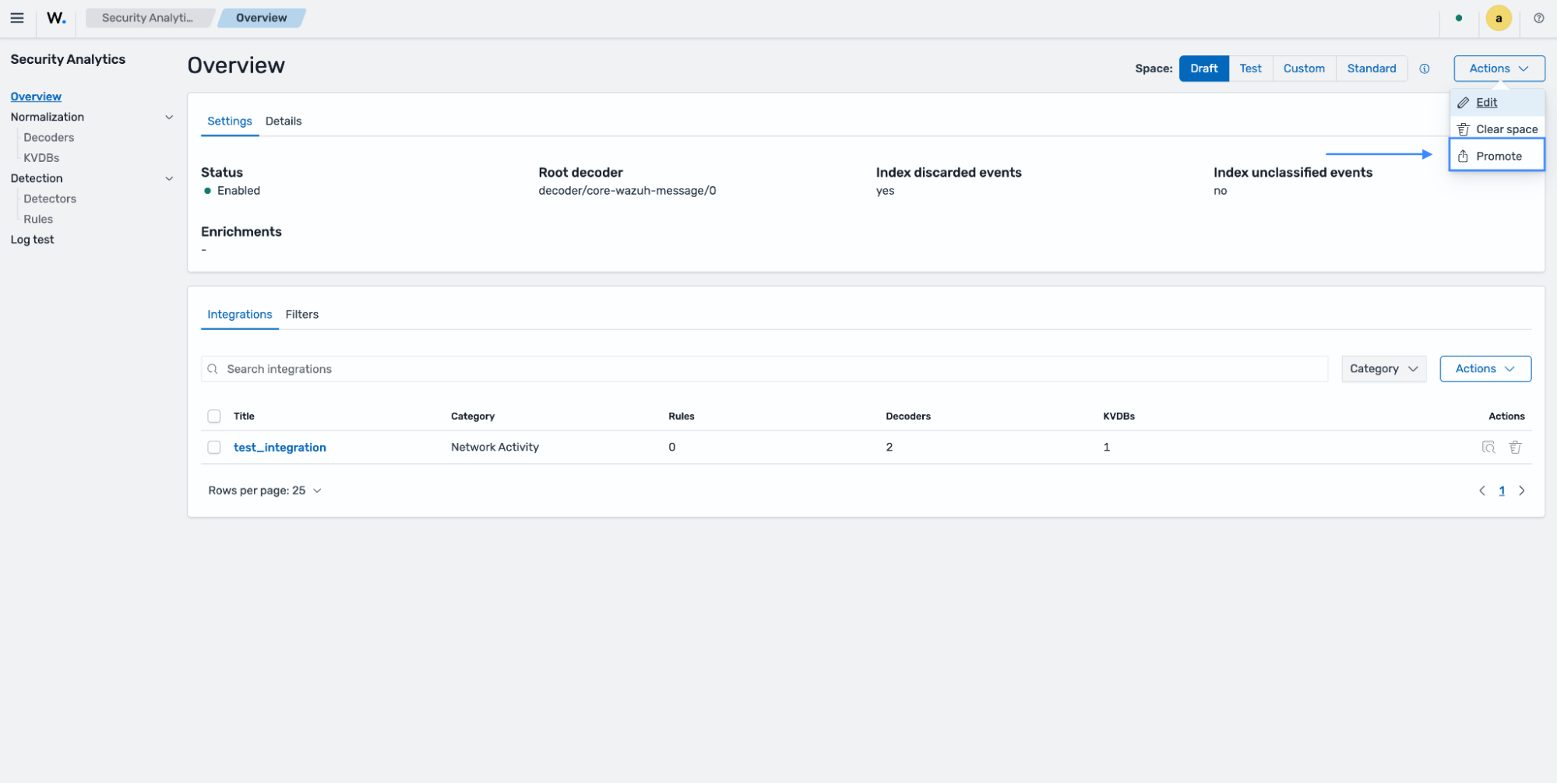
Navigate to Security Analytics > Overview > Actions and click on Promote. Ensure to promote the decoders and KVDB created.
Log test
Navigate to Security Analytics > Log test and test the following sample log:
Raw log:
{"version":"1.100000","account_id":"123456789023","region":"us-east-1","vpc_id":"vpc-0000000","query_timestamp":"2025-12-11T22:22:22Z","query_name":"amazonlinux-2-repos-us-east-1.s3.dualstack.us-east-1.amazonaws.com.","query_type":"AAAA","query_class":"IN","rcode":"NOERROR","answers":[{"Rdata":"s3-r-w.dualstack.us-east-1.amazonaws.com.","Type":"CNAME","Class":"IN"},{"Rdata":"2a02:cf40:add:4444:9191:a9a9:aaaa:cccc","Type":"AAAA","Class":"IN"}],"srcaddr":"8.8.8.8","srcport":"8010","transport":"UDP","srcids":{}}
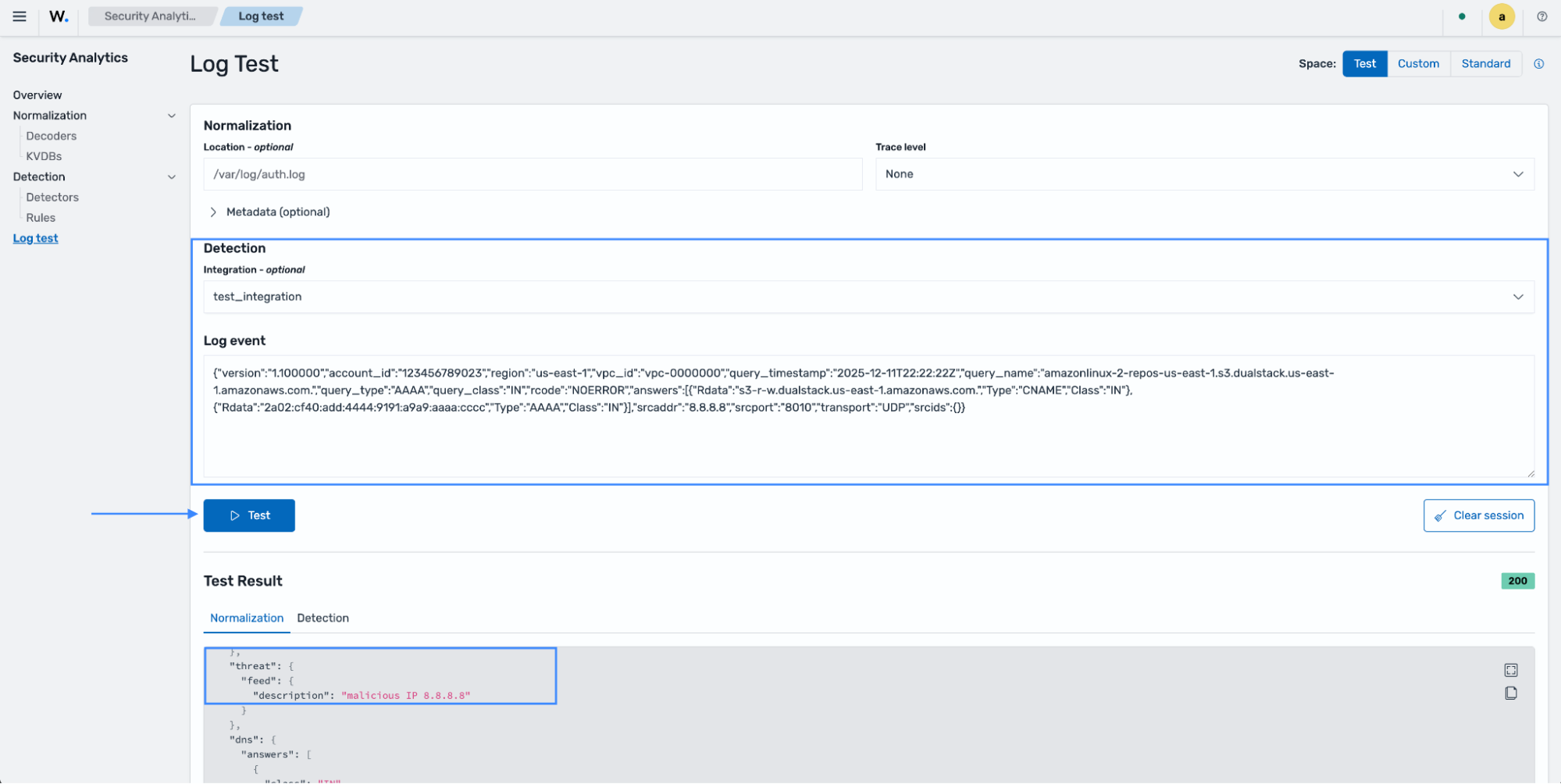
The output shows the normalized event has been enriched with the KVDB value.