Remove agents
There are different ways to remove a Wazuh agent that is enrolled in the Wazuh manager. This includes using the Wazuh dashboard or querying the Wazuh manager API.
Remove agents using the Wazuh dashboard
You can remove Wazuh agents directly from the Wazuh dashboard.
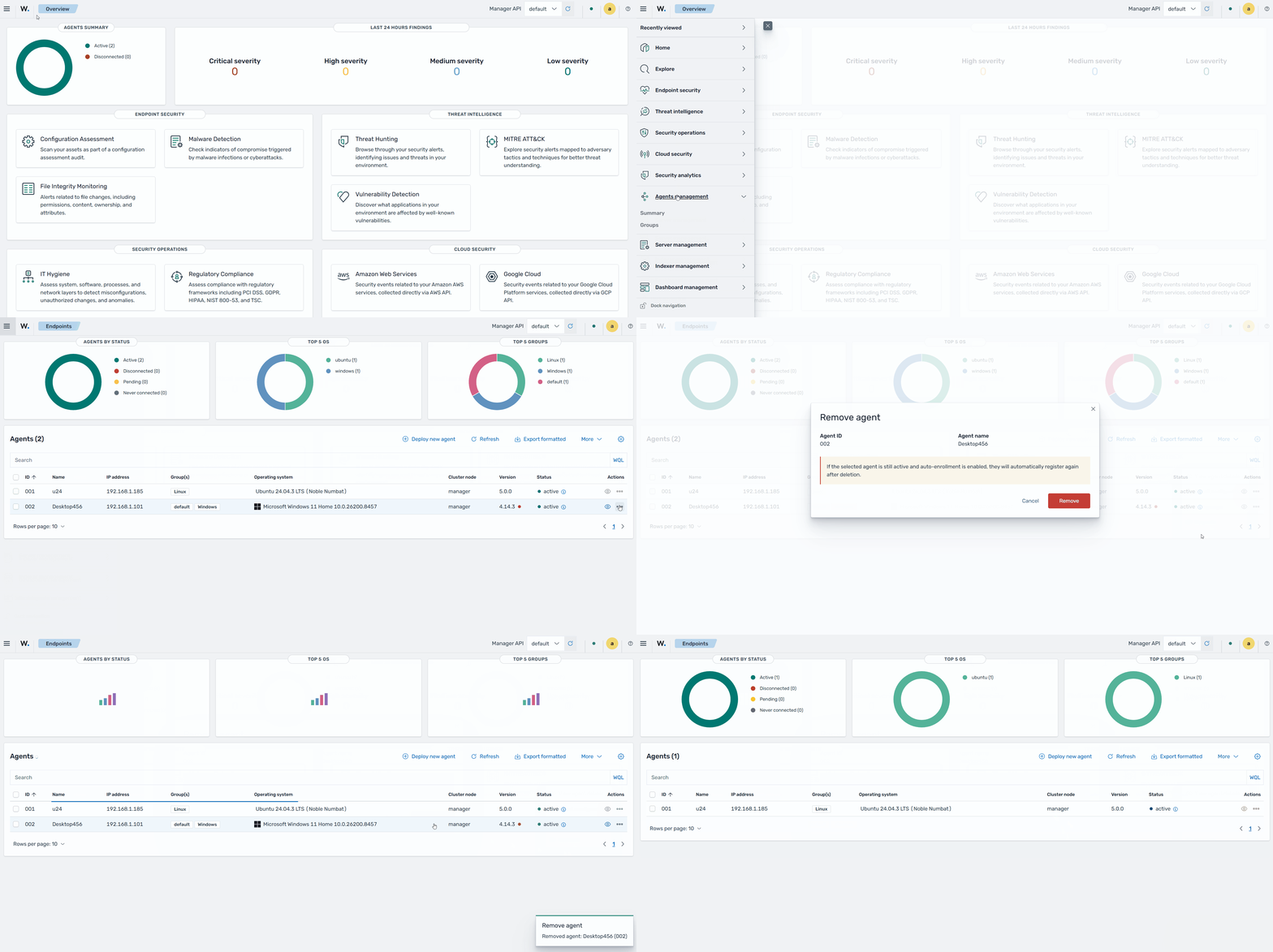
In the Wazuh dashboard, go to Agents management > Endpoints.
In the Actions column, click the selection icon for the Wazuh agent that you want to remove.
Select Remove.
When prompted, click Remove.
Remove agents using the Wazuh manager API
This section includes examples of using the DELETE /agents request to delete a list of agents or agents disconnected for a given period. This action is performed on the Wazuh manager or on an authorized endpoint.
The examples use an authentication token. To get your token, replace <USER>:<PASSWORD> with your Wazuh manager API credentials, <WAZUH_MANAGER_IP_ADDRESS> with the Wazuh manager IP address or fully qualified domain name (FQDN), and run the following command:
# TOKEN=$(curl -u <USER>:<PASSWORD> -k -X POST "https://<WAZUH_MANAGER_IP_ADDRESS>:55000/security/user/authenticate?raw=true")
Note
You can reset the password for the Wazuh manager API user if you forget it.
Removing agents in a list
You can remove specific Wazuh agents using a list. Use the parameter agents_list to set a list of agent IDs separated by commas. For example, to remove agents ID 005, 006, and 007, run the following query:
# curl -k -X DELETE "https://<WAZUH_MANAGER_IP>:55000/agents?pretty=true&older_than=0s&agents_list=012,014,016&status=all" -H "Authorization: Bearer $TOKEN"
Replace <WAZUH_MANAGER_IP> with the IP address or FQDN of the Wazuh manager.
{
   "data": {
      "affected_items": [
         "012",
         "014",
         "016"
      ],
      "total_affected_items": 3,
      "total_failed_items": 0,
      "failed_items": []
   },
   "message": "All selected agents were deleted",
   "error": 0
}
Removing disconnected agents
You can remove Wazuh agents that never connected or agents that have been disconnected for a given period. Use the parameter older_than to set a period of no known activity. Use status to select the never connected and disconnected Wazuh agents. For example, to remove Wazuh agents inactive for more than 21 days, execute the following query:
# curl -k -X DELETE "https://<WAZUH_MANAGER_IP>:55000/agents?pretty=true&older_than=21d&agents_list=all&status=never_connected,disconnected" -H "Authorization: Bearer $TOKEN"
Replace <WAZUH_MANAGER_IP> with the IP address or FQDN of the Wazuh manager.
{
   "data": {
      "affected_items": [
         "003"
      ],
      "total_affected_items": 1,
      "total_failed_items": 0,
      "failed_items": []
   },
   "message": "All selected agents were deleted",
   "error": 0
}