How it works
Wazuh CTI provides the threat intelligence and security content that powers Wazuh capabilities such as event enrichment, threat detection, and vulnerability detection. The Wazuh Content Manager retrieves this content from the Wazuh CTI service and stores it in the Wazuh indexer, where it becomes available to the Wazuh components that use it.
The following diagram illustrates how Wazuh CTI content flows through the Wazuh architecture.
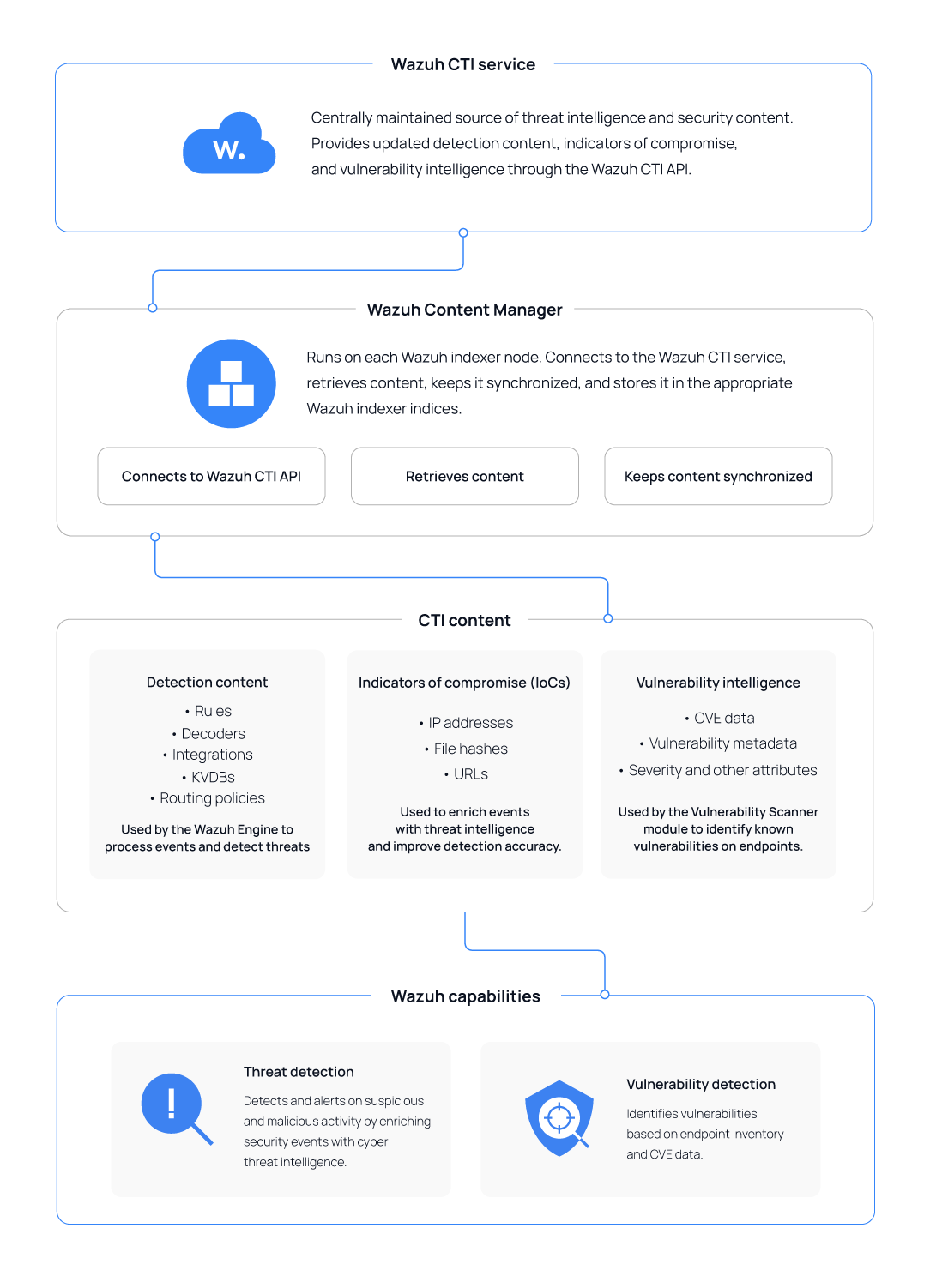
Wazuh CTI service
The Wazuh CTI service is the upstream source of threat intelligence and security content provided by Wazuh. It provides detection content, indicators of compromise (IoCs), and vulnerability intelligence through the Wazuh CTI API.
Wazuh maintains and updates this content as new threat intelligence and security information become available. The Wazuh Content Manager connects to the Wazuh CTI service to retrieve the content and keep the locally available content synchronized with the upstream source.
Wazuh Content Manager
The Content Manager is a Wazuh indexer plugin responsible for retrieving, storing, and synchronizing CTI content used by Wazuh components. It connects to the Wazuh CTI service through the Wazuh CTI API to retrieve CTI content and store it in the corresponding Wazuh indexer indices.
The Content Manager periodically checks the Wazuh CTI service for updates and synchronizes the supported CTI content categories with the Wazuh indexer. This ensures that Wazuh components have access to up-to-date threat intelligence and security content without requiring administrators to manually distribute updates.
Each content category maintains its own synchronization state. The Content Manager uses this metadata to determine the category's synchronization state and whether additional updates are required.
CTI content synchronization
The Wazuh Content Manager synchronizes each CTI content category independently and maintains its synchronization state. The state indicates whether the category is synchronized, currently being synchronized, or whether the previous synchronization attempt failed.
The Content Manager tracks the status of each content category throughout the synchronization process. The status indicates whether synchronization has completed successfully, is currently in progress, or has encountered an error.
Status |
Description |
|---|---|
|
Synchronization is complete, and the content is available for use. |
|
Synchronization is in progress. |
|
The previous synchronization attempt was interrupted by an error. |
The Content Manager sets the status to running when a synchronization cycle begins. After it applies the required content changes and completes the synchronization process, the status changes to ready. If an unexpected error interrupts the process, the status changes to failed. A failed scheduled synchronization does not prevent subsequent synchronization attempts. The Content Manager records the failure and attempts synchronization again during the next scheduled cycle.
The content synchronization process differs depending on whether the Content Manager is initializing a content category for the first time or updating content that has already been synchronized. During initial synchronization, the Content Manager loads a content snapshot. Subsequent synchronization cycles retrieve and apply only the changes that have occurred since the previous synchronization.
Initial content synchronization
When a CTI content category is initialized for the first time during installation, the Content Manager loads a snapshot containing the content available for that category. It first attempts to retrieve the snapshot from the Wazuh CTI service. If the remote snapshot is unavailable, the Content Manager uses the local snapshot packaged with the Wazuh indexer. The packaged snapshot provides baseline security content and allows the content category to initialize when the Wazuh CTI service is unavailable.
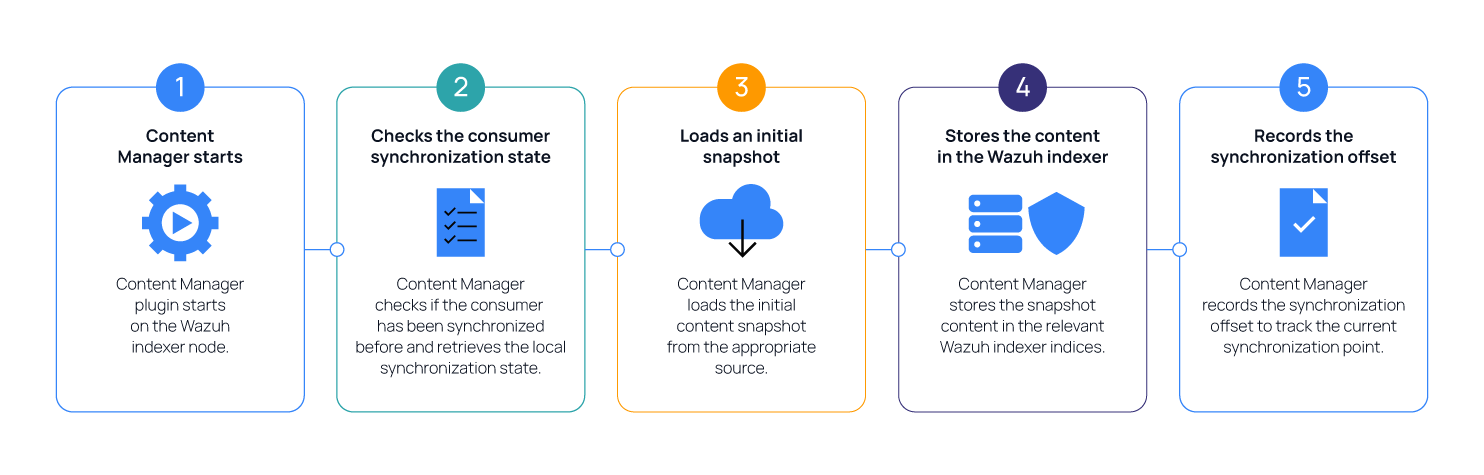
After loading and storing the snapshot content in the Wazuh indexer, the Content Manager records the corresponding synchronization offset. This offset identifies the synchronization point of the local content and is used to determine which updates must be retrieved during subsequent synchronization cycles.
Incremental content synchronization
After the initial content synchronization, the Content Manager uses incremental updates to keep CTI content current. Instead of retrieving the complete content set during every synchronization cycle, it retrieves only the changes that occurred after the previously recorded synchronization offset.
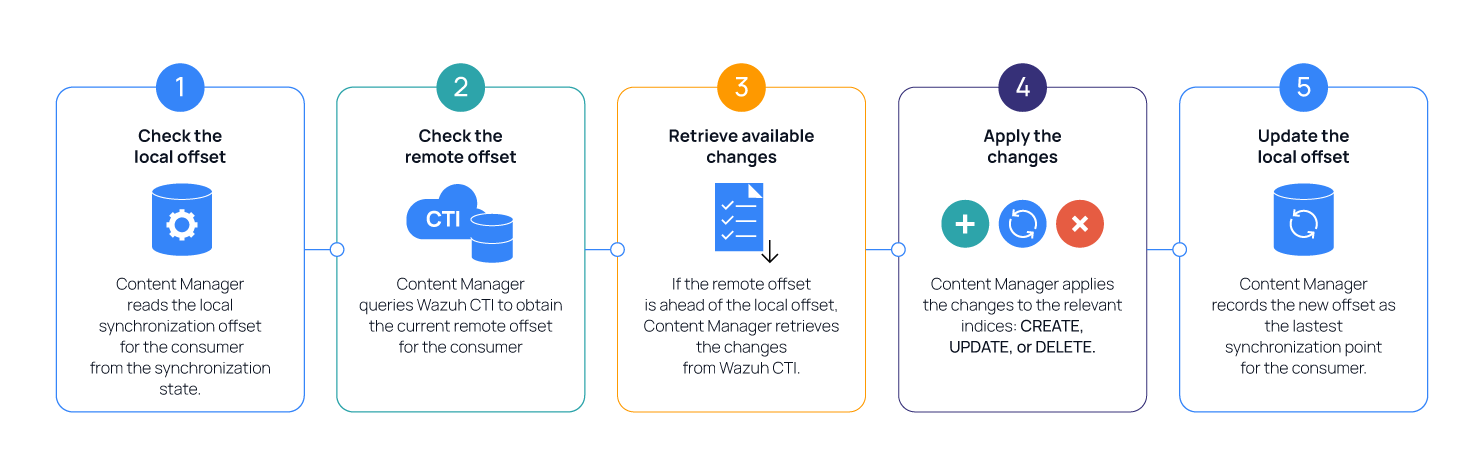
If the remote offset is ahead of the local offset, the Content Manager retrieves the changes required to bring the local content up to date. Depending on the content category, these changes can include operations to:
Create new content.
Update existing content.
Delete content that is no longer available.
The Content Manager applies the applicable operations to the corresponding content and updates the local synchronization offset after processing the changes. If the local and remote offsets are the same, the content category is already synchronized, and no content update is required.
Each CTI content category maintains its synchronization state independently. Therefore, the Content Manager can update one content category without requiring the other categories to be reinitialized or synchronized.
The synchronization interval and startup behavior can be modified through the Content Manager configuration. You can also trigger a synchronization manually without waiting for the next scheduled cycle.
CTI content storage
The Wazuh Content Manager stores synchronized Wazuh CTI content and the information required to manage its synchronization in the Wazuh indexer. The data is distributed across content indices and internal indices.
CTI content indices store the security content used by Wazuh components, while the Internal CTI indices maintain synchronization state, subscription information, and scheduled job metadata.
CTI content indices
The Content Manager stores synchronized detection content, indicators of compromise (IoCs), and vulnerability intelligence in dedicated Wazuh indexer indices.
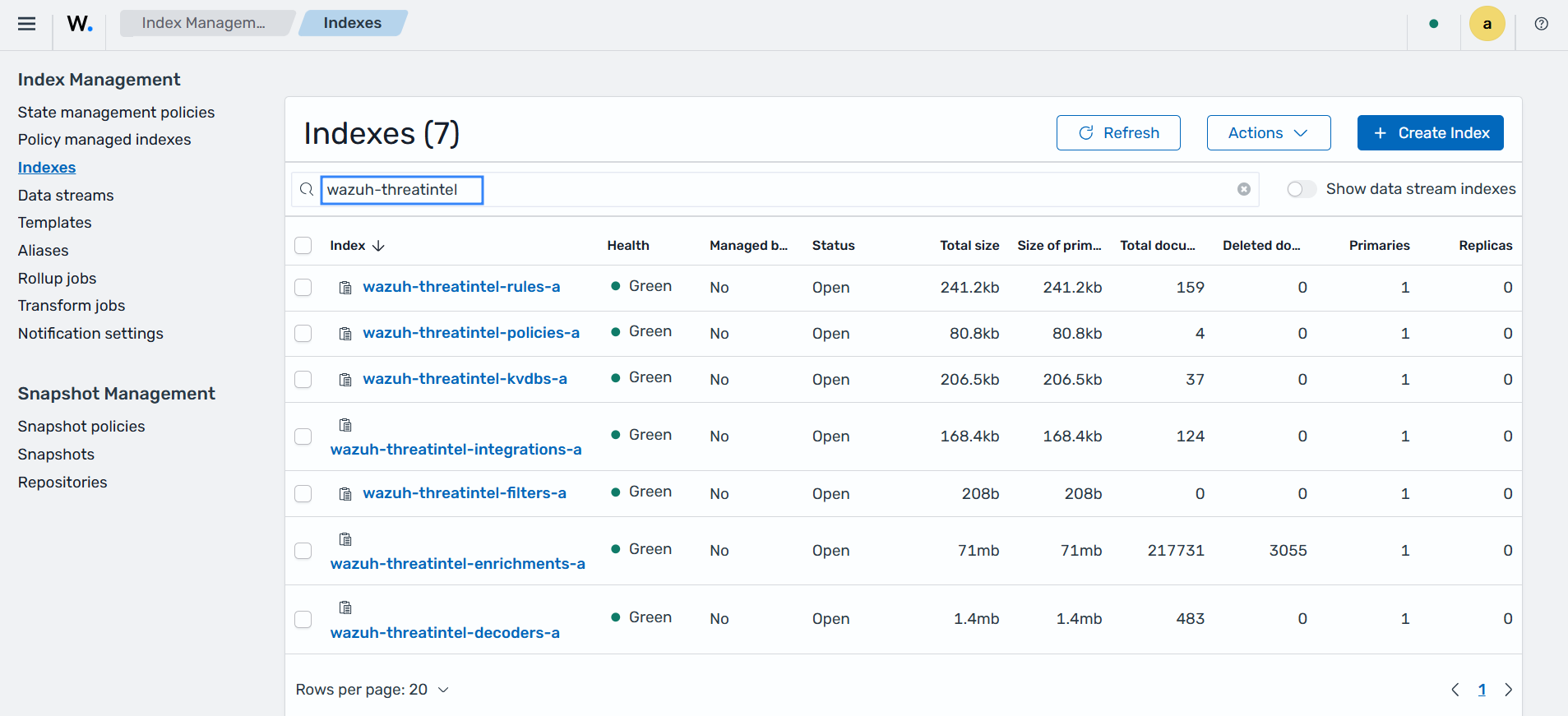
The following table describes the CTI content indices:
Index |
Content |
|---|---|
|
Detection rules synchronized from Wazuh CTI and user-created rules. |
|
Decoders used to parse and normalize events. |
|
Integration definitions used to process events from supported data sources. |
|
Key-value databases (KVDBs) containing reference data used during event processing and detection. |
|
Routing policies that determine how events are routed to the appropriate integrations. |
|
Event filter rules that evaluate incoming events against defined conditions and decide whether an event continues through normalization and detection. |
|
Indicators of compromise and other threat intelligence used for event enrichment. |
|
Vulnerability intelligence used by the Wazuh Vulnerability Scanner module. |
The .wazuh-threatintel-vulnerabilities index is a hidden index used by the Vulnerability Scanner module. Unlike detection content, vulnerability intelligence does not use content spaces.
To view the CTI content indices on the Wazuh dashboard, navigate to Indexer management > Indexes and search for wazuh-threatintel to filter the index list.
Internal CTI indices
The Content Manager uses internal indices to maintain the operational information required for CTI synchronization, subscription management, and scheduled tasks.
Index |
Purpose |
|---|---|
|
Stores the synchronization state of each content category, including its synchronization status and local and remote offsets. |
|
Stores internal Content Manager state, including the registered Wazuh CTI access token. |
|
Stores metadata for the Content Manager scheduled jobs, including content synchronization and Wazuh version update checks. |
The .wazuh-cti-consumers index maintains a separate synchronization state for each CTI content category. The Content Manager uses this information to determine whether a content category requires initial synchronization or incremental updates. Administrators can inspect this index when verifying or troubleshooting CTI synchronization.
The .wazuh-internal-state index maintains the internal state that the Content Manager requires across restarts. This includes the CTI access token registered through the subscription mechanism. The Content Manager retrieves the stored credentials when required to authenticate requests to Wazuh CTI.
The .wazuh-content-manager-jobs index maintains information about scheduled Content Manager operations. This includes the periodic CTI synchronization job and the Wazuh version update check job.
Warning
The internal CTI indices are managed automatically by the Wazuh Content Manager.
Wazuh CTI content categories
The Wazuh Content Manager organizes Wazuh CTI content into three content categories based on how Wazuh uses the synchronized content.
Categories |
Content |
|---|---|
Detection content |
Rules, decoders, integrations, key-value databases (KVDBs), and routing policies used for event processing and threat detection. |
IOCs content |
Indicators of compromise, such as IP addresses, file hashes, and URLs, used for threat intelligence enrichment. |
Vulnerability intelligence |
Vulnerability intelligence used by the Wazuh Vulnerability Scanner module to identify known vulnerabilities affecting monitored endpoints. |
Each content category maintains its own synchronization state. This allows the Content Manager to track the content available for each category and synchronize updates independently. For example, new IoC data can be synchronized without requiring the ruleset or vulnerability content to be reloaded.
During synchronization, the Content Manager determines whether a content category requires initial content or an incremental update. It then retrieves the required content from the appropriate source and updates the corresponding data in the Wazuh indexer. The synchronization process is described in more detail in the CTI content synchronization section.
Detection content
Wazuh CTI provides the detection content that the normalization engine uses to process and analyze security events. This content provides the logic and supporting data required to normalize incoming events, detect security threats, and route events through the analysis pipeline.
The detection content includes the following:
Rules define the conditions that normalized events must meet to generate findings.
Decoders parse incoming events and normalize the extracted information into fields that follow the Wazuh Common Schema (WCS).
Integrations define how Wazuh processes events from supported data sources and associate the required decoders, rules, and other detection content with those events.
Key-value databases (KVDBs) store structured reference data that rules and decoders can use during event processing and detection.
Routing policies determine how events are routed to the appropriate integrations for processing.
The image below shows Wazuh out-of-the-box Wazuh decoders.
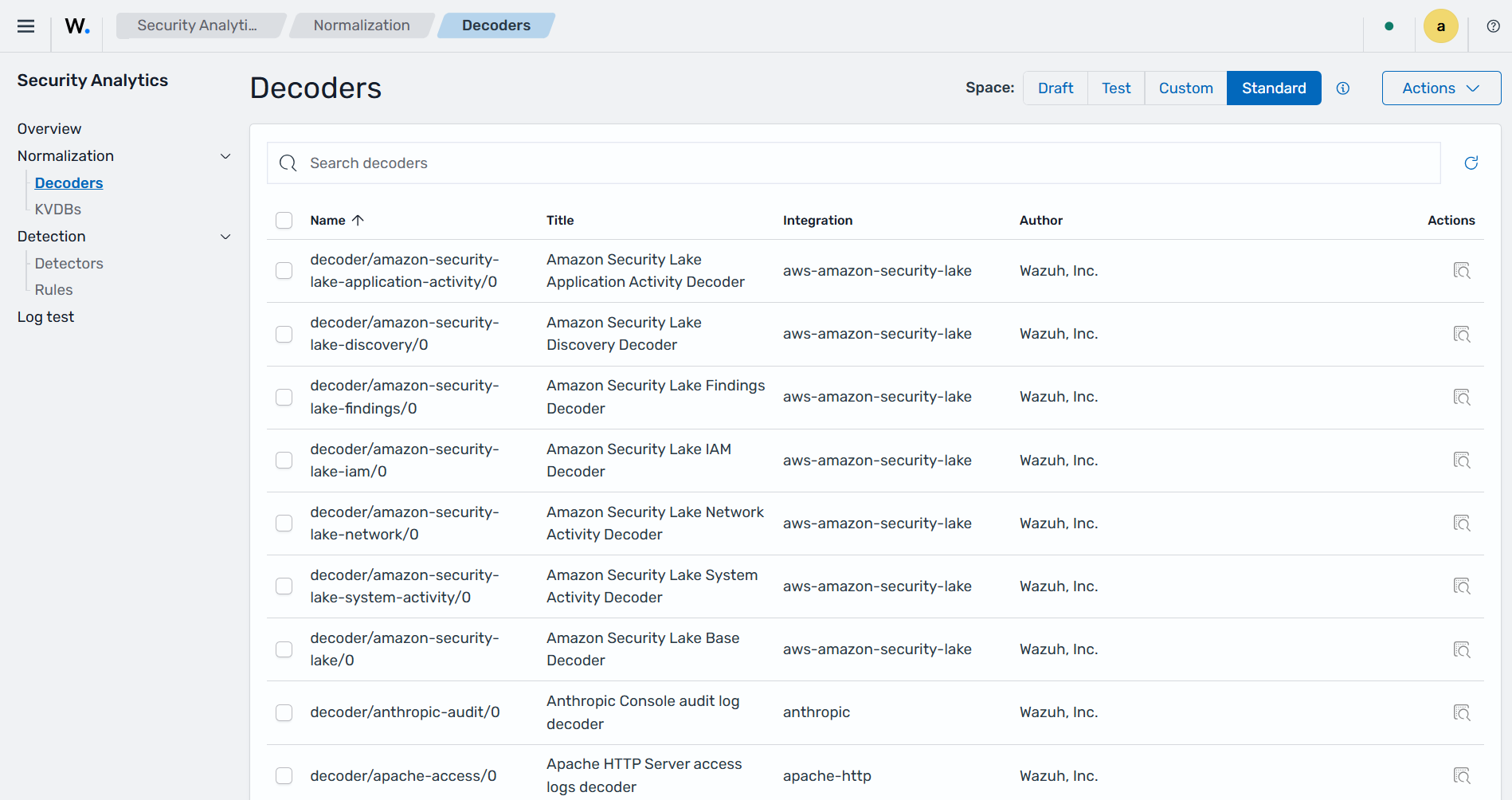
The Standard space in the Wazuh indexer contains the default detection content provided by the Wazuh CTI.
Indicators of compromise
Wazuh CTI provides indicators of compromise (IoCs) associated with known malicious or suspicious activity. These indicators can include:
IP addresses.
File hashes.
URLs.
The Content Manager synchronizes IoCs from Wazuh CTI and makes them available for threat intelligence enrichment. During event processing, the normalization engine can compare relevant values extracted from security events against the synchronized threat intelligence. When a match is found, the event is enriched with the corresponding threat intelligence, providing additional context for threat detection and investigation.
For example, if an event contains an IP address associated with known malicious activity, Wazuh enriches the event with the corresponding threat intelligence before evaluating it against the configured detection rules. If the event satisfies the rule conditions, Wazuh generates a finding.
Vulnerability intelligence
Wazuh CTI provides vulnerability intelligence about known security vulnerabilities, including Common Vulnerabilities and Exposures (CVE) information and associated vulnerability metadata. The Wazuh Vulnerability Scanner module uses this information to identify vulnerabilities that affect monitored endpoints.
Wazuh agents collect system and software information from monitored endpoints and maintain this information in the Wazuh system inventory. The Wazuh Vulnerability Scanner module compares the collected inventory information with Wazuh CTI vulnerability intelligence to determine whether installed operating systems and software packages are affected by known vulnerabilities.
When Wazuh identifies a match between the endpoint system inventory and the vulnerability intelligence, it updates the corresponding vulnerability state. It makes the information available for analysis and visualization on the Wazuh dashboard.
On the Wazuh dashboard, navigate to Threat intelligence > Vulnerability Detection, then select the Inventory tab to view the vulnerability inventory.

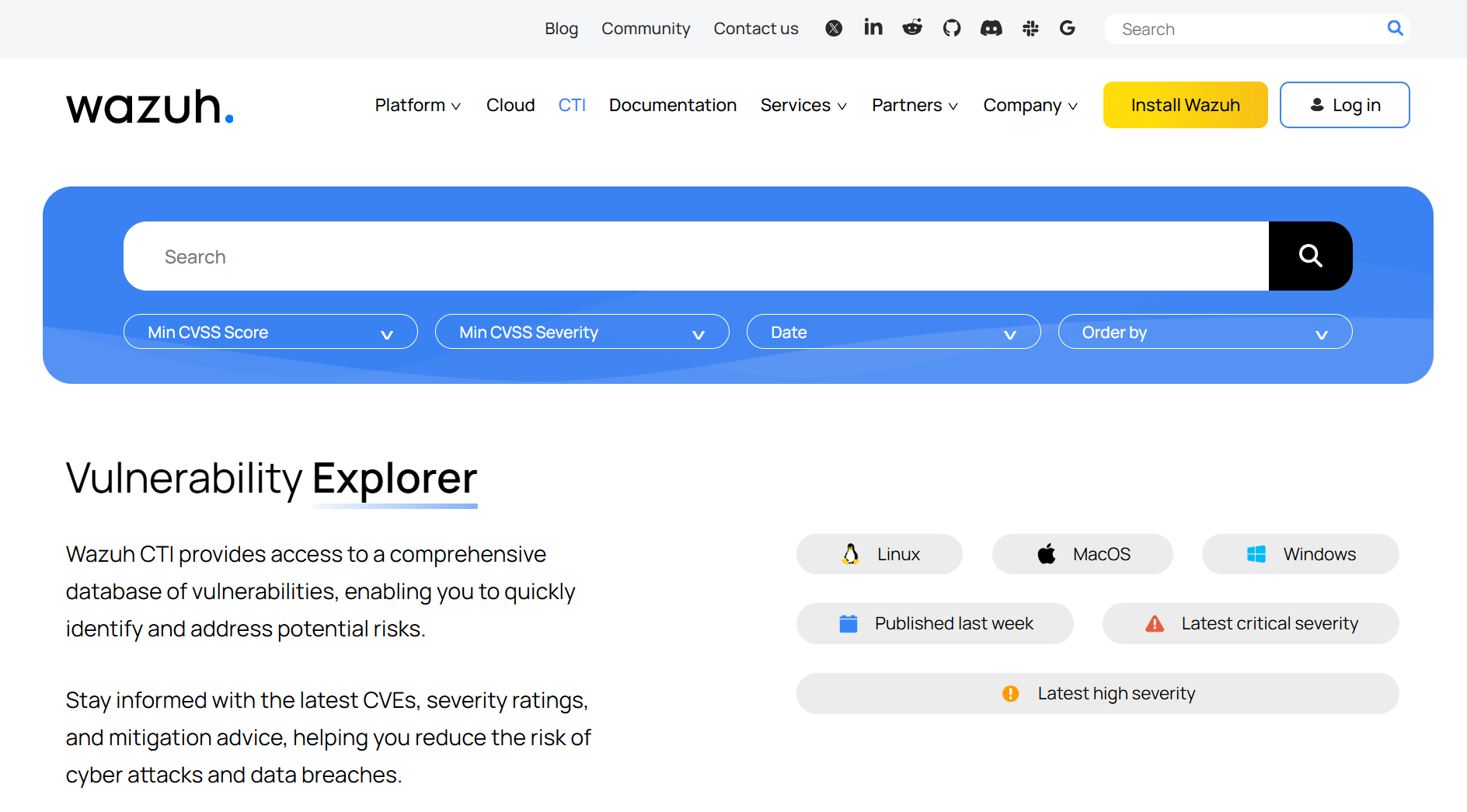
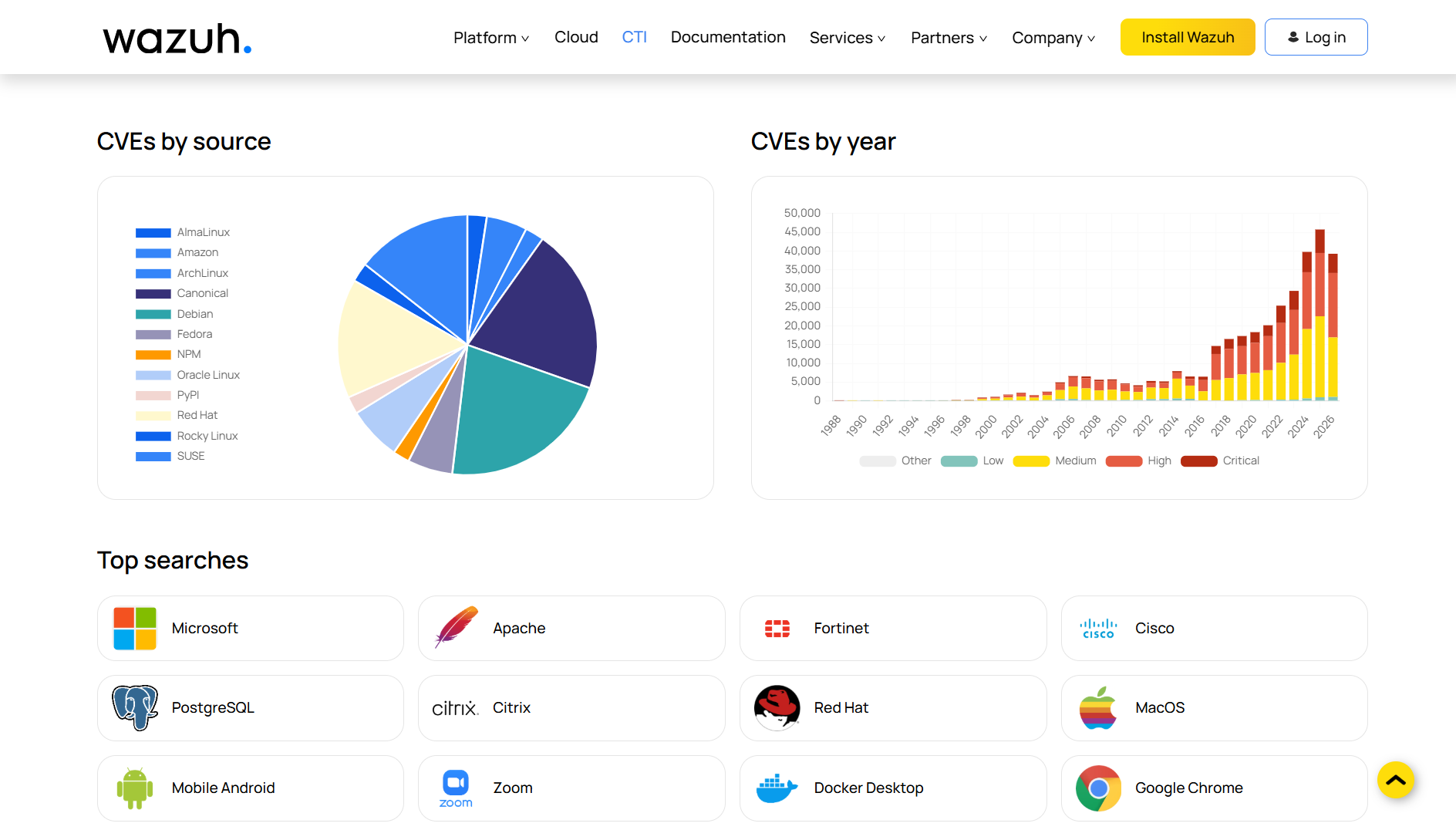
The vulnerability intelligence data can also be accessed through the Wazuh CTI website. The website is publicly accessible and requires no registration or Wazuh installation. It features a search tool for filtering vulnerabilities by CVE ID, affected application, CVSS score, severity, and publication date, with customizable sorting.
For more information about how Wazuh identifies and processes vulnerabilities, see the Vulnerability Detection documentation.