Wazuh normalization engine
The Wazuh normalization engine is the event processing pipeline of the Wazuh manager. It transforms raw events into structured documents, enriches them with contextual information, and evaluates them against configured security policies. It then forwards the resulting events to the Wazuh indexer and other configured destinations.
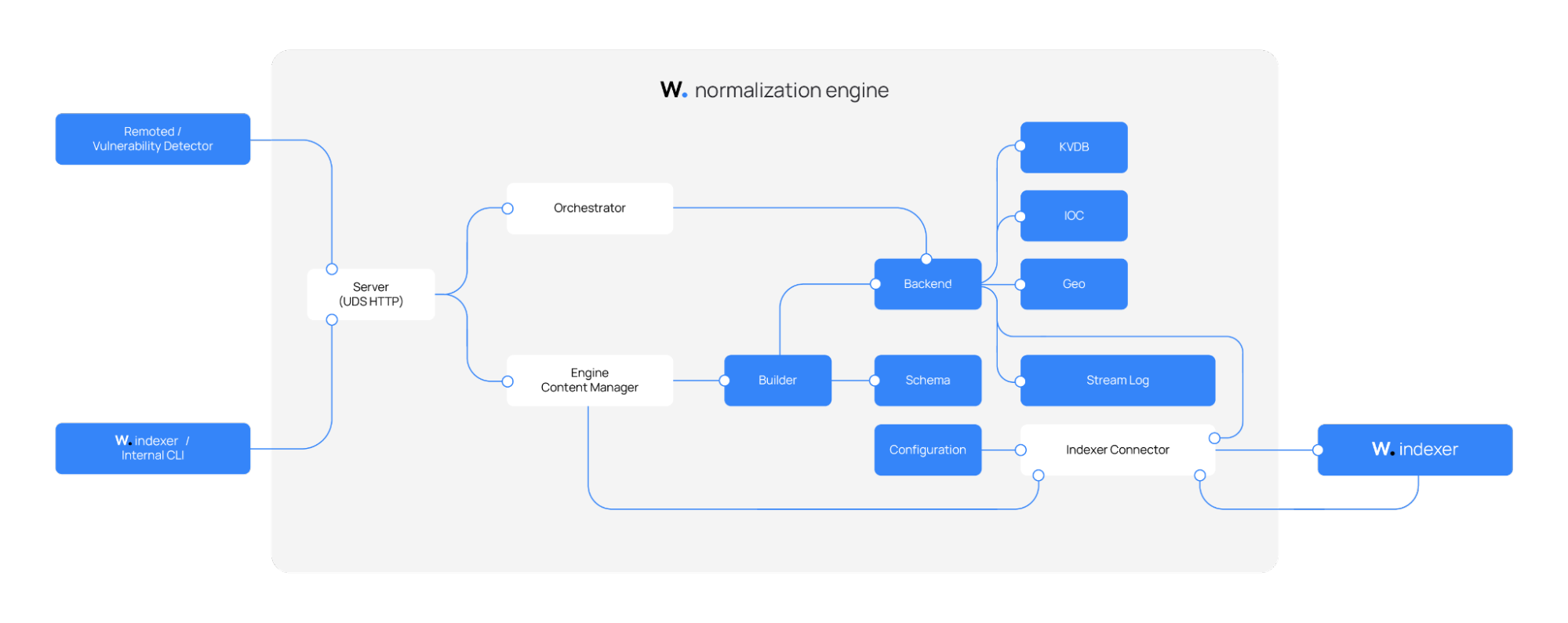
The Wazuh normalization engine ingests events from monitored endpoints and from the vulnerability detection service for processing. During event processing, it retrieves required resources such as decoders, integrations, policies, and key-value databases from the Wazuh indexer through the shared content manager library, which reads over the indexer connector connection. The indexer connector also serves as the only outbound path for sending processed events back to the Wazuh indexer.
The diagram below shows the Wazuh normalization engine and its relationships with other components. Refer to the reference section for a description of each module of the Wazuh normalization engine.
Event processing pipeline
The Wazuh normalization engine provides an Orchestrator, which is the central runtime component that manages active security policies. A security policy is an operational graph that defines an ordered pipeline of stages applied to each event. The Orchestrator forwards an independent copy of every incoming event to each active policy, so a single incoming event can produce multiple output documents, one per active policy.
The diagram below shows how an incoming event moves through the Wazuh normalization engine, including the modules involved at each stage until its output.
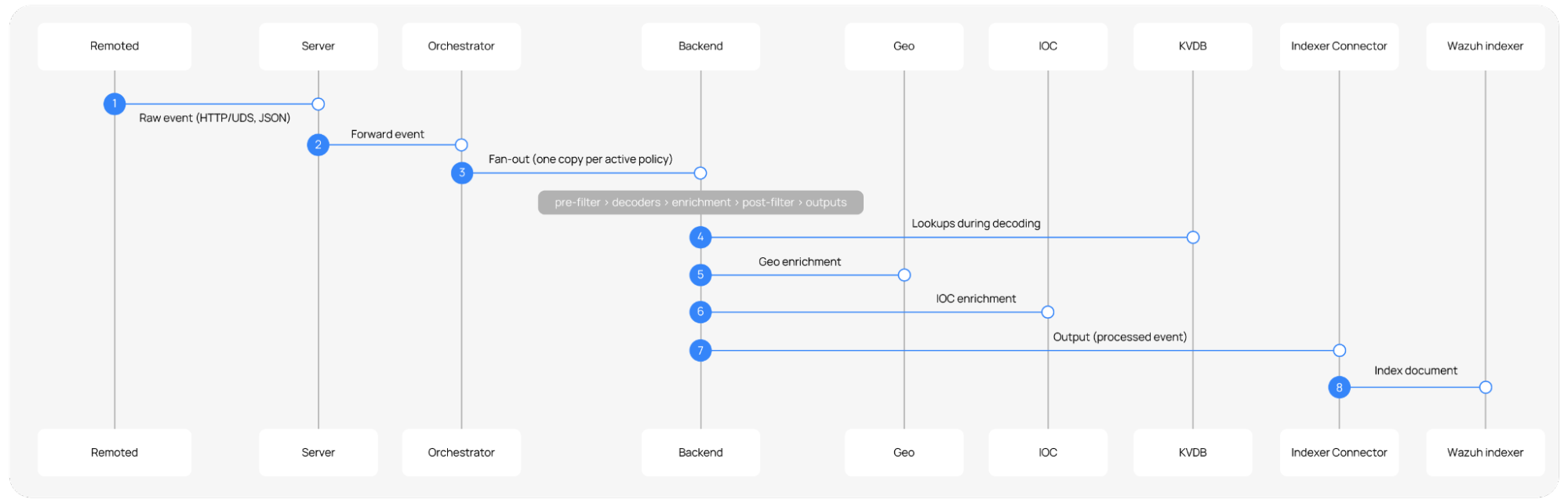
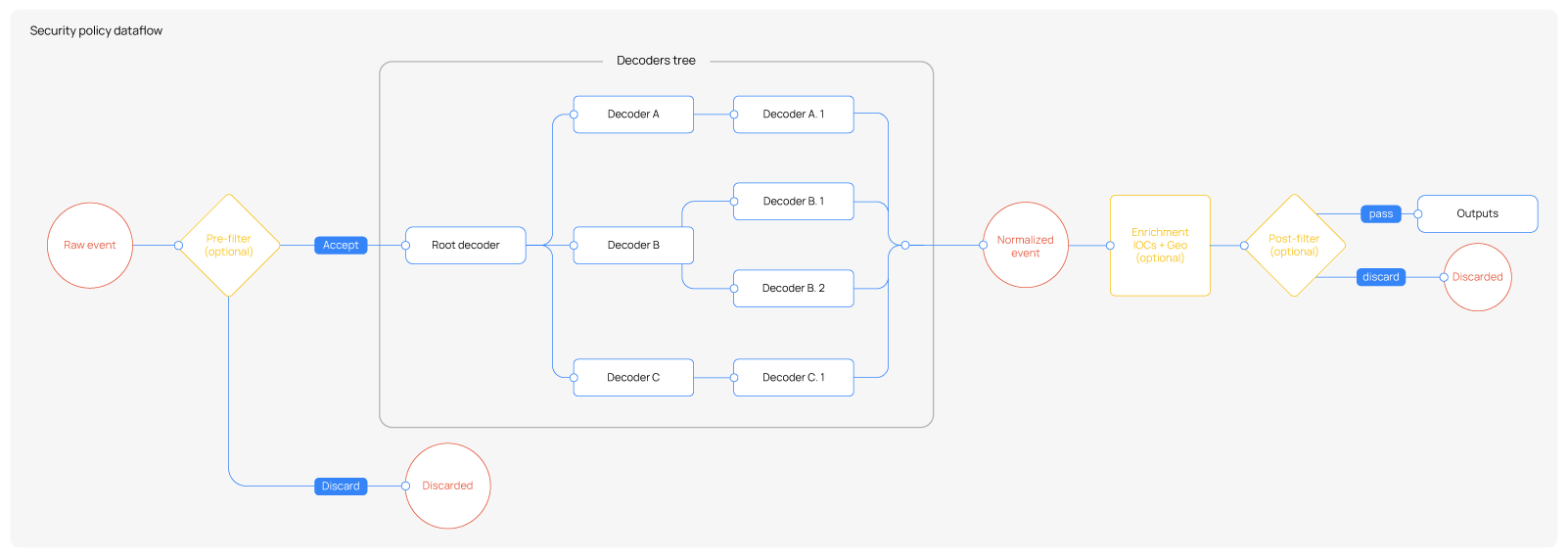
Policies consist of an ordered set of stages that perform pre-filtering, decoding, enrichment, post-filtering, and output delivery. The pre-filtering, enrichment, and post-filtering stages are optional, and each policy configuration can omit or disable them. Each event passes through the following ordered stages inside a policy:
Pre-filtering (optional): Evaluated before decoding. If configured, events that do not satisfy the filter conditions are discarded immediately, avoiding unnecessary decoding work. If no pre-filter is configured, all events proceed to the decoding stage unconditionally.
Decoding: Normalize and extract fields from the raw event, mapping them to the Wazuh Common Schema (WCS). This stage is mandatory as every event must traverse the decoder tree.
Enrichment (optional): This stage involves plugins that augment the normalized event with additional context after decoding. Built-in plugins include GeoIP geolocation and indicator of compromise (IOC) matching. Enrichment can be fully disabled at the policy level. When disabled, the normalized event is passed directly to the next stage.
Post-filtering (optional): Evaluated after enrichment (or after decoding if enrichment is disabled). If configured, events that do not satisfy the filter conditions are discarded before reaching the outputs. If no post-filter is configured, all events are forwarded unconditionally.
Outputs: Sends the final processed events to the Wazuh indexer or other downstream components.
The following diagram shows the complete pipeline with all stages active. The optional stages are highlighted in yellow.
Wazuh provides a built-in standard policy that covers all supported log sources and enables all its components to work out of the box. It includes pre-configured decoders, enrichments, and outputs for every integration supported by Wazuh. You can additionally define a custom policy to extend or adapt the processing pipeline to your specific needs. Optional stages such as pre-filters, enrichment, and post-filters can be enabled or disabled per policy depending on the use case.
Decoding process
The decoding process converts the unstructured or semi-structured raw event received by the Wazuh normalization engine into a schema-based JSON document aligned with the Wazuh Common Schema (WCS).
All events enter the decoder stage through the root decoder, which acts as the entry point of the decoder tree. The root decoder evaluates the event and, upon matching, passes it down to the appropriate child decoders for progressively more specialized processing. Each decoder in the tree applies its own field mappings and transformations. If an event does not match a decoder's conditions, the next sibling decoder at the same level is tried instead. This process continues until no further applicable decoder is found.
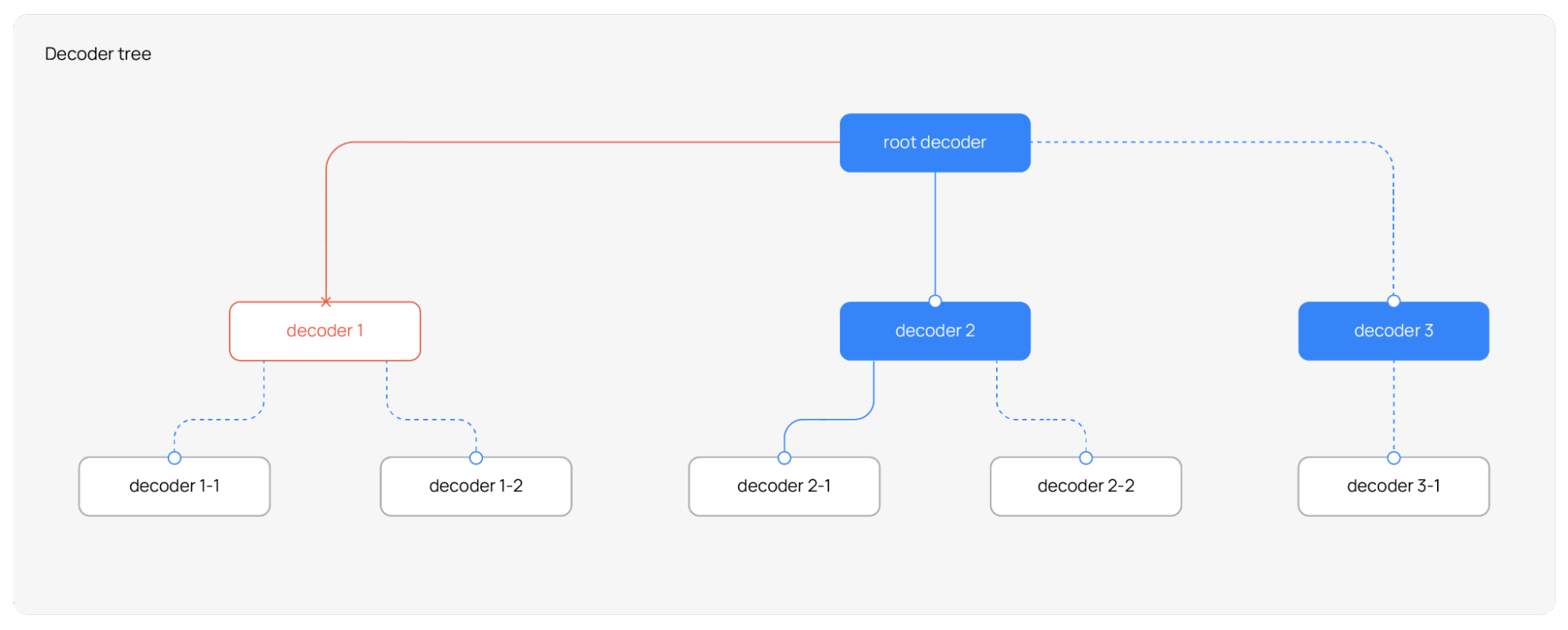
When a decoder evaluates an event, it checks whether the event satisfies its match conditions. If the conditions are not met, the event is passed to the next sibling decoder in the same hierarchy. This process continues until a decoder accepts the event or no more sibling decoders remain at that level. At that point, the decoder branch has fully decoded the event.
Once a decoder accepts an event, it applies its transformations: normalizing fields, extracting values, or mapping data to schema fields. The transformed event is then forwarded to that decoder's child decoders for additional, more specialized processing. Each child decoder follows the same evaluation logic, making the overall process both hierarchical and iterative.
This tree-based evaluation ensures that events are efficiently routed to the most specific applicable decoder based on their structure and content, without requiring explicit routing rules.
Security enrichment process
The security enrichment process is divided into two consecutive stages in the policy pipeline:
The pre-enrichment stage performs preliminary event adjustments and filtering before the enrichment stage is executed. It takes care of event control decisions.
The enrichment stage applies the enrichments configured in the policy, such as Geo/ASN or IOC enrichments. It is dedicated to contextual event augmentation based on predefined WCS-driven observation rules, and handles unclassified-event routing later, as part of output selection.
Pre-enrichment
This stage prepares and filters the event before the configured enrichments are evaluated. It performs preliminary adjustments, enforces filtering decisions, and ensures that excluded events do not reach the enrichment stage.
The pre-enrichment stage performs the following actions:
Space enrichment: The first pre-enrichment operation maps the policy space into the event. Its purpose is to annotate the event with the space from which the policy is being executed. This annotation allows the event to carry the policy space context as part of its own data before enrichment is applied.
Conceptually, the event is enriched with the space context as shown:
{
  "wazuh": {
    "space": {
      "name": "standard|custom"
    }
  }
}
Discarded events filter: The discarded events filter decides whether discarded events continue through the pipeline. This behavior is controlled by the policy configuration.
Cleanup of decoder temporary variables: Decoders can only map fields that belong to the WCS or to temporary variables. Temporary variables are used to store intermediate values that help decoders share information while processing an event. After decoding is complete, all temporary variables are automatically removed. This cleanup step always runs at the end of pre-enrichment and requires no user configuration. As a result, only WCS-compliant fields remain in the event, ensuring it can be successfully indexed by the Wazuh indexer.
Enrichment
The enrichments to apply are defined as an array within the policy document. During event processing, each configured enrichment is evaluated sequentially and applied according to its configuration. The enrichment stage does not decide whether the event continues in the pipeline. Its sole purpose is to add context to the event when applicable.
During installation, the Wazuh normalization engine generates enrichment source definition files for both Geo/ASN and IOC enrichments. These files define which event fields the normalization engine observes at runtime to decide whether to apply enrichment. Predefined rules indicate which WCS-compliant fields to observe for each type of enrichment, and the installation generates the files from these rules. As a result, the engine does not decide the set of inspected fields dynamically for every event. Instead, it is determined beforehand through these generated definitions, which ensures a controlled and consistent enrichment process.
The available enrichments include:
Geo enrichment
Geo enrichment evaluates the event fields defined for Geo/ASN observation and, when applicable, adds location and autonomous system context to the event. The observed fields are determined from the generated Geo enrichment definitions based on the WCS and typically include fields that might contain IP addresses relevant for enrichment.
When a valid source value is found, Geo enrichment adds information such as:
Geographic location data
Country or city data
Autonomous System Number (ASN)
ASN organization
Conceptually, the event is enriched with the following Geo/ASN context:
{
  "source": {
    "ip": "8.8.8.8",
    "geo": {
      "country_name": "United States",
      "location": {
        "lat": 37.751,
        "lon": -97.822
      }
    },
    "as": {
      "number": 15169,
      "organization": {
        "name": "Google LLC"
      }
    }
  }
}
IOC enrichment
IOC enrichment evaluates the event fields defined for IOC observation and checks whether their values match known indicators of compromise. The observed fields are determined from the generated IOC enrichment definitions based on the WCS and the predefined observation rules.
Based on the observed field and the configured IOC types, IOC enrichment can evaluate values such as:
Connection-based indicators represented as
ip:portDomains
URLs
Hashes
Other supported indicator values
Network IOC matching is not limited to plain IP values. For connection-based enrichment, the observed value is built from the relevant event fields as a connection key, typically combining IP address and port. If a match is found, the event is enriched with threat-related context associated with the matched indicator.
Conceptually, the event is enriched with the following threat context:
{
  "wazuh": {
    "threat": {
      "enrichments": [
        {
          "indicator": {
            "type": "ipv4-addr",
            "ip": "203.0.113.10"
          },
          "matched": {
            "field": "destination.ip"
          }
        }
      ]
    }
  }
}
Output process
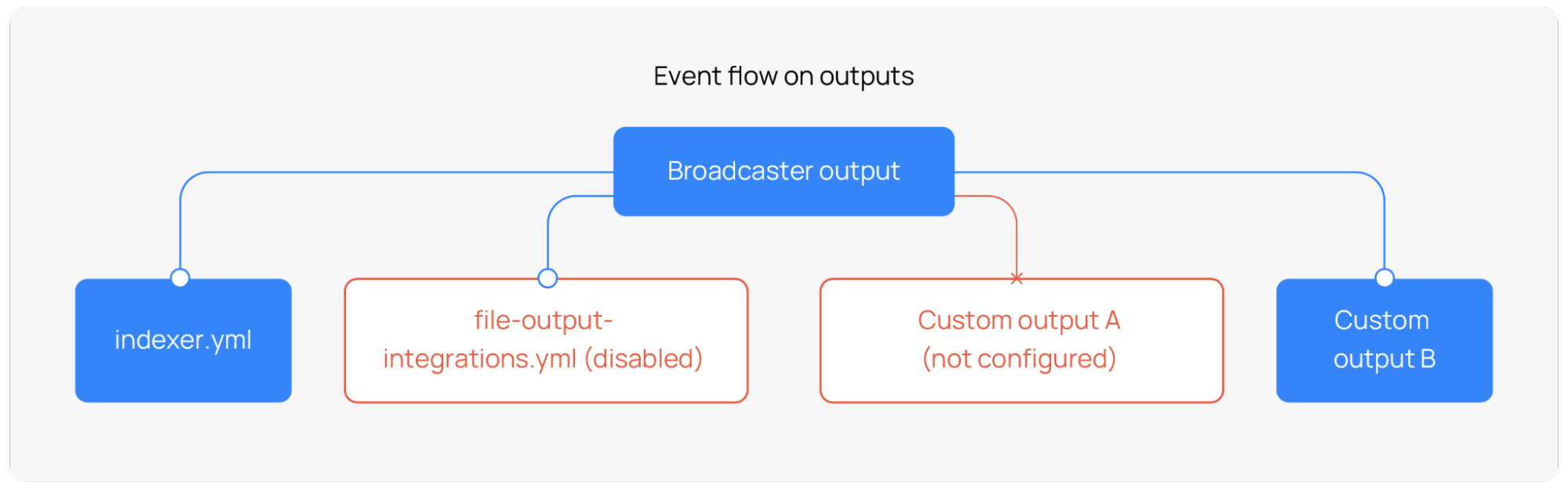
Once an event completes the full processing pipeline, including decoding, optional enrichment, and optional post-filtering, it is forwarded to the output stage. Outputs are files that deliver the decoded event to one or more configured destinations, such as the Wazuh indexer or a local file.
Unlike decoders and enrichment assets, which are downloaded from the content distribution infrastructure, outputs are bundled with the Wazuh manager installation and stored locally on the Wazuh manager endpoint. They do not originate from the Wazuh indexer.
Output directory structure
Outputs are stored under /etc/wazuh-manager/outputs/ and organized by space name.
/etc/wazuh-manager/outputs/
├── default/                          # Fallback outputs, applied to all spaces unless overridden
│   ├── indexer.yml                   # Sends decoded events to the Wazuh Indexer (enabled)
│   └── file-output-integrations.yml  # Writes decoded events to a local file (disabled)
├── standard/                         # (Optional) Outputs specific to the standard space
└── custom/                           # (Optional) Outputs specific to the custom space
To build the output stage for a security policy, the normalization engine looks for a directory whose name matches the policy space, such as standard or custom. If that directory exists, only its outputs are loaded for that policy. If no space-specific directory is found, the normalization engine falls back to the default/ directory, ensuring every policy has a working set of outputs from the start.
Default outputs
A default Wazuh manager installation includes the two outputs shown in the table below.
File |
Description |
Default state |
|---|---|---|
|
Forwards processed events to the configured Wazuh indexer |
Enabled |
|
Writes processed events to a local file on the Wazuh manager |
Disabled |
The output stage operates as a broadcaster. It dispatches the processed event independently to every active output, allowing multiple destinations to receive the same processed event.
Unclassified events
An event is unclassified when its wazuh.integration.category field equals unclassified. This category comes from a catch-all integration whose decoder accepts events that no other integration decoder matched. The /etc/wazuh-manager/outputs/default/indexer.yml output sends unclassified events to the wazuh-events-v5-unclassified index only when the policy enables indexing of unclassified events. Otherwise, the Wazuh normalization engine does not index them.
Event format
The Wazuh agent collects raw logs and forwards them to the Wazuh manager with added agent and cluster metadata. The Wazuh normalization engine then decodes, normalizes, and enriches each log into a schema-conformant JSON document.
The following sample logs illustrate the transformation process:
Example of raw event on the Wazuh agent:
{
   "version":"1.100000",
   "account_id":"123456789023",
   "region":"us-east-1",
   "vpc_id":"vpc-0000000",
   "query_timestamp":"2025-12-11T22:22:22Z",
   "query_name":"amazonlinux-2-repos-us-east-1.s3.dualstack.us-east-1.amazonaws.com.",
   "query_type":"AAAA",
   "query_class":"IN",
   "rcode":"NOERROR",
   "answers":[
      {
         "Rdata":"s3-r-w.dualstack.us-east-1.amazonaws.com.",
         "Type":"CNAME",
         "Class":"IN"
      },
      {
         "Rdata":"2a02:cf40:add:4444:9191:a9a9:aaaa:cccc",
         "Type":"AAAA",
         "Class":"IN"
      }
   ],
   "srcaddr":"8.8.8.8",
   "srcport":"8010",
   "transport":"UDP",
   "srcids":{}
}
Example event received by the Wazuh manager:
{
  "wazuh": {
    "protocol": {
      "queue": 49,
      "location": "/var/ossec/logs/active-responses.log"
    },
    "agent": {
      "host": {
        "os": {
          "name": "Rocky Linux",
          "version": "8.10",
          "platform": "rocky",
          "type": "linux"
        },
        "architecture": "x86_64",
        "hostname": "wazuh-agent-50-rocky8"
      },
      "id": "002",
      "name": "wazuh-agent-50-rocky8",
      "version": "v5.0.0",
      "groups": [
        "default"
      ]
    },
    "cluster": {
      "name": "wazuh",
      "node": "node01"
    }
  },
  "event": {
    "original": "{\"version\":\"1.100000\",\"account_id\":\"123456789023\",\"region\":\"us-east-1\",\"vpc_id\":\"vpc-0000000\",\"query_timestamp\":\"2025-12-11T22:22:22Z\",\"query_name\":\"amazonlinux-2-repos-us-east-1.s3.dualstack.us-east-1.amazonaws.com.\",\"query_type\":\"AAAA\",\"query_class\":\"IN\",\"rcode\":\"NOERROR\",\"answers\":[{\"Rdata\":\"s3-r-w.dualstack.us-east-1.amazonaws.com.\",\"Type\":\"CNAME\",\"Class\":\"IN\"},{\"Rdata\":\"2a02:cf40:add:4444:9191:a9a9:aaaa:cccc\",\"Type\":\"AAAA\",\"Class\":\"IN\"}],\"srcaddr\":\"8.8.8.8\",\"srcport\":\"8010\",\"transport\":\"UDP\",\"srcids\":{}}"
  }
}
Processed event:
{
  "wazuh": {
    "protocol": {
      "queue": 49,
      "location": "/var/ossec/logs/active-responses.log"
    },
    "agent": {
      "host": {
        "os": {
          "name": "Rocky Linux",
          "version": "8.10",
          "platform": "rocky",
          "type": "linux"
        },
        "architecture": "x86_64",
        "hostname": "wazuh-agent-50-rocky8"
      },
      "id": "002",
      "name": "wazuh-agent-50-rocky8",
      "version": "v5.0.0",
      "groups": [
        "default"
      ]
    },
    "cluster": {
      "name": "wazuh",
      "node": "node01"
    },
    "integration": {
      "category": "cloud-services",
      "name": "aws",
      "decoders": [
        "decoder/core-wazuh-message/0",
        "decoder/aws-route53-resolver-logs/0"
      ]
    },
    "space": {
      "name": "standard"
    },
    "threat": {
      "enrichments": [
        {
          "indicator": {
            "confidence": 100,
            "feed": {
              "name": "dyingbreeds_"
            },
            "first_seen": "2026-01-13T00:35:01.000Z",
            "id": "1718594",
            "last_seen": "2026-01-13T00:35:01.000Z",
            "name": "8.8.8.8:8010",
            "provider": "threat-fox",
            "software": {
              "alias": [
                "Unknown malware"
              ],
              "name": "unknown",
              "type": "botnet_cc"
            },
            "tags": [
              "AS55990",
              "Botnet",
              "byob",
              "C2",
              "censys"
            ],
            "type": "connection"
          },
          "matched": {
            "field": "source.ip, source.port"
          }
        }
      ]
    }
  },
  "event": {
    "original": "{\"version\":\"1.100000\",\"account_id\":\"123456789023\",\"region\":\"us-east-1\",\"vpc_id\":\"vpc-0000000\",\"query_timestamp\":\"2025-12-11T22:22:22Z\",\"query_name\":\"amazonlinux-2-repos-us-east-1.s3.dualstack.us-east-1.amazonaws.com.\",\"query_type\":\"AAAA\",\"query_class\":\"IN\",\"rcode\":\"NOERROR\",\"answers\":[{\"Rdata\":\"s3-r-w.dualstack.us-east-1.amazonaws.com.\",\"Type\":\"CNAME\",\"Class\":\"IN\"},{\"Rdata\":\"2a02:cf40:add:4444:9191:a9a9:aaaa:cccc\",\"Type\":\"AAAA\",\"Class\":\"IN\"}],\"srcaddr\":\"8.8.8.8\",\"srcport\":\"8010\",\"transport\":\"UDP\",\"srcids\":{}}",
    "kind": "event",
    "action": "dns-query",
    "category": [
      "network"
    ],
    "start": "2021-12-11T22:46:26.000Z",
    "type": [
      "protocol"
    ],
    "outcome": "success"
  },
  "@timestamp": "2026-04-14T19:29:51.105Z",
  "cloud": {
    "provider": "aws",
    "account": {
      "id": "123456789023"
    },
    "region": "us-east-1"
  },
  "dns": {
    "question": {
      "name": "amazonlinux-2-repos-us-east-1.s3.dualstack.us-east-1.amazonaws.com.",
      "class": "IN",
      "type": "AAAA"
    },
    "response_code": "NOERROR",
    "answers": [
      {
        "data": "s3-r-w.dualstack.us-east-1.amazonaws.com.",
        "type": "CNAME",
        "class": "IN"
      },
      {
        "Rdata": "2a02:cf40:add:4444:9191:a9a9:aaaa:cccc",
        "Type": "AAAA",
        "Class": "IN"
      }
    ]
  },
  "network": {
    "transport": "udp",
    "protocol": "dns",
    "type": "IPv4"
  },
  "source": {
    "address": "8.8.8.8",
    "ip": "8.8.8.8",
    "port": 8010,
    "as": {
      "number": 55990,
      "organization": {
        "name": "Huawei Cloud Service data center"
      }
    },
    "geo": {
      "city_name": "Shanghai",
      "continent_code": "AS",
      "continent_name": "Asia",
      "country_iso_code": "CN",
      "country_name": "China",
      "location": {
        "lat": 31.2222,
        "lon": 121.4581
      },
      "timezone": "Asia/Shanghai",
      "region_iso_code": "SH",
      "region_name": "Shanghai"
    }
  },
  "related": {
    "ip": [
      "8.8.8.8"
    ],
    "hosts": [
      "amazonlinux-2-repos-us-east-1.s3.dualstack.us-east-1.amazonaws.com."
    ]
  }
}
Wazuh Common Schema (WCS)
The Wazuh Common Schema (WCS) defines a structured format for data, ensuring consistency, interoperability, and efficient querying. It establishes a common set of field names, data types, and relationships that standardize log and event data across different sources.
The Wazuh normalization engine ensures that all operations, including parsing, normalization, and enrichment, transform unstructured data into structured data that adheres to the schema. This structured approach provides:
Consistency: Standardized field names prevent discrepancies when integrating data from different sources.
Interoperability: Facilitates integration with multiple tools and analytics platforms.
Efficient querying: Optimizes indexing and search performance.
Data enrichment: Enables meaningful correlations by aligning logs with predefined categories, such as network, process, and user activity.
For example, a network event log structured according to the schema looks like this:
{
  "event": {
    "category": "network",
    "type": "connection",
    "action": "network_connection"
  },
  "source": {
    "ip": "192.168.1.10",
    "port": 443
  },
  "destination": {
    "ip": "10.0.0.5",
    "port": 8080
  },
  "user": {
    "name": "admin"
  }
}
Schema configuration
The schema configuration for the Wazuh normalization engine follows a structured format in which each field is defined. The WCS originates in the wcs_flat.yml file of the wazuh-indexer-plugins repository. The Wazuh manager build process downloads this YAML file and converts it into the engine schema, a JSON object that users must not modify. The engine schema consists of the following key elements:
Fields definition: The fields object contains a list of field names as keys.
Each field has a corresponding object defining its
type, which specifies the Wazuh indexer field type, such as date, keyword, text, or integer.
The following JSON object provides an example of a WCS definition:
{
  "name": "schema/engine-schema/0",
  "fields": {
    "@timestamp": {
      "type": "date"
    },
    "agent.build.original": {
      "type": "keyword"
    },
    "agent.ephemeral_id": {
      "type": "keyword"
    },
    "agent.groups": {
      "type": "keyword"
    },
    "agent.id": {
      "type": "keyword"
    },
    "agent.name": {
      "type": "keyword"
    }
  }
}
Content management
Content management keeps the processing content of the Wazuh normalization engine in step with the Wazuh indexer. The content includes:
Policy configuration: The list of integrations (ordered by evaluation priority) and policy-level settings.
Integrations: Logical groups of decoders (and optionally KVDBs) for each log source.
Decoders: Normalization and field-extraction assets.
Filters: Pre-filter and post-filter assets.
KVDBs: Key-value databases used by decoders and filters during event processing.
The normalization engine pulls all content and policy configurations from the Wazuh indexer and stores them locally for runtime execution. The Wazuh indexer is the single source of truth for all content management. You create custom decoders and integrations, enable or disable them, and modify policy-related settings through the Wazuh indexer, not directly on the Wazuh normalization engine.
Synchronization process
Before building the security policy, the Wazuh normalization engine must ensure that its local state reflects the latest configuration available in the Wazuh indexer. The CMSync module keeps the local state current. It periodically pulls content from the Wazuh indexer and applies any detected changes to the local store of the Wazuh normalization engine.
CMSync synchronizes content independently for the standard and custom spaces, following the same two-step process for each:
Hash comparison: CMSync retrieves the content hash stored in the Wazuh indexer for the space and compares it against the locally stored hash. This check allows CMSync to determine quickly whether the space content has changed at all.
Content fetch: If the hashes differ, CMSync downloads the full content for that space from the Wazuh indexer and applies it to the local store of the Wazuh normalization engine. The engine then rebuilds the affected operational graphs.
Note
IOC and Geo/ASN databases are not part of this synchronization. They are shared across all spaces and are managed by a dedicated synchronization system, independent of the per-space content sync described above.
Space
A space is a content organization concept that originates in the Wazuh indexer. The Wazuh indexer has four spaces: draft, test, custom, and standard. When CMSync pulls content from the Wazuh indexer, the normalization engine stores each synchronized asset under the space it belongs to. In this way, the Wazuh manager mirrors the relevant Wazuh indexer spaces.
The Wazuh normalization engine manages the following spaces:
Standard: Contains the default integrations curated and maintained by the Wazuh CTI. The Wazuh indexer is responsible for downloading and hosting this content from the CTI feed. The Wazuh normalization engine never communicates with the Wazuh CTI directly. CMSync synchronizes the local copy from the Wazuh indexer.
Custom: An independent space for user-defined or user-modified content. Users manage this space through the Wazuh indexer, and CMSync propagates any changes to the Wazuh normalization engine.
When Wazuh starts, the normalization engine triggers an initial synchronization to pull both spaces from the Wazuh indexer. This initial synchronization makes all assets available before the engine builds security policies and defines routes. After this initial load, subsequent synchronization cycles run periodically to keep the local state up to date. When both spaces are available and synchronized, the Wazuh normalization engine processes all incoming events through each active operational graph.