How it works
The Wazuh agent uses the Syscollector module to collect endpoint inventory from monitored endpoints. This inventory includes operating system details, installed packages, and Windows hotfixes when hotfix collection is enabled.
The Wazuh agent periodically sends inventory updates to the Wazuh manager. Wazuh maintains a separate vulnerability inventory for each endpoint and updates it when the endpoint inventory changes or Wazuh CTI content is refreshed.
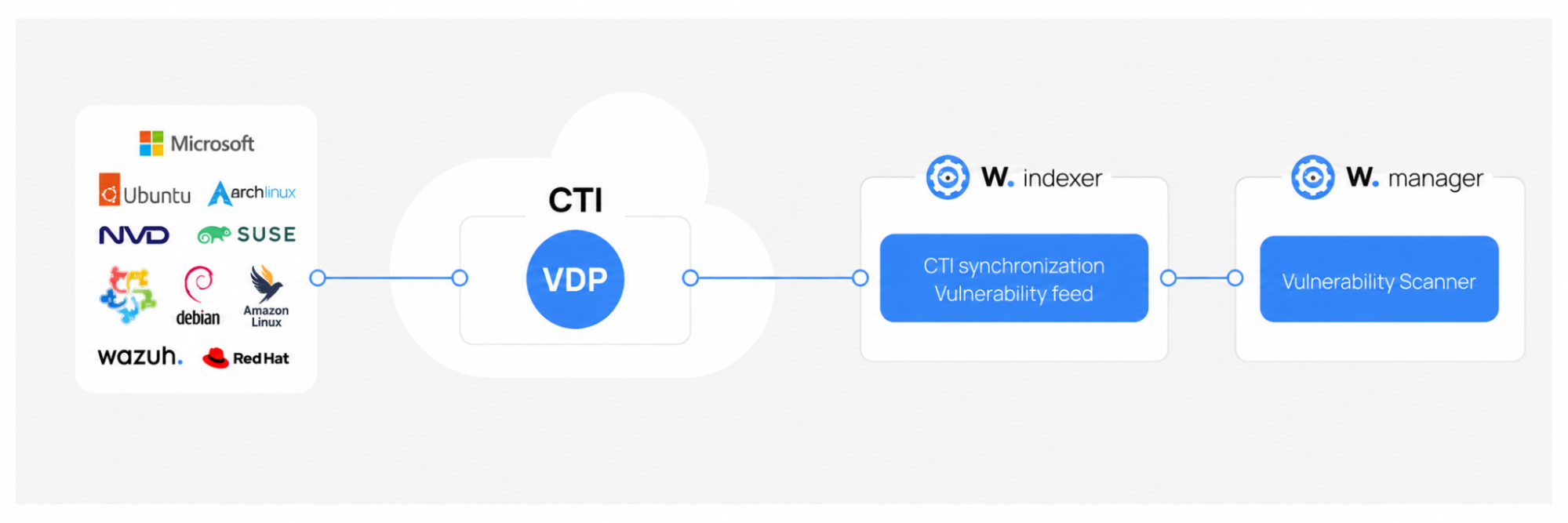
Vulnerability detection uses two data inputs: endpoint inventory from the Syscollector module and vulnerability intelligence from Wazuh CTI. The Wazuh indexer synchronizes CTI content and provides the vulnerability feed used by the Vulnerability Scanner module. This feed includes CVE data, affected version ranges, and package mappings.
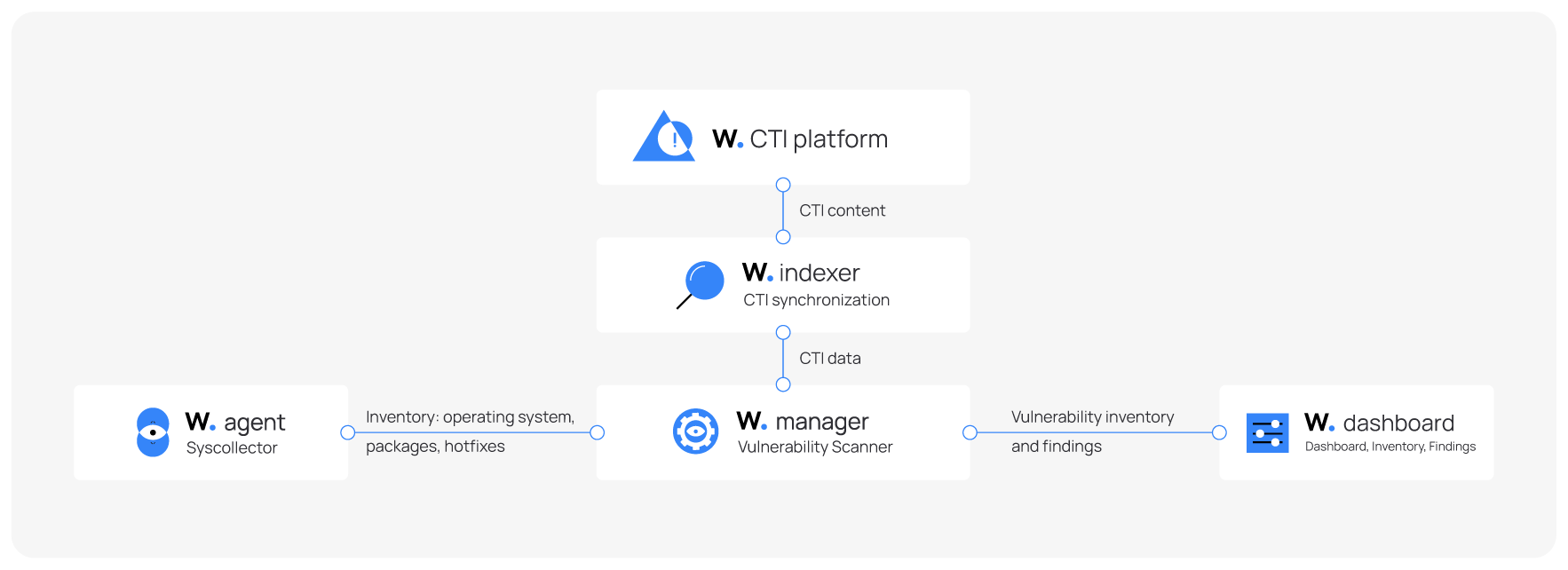
The Vulnerability Scanner module evaluates both inputs to determine whether an installed package, operating system, or missing hotfix matches a known vulnerability. Wazuh maintains a vulnerability inventory for each endpoint and updates it based on the results of this evaluation.
The first system inventory scan performed after the endpoint is enrolled builds its vulnerability inventory but does not generate findings. Subsequent inventory changes, such as package installations, package removals, package updates, hotfix changes, or operating system changes, can create or update findings. See the Finding generation and detection behavior section for more information.
For Windows systems and certain Microsoft products, the Syscollector module can collect installed hotfixes. The Vulnerability Scanner module uses hotfix data to identify vulnerabilities that Microsoft updates have already resolved.
Wazuh Cyber Threat Intelligence (CTI) platform
The Wazuh Cyber Threat Intelligence (CTI) platform is a publicly accessible service that collects, analyzes, and disseminates actionable information on emerging cyber threats and vulnerabilities. The Wazuh CTI platform aggregates vulnerability data from various sources, including operating system vendors and public vulnerability databases, and processes it into vulnerability intelligence used for vulnerability detection.
In Wazuh 5.0, the Wazuh indexer synchronizes vulnerability content from Wazuh CTI. The Vulnerability Scanner module downloads this feed and builds its local vulnerability database.
Vulnerability data sources
The Wazuh CTI platform gathers vulnerability data from a defined set of trusted sources, including official feeds from operating system vendors and reputable security databases. The sources include:
Operating system vendors: AlmaLinux, Amazon Linux, Arch Linux, Ubuntu (Canonical), Debian, Fedora, Oracle Linux, Red Hat Enterprise Linux (RHEL), Rocky Linux, and SUSE Linux Enterprise.
Security databases: Microsoft Security Updates (MSU), National Vulnerability Database (NVD), Open Source Vulnerabilities (OSV), Cybersecurity and Infrastructure Security Agency (CISA).
Vulnerability Detector Provider (VDP)
The Vulnerability Detector Provider (VDP) is the Wazuh CTI pipeline that prepares vulnerability data for detection. It collects vulnerability data from multiple vendors and security databases, normalizes it into the CVE JSON v5 format, sanitizes inconsistencies, and merges related content into a single document per CVE.
This standardized vulnerability content allows the Vulnerability Scanner module on the Wazuh manager to identify vulnerabilities across different operating systems, including Windows, CentOS, Red Hat Enterprise Linux (RHEL), Ubuntu, Debian, Amazon Linux, Arch Linux, SUSE Linux Enterprise, and macOS.
In Wazuh 5.0, the Wazuh indexer synchronizes vulnerability content from Wazuh CTI. The Vulnerability Scanner module downloads this feed from the indexer and builds its local vulnerability database.
The VDP performs three key functions:
Content migration: Fetches raw vulnerability data from vendors and normalizes it into the CVE JSON v5 format.
Data sanitization: Fixes inconsistencies in the normalized data, such as version mismatches, typographical errors, and missing fields.
Content merging: Combines vendor-specific vulnerability data with Wazuh-maintained intelligence, such as product name mappings, product translations, and operating system base rules.
The VDP feed uses the CVE JSON v5 format. Detection results generated by the Vulnerability Scanner module are indexed as ECS/WCS documents in the wazuh-states-vulnerabilities index.
Accessing Wazuh CTI
The Wazuh CTI platform is accessible either through the Wazuh CTI website or from the Wazuh dashboard.
Wazuh CTI website
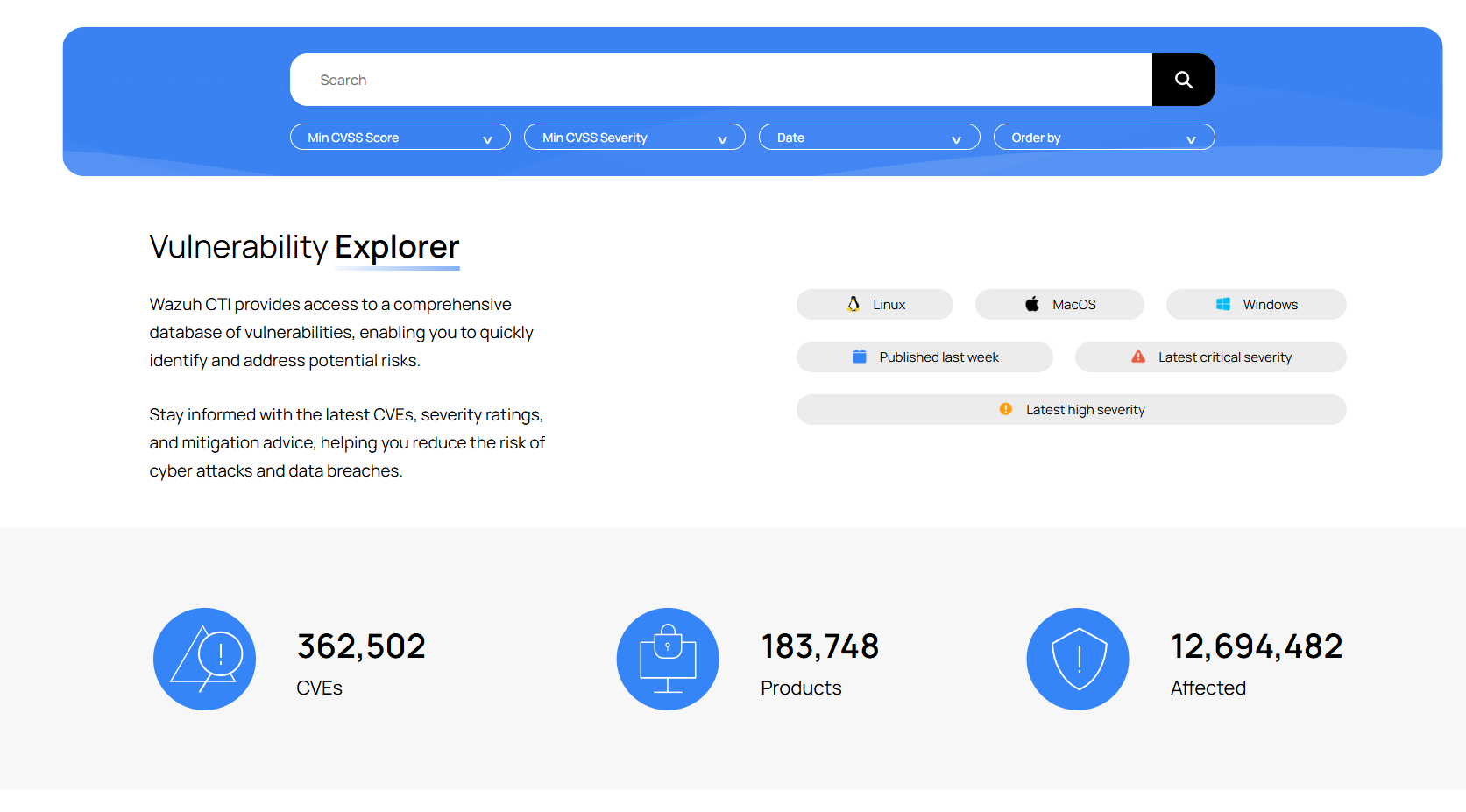
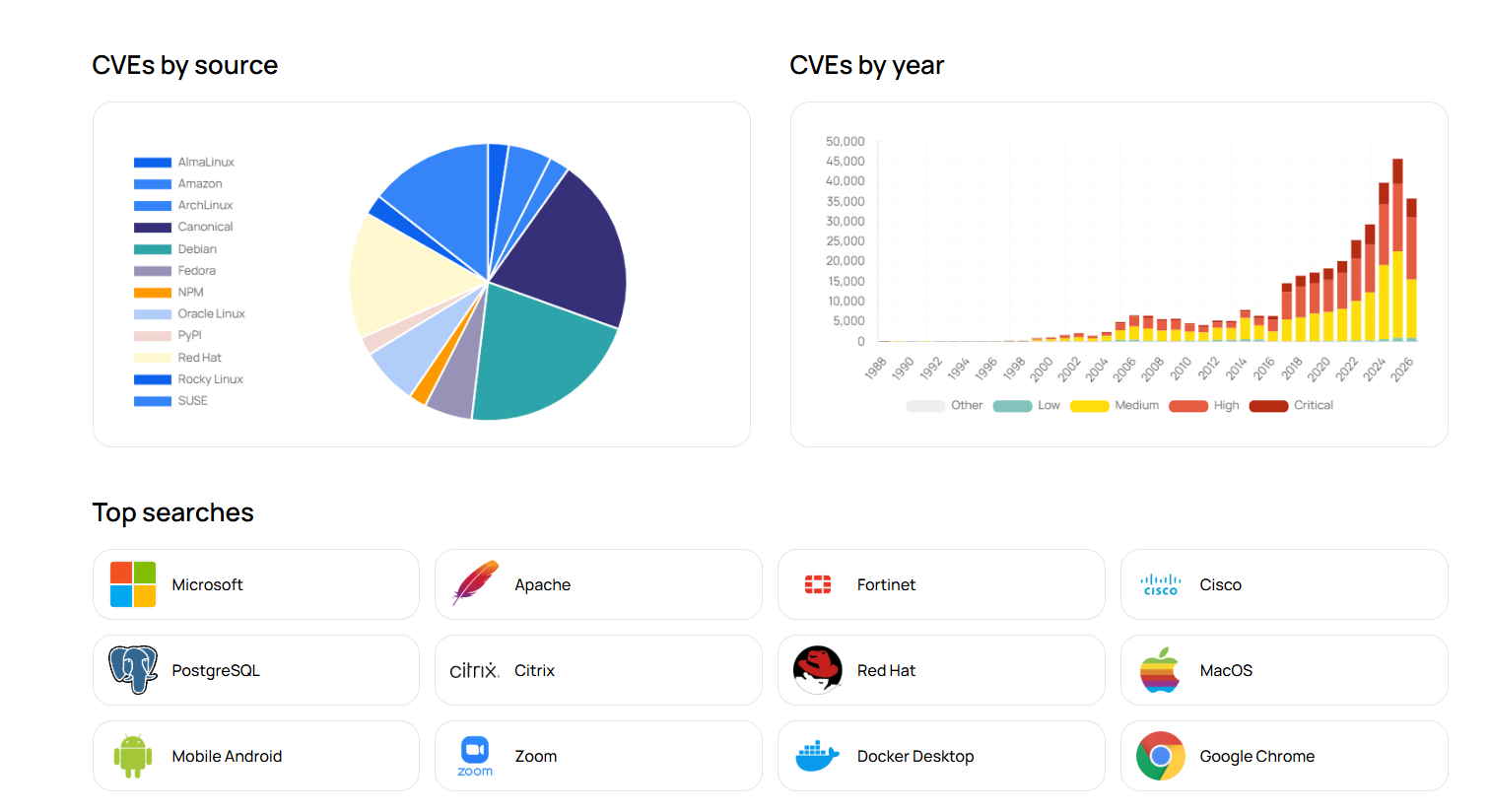
The Wazuh CTI website is publicly accessible and requires no registration or Wazuh installation. It features a search tool for filtering vulnerabilities by CVE ID, affected application, CVSS score, severity, and publication date, with customizable sorting.
From the Wazuh dashboard
You can access the Wazuh CTI platform directly through the vulnerability detection page in the Wazuh dashboard. Navigate to Vulnerability Detection > Inventory, then click the vulnerability ID of any listed vulnerability to open detailed threat intelligence on the Wazuh CTI website.
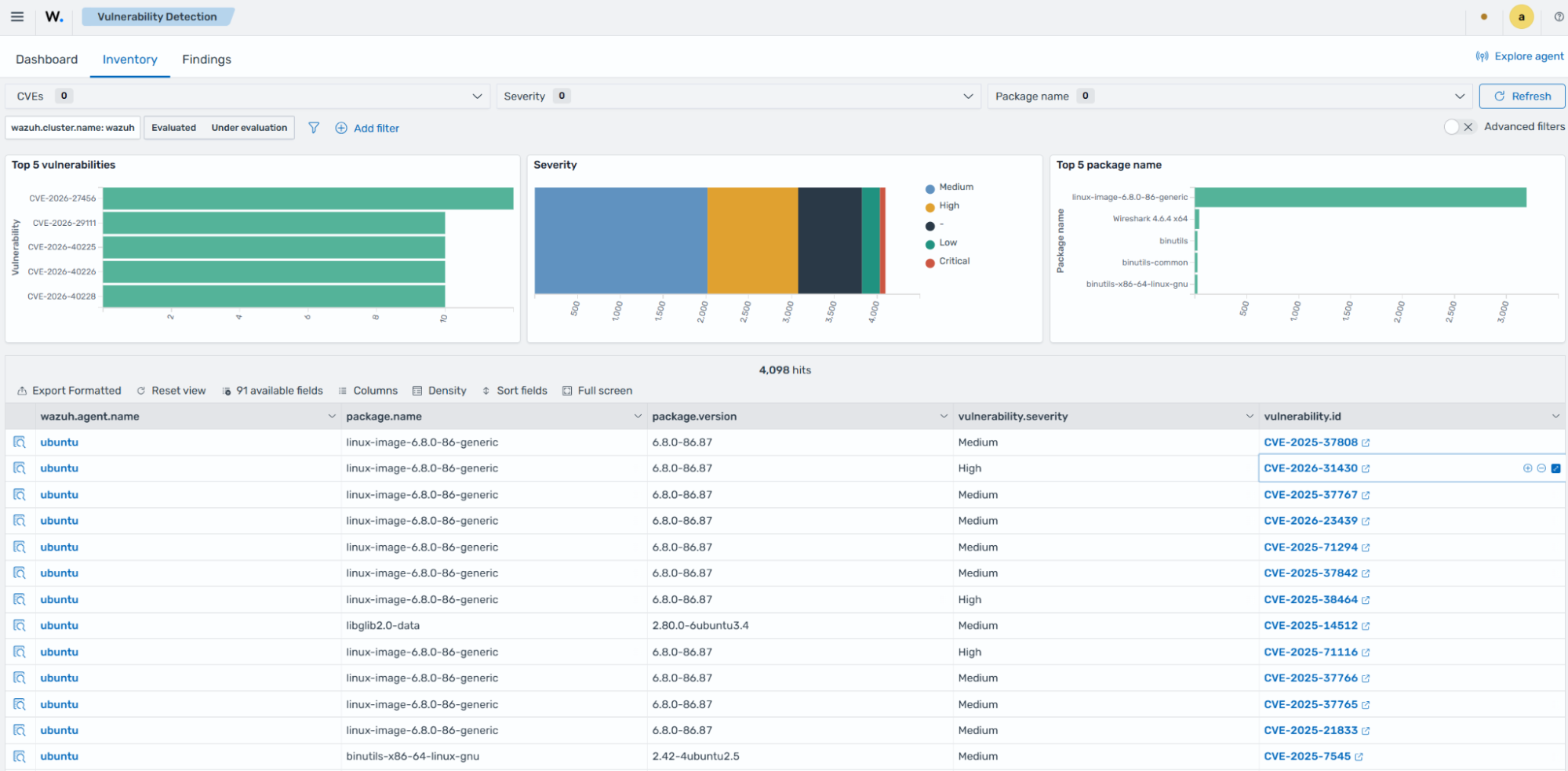
You can also access the Wazuh CTI platform by clicking the Inspect vulnerability details icon. Then, navigate to the vulnerability.scanner.reference section and click the provided URL to be redirected to the Wazuh CTI page, which contains detailed information about the vulnerability.

Finding generation and detection behavior
Vulnerability detection is driven by Syscollector module inventory updates. When the Syscollector module reports a package installation, package removal, version change, hotfix update, or operating system change, the Vulnerability Scanner module processes the updated inventory and updates vulnerability data in the Wazuh indexer.
Wazuh tracks vulnerability data in two distinct ways:
Inventory represents the current vulnerability state of an endpoint. This is information about which packages are currently vulnerable. It is updated whenever the endpoint inventory changes or CTI content is refreshed.
Findings are event records generated when a vulnerability is newly detected or resolved. Not every inventory update produces a finding.
The following sections describe how different types of inventory changes affect vulnerability detection and how findings are generated or updated.
Initial inventory scan
The initial system inventory scan builds the vulnerability inventory for the endpoint. It does not generate findings in the Findings tab. Subsequent inventory changes can generate findings when they add or resolve vulnerabilities.
Package changes
Package-related findings depend on inventory changes detected by the Syscollector module. Wazuh creates or updates findings when a package installation, update, or removal adds or resolves a vulnerability.
If the package change occurs while the Wazuh agent is stopped, Wazuh updates the vulnerability state after the next inventory synchronization, but it does not generate a package change finding for the missed activity.
Operating system changes
Operating system findings depend on inventory changes detected by the Syscollector module. Wazuh creates or updates findings after a subsequent inventory scan detects a change in the operating system version or patch state that adds or resolves vulnerabilities.
CTI content updates
When CVE content, mappings, translations, or other vulnerability feed data changes, Wazuh reevaluates the existing endpoint inventory against the updated vulnerability intelligence. This process does not trigger a new system inventory scan on the endpoint. The re-evaluation can update the vulnerability inventory but does not generate findings.
Cluster environments
In a clustered deployment, an agent might reconnect to a different Wazuh manager node. When this happens, the new node does not have the agent's existing vulnerability state, so it treats the reconnection as an initial synchronization, similar to the first time an agent connects. This initial synchronization updates the vulnerability inventory but does not generate findings.
View vulnerability data
You can view the vulnerability data of each monitored endpoint from the Wazuh dashboard. Click on Threat intelligence from the menu (☰), then select Vulnerability Detection.
The vulnerability detection page includes the following tabs:
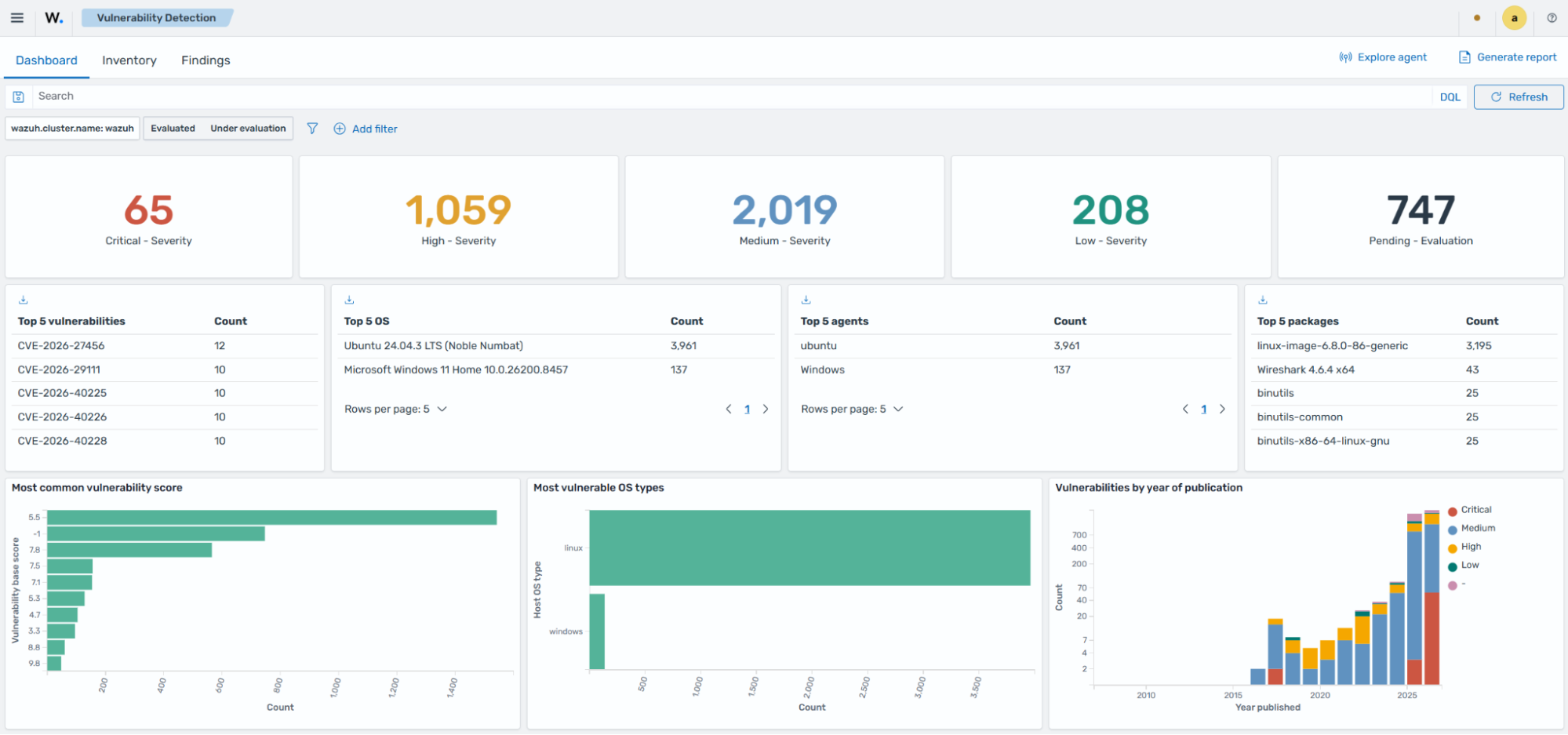
Dashboard: Shows a summary of vulnerability findings by severity, score, affected operating system, affected agent, package, and publication year.
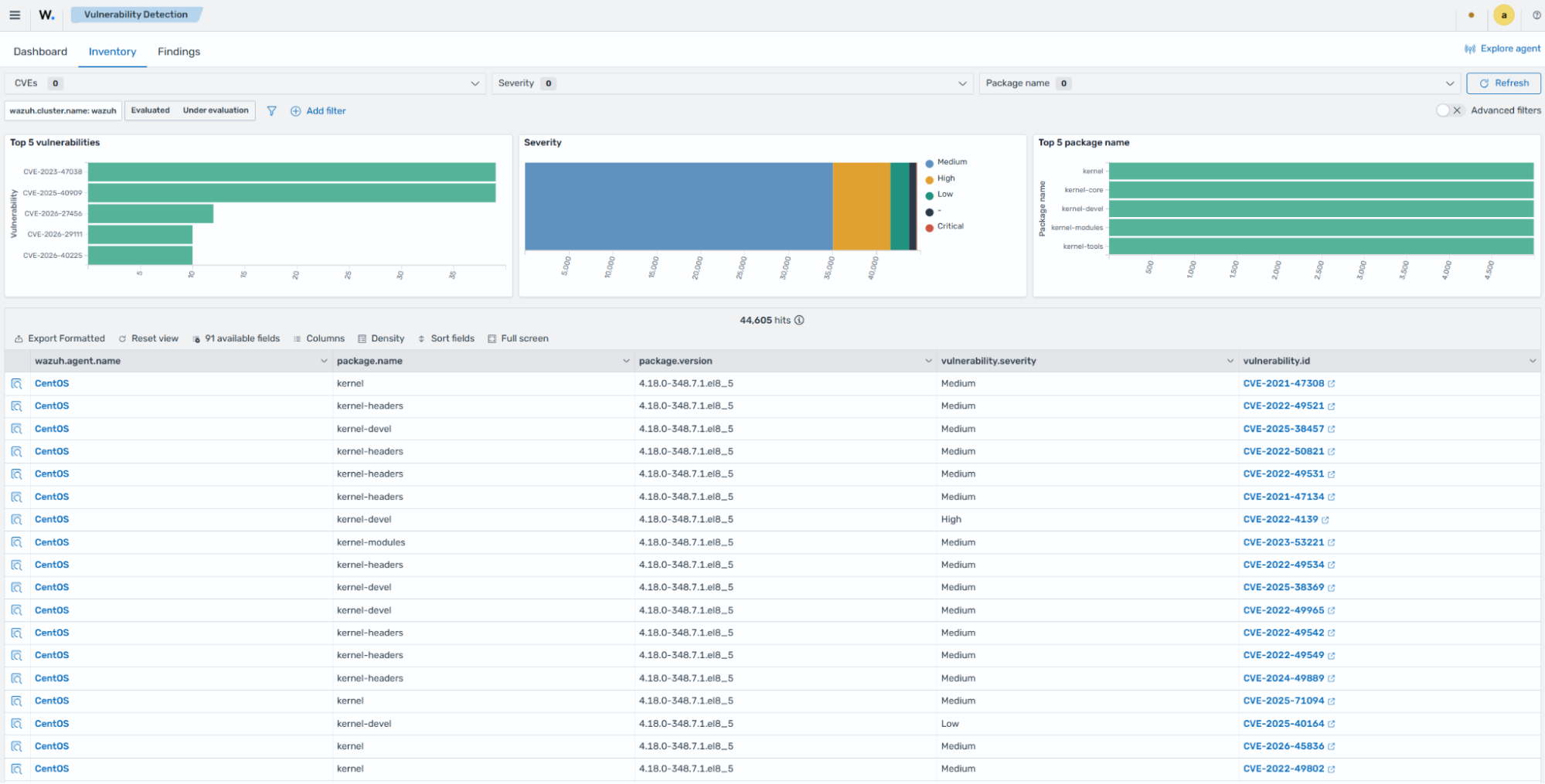
Inventory: Shows the current vulnerability inventory for monitored endpoints. This view includes fields such as agent name, package name, package version, vulnerability severity, and CVE ID.
The Inventory tab includes two filters:
Evaluated: Vulnerabilities for which Wazuh has confirmed the package is affected based on available CTI data.
Under evaluation: Vulnerabilities that Wazuh is still evaluating with the available CTI data. These entries are updated automatically when the relevant vulnerability data is available.
Note
To view the vulnerability inventory for a specific endpoint, select the endpoint from the Wazuh dashboard and go to Vulnerability Detection.
Each vulnerability in the Inventory tab contains key fields such as:
vulnerability.id: The Common Vulnerabilities and Exposures (CVE) identifier for the corresponding vulnerability.package.name: Name of the affected package.package.description: Short description of the affected package.package.version: Version of the affected package.vulnerability.severity: Severity of the detected vulnerability.vulnerability.scanner.condition: Information about why the package is marked as vulnerable.vulnerability.scanner.reference: Wazuh CTI website URL, providing additional information on the vulnerability.
Sample inventory data
{
  "_index": "wazuh-states-vulnerabilities",
  "_id": "003_2d27f74716e3047f48068ac7b08e791cf66e8766_CVE-2025-49796",
  "_score": null,
  "_source": {
    "host": {
      "os": {
        "full": "CentOS Linux 8.5.2111",
        "kernel": "4.18.0-348.7.1.el8_5.x86_64",
        "name": "CentOS Linux",
        "platform": "centos",
        "type": "linux",
        "version": "8.5.2111"
      }
    },
    "package": {
      "architecture": "x86_64",
      "description": "Library providing XML and HTML support",
      "installed": "2024-01-10T02:40:59.000Z",
      "name": "libxml2",
      "path": null,
      "size": 1753146,
      "type": "rpm",
      "version": "2.9.7-9.el8_4.2"
    },
    "state": {
      "document_version": 1
    },
    "vulnerability": {
      "category": "Packages",
      "detected_at": "2026-07-10T06:50:47.204Z",
      "id": "CVE-2025-49796",
      "published_at": "2025-06-16T16:15:19Z",
      "scanner": {
        "condition": "Package less than 0:2.9.7-21.el8_10.1",
        "reference": "https://cti.wazuh.com/vulnerabilities/cves/CVE-2025-49796",
        "source": "Red Hat CVE Database",
        "vendor": "Wazuh"
      },
      "score": {
        "base": 9.1,
        "version": "3.1"
      },
      "severity": "Critical",
      "under_evaluation": false
    },
    "wazuh": {
      "agent": {
        "groups": [
          "default"
        ],
        "host": {
          "architecture": "x86_64",
          "hostname": "CentOS",
          "os": {
            "name": "CentOS Linux",
            "platform": "centos",
            "type": "linux",
            "version": "8.5.2111"
          }
        },
        "id": "003",
        "name": "CentOS",
        "version": "v5.0.0"
      },
      "cluster": {
        "name": "wazuh"
      },
      "schema": {
        "version": "1.0.0"
      }
    }
  },
  "fields": {
    "vulnerability.detected_at": [
      "2026-07-10T06:50:47.204Z"
    ],
    "package.installed": [
      "2024-01-10T02:40:59.000Z"
    ],
    "vulnerability.published_at": [
      "2025-06-16T16:15:19.000Z"
    ]
  },
  "sort": [
    "Critical"
  ]
}
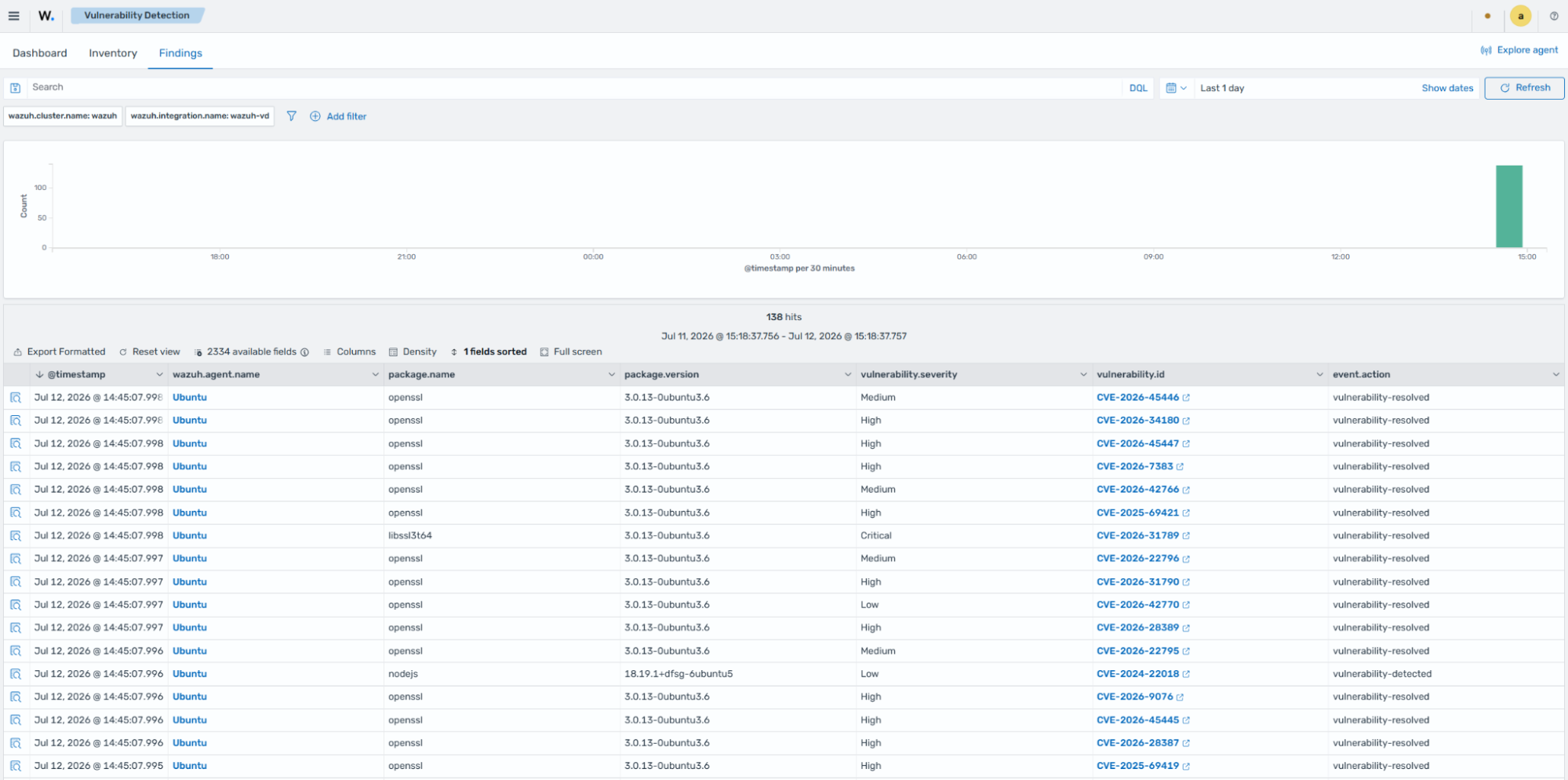
Findings: Shows event records generated when Wazuh detects a new vulnerability or resolves an existing one. Each finding carries one of two statuses:
vulnerability-detected: A vulnerability was newly identified on the endpoint.
vulnerability-resolved: A previously detected vulnerability is no longer present, typically because a package was updated or removed.
Finding availability depends on detection behavior. Initial inventory scans, cluster resynchronization, and CTI content updates can update the vulnerability inventory without creating new findings. See finding generation and detection behavior for a full explanation of when findings are and are not generated.
Compatibility matrix
Wazuh continuously expands its compatibility list to include new operating systems. The following table highlights the operating systems officially supported by the Vulnerability Scanner module. Detection coverage for other systems depends on the available CTI data and collected inventory fields.
Vulnerability Information Provider |
Operating Systems and Versions |
Provider Security Website |
|---|---|---|
AlmaLinux |
|
|
Amazon Linux |
|
|
Arch Linux |
|
|
Canonical |
|
|
Debian |
|
|
Fedora Linux |
The same versions reported by the Fedora feed, generally all versions. |
|
NPM |
- |
|
NVD |
Windows: The same versions reported by the NVD feed, generally all versions. |
|
macOS: The same versions reported by the NVD feed, generally all versions. |
||
Oracle Linux |
The same versions reported by the Oracle feed, generally all versions. |
|
PyPI |
- |
|
Red Hat Enterprise Linux |
|
|
Rocky Linux |
The same versions reported by the Rocky Linux feed, generally all versions. |
|
SUSE |
|