How it works
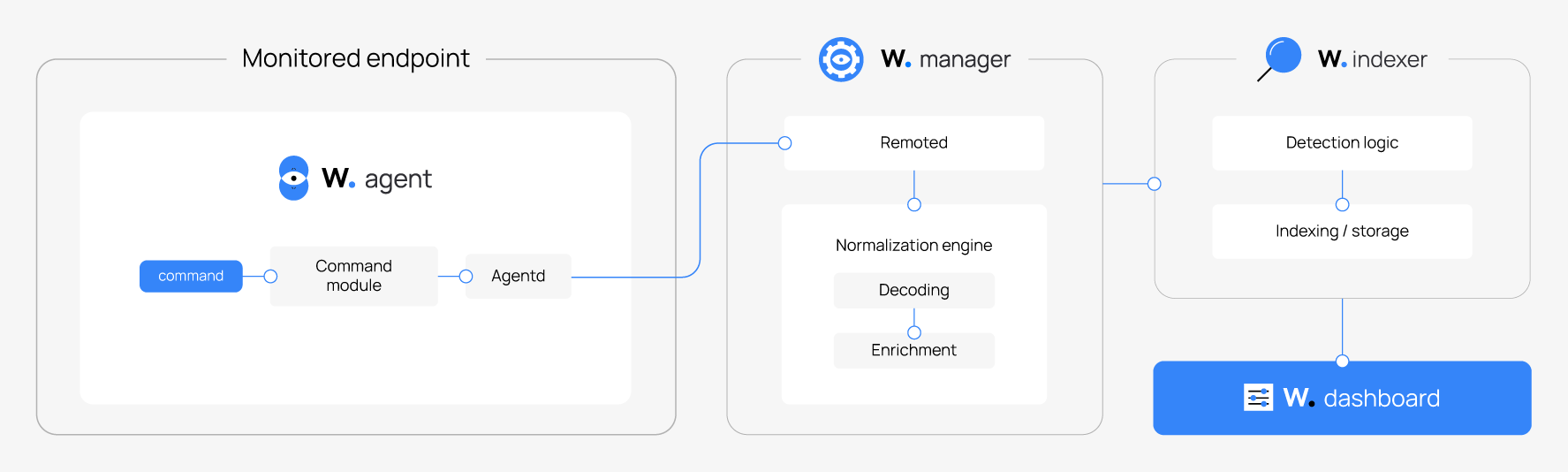
The Wazuh command monitoring capability works on all endpoints where the Wazuh agent is installed. Wazuh uses the Command module to run commands on monitored endpoints and forward the output to the Wazuh manager.
The steps below describe the sequence of actions from when you configure command monitoring to when the Wazuh dashboard displays a finding:
You add the desired command to the Wazuh agent configuration file or remotely through the Wazuh dashboard.
The Wazuh agent reads the configuration and executes the command on the endpoint at the set interval.
The Wazuh agent forwards the structured command output to the Wazuh manager for decoding, enrichment, and normalization.
The Wazuh manager sends the structured event to the Wazuh indexer, which applies detection rules to generate findings. You must create a detection rule for the command output first. Visit the Create a custom rule section for the steps.
The Wazuh dashboard queries the Wazuh indexer and displays the findings.
The image below shows the components involved in the command monitoring process.
Wazuh provides a default decoder, decoder/wazuh-wodle/0, that decodes events from monitored commands into a standardized format (Wazuh Common Schema). This lets the detection engine process command output without additional configuration.
To extract custom fields from your command output, you must create a custom decoder. Visit the Create a security analytics detection workflow section for more information.