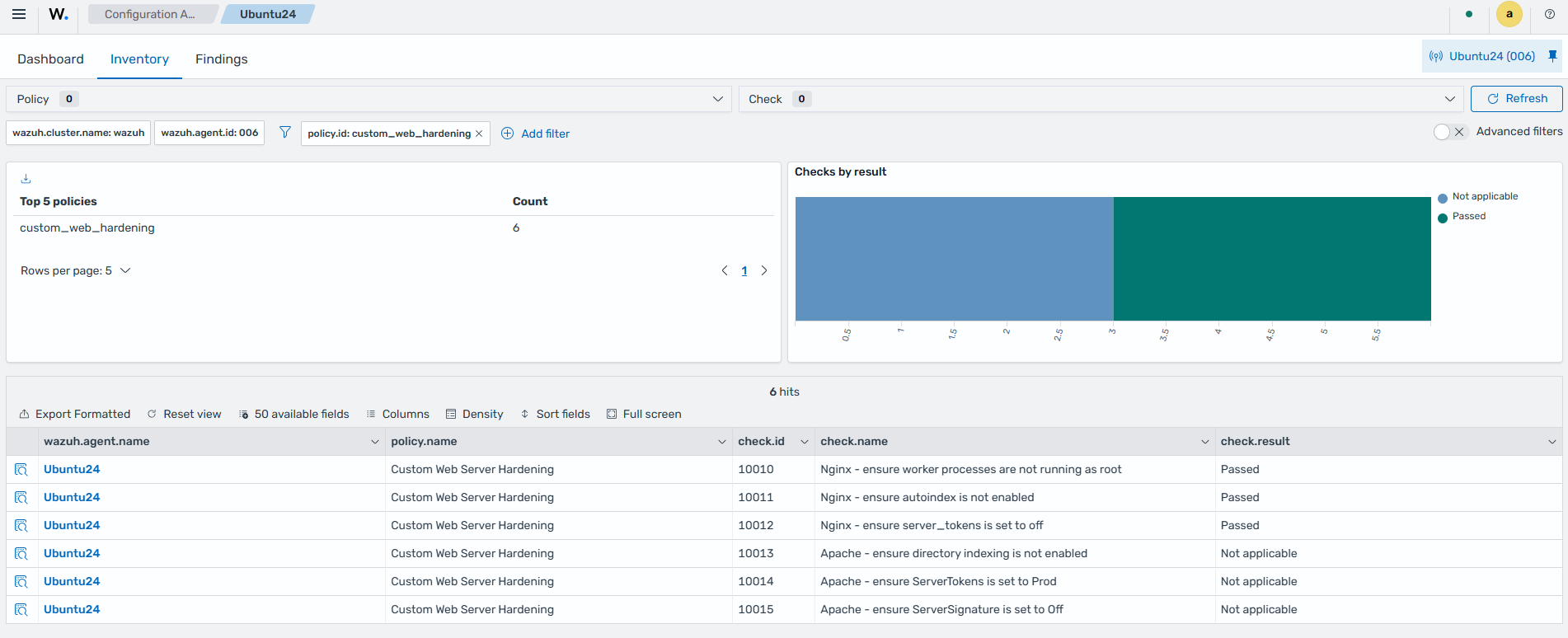
Security configuration assessment
The Wazuh Security Configuration Assessment (SCA) module continuously evaluates monitored endpoints against security policies and hardening standards (such as CIS benchmarks). It identifies misconfigurations, missing patches, weak settings, and policy violations, then provides remediation guidance. This guide demonstrates how to view the result of the default SCA policy on a Linux endpoint, create and deploy a custom SCA policy, test the policy with simulated insecure configurations, and review results and remediation steps in the Wazuh dashboard. Regular configuration assessments help reduce your attack surface and support compliance with standards like PCI DSS, HIPAA, or NIST.
Infrastructure
Endpoint |
Description |
|---|---|
Ubuntu 24.04 |
Monitored endpoint where SCA policies are evaluated. |
Configuration
SCA is enabled by default in Wazuh 5.x. No changes are typically required for built-in policies.
Ubuntu endpoint
Default SCA policy
On the Ubuntu endpoint, check
/var/ossec/etc/ossec.confto validate that SCA is enabled:<sca> <enabled>yes</enabled> <scan_on_start>yes</scan_on_start> <interval>12h</interval> <!-- Database synchronization settings --> <synchronization> <enabled>yes</enabled> <interval>5m</interval> <integrity_interval>24h</integrity_interval> <max_eps>75</max_eps> </synchronization> </sca>
Note
You can adjust the interval to reduce or increase the scan frequency. This is optional.
Explore the built-in policy. Wazuh provides a CIS Check for Ubuntu Linux 24.04 LTS policy out of the box:
# cat /var/ossec/ruleset/sca/cis_ubuntu24-04.yml
You can view the full list of available SCA policies in the Wazuh documentation. On your Wazuh dashboard, navigate to the Configuration Assessment module and select the Ubuntu endpoint to view the results of the default SCA check.
Custom SCA policy
You can also configure custom SCA policies to meet your individual use cases. Follow the steps below to configure a custom SCA policy.
Create a new directory
/var/ossec/etc/custom-sca-files/to save your custom policy files:# mkdir -p /var/ossec/etc/custom-sca-files
Note
We recommend placing custom SCA policies in a dedicated directory (instead of
/var/ossec/ruleset/sca/) to prevent them from being overwritten during agent or ruleset updates, and to keep your custom policies cleanly separated from the built-in ones.Create a new SCA policy file
custom-web-hardening.ymlin the/var/ossec/etc/custom-sca-files/directory and add the following policy to it:# Security Configuration Assessment # Custom Web Server Hardening Policy # Copyright (C) 2026, Your Organization / Wazuh Inc. policy: id: "custom_web_hardening" file: "custom-web-hardening.yml" name: "Custom Web Server Hardening" description: "Checks for basic secure configuration of web servers (Nginx/Apache)." references: - https://documentation.wazuh.com/current/user-manual/capabilities/sec-config-assessment/index.html requirements: title: "Check that a web server is present on the system" description: "This policy applies to endpoints running Nginx or Apache." condition: any rules: - 'p:nginx' - 'p:httpd' - 'p:apache2' checks: - id: 10010 title: "Nginx - ensure worker processes are not running as root" description: "Nginx worker processes (not the master) should run under a dedicated non-privileged user." rationale: "Worker processes handle untrusted external requests directly; running them as root removes the privilege separation nginx's architecture is designed to provide." remediation: "Set 'user www-data;' (or your intended non-root user) in /etc/nginx/nginx.conf, then run 'nginx -t && systemctl reload nginx'." condition: none rules: - 'c:sh -c "ps aux | grep -E \"nginx: worker\" | grep -v grep" -> r:^root' - id: 10011 title: "Nginx - ensure autoindex is not enabled" description: "Directory listing should be disabled to prevent information disclosure." rationale: "Exposing directory contents helps attackers map the filesystem and discover unintended files." remediation: "Set 'autoindex off;' in /etc/nginx/nginx.conf, then run 'nginx -t && systemctl reload nginx'." condition: none rules: - 'f:/etc/nginx/nginx.conf -> r:^\s*autoindex\s+on' - id: 10013 title: "Apache - ensure directory indexing is not enabled" description: "Directory listing should be disabled to prevent information disclosure." rationale: "Exposing directory contents helps attackers map the filesystem and discover unintended files." remediation: "Remove 'Indexes' from the 'Options' directive in /etc/apache2/apache2.conf (e.g. 'Options FollowSymLinks' instead of 'Options Indexes FollowSymLinks'), then reload Apache." condition: none rules: - 'f:/etc/apache2/apache2.conf -> r:Options\s+.*Indexes' - id: 10012 title: "Nginx - ensure server_tokens is set to off" description: "Nginx should not disclose its version number in the Server header or default error pages." rationale: "Version disclosure aids attackers in fingerprinting the server for known CVEs. Nginx's own default is 'on', so an absent directive is also insecure." remediation: "Set 'server_tokens off;' inside the http {} block in /etc/nginx/nginx.conf, then run 'nginx -t && systemctl reload nginx'." condition: all rules: - 'f:/etc/nginx/nginx.conf -> r:^\s*server_tokens\s+off;' - id: 10014 title: "Apache - ensure ServerTokens is set to Prod" description: "Apache should not disclose detailed version/module/OS information in the Server header." rationale: "Non-'Prod' settings leak OS, module, and version details useful for targeted exploitation. Apache's default is 'Full', so an absent directive is also insecure." remediation: "Set 'ServerTokens Prod' in /etc/apache2/apache2.conf (or conf-enabled/security.conf), then reload Apache." condition: all rules: - 'f:/etc/apache2/apache2.conf -> r:^\s*ServerTokens\s+Prod\s*$' - id: 10015 title: "Apache - ensure ServerSignature is set to Off" description: "Apache should not append version/OS info to auto-generated error pages and directory listings." rationale: "Even with ServerTokens minimized, ServerSignature can still leak version details on generated pages. Apache's default is 'On'." remediation: "Set 'ServerSignature Off' in /etc/apache2/apache2.conf (or conf-enabled/security.conf), then reload Apache." condition: all rules: - 'f:/etc/apache2/apache2.conf -> r:^\s*ServerSignature\s+Off\s*$'
The policy targets endpoints running NGINX or Apache web servers. It runs only on a system where at least one of the processes NGINX, httpd, or apache2 is present.
Check ID 10010 flags a FAIL if NGINX runs under the root user.
Check ID 10011 flags a FAIL if NGINX directory listing is enabled.
Check ID 10012 flags a FAIL if the NGINX server exposes version details in HTTP response headers.
Check ID 10013 flags a FAIL if the Apache directory listing is enabled.
Check ID 10014 flags a FAIL if the Apache server exposes version details in HTTP response headers.
Check ID 10015 flags a FAIL if the Apache server exposes version/OS info to auto-generated error pages and directory listings.
Change the file ownership to ensure Wazuh has permission to it:
# chown wazuh:wazuh /var/ossec/etc/custom-sca-files/custom-web-hardening.yml
Enable the policy file by adding the following lines within the
<sca>block of the Wazuh agent configuration file at/var/ossec/etc/ossec.conf:<policies> <policy enabled="yes">/var/ossec/etc/custom-sca-files/custom-web-hardening.yml</policy> </policies>
Restart the Wazuh agent to implement changes:
# systemctl restart wazuh-agent
Test the configuration
Install NGINX on the monitored Ubuntu endpoint:
# apt update
# apt install nginx
Run the following commands to simulate insecure configurations:
# sed -i 's/# server_tokens off;/server_tokens on;/' /etc/nginx/nginx.conf 2>/dev/null || true
# sed -i '/^http {/a\    autoindex on;' /etc/nginx/nginx.conf
# sed -i 's/^user .*/user root;/' /etc/nginx/nginx.conf
# systemctl restart nginx
Restart the Wazuh agent to force a fresh SCA scan:
# systemctl restart wazuh-agent
Visualize the SCA checks
You can visualize the SCA checks on the Wazuh dashboard. To see the SCA check results, perform the following on the Wazuh dashboard:
Navigate to Endpoint security > Configuration Assessment.
Select the Ubuntu agent and inspect both the default
CIS Ubuntu Linux 24.04 LTS Benchmark v1.0.0andCustom Web Server HardeningSCA policies.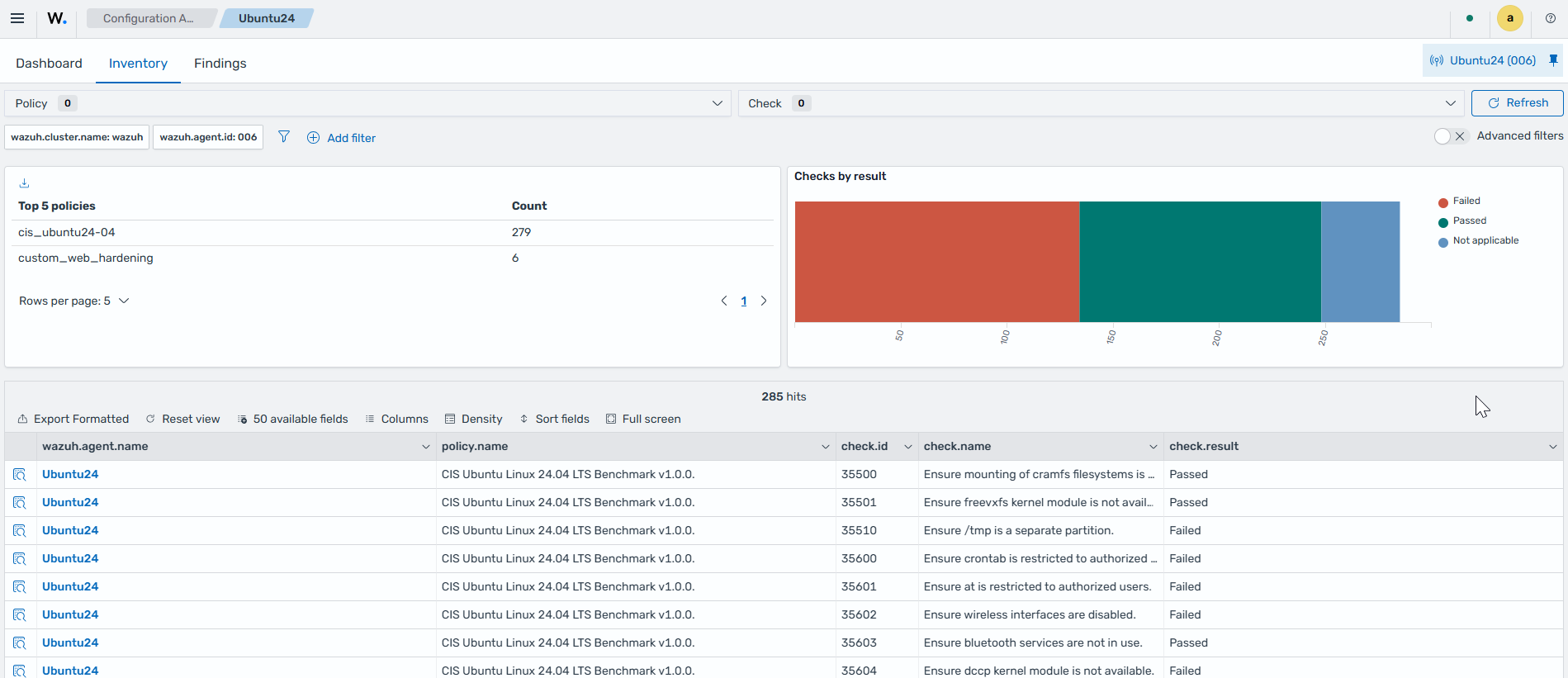
Click + Add filter. Then filter by
policy.name.In the Operator field, select is.
In the Values field, select
CIS Ubuntu Linux 24.04 LTS Benchmark v1.0.0. Inspect the information under Dashboard and Inventory.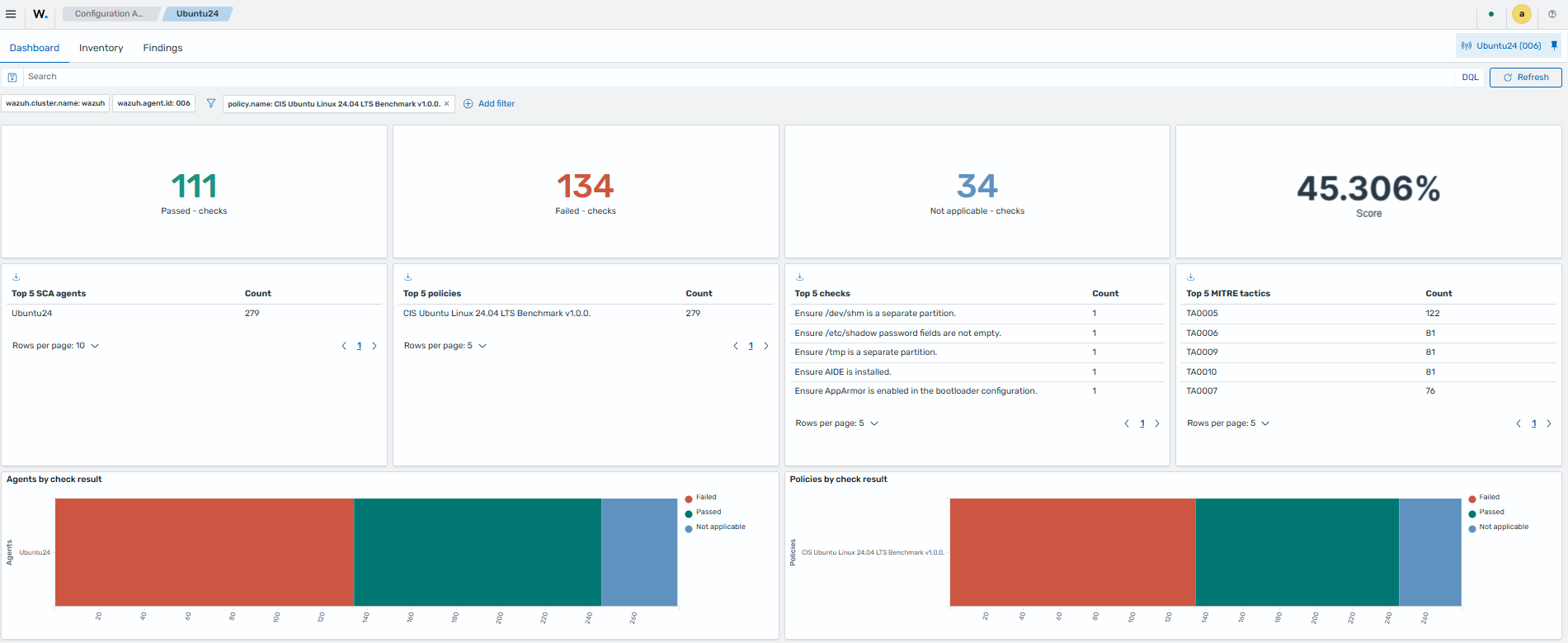
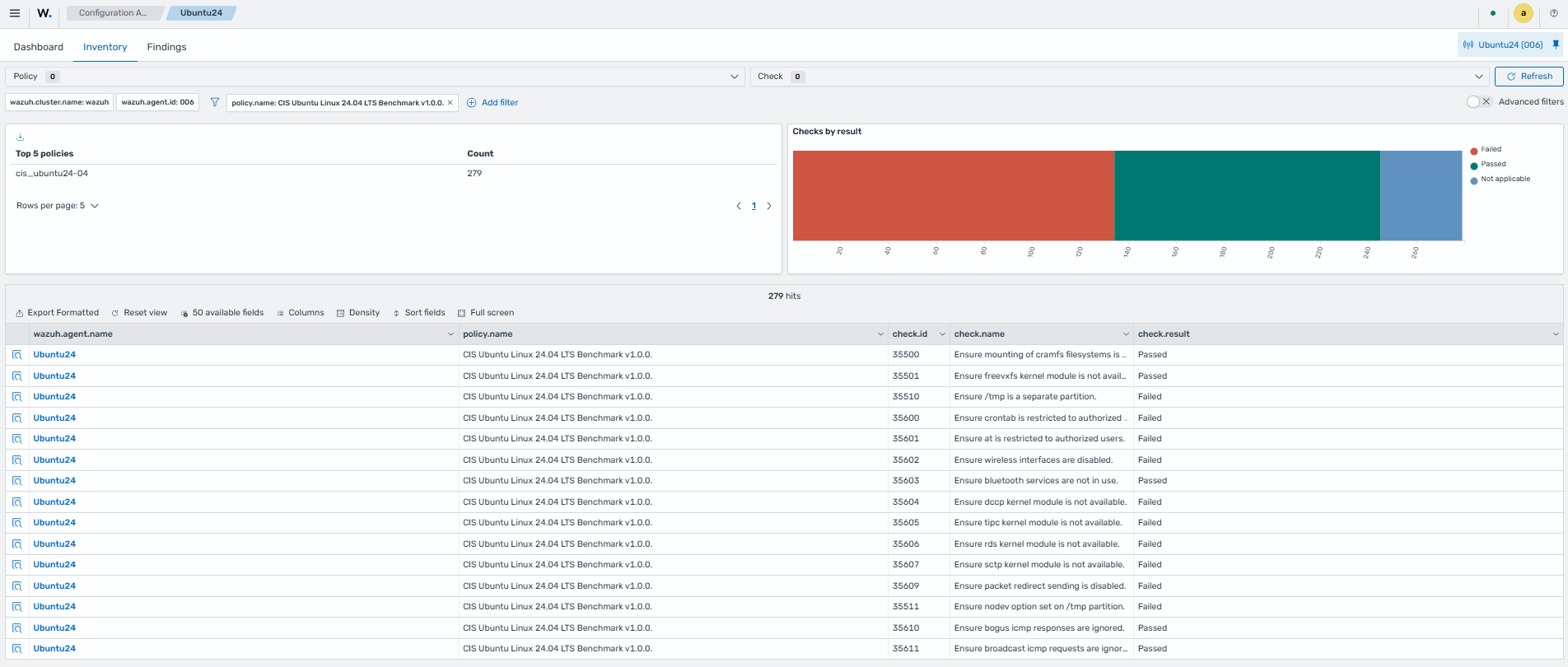
Click + Add filter. Then filter by
policy.name.In the Operator field, select is.
In the Values field, select
Custom Web Server Hardening. Inspect the information under Dashboard and Inventory.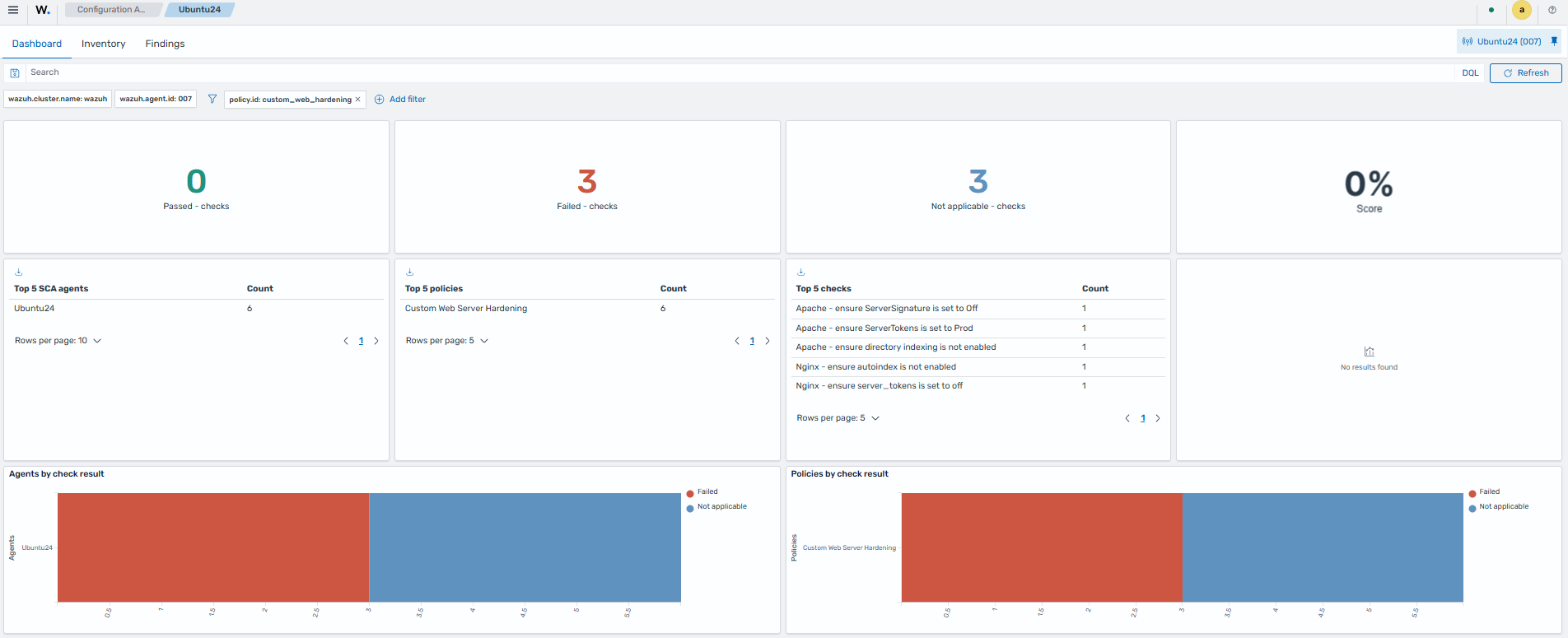
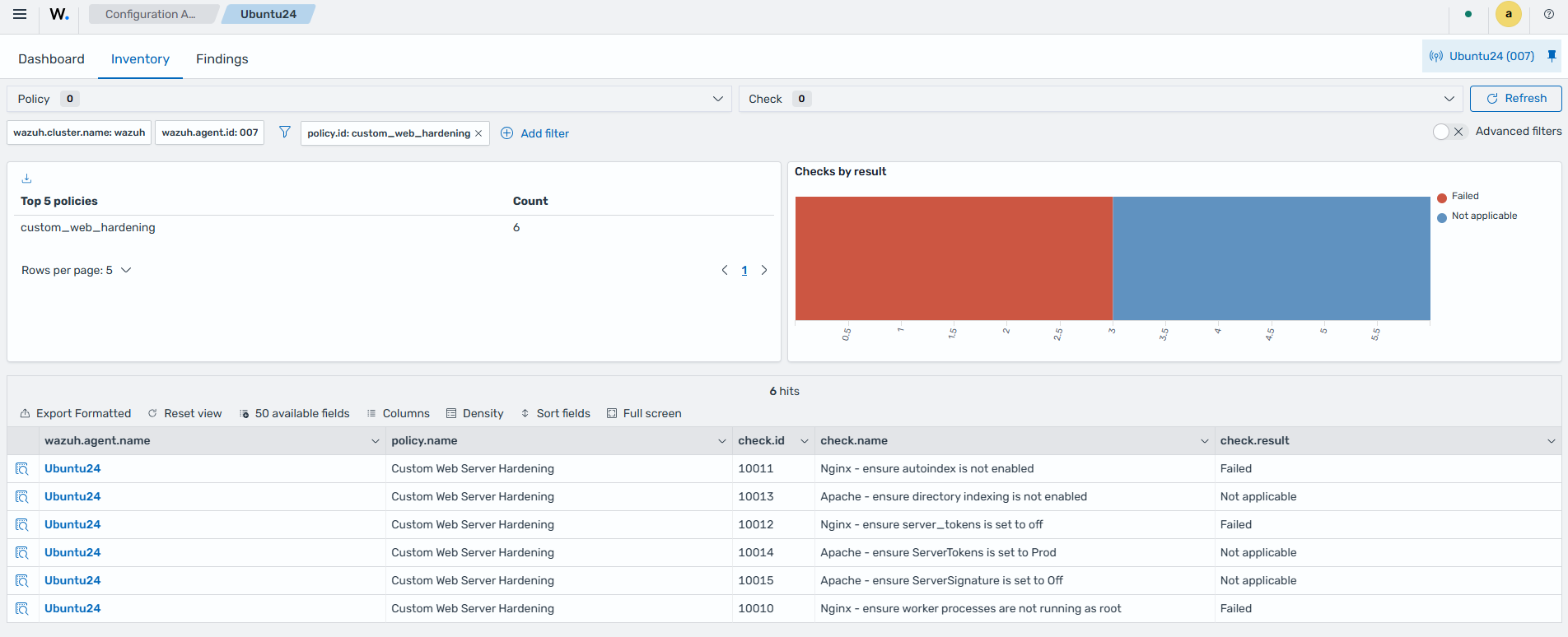
The custom policy appears alongside the built-in CIS policies. Failed checks clearly show why they failed and how to fix them, which demonstrates the value of tailoring assessments to your environment. Expanding a check Finding shows the remediation steps in the check.remediation field.
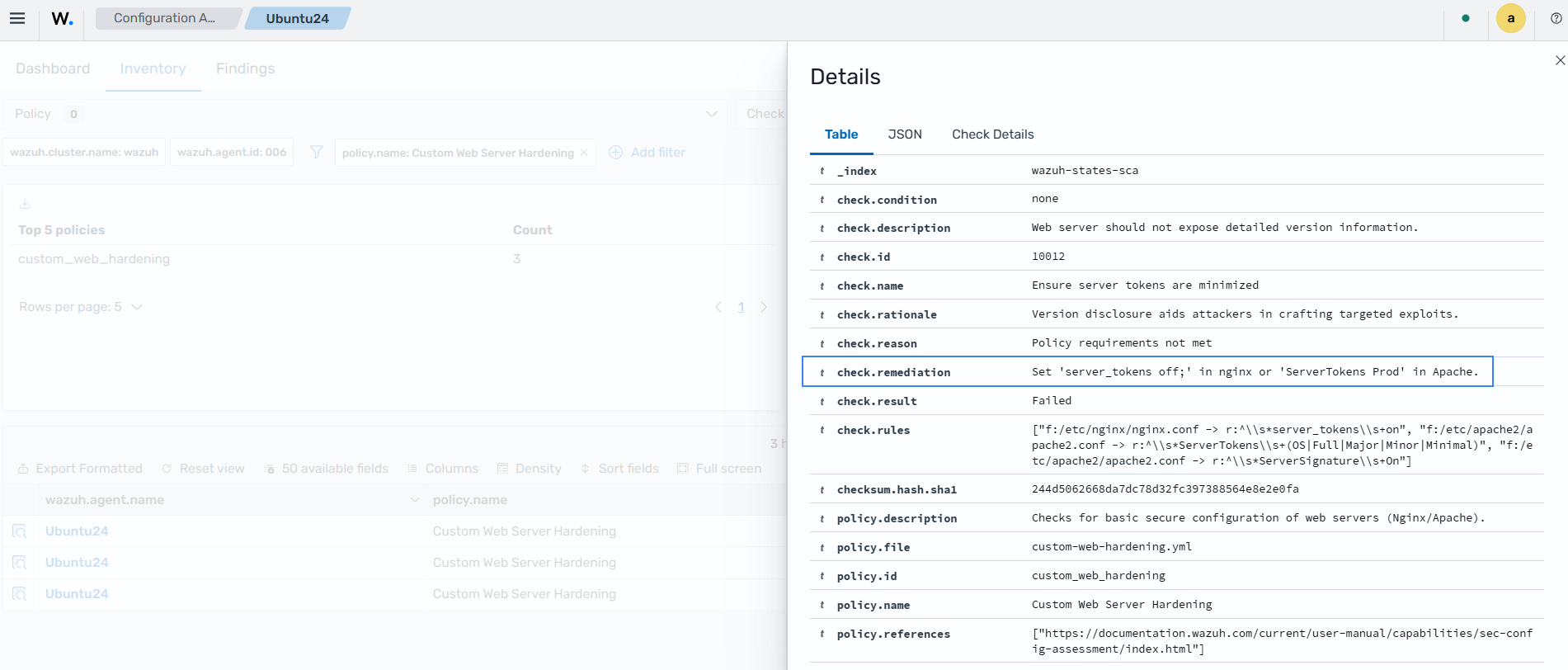
Follow the steps below to remediate the Findings and update the SCA check:
Run the following commands to remediate the insecure configurations:
# sed -i 's/server_tokens on;/server_tokens off;/' /etc/nginx/nginx.conf 2>/dev/null || true
# sed -i 's/autoindex on;/autoindex off;/' /etc/nginx/nginx.conf
# sed -i 's/^user .*/user www-data;/' /etc/nginx/nginx.conf
# systemctl restart nginx
Restart the Wazuh agent to force a fresh SCA scan:
# systemctl restart wazuh-agent