Wazuh agent life cycle
The Wazuh agent life cycle refers to the stages a Wazuh agent goes through from installation on an endpoint to removal from the Wazuh platform. It includes the following stages:
Installation and enrollment
The life cycle starts when you install the Wazuh agent on the endpoint that you want to monitor. After installation, enroll the Wazuh agent with the Wazuh manager to establish communication. For more information, see Wazuh agent enrollment.
Agent connection states
After enrollment, the Wazuh manager stores information about the Wazuh agent and tracks its connection status until you remove the agent. A Wazuh agent can have one of the following connection states, as shown in the image below:
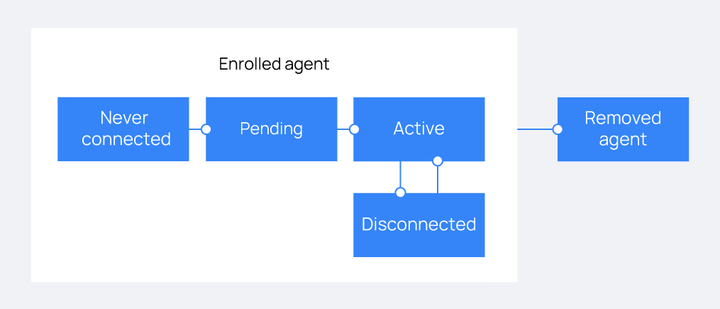
Never connected: The Wazuh agent enrolled successfully but has not connected to the Wazuh manager.
Pending: The Wazuh manager received the initial connection request from the Wazuh agent, but the authentication process has not completed. The Wazuh agent enters this state once after each startup. If the Wazuh agent remains in this state, check for connectivity or authentication issues.
Active: The Wazuh agent connected successfully and can communicate with the Wazuh manager.
Disconnected: The Wazuh manager marks the Wazuh agent as disconnected when it does not receive keep alive messages within the
agents_disconnection_timeinterval. The default value is15m.
Removal
The Wazuh agent life cycle ends when you remove the Wazuh agent from the Wazuh manager. You can remove a Wazuh agent through the Wazuh dashboard or the Wazuh manager API.