Monitoring GitHub audit logs
Organization administrators use GitHub audit logs to review the actions that members perform within their organization. Each log includes details such as the user who performs the action, the nature of the action, and the timestamp of its execution. The Wazuh module for GitHub enables the collection of audit logs from GitHub through its API. Wazuh initiates an HTTP GET request to the GitHub API endpoint /orgs/{org}/audit-log to collect the audit logs. For further details, refer to the GitHub REST API documentation.
Requirements for monitoring GitHub audit logs
You need the following requirements on GitHub to access the audit logs with Wazuh.
GitHub organization: You can only view audit logs for GitHub organizations.
GitHub Enterprise Cloud subscription: Only organizations with a GitHub Enterprise Cloud subscription can use the GitHub audit log REST API.
Creating a personal access token on GitHub
Perform the following steps on GitHub to generate the required personal access token. This access token is required to read audit logs.
Sign in to GitHub with an account that belongs to the organization owner.
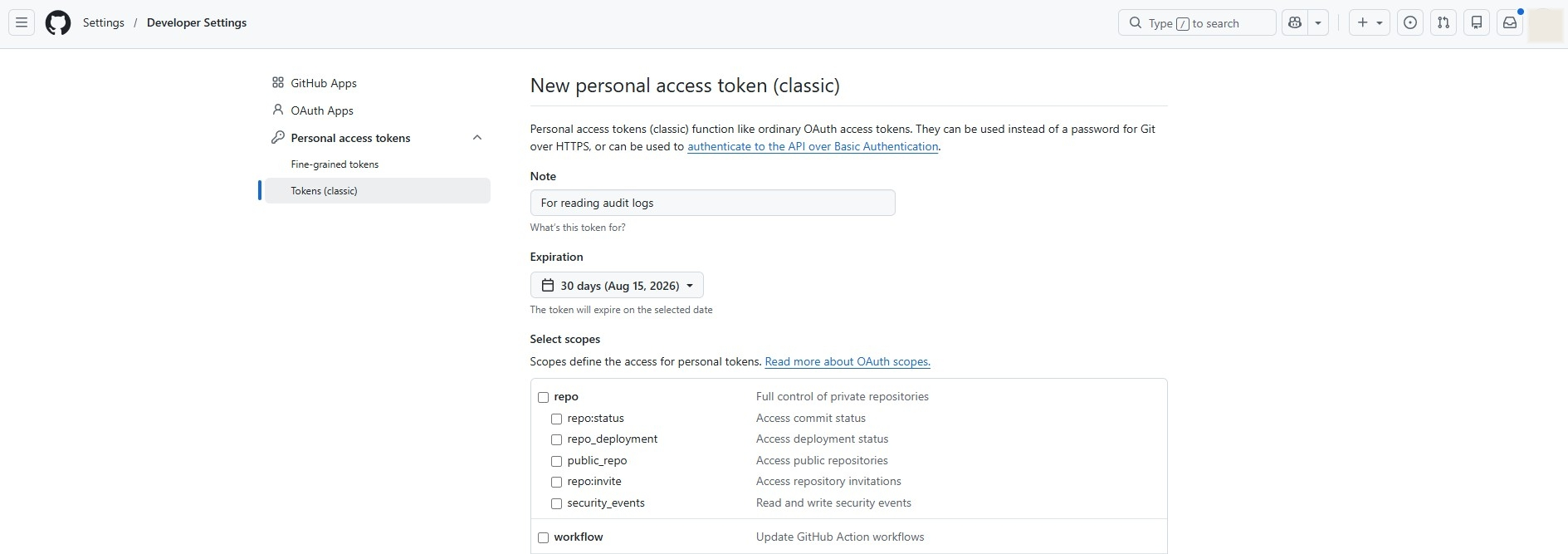
Navigate to https://github.com/settings/tokens/new to create a new personal access token.
Include a descriptive note for the personal access token, and select an expiration time.
Scroll down, select
audit_log, and click Generate token.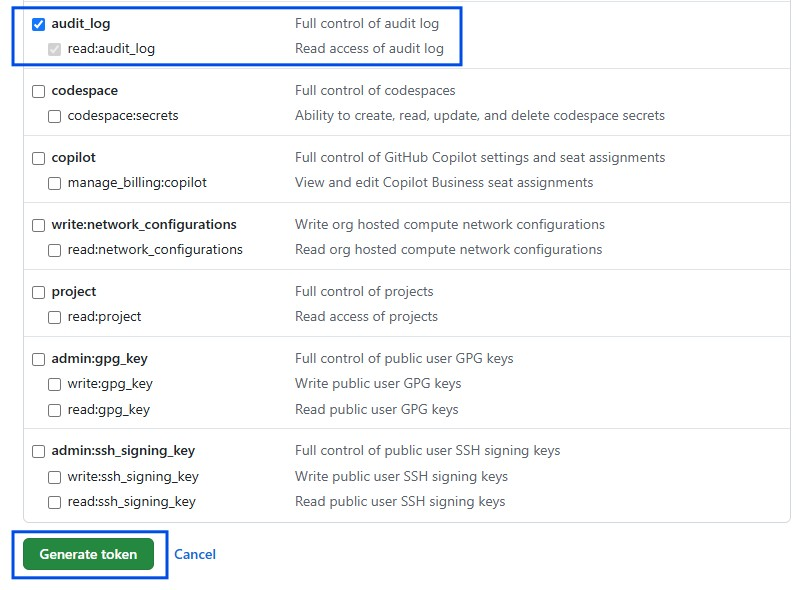
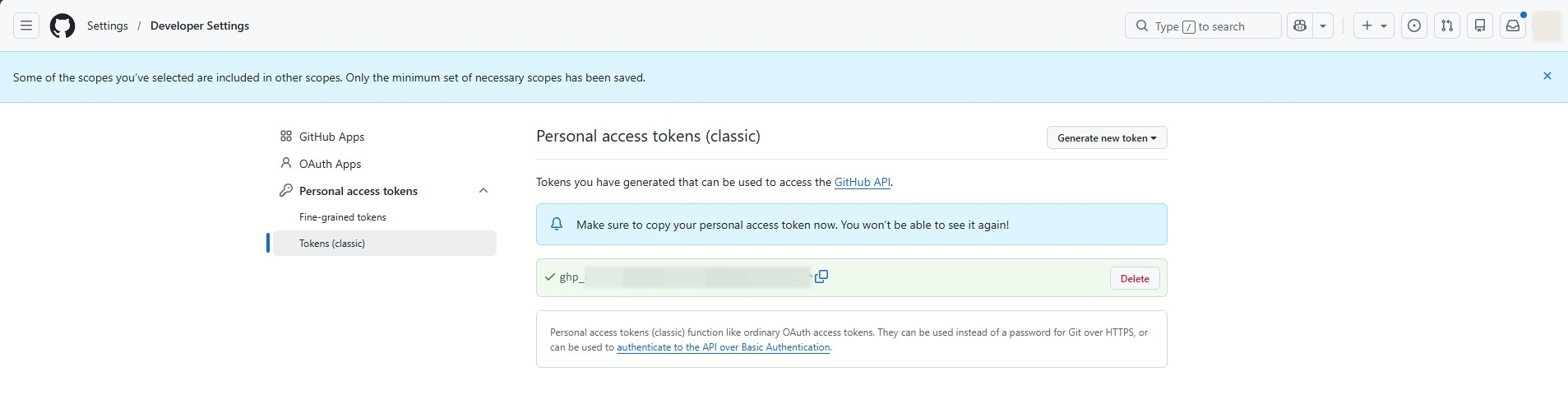
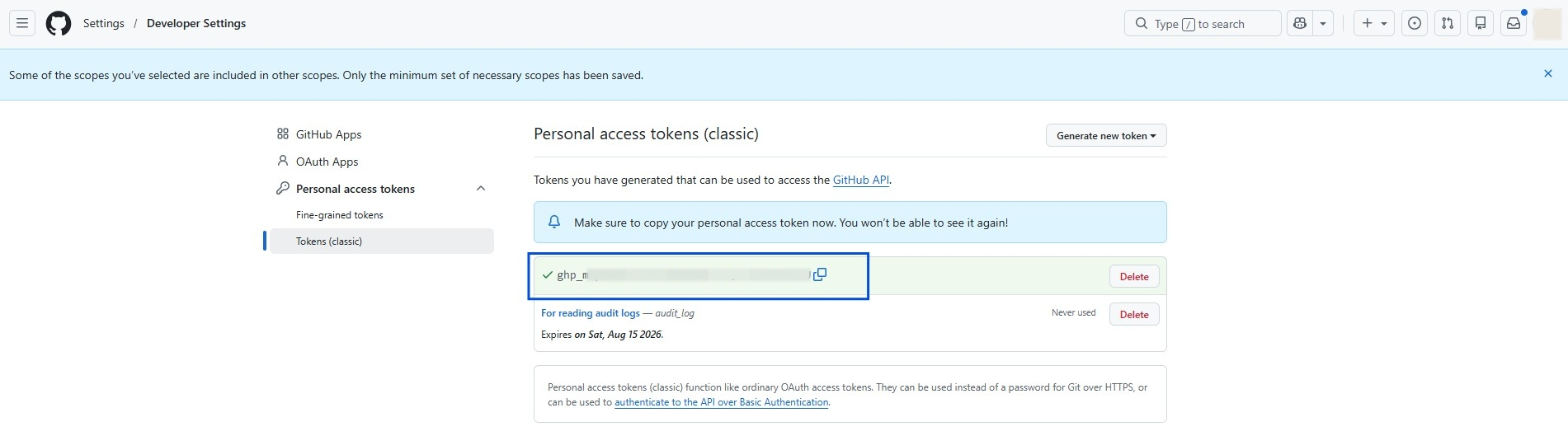
Copy the newly generated personal access token. Save this to a secure location as it is required to configure the Wazuh module for GitHub.
Configuring Wazuh to pull GitHub logs
Perform the following steps to allow Wazuh to monitor, collect, and analyze the GitHub audit logs. You can configure the Wazuh module for GitHub on the Wazuh agent.
Append the following configuration to the
/var/ossec/etc/ossec.conffile on the Wazuh agent.<ossec_config> <github> <enabled>yes</enabled> <interval>10m</interval> <time_delay>30s</time_delay> <curl_max_size>1M</curl_max_size> <only_future_events>yes</only_future_events> <api_auth> <org_name><ORG_NAME></org_name> <api_token><API_TOKEN></api_token> </api_auth> <api_parameters> <event_type>all</event_type> </api_parameters> </github> </ossec_config>
Where:
<enabled>: Enables the Wazuh module for GitHub. The allowed values areyesandno.<interval>: Defines the time interval between each execution of the Wazuh module for GitHub. The default value is10m. The allowed value is any positive number with a suffix character indicating a time unit, such as s (seconds), m (minutes), h (hours), or d (days).<time_delay>: Specifies the delay time of the scan with respect to the current time. The default value is30s. The allowed value is any positive number with a suffix character indicating a time unit, such as s (seconds), m (minutes), h (hours), or d (days).<curl_max_size>: Specifies the maximum size allowed for the GitHub API response. The default value is1M. The allowed value is any positive number with a suffix character indicating a size unit, such as b/B (bytes), k/K (kilobytes), m/M (megabytes), and g/G (gigabytes).<only_future_events>: When set toyes, the Wazuh module for GitHub collects only events generated after you start the Wazuh agent. When set tono, it collects events generated before you start the Wazuh agent. The default value isyes, and the allowed values areyesandno.<api_auth>: This block configures the credentials for authentication with the GitHub REST API. The tags<org_name>and<api_token>are configuration tags within<api_auth>.<org_name>: Name of your GitHub organization. The allowed value is any string.<api_token>: Personal access token to authenticate with the GitHub API. The allowed value is any string.
<api_parameters>: This block configures the internal options in the GitHub REST API. One sub-configuration block within<api_parameters>is<event_type>.<event_type>: Specifies the event types Wazuh collects. The available event types are web and git events. The default value for this configuration block isall, to collect both web and git events. Allowed values areall,web, andgit.
Restart the Wazuh agent service to apply the changes:
# systemctl restart wazuh-agent
Monitoring multiple GitHub organizations
You can monitor multiple GitHub organizations with Wazuh by specifying the organization credentials in individual <api_auth> sections. For example, the following configuration monitors two organizations named organization1 and organization2.
<github>
  <enabled>yes</enabled>
  <interval>10m</interval>
  <time_delay>30s</time_delay>
  <curl_max_size>1M</curl_max_size>
  <only_future_events>yes</only_future_events>


  <api_auth>
    <org_name>organization1</org_name>
    <api_token><API_TOKEN></api_token>
  </api_auth>


  <api_auth>
    <org_name>organization2</org_name>
    <api_token><API_TOKEN></api_token>
  </api_auth>


  <api_parameters>
    <event_type>git</event_type>
  </api_parameters>
</github>
Where:
<API_TOKEN>is the GitHub personal access token created within theadmin:orgscope.
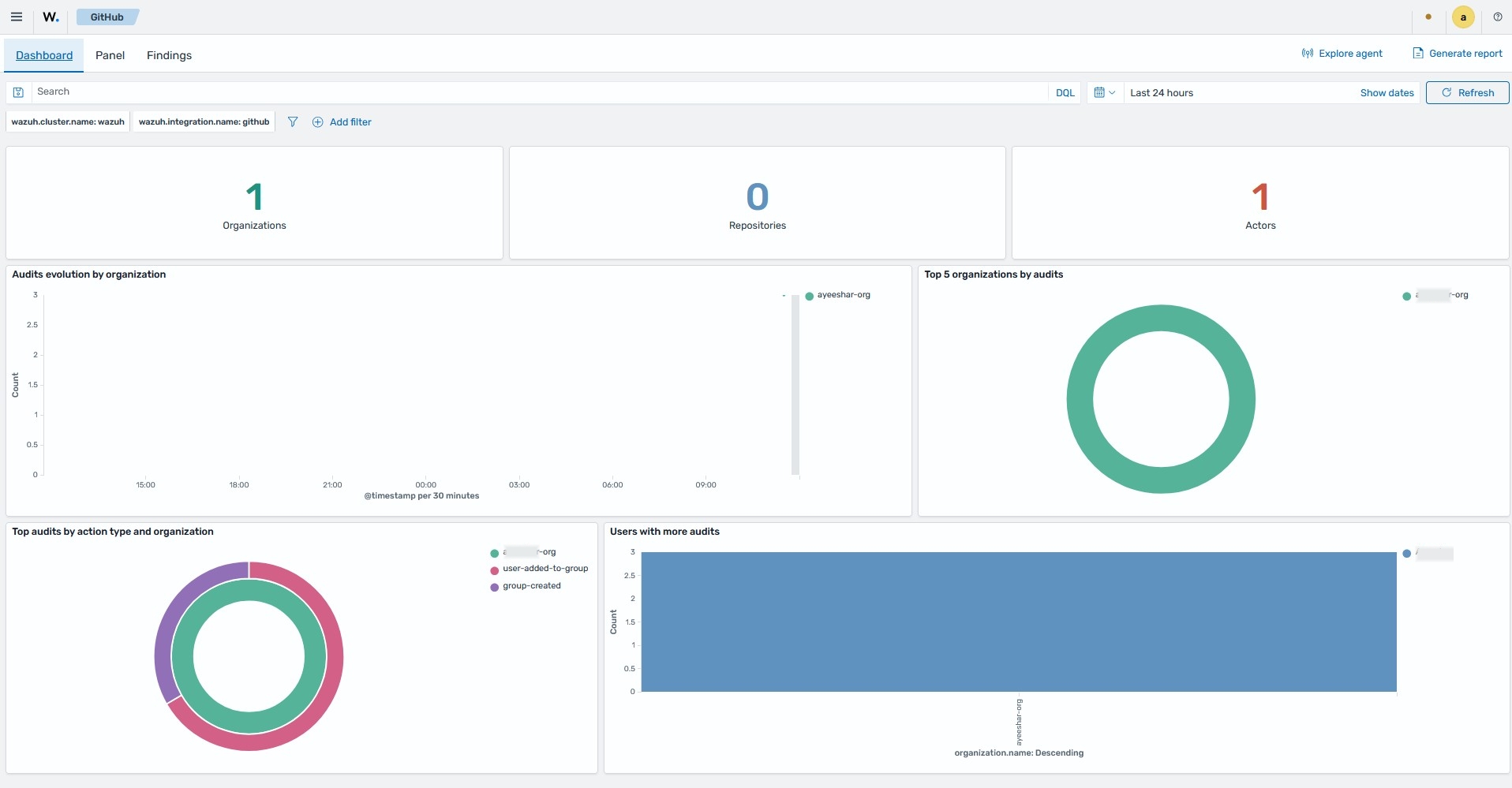
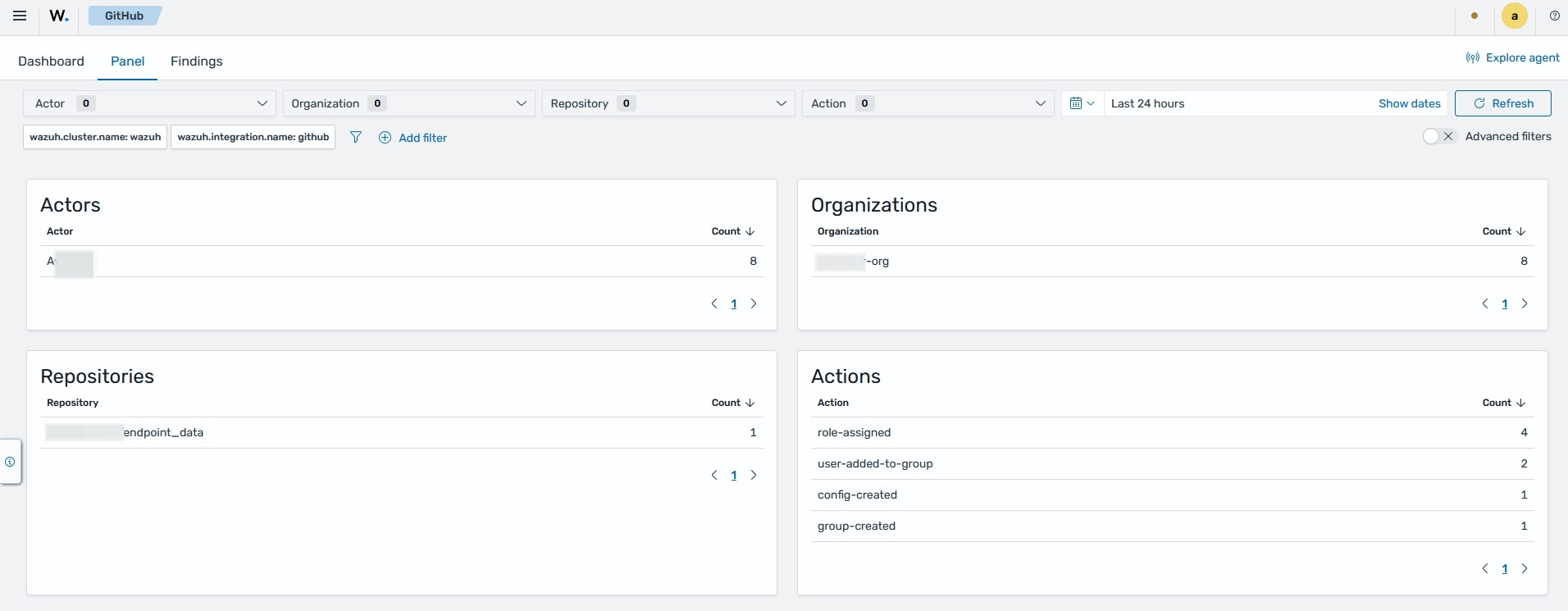
Use cases
Requirements
Integrate Wazuh with GitHub according to the monitoring GitHub activity documentation.
An Ubuntu 24.04 endpoint with curl installed.
GitHub
Create a GitHub personal access token within the admin:org, repo, and delete_repo scopes. We use this token with the GitHub REST API to test use cases by performing actions on the organization that trigger Wazuh findings.
Perform the following steps to create the API token:
Navigate to https://github.com/settings/tokens/new, add a note for the token, select your desired expiration time, and then select the
repoandadmin:orgscopes.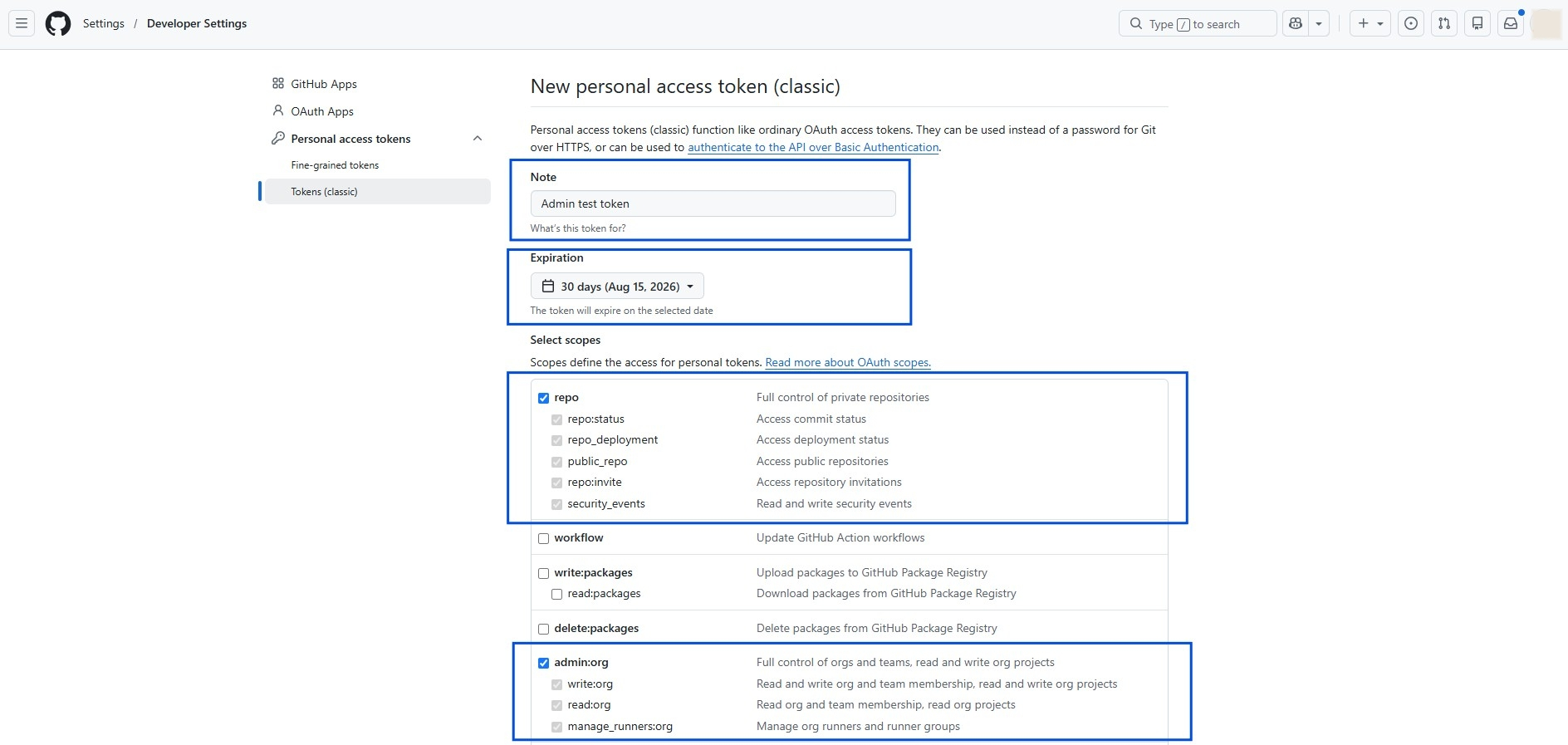
Scroll to the bottom of the page, then select the
delete_reposcope and click the Generate token button.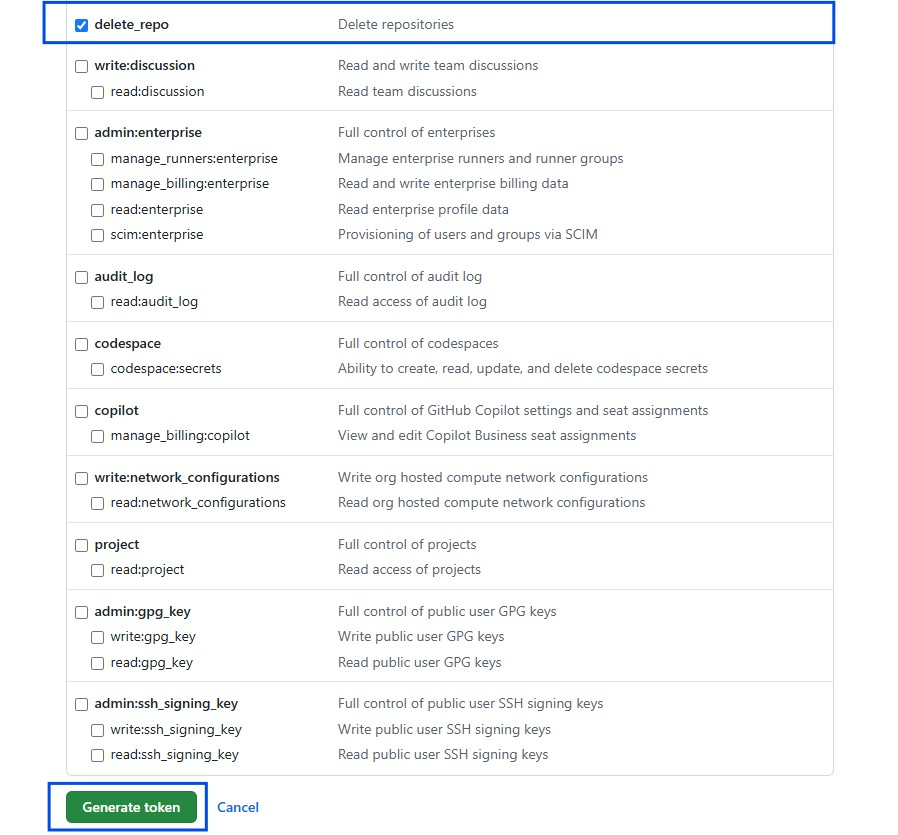
Copy the newly generated personal access token.
Ubuntu endpoint
Detecting manipulation of organization members
Inviting a member
Perform the following steps to invite a member to your organization.
Run the following command on the Ubuntu endpoint:
# curl -L \
  -X POST \
  -H "Accept: application/vnd.github+json" \
  -H "Authorization: Bearer <API_TOKEN>" \
  -H "X-GitHub-Api-Version: 2026-03-10" \
  https://api.github.com/orgs/<ORG_NAME>/invitations \
  -d '{"email":"<USER_EMAIL>","role":"direct_member"}'
Where:
<API_TOKEN>is the GitHub personal access token created within theadmin:orgscope.<ORG_NAME>is your organization's name.<USER_EMAIL>is the email address of the user you want to invite.
Sample output:
{
  "id": 2,
  "node_id": "kgDOCifghnx1",
  "login": null,
  "email": "jack@github.com",
  "role": "direct_member",
  "created_at": "2026-07-16T13:53:19.000+02:00",
  "failed_at": null,
  "failed_reason": null,
  "inviter": {
    "login": "other_user",
    "id": 2,
    "node_id": "kgDOCifghnx1",
    "avatar_url": "https://avatars.githubusercontent.com/u/x?v=4",
    "gravatar_id": "",
    "url": "https://api.github.com/users/other_user",
    "html_url": "https://github.com/other_user",
    "followers_url": "https://api.github.com/users/other_user/followers",
    "following_url": "https://api.github.com/users/other_user/following{/other_user}",
    "gists_url": "https://api.github.com/users/other_user/gists{/gist_id}",
    "starred_url": "https://api.github.com/users/other_user/starred{/owner}{/repo}",
    "subscriptions_url": "https://api.github.com/users/other_user/subscriptions",
    "organizations_url": "https://api.github.com/users/other_user/orgs",
    "repos_url": "https://api.github.com/users/other_user/repos",
    "events_url": "https://api.github.com/users/other_user/events{/privacy}",
    "received_events_url": "https://api.github.com/users/other_user/received_events",
    "type": "User",
    "user_view_type": "public",
    "site_admin": false
  },
  "team_count": 1,
  "invitation_teams_url": "https://api.github.com/organizations/2/invitations/1/teams",
  "invitation_source": "member"
}
Go to the invited member’s mailbox and accept the invite.
Promoting a member to administrator
Run the following command to promote a member of your organization to the role of an administrator:
# curl -L \
  -X PUT \
  -H "Accept: application/vnd.github+json" \
  -H "Authorization: Bearer <API_TOKEN>" \
  -H "X-GitHub-Api-Version: 2026-03-10" \
  https://api.github.com/orgs/<ORG_NAME>/memberships/<MEMBER_USERNAME> \
  -d '{"role":"admin"}'
Where:
<API_TOKEN>is the GitHub personal access token created within theadmin:orgscope.<ORG_NAME>is your organization's name.<MEMBER_USERNAME>is the username of the user you want to promote.
Sample output:
{
  "url": "https://api.github.com/orgs/other_user-org/memberships/other_user1",
  "state": "active",
  "role": "admin",
  "organization_url": "https://api.github.com/orgs/other_user-org",
  "user": {
    "login": "other_user1",
    "id": 2,
    "node_id": "kgDOCifghnx1",
    "avatar_url": "https://avatars.githubusercontent.com/u/2?v=4",
    "gravatar_id": "",
    "url": "https://api.github.com/users/other_user1",
    "html_url": "https://github.com/other_user1",
    "followers_url": "https://api.github.com/users/other_user1/followers",
    "following_url": "https://api.github.com/users/other_user1/following{/other_user}",
    "gists_url": "https://api.github.com/users/other_user1/gists{/gist_id}",
    "starred_url": "https://api.github.com/users/other_user1/starred{/owner}{/repo}",
    "subscriptions_url": "https://api.github.com/users/other_user1/subscriptions",
    "organizations_url": "https://api.github.com/users/other_user1/orgs",
    "repos_url": "https://api.github.com/users/other_user1/repos",
    "events_url": "https://api.github.com/users/other_user1/events{/privacy}",
    "received_events_url": "https://api.github.com/users/other_user1/received_events",
    "type": "User",
    "user_view_type": "public",
    "site_admin": false
  },
  "direct_membership": true,
  "enterprise_teams_providing_indirect_membership": [],
  "organization": {
    "login": "other_user-org",
    "id": 2,
    "node_id": "kgDOCifghnx1",
    "url": "https://api.github.com/orgs/other_user-org",
    "repos_url": "https://api.github.com/orgs/other_user-org/repos",
    "events_url": "https://api.github.com/orgs/other_user-org/events",
    "hooks_url": "https://api.github.com/orgs/other_user-org/hooks",
    "issues_url": "https://api.github.com/orgs/other_user-org/issues",
    "members_url": "https://api.github.com/orgs/other_user-org/members{/member}",
    "public_members_url": "https://api.github.com/orgs/other_user-org/public_members{/member}",
    "avatar_url": "https://avatars.githubusercontent.com/u/305824220?v=4",
    "description": null
  }
}
Creating a new team
Run the following command to create a new team in your organization:
# curl -X POST \
     -H "Authorization: Bearer <API_TOKEN>" \
     -d '{"name": "<NEW_TEAM_NAME>"}' \
     "https://api.github.com/orgs/<ORG_NAME>/teams"
Where:
<NEW_TEAM_NAME>is the name of the new team.<API_TOKEN>is the GitHub personal access token created within theadmin:orgscope.<ORG_NAME>is your organization's name.
Sample output:
{
  "name": "Org managers",
  "id": 2,
  "node_id": "kgDOCifghnx1",
  "slug": "org-managers",
  "description": null,
  "privacy": "secret",
  "notification_setting": "notifications_enabled",
  "url": "https://api.github.com/organizations/3/team/7",
  "html_url": "https://github.com/orgs/other_user/teams/org-managers",
  "members_url": "https://api.github.com/organizations/3/team/1/members{/member}",
  "repositories_url": "https://api.github.com/organizations/7/team/9/repos",
  "type": "organization",
  "organization_id": 5,
  "permission": "pull",
  "created_at": "2026-07-16T12:53:24Z",
  "updated_at": "2026-07-16T12:53:24Z",
  "members_count": 1,
  "repos_count": 0,
  "organization": {
    "login": "other_user",
    "id": 6,
    "node_id": "kgDOCifghnx1",
    "url": "https://api.github.com/orgs/other_user",
    "repos_url": "https://api.github.com/orgs/other_user/repos",
    "events_url": "https://api.github.com/orgs/other_user/events",
    "hooks_url": "https://api.github.com/orgs/other_user/hooks",
    "issues_url": "https://api.github.com/orgs/other_user/issues",
    "members_url": "https://api.github.com/orgs/other_user/members{/member}",
    "public_members_url": "https://api.github.com/orgs/other_user/public_members{/member}",
    "avatar_url": "https://avatars.githubusercontent.com/u/5?v=4",
    "description": null,
    "is_verified": false,
    "has_organization_projects": true,
    "has_repository_projects": true,
    "public_repos": 0,
    "public_gists": 0,
    "followers": 0,
    "following": 0,
    "html_url": "https://github.com/other_user",
    "created_at": "2026-07-16T11:46:25Z",
    "updated_at": "2026-07-16T11:46:25Z",
    "archived_at": null,
    "type": "Organization"
  },
  "parent": null
}
Viewing the findings
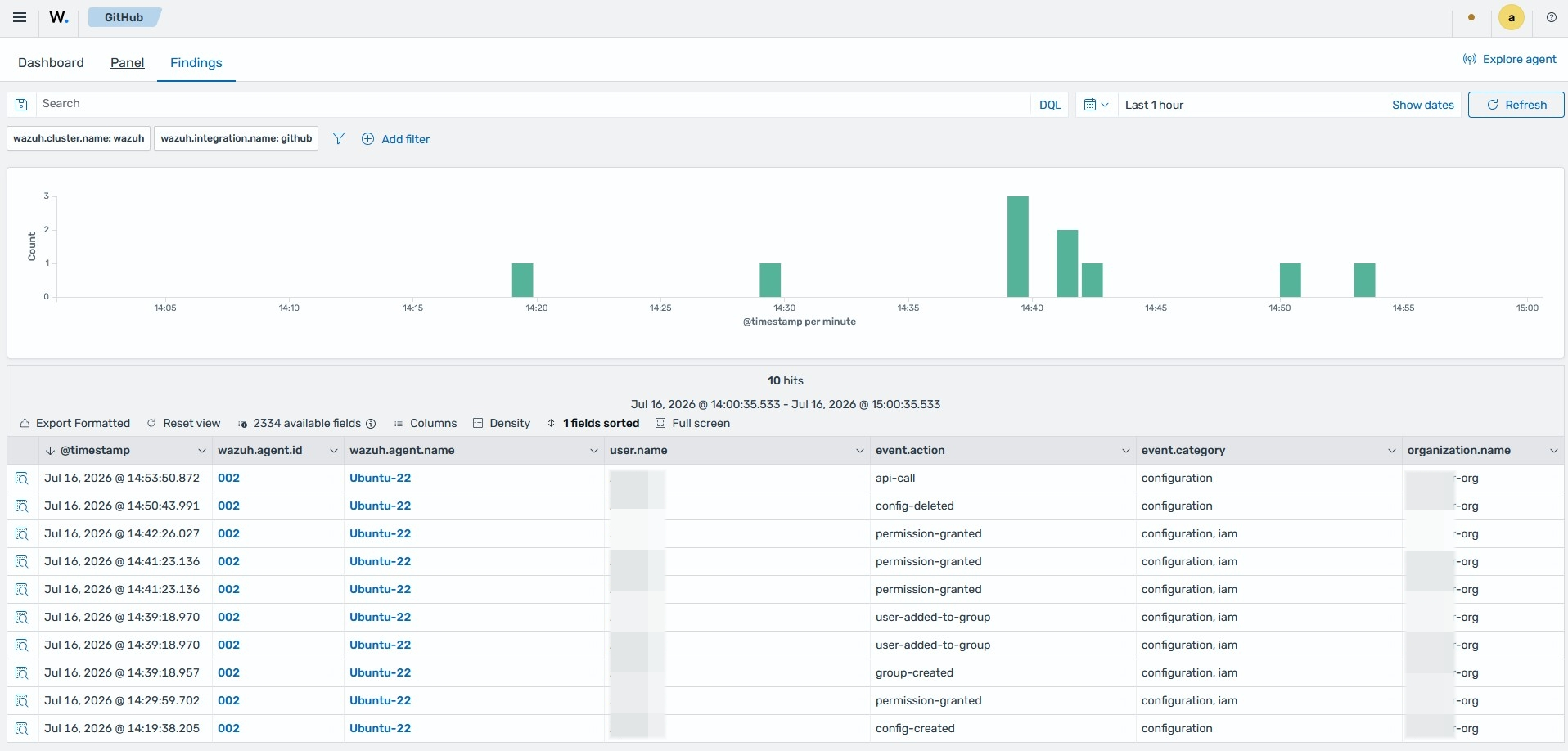
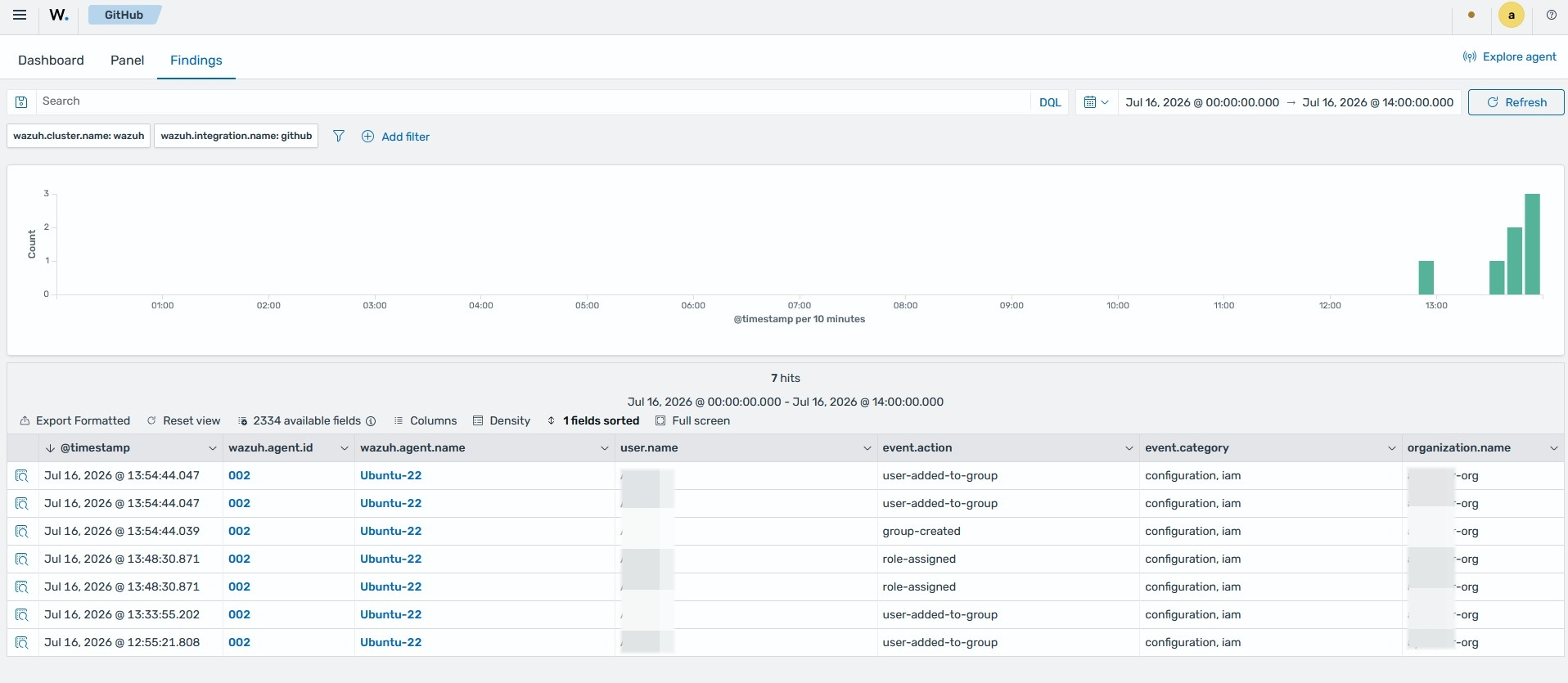
View the findings generated on the Wazuh dashboard after we performed the above actions on the monitored GitHub organization.
Click the menu icon, then navigate to Cloud security > GitHub.
Switch to the Findings tab.
Detecting changes to a repository
Creating a new repository
Run the following command to create a new repository:
# curl -L \
  -X POST \
  -H "Accept: application/vnd.github+json" \
  -H "Authorization: Bearer <API_TOKEN>" \
  -H "X-GitHub-Api-Version: 2026-03-10" \
  https://api.github.com/orgs/<ORG_NAME>/repos \
  -d '{"name":"<NEW_REPO_NAME>","description":"<REPO_DESCRIPTION>"}'
Where:
<API_TOKEN>is the GitHub personal access token created within thereposcope.<ORG_NAME>is your organization name.<NEW_REPO_NAME>is the name of the repository you want to create.<REPO_DESCRIPTION>is the description of the repository you want to create.
Sample output:
{
  "id": 5,
  "node_id": "kgDoCifgonx1",
  "name": "Repo",
  "full_name": "other_user/Repo",
  "private": false,
  "owner": {
    "login": "other_user",
    "id": 5,
    "node_id": "kgDoCifgonx1",
    "avatar_url": "https://avatars.githubusercontent.com/u/30?v=4",
    "gravatar_id": "",
    "url": "https://api.github.com/users/other_user",
    "html_url": "https://github.com/other_user",
    "followers_url": "https://api.github.com/users/other_user/followers",
    "following_url": "https://api.github.com/users/other_user/following{/other_user}",
    "gists_url": "https://api.github.com/users/other_user/gists{/gist_id}",
    "starred_url": "https://api.github.com/users/other_user/starred{/owner}{/repo}",
    "subscriptions_url": "https://api.github.com/users/other_user/subscriptions",
    "organizations_url": "https://api.github.com/users/other_user/orgs",
    "repos_url": "https://api.github.com/users/other_user/repos",
    "events_url": "https://api.github.com/users/other_user/events{/privacy}",
    "received_events_url": "https://api.github.com/users/other_user/received_events",
    "type": "Organization",
    "user_view_type": "public",
    "site_admin": false
  },
  "html_url": "https://github.com/other_user/Repo",
  "description": "This is your first repository",
  "fork": false,
  "url": "https://api.github.com/repos/other_user/Repo",
  "forks_url": "https://api.github.com/repos/other_user/Repo/forks",
  "keys_url": "https://api.github.com/repos/other_user/Repo/keys{/key_id}",
  "collaborators_url": "https://api.github.com/repos/other_user/Repo/collaborators{/collaborator}",
  "teams_url": "https://api.github.com/repos/other_user/Repo/teams",
  "hooks_url": "https://api.github.com/repos/other_user/Repo/hooks",
  "issue_events_url": "https://api.github.com/repos/other_user/Repo/issues/events{/number}",
  "events_url": "https://api.github.com/repos/other_user/Repo/events",
  "assignees_url": "https://api.github.com/repos/other_user/Repo/assignees{/user}",
  "branches_url": "https://api.github.com/repos/other_user/Repo/branches{/branch}",
  "tags_url": "https://api.github.com/repos/other_user/Repo/tags",
  "blobs_url": "https://api.github.com/repos/other_user/Repo/git/blobs{/sha}",
  "git_tags_url": "https://api.github.com/repos/other_user/Repo/git/tags{/sha}",
  "git_refs_url": "https://api.github.com/repos/other_user/Repo/git/refs{/sha}",
  "trees_url": "https://api.github.com/repos/other_user/Repo/git/trees{/sha}",
  "statuses_url": "https://api.github.com/repos/other_user/Repo/statuses/{sha}",
  "languages_url": "https://api.github.com/repos/other_user/Repo/languages",
  "stargazers_url": "https://api.github.com/repos/other_user/Repo/stargazers",
  "contributors_url": "https://api.github.com/repos/other_user/Repo/contributors",
  "subscribers_url": "https://api.github.com/repos/other_user/Repo/subscribers",
  "subscription_url": "https://api.github.com/repos/other_user/Repo/subscription",
  "commits_url": "https://api.github.com/repos/other_user/Repo/commits{/sha}",
  "git_commits_url": "https://api.github.com/repos/other_user/Repo/git/commits{/sha}",
  "comments_url": "https://api.github.com/repos/other_user/Repo/comments{/number}",
  "issue_comment_url": "https://api.github.com/repos/other_user/Repo/issues/comments{/number}",
  "contents_url": "https://api.github.com/repos/other_user/Repo/contents/{+path}",
  "compare_url": "https://api.github.com/repos/other_user/Repo/compare/{base}...{head}",
  "merges_url": "https://api.github.com/repos/other_user/Repo/merges",
  "archive_url": "https://api.github.com/repos/other_user/Repo/{archive_format}{/ref}",
  "downloads_url": "https://api.github.com/repos/other_user/Repo/downloads",
  "issues_url": "https://api.github.com/repos/other_user/Repo/issues{/number}",
  "pulls_url": "https://api.github.com/repos/other_user/Repo/pulls{/number}",
  "milestones_url": "https://api.github.com/repos/other_user/Repo/milestones{/number}",
  "notifications_url": "https://api.github.com/repos/other_user/Repo/notifications{?since,all,participating}",
  "labels_url": "https://api.github.com/repos/other_user/Repo/labels{/name}",
  "releases_url": "https://api.github.com/repos/other_user/Repo/releases{/id}",
  "deployments_url": "https://api.github.com/repos/other_user/Repo/deployments",
  "created_at": "2026-07-16T13:18:11Z",
  "updated_at": "2026-07-16T13:18:11Z",
  "pushed_at": "2026-07-16T13:18:11Z",
  "git_url": "git://github.com/other_user/Repo.git",
  "ssh_url": "git@github.com:other_user/Repo.git",
  "clone_url": "https://github.com/other_user/Repo.git",
  "svn_url": "https://github.com/other_user/Repo",
  "homepage": null,
  "size": 0,
  "stargazers_count": 0,
  "watchers_count": 0,
  "language": null,
  "has_issues": true,
  "has_projects": true,
  "has_wiki": true,
  "has_pages": false,
  "has_discussions": false,
  "forks_count": 0,
  "mirror_url": null,
  "archived": false,
  "disabled": false,
  "open_issues_count": 0,
  "license": null,
  "allow_forking": true,
  "is_template": false,
  "web_commit_signoff_required": false,
  "has_pull_requests": true,
  "pull_request_creation_policy": "all",
  "topics": [],
  "visibility": "public",
  "forks": 0,
  "open_issues": 0,
  "watchers": 0,
  "default_branch": "main",
  "permissions": {
    "admin": true,
    "maintain": true,
    "push": true,
    "triage": true,
    "pull": true
  },
  "allow_squash_merge": true,
  "allow_merge_commit": true,
  "allow_rebase_merge": true,
  "allow_auto_merge": false,
  "delete_branch_on_merge": false,
  "allow_update_branch": false,
  "squash_merge_commit_message": "COMMIT_MESSAGES",
  "squash_merge_commit_title": "COMMIT_OR_PR_TITLE",
  "merge_commit_message": "PR_TITLE",
  "merge_commit_title": "MERGE_MESSAGE",
  "custom_properties": {},
  "organization": {
    "login": "other_user",
    "id": 4,
    "node_id": "O_kgDOEjqB3A",
    "avatar_url": "https://avatars.githubusercontent.com/u/34?v=4",
    "gravatar_id": "",
    "url": "https://api.github.com/users/other_user",
    "html_url": "https://github.com/other_user",
    "followers_url": "https://api.github.com/users/other_user/followers",
    "following_url": "https://api.github.com/users/other_user/following{/other_user}",
    "gists_url": "https://api.github.com/users/other_user/gists{/gist_id}",
    "starred_url": "https://api.github.com/users/other_user/starred{/owner}{/repo}",
    "subscriptions_url": "https://api.github.com/users/other_user/subscriptions",
    "organizations_url": "https://api.github.com/users/other_user/orgs",
    "repos_url": "https://api.github.com/users/other_user/repos",
    "events_url": "https://api.github.com/users/other_user/events{/privacy}",
    "received_events_url": "https://api.github.com/users/other_user/received_events",
    "type": "Organization",
    "user_view_type": "public",
    "site_admin": false
  },
  "network_count": 0,
  "subscribers_count": 0
}
Adding a team to your repository
Run the following commands to list teams and add a team to your repository:
List your organization's team IDs.
# curl -H "Authorization: Bearer <API_TOKEN>" "https://api.github.com/orgs/<ORG_NAME>/teams"
Input the ID of the team you want to add to your repository.
# curl -X PUT \
     -H "Authorization: Bearer <API_TOKEN>" \
     -d '{"permission": "push"}' \
     "https://api.github.com/teams/<TEAM_ID>/repos/<ORG_NAME>/<REPO_NAME>"
Where:
<API_TOKEN>is the GitHub personal access token created within theadmin:orgscope.<TEAM_ID>is the team ID.<ORG_NAME>is your organization's name.<REPO_NAME>is the name of the repository you want to add a team to.
Managing privileges
Run the following command to grant members of your team administrator privileges on the repository:
# curl \
  -H "Authorization: Bearer <API_TOKEN>" \
  -X PUT \
  -H "Accept: application/vnd.github.v3+json" \
  https://api.github.com/orgs/<ORG_NAME>/teams/<TEAM_NAME>/repos/<ORG_NAME>/<REPO_NAME> \
  -d '{"permission":"admin"}'
Where:
<API_TOKEN>is the GitHub personal access token created within theadmin:orgscope.<ORG_NAME>is your organization's name.<TEAM_NAME>is the name of the specific team in your repository.<REPO_NAME>is the name of the repository whose team access you want to manage.
Deleting repository
Run the following command to delete a repository in your organization:
# curl -L \
  -X DELETE \
  -H "Accept: application/vnd.github+json" \
  -H "Authorization: Bearer <API_TOKEN>" \
  -H "X-GitHub-Api-Version: 2026-03-10" \
  https://api.github.com/repos/<ORG_NAME>/<REPO_NAME>
Where:
<API_TOKEN>is the GitHub personal access token created within thedelete_reposcope.<ORG_NAME>is your organization's name.<REPO_NAME>is the name of the repository you want to delete from your organization.
Deleting team
Run the following command to delete the team you created:
# curl -L \
  -X DELETE \
  -H "Accept: application/vnd.github+json" \
  -H "Authorization: Bearer <API_TOKEN>" \
  -H "X-GitHub-Api-Version: 2026-03-10" \
  https://api.github.com/orgs/<ORG_NAME>/teams/<TEAM_NAME>
Where:
<API_TOKEN>is the GitHub personal access token created within theadmin:orgscope.<ORG_NAME>is your organization's name.<TEAM_NAME>is the name of the specific team in your repository.
Viewing the findings
View the findings generated on the Wazuh dashboard after we performed the above actions on the monitored GitHub organization.
Click the menu icon, then navigate to Cloud security > GitHub.
Switch to the Findings tab.