Creating custom FIM rules
Wazuh includes out-of-the-box rules that trigger findings when monitored files are created, modified, or deleted. The image below shows findings for file addition, modification, and deletion.
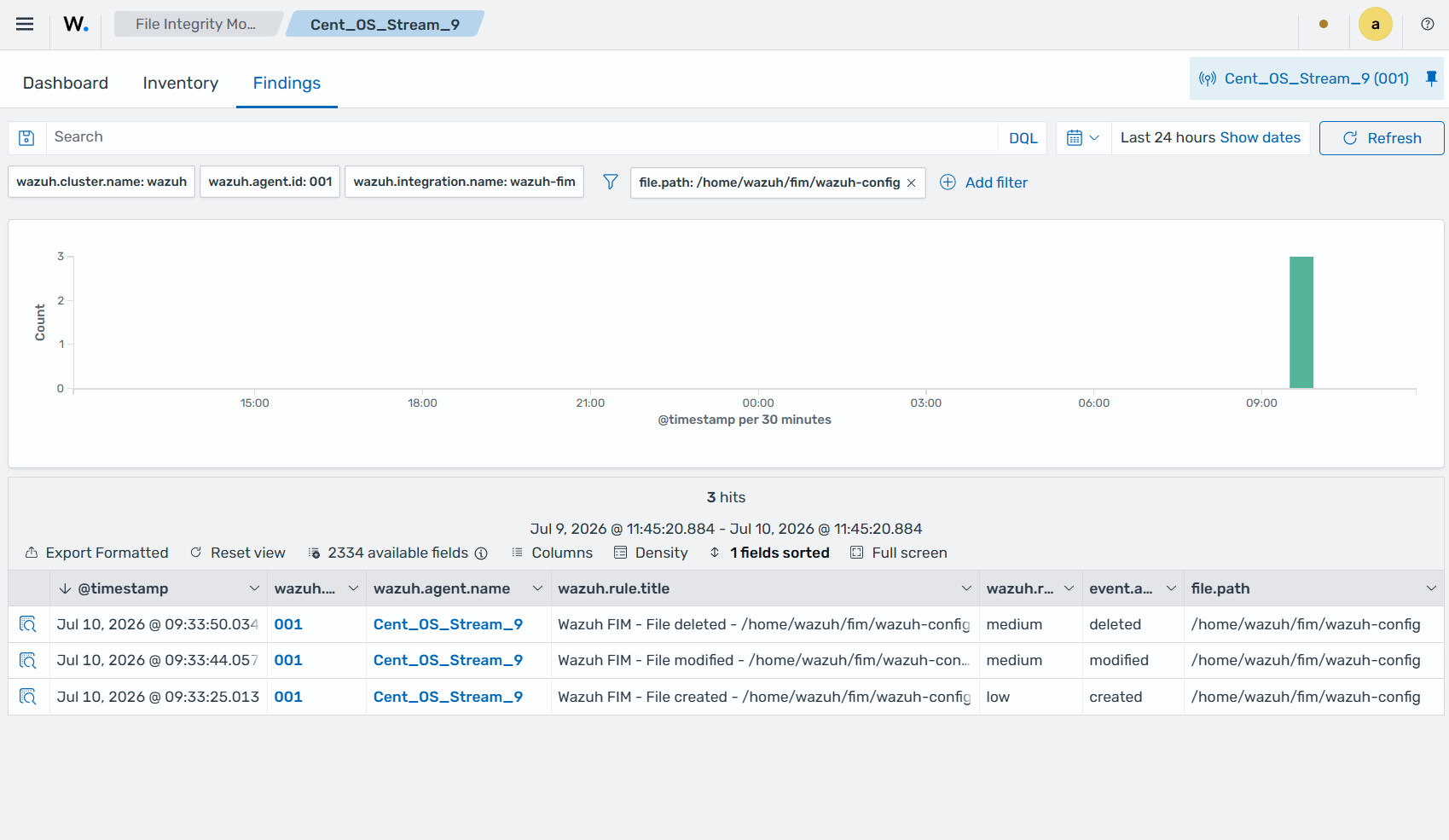
You can use custom Wazuh FIM rules to monitor changes to files and directories based on specific criteria such as filename, permissions, and content. For example, you can create a custom rule to detect changes to a critical system file or configuration file. Whenever a user or process modifies the file, Wazuh triggers a specific finding indicating the change and the details of the modification.
Custom FIM rules extend the out-of-the-box detection capability of the Wazuh FIM module, making it easier to identify and respond to security incidents such as data breaches, insider threats, and other cyberattacks involving file manipulation.
This section shows how to use fields decoded from FIM events in custom rules, explaining what each decoded field represents in the Wazuh Common Schema.
Mapping FIM fields to Wazuh findings
Fields are information that the Wazuh decoder extracts from events the Wazuh manager receives. Each event type has specific fields. The decoder identifies them with a field name. The Wazuh manager translates these fields into Wazuh Common Schema (WCS) fields and sends them to the Wazuh indexer for storage and threat detection.
FIM findings: fields correspondence
The following table shows a subset of FIM event fields and their corresponding Wazuh Common Schema (WCS) fields as they appear in a finding. Refer to WCS fields for the complete list.
Field Name |
WCS field |
Field description |
|---|---|---|
|
|
Unique identifier of the Wazuh agent. |
|
|
Name assigned to the agent. |
|
|
IP address of the agent host. |
|
|
Version of the Wazuh agent. |
|
|
Host system architecture. |
|
|
Name of the Wazuh cluster. |
|
|
Cluster node where the event originated. |
|
|
Absolute path of the monitored file. |
|
|
File size in bytes. |
|
|
Last modification timestamp. |
|
|
Inode number of the file. |
|
|
User ID of the file owner. |
|
|
Username of the file owner. |
|
|
Group ID of the file. |
|
|
Group name owning the file. |
|
|
File permission bits. |
|
|
File attributes (system‑dependent). |
|
|
Device associated with the file. |
|
|
MD5 hash of the file contents. |
|
|
SHA‑1 hash of the file contents. |
|
|
SHA‑256 hash of the file contents. |
|
|
Timestamp when the FIM event was generated. |
|
|
Version of the Wazuh Common Schema. |
Custom FIM rules example
The following example demonstrates how to customize the default Wazuh FIM detection behavior by building a custom rule from the Wazuh Common Schema (WCS) FIM fields.
Trigger file deletion findings
Accidental or unauthorized deletion of critical files can cause data loss, system disruption, or downtime. An attacker who gains access to a system can delete critical files, rendering it unusable and disrupting the organization.
Wazuh includes an out-of-the-box rule that generates a finding when a monitored file or a file in a monitored directory is deleted. This example creates a custom FIM rule that triggers a finding and shows the user and application that deleted a file in the rule title.
Use case description
Endpoint |
Description |
|---|---|
Windows 11 |
The FIM module monitors a folder on this endpoint for file deletions. |
Wazuh dashboard
This section describes how to create custom rules using the Security Analytics interface on the Wazuh dashboard.
Create custom integration
An integration is a logical grouping of decoders, KVDBs, and rules that belong to a common log source or product. Perform the following steps on the Wazuh dashboard using the Security Analytics section.
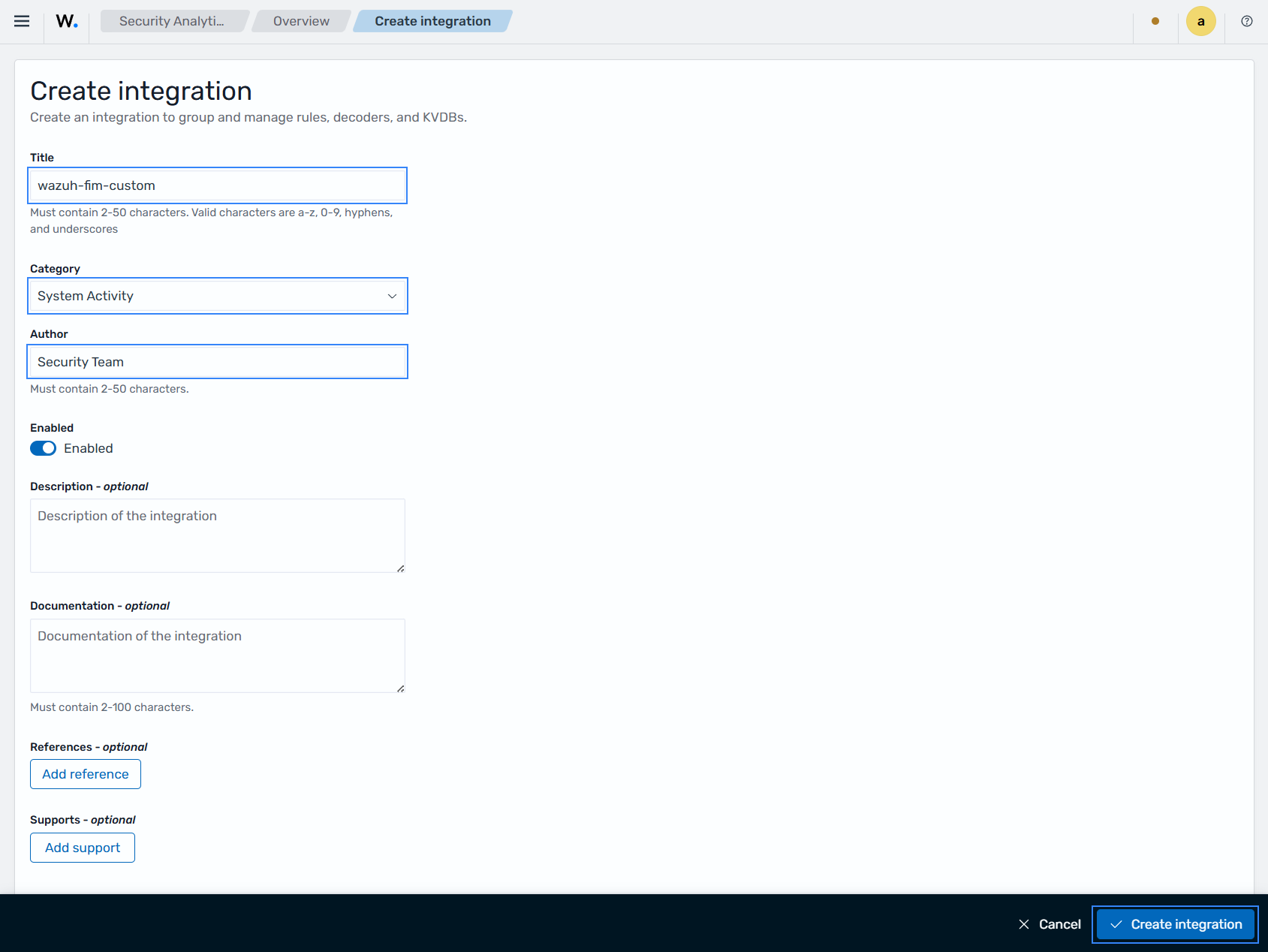
Go to Security Analytics → Overview → Integrations → Actions → Create. Make sure the space selector reads Draft.
In the form, enter the following values that we use in this example. Make sure the integration is Enabled, then click Create integration:
Title:
wazuh-fim-customCategory:
System ActivityAuthor:
Security Team
Create a custom rule
Wazuh rules define the detection logic for identifying relevant security activity in normalized events. They describe what should be detected by specifying conditions on event fields. Make sure the space selector reads Draft and then follow these steps to create a custom rule.
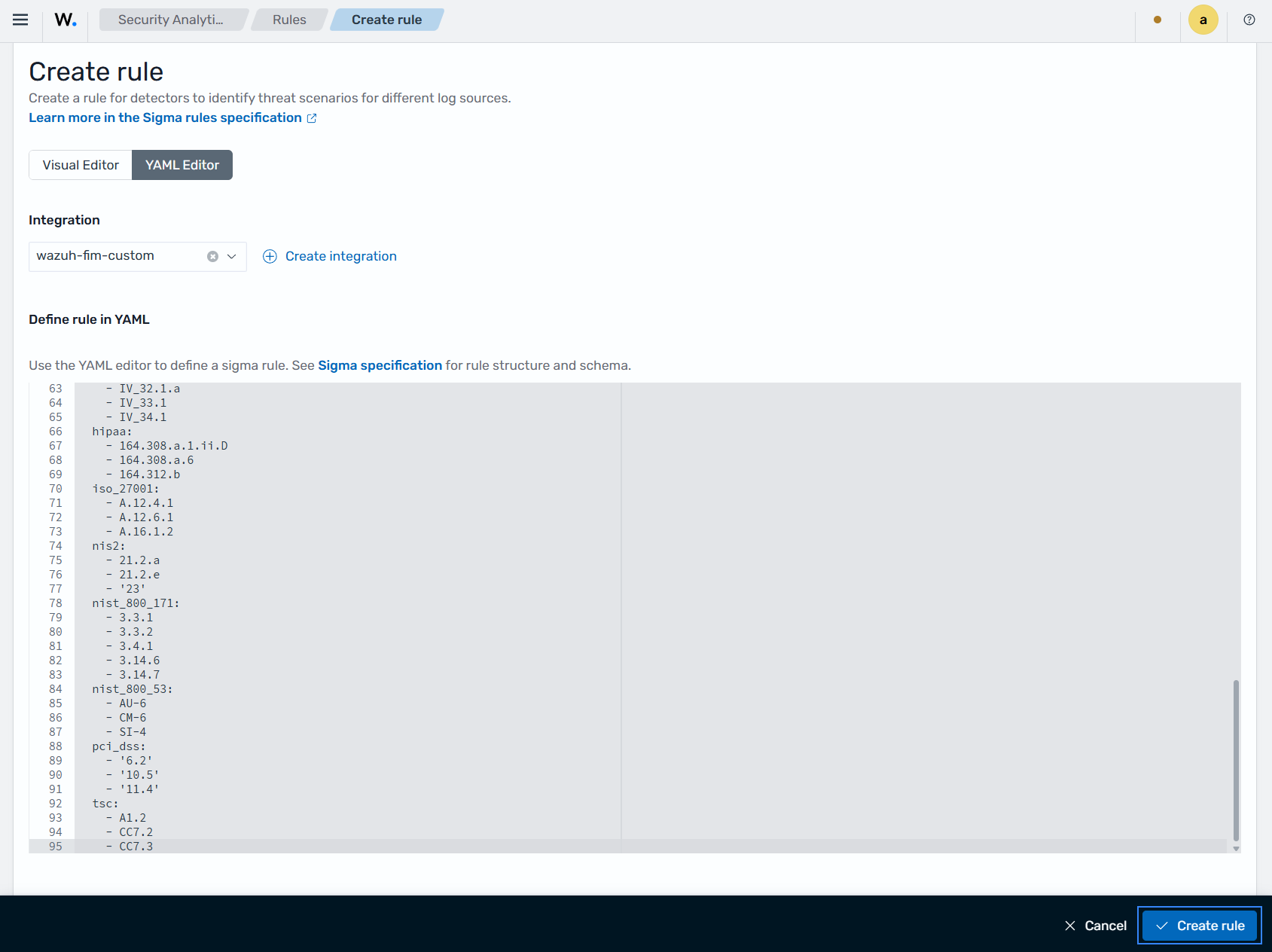
Go to Security Analytics → Detection → Rules → Create.
Select YAML Editor, choose the integration
wazuh-fim-custom, and paste the rule below:logsource: product: wazuh-fim-custom tags: - attack.defense-evasion - attack.impact - attack.t1070.004 - attack.t1485 falsepositives: - Legitimate file cleanup operations or uninstallation of software - Authorized administrative removal of files - Temporary file deletion by applications level: medium status: stable enabled: true detection: condition: selection selection: event.action: deleted metadata: title: Wazuh FIM - Monitored file deleted by {{user.name}} with {{process.name}} author: Wazuh, Inc. description: >- Detects file deletion events reported by Wazuh File Integrity Monitoring (FIM). A monitored file was removed, which could indicate unauthorized deletion, anti-forensics activity, or data destruction. references: - >- https://documentation.wazuh.com/current/user-manual/capabilities/file-integrity/index.html - >- https://documentation.wazuh.com/current/user-manual/reference/ossec-conf/syscheck.html documentation: '' supports: - '' mitre: tactic: id: - TA0005 - TA0040 name: - Stealth - Impact technique: id: - T1070 - T1485 name: - Indicator Removal - Data Destruction compliance: cmmc: - AU.L2-3.3.1 - CM.L2-3.4.1 - SI.L2-3.14.1 fedramp: - AU-6 - CM-6 - SI-4 gdpr: - II_5.1.f - IV_32.1.a - IV_33.1 - IV_34.1 hipaa: - 164.308.a.1.ii.D - 164.308.a.6 - 164.312.b iso_27001: - A.12.4.1 - A.12.6.1 - A.16.1.2 nis2: - 21.2.a - 21.2.e - '23' nist_800_171: - 3.3.1 - 3.3.2 - 3.4.1 - 3.14.6 - 3.14.7 nist_800_53: - AU-6 - CM-6 - SI-4 pci_dss: - '6.2' - '10.5' - '11.4' tsc: - A1.2 - CC7.2 - CC7.3
Click Create rule to complete the rule creation process.
Promote the rule from the draft to the test space
In the draft space, you create and refine your integrations, decoders, and rules. Promoting this rule to the test space allows you to validate it before introducing it to production. Make sure the space selector reads Draft, then follow these steps to promote the content.
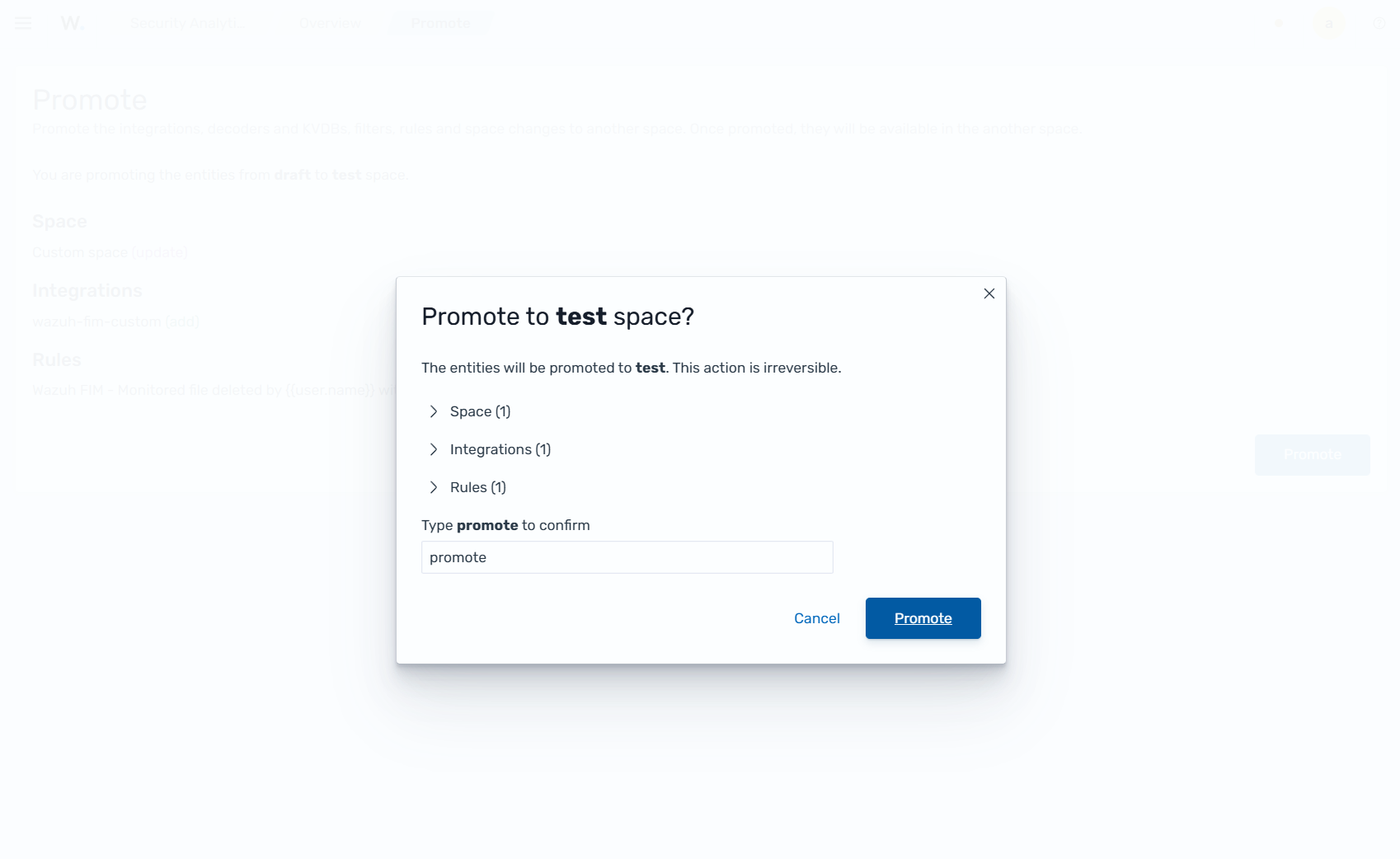
Go to Security Analytics → Overview, and click Actions → Promote.
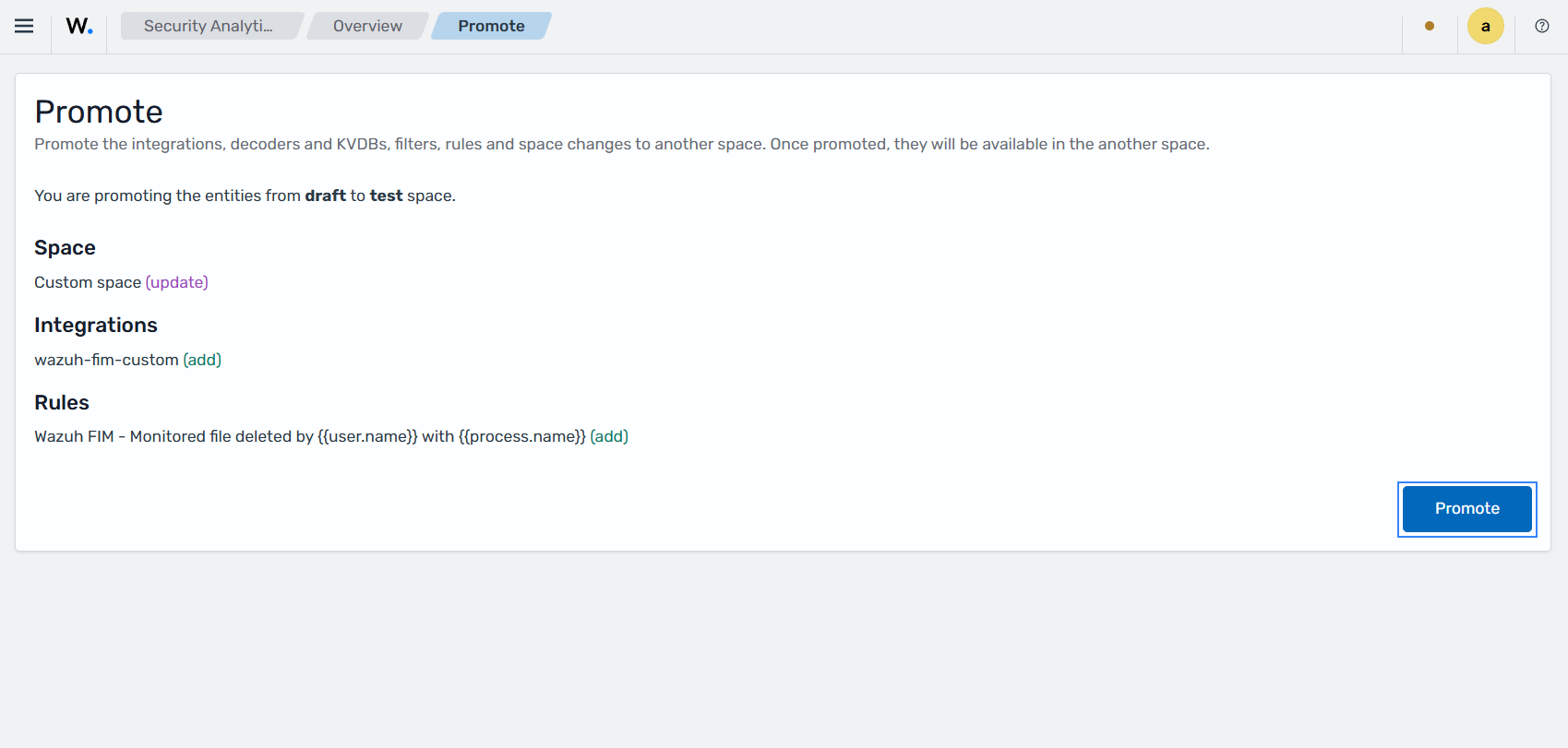
Type the confirmation message when prompted, and click Promote.
Promote the rule from test to custom
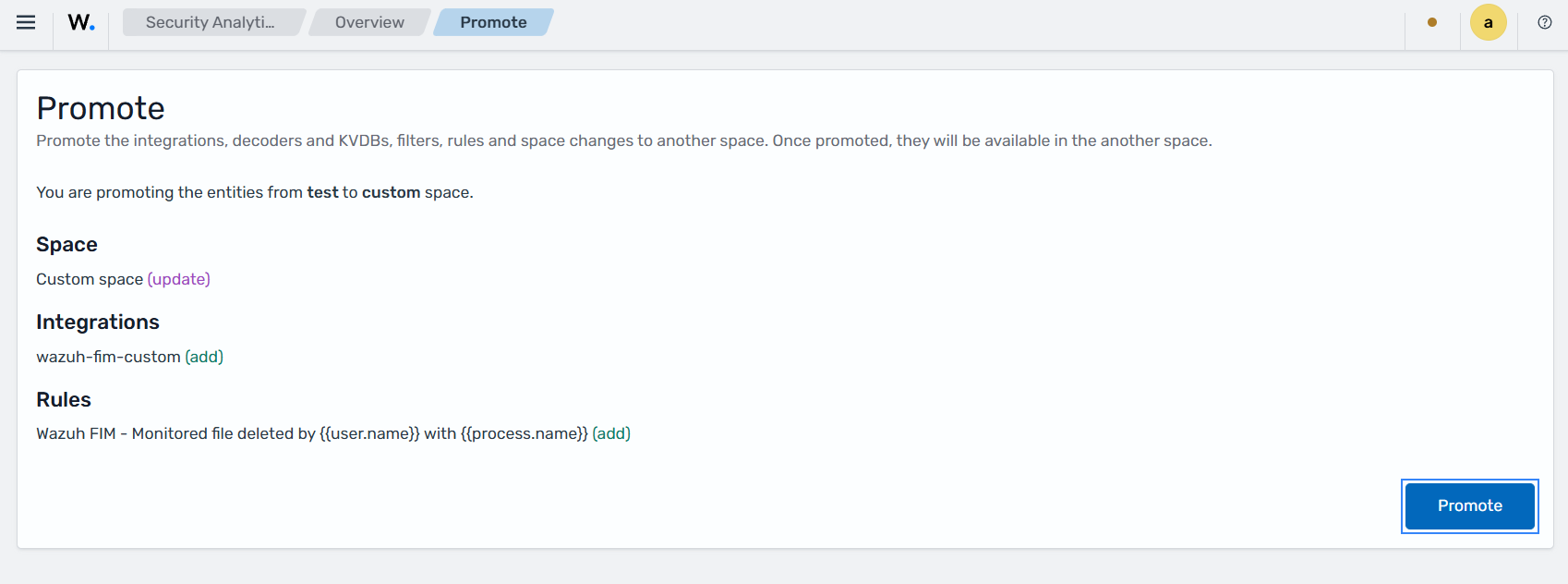
Promoting your rule makes it available for use in production environments, where the Wazuh data analysis engine can process and analyze incoming events. Make sure the space selector reads Test, then follow these steps to promote the rule.
Go to Security Analytics → Overview.
Click Actions → Promote, type the confirmation message, and click Promote.
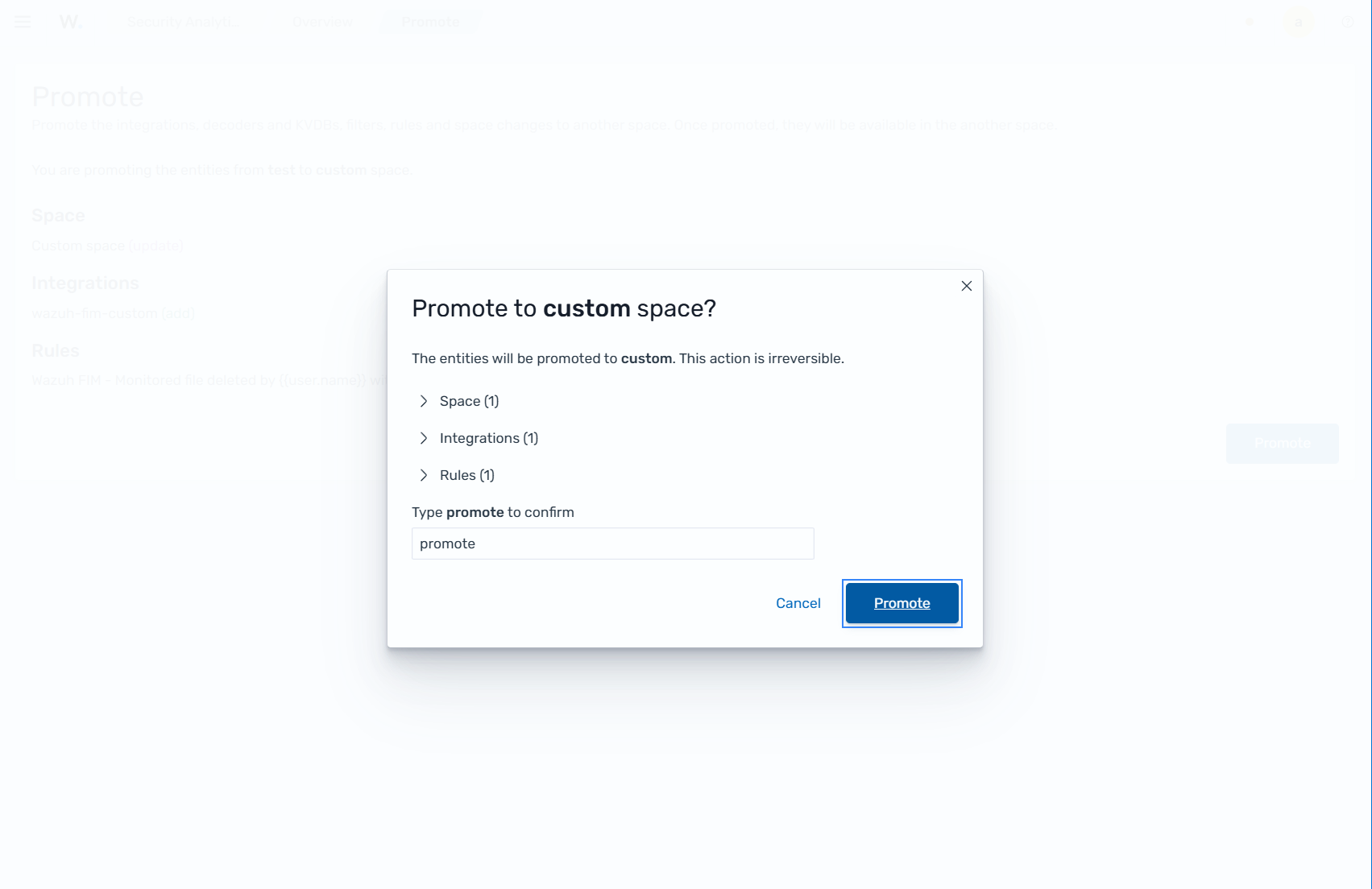
After promotion, the integration becomes active and is used by the Wazuh data analysis engine to process incoming FIM events and trigger findings when rule conditions are met.
Create a detector
A detector is the scheduled job that executes your rule. It scans indexed events from monitored endpoints at a defined interval, applies the selected rules, and generates findings when matches occur. Follow these steps to create a detector.
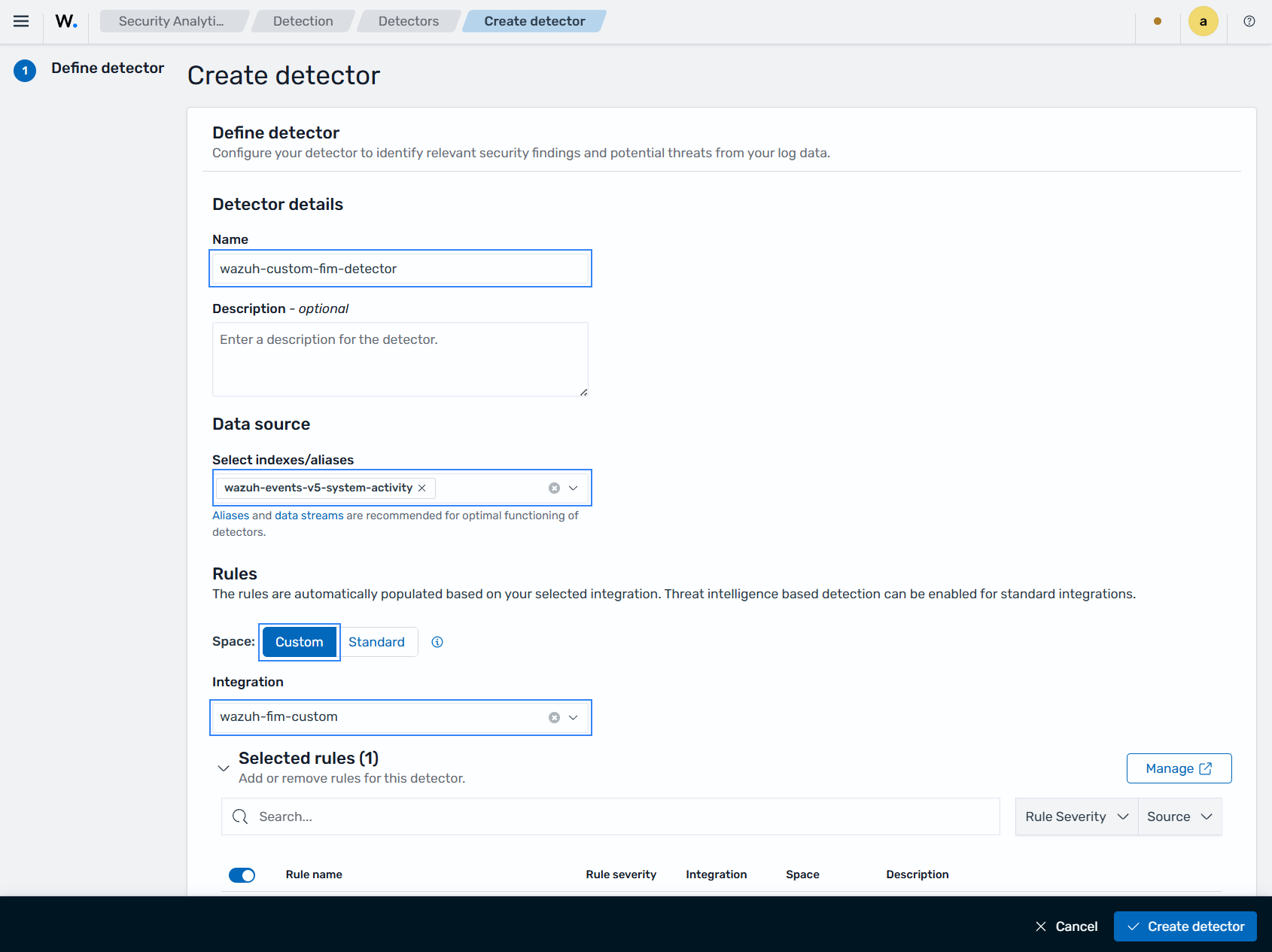
Go to Security Analytics → Detection → Detectors → Create detector.
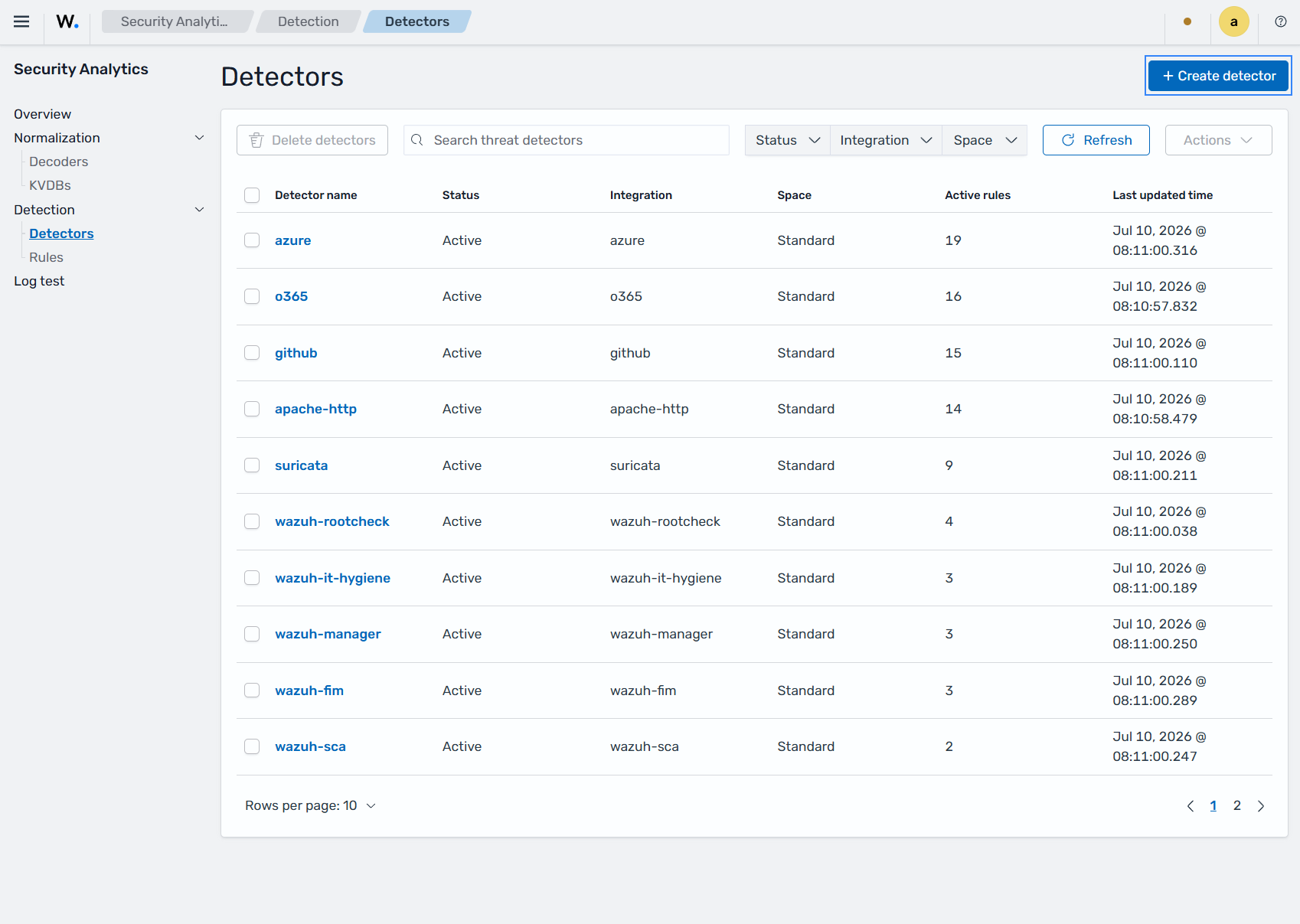
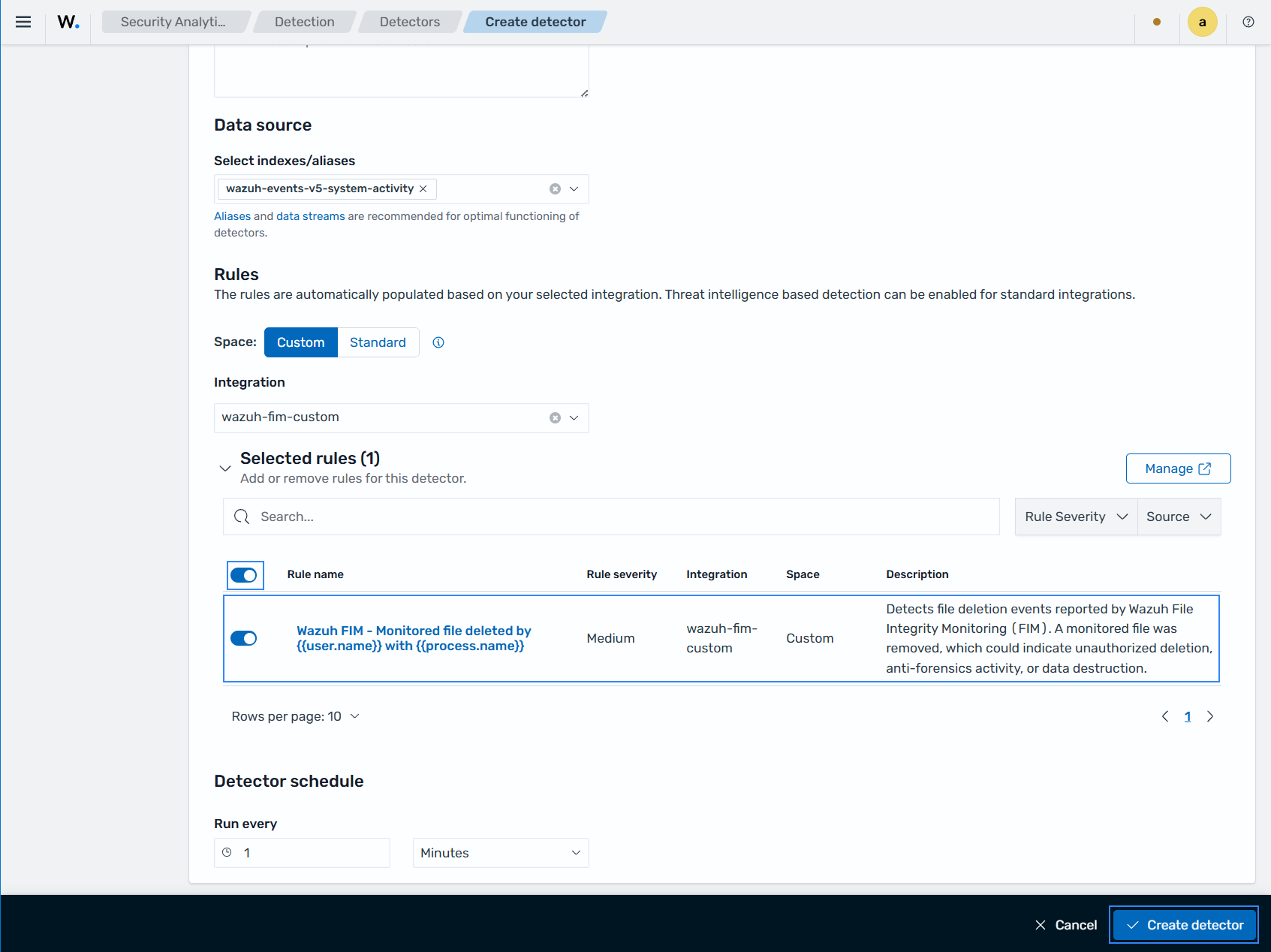
Fill the required sections with this information and click Create detector.
Name:
wazuh-custom-fim-detectorSelect indexes/aliases:
wazuh-events-v5-system-activity(this must match the integration category you configured earlier)Space: Custom
Integration:
wazuh-fim-customSelected rules:
Wazuh FIM - Monitored file deleted by {{user.name}} with {{process.name}}Run every:
1 Minutes
Windows endpoint
Perform the following steps to configure the Wazuh FIM module to monitor file deletion in the C:\test directory.
Run the command below using PowerShell as an administrator to create the
C:\testdirectory on the endpoint:> mkdir C:\test
Edit the Wazuh agent
C:\Program Files (x86)\ossec-agent\ossec.confconfiguration file of the Wazuh agent. Add theC:\testdirectory for monitoring:<syscheck> <directories whodata="yes">C:\test</directories> </syscheck>
Restart the Wazuh agent to apply the changes:
> Restart-Service -Name wazuh
Test the configuration
Create a text file with Notepad and save the file in the
C:\testdirectory ashello.txt.Delete the
hello.txtfile with Windows File Explorer.
Visualize the findings
Navigate to Endpoint security → File Integrity Monitoring → Findings on the Wazuh dashboard to view the finding generated when files are deleted in the monitored directory.
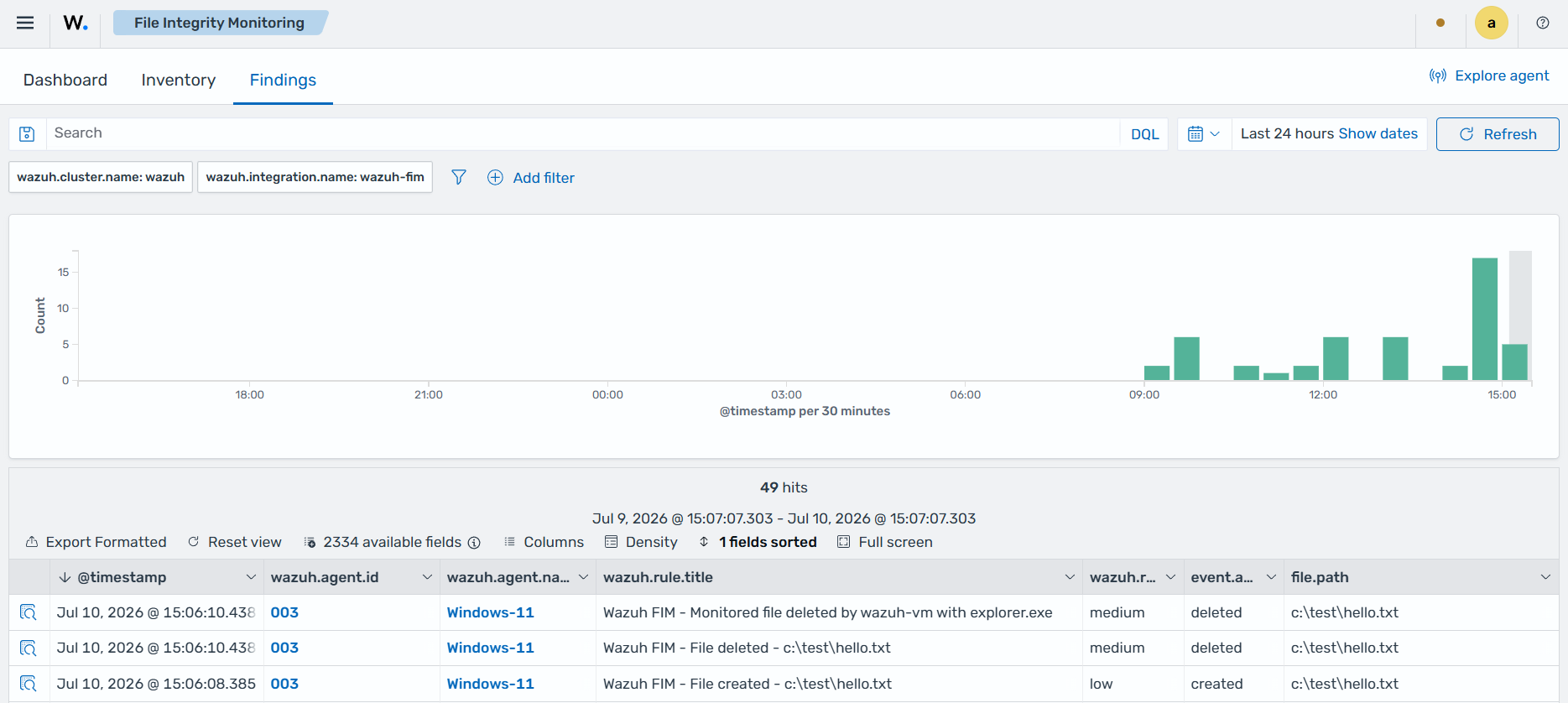
You can see the finding fields in the data below:
{
  "_index": ".ds-wazuh-findings-v5-system-activity-000001",
  "_id": "Y9dsTZ8BL87M59AH6yRc",
  "_score": null,
  "_source": {
    "process": {
      "name": "explorer.exe",
      "pid": 5052
    },
    "@timestamp": "2026-07-10T19:06:10.438Z",
    "file": {
      "inode": "0",
      "mode": "whodata",
      "owner": "wazuh-vm",
      "path": "c:\\test\\hello.txt",
      "uid": "S-1-5-21-3494786958-4119424836-2404692206-1002",
      "extension": "txt",
      "size": 6,
      "attributes": [
        "ARCHIVE"
      ],
      "directory": "c:\\test",
      "hash": {
        "sha1": "5800776d9b531d82e2b62aea4051a968e05b9156",
        "sha256": "7dd91e07f0341646d53f6938278a4d3e87961fabea066f7e6f40b7398f3b0b0f",
        "md5": "ad2d611e4b060351732574b64aeaeed7"
      }
    },
    "related": {
      "user": [
        "wazuh-vm"
      ],
      "hash": [
        "ad2d611e4b060351732574b64aeaeed7",
        "5800776d9b531d82e2b62aea4051a968e05b9156",
        "7dd91e07f0341646d53f6938278a4d3e87961fabea066f7e6f40b7398f3b0b0f"
      ]
    },
    "data_stream": {
      "type": "logs",
      "dataset": "wazuh.fim"
    },
    "wazuh": {
      "cluster": {
        "node": "node01",
        "name": "wazuh"
      },
      "protocol": {
        "location": "syscheck",
        "queue": 56
      },
      "agent": {
        "host": {
          "hostname": "WINDOWS-11",
          "os": {
            "name": "Microsoft Windows 11 Pro",
            "type": "windows",
            "version": "10.0.26200.8655",
            "platform": "windows"
          },
          "architecture": "x86_64"
        },
        "name": "Windows-11",
        "groups": [
          "default"
        ],
        "id": "003",
        "version": "v5.0.0"
      },
      "integration": {
        "name": "wazuh-fim",
        "decoders": [
          "decoder/core-wazuh-message/0",
          "decoder/wazuh-fim/0"
        ],
        "category": "system-activity"
      },
      "rule": {
        "sigma_id": "c06abe18-8ffe-484f-861f-522f1ef89699",
        "level": "medium",
        "compliance": {
          "iso_27001": [
            "A.12.4.1",
            "A.12.6.1",
            "A.16.1.2"
          ],
          "hipaa": [
            "164.308.a.1.ii.D",
            "164.308.a.6",
            "164.312.b"
          ],
          "pci_dss": [
            "6.2",
            "10.5",
            "11.4"
          ],
          "tsc": [
            "A1.2",
            "CC7.2",
            "CC7.3"
          ],
          "nis2": [
            "21.2.a",
            "21.2.e",
            "23"
          ],
          "nist_800_171": [
            "3.3.1",
            "3.3.2",
            "3.4.1",
            "3.14.6",
            "3.14.7"
          ],
          "fedramp": [
            "AU-6",
            "CM-6",
            "SI-4"
          ],
          "nist_800_53": [
            "AU-6",
            "CM-6",
            "SI-4"
          ],
          "cmmc": [
            "AU.L2-3.3.1",
            "CM.L2-3.4.1",
            "SI.L2-3.14.1"
          ],
          "gdpr": [
            "II_5.1.f",
            "IV_32.1.a",
            "IV_33.1",
            "IV_34.1"
          ]
        },
        "mitre": {
          "technique": {
            "name": [
              "Indicator Removal",
              "Data Destruction"
            ],
            "id": [
              "T1070",
              "T1485"
            ]
          },
          "tactic": {
            "name": [
              "Stealth",
              "Impact"
            ],
            "id": [
              "TA0005",
              "TA0040"
            ]
          }
        },
        "id": "c06abe18-8ffe-484f-861f-522f1ef89699",
        "title": "Wazuh FIM - Monitored file deleted by wazuh-vm with explorer.exe",
        "tags": [
          "medium",
          "wazuh-fim-custom",
          "attack.defense-evasion",
          "attack.impact",
          "attack.t1070.004",
          "attack.t1485"
        ],
        "status": "stable"
      },
      "event": {
        "id": "531ae9e6-812f-4814-a812-491374ab8f55"
      },
      "space": {
        "name": "standard"
      }
    },
    "event": {
      "original": "{\"collector\":\"file\",\"module\":\"fim\",\"data\":{\"event\":{\"created\":\"2026-07-10T19:06:10.348Z\",\"type\":\"deleted\"},\"file\":{\"size\":6,\"permissions\":[\"{\\\"S-1-5-32-544\\\":{\\\"name\\\":\\\"Administrators\\\",\\\"allowed\\\":[\\\"delete\\\",\\\"read_control\\\",\\\"write_dac\\\",\\\"write_owner\\\",\\\"synchronize\\\",\\\"read_data\\\",\\\"write_data\\\",\\\"append_data\\\",\\\"read_ea\\\",\\\"write_ea\\\",\\\"execute\\\",\\\"read_attributes\\\",\\\"write_attributes\\\"]}}\",\"{\\\"S-1-5-18\\\":{\\\"name\\\":\\\"SYSTEM\\\",\\\"allowed\\\":[\\\"delete\\\",\\\"read_control\\\",\\\"write_dac\\\",\\\"write_owner\\\",\\\"synchronize\\\",\\\"read_data\\\",\\\"write_data\\\",\\\"append_data\\\",\\\"read_ea\\\",\\\"write_ea\\\",\\\"execute\\\",\\\"read_attributes\\\",\\\"write_attributes\\\"]}}\",\"{\\\"S-1-5-32-545\\\":{\\\"name\\\":\\\"Users\\\",\\\"allowed\\\":[\\\"read_control\\\",\\\"synchronize\\\",\\\"read_data\\\",\\\"read_ea\\\",\\\"execute\\\",\\\"read_attributes\\\"]}}\",\"{\\\"S-1-5-11\\\":{\\\"name\\\":\\\"Authenticated Users\\\",\\\"allowed\\\":[\\\"delete\\\",\\\"read_control\\\",\\\"synchronize\\\",\\\"read_data\\\",\\\"write_data\\\",\\\"append_data\\\",\\\"read_ea\\\",\\\"write_ea\\\",\\\"execute\\\",\\\"read_attributes\\\",\\\"write_attributes\\\"]}}\"],\"uid\":\"S-1-5-21-3494786958-4119424836-2404692206-1002\",\"owner\":\"wazuh-vm\",\"inode\":\"0\",\"device\":\"2\",\"mtime\":\"2026-07-10T19:01:15.000Z\",\"hash\":{\"md5\":\"ad2d611e4b060351732574b64aeaeed7\",\"sha1\":\"5800776d9b531d82e2b62aea4051a968e05b9156\",\"sha256\":\"7dd91e07f0341646d53f6938278a4d3e87961fabea066f7e6f40b7398f3b0b0f\"},\"attributes\":[\"ARCHIVE\"],\"path\":\"c:\\\\test\\\\hello.txt\",\"mode\":\"whodata\",\"audit\":{\"user_id\":\"S-1-5-21-3494786958-4119424836-2404692206-1002\",\"user_name\":\"wazuh-vm\",\"process_name\":\"C:\\\\Windows\\\\explorer.exe\",\"process_id\":5052}}}}",
      "kind": "event",
      "action": "deleted",
      "index": ".ds-wazuh-events-v5-system-activity-000001",
      "category": [
        "file"
      ],
      "type": [
        "deletion"
      ],
      "dataset": "wazuh.fim",
      "doc_id": "JtdsTZ8BL87M59AHfCQm",
      "outcome": "success"
    },
    "user": {
      "name": "wazuh-vm",
      "id": "S-1-5-21-3494786958-4119424836-2404692206-1002"
    }
  },
  "fields": {
    "@timestamp": [
      "2026-07-10T19:06:10.438Z"
    ]
  },
  "sort": [
    1783710370438
  ]
}