Advanced configuration options
This section describes advanced configuration options that provide greater control and flexibility over how the FIM module works.
Who-data monitoring
The who-data functionality lets the FIM module identify who modified a monitored file, capturing the user and the program or process responsible.
Who-data monitoring on Linux
Wazuh supports two modes for who-data monitoring on Linux endpoints:
The audit mode
Who-data monitoring in audit mode uses the Linux Audit subsystem to identify who makes changes in a monitored directory. These changes produce audit events, which the FIM module processes and reports to the Wazuh manager. Audit mode extends the real-time monitoring by adding who-data information.
Requirements
Install the audit daemon if you do not already have it on your endpoint.
In Red Hat-based systems:
# yum install audit
For audit version 3.1.1 and later, install the audispd-af_unix plugin and restart the audit service:
# yum install audispd-plugins
# service auditd restart
Debian-based systems:
# apt-get install auditd
For audit version 3.1.1 and later, install the audispd-af_unix plugin and restart the audit service:
# apt-get install audispd-plugins
# service auditd restart
In most systems, auditd includes a default rule that stops the processing of subsequent audit rules. This setting prevents the reporting of any who-data information. Follow these steps to verify that auditing is not disabled. For more information, visit the manual for auditctl.
Check the output of this command to find out if the auditd rules include the
-a never,taskrule:# auditctl -l | grep task
If the output displays the
-a never,taskrule, remove it from the/etc/audit/rules.d/audit.rulesaudit rules file.Restart auditd and Wazuh agent to apply the changes:
# service auditd restart
# systemctl restart wazuh-agent
Configuration
Perform the following steps to enable who-data monitoring using the audit mode. In this example, we configure who-data monitoring for the /etc directory.
Add the configuration below within the
<ossec_config>block of the Wazuh agent/var/ossec/etc/ossec.confconfiguration file:<syscheck> <directories check_all="yes" whodata="yes">/etc</directories> <whodata> <provider>audit</provider> </whodata> </syscheck>
Note
If the
<provider>tag is not configured, the FIM module will default to using the audit mode.Restart the Wazuh agent to apply the changes. This action adds an audit rule for the monitored directory.
# systemctl restart wazuh-agent
Execute the following command to check if the audit rule for monitoring the selected directory is applied:
# auditctl -l | grep wazuh_fim
The command output looks similar to this:
auditctl -w /etc -p wa -k wazuh_fim
From the output above, you can see the rule was added.
Note
When the Wazuh agent service stops, it removes the rule. You can use the same command to check that it removed the rule successfully.
FIM finding fields
The following table maps each audit field collected through whodata to its corresponding Wazuh Common Schema (WCS) field as it appears in the resulting FIM finding on the Wazuh dashboard.
Audit field |
WCS field |
Fields description |
|---|---|---|
|
user.nameuser.id |
Contains information about who started the process that modified the monitored file. |
|
user.effective.iduser.effective.name |
Contains the effective ID and name of the user who started the process that modified the monitored file. When a user executes a command using sudo, the effective user ID changes to 0, and the effective username becomes root. |
|
user.group.iduser.group.name |
Contains the group ID and group name of the user who started the process that modified the monitored file. |
|
|
Contains the ID of the process used to modify the monitored file. |
|
|
Contains the name of the process used to modify the monitored file. |
|
|
Contains the parent process ID of the process used to modify the monitored file. |
Example: Monitor changes in the /etc/hosts.allow file on Linux
Perform the following steps to configure the FIM module to get the information about who makes changes to the /etc/hosts.allow file.
Configuration
Append the configuration below to the
/var/ossec/etc/ossec.conffile to monitor the/etc/hosts.allowfile for changes:<ossec_config> <syscheck> <directories check_all="yes" whodata="yes" report_changes="yes">/etc/hosts.allow</directories> <whodata> <provider>audit</provider> </whodata> </syscheck> </ossec_config>
Restart the Wazuh agent to apply the configuration changes:
# systemctl restart wazuh-agent
Test the configuration
Create the user
smithon a Linux endpoint, and assign sudo privileges:# adduser smith # sudo usermod -aG sudo smith
Log out of the Linux endpoint and log in as
smith.Open the nano editor and add a new IP address, such as
192.168.32.5, in the/etc/hosts.allowfile on the Linux endpoint.# sudo nano /etc/hosts.allow
Visualize the finding
Navigate to Endpoint security → File Integrity Monitoring → Findings on the Wazuh dashboard to view the finding generated when the monitored file is modified.
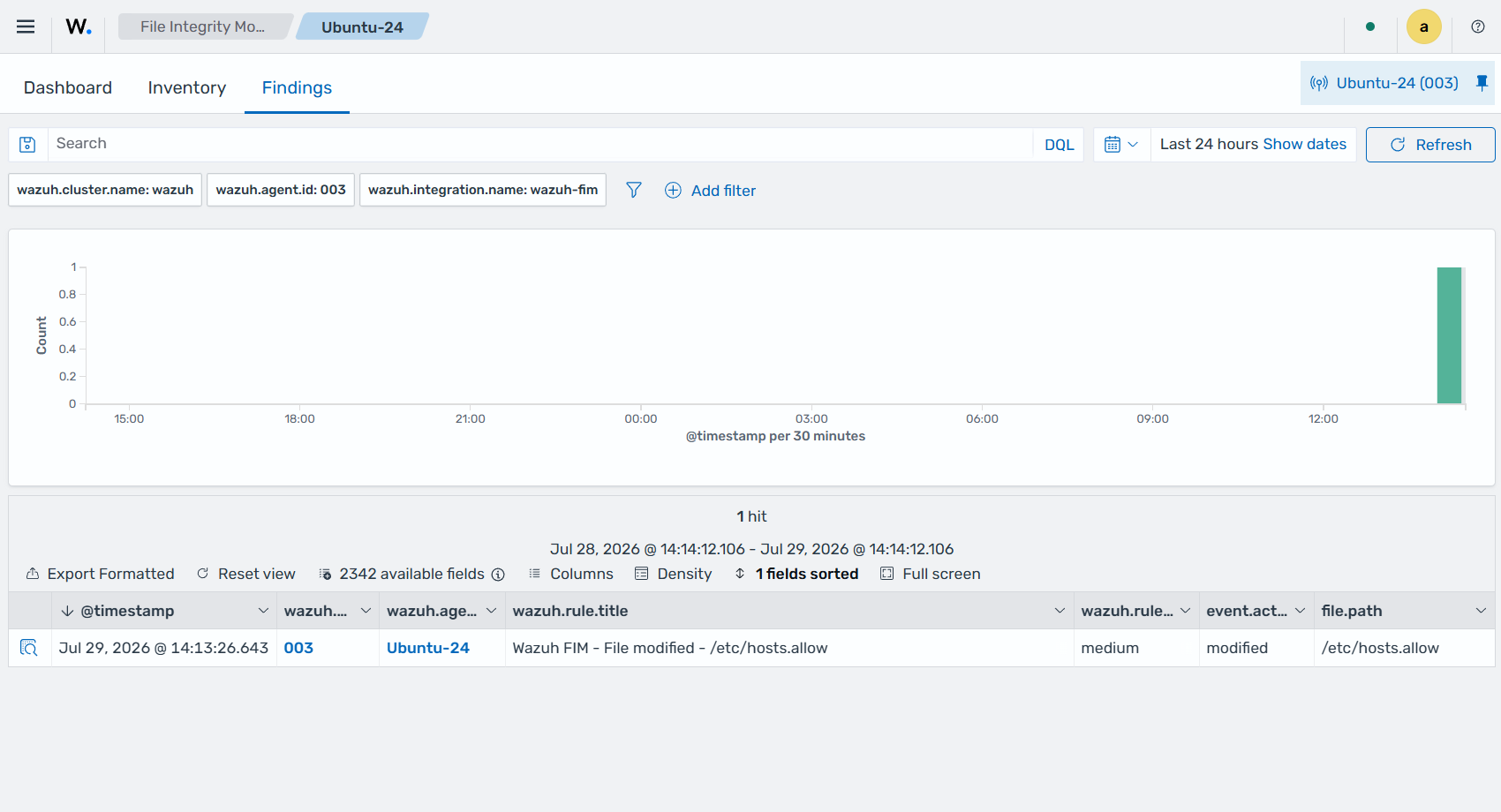
Expand the finding to view more information. In the finding fields below, you can see that the user smith added a new IP address to the /etc/hosts.allow file using the nano text editor with root privileges.
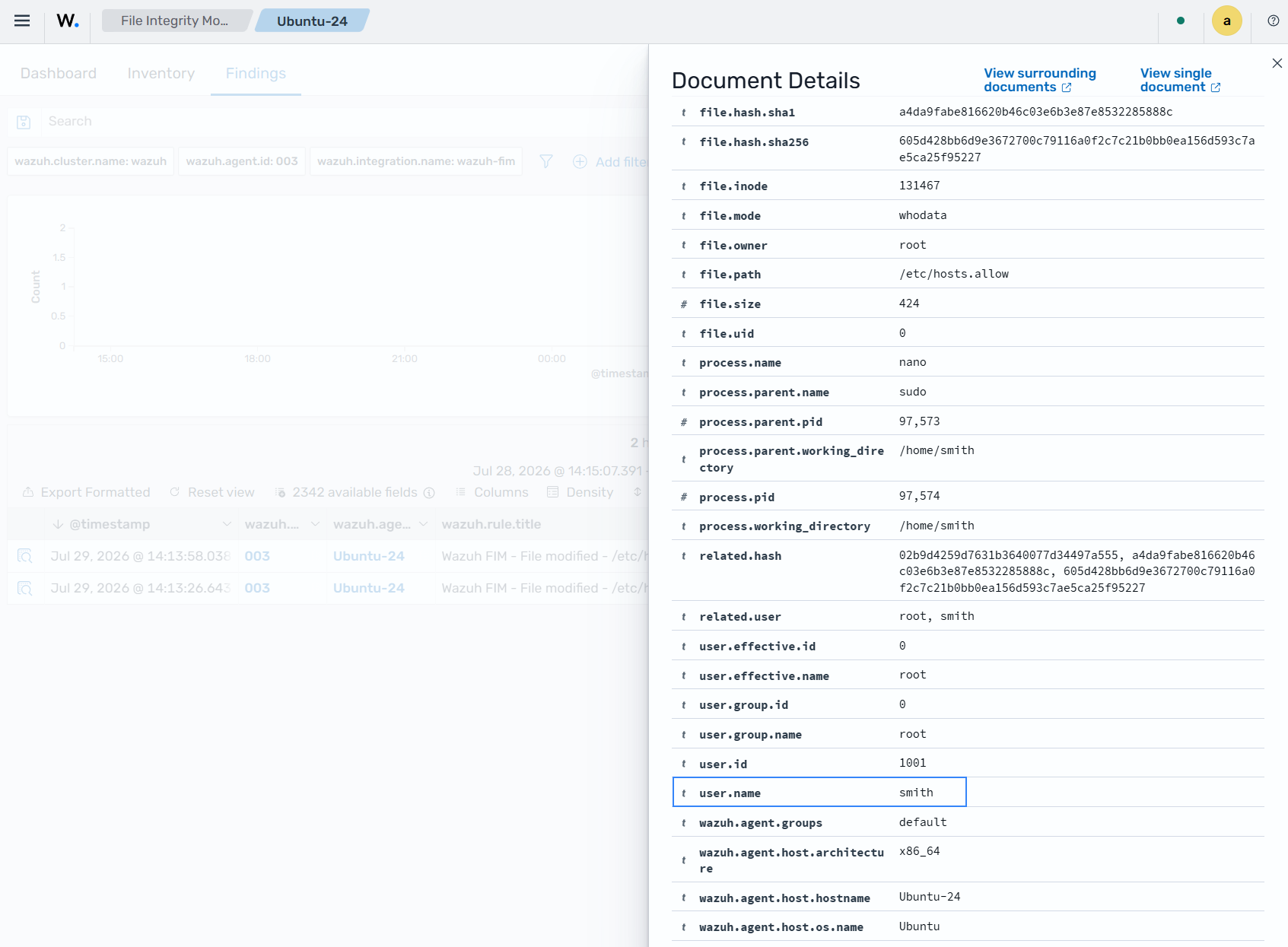
Finding in JSON format:
{
  "_index": ".ds-wazuh-findings-v5-system-activity-000001",
  "_id": "SF8Wr58BegqTXBPMJZSi",
  "_score": null,
  "_source": {
    "process": {
      "parent": {
        "name": "sudo",
        "pid": 97573,
        "working_directory": "/home/smith"
      },
      "name": "nano",
      "pid": 97574,
      "working_directory": "/home/smith"
    },
    "@timestamp": "2026-07-29T18:13:58.038Z",
    "file": {
      "inode": "131467",
      "mode": "whodata",
      "owner": "root",
      "path": "/etc/hosts.allow",
      "uid": "0",
      "extension": "allow",
      "gid": "0",
      "size": 424,
      "directory": "/etc",
      "hash": {
        "sha1": "a4da9fabe816620b46c03e6b3e87e8532285888c",
        "sha256": "605d428bb6d9e3672700c79116a0f2c7c21b0bb0ea156d593c7ae5ca25f95227",
        "md5": "02b9d4259d7631b3640077d34497a555"
      },
      "group": "root"
    },
    "related": {
      "user": [
        "root",
        "smith"
      ],
      "hash": [
        "02b9d4259d7631b3640077d34497a555",
        "a4da9fabe816620b46c03e6b3e87e8532285888c",
        "605d428bb6d9e3672700c79116a0f2c7c21b0bb0ea156d593c7ae5ca25f95227"
      ]
    },
    "data_stream": {
      "type": "logs",
      "dataset": "wazuh.fim"
    },
    "wazuh": {
      "cluster": {
        "node": "node01",
        "name": "wazuh"
      },
      "protocol": {
        "location": "syscheck",
        "queue": 56
      },
      "agent": {
        "host": {
          "hostname": "Ubuntu-24",
          "os": {
            "name": "Ubuntu",
            "type": "linux",
            "version": "24.04.4 LTS (Noble Numbat)",
            "platform": "ubuntu"
          },
          "architecture": "x86_64"
        },
        "name": "Ubuntu-24",
        "groups": [
          "default"
        ],
        "id": "003",
        "version": "v5.0.0"
      },
      "integration": {
        "name": "wazuh-fim",
        "decoders": [
          "decoder/core-wazuh-message/0",
          "decoder/wazuh-fim/0"
        ],
        "category": "system-activity"
      },
      "rule": {
        "sigma_id": "90364f8a-4402-4637-9f3c-4d5f53a7a461",
        "level": "medium",
        "compliance": {
          "iso_27001": [
            "A.12.4.1",
            "A.12.6.1",
            "A.16.1.2"
          ],
          "hipaa": [
            "164.308.a.1.ii.D",
            "164.308.a.6",
            "164.312.b"
          ],
          "pci_dss": [
            "6.2",
            "10.5",
            "11.4"
          ],
          "tsc": [
            "A1.2",
            "CC7.2",
            "CC7.3"
          ],
          "nis2": [
            "21.2.a",
            "21.2.e",
            "23"
          ],
          "nist_800_171": [
            "3.3.1",
            "3.3.2",
            "3.4.1",
            "3.14.6",
            "3.14.7"
          ],
          "fedramp": [
            "AU-6",
            "CM-6",
            "SI-4"
          ],
          "nist_800_53": [
            "AU-6",
            "CM-6",
            "SI-4"
          ],
          "cmmc": [
            "AU.L2-3.3.1",
            "CM.L2-3.4.1",
            "SI.L2-3.14.1"
          ],
          "gdpr": [
            "II_5.1.f",
            "IV_32.1.a",
            "IV_33.1",
            "IV_34.1"
          ]
        },
        "mitre": {
          "technique": {
            "name": [
              "Data Manipulation",
              "Masquerading"
            ],
            "id": [
              "T1565",
              "T1036"
            ]
          },
          "tactic": {
            "name": [
              "Stealth",
              "Impact"
            ],
            "id": [
              "TA0005",
              "TA0040"
            ]
          }
        },
        "id": "90364f8a-4402-4637-9f3c-4d5f53a7a461",
        "title": "Wazuh FIM - File modified - /etc/hosts.allow",
        "tags": [
          "medium",
          "wazuh-fim",
          "attack.defense-evasion",
          "attack.impact",
          "attack.t1565.001",
          "attack.t1036"
        ],
        "status": "stable"
      },
      "event": {
        "id": "9d189d06-730b-4373-908c-5ecb71cf6c68"
      },
      "space": {
        "name": "standard"
      }
    },
    "event": {
      "original": "{\"collector\":\"file\",\"module\":\"fim\",\"data\":{\"event\":{\"created\":\"2026-07-29T18:13:58.037Z\",\"type\":\"modified\",\"changed_fields\":[\"file.size\",\"file.mtime\",\"file.hash.md5\",\"file.hash.sha1\",\"file.hash.sha256\"]},\"file\":{\"size\":424,\"permissions\":[\"rw-r--r--\"],\"uid\":\"0\",\"owner\":\"root\",\"gid\":\"0\",\"group\":\"root\",\"inode\":\"131467\",\"device\":\"2050\",\"mtime\":\"2026-07-29T18:13:58.000Z\",\"hash\":{\"md5\":\"02b9d4259d7631b3640077d34497a555\",\"sha1\":\"a4da9fabe816620b46c03e6b3e87e8532285888c\",\"sha256\":\"605d428bb6d9e3672700c79116a0f2c7c21b0bb0ea156d593c7ae5ca25f95227\"},\"path\":\"/etc/hosts.allow\",\"mode\":\"whodata\",\"previous\":{\"size\":411,\"mtime\":\"2026-07-29T18:13:26.000Z\",\"hash\":{\"md5\":\"d0cfb796d371b0182cd39d589b1c1ce3\",\"sha1\":\"2964c8d9f69c7261de20877392bc7393d471f4ed\",\"sha256\":\"9eadbcd7ec16f4e5961ad2035c0228de7c22b2ba0f6761df63b1b3d9bad9d0a7\"}},\"content_changes\":\"10a11\\n> 192.168.32.5\\n\",\"audit\":{\"user_id\":\"0\",\"user_name\":\"root\",\"process_name\":\"/usr/bin/nano\",\"process_id\":97574,\"cwd\":\"/home/smith\",\"group_id\":\"0\",\"group_name\":\"root\",\"audit_uid\":\"1001\",\"audit_name\":\"smith\",\"effective_uid\":\"0\",\"effective_name\":\"root\",\"parent_name\":\"/usr/bin/sudo\",\"parent_cwd\":\"/home/smith\",\"ppid\":97573}}}}",
      "kind": "event",
      "action": "modified",
      "index": ".ds-wazuh-events-v5-system-activity-000001",
      "category": [
        "file"
      ],
      "type": [
        "change"
      ],
      "dataset": "wazuh.fim",
      "doc_id": "Ql8Vr58BegqTXBPMn5TS",
      "outcome": "success"
    },
    "user": {
      "effective": {
        "name": "root",
        "id": "0"
      },
      "name": "smith",
      "id": "1001",
      "group": {
        "name": "root",
        "id": "0"
      }
    }
  },
  "fields": {
    "@timestamp": [
      "2026-07-29T18:13:58.038Z"
    ]
  },
  "sort": [
    1785348838038
  ]
}
The eBPF mode
Extended Berkeley Packet Filter (eBPF) lets developers build programs that run securely in the Linux kernel space. Who-data monitoring in eBPF mode extracts FIM events directly from eBPF programs, eliminating the need for external dependencies such as auditd, for faster event extraction.
The FIM events extracted from eBPF programs for who-data monitoring include:
vfs_open: When a new file has been created on the endpoint.security_inode_setattr: When a file has been modified on the endpoint.vfs_unlink: When a file has been removed from the endpoint.
Wazuh uses a kernel data structure called ring_buffer to transfer these events from the kernel to the user space, where the FIM module analyzes them.
Note
Who-data monitoring with eBPF requires a kernel that supports the BPF ring buffer and BTF. Upstream kernels support them from version 5.8, and some distributions backport them to older kernels, such as RHEL 8.10 (kernel 4.18). When the agent starts, the FIM module runs a health check of the eBPF provider and uses it only if the health check succeeds.
Configuration
Configuring who-data in eBPF mode requires a provider option within the <whodata> tag. The <provider> tag accepts two values, audit and ebpf. The audit mode (default) and the eBPF mode should not be used together. If both are configured, only the last configured provider takes effect to monitor every who-data configured directory.
Note
If the
<provider>tag is not configured, the FIM module uses theauditprovider by default. To confirm which mode is in use, check the Wazuh agent log file/var/ossec/logs/ossec.log.When the eBPF provider is configured and the eBPF health check succeeds, the agent logs this message
(6048): Healthcheck for eBPF FIM whodata module success.If the eBPF provider is configured but the health check fails, FIM falls back to the
auditprovider. The agent logs this message(6959): The eBPF healthcheck has failed. Switching all whodata eBPF configuration to audit.
A configuration block of who-data in eBPF mode to monitor the /home/user/documents directory is shown below:
<syscheck>
  <directories whodata="yes">/home/user/documents</directories>
  <whodata>
    <provider>ebpf</provider>
  </whodata>
</syscheck>
Given the high speed at which eBPF detects events, it is important to fine-tune the queue_size of the whodata option. This adjustment gives it enough size to handle a big burst of events that may be generated by the kernel, such as during a massive deletion event. An increase in the value of the queue_size will prevent events from being lost when a large number of events are collected from monitored endpoints. Note that increasing the value of the queue_size increases the memory consumption of the Wazuh agent on the monitored endpoint.
The configuration below enables who-data in eBPF mode to handle up to 50000 events:
<whodata>
  <provider>ebpf</provider>
  <queue_size>50000</queue_size>
</whodata>
You can learn more about the available configuration options in the whodata reference section.
Example: Monitoring changes in configuration files
Monitoring configuration files such as the sshd_config file on Linux endpoints can help detect unauthorized changes. This approach ensures the integrity of configuration files is not compromised and provides early detection of suspicious behavior.
Perform the steps below to monitor changes made to the /etc/ssh/sshd_config configuration file on an Ubuntu endpoint using who-data in eBPF mode.
Configuration
Append the configuration below to the
/var/ossec/etc/ossec.confconfiguration file on the Ubuntu endpoint:<ossec_config> <syscheck> <directories whodata="yes">/etc/ssh/sshd_config</directories> <whodata> <provider>ebpf</provider> <queue_size>50000</queue_size> </whodata> </syscheck> </ossec_config>
Restart the Wazuh agent to apply the configuration changes:
# systemctl restart wazuh-agent
Test the configuration
While logged in as the root user, append a new line of text to the /etc/ssh/sshd_config file on the Ubuntu endpoint:
# echo "eBPF test" >> /etc/ssh/sshd_config
Visualize the finding
Navigate to Endpoint security → File Integrity Monitoring → Findings on the Wazuh dashboard to view the finding generated when the FIM module detects changes in the monitored file.
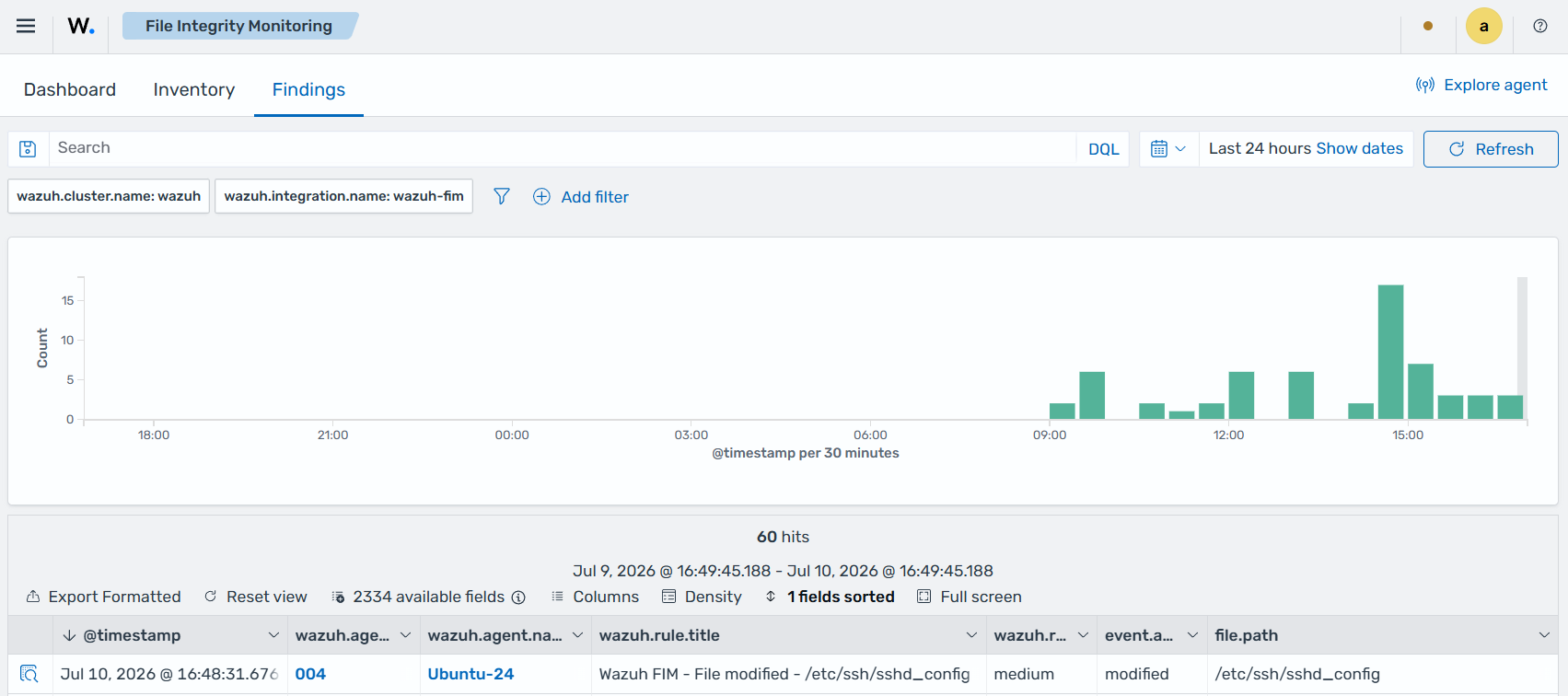
Expand the finding to view more information. In the finding fields below, you can see that the user root added a config to the /etc/ssh/sshd_config file using the bash terminal program.
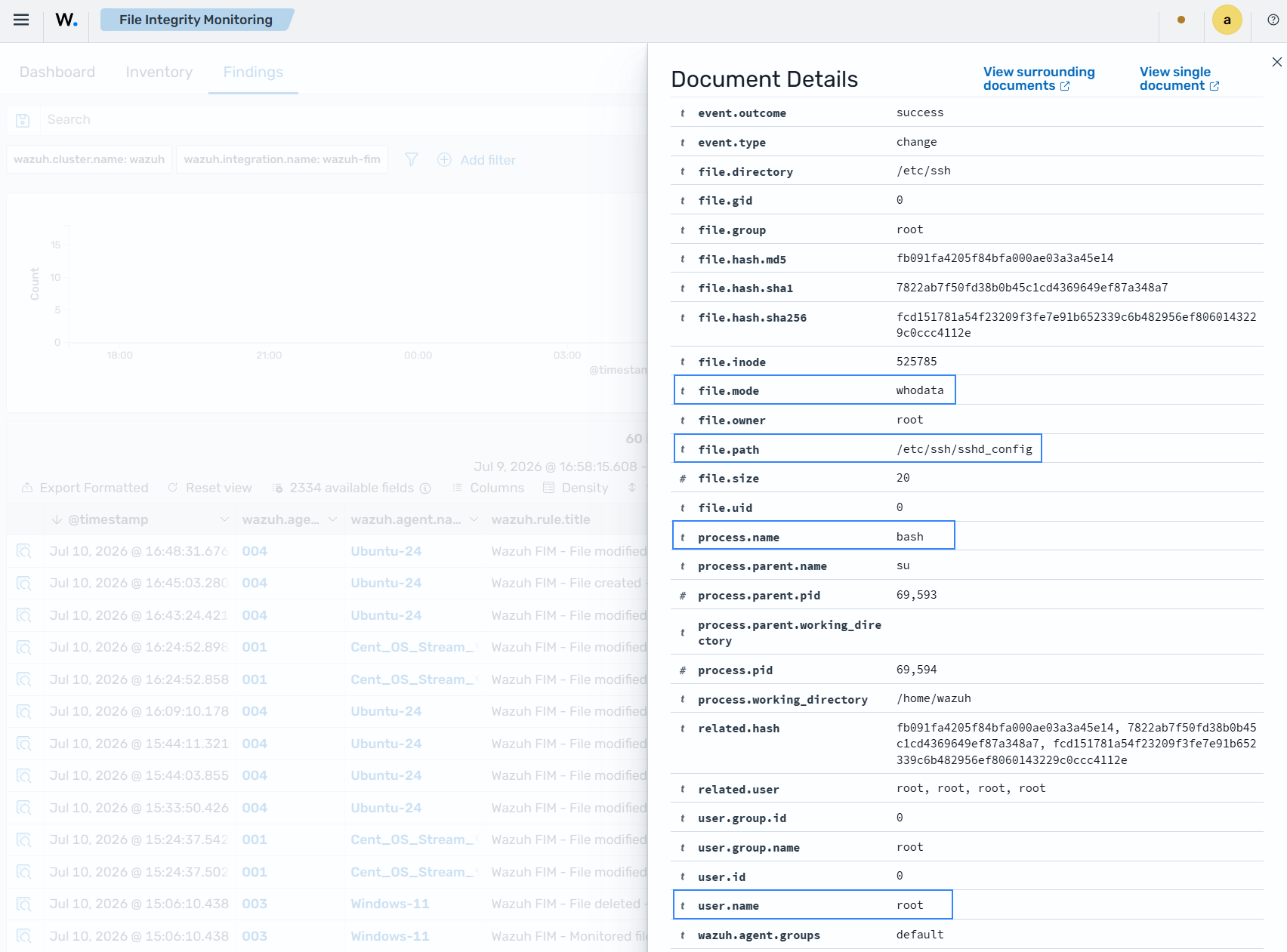
Finding in JSON format.
{
  "_index": ".ds-wazuh-findings-v5-system-activity-000001",
  "_id": "69fKTZ8BL87M59AHdkeM",
  "_score": null,
  "_source": {
    "process": {
      "parent": {
        "name": "su",
        "pid": 69593,
        "working_directory": ""
      },
      "name": "bash",
      "pid": 69594,
      "working_directory": "/home/wazuh"
    },
    "@timestamp": "2026-07-10T20:48:31.676Z",
    "file": {
      "inode": "525785",
      "mode": "whodata",
      "owner": "root",
      "path": "/etc/ssh/sshd_config",
      "uid": "0",
      "gid": "0",
      "size": 20,
      "directory": "/etc/ssh",
      "hash": {
        "sha1": "7822ab7f50fd38b0b45c1cd4369649ef87a348a7",
        "sha256": "fcd151781a54f23209f3fe7e91b652339c6b482956ef8060143229c0ccc4112e",
        "md5": "fb091fa4205f84bfa000ae03a3a45e14"
      },
      "group": "root"
    },
    "related": {
      "user": [
        "root",
        "root",
        "root",
        "root"
      ],
      "hash": [
        "fb091fa4205f84bfa000ae03a3a45e14",
        "7822ab7f50fd38b0b45c1cd4369649ef87a348a7",
        "fcd151781a54f23209f3fe7e91b652339c6b482956ef8060143229c0ccc4112e"
      ]
    },
    "data_stream": {
      "type": "logs",
      "dataset": "wazuh.fim"
    },
    "wazuh": {
      "cluster": {
        "node": "node01",
        "name": "wazuh"
      },
      "protocol": {
        "location": "syscheck",
        "queue": 56
      },
      "agent": {
        "host": {
          "hostname": "Ubuntu-24",
          "os": {
            "name": "Ubuntu",
            "type": "linux",
            "version": "24.04.4 LTS (Noble Numbat)",
            "platform": "ubuntu"
          },
          "architecture": "x86_64"
        },
        "name": "Ubuntu-24",
        "groups": [
          "default"
        ],
        "id": "004",
        "version": "v5.0.0"
      },
      "integration": {
        "name": "wazuh-fim",
        "decoders": [
          "decoder/core-wazuh-message/0",
          "decoder/wazuh-fim/0"
        ],
        "category": "system-activity"
      },
      "rule": {
        "sigma_id": "50f82a2d-d13a-44b2-9ce0-5e5ce22a7b6a",
        "level": "medium",
        "compliance": {
          "iso_27001": [
            "A.12.4.1",
            "A.12.6.1",
            "A.16.1.2"
          ],
          "hipaa": [
            "164.308.a.1.ii.D",
            "164.308.a.6",
            "164.312.b"
          ],
          "pci_dss": [
            "6.2",
            "10.5",
            "11.4"
          ],
          "tsc": [
            "A1.2",
            "CC7.2",
            "CC7.3"
          ],
          "nis2": [
            "21.2.a",
            "21.2.e",
            "23"
          ],
          "nist_800_171": [
            "3.3.1",
            "3.3.2",
            "3.4.1",
            "3.14.6",
            "3.14.7"
          ],
          "fedramp": [
            "AU-6",
            "CM-6",
            "SI-4"
          ],
          "nist_800_53": [
            "AU-6",
            "CM-6",
            "SI-4"
          ],
          "cmmc": [
            "AU.L2-3.3.1",
            "CM.L2-3.4.1",
            "SI.L2-3.14.1"
          ],
          "gdpr": [
            "II_5.1.f",
            "IV_32.1.a",
            "IV_33.1",
            "IV_34.1"
          ]
        },
        "mitre": {
          "technique": {
            "name": [
              "Data Manipulation",
              "Masquerading"
            ],
            "id": [
              "T1565",
              "T1036"
            ]
          },
          "tactic": {
            "name": [
              "Stealth",
              "Impact"
            ],
            "id": [
              "TA0005",
              "TA0040"
            ]
          }
        },
        "id": "50f82a2d-d13a-44b2-9ce0-5e5ce22a7b6a",
        "title": "Wazuh FIM - File modified - /etc/ssh/sshd_config",
        "tags": [
          "medium",
          "wazuh-fim",
          "attack.defense-evasion",
          "attack.impact",
          "attack.t1565.001",
          "attack.t1036"
        ],
        "status": "stable"
      },
      "event": {
        "id": "50c6d9a8-d9cf-4ec5-89ba-7a51346b9209"
      },
      "space": {
        "name": "standard"
      }
    },
    "event": {
      "original": "{\"collector\":\"file\",\"module\":\"fim\",\"data\":{\"event\":{\"created\":\"2026-07-10T20:48:31.668Z\",\"type\":\"modified\",\"changed_fields\":[\"file.size\",\"file.mtime\",\"file.hash.md5\",\"file.hash.sha1\",\"file.hash.sha256\"]},\"file\":{\"size\":20,\"permissions\":[\"rw-r--r--\"],\"uid\":\"0\",\"owner\":\"root\",\"gid\":\"0\",\"group\":\"root\",\"inode\":\"525785\",\"device\":\"2050\",\"mtime\":\"2026-07-10T20:48:31.000Z\",\"hash\":{\"md5\":\"fb091fa4205f84bfa000ae03a3a45e14\",\"sha1\":\"7822ab7f50fd38b0b45c1cd4369649ef87a348a7\",\"sha256\":\"fcd151781a54f23209f3fe7e91b652339c6b482956ef8060143229c0ccc4112e\"},\"path\":\"/etc/ssh/sshd_config\",\"mode\":\"whodata\",\"previous\":{\"size\":10,\"mtime\":\"2026-07-10T20:45:03.000Z\",\"hash\":{\"md5\":\"4173ce769956620037c23450d6c8ed90\",\"sha1\":\"4d145f52fb6c8678b857747a668d4d667423dd48\",\"sha256\":\"b10cf9c6c9b5a95a2ea248dc6386f4758b0fdefaeffc43e6e52115a0ad650105\"}},\"audit\":{\"user_id\":\"0\",\"user_name\":\"root\",\"process_name\":\"bash\",\"process_id\":69594,\"cwd\":\"/home/wazuh\",\"group_id\":\"0\",\"group_name\":\"root\",\"parent_name\":\"su\",\"parent_cwd\":\"\",\"ppid\":69593}}}}",
      "kind": "event",
      "action": "modified",
      "index": ".ds-wazuh-events-v5-system-activity-000001",
      "category": [
        "file"
      ],
      "type": [
        "change"
      ],
      "dataset": "wazuh.fim",
      "doc_id": "6dfKTZ8BL87M59AHMEfF",
      "outcome": "success"
    },
    "user": {
      "name": "root",
      "id": "0",
      "group": {
        "name": "root",
        "id": "0"
      }
    }
  },
  "fields": {
    "@timestamp": [
      "2026-07-10T20:48:31.676Z"
    ]
  },
  "sort": [
    1783716511676
  ]
}
Who-data monitoring on Windows
How it works
The who-data monitoring functionality uses the Microsoft Windows auditing subsystem to identify who modifies a monitored directory. These changes produce audit events, which the FIM module processes and reports to the Wazuh manager. This feature only works with Windows versions later than Windows Vista.
Configuration
To enable the who-data feature, you must declare the tag whodata="yes" within the directories block in the C:\Program Files (x86)\ossec-agent\ossec.conf configuration file. Wazuh automatically configures the Local Audit Policies and System Access Control List (SACL) for each monitored directory.
...
<syscheck>
  ...
  <directories check_all="yes" whodata="yes">C:\test</directories>
  ...
</syscheck>
...
The FIM module configures the required Local Audit Policies and SACLs at launch. However, other services might change this configuration and prevent who-data from receiving monitored events. To prevent this, FIM detects the change and switches the affected directories to real-time mode, using two available mechanisms:
Wazuh monitors specific events (ID 4719) that Windows generates when one of the Audit Policies is modified (Success removed).
Periodically, Wazuh checks that the Audit Policies and the SACLs are configured as expected. You can modify the frequency of this verification with
windows_audit_interval.
For Windows versions earlier than Windows Vista, see the Manual configuration of the Windows Audit Policies guide if the system does not automatically configure the audit policies.
The following table establishes a correspondence between audit fields and their equivalent Wazuh Common Schema (WCS) fields in a finding when who-data is enabled:
Audit field |
WCS field |
Fields description |
|---|---|---|
User |
|
Contains the ID and name of the user who started the process that modified the monitored file. |
Process id |
|
Contains the ID of the process used to modify the monitored file. |
Process name |
|
Contains the name of the process used to modify the monitored file. |
Example: Monitor changes in a text file on Windows
Perform the following steps to configure the FIM module to monitor changes to a text file and collect information about the user and process responsible for the changes.
Edit the Wazuh agent
C:\Program Files (x86)\ossec-agent\ossec.confconfiguration file and add theDocumentsdirectory for FIM monitoring. The configuration enables who-data monitoring for changes to monitored files:<syscheck> <directories check_all="yes" whodata="yes">C:\Users\*\Documents</directories> </syscheck>
Restart the Wazuh agent using PowerShell to apply the changes:
> Restart-Service -Name wazuh
Test the configuration
Create a text file
audit_docu.txtin theDocumentsfolder using Notepad.Add the text "Hello" and save the changes.
Visualize the finding
Navigate to Endpoint security → File Integrity Monitoring → Findings on the Wazuh dashboard and find the finding generated when the FIM module detects changes in the monitored directory.
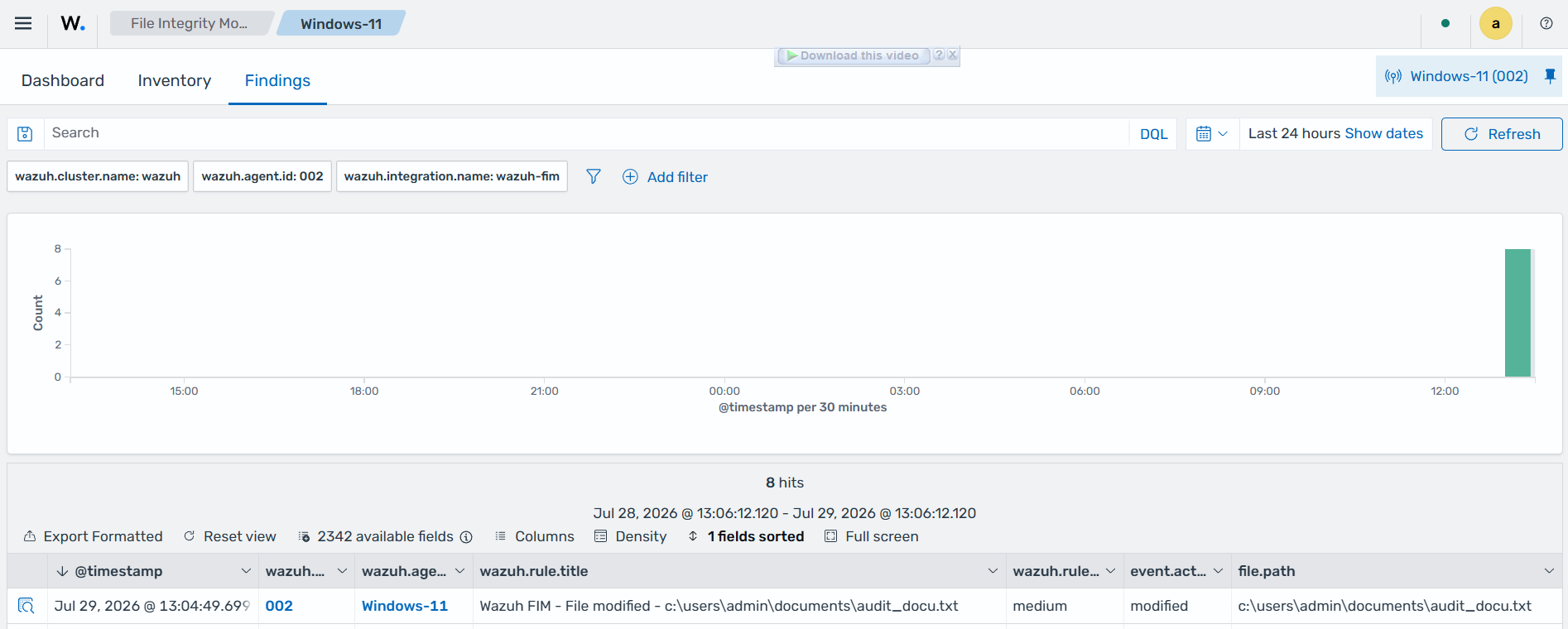
Expand the finding to view all the information. In the finding fields below, you can see that the admin user modified the audit_docu.txt file using the Notepad text editor.
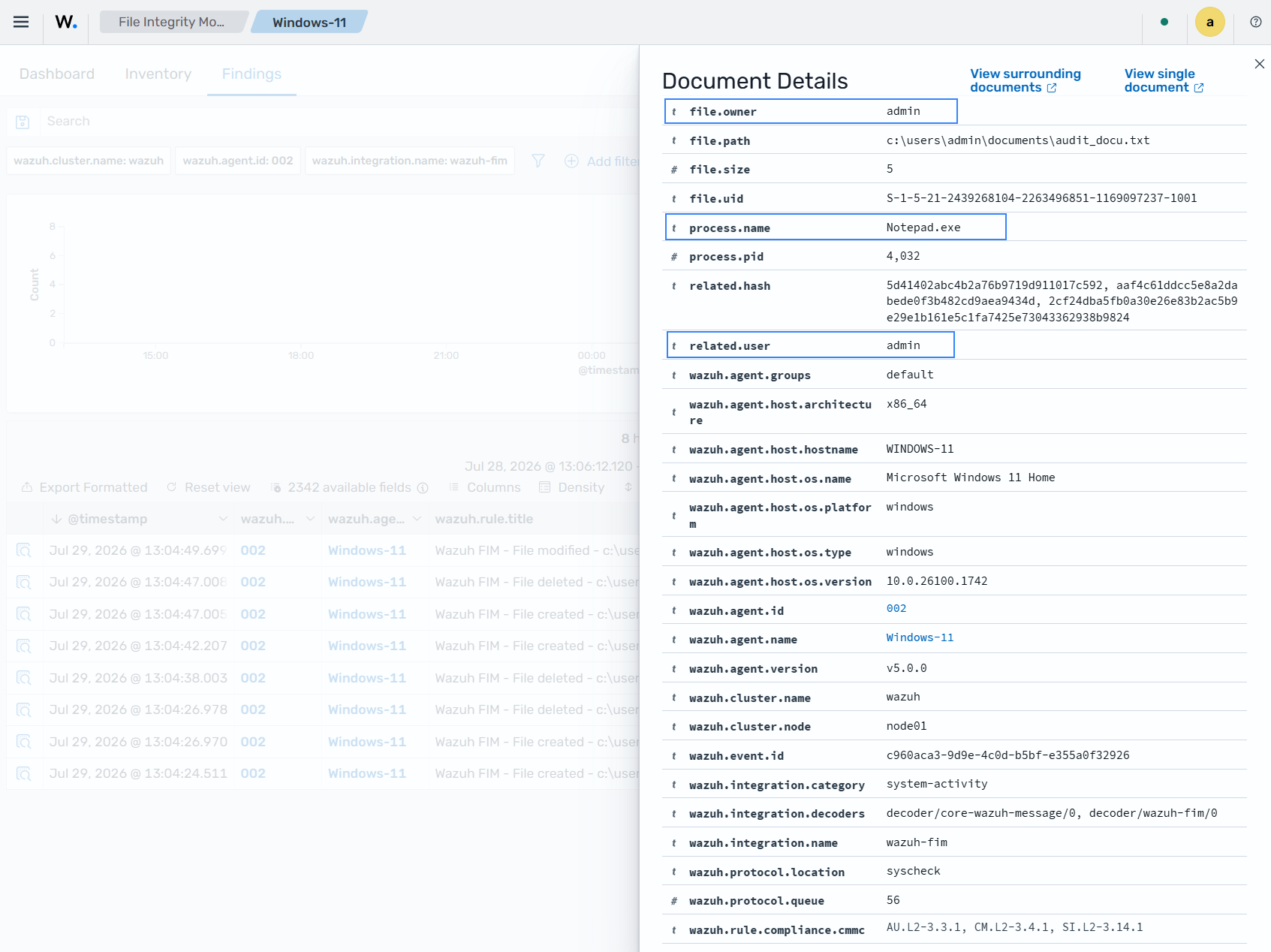
Finding in JSON:
{
  "_index": ".ds-wazuh-findings-v5-system-activity-000001",
  "_id": "lV_Wrp8BegqTXBPM_3R-",
  "_score": null,
  "_source": {
    "process": {
      "name": "Notepad.exe",
      "pid": 4032
    },
    "@timestamp": "2026-07-29T17:04:49.699Z",
    "file": {
      "inode": "0",
      "mode": "whodata",
      "owner": "admin",
      "path": "c:\\users\\admin\\documents\\audit_docu.txt",
      "uid": "S-1-5-21-2439268104-2263496851-1169097237-1001",
      "extension": "txt",
      "size": 5,
      "attributes": [
        "ARCHIVE"
      ],
      "directory": "c:\\users\\admin\\documents",
      "hash": {
        "sha1": "aaf4c61ddcc5e8a2dabede0f3b482cd9aea9434d",
        "sha256": "2cf24dba5fb0a30e26e83b2ac5b9e29e1b161e5c1fa7425e73043362938b9824",
        "md5": "5d41402abc4b2a76b9719d911017c592"
      }
    },
    "related": {
      "user": [
        "admin"
      ],
      "hash": [
        "5d41402abc4b2a76b9719d911017c592",
        "aaf4c61ddcc5e8a2dabede0f3b482cd9aea9434d",
        "2cf24dba5fb0a30e26e83b2ac5b9e29e1b161e5c1fa7425e73043362938b9824"
      ]
    },
    "data_stream": {
      "type": "logs",
      "dataset": "wazuh.fim"
    },
    "wazuh": {
      "cluster": {
        "node": "node01",
        "name": "wazuh"
      },
      "protocol": {
        "location": "syscheck",
        "queue": 56
      },
      "agent": {
        "host": {
          "hostname": "WINDOWS-11",
          "os": {
            "name": "Microsoft Windows 11 Home",
            "type": "windows",
            "version": "10.0.26100.1742",
            "platform": "windows"
          },
          "architecture": "x86_64"
        },
        "name": "Windows-11",
        "groups": [
          "default"
        ],
        "id": "002",
        "version": "v5.0.0"
      },
      "integration": {
        "name": "wazuh-fim",
        "decoders": [
          "decoder/core-wazuh-message/0",
          "decoder/wazuh-fim/0"
        ],
        "category": "system-activity"
      },
      "rule": {
        "sigma_id": "90364f8a-4402-4637-9f3c-4d5f53a7a461",
        "level": "medium",
        "compliance": {
          "iso_27001": [
            "A.12.4.1",
            "A.12.6.1",
            "A.16.1.2"
          ],
          "hipaa": [
            "164.308.a.1.ii.D",
            "164.308.a.6",
            "164.312.b"
          ],
          "pci_dss": [
            "6.2",
            "10.5",
            "11.4"
          ],
          "tsc": [
            "A1.2",
            "CC7.2",
            "CC7.3"
          ],
          "nis2": [
            "21.2.a",
            "21.2.e",
            "23"
          ],
          "nist_800_171": [
            "3.3.1",
            "3.3.2",
            "3.4.1",
            "3.14.6",
            "3.14.7"
          ],
          "fedramp": [
            "AU-6",
            "CM-6",
            "SI-4"
          ],
          "nist_800_53": [
            "AU-6",
            "CM-6",
            "SI-4"
          ],
          "cmmc": [
            "AU.L2-3.3.1",
            "CM.L2-3.4.1",
            "SI.L2-3.14.1"
          ],
          "gdpr": [
            "II_5.1.f",
            "IV_32.1.a",
            "IV_33.1",
            "IV_34.1"
          ]
        },
        "mitre": {
          "technique": {
            "name": [
              "Data Manipulation",
              "Masquerading"
            ],
            "id": [
              "T1565",
              "T1036"
            ]
          },
          "tactic": {
            "name": [
              "Stealth",
              "Impact"
            ],
            "id": [
              "TA0005",
              "TA0040"
            ]
          }
        },
        "id": "90364f8a-4402-4637-9f3c-4d5f53a7a461",
        "title": "Wazuh FIM - File modified - c:\\users\\admin\\documents\\audit_docu.txt",
        "tags": [
          "medium",
          "wazuh-fim",
          "attack.defense-evasion",
          "attack.impact",
          "attack.t1565.001",
          "attack.t1036"
        ],
        "status": "stable"
      },
      "event": {
        "id": "c960aca3-9d9e-4c0d-b5bf-e355a0f32926"
      },
      "space": {
        "name": "standard"
      }
    },
    "event": {
      "original": "{\"collector\":\"file\",\"module\":\"fim\",\"data\":{\"event\":{\"created\":\"2026-07-29T17:04:50.278Z\",\"type\":\"modified\",\"changed_fields\":[\"file.size\",\"file.mtime\",\"file.hash.md5\",\"file.hash.sha1\",\"file.hash.sha256\"]},\"file\":{\"size\":5,\"permissions\":[\"{\\\"S-1-5-18\\\":{\\\"name\\\":\\\"SYSTEM\\\",\\\"allowed\\\":[\\\"delete\\\",\\\"read_control\\\",\\\"write_dac\\\",\\\"write_owner\\\",\\\"synchronize\\\",\\\"read_data\\\",\\\"write_data\\\",\\\"append_data\\\",\\\"read_ea\\\",\\\"write_ea\\\",\\\"execute\\\",\\\"read_attributes\\\",\\\"write_attributes\\\"]}}\",\"{\\\"S-1-5-32-544\\\":{\\\"name\\\":\\\"Administrators\\\",\\\"allowed\\\":[\\\"delete\\\",\\\"read_control\\\",\\\"write_dac\\\",\\\"write_owner\\\",\\\"synchronize\\\",\\\"read_data\\\",\\\"write_data\\\",\\\"append_data\\\",\\\"read_ea\\\",\\\"write_ea\\\",\\\"execute\\\",\\\"read_attributes\\\",\\\"write_attributes\\\"]}}\",\"{\\\"S-1-5-21-2439268104-2263496851-1169097237-1001\\\":{\\\"name\\\":\\\"admin\\\",\\\"allowed\\\":[\\\"delete\\\",\\\"read_control\\\",\\\"write_dac\\\",\\\"write_owner\\\",\\\"synchronize\\\",\\\"read_data\\\",\\\"write_data\\\",\\\"append_data\\\",\\\"read_ea\\\",\\\"write_ea\\\",\\\"execute\\\",\\\"read_attributes\\\",\\\"write_attributes\\\"]}}\"],\"uid\":\"S-1-5-21-2439268104-2263496851-1169097237-1001\",\"owner\":\"admin\",\"inode\":\"0\",\"device\":\"2\",\"mtime\":\"2026-07-29T17:04:50.000Z\",\"hash\":{\"md5\":\"5d41402abc4b2a76b9719d911017c592\",\"sha1\":\"aaf4c61ddcc5e8a2dabede0f3b482cd9aea9434d\",\"sha256\":\"2cf24dba5fb0a30e26e83b2ac5b9e29e1b161e5c1fa7425e73043362938b9824\"},\"attributes\":[\"ARCHIVE\"],\"path\":\"c:\\\\users\\\\admin\\\\documents\\\\audit_docu.txt\",\"mode\":\"whodata\",\"previous\":{\"size\":0,\"mtime\":\"2026-07-29T17:04:41.000Z\",\"hash\":{\"md5\":\"d41d8cd98f00b204e9800998ecf8427e\",\"sha1\":\"da39a3ee5e6b4b0d3255bfef95601890afd80709\",\"sha256\":\"e3b0c44298fc1c149afbf4c8996fb92427ae41e4649b934ca495991b7852b855\"}},\"audit\":{\"user_id\":\"S-1-5-21-2439268104-2263496851-1169097237-1001\",\"user_name\":\"admin\",\"process_name\":\"C:\\\\Program Files\\\\WindowsApps\\\\Microsoft.WindowsNotepad_11.2605.34.0_x64__8wekyb3d8bbwe\\\\Notepad\\\\Notepad.exe\",\"process_id\":4032}}}}",
      "kind": "event",
      "action": "modified",
      "index": ".ds-wazuh-events-v5-system-activity-000001",
      "category": [
        "file"
      ],
      "type": [
        "change"
      ],
      "dataset": "wazuh.fim",
      "doc_id": "dF_Wrp8BegqTXBPMIXQq",
      "outcome": "success"
    }
  },
  "fields": {
    "@timestamp": [
      "2026-07-29T17:04:49.699Z"
    ]
  },
  "sort": [
    1785344689699
  ]
}
Manual configuration of the Windows Audit Policies
For Windows versions later than Windows Vista and Windows Server 2008, when you monitor a file or directory with the whodata option, Wazuh automatically configures the Local Audit Policies and the System Access Control List (SACL) for the file or directory. If this is not done automatically or you have an earlier version of Windows such as Windows Vista and Windows Server 2008, you have to manually configure the audit policies and the SACL.
Local Audit Policies in Windows
To manually configure the audit policies needed to run FIM in who-data mode, activate the logging of successful events.
On the Run dialog box (Win + R), open the Local Group Policy Editor using the following command:
gpedit.msc
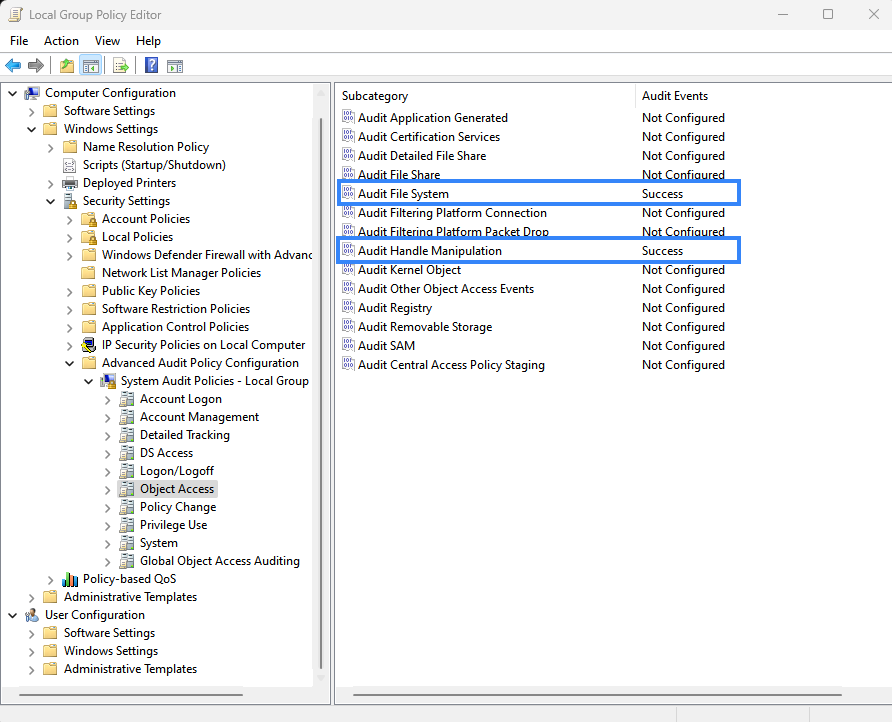
Configure the Audit Events field to Success for the following policies:
Computer Configuration → Windows Settings → Security Settings → Advanced Audit Policy Configuration → Object Access → Audit File System
Computer Configuration → Windows Settings → Security Settings → Advanced Audit Policy Configuration → Object Access → Audit Handle Manipulation
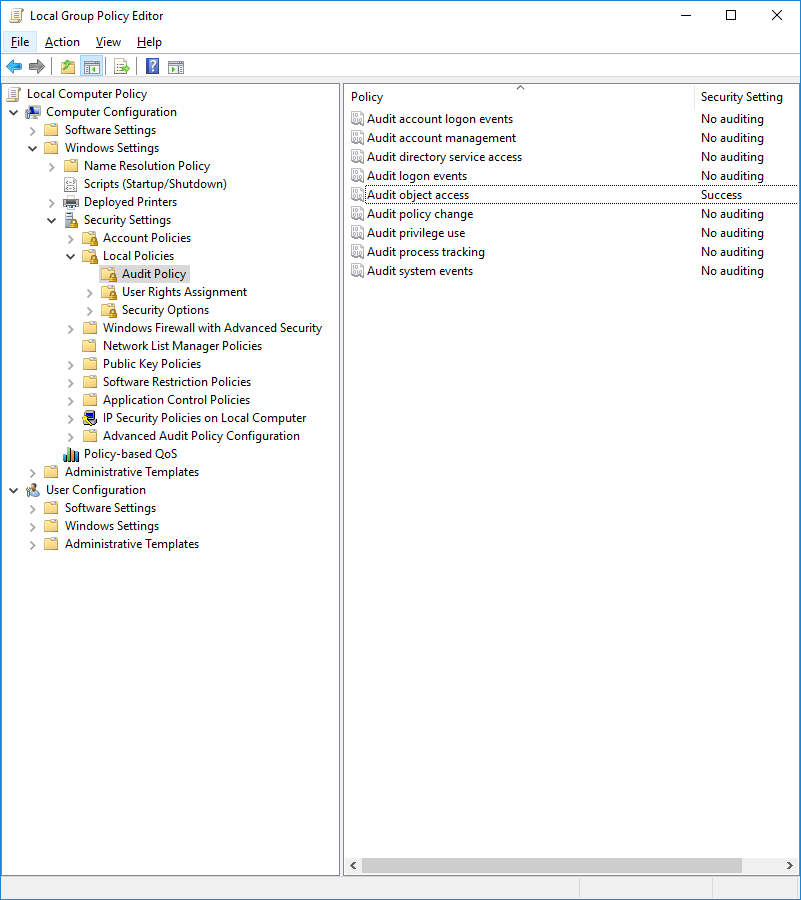
If your system does not allow configuring subcategories through Advanced Audit Policy Configuration, configure the Security Setting field to Success for the following policy:
Computer Configuration → Windows Settings → Security Settings → Local Policies → Audit Policy → Audit object access
System Access Control List (SACL) in Windows
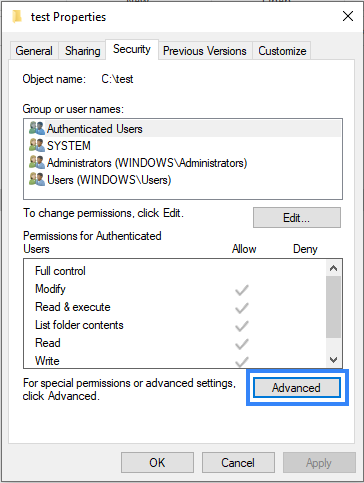
A system access control list (SACL) enables administrators to log attempts to access a secured object. You can check and modify SACLs of each monitored directory through Properties, selecting the Security tab, and clicking on Advanced:
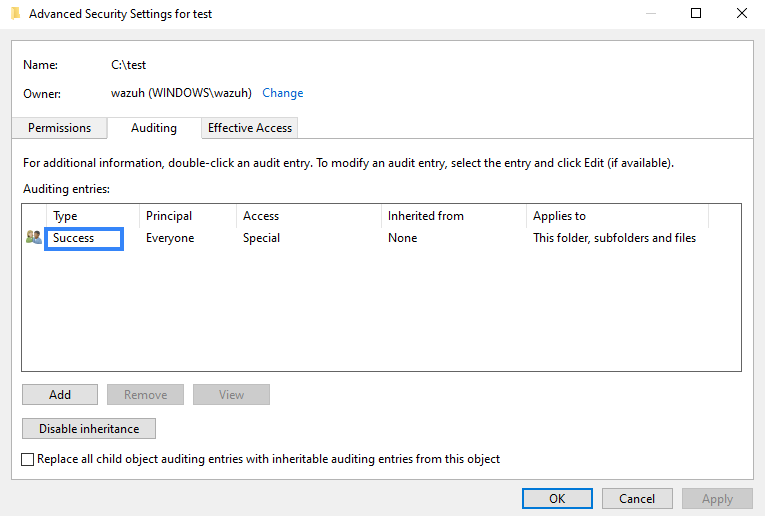
It is necessary to have a Success entry in the Auditing tab:
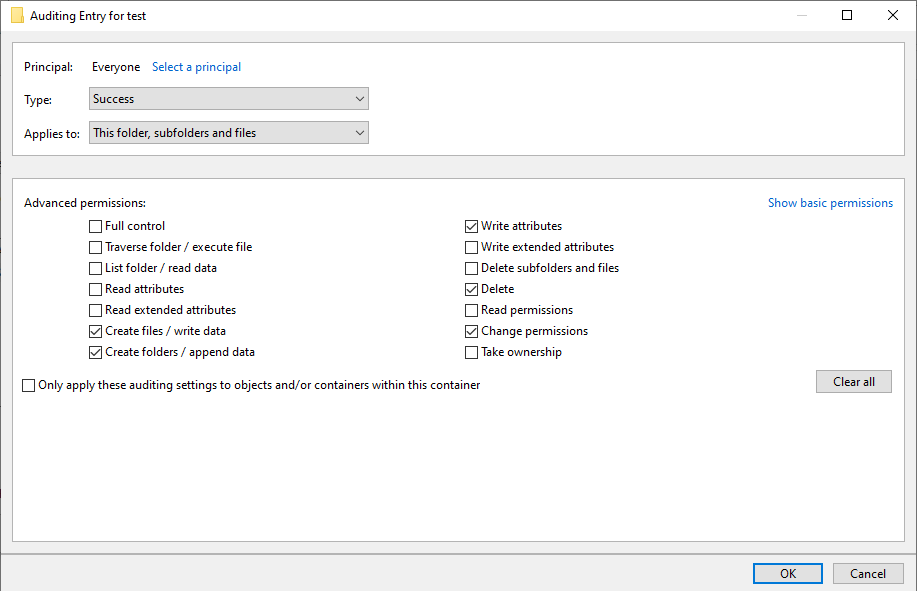
If there is no Success entry, click on Add to create it with these advanced permissions:
Tuning audit to deal with a flood of who-data events
The syscheck.rt_delay variable in the internal FIM configuration helps to prevent the loss of events by setting a delay before sending events to the Wazuh manager. You can configure this variable in the /var/ossec/etc/internal_options.conf file on the Wazuh agent. The allowed value for this variable is a numerical value. You must set the delay in milliseconds. Increase the delay to better handle event floods, or decrease it when you need faster processing of realtime or whodata events.
Windows installation directory monitoring
In 64-bit architecture systems, you can specifically locate 32-bit and 64-bit DLLs.
System32is reserved for 64-bit DLLs.SysWOW64is reserved for all 32-bit DLLs.
Furthermore, 32-bit processes running in 64-bit environments access System32 through a virtual folder called Sysnative.
We disabled this redirection, and you can access System32 directly. Monitoring %WINDIR%/System32 and %WINDIR%/Sysnative directories is equivalent, and Wazuh shows the path %WINDIR%/System32 in the findings. SysWOW64 is a different directory. To monitor %WINDIR%/SysWOW64, you must add it to the C:\Program Files (x86)\ossec-agent\ossec.conf configuration file.
You can monitor the Windows special directories %WINDIR%/System32 and %WINDIR%/SysWOW64 by configuring them with any of the FIM modes. For example:
Scheduled scan
<syscheck>
  <directories>%WINDIR%/System32</directories>
  <directories>%WINDIR%/SysWOW64</directories>
</syscheck>
Real-time
<syscheck>
  <directories realtime="yes">%WINDIR%/System32</directories>
  <directories realtime="yes">%WINDIR%/SysWOW64</directories>
</syscheck>
Who-data
<syscheck>
  <directories whodata="yes">%WINDIR%/System32</directories>
  <directories whodata="yes">%WINDIR%/SysWOW64</directories>
</syscheck>
Note
The FIM module on Windows does not support monitoring network locations. This includes:
UNC paths (for example,
\\server\share\folder)Mapped drives (for example,
Z:\folder)
If these types of paths are included in your <directories> configuration, they will be ignored, and no FIM events will be generated for them. This applies to all FIM modes: scheduled, real-time, and whodata.
Recursion level
You can configure the maximum recursion level allowed for a specific directory by using the recursion_level option of the directories option. The recursion_level value must be an integer between 0 and 320.
Note
This 320 limit applies specifically to <directories> (file and folder monitoring). The recursion_level attribute for <windows_registry> is different and supports a wider range. See Recursion level in Windows Registry monitoring.
The following configuration example sets the recursion_level of the monitored directory to 3. Replace <FILEPATH_OF_MONITORED_DIRECTORY> with your own file paths.
Add the following settings to the Wazuh agent configuration file:
Linux:
/var/ossec/etc/ossec.confWindows:
C:\Program Files (x86)\ossec-agent\ossec.confmacOS:
/Library/Ossec/etc/ossec.conf
<syscheck>
  <directories check_all="yes" recursion_level="3"><FILEPATH_OF_MONITORED_DIRECTORY></directories>
</syscheck>
Restart the Wazuh agent to apply any configuration change:
Linux:
systemctl restart wazuh-agentWindows:
Restart-Service -Name wazuhmacOS:
/Library/Ossec/bin/wazuh-control restart
If you have the following directory structure and the above setting with recursion_level="3", FIM then generates findings for file_3.txt and all files up to <FILEPATH_OF_MONITORED_DIRECTORY>/level_1/level_2/level_3/, but not for any files in the directory deeper than level_3.
<FILEPATH_OF_MONITORED_DIRECTORY>
├── file_0.txt
└── level_1
    ├── file_1.txt
    └── level_2
        ├── file_2.txt
        └── level_3
            ├── file_3.txt
            └── level_4
                ├── file_4.txt
                └── level_5
                    └── file_5.txt
To disable the recursion and generate the findings only for the files in the monitored folder, you need to set the recursion_level value to 0.
If you do not specify recursion_level, it is set to 256. This is the default value defined by syscheck.default_max_depth in the internal options configuration file.
Process priority
To adjust the CPU usage of the FIM module on a monitored endpoint, use the process_priority option in the agent configuration. This works on Windows, Linux, and macOS.
The process priority scale for the Wazuh FIM module ranges from -20 to 19 for each Wazuh agent. The default process_priority value is set to 10. Increasing this value lowers the priority of the FIM process, reducing its access to CPU resources and potentially slowing its execution.
You need to edit the Wazuh agent /var/ossec/etc/ossec.conf configuration file to configure the process priority of the Wazuh FIM module.
In the configuration example below, the FIM module on the Wazuh agent is set to run with the minimum process priority:
Add the following settings to the Wazuh agent configuration file:
Linux:
/var/ossec/etc/ossec.confWindows:
C:\Program Files (x86)\ossec-agent\ossec.confmacOS:
/Library/Ossec/etc/ossec.conf
<syscheck>
  <process_priority>19</process_priority>
</syscheck>
Restart the Wazuh agent to apply any configuration change:
Linux:
systemctl restart wazuh-agentWindows:
Restart-Service -Name wazuhmacOS:
/Library/Ossec/bin/wazuh-control restart
Setting the process_priority value lower than the default gives the FIM module higher priority, more CPU resources, and makes it run faster. In the configuration example below, the FIM module has the maximum process priority.
Add the following settings to the Wazuh agent configuration file:
Linux:
/var/ossec/etc/ossec.confWindows:
C:\Program Files (x86)\ossec-agent\ossec.confmacOS:
/Library/Ossec/etc/ossec.conf
<syscheck>
  <process_priority>-20</process_priority>
</syscheck>
Restart the Wazuh agent to apply any configuration change:
Linux:
systemctl restart wazuh-agentWindows:
Restart-Service -Name wazuhmacOS:
/Library/Ossec/bin/wazuh-control restart
Database storage
Wazuh uses a SQLite database to store information about FIM events, such as the creation, modification, and deletion of regular files. When the Wazuh agent starts, the FIM module performs a first scan and generates the agent's database. By default, Wazuh saves this database to disk at /var/ossec/queue/fim/db.
You can configure the database storage options by using the database attribute. The allowed values for the database option are disk and memory. These storage options are available on Windows, macOS, and Linux operating systems.
In the configuration example below, we set the database location to memory.
Add the following settings to the Wazuh agent configuration file:
Linux:
/var/ossec/etc/ossec.confWindows:
C:\Program Files (x86)\ossec-agent\ossec.confmacOS:
/Library/Ossec/etc/ossec.conf
<syscheck>
  <database>memory</database>
</syscheck>
Restart the Wazuh agent to apply any configuration change:
Linux:
systemctl restart wazuh-agentWindows:
Restart-Service -Name wazuhmacOS:
/Library/Ossec/bin/wazuh-control restart
In the configuration example below, we set the database location to disk.
Add the following settings to the Wazuh agent configuration file:
Linux:
/var/ossec/etc/ossec.confWindows:
C:\Program Files (x86)\ossec-agent\ossec.confmacOS:
/Library/Ossec/etc/ossec.conf
<syscheck>
  <database>disk</database>
</syscheck>
Restart the Wazuh agent to apply any configuration change:
Linux:
systemctl restart wazuh-agentWindows:
Restart-Service -Name wazuhmacOS:
/Library/Ossec/bin/wazuh-control restart
The main advantage of using an in-memory database is the performance, as reading and writing operations are faster than performing them on disk. The corresponding disadvantage is that the memory must be sufficient to store the data.
Synchronization
The FIM module keeps the Wazuh agent and manager databases synchronized, ensuring the manager has an up-to-date inventory of monitored files. The agent periodically synchronizes with the manager, transmitting local FIM database changes and validating consistency through scheduled integrity checks. If a sync attempt fails due to a timeout or temporary connectivity issue, the agent automatically retries before marking it failed.
At startup, the Wazuh agent rebuilds its local FIM database, scans to establish the current state of monitored files, and synchronizes the resulting inventory with the manager. Directories monitored in realtime or whodata mode report changes as they occur, while directories monitored in scheduled mode are synchronized after the corresponding scan completes. If the Wazuh agent is offline, file changes are not reported immediately; once connectivity is restored, subsequent synchronization and integrity validation reconcile the Wazuh agent and manager databases to ensure they remain consistent.
You can see below the default synchronization setting on the /var/ossec/etc/ossec.conf configuration file:
<syscheck>
  <synchronization>
    <enabled>yes</enabled>
    <interval>5m</interval>
    <response_timeout>60</response_timeout>
    <max_eps>75</max_eps>
    <integrity_interval>24h</integrity_interval>
  </synchronization>
</syscheck>
The table below explains the supported attributes of the synchronization option:
Attribute |
Default value |
Allowed values |
Description |
|---|---|---|---|
|
|
yes, no |
Enable or disable FIM synchronization. |
|
|
Any number greater than or equal to 1. Allowed suffixes (s, m, h, d) |
Specifies how often the agent initiates a sync with the manager. |
|
|
Any number greater than or equal to 1. Allowed suffixes (s, m, h, d) |
Specifies the maximum number of seconds the agent will wait for a manager response before treating the synchronization attempt as failed. Setting this value too low may trigger premature retries, while setting it too high may delay timely detection of synchronization failures. |
|
|
Integer number between 0 and 1000000. 0 means unlimited. |
Sets the maximum synchronization messages per second. |
|
|
Any number greater than or equal to 1. Allowed suffixes (s, m, h, d) |
Specifies how often the agent performs a full integrity validation by comparing checksums with the manager. |