Amazon Inspector
Amazon Inspector is an automated vulnerability management and security assessment service that helps improve the security posture of workloads running on AWS. It provides continuous scanning for Amazon EC2 instances, container images in Amazon ECR, and AWS Lambda functions, helping identify software vulnerabilities and unintended network exposure.
Amazon Inspector generates detailed security findings that are prioritized by severity, enabling teams to focus on the most critical risks. Findings can be reviewed directly or included in reports accessible through the Amazon Inspector console or API. The Wazuh module for AWS collects findings from Amazon Inspector only. Amazon Inspector Classic isn't supported.
AWS configuration
The following sections cover how to configure Amazon Inspector to integrate with Wazuh.
Amazon Inspector configuration
Activate Amazon Inspector in each AWS Region where you want Wazuh to collect findings:
On your AWS console, search for
inspectorin the search bar or go to Services > Security, Identity, & Compliance > Amazon Inspector.Use the Region selector in the upper-right corner of the console to select the Region where you want to activate Amazon Inspector.
Click Get Started.
Click Activate Amazon Inspector. For a standalone account, this activates all scan types by default, including Amazon EC2 scanning, Amazon ECR scanning, and Lambda standard scanning.
To activate a scan type later, go to Account management in the navigation pane, select your account, click Activate, and select the scan type.
Note
Amazon ECR scanning in Amazon Inspector replaces basic scanning with enhanced scanning for your whole private registry. The Amazon ECR image scanning configuration only receives results from basic scanning. If you use that configuration, deactivate Amazon ECR scanning in Amazon Inspector. Otherwise, collect your container image findings through Amazon Inspector instead. For detailed instructions on activating scan types, see the Amazon Inspector documentation.
Policy configuration
Follow the creating an AWS policy guide to create a policy using the Amazon Web Services console.
The policies below follow the principle of least privilege, so they give the AWS IAM user only the minimum permissions it needs.
To allow an AWS user to use the Wazuh module for AWS with read-only permissions, it must have a policy like the following attached:
{
    "Version": "2012-10-17",
    "Statement": [
        {
            "Sid": "VisualEditor0",
            "Effect": "Allow",
            "Action": [
                "inspector2:ListFindings"
            ],
            "Resource": "*"
        }
    ]
}
After creating a policy, you can attach it directly to a user or to a group to which the user belongs. In attaching a policy to an IAM user group, you see how to attach a policy to a group. More information on how to use other methods is available in the AWS documentation.
Configure Wazuh to process Amazon Inspector logs
Make sure that the AWS integrations are enabled on the Wazuh dashboard, as described in Enable AWS integration on the Wazuh dashboard.
Add the following Wazuh module for AWS configuration to the
/var/ossec/etc/ossec.conffile on the Wazuh agent. Replace the Regions in the example with the Regions where you activated Amazon Inspector. If the file already has a<wodle name="aws-s3">block, add only the<service>section to it:<wodle name="aws-s3"> <disabled>no</disabled> <interval>10m</interval> <run_on_start>yes</run_on_start> <skip_on_error>yes</skip_on_error> <service type="inspector"> <aws_profile>default</aws_profile> <regions>us-east-1,us-east-2</regions> </service> </wodle>
Note
This example uses the
aws_profileauthentication parameter. Check the Configure AWS credentials section to learn more about the different authentication options and how to use them.Save the changes and restart the Wazuh agent service to apply the changes.
# systemctl restart wazuh-agent
Inspector use case
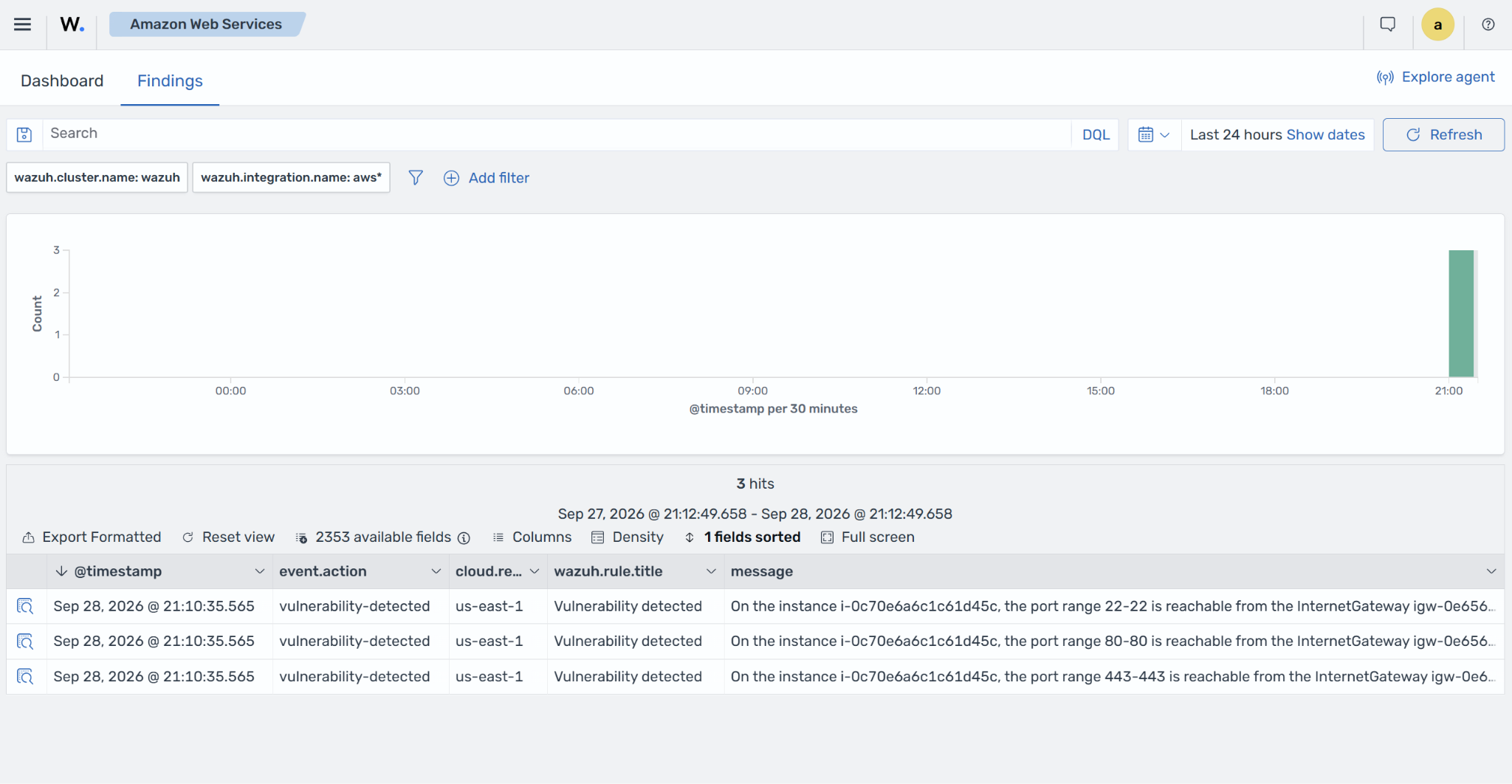
Wazuh collects the Inspector findings through the Wazuh module for AWS and displays them on the Wazuh dashboard. The screenshot below shows the ingested findings, including network reachability findings for publicly reachable ports on an EC2 instance.