Wazuh manager API use cases
You can use the Wazuh manager API to check the health of the Wazuh manager, read its logs, and enroll, query, restart, upgrade, and delete Wazuh agents. You can send each request from Dev Tools in the Wazuh dashboard or with cURL from a terminal. These use cases apply to Wazuh 5.0.0.
Using the Wazuh dashboard
The following use cases demonstrate how to manage the Wazuh manager and Wazuh agents using the Wazuh manager API through the Wazuh dashboard.
Wazuh manager operations
You can use the Wazuh manager API to check the status, statistics, and logs of the Wazuh manager and to restart it. Review the API manager reference for more information on managing the Wazuh manager using the Wazuh manager API.
The following use cases show how to check and restart the Wazuh manager.
Retrieving the Wazuh manager daemon status
Use the Wazuh manager API to retrieve the current status of all Wazuh manager daemons. The /cluster/<NODE_ID>/status endpoint shows whether each Wazuh manager daemon is running and ready. Use it to check the health of the Wazuh manager and to troubleshoot it.
Follow these steps to retrieve the Wazuh daemon status:
Navigate to Server management > Dev Tools to open the Wazuh manager API Console.
Set the method and endpoint to
GET /cluster/<NODE_ID>/status, where<NODE_ID>is the name of the Wazuh manager node. You can get the node name withGET /cluster/local/info.Click the play button to execute the request. A response similar to the following is returned:
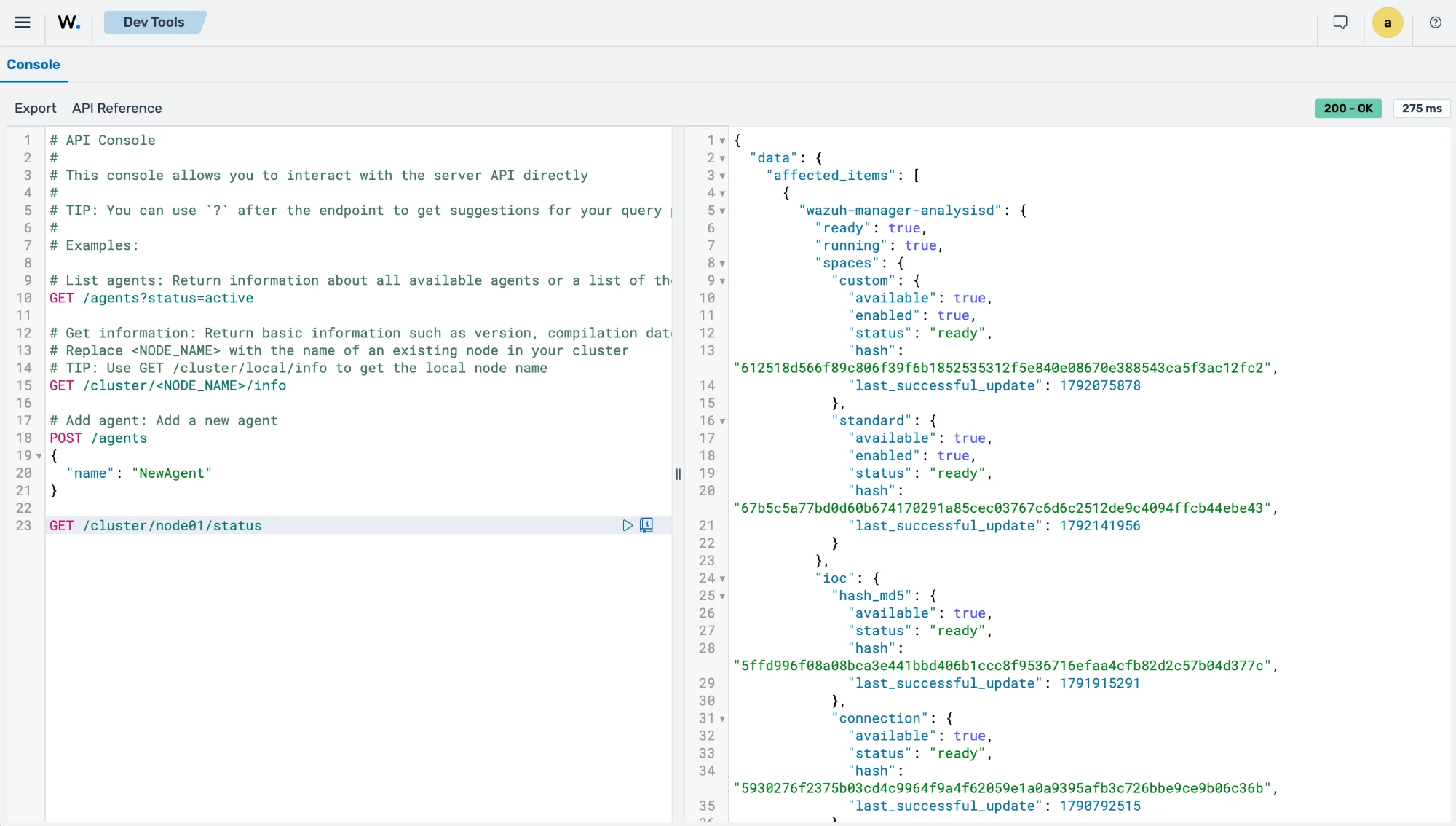
The command output looks similar to this:
{
  "data": {
    "affected_items": [
      {
        "wazuh-manager-analysisd": {
          "ready": true,
          "running": true,
          "spaces": {
            "custom": {
              "available": true,
              "enabled": true,
              "status": "ready",
              "hash": "612518d566f89c806f39f6b1852535312f5e840e08670e388543ca5f3ac12fc2",
              "last_successful_update": 1792075878
            },
            "standard": {
              "available": true,
              "enabled": true,
              "status": "ready",
              "hash": "67b5c5a77bd0d60b674170291a85cec03767c6d6c2512de9c4094ffcb44ebe43",
              "last_successful_update": 1792141956
            }
          },
          "ioc": {
            "connection": {
              "available": true,
              "status": "ready",
              "hash": "5930276f2375b03cd4c9964f9a4f62059e1a0a9395afb3c726bbe9ce9b06c36b",
              "last_successful_update": 1790792515
            },
            "hash_sha1": {
              "available": true,
              "status": "ready",
              "hash": "464f52d41b3d8a7fc37c9a7876affbee99bd7db0298923fa753d914f9ddcb9d2",
              "last_successful_update": 1791578471
            },
            "url_full": {
              "available": true,
              "status": "ready",
              "hash": "7e2bc89c6130487bb508998961f827c5a901bae9b0a50fa8c051ba1f0fdafb47",
              "last_successful_update": 1791915251
            },
            "url_domain": {
              "available": true,
              "status": "ready",
              "hash": "066b294c7ab0582126778d4d9a154bceb249d1e9f364b2b1d6a82027c5f499bd",
              "last_successful_update": 1792437225
            },
            "hash_sha256": {
              "available": true,
              "status": "ready",
              "hash": "c97799701a881ed6d0c9821eef3ef6c5b04d2f40057bcd3d654683db78534466",
              "last_successful_update": 1791915293
            },
            "hash_md5": {
              "available": true,
              "status": "ready",
              "hash": "5ffd996f08a08bca3e441bbd406b1ccc8f9536716efaa4cfb82d2c57b04d377c",
              "last_successful_update": 1791915291
            }
          },
          "geo": {
            "asn": {
              "available": true,
              "status": "ready",
              "hash": "5a80bc4d5d9d7d60037d195ae547172e",
              "last_successful_update": 1792419413
            },
            "city": {
              "available": true,
              "status": "ready",
              "hash": "a14e3b6ba4d67ea2bbf54f66b1257da3",
              "last_successful_update": 1792246439
            }
          }
        },
        "wazuh-manager-authd": {
          "ready": true,
          "running": true
        },
        "wazuh-manager-remoted": {
          "ready": true,
          "running": true,
          "keystore": {
            "readable": true,
            "agents_loaded": 12,
            "entries_skipped": 0
          },
          "enrollment_password": {
            "ready": true
          }
        },
        "wazuh-manager-clusterd": {
          "ready": true,
          "running": true
        },
        "wazuh-manager-modulesd": {
          "ready": true,
          "running": true,
          "modules": {
            "vulnerability-detector": {
              "available": true,
              "enabled": true,
              "last_successful_update": 1792500481,
              "offset": 1141562,
              "status": "ready"
            },
            "inventory-sync": {
              "available": true
            },
            "content-manager": {
              "available": true
            },
            "task-manager": {
              "available": true
            }
          }
        },
        "wazuh-manager-db": {
          "ready": true,
          "running": true,
          "global": {
            "available": true
          }
        },
        "wazuh-manager-apid": {
          "ready": true,
          "running": true
        },
        "ready": true
      }
    ],
    "total_affected_items": 1,
    "total_failed_items": 0,
    "failed_items": []
  },
  "message": "Node status was successfully read in specified node",
  "error": 0
}
Retrieving Wazuh manager daemon statistics
You can use the Wazuh manager API to retrieve real-time statistics for the Wazuh manager daemon. The /cluster/<NODE_ID>/daemons/stats endpoint returns detailed metrics for components such as wazuh-manager-remoted, wazuh-manager-analysisd, and wazuh-manager-db. The information retrieved from these daemons helps administrators monitor event processing, queue usage, and database activity on the manager.
Follow these steps to retrieve Wazuh daemon statistics:
Navigate to Server management > Dev Tools to open the Wazuh manager API Console.
Set the method and endpoint to
GET /cluster/<NODE_ID>/daemons/stats, where<NODE_ID>is the name of the Wazuh manager node.Click the play button to execute the request. A response similar to the following is returned:
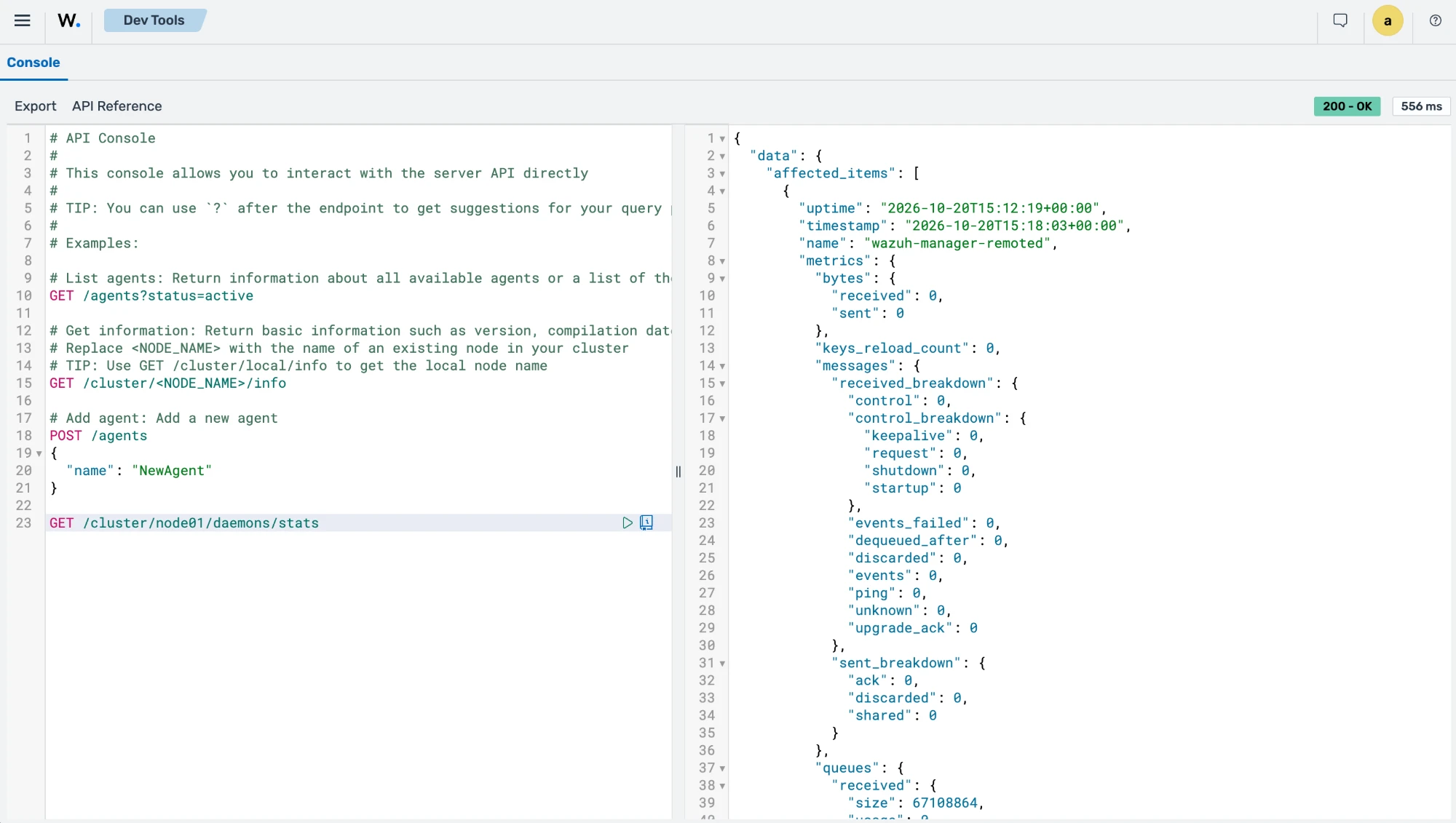
The command output looks similar to this:
{ "data": { "affected_items": [ { "uptime": "2026-10-20T11:48:00+00:00", "timestamp": "2026-10-20T12:57:05+00:00", "name": "wazuh-manager-remoted", "metrics": { "bytes": { "received": 0, "sent": 0 }, "keys_reload_count": 0, "messages": { "received_breakdown": { "control": 0, "control_breakdown": { "keepalive": 0, "request": 0, "shutdown": 0, "startup": 0 }, "events_failed": 0, "dequeued_after": 0, "discarded": 0, "events": 0, "ping": 0, "unknown": 0, "upgrade_ack": 0 }, "sent_breakdown": { "ack": 0, "discarded": 0, "shared": 0 } }, "queues": { "received": { "size": 67108864, "usage": 0 } }, "tcp_sessions": 0, "tcp_sessions_unassociated": 0, "control_messages_queue_usage": 0, "control_messages_queue_breakdown": { "inserted": 0, "replaced": 0, "processed": 0 }, "http_server": { "timestamp": "2026-10-20T12:57:05Z", "responses": { "stateless": { "total": 263, "2xx": 263, "400": 0, "403": 0, "409": 0, "413": 0, "429": 0, "500": 0, "503": 0, "other": 0 }, "stateful": { "total": 2, "2xx": 2, "400": 0, "403": 0, "409": 0, "413": 0, "429": 0, "500": 0, "503": 0, "other": 0 }, "stats": { "total": 0, "2xx": 0, "400": 0, "403": 0, "409": 0, "413": 0, "429": 0, "500": 0, "503": 0, "other": 0 }, "config": { "total": 0, "2xx": 0, "400": 0, "403": 0, "409": 0, "413": 0, "429": 0, "500": 0, "503": 0, "other": 0 }, "enroll": { "total": 0, "2xx": 0, "400": 0, "403": 0, "409": 0, "413": 0, "429": 0, "500": 0, "503": 0, "other": 0 }, "cacerts": { "total": 0, "2xx": 0, "400": 0, "403": 0, "409": 0, "413": 0, "429": 0, "500": 0, "503": 0, "other": 0 } }, "latency": { "stateless": { "count": 263, "sum": 1796452, "min": 795, "max": 59904, "p50": 5632, "p90": 11264, "p99": 36864 }, "stateful": { "count": 2, "sum": 77574, "min": 30571, "max": 47003, "p50": 45056, "p90": 45056, "p99": 45056 }, "enroll": { "count": 0, "sum": 0, "min": 0, "max": 0, "p50": 0, "p90": 0, "p99": 0 } }, "auth_rejections": { "total": 15, "unknown_agent": 0, "invalid_signature": 0, "bad_token": 0, "identity_mismatch": 0, "clock_skew": 15, "unusable_key": 0, "address_not_allowed": 0, "enrollment_key_unavailable": 0, "payload_mismatch": 0, "body_too_large": 0, "bad_encoding": 0, "malformed": 0 }, "enrollment": { "accepted": 0, "rejected_auth": 0, "rejected_validation": 0, "disabled": 0, "authd_error": 0, "authd_unavailable": 0, "authd_queue": { "depth": 0, "capacity": 256, "rejected_total": 0 }, "rate_limited": 0, "rate_limit": { "limit": 100, "burst": 200, "available": 200 } }, "control": { "startup": 0, "notify": 747, "shutdown": 0, "rejected": 0, "wdb_error": 0, "task_fetch": 747, "task_fetch_error": 0, "registry_agents": 3, "wdb_latency": { "count": 252, "sum": 510083, "min": 212, "max": 31427, "p50": 1152, "p90": 4608, "p99": 13312 } }, "keystore": { "agents": 12, "entries_skipped": 0, "reloads_total": 1, "reload_failures_total": 0 }, "downstream": { "downstream_5xx": 0, "route_mismatch": 0, "errors": { "connect": 0, "connect_timeout": 0, "write_timeout": 0, "response_timeout": 0, "transport": 0, "protocol": 0, "response_too_large": 0 }, "deferred": { "capacity": 128, "inflight": 0, "rejected_total": 0 } }, "backpressure": { "available_bytes": 268435456, "inflight_bytes": 0, "inflight_requests": 0, "rejected_total": 0, "connections_open": 0, "connections_max": 256 }, "downloads": { "started": 0, "rejected": 0, "not_found": 0, "open_error": 0, "bytes_total": 0 }, "tls": { "cert_expiry_days": 3630, "ca_matches_leaf": 1 }, "cacerts": { "served": 0, "not_found": 0, "ca_mismatch": 0, "rate_limited": 0, "rate_limit": { "limit": 50, "burst": 100, "available": 100 } }, "vd_scan": { "requests_total": 0, "accepted": 0, "version_mismatch": 0, "queue_full": 0, "invalid_agent": 0, "vd_error": 0, "indexer_unavailable": 0 } } } }, { "status": "OK", "global": [ { "name": "server.events.received", "type": "counter", "enabled": true, "value": 2064 }, { "name": "server.bytes.received", "type": "counter", "enabled": true, "value": 4406958 }, { "name": "agent.cache.entries", "type": "pull", "enabled": true, "value": 2 }, { "name": "agent.cache.evictions", "type": "counter", "enabled": true, "value": 7 }, { "name": "agent.cache.insertions", "type": "counter", "enabled": true, "value": 9 }, { "name": "agent.cache.hits", "type": "counter", "enabled": true, "value": 254 }, { "name": "router.events.processed", "type": "counter", "enabled": true, "value": 2064 }, { "name": "indexer.queue.usage.percent", "type": "pull", "enabled": true, "value": 0 }, { "name": "agent.cache.updates", "type": "counter", "enabled": true, "value": 0 }, { "name": "router.queue.size", "type": "pull", "enabled": true, "value": 0 }, { "name": "router.eps.30m", "type": "pull", "enabled": true, "value": 0.7083333333333334 }, { "name": "router.queue.usage.percent", "type": "pull", "enabled": true, "value": 0 }, { "name": "router.queue.bytes.usage.percent", "type": "pull", "enabled": true, "value": 0 }, { "name": "router.queue.bytes.used", "type": "pull", "enabled": true, "value": 0 }, { "name": "router.events.dropped", "type": "counter", "enabled": true, "value": 0 }, { "name": "router.eps.1m", "type": "pull", "enabled": true, "value": 0.6833333333333333 }, { "name": "router.eps.5m", "type": "pull", "enabled": true, "value": 0.6666666666666666 }, { "name": "indexer.queue.size", "type": "pull", "enabled": true, "value": 0 }, { "name": "indexer.events.dropped", "type": "pull", "enabled": true, "value": 0 } ], "spaces": [ { "name": "custom", "metrics": [ { "name": "events.discarded", "type": "counter", "enabled": true, "value": 0 }, { "name": "events.unclassified", "type": "counter", "enabled": true, "value": 0 }, { "name": "events.discarded.prefilter", "type": "counter", "enabled": true, "value": 0 }, { "name": "events.discarded.postfilter", "type": "counter", "enabled": true, "value": 0 } ] }, { "name": "standard", "metrics": [ { "name": "events.unclassified", "type": "counter", "enabled": true, "value": 47 }, { "name": "events.discarded.postfilter", "type": "counter", "enabled": true, "value": 0 }, { "name": "events.discarded", "type": "counter", "enabled": true, "value": 0 }, { "name": "events.discarded.prefilter", "type": "counter", "enabled": true, "value": 0 } ] } ], "name": "wazuh-manager-analysisd", "uptime": "2026-10-20T11:47:59.651Z", "timestamp": "2026-10-20T12:57:05.602Z" }, { "uptime": "2026-10-20T11:47:59+00:00", "timestamp": "2026-10-20T12:57:05+00:00", "name": "wazuh-manager-db", "metrics": { "queries": { "received": 805, "received_breakdown": { "global": 812, "global_breakdown": { "db": { "backup": 0, "sql": 285, "vacuum": 0, "commit": 0, "get_fragmentation": 0 }, "tables": { "agent": { "delete-agent": 0, "disconnect-agents": 13, "find-agent": 0, "get-agent-info": 0, "get-agents-by-connection-status": 0, "get-all-agents": 1, "get-distinct-groups": 251, "get-groups-integrity": 0, "recalculate-agent-group-hashes": 0, "insert-agent": 0, "reset-agents-connection": 1, "select-agent-group": 126, "set-agent-groups": 0, "sync-agent-groups-get": 0, "sync-agent-info-get": 0, "sync-agent-info-set": 0, "update-agent-data": 126, "update-connection-status": 0, "update-status-code": 0, "update-keepalive": 0, "set-agent-credentials": 0 }, "belongs": { "get-group-agents": 0, "select-group-belong": 0 }, "group": { "delete-group": 0, "find-group": 1, "insert-agent-group": 0, "select-groups": 1 } } }, "mitre": 0, "mitre_breakdown": { "db": { "sql": 0 } } } }, "time": { "execution": 908, "execution_breakdown": { "global": 908, "global_breakdown": { "db": { "open": 9, "backup": 0, "sql": 75, "vacuum": 0, "commit": 0, "get_fragmentation": 0 }, "tables": { "agent": { "delete-agent": 0, "disconnect-agents": 3, "find-agent": 0, "get-agent-info": 0, "get-agents-by-connection-status": 0, "get-all-agents": 18, "get-distinct-groups": 452, "get-groups-integrity": 0, "recalculate-agent-group-hashes": 0, "insert-agent": 0, "reset-agents-connection": 0, "select-agent-group": 36, "set-agent-groups": 0, "sync-agent-groups-get": 0, "sync-agent-info-get": 0, "sync-agent-info-set": 0, "update-agent-data": 267, "update-connection-status": 0, "update-status-code": 0, "update-keepalive": 0, "set-agent-credentials": 0 }, "belongs": { "get-group-agents": 0, "select-group-belong": 0 }, "group": { "delete-group": 0, "find-group": 1, "insert-agent-group": 0, "select-groups": 41 } } }, "mitre": 0, "mitre_breakdown": { "db": { "sql": 0 } } } } } } ], "total_affected_items": 3, "total_failed_items": 0, "failed_items": [] }, "message": "Statistical information for each daemon was successfully read", "error": 0 }
Retrieving Wazuh manager logs
You can use the Wazuh manager API to retrieve log messages generated by the Wazuh manager.
The /cluster/<NODE_ID>/logs endpoint provides insight into module activity, scan progress, errors, warnings, and other operational events. The endpoint helps troubleshoot Wazuh manager components such as the vulnerability scanner, the content updater, and wazuh-manager-remoted.
Follow these steps to retrieve the last 100 log messages generated by the Wazuh manager:
Navigate to Server management > Dev Tools to open the Wazuh manager API Console.
Set the method and endpoint to
GET /cluster/<NODE_ID>/logs?limit=100, where<NODE_ID>is the name of the Wazuh manager node.Click the play button to execute the request. A response similar to the following is returned:
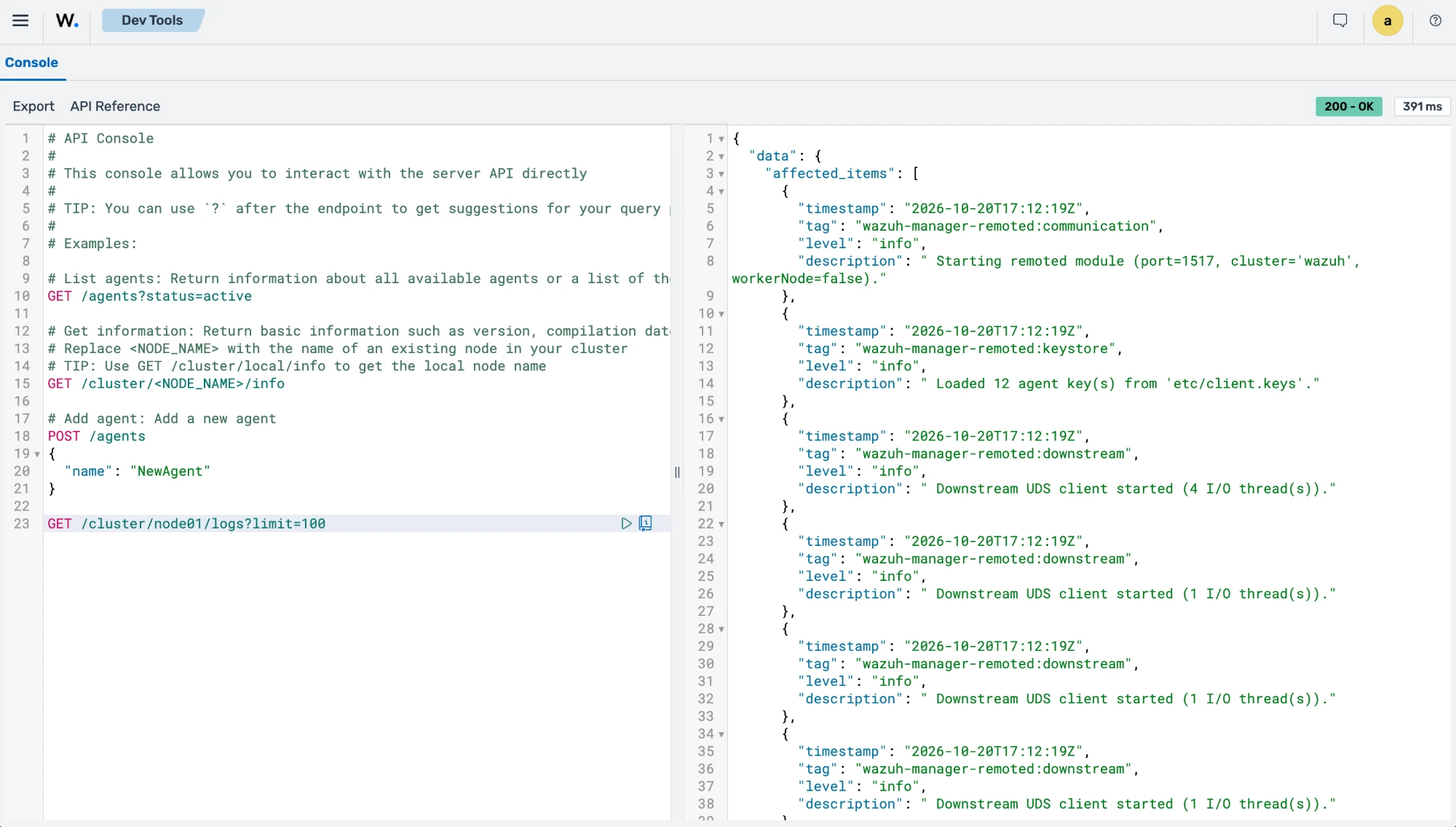
The command output looks similar to this:
{
  "data": {
    "affected_items": [
      {
        "timestamp": "2026-10-20T14:48:01Z",
        "tag": "wazuh-manager-modulesd:content-updater",
        "level": "info",
        "description": " IndexerDownloader: Consumer 'cti:catalog:consumer:vulnerabilities' in index '.wazuh-cti-consumers' is ready. Starting feed download."
      },
      {
        "timestamp": "2026-10-20T14:48:01Z",
        "tag": "wazuh-manager-modulesd:content-updater",
        "level": "info",
        "description": " IndexerDownloader: Starting incremental update from offset 1141562"
      },
      {
        "timestamp": "2026-10-20T14:48:01Z",
        "tag": "wazuh-manager-modulesd:content-updater",
        "level": "info",
        "description": " IndexerDownloader: Incremental update download phase complete — 0 documents, new cursor: '1141562'"
      },
      {
        "timestamp": "2026-10-20T14:48:01Z",
        "tag": "wazuh-manager-modulesd:vulnerability-scanner",
        "level": "info",
        "description": " Feed update process completed (changed=false)."
      },
      {
        "timestamp": "2026-10-20T14:48:01Z",
        "tag": "wazuh-manager-modulesd:vulnerability-scanner",
        "level": "info",
        "description": " CVE feed fully loaded — per-agent scans unblocked."
      },
      {
        "timestamp": "2026-10-20T14:15:42Z",
        "tag": "wazuh-manager-remoted:endpoints",
        "level": "warning",
        "description": " Rejected 2 request(s) in the last 90 s whose token fell outside the accepted time window (stale_token). Check clock synchronization between the agents and the manager; the window is set by 'jwt_max_age' and 'jwt_clock_skew' (remoted internal options)."
      },
      {
        "timestamp": "2026-10-20T14:10:53Z",
        "tag": "wazuh-manager-remoted:endpoints",
        "level": "warning",
        "description": " Rejected 2 request(s) in the last 90 s whose token fell outside the accepted time window (stale_token). Check clock synchronization between the agents and the manager; the window is set by 'jwt_max_age' and 'jwt_clock_skew' (remoted internal options)."
      },
      {
        "timestamp": "2026-10-20T13:59:07Z",
        "tag": "wazuh-manager-remoted:endpoints",
        "level": "warning",
        "description": " Rejected 2 request(s) in the last 90 s whose token fell outside the accepted time window (stale_token). Check clock synchronization between the agents and the manager; the window is set by 'jwt_max_age' and 'jwt_clock_skew' (remoted internal options)."
      },
      {
        "timestamp": "2026-10-20T13:56:15Z",
        "tag": "wazuh-manager-remoted:endpoints",
        "level": "warning",
        "description": " Rejected 3 request(s) in the last 90 s whose token fell outside the accepted time window (stale_token). Check clock synchronization between the agents and the manager; the window is set by 'jwt_max_age' and 'jwt_clock_skew' (remoted internal options)."
      },
      {
        "timestamp": "2026-10-20T13:50:31Z",
        "tag": "wazuh-manager-remoted:endpoints",
        "level": "warning",
        "description": " Rejected 1 request(s) in the last 90 s whose token fell outside the accepted time window (stale_token). Check clock synchronization between the agents and the manager; the window is set by 'jwt_max_age' and 'jwt_clock_skew' (remoted internal options)."
      },
      {
        "timestamp": "2026-10-20T13:49:37Z",
        "tag": "wazuh-manager-modulesd:inventory-sync-server:sync",
        "level": "info",
        "description": " Deletion of agent 013 state documents completed (wazuh-states-*)."
      },
      {
        "timestamp": "2026-10-20T13:48:01Z",
        "tag": "wazuh-manager-modulesd:task-manager:http",
        "level": "info",
        "description": " task manager server bound to 'queue/sockets/task-http.sock' (mode 0660, 2 I/O thread(s), 2 concurrent accept(s), max 1024 connection(s), 64 reserved for control, 960 data session(s), 268435456 byte in-flight budget, 8388608 byte body cap, 282624 byte per-request overhead; timeouts s: header=10 body=30 response=300 write=10 drain=2)."
      },
      {
        "timestamp": "2026-10-20T13:48:01Z",
        "tag": "wazuh-manager-modulesd:task-manager:http",
        "level": "info",
        "description": " Listening on 'queue/sockets/task-http.sock'"
      },
      {
        "timestamp": "2026-10-20T13:48:01Z",
        "tag": "wazuh-manager-modulesd:task-manager",
        "level": "info",
        "description": " Task manager started: 4 executor workers, database 'queue/tasks/tasks.db'"
      },
      {
        "timestamp": "2026-10-20T13:48:01Z",
        "tag": "wazuh-manager-modulesd:inventory-sync-server:server",
        "level": "info",
        "description": " inventory sync server bound to 'queue/sockets/inventory-sync-http.sock' (mode 0660, 4 I/O thread(s), 2 concurrent accept(s), max 1024 connection(s), 64 reserved for control, 960 data session(s), 268435456 byte in-flight budget, 268152832 byte body cap, 282624 byte per-request overhead; timeouts s: header=10 body=30 response=300 write=10 drain=2)."
      },
      {
        "timestamp": "2026-10-20T13:48:01Z",
        "tag": "wazuh-manager-modulesd:inventory-sync-server",
        "level": "info",
        "description": " inventory sync server listening on 'queue/sockets/inventory-sync-http.sock' (routes: GET /, GET /metrics, /stateful, /stats, /config, /_internal/agents/delete and /_internal/vd/scan; 2 sync worker(s))."
      },
      {
        "timestamp": "2026-10-20T13:48:01Z",
        "tag": "wazuh-manager-modulesd:inventory-sync-server",
        "level": "info",
        "description": " The indexer is reachable; inventory documents can be delivered."
      },
      {
        "timestamp": "2026-10-20T13:48:01Z",
        "tag": "wazuh-manager-remoted:vd-client",
        "level": "warning",
        "description": " Failed to query VD offset: status=0 (1 occurrence(s) in the last 90 s)."
      },
      {
        "timestamp": "2026-10-20T13:48:01Z",
        "tag": "wazuh-manager-modulesd:vulnerability-scanner:server",
        "level": "info",
        "description": " vulnerability detector server bound to 'queue/sockets/vd-http.sock' (mode 0660, 2 I/O thread(s), 2 concurrent accept(s), max 1024 connection(s), 64 reserved for control, 960 data session(s), 268435456 byte in-flight budget, 268152832 byte body cap, 282624 byte per-request overhead; timeouts s: header=10 body=30 response=3600 write=10 drain=2)."
      },
      {
        "timestamp": "2026-10-20T13:48:01Z",
        "tag": "wazuh-manager-modulesd:content-updater",
        "level": "info",
        "description": " IndexerDownloader: Consumer 'cti:catalog:consumer:vulnerabilities' in index '.wazuh-cti-consumers' is ready. Starting feed download."
      },
      {
        "timestamp": "2026-10-20T13:48:01Z",
        "tag": "wazuh-manager-modulesd:content-updater",
        "level": "info",
        "description": " IndexerDownloader: Starting incremental update from offset 1141562"
      },
      {
        "timestamp": "2026-10-20T13:48:01Z",
        "tag": "wazuh-manager-modulesd:content-updater",
        "level": "info",
        "description": " IndexerDownloader: Incremental update download phase complete — 0 documents, new cursor: '1141562'"
      },
      {
        "timestamp": "2026-10-20T13:48:01Z",
        "tag": "wazuh-manager-modulesd:vulnerability-scanner",
        "level": "info",
        "description": " Feed update process completed (changed=false)."
      },
      {
        "timestamp": "2026-10-20T13:48:01Z",
        "tag": "wazuh-manager-modulesd:vulnerability-scanner",
        "level": "info",
        "description": " CVE feed fully loaded — per-agent scans unblocked."
      },
      {
        "timestamp": "2026-10-20T13:48:00Z",
        "tag": "wazuh-manager-analysisd",
        "level": "info",
        "description": " Schema initialized"
      },
      {
        "timestamp": "2026-10-20T13:48:00Z",
        "tag": "wazuh-manager-analysisd",
        "level": "info",
        "description": " HLP initialized"
      },
      {
        "timestamp": "2026-10-20T13:48:00Z",
        "tag": "wazuh-manager-analysisd",
        "level": "info",
        "description": " Scheduler initialized"
      },
      {
        "timestamp": "2026-10-20T13:48:00Z",
        "tag": "wazuh-manager-analysisd",
        "level": "info",
        "description": " Indexer Connector initialized"
      },
      {
        "timestamp": "2026-10-20T13:48:00Z",
        "tag": "wazuh-manager-analysisd",
        "level": "info",
        "description": " Stream logger initialized"
      },
      {
        "timestamp": "2026-10-20T13:48:00Z",
        "tag": "wazuh-manager-analysisd",
        "level": "info",
        "description": " Builder initialized"
      },
      {
        "timestamp": "2026-10-20T13:48:00Z",
        "tag": "wazuh-manager-analysisd",
        "level": "info",
        "description": " Content Manager CRUD Service initialized"
      },
      {
        "timestamp": "2026-10-20T13:48:00Z",
        "tag": "wazuh-manager-analysisd",
        "level": "info",
        "description": " Raw Event Indexer initialized"
      },
      {
        "timestamp": "2026-10-20T13:48:00Z",
        "tag": "wazuh-manager-analysisd",
        "level": "info",
        "description": " Orchestrator initialized and started with event queue size: 131072, events per second: unlimited, max bytes: 33554432."
      },
      {
        "timestamp": "2026-10-20T13:48:00Z",
        "tag": "wazuh-manager-analysisd",
        "level": "info",
        "description": " Content Manager Sync Service initialized"
      },
      {
        "timestamp": "2026-10-20T13:48:00Z",
        "tag": "wazuh-manager-analysisd",
        "level": "info",
        "description": " IOC Sync Service initialized"
      },
      {
        "timestamp": "2026-10-20T13:48:00Z",
        "tag": "wazuh-manager-analysisd",
        "level": "info",
        "description": " Dumper Events initialized"
      },
      {
        "timestamp": "2026-10-20T13:48:00Z",
        "tag": "wazuh-manager-analysisd",
        "level": "info",
        "description": " Remote engine's server initialized and started"
      },
      {
        "timestamp": "2026-10-20T13:48:00Z",
        "tag": "wazuh-manager-analysisd",
        "level": "info",
        "description": " Engine started"
      },
      {
        "timestamp": "2026-10-20T13:48:00Z",
        "tag": "wazuh-manager-analysisd",
        "level": "info",
        "description": " Scheduler started"
      },
      {
        "timestamp": "2026-10-20T13:48:00Z",
        "tag": "wazuh-manager-analysisd",
        "level": "info",
        "description": " [CMSync] Event processing is now active"
      },
      {
        "timestamp": "2026-10-20T13:48:00Z",
        "tag": "wazuh-manager-remoted:communication",
        "level": "info",
        "description": " Starting remoted module (port=1517, cluster='wazuh', workerNode=false)."
      },
      {
        "timestamp": "2026-10-20T13:48:00Z",
        "tag": "wazuh-manager-remoted:keystore",
        "level": "info",
        "description": " Loaded 12 agent key(s) from '/etc/wazuh-manager/client.keys'."
      },
      {
        "timestamp": "2026-10-20T13:48:00Z",
        "tag": "wazuh-manager-remoted:downstream",
        "level": "info",
        "description": " Downstream UDS client started (4 I/O thread(s))."
      },
      {
        "timestamp": "2026-10-20T13:48:00Z",
        "tag": "wazuh-manager-remoted:downstream",
        "level": "info",
        "description": " Downstream UDS client started (1 I/O thread(s))."
      },
      {
        "timestamp": "2026-10-20T13:48:00Z",
        "tag": "wazuh-manager-remoted:downstream",
        "level": "info",
        "description": " Downstream UDS client started (1 I/O thread(s))."
      },
      {
        "timestamp": "2026-10-20T13:48:00Z",
        "tag": "wazuh-manager-remoted:downstream",
        "level": "info",
        "description": " Downstream UDS client started (1 I/O thread(s))."
      },
      {
        "timestamp": "2026-10-20T13:48:00Z",
        "tag": "wazuh-manager-remoted:passwordKeySource",
        "level": "info",
        "description": " Enrollment password loaded from '/etc/wazuh-manager/authd.pass'."
      },
      {
        "timestamp": "2026-10-20T13:48:00Z",
        "tag": "wazuh-manager-remoted:tokenKeySource",
        "level": "info",
        "description": " Enrollment token store loaded from '/etc/wazuh-manager/enrollment_tokens.json' (12 token(s) with a credential)."
      },
      {
        "timestamp": "2026-10-20T13:48:00Z",
        "tag": "wazuh-manager-remoted:downstream",
        "level": "info",
        "description": " Downstream UDS client started (1 I/O thread(s))."
      },
      {
        "timestamp": "2026-10-20T13:48:00Z",
        "tag": "wazuh-manager-remoted:http-server",
        "level": "info",
        "description": " HTTP server listening on https://0.0.0.0:1517 (4 I/O thread(s), 8 worker thread(s), max body 10485760 bytes, in-flight budget 268435456 bytes, max 256 connection(s))."
      },
      {
        "timestamp": "2026-10-20T13:48:00Z",
        "tag": "wazuh-manager-remoted:http-server",
        "level": "info",
        "description": " All HTTP endpoints are served under the global prefix '/wazuh-manager' (e.g. https://0.0.0.0:1517/wazuh-manager/stateless); unprefixed paths answer 404; agents must send and sign the full prefixed target."
      },
      {
        "timestamp": "2026-10-20T13:48:00Z",
        "tag": "wazuh-manager-remoted:communication",
        "level": "info",
        "description": " remoted HTTP server started."
      },
      {
        "timestamp": "2026-10-20T13:48:00Z",
        "tag": "wazuh-manager-remoted:remoted-module:admin",
        "level": "info",
        "description": " remoted admin server bound to 'queue/sockets/remote-admin-http.sock' (mode 0660, 2 I/O thread(s), 2 concurrent accept(s), max 64 connection(s), 16 reserved for control, 48 data session(s), 268435456 byte in-flight budget, 268152832 byte body cap, 282624 byte per-request overhead; timeouts s: header=10 body=30 response=300 write=10 drain=2)."
      },
      {
        "timestamp": "2026-10-20T13:48:00Z",
        "tag": "wazuh-manager-remoted:communication",
        "level": "info",
        "description": " remoted admin server listening on 'queue/sockets/remote-admin-http.sock' (routes: GET /, GET /metrics, GET /status, and GET /tls)."
      },
      {
        "timestamp": "2026-10-20T13:48:00Z",
        "tag": "wazuh-manager-remoted",
        "level": "info",
        "description": " Started (pid: 1241435). Listening on port 1514/TCP (secure)."
      },
      {
        "timestamp": "2026-10-20T13:48:00Z",
        "tag": "wazuh-manager-remoted:communication",
        "level": "info",
        "description": " remoted module worker thread running."
      },
      {
        "timestamp": "2026-10-20T13:48:00Z",
        "tag": "wazuh-manager-remoted",
        "level": "info",
        "description": " legacy_task_delivery: poller thread started (startup delay 65s, poll interval 900s)"
      },
      {
        "timestamp": "2026-10-20T13:48:00Z",
        "tag": "wazuh-manager-modulesd",
        "level": "info",
        "description": " Started (pid: 1241515)."
      },
      {
        "timestamp": "2026-10-20T13:48:00Z",
        "tag": "wazuh-manager-modulesd:control",
        "level": "info",
        "description": " Starting control thread."
      },
      {
        "timestamp": "2026-10-20T13:48:00Z",
        "tag": "wazuh-manager-modulesd:database",
        "level": "info",
        "description": " Started (pid: 1241515)."
      },
      {
        "timestamp": "2026-10-20T13:48:00Z",
        "tag": "wazuh-manager-modulesd:vulnerability-scanner",
        "level": "info",
        "description": " Started (pid: 1241515)."
      },
      {
        "timestamp": "2026-10-20T13:48:00Z",
        "tag": "wazuh-manager-modulesd:keystore-server",
        "level": "info",
        "description": " Started (pid: 1241515)."
      },
      {
        "timestamp": "2026-10-20T13:48:00Z",
        "tag": "wazuh-manager-modulesd:content-updater",
        "level": "info",
        "description": " Started (pid: 1241515)."
      },
      {
        "timestamp": "2026-10-20T13:48:00Z",
        "tag": "wazuh-manager-modulesd:inventory-sync-server",
        "level": "info",
        "description": " Started (pid: 1241515)."
      },
      {
        "timestamp": "2026-10-20T13:48:00Z",
        "tag": "wazuh-manager-modulesd:inventory-sync-server",
        "level": "info",
        "description": " Dispatching start; the module binds its socket asynchronously and reports under its own tag."
      },
      {
        "timestamp": "2026-10-20T13:48:00Z",
        "tag": "wazuh-manager-modulesd:inventory-sync-server",
        "level": "info",
        "description": " Starting inventory sync server (cluster='wazuh')."
      },
      {
        "timestamp": "2026-10-20T13:48:00Z",
        "tag": "wazuh-manager-modulesd:keystore-server",
        "level": "info",
        "description": " keystore server listening on 'queue/sockets/keystore.sock'."
      },
      {
        "timestamp": "2026-10-20T13:48:00Z",
        "tag": "wazuh-manager-modulesd:inventory-sync-server",
        "level": "info",
        "description": " inventory sync server worker thread running."
      },
      {
        "timestamp": "2026-10-20T13:47:59Z",
        "tag": "wazuh-manager-authd",
        "level": "info",
        "description": " 12 enrollment token(s) loaded from '/etc/wazuh-manager/enrollment_tokens.json'."
      },
      {
        "timestamp": "2026-10-20T13:47:59Z",
        "tag": "wazuh-manager-authd",
        "level": "info",
        "description": " Started (pid: 1241186)."
      },
      {
        "timestamp": "2026-10-20T13:47:59Z",
        "tag": "wazuh-manager-authd",
        "level": "info",
        "description": " Using the existing enrollment password from '/etc/wazuh-manager/authd.pass'. To rotate the password, delete the file and restart."
      },
      {
        "timestamp": "2026-10-20T13:47:59Z",
        "tag": "wazuh-manager-authd",
        "level": "info",
        "description": " Accepting connections on port 1515. Shared-password enrollment is required."
      },
      {
        "timestamp": "2026-10-20T13:47:59Z",
        "tag": "wazuh-manager-authd",
        "level": "info",
        "description": " Raising the agent id counter from 12 to 13: ids that were handed out are never reused."
      },
      {
        "timestamp": "2026-10-20T13:47:59Z",
        "tag": "wazuh-manager-db",
        "level": "info",
        "description": " Started (pid: 1241194)."
      },
      {
        "timestamp": "2026-10-20T13:47:59Z",
        "tag": "wazuh-manager-db",
        "level": "info",
        "description": " wazuh-db HTTP server bound to 'queue/sockets/wdb-http.sock' (mode 0660, 4 I/O thread(s), 2 concurrent accept(s), max 1024 connection(s), 64 reserved for control, 960 data session(s), 268435456 byte in-flight budget, 268152832 byte body cap, 282624 byte per-request overhead; timeouts s: header=10 body=30 response=300 write=10 drain=2)."
      },
      {
        "timestamp": "2026-10-20T13:47:59Z",
        "tag": "wazuh-manager-analysisd",
        "level": "info",
        "description": " Store initialized"
      },
      {
        "timestamp": "2026-10-20T13:47:59Z",
        "tag": "wazuh-manager-analysisd",
        "level": "info",
        "description": " Content Manager initialized"
      },
      {
        "timestamp": "2026-10-20T13:47:59Z",
        "tag": "wazuh-manager-analysisd",
        "level": "info",
        "description": " KVDB initialized"
      },
      {
        "timestamp": "2026-10-20T13:47:59Z",
        "tag": "wazuh-manager-analysisd",
        "level": "info",
        "description": " IOC initialized"
      },
      {
        "timestamp": "2026-10-20T13:47:59Z",
        "tag": "wazuh-manager-analysisd",
        "level": "info",
        "description": " GEO initialized"
      },
      {
        "timestamp": "2026-10-20T13:47:59Z",
        "tag": "wazuh-manager-analysisd",
        "level": "info",
        "description": " Fast metrics initialized"
      },
      {
        "timestamp": "2026-10-20T13:47:52Z",
        "tag": "wazuh-manager-modulesd:content-updater",
        "level": "info",
        "description": " Module finished."
      },
      {
        "timestamp": "2026-10-20T13:47:52Z",
        "tag": "wazuh-manager-modulesd:keystore-server",
        "level": "info",
        "description": " keystore server stopped."
      },
      {
        "timestamp": "2026-10-20T13:47:52Z",
        "tag": "wazuh-manager-modulesd:keystore-server",
        "level": "info",
        "description": " Module finished."
      },
      {
        "timestamp": "2026-10-20T13:47:52Z",
        "tag": "wazuh-manager-modulesd:inventory-sync-server",
        "level": "info",
        "description": " Stopping inventory sync server."
      },
      {
        "timestamp": "2026-10-20T13:47:52Z",
        "tag": "wazuh-manager-modulesd:inventory-sync-server:server",
        "level": "info",
        "description": " inventory sync server is no longer accepting on 'queue/sockets/inventory-sync-http.sock'; 0 deferred replies still outstanding, 0 pre-handler connection(s) answered 503."
      },
      {
        "timestamp": "2026-10-20T13:47:52Z",
        "tag": "wazuh-manager-modulesd:inventory-sync-server:server",
        "level": "info",
        "description": " inventory sync server fully stopped."
      },
      {
        "timestamp": "2026-10-20T13:47:52Z",
        "tag": "wazuh-manager-modulesd:inventory-sync-server",
        "level": "info",
        "description": " inventory sync server worker thread finished."
      },
      {
        "timestamp": "2026-10-20T13:47:52Z",
        "tag": "wazuh-manager-modulesd:inventory-sync-server",
        "level": "info",
        "description": " inventory sync server stopped."
      },
      {
        "timestamp": "2026-10-20T13:47:52Z",
        "tag": "wazuh-manager-modulesd:inventory-sync-server",
        "level": "info",
        "description": " Module finished."
      },
      {
        "timestamp": "2026-10-20T13:47:52Z",
        "tag": "wazuh-manager-analysisd",
        "level": "info",
        "description": " [RemoteConfig] Shutdown requested"
      },
      {
        "timestamp": "2026-10-20T13:47:52Z",
        "tag": "wazuh-manager-analysisd",
        "level": "info",
        "description": " [Stream logger] Shutdown requested"
      },
      {
        "timestamp": "2026-10-20T13:47:52Z",
        "tag": "wazuh-manager-analysisd",
        "level": "info",
        "description": " [indexer-connector] Shutdown requested"
      },
      {
        "timestamp": "2026-10-20T13:47:52Z",
        "tag": "wazuh-manager-analysisd",
        "level": "info",
        "description": " [indexer-connector] Shutdown initiated"
      },
      {
        "timestamp": "2026-10-20T13:47:52Z",
        "tag": "wazuh-manager-analysisd",
        "level": "info",
        "description": " [Scheduler] Requesting scheduler shutdown..."
      },
      {
        "timestamp": "2026-10-20T13:47:52Z",
        "tag": "wazuh-manager-analysisd",
        "level": "info",
        "description": " [Scheduler] Scheduler stopped."
      },
      {
        "timestamp": "2026-10-20T13:47:50Z",
        "tag": "wazuh-manager-analysisd",
        "level": "info",
        "description": " [Server] Event services stopped"
      },
      {
        "timestamp": "2026-10-20T13:47:50Z",
        "tag": "wazuh-manager-analysisd",
        "level": "info",
        "description": " [Server] API services stopped"
      },
      {
        "timestamp": "2026-10-20T13:47:50Z",
        "tag": "wazuh-manager-analysisd",
        "level": "info",
        "description": " [Geo::Manager] Shutdown requested"
      },
      {
        "timestamp": "2026-10-20T13:47:50Z",
        "tag": "wazuh-manager-analysisd",
        "level": "info",
        "description": " [IOC::Sync] Shutdown requested"
      }
    ],
    "total_affected_items": 903,
    "total_failed_items": 0,
    "failed_items": []
  },
  "message": "Logs were successfully read in specified node",
  "error": 0
}
The preceding output shows a detailed view of the Wazuh manager logs, including module activity, scan progress, errors, warnings, and other operational events.
Restarting the Wazuh manager cluster
You can use the Wazuh manager API to initiate a coordinated restart of the manager nodes within your environment. The /cluster/restart endpoint allows you to trigger a restart across the cluster to make sure that configuration changes or updates are properly applied. Every Wazuh manager node restarts, so send the request when a short interruption is acceptable.
Follow these steps to restart the Wazuh manager cluster nodes:
Navigate to Server management > Dev Tools to open the Wazuh manager API Console.
Set the method and endpoint to
PUT /cluster/restart.Click the play button to execute the request. A response similar to the following is returned:
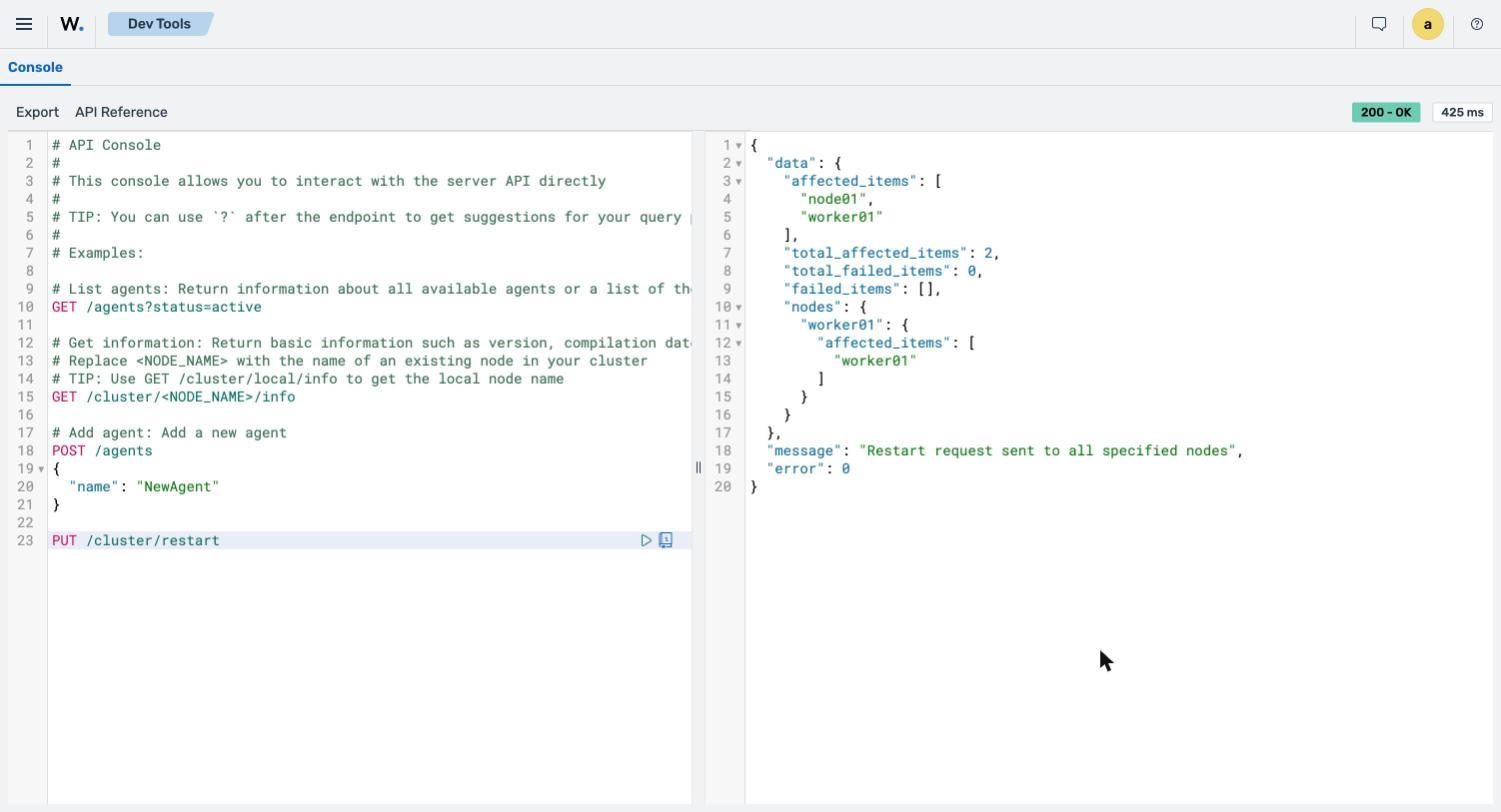
The command output looks similar to this:
{
  "data": {
    "affected_items": [
      "node01",
      "worker01"
    ],
    "total_affected_items": 2,
    "total_failed_items": 0,
    "failed_items": [],
    "nodes": {
      "worker01": {
        "affected_items": [
          "worker01"
        ]
      }
    }
  },
  "message": "Restart request sent to all specified nodes",
  "error": 0
}
The preceding output lists the Wazuh manager nodes that received the restart request. The restart takes about 10 seconds on a single node, and Dev Tools returns an ECONNREFUSED error until it finishes. Then run GET /cluster/<NODE_ID>/status to confirm that the Wazuh manager daemons are running again. On a multi-node cluster, worker nodes can take a minute or more to reconnect to the master node. Until a worker node reconnects, GET /cluster/<NODE_ID>/status for that node returns error 1730. Run GET /cluster/nodes to confirm that every node is connected.
Wazuh agent operations
You can use the Wazuh manager API to manage Wazuh agents, including enrolling, querying, restarting, and upgrading them. Review the API reference to find out more about managing Wazuh agents using the Wazuh manager API.
The following use cases show how to enroll, query, restart, and upgrade Wazuh agents.
Generating a Wazuh agent enrollment key
Follow these steps to generate a key for enrolling a new Wazuh agent:
Navigate to Server management > Dev Tools, then paste the following query:
POST /agents
{
  "name": "UBUNTU_AGENT_01"
}
Where:
UBUNTU_AGENT_01is a unique name for the Wazuh agent.This request adds a Wazuh agent with this name to the Wazuh manager and returns its client key. The Wazuh agent shows as never connected until an endpoint uses the key. If a Wazuh agent with the same name or IP address already exists, the request fails with error
1706. To replace it, setforce.enabledtotruein the request body. By default, the Wazuh manager then replaces it only if it has been disconnected and registered for more than one hour.
Click the play button to execute the request. The Wazuh manager responds with the ID and client key of the new Wazuh agent:
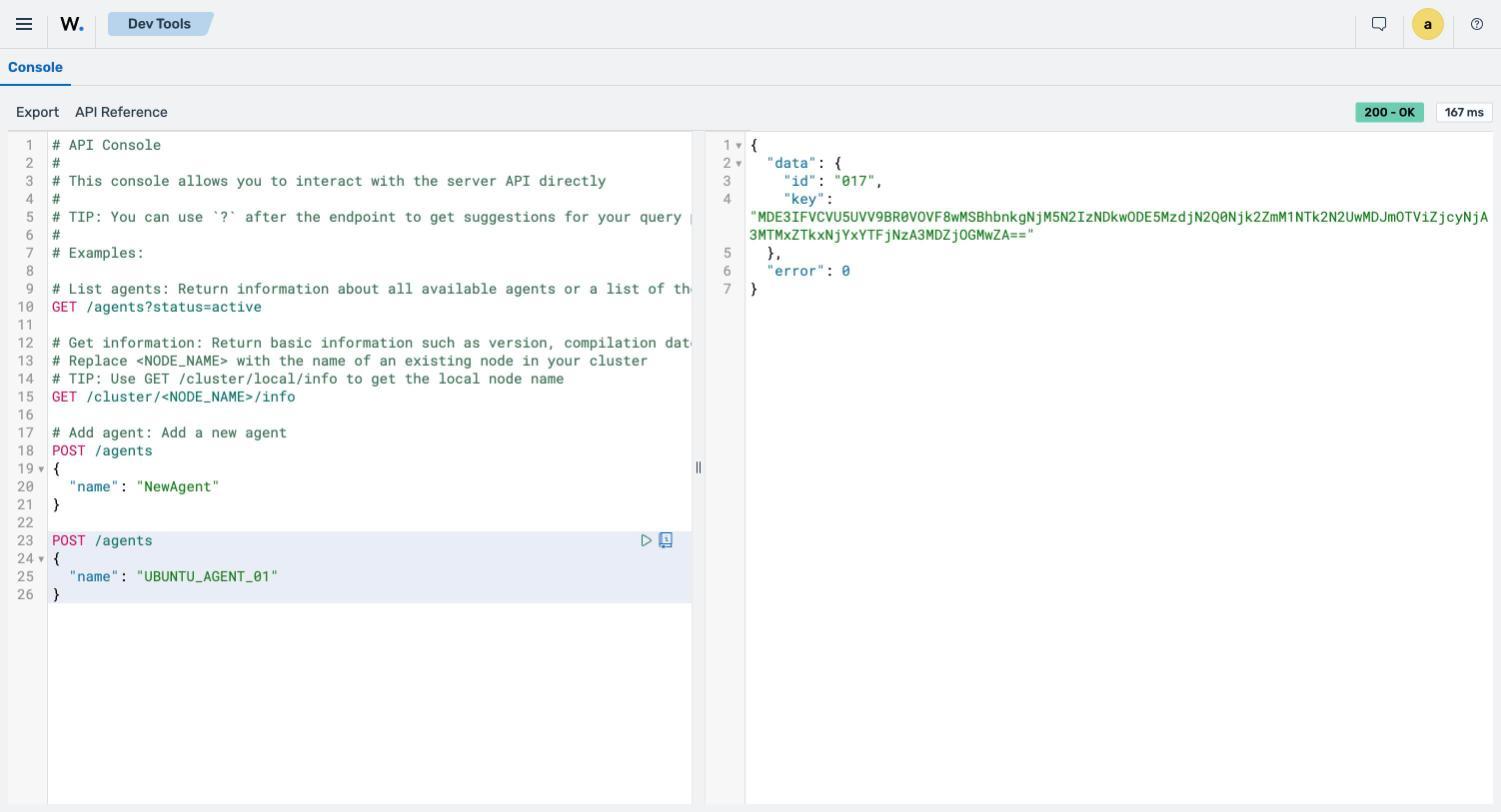
The command output looks similar to this:
{
  "data": {
    "id": "017",
    "key": "MDE3IFVCVU5UVV9BR0VOVF8wMSBhbnkgNjM5N2IzNDkwODE5MzdjN2Q0Njk2ZmM1NTk2N2UwMDJmOTViZjcyNjA3MTMxZTkxNjYxYTFjNzA3MDZjOGMwZA=="
  },
  "error": 0
}
The preceding output shows the ID and client key of the new Wazuh agent. To use the key on a Linux endpoint, run /var/ossec/bin/manage_agents as root, enter I to import a key, and paste the key value from the output when prompted. Don't pass the key with the -i option, because other processes can read command-line arguments and the shell saves them in its history. Then set <endpoint> in the <manager> section of /var/ossec/etc/ossec.conf to the Wazuh manager IP address, and start the Wazuh agent. To enroll a new Wazuh agent without a key, use an enrollment token, as shown in the next section. A Wazuh agent added this way has no copy of the Wazuh manager CA, so it doesn't verify the Wazuh manager certificate. To install the CA, run wazuh-agent-auth --certs-only with an enrollment token.
Enrolling a Wazuh agent with an enrollment token
An enrollment token lets a new Wazuh agent enroll with the Wazuh manager without the shared enrollment password. The Wazuh agent sends its enrollment request over HTTPS to port 1517 on the Wazuh manager. Each token contains the Wazuh manager address and a fingerprint of the Wazuh manager certificate authority (CA). You can also limit how long the token is valid and how many Wazuh agents can use it.
Install the Wazuh agent package on the endpoint first. Then follow these steps to create an enrollment token and use it to enroll a Wazuh agent on Linux, macOS, or Windows:
Navigate to Server management > Dev Tools, then paste the following request:
POST /agents/enrollment-tokens
{
  "address": "<WAZUH_MANAGER_IP_ADDRESS>",
  "ttl": "12h",
  "max_uses": 10,
  "description": "Wazuh agent enrollment"
}
Where:
<WAZUH_MANAGER_IP_ADDRESS>is the IP address or FQDN of the Wazuh manager. It must match a name in the certificate of the Wazuh manager HTTPS listener, or the request fails with error1768. To list those names, runGET /cluster/<NODE_ID>/daemons/remoted/tlsand readlistener.sansin the response. On an all-in-one installation, the names are the hostname and private IP address of the Wazuh manager, plus the loopback addresses. A default installation might not include a public address, so Wazuh agents outside the Wazuh manager network must use one of these names.ttlis how long the token stays valid; for example,12h.max_usesis the number of Wazuh agents that can enroll with the token.descriptionis an optional label that helps you identify the token.
Click the play button to execute the request.
The command output looks similar to this:
{
  "data": {
    "token": "eyJ2ZXIiOjEsImFkciI6IjE5Mi4xNjguNzEuMTUiLCJwaW4iOiJJZzlnaWU5UGJ0VTFKV3Z4VjFUUlU1TWpyVXIwNk90dGVUMnhQQmJ4YjlFIiwia2V5IjoiSTZjdkVUb085bWhPQlIzWVQxODg1V1MzWkZlVm9YOVNWQk56cnM2aVV3NCJ9",
    "id": "I6cvEToO9mhOBR3YT1885Q",
    "address": "192.168.71.15",
    "expires": "2026-10-24T02:55:30+00:00",
    "pin_hex": "220f6089ef4f6ed535256bf15754d1539323ad4af4e8eb6d793db13c16f16fd1"
  },
  "error": 0
}
Copy the token value. The Wazuh manager API returns the token only in this response.
Then enroll the Wazuh agent on the endpoint. Follow the steps for its operating system:
Linux
On the Linux endpoint, run the following command to save the token to a file that only the root user can read. Paste the token, press Enter, then press Ctrl + D:
# (umask 077; cat > /root/wazuh-enrollment.tok)
Don't pass the token as a command-line argument. Other processes can read command-line arguments, and the shell saves them in its history.
Stop the Wazuh agent:
# systemctl stop wazuh-agent
Enroll the Wazuh agent with the token:
# /var/ossec/bin/wazuh-agent-auth --token-file /root/wazuh-enrollment.tok
The Wazuh agent name and groups come from the
<enrollment>section of/var/ossec/etc/ossec.conf. If the Wazuh agent is already enrolled, add--force-enrollto enroll it again. The Wazuh agent then gets a new ID. If the Wazuh manager still has a Wazuh agent with this name, it usually refuses the enrollment with aDuplicate nameerror. By default, it replaces the existing Wazuh agent only when that Wazuh agent has been disconnected and registered for more than one hour. Delete that Wazuh agent first, as shown in Deleting Wazuh agents. Add--dry-runto list the changes the command makes without contacting the Wazuh manager.Start the Wazuh agent to load its new identity:
# systemctl start wazuh-agent
Delete the token file:
# rm /root/wazuh-enrollment.tok
macOS
On the macOS endpoint, run the following command to save the token to a file that only the root user can read. Paste the token, press Enter, then press Ctrl + D:
# (umask 077; cat > /var/root/wazuh-enrollment.tok)
Stop the Wazuh agent:
# /Library/Ossec/bin/wazuh-control stop
Enroll the Wazuh agent with the token:
# /Library/Ossec/bin/wazuh-agent-auth --token-file /var/root/wazuh-enrollment.tok
The Wazuh agent name and groups come from the
<enrollment>section of/Library/Ossec/etc/ossec.conf. If the Wazuh agent is already enrolled, add--force-enrollto enroll it again. The Wazuh agent then gets a new ID. If the Wazuh manager still has a Wazuh agent with this name, it usually refuses the enrollment with aDuplicate nameerror. By default, it replaces the existing Wazuh agent only when that Wazuh agent has been disconnected and registered for more than one hour. Delete that Wazuh agent first, as shown in Deleting Wazuh agents.Start the Wazuh agent:
# /Library/Ossec/bin/wazuh-control start
Delete the token file:
# rm /var/root/wazuh-enrollment.tok
Windows
Run the following commands in PowerShell as an administrator.
Save the token to a file in your temporary folder. Paste the token when prompted:
> Read-Host -Prompt "Enrollment token" | Set-Content -NoNewline -Path "$env:TEMP\wazuh-enrollment.tok"
Stop the Wazuh agent:
> Stop-Service -Name WazuhSvc
Enroll the Wazuh agent with the token:
> & "C:\Program Files (x86)\ossec-agent\wazuh-agent-auth.exe" --token-file "$env:TEMP\wazuh-enrollment.tok"
The Wazuh agent name and groups come from the
<enrollment>section ofC:\Program Files (x86)\ossec-agent\ossec.conf. If the Wazuh agent is already enrolled, add--force-enrollto enroll it again. The Wazuh agent then gets a new ID. If the Wazuh manager still has a Wazuh agent with this name, it usually refuses the enrollment with aDuplicate nameerror. By default, it replaces the existing Wazuh agent only when that Wazuh agent has been disconnected and registered for more than one hour. Delete that Wazuh agent first, as shown in Deleting Wazuh agents.Start the Wazuh agent:
> Start-Service -Name WazuhSvc
Delete the token file:
> Remove-Item "$env:TEMP\wazuh-enrollment.tok"
To list the enrollment tokens, run GET /agents/enrollment-tokens. The response shows each token's ID, expiry date, and number of uses, but not the token itself. To revoke a token before it expires, run DELETE /agents/enrollment-tokens/<TOKEN_ID>.
Querying the Wazuh agents
The /agents endpoint returns information about the enrolled Wazuh agents. For example, you can query for all inactive Wazuh agents. This is useful for troubleshooting Wazuh agent health issues.
Navigate to Server management > Dev Tools, then paste the following query:
GET /agents?status=disconnected,pending,never_connected&select=ip,name
Click the play button to execute the request. This returns information about the IP and enrolled name of all inactive Wazuh agents:
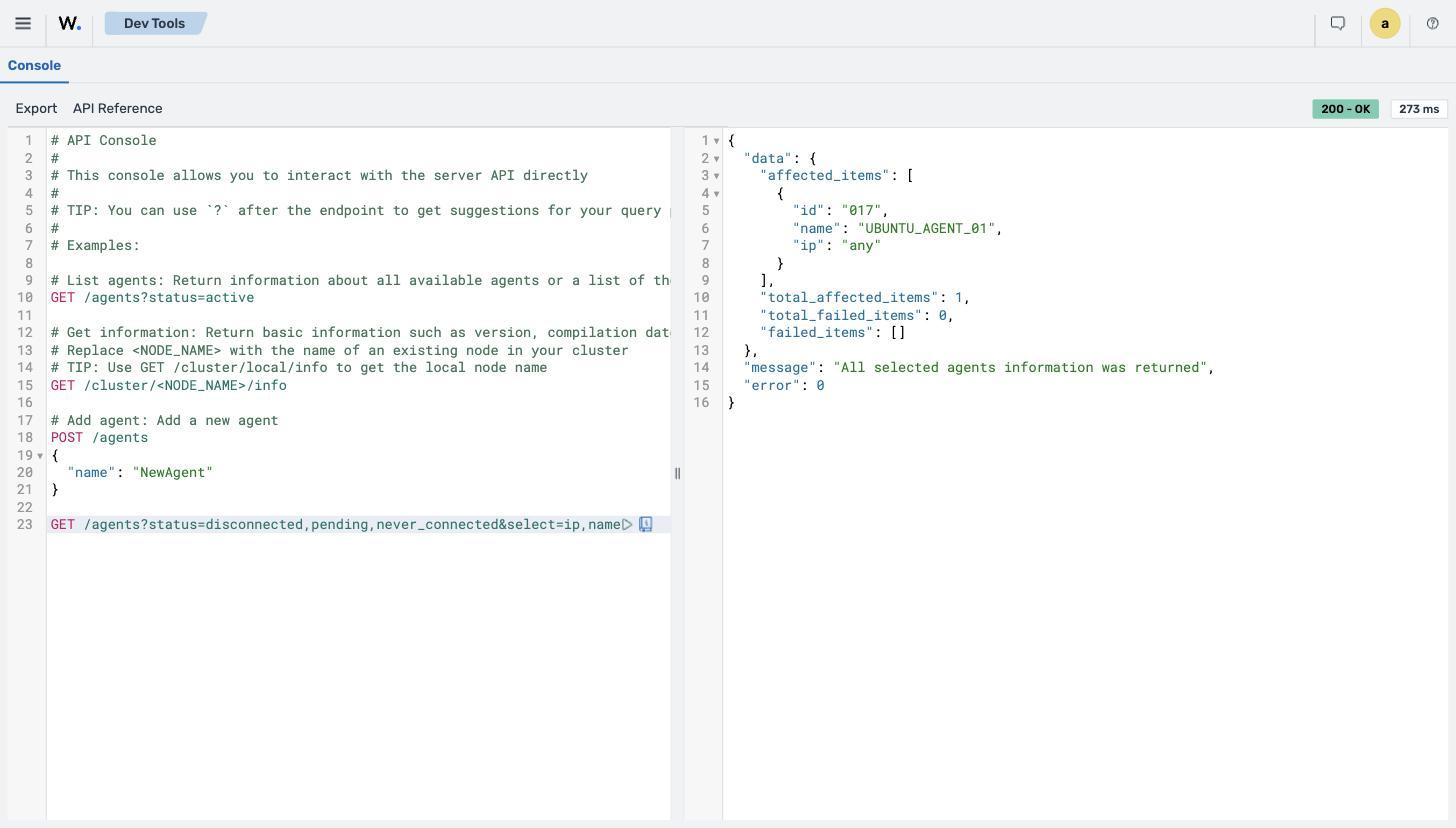
The command output looks similar to this:
{
  "data": {
    "affected_items": [
      {
        "id": "017",
        "name": "UBUNTU_AGENT_01",
        "ip": "any"
      }
    ],
    "total_affected_items": 1,
    "total_failed_items": 0,
    "failed_items": []
  },
  "message": "All selected agents information was returned",
  "error": 0
}
The preceding output shows the ID, name, and IP address of each Wazuh agent that is disconnected, pending, or never connected.
Restarting a Wazuh agent remotely
Wazuh agents can be restarted using the Wazuh manager API from the Wazuh dashboard. Follow these steps to restart a Wazuh agent.
Navigate to Server management > Dev Tools, then paste the following query:
PUT /agents/021/restart
Where:
021is the ID of the Wazuh agent that is to be restarted.
Click the play button to execute the request. A response similar to the following is received:
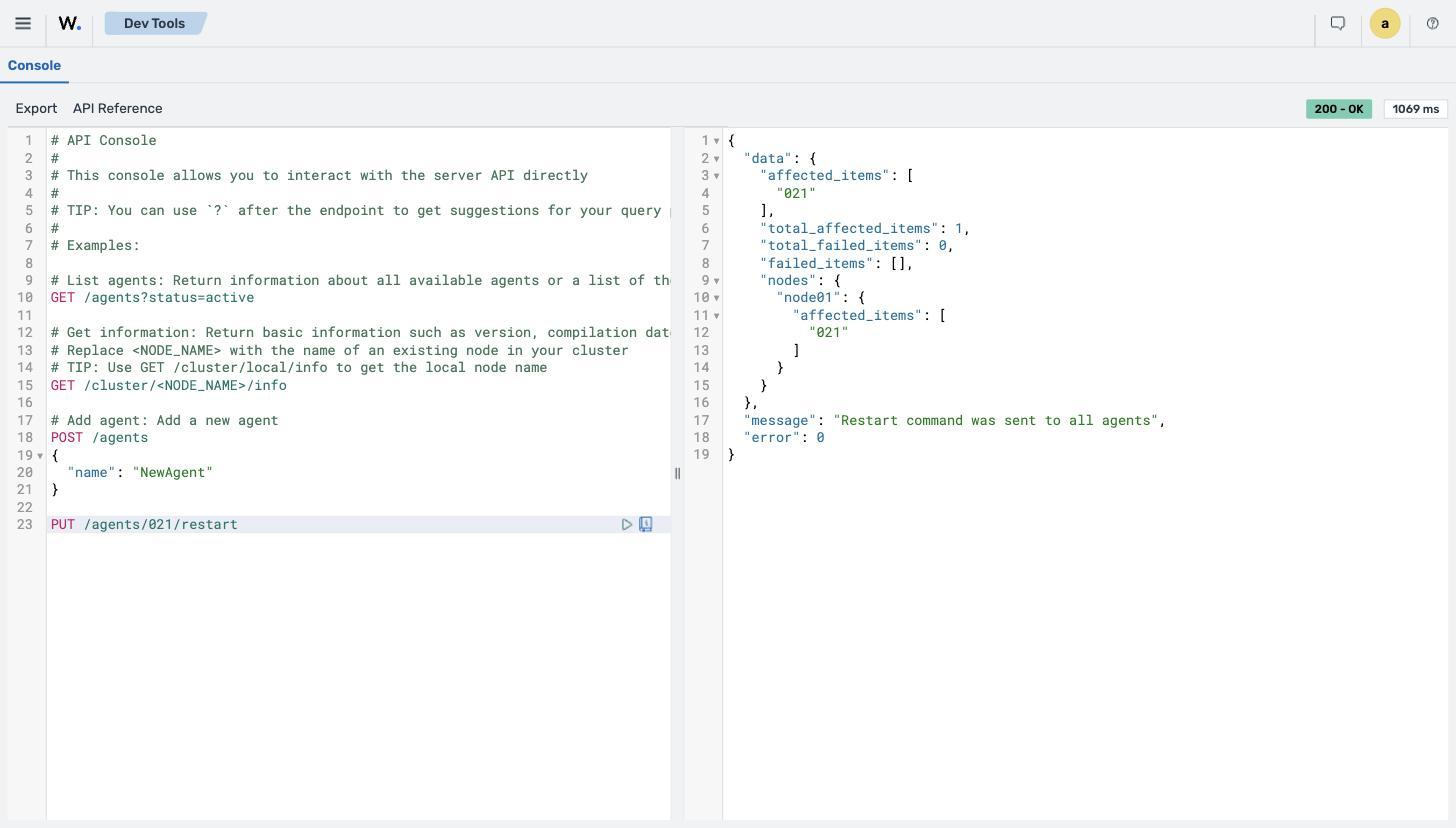
The command output looks similar to this:
{
  "data": {
    "affected_items": [
      "021"
    ],
    "total_affected_items": 1,
    "total_failed_items": 0,
    "failed_items": [],
    "nodes": {
      "node01": {
        "affected_items": [
          "021"
        ]
      }
    }
  },
  "message": "Restart command was sent to all agents",
  "error": 0
}
The preceding output shows the Wazuh agent that received the restart command.
Upgrading the Wazuh agents
To upgrade a Wazuh agent, you can use the /agents/upgrade endpoint. You can specify the IDs of Wazuh agents to upgrade, separated by commas, or specify all to upgrade every enrolled Wazuh agent. The Wazuh agents must run an older version than the Wazuh manager, and the Wazuh manager must be able to reach the WPK package repository. The Wazuh agents must also reach port 1517 on the Wazuh manager. If they can't, the upgrade stops before installing, and the Wazuh agent stays on 4.x. A Wazuh agent that already runs the version of the Wazuh manager returns error 1820. Wazuh agents on 4.x must run version 4.14.0 or later, or the request returns error 1819. Upgrade older Wazuh agents to 4.14.x first. The Wazuh manager checks for pending upgrades for 4.x Wazuh agents every 900 seconds by default. The upgrade can start up to 15 minutes after the request.
Navigate to Server management > Dev Tools, then paste the following query:
PUT /agents/upgrade?agents_list=023
Where:
023is the ID of the Wazuh agent to upgrade. Theagents_listparameter accepts a comma-separated list of Wazuh agent IDs. You can also useallto send the request to all Wazuh agents.
Click the play button to execute the request.
The command output looks similar to this:
{
  "data": {
    "affected_items": [
      "023"
    ],
    "total_affected_items": 1,
    "total_failed_items": 0,
    "failed_items": [],
    "nodes": {
      "node01": {
        "affected_items": [
          "023"
        ]
      }
    }
  },
  "message": "All upgrade tasks were created",
  "error": 0
}
The preceding output shows the upgrade task created for the Wazuh agent. The response doesn't report whether the upgrade succeeds. To check the result, run GET /agents?agents_list=023&select=version,status until the Wazuh agent reports the new version.
Using an authenticated terminal
The following use cases demonstrate how to manage Wazuh agents using the Wazuh manager API through an authenticated terminal.
Prerequisites
Your terminal must reach port 55000 on the Wazuh manager. Generate a JWT to authenticate with the Wazuh manager API by making a cURL request. Replace <WAZUH_MANAGER_IP_ADDRESS> with the IP address or fully qualified domain name (FQDN) of the Wazuh manager. Replace <USER> with the Wazuh manager API user wazuh by default, and <PASSWORD> with its password:
# TOKEN=$(curl -u <USER>:<PASSWORD> -k -X POST "https://<WAZUH_MANAGER_IP_ADDRESS>:55000/security/user/authenticate?raw=true")
Run echo $TOKEN to confirm that the token was generated:
# echo $TOKEN
The command output looks similar to this:
eyJhbGciOiJFUzUxMiIsInR5cCI6IkpXVCJ9.eyJpc3MiOiJ3YXp1aCIsImF1ZCI6IldhenVoIEFQSSBSRVNUIiwibmJmIjoxNzkyNzY3MzI5LCJuYmZfbXMiOjE3OTI3NjczMjk0MDUsImV4cCI6MTc5Mjc2ODIyOSwic3ViIjoid2F6dWgiLCJydW5fYXMiOmZhbHNlLCJyYmFjX3JvbGVzIjpbMV0sInJiYWNfbW9kZSI6IndoaXRlIn0.AVqR66Xjm2nbB4wryL9T6g4xattuIy7oKQHfyN1NO42fgtcpeff4TKsuO2Fe5XRFvTy5NPc1cnuhJ1Z0R6uCMyskATedb60RbrFrlS6tGMqzogePJOo87NQdrL7Ju3Ek2R0ndrWvO6m1debmfBTJKstFYLCdP8gHCa0w9YLHqdsvGzjz
The following requests use this token to authenticate with the Wazuh manager API. The token expires after 900 seconds by default. When a request returns 401, run the first command again to get a new token.
Note
The password of the wazuh user is in the WAZUH_MANAGER_API_PASSWORD variable of the /etc/wazuh-manager/export/credentials.env file on the Wazuh manager. Only the root user can read this file. In a distributed deployment, the password is in the wazuh-install-files/credentials.env file inside the wazuh-install-files.tar archive that the installation assistant creates. The admin account of the Wazuh dashboard can't authenticate with the Wazuh manager API. You can also reset the password for the Wazuh manager API user if you have forgotten it.
Wazuh agent management
You can use the Wazuh manager API from a terminal to delete Wazuh agents and to summarize them by status, operating system, and group. Review the API reference to find out more about managing Wazuh agents using the Wazuh manager API.
The following use cases show how to delete and summarize Wazuh agents.
Deleting Wazuh agents
Using the Wazuh manager API, you can delete specific Wazuh agents, or every Wazuh agent that matches a filter such as connection status or time since the last keepalive. Refer to the Wazuh manager API reference to see other categories that can be queried.
Run the following request:
# curl -k -X DELETE "https://<WAZUH_MANAGER_IP_ADDRESS>:55000/agents?agents_list=<AGENT_ID>&status=all&older_than=1&pretty=true" -H "Authorization: Bearer $TOKEN"
This request deletes every Wazuh agent that matches the filters.
Where:
<AGENT_ID>is the ID of the Wazuh agent. You can also pass a comma-separated list of Wazuh agent IDs, orall.status=alldeletes the Wazuh agents, regardless of their connection status. This parameter is required.older_than=1includes Wazuh agents whose last keepalive is older than one second. Without it, only Wazuh agents whose last keepalive is older than seven days are deleted.
The command output looks similar to this:
{
  "data": {
    "affected_items": [
      "001"
    ],
    "total_affected_items": 1,
    "total_failed_items": 0,
    "failed_items": []
  },
  "message": "All selected agents were deleted",
  "error": 0
}
The preceding output shows the deleted Wazuh agent. The Wazuh agent on the endpoint keeps running and retries enrollment. Stop or uninstall the Wazuh agent on the endpoint, or enroll it again with an enrollment token and --force-enroll.
Getting a summary of Wazuh agent information
You can use the /agents/summary endpoint to return a summary of the available Wazuh agents, operating systems, status, and groups.
Run the following command to retrieve information about the registered Wazuh agents:
# curl -k -X GET "https://<WAZUH_MANAGER_IP_ADDRESS>:55000/agents/summary?pretty=true" -H "Authorization: Bearer $TOKEN"
The command output looks similar to this:
{
  "data": {
    "status": {
      "active": 8,
      "disconnected": 0,
      "never_connected": 1,
      "pending": 2
    },
    "os": {
      "debian": 8,
      "ubuntu": 3
    },
    "groups": {
      "default": 11,
      "test": 5
    }
  },
  "error": 0
}
The preceding output shows the number of Wazuh agents by status, operating system, and group.