Authorization context
An authorization context is data a user sends at login, which the Wazuh manager API matches against security rules to assign roles.
Authorization context login method
The authorization context login method (POST /security/user/authenticate/run_as) lets a trusted user log in and receive a different, dynamically-assigned set of permissions. The new set replaces the fixed permissions tied to their own role. The user includes a custom piece of data called the authorization context in their login request (for example, a name and department). The Wazuh manager checks this data against a set of rules you've defined, and grants whatever role each matching rule points to. An empty authorization context ({}) matches no rule, so its token has no roles.
To use this method, you must first allow a user to use the authorization context. Details on creating and enabling a user for the authorization context are in the RBAC configuration section. Once you have established the necessary security rules, you must send an authorization context containing all the required information. The system verifies the authorization context against the security rules and grants the associated permissions.
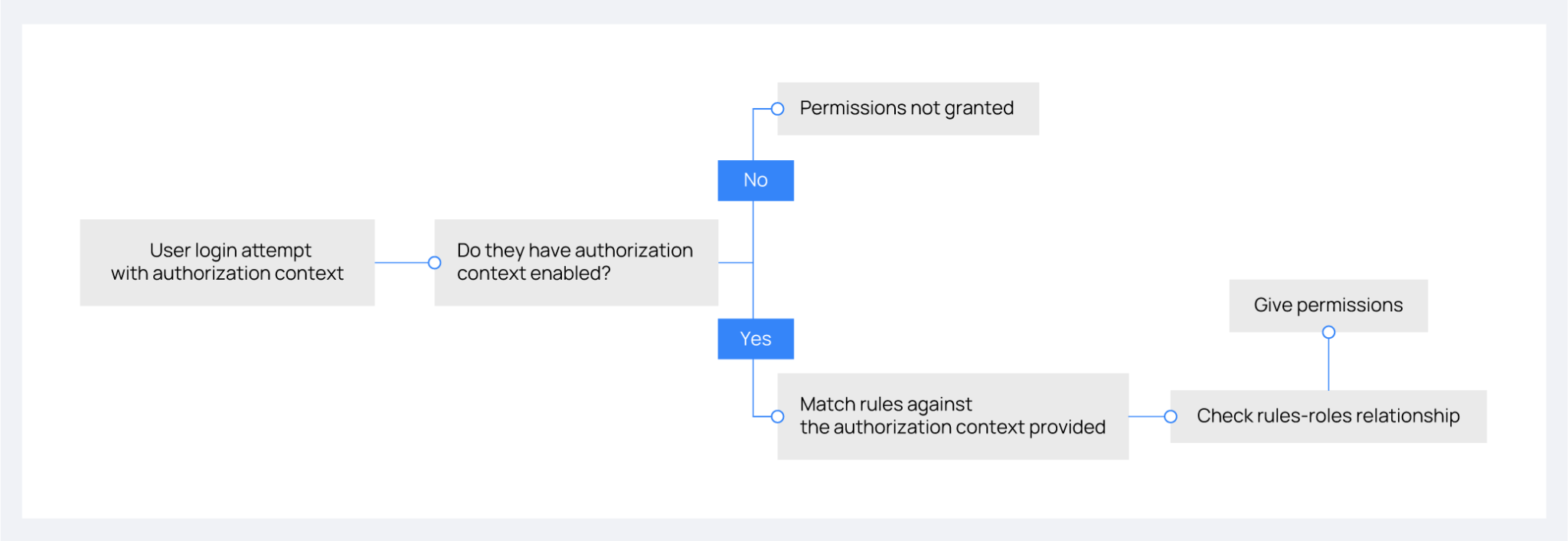
The following image outlines the decision process for granting permissions through authorization context. It covers the steps from a user's login attempt to the assignment of permissions based on enabled settings and rule validation.
Rules and roles
A rule defines logical and search operations that apply to an incoming authorization context. When the Wazuh manager API processes an authentication request through an authorization context, it checks all rules against it. It grants the user any roles associated with the rules that yield an affirmative result.
Let's use the following authorization context to illustrate each operation within the rules and how it matches up to the examples:
{
    "name": "Initial_auth",
    "auth": {
        "name": "Wazuh",
        "office": ["20", "21", "30"]
    }
}
Search operations
The search operations in the rules are used to search in the authorization context for a specific object or string.
MATCH: This operation searches the authorization context for the structure indicated insideMATCH. An exact match is not necessary. In the following case, it searches for anauthkey and, within it, anofficekey whose value must contain the number20:
{
    "MATCH": {
        "auth": {
            "office": "20"
        }
    }
}
MATCH$: This operation is the same asMATCHwith the difference that it is strict in terms of content. It evaluates to False even if the clause is contained in a larger set (list) in the authorization context. The previous example does not evaluate to True, because the content of theauthkey is not an exact match. For this rule to evaluate to True, use the exact list of values:
{
    "MATCH$": {
        "auth": {
            "office": ["20", "21", "30"]
        }
    }
}
FIND: This operation is a recursiveMATCH, up to eight levels deep, of the authorization context.MATCHsearches the structure only at the root of the authorization context. In theFINDcase, the operation searches the structure up to eight levels deep. If the authorization context is nested more deeply, the role is not granted. In the following example, you can omit the key auth, because theFINDoperation searches for the keyofficeinside all the authorization contexts:
{
    "FIND": {
        "office": "20"
    }
}
FIND$: This operation is a recursiveMATCH$, up to eight levels deep, of the authorization context. As with theMATCH$operation, the exact list of values in the office key must be included for it to evaluate to True. Thenameis optional as it depends on how specific it needs to be:
{
    "FIND$": {
        "name": "Wazuh",
        "office": ["20", "21", "30"]
    }
}
Logical operations
In defining rules for authorization contexts, logical operations play a crucial role. Rules combine clauses with the AND, OR, and NOT logical operations.
AND: Requires all contained clauses to be true for the overall expression to be true. For example:
{
    "AND": [
        {
            "MATCH$": {
                "name": "r'.+'"
            }
        },
        {
            "FIND": {
                "auth": {
                    "office": "20"
                }
            }
        }
    ]
}
OR: The result is true if at least one of the enclosed clauses is satisfied. For example:
{
    "OR": [
        {
            "MATCH$": {
                "name": "NameNotFound"
            }
        },
        {
            "FIND$": {
                "auth": {
                    "name": "Wazuh",
                    "office": ["20", "21", "30"]
                }
            }
        }
    ]
}
NOT: This operation inverts the result of the enclosed clause, resulting in it being true only if the enclosed clause is false. For example:
{
    "NOT": {
        "OR": [
            {
                "MATCH$": {
                    "name": "NameNotFound"
                }
            },
            {
                "FIND$": {
                    "auth": {
                        "name": "Wazuh",
                        "office": ["20", "30"]
                    }
                }
            }
        ]
    }
}
Advanced examples
The following Rule blocks show the rule content. To create one of these rules, send the content of its rules list to the POST /security/rules endpoint as {"name": "<RULE_NAME>", "rule": { ... }}.
Example 1
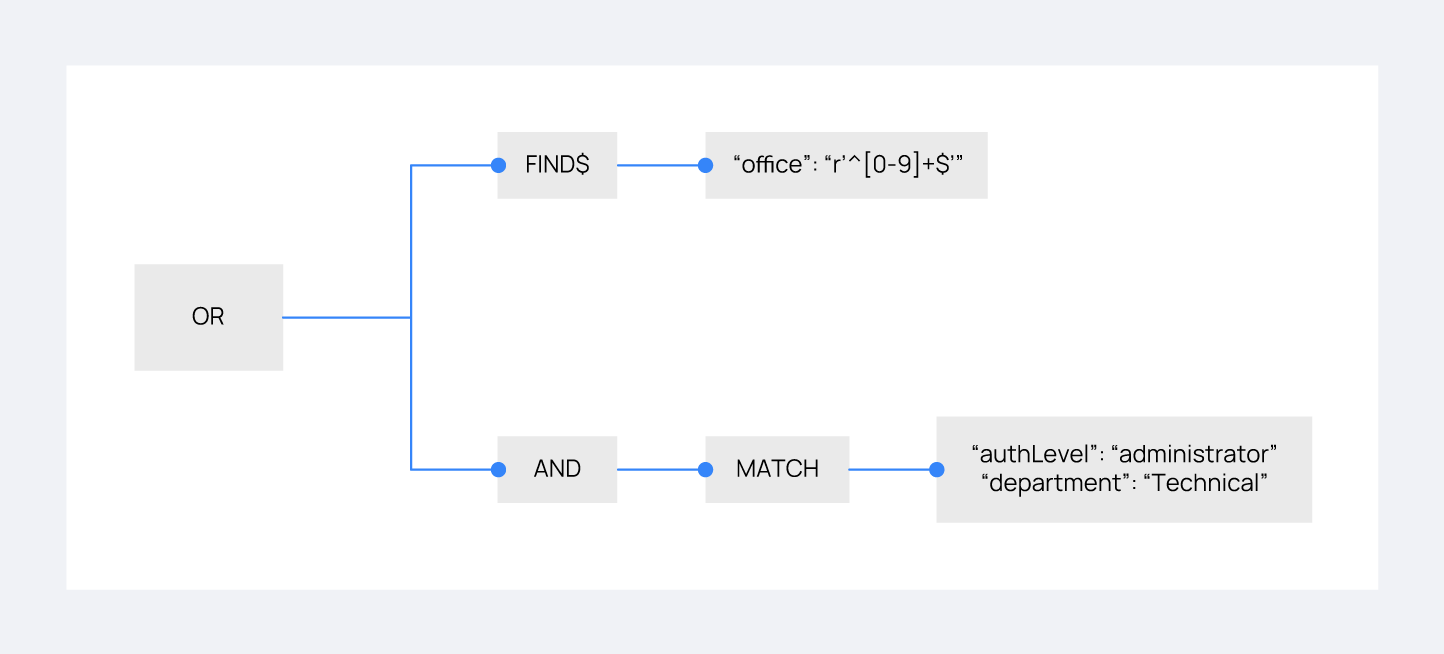
Consider the following rule that a user wants to match:
{
    "id": "1",
    "name": "First",
    "rules": [{
      "OR": [
        {
          "FIND$": {
            "office": "r'^[0-9]+$'"
          }
        },
        {
          "AND": [
            {
              "MATCH": {
                "authLevel": "administrator",
                "department": "Technical"
              }
            }
          ]
        }
      ]
    }]
  }
With the following authorization context, the user intends to gain the necessary permissions:
{
    "name": "Eleventh_auth",
    "auth": {
        "test": "New",
        "department": [
            "Technical1"
        ],
        "authLevel": [
            "basic1"
        ]
    },
    "authLevel": [
        "administrator"
    ],
    "department": [
        "Technical"
    ]
}
The OR operation in the rule contains two sub-operations. The first is a FIND$ operation looking for an office key matching any positive number. The second is an AND operation requiring a MATCH on both authLevel as administrator and department as Technical. The FIND$ operation fails because the context has no office key. The AND operation succeeds, because the authorization context directly matches the required authLevel and department. Consequently, since one of the conditions within the OR operation succeeds, the rule matches, allowing the authorization process to proceed.
Example 2
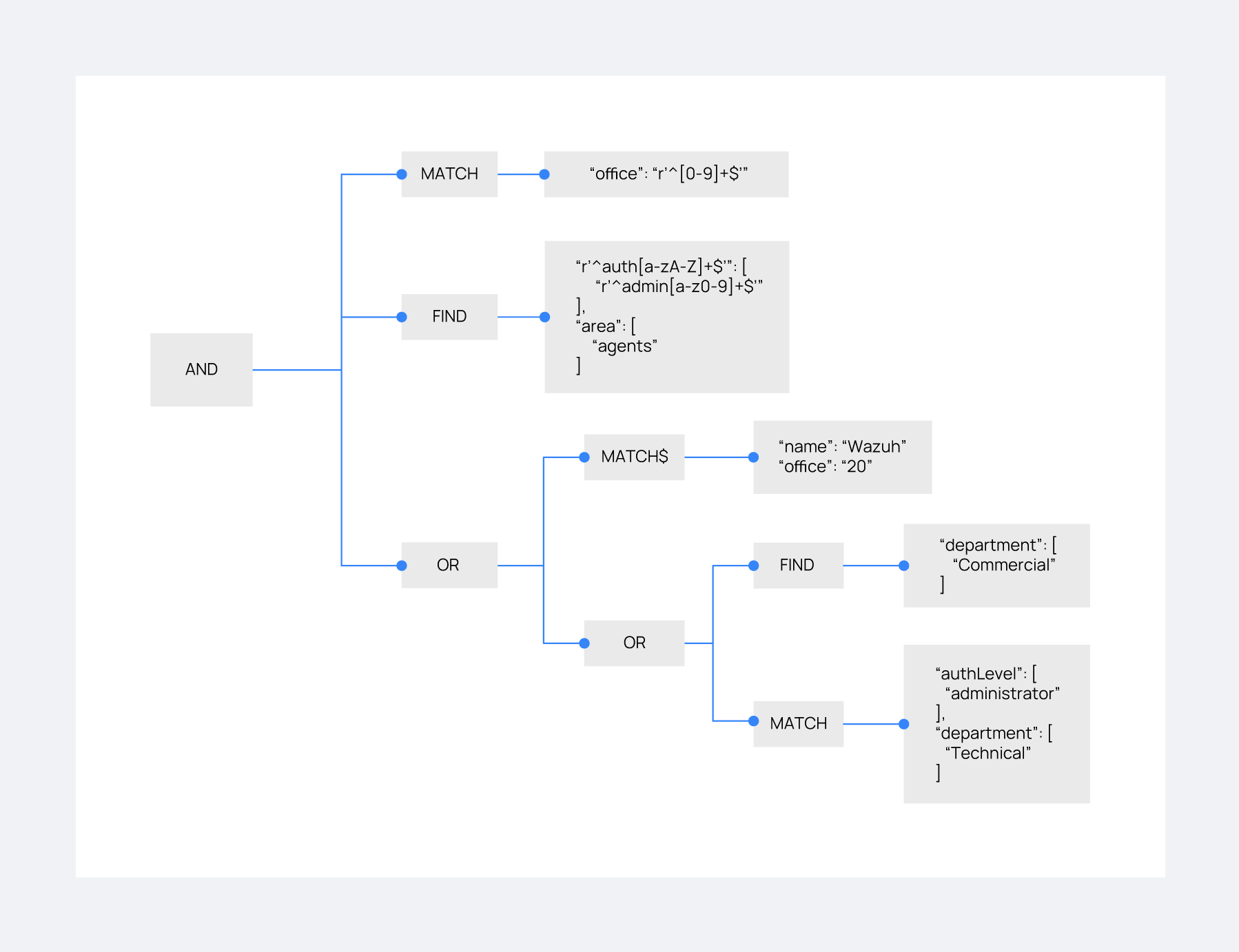
Consider the following rule that a user wants to match:
{
    "id": "2",
    "name": "Second",
    "rules": [
        {
            "AND": [
                {
                    "MATCH": {
                        "office": "r'^[0-9]+$'"
                    }
                },
                {
                    "FIND": {
                        "r'^auth[a-zA-Z]+$'": [
                            "r'^admin[a-z0-9]+$'"
                        ],
                        "area": [
                            "agents"
                        ]
                    }
                },
                {
                    "OR": [
                        {
                            "MATCH$": {
                                "name": "Wazuh",
                                "office": "20"
                            }
                        },
                        {
                            "OR": [
                                {
                                    "FIND": {
                                        "department": [
                                            "Commercial"
                                        ]
                                    }
                                },
                                {
                                    "MATCH": {
                                        "authLevel": [
                                            "administrator"
                                        ],
                                        "department": [
                                            "Technical"
                                        ]
                                    }
                                }
                            ]
                        }
                    ]
                }
            ]
        }
    ]
}
For this match, the user uses the following authorization context:
{
    "name": "First_example",
    "auth": {
        "disabled": false,
        "name": "Wazuh",
        "office": "20",
        "department": [
            "Technical"
        ],
        "bindings": {
            "authLevel": [
                "basic",
                "advanced-agents",
                "administrator"
            ],
            "area": [
                "agents",
                "syscheck",
                "syscollector"
            ]
        },
        "test": {
            "new": {
                "test2": [
                    "new"
                ],
                "test3": {
                    "test4": [
                        "a",
                        "b",
                        "c",
                        "d4"
                    ]
                }
            },
            "test": "new2"
        }
    }
}
This context does not satisfy the rule. MATCH searches only at the root of the authorization context, and this context holds office under auth. The first MATCH clause of the outermost AND operation therefore fails. The FIND operation meets the criteria with the help of the regular expression matching. The concluding OR operation fails too. Its MATCH$ clause looks for the name Wazuh and the office 20 at the root of the context, where the name is First_example and there is no office key, and neither clause of the nested OR operation matches. An AND operation is true only when all its clauses are true, so the rule does not match. The login gets no role from this rule.