Architecture overview
A Wazuh manager cluster consists of one master node and any number of worker nodes. A single agent-facing address can route traffic to these nodes. Understanding how traffic reaches each node helps you plan network rules, certificates, and load balancing.
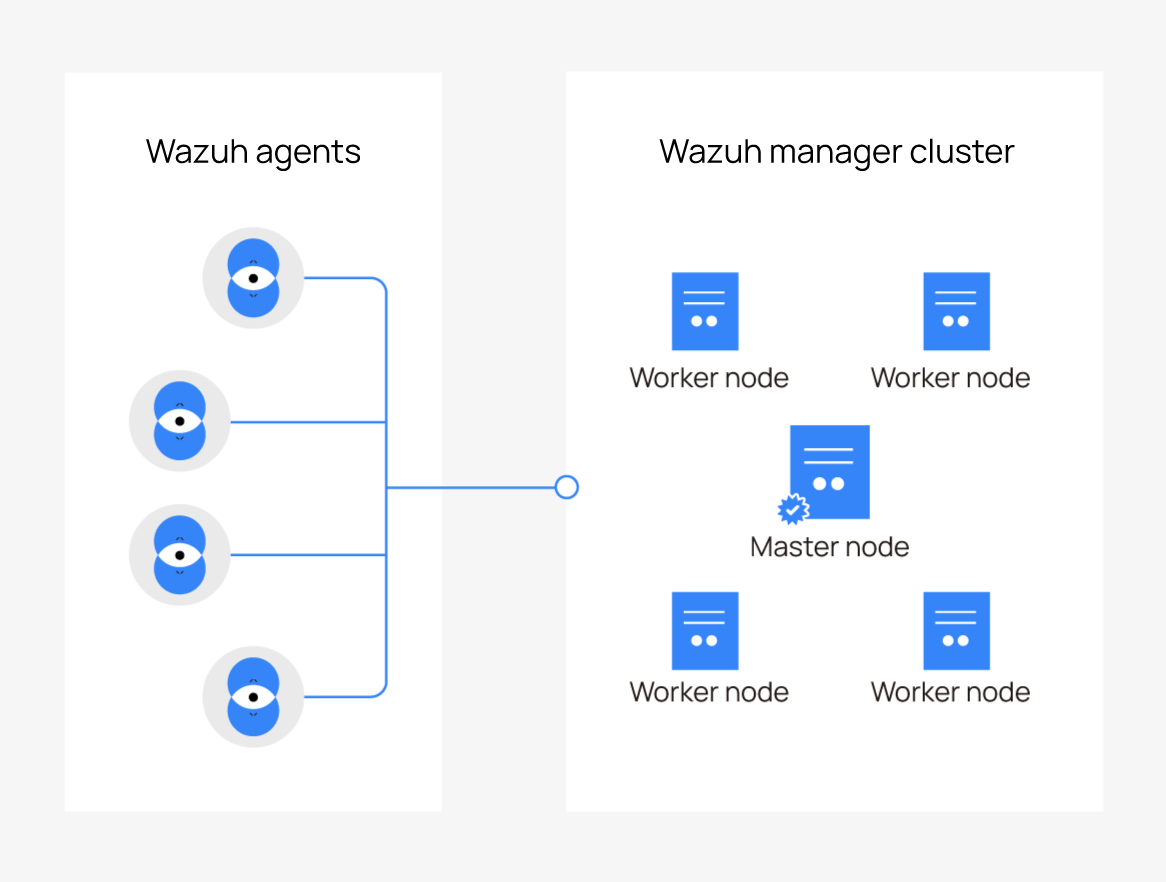
Each node in the cluster runs a complete Wazuh manager. The nodes share agent identities and group configuration through the cluster. Each node also sends its data directly to the Wazuh indexer.
Wazuh agents connect to any node, either directly or through a load balancer. Wazuh agents 5.x use the HTTPS agent API on port
1517.Worker nodes receive and process events from the Wazuh agents connected to them. They forward enrollment requests to the master node over the cluster connection.
The master node serves Wazuh agents like any worker node. It also creates agent identities and runs the Wazuh manager API.
The cluster connection links each worker node to the master node. Worker nodes initiate connections to the master node, which uses them to push data to the workers.
The Wazuh indexer receives data from every node. Each node connects to the indexer using the <indexer> section in its own configuration.
Ports
The following table lists the default ports used by a Wazuh manager cluster and identifies the nodes that listen on each port.
Port |
Protocol |
Purpose |
Listens on |
|---|---|---|---|
|
TCP, HTTPS |
Agent API for Wazuh agents 5.x: enrollment, events, and configuration download. |
Every node. |
|
TCP (default) or UDP |
Legacy agent channel for Wazuh agents 4.x. Open only while the <remote> |
Every node. |
|
TCP, TLS |
Legacy enrollment for Wazuh agents 4.x. Worker nodes forward each request to the master node. |
Every node, when legacy enrollment is on. |
|
TCP |
Cluster connection between worker nodes and the master node. Never exposed to agents. |
Master node. |
|
TCP, HTTPS |
Wazuh manager API. |
Master node. |
Every node also connects to the Wazuh indexer, by default on port 9200.
Note
The cluster port, the HTTPS agent port, the enrollment port, and the legacy agent port must be different. The Wazuh manager rejects a configuration where two active listeners share a port.
Scaling and availability
Each worker node that you add increases the capacity of the cluster to serve Wazuh agents. Each worker node connects to the master node independently, so losing one worker does not affect the others. However, Wazuh agents connected directly to a failed worker cannot automatically switch to another node. They can reach another node through a load balancer that distributes connections across the cluster.
While the master node is down, existing Wazuh agents continue reporting to the worker nodes, but enrollment and group changes stop. To restore these operations, see Master node.
To add nodes to an existing cluster, see Adding Wazuh manager nodes.