File integrity monitoring
The Wazuh File Integrity Monitoring (FIM) module monitors an endpoint filesystem to detect file changes in specified files and directories. It triggers findings on file creation, modification, or deletion from the monitored paths. The FIM module compares the cryptographic checksum and other attributes of the monitored files and folders when a change occurs.
The Wazuh File Integrity Monitoring module assists you in meeting the following NIST 800-53 controls:
SC-28 Protection of information at rest: "Information at rest refers to the state of information when it is not in process or in transit and is located on system components. Such components include internal or external hard disk drives, storage area network devices, or databases. However, the focus of protecting information at rest is not on the type of storage device or frequency of access but rather on the state of the information. Information at rest addresses the confidentiality and integrity of information and covers user information and system information. System-related information that requires protection includes configurations or rule sets for firewalls, intrusion detection and prevention systems, filtering routers, and authentication information. Organizations may employ different mechanisms to achieve confidentiality and integrity protections, including the use of cryptographic mechanisms and file share scanning. Integrity protection can be achieved, for example, by implementing write-once-read-many (WORM) technologies. When adequate protection of information at rest cannot otherwise be achieved, organizations may employ other controls, including frequent scanning to identify malicious code at rest and secure offline storage in lieu of online storage."
CM-3 Configuration change control: "Configuration change control for organizational systems involves the systematic proposal, justification, implementation, testing, review, and disposition of system changes, including system upgrades and modifications. Configuration change control includes changes to baseline configurations, configuration items of systems, operational procedures, configuration settings for system components, remediate vulnerabilities, and unscheduled or unauthorized changes. Processes for managing configuration changes to systems include Configuration Control Boards or Change Advisory Boards that review and approve proposed changes. For changes that impact privacy risk, the senior agency official for privacy updates privacy impact assessments and system of records notices. For new systems or major upgrades, organizations consider including representatives from the development organizations on the Configuration Control Boards or Change Advisory Boards. Auditing of changes includes activities before and after changes are made to systems and the auditing activities required to implement such changes. See also SA-10."
These NIST 800-53 controls require you to protect information at rest and monitor configuration changes in your infrastructure. The Wazuh FIM module helps you monitor the creation, modification, and deletion of files, directories, and Windows registry keys. This helps you meet the NIST 800-53 controls that require monitoring changes to files and folders.
Use cases
Detect SSH configuration changes
Wazuh helps meet the SC-28 Protection of information at rest requirement by providing file integrity monitoring on specified files and paths.
In this scenario, the Wazuh FIM monitors the SSH configuration file /etc/ssh/sshd_config on an Ubuntu 24.04 endpoint to detect changes in the SSH configuration. Monitor the SSH configuration file for changes using the steps below:
Install OpenSSH server:
# apt install openssh-server
Add the following configuration to the
<syscheck>block of the Wazuh agent configuration file/var/ossec/etc/ossec.conf.This monitors the
/etc/ssh/sshd_configfile for changes:<directories report_changes="yes" realtime="yes">/etc/ssh</directories>
Restart the Wazuh agent to apply the changes:
# systemctl restart wazuh-agent
Enable the
PasswordAuthenticationoption in the/etc/ssh/sshd_configfile to create a change in the SSH configuration:# sed -i.`date -I` 's/^#PasswordAuthentication yes/PasswordAuthentication yes/' /etc/ssh/sshd_config
Click the upper-left menu icon (☰) and go to Endpoint security > File Integrity Monitoring.
The finding details show that
/etc/ssh/sshd_configchanged, including the differences in the file checksum, the modification made, the modification time, and other information. The first change after the Wazuh agent restarts can showUnable to calculate diff due to no previous data stored for this file.in thefile.difffield. Later changes show the modified lines.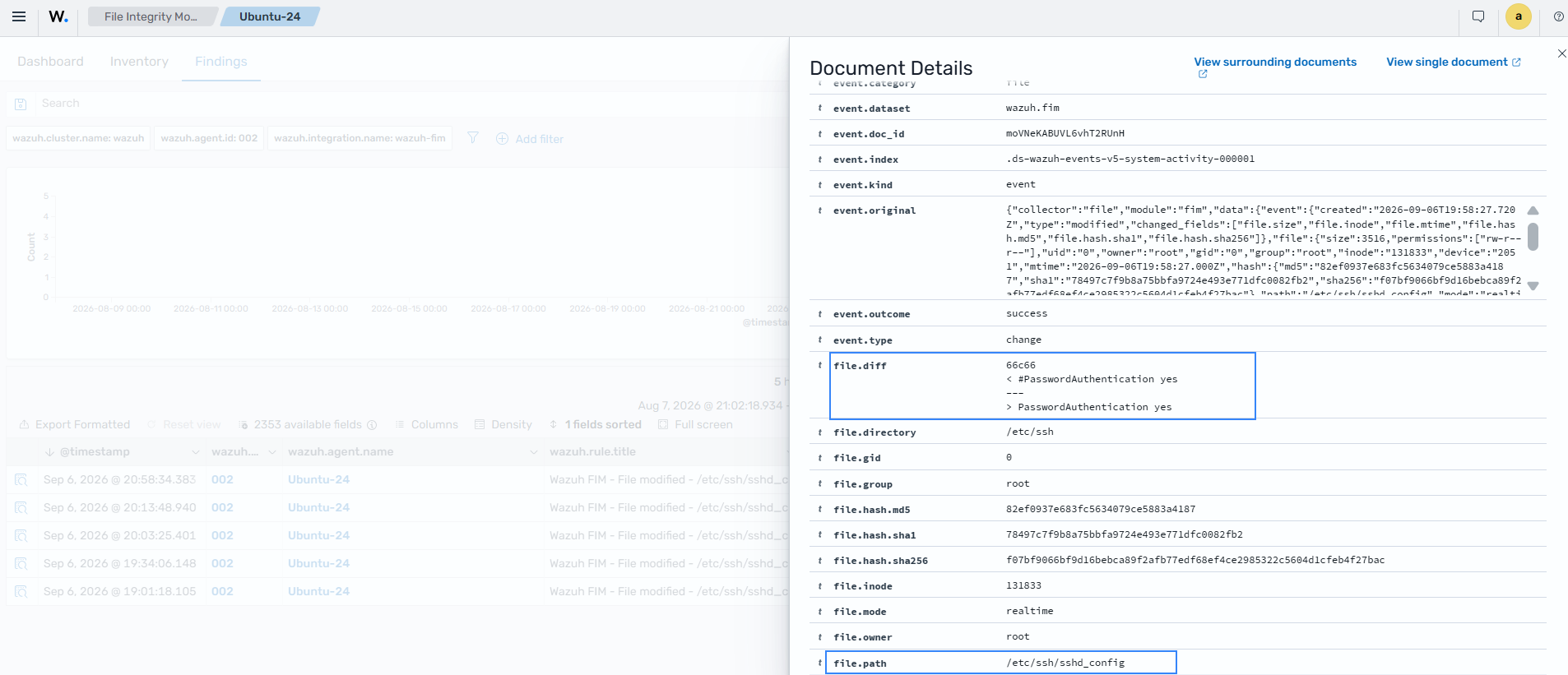
Detect change actors to UFW rules using who-data
Wazuh helps meet CM-3 Configuration change control by monitoring system configuration changes and providing additional audit data on triggered events.
In this scenario, the Wazuh FIM monitors the Uncomplicated Firewall (UFW) rule files in the /etc/ufw/ directory on an Ubuntu 24.04 endpoint. Using who-data, you can get more information like the user, program, or process that made changes to a monitored file or folder. Perform the steps below to monitor and detect changes to the UFW rule files:
Install the audit daemon:
# apt-get install auditd
# apt-get install audispd-plugins
Add the following configuration to the
<syscheck>block of the Wazuh agent configuration file/var/ossec/etc/ossec.conf.This monitors all UFW rule files for changes:
<directories report_changes="yes" whodata="yes">/etc/ufw/</directories>
UFW stores its rule files in the
/etc/ufw/directory, and all rule files have the extension.rules. We use the configuration above to monitor the modification, addition, and deletion of any files in the/etc/ufw/directory.Restart the Wazuh agent to apply the changes:
# systemctl restart wazuh-agent
Modify the permissions for an existing rule file,
user.rules, in the/etc/ufwdirectory to create a change to the UFW rule files:# chmod 777 /etc/ufw/user.rules
Click the upper-left menu icon (☰) and go to Endpoint security > File Integrity Monitoring.
Check the FIM finding regarding the
/etc/ufw/user.rulesfile which shows permissions for the/etc/ufw/user.rulesfile have changed.Expand the finding. The
user.nameandprocess.namefields show the user and the process that changed the file, and theevent.originalfield shows an overview of the event.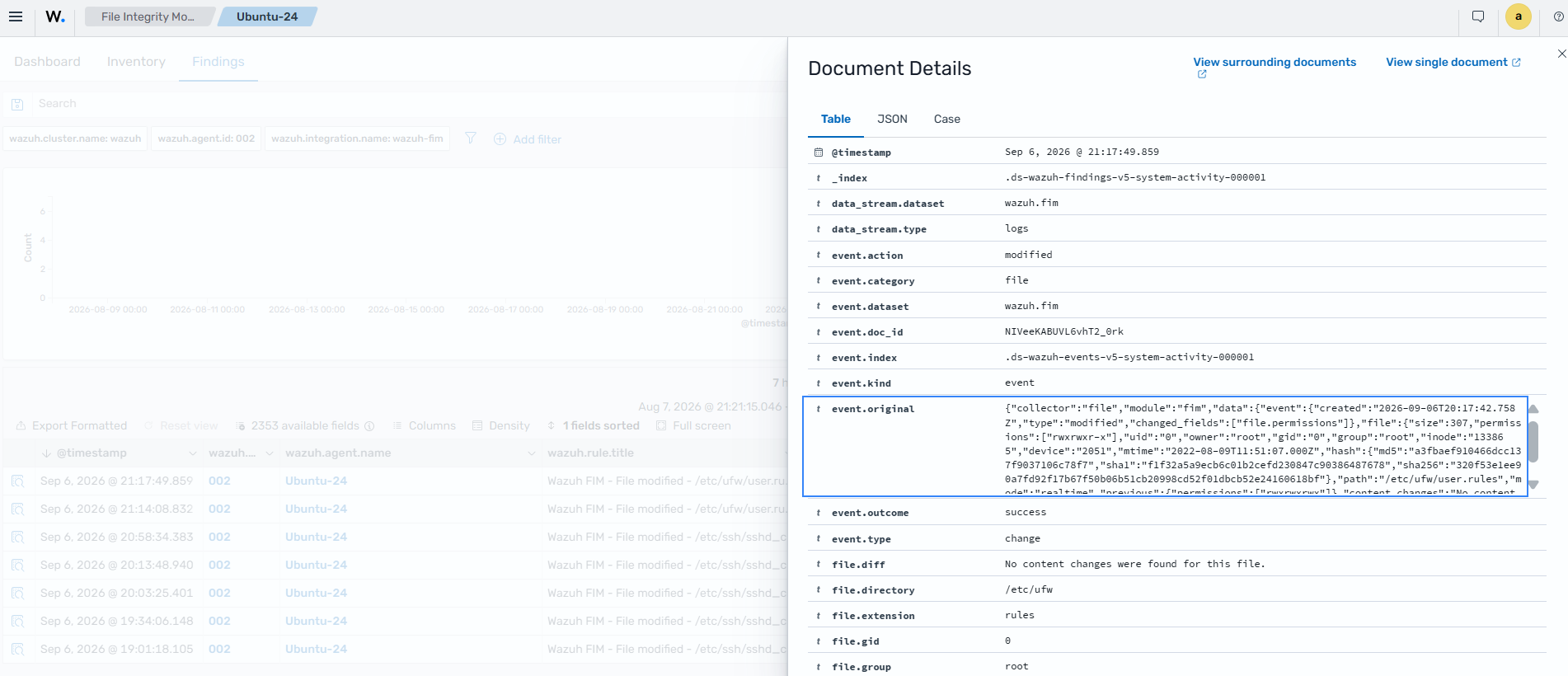
After you review the finding, restore the original permissions of the rule file with chmod 640 /etc/ufw/user.rules. Otherwise, later ufw commands warn that /etc/ufw/user.rules is world writable.