Use cases
The following use cases demonstrate practical applications of the Wazuh indexer API. You can find details about all available API requests in the Reference section.
The results of the queries in this section depend on the data in your Wazuh indexer. The Wazuh manager doesn't collect the logs of its own host, so a new installation has no events, findings, or vulnerability data until a Wazuh agent reports. Until then, the requests succeed but return no documents.
Exploring findings
Wazuh stores findings in the wazuh-findings-v5-* data streams in the Wazuh indexer. A finding is an event that matches a detection rule, enriched with the rule metadata and the full triggering event. In this use case, you use the _search endpoint to identify the riskiest users. The query searches all findings and aggregates the user.name field to identify the top three (3) users associated with findings.
Follow these steps.
On the Wazuh dashboard, go to Indexer management > Dev Tools.
Enter the following query and run it:
POST /wazuh-findings-v5-*/_search
{
  "size": 0,
  "aggs": {
    "top_risky_users": {
      "terms": {
        "field": "user.name",
        "size": 3,
        "order": { "_count": "desc" }
      }
    }
  }
}
The response identifies three different users and their number of findings. This information helps security analysts and threat hunters prioritize their defense and discovery efforts. The output is similar to the following:
{
  "took": 19,
  "timed_out": false,
  "_shards": {
    "total": 8,
    "successful": 8,
    "skipped": 0,
    "failed": 0
  },
  "hits": {
    "total": {
      "value": 2352,
      "relation": "eq"
    },
    "max_score": null,
    "hits": []
  },
  "aggregations": {
    "top_risky_users": {
      "doc_count_error_upper_bound": 0,
      "sum_other_doc_count": 10,
      "buckets": [
        {
          "key": "root",
          "doc_count": 21
        },
        {
          "key": "cain",
          "doc_count": 18
        },
        {
          "key": "abel",
          "doc_count": 5
        }
      ]
    }
  }
}
You can group findings by other fields in the same way, for example, wazuh.rule.title for the detection rule, wazuh.rule.level for the severity, or wazuh.agent.name for the Wazuh agent.
Getting information about the Wazuh indexer configuration
You can retrieve details about the Wazuh indexer through the Wazuh indexer API, such as configuration settings, status, and logs. The following example retrieves the current security (authentication) configuration of the Wazuh indexer.
On the Wazuh dashboard, go to Indexer management > Dev Tools.
Enter the following query and run it:
GET _plugins/_security/api/securityconfig
The output shows the current authentication settings of the Wazuh indexer. The following is an excerpt of the default configuration:
{
  "config": {
    "dynamic": {
      "filtered_alias_mode": "warn",
      "disable_rest_auth": false,
      "disable_intertransport_auth": false,
      "respect_request_indices_options": false,
      "kibana": {
        "multitenancy_enabled": false,
        ...
        "server_username": "kibanaserver",
        "index": ".kibana"
      },
      "http": {
        "anonymous_auth_enabled": false,
        "xff": {
          "enabled": false,
          "internalProxies": "192\\.168\\.0\\.10|192\\.168\\.0\\.11",
          "remoteIpHeader": "X-Forwarded-For"
        }
      },
      "authc": {
        "jwt_auth_domain": {
          "http_enabled": false,
          "order": 0,
          "http_authenticator": {
            "challenge": false,
            "type": "jwt",
            "config": {
              "signing_key": "base64 encoded HMAC key or public RSA/ECDSA pem key",
              "jwt_header": "Authorization",
              "jwt_clock_skew_tolerance_seconds": 30,
              ...
            }
          },
          "authentication_backend": {
            "type": "noop",
            "config": {}
          },
          "description": "Authenticate via Json Web Token"
        },
        ...
        "basic_internal_auth_domain": {
          "http_enabled": true,
          "order": 4,
          "http_authenticator": {
            "challenge": true,
            "type": "basic",
            "config": {}
          },
          "authentication_backend": {
            "type": "intern",
            "config": {}
          },
          "description": "Authenticate via HTTP Basic against internal users database"
        },
        ...
      },
      ...
      "hosts_resolver_mode": "ip-only",
      ...
      "on_behalf_of": {
        "enabled": false
      }
    }
  }
}
Multi-tenancy is disabled by default, so
multitenancy_enabledisfalse. If you enabled on-behalf-of tokens in JSON Web Token (JWT),on_behalf_of.enabledistrue.Note
If you enabled on-behalf-of tokens, the response includes the signing and encryption keys. Don't share it.
Run a report on cluster health and statistics
Tracking the Wazuh indexer health and node statistics helps you identify and resolve performance issues promptly. This use case shows how to interact with the Wazuh indexer API from a script to generate a report.
Export your Wazuh indexer credentials as environment variables:
# export WAZUH_INDEXER_USER="<WAZUH_INDEXER_USERNAME>"
# export WAZUH_INDEXER_PASS="<WAZUH_INDEXER_PASSWORD>"
Replace
<WAZUH_INDEXER_USERNAME>and<WAZUH_INDEXER_PASSWORD>with your Wazuh indexer username and password.Create a file named
indexer_check_report.shwith the following content. The script requiresjq:#!/bin/bash # Configuration BASE_URL="https://<WAZUH_INDEXER_IP>:9200" DATE=$(date +%Y-%m-%d) OUTPUT_FILE="wazuh_indexer_report_${DATE}.html" USER="${WAZUH_INDEXER_USER}" PASS="${WAZUH_INDEXER_PASS}" api_request() { local endpoint=$1 curl -s -k -u "$USER:$PASS" -H "Content-Type: application/json" "$BASE_URL$endpoint" } # Fetch cluster health fetch_cluster_health() { api_request "/_cluster/health" } # Fetch index statistics fetch_index_stats() { api_request "/_cat/indices?format=json" } # Fetch node statistics fetch_node_stats() { api_request "/_nodes/stats" } # Format JSON to indented HTML format_json_html() { local json=$1 echo "$json" | jq '.' | sed 's/&/\&/g; s/</\</g; s/>/\>/g' | awk '{print "<div>" $0 "</div>"}' } # Generate HTML report generate_html_report() { local cluster_health=$1 local index_stats=$2 local node_stats=$3 cat <<EOF > "$OUTPUT_FILE" <!DOCTYPE html> <html lang="en"> <head> <meta charset="UTF-8"> <meta name="viewport" content="width=device-width, initial-scale=1.0"> <title>Wazuh Indexer Report</title> <style> body { font-family: Arial, sans-serif; } h1 { text-align: center; } table { width: 100%; border-collapse: collapse; margin: 20px 0; } th, td { border: 1px solid #ddd; padding: 8px; text-align: left; } th { background-color: #f4f4f4; } .json-block { font-family: monospace; background-color: #f9f9f9; padding: 10px; border: 1px solid #ddd; overflow-x: auto; } .json-block div { white-space: pre; } </style> </head> <body> <h1>Wazuh Indexer Report</h1> <h2>Cluster Health</h2> <div class="json-block"> $(format_json_html "$cluster_health") </div> <h2>Index Statistics</h2> <table> <tr> <th>Index</th> <th>Status</th> <th>Docs Count</th> <th>Store Size</th> </tr> EOF # Parse and append index stats echo "$index_stats" | jq -r '.[] | "<tr><td>\(.index)</td><td>\(.status)</td><td>\(.["docs.count"])</td><td>\(.["store.size"])</td></tr>"' >> "$OUTPUT_FILE" cat <<EOF >> "$OUTPUT_FILE" </table> <h2>Node Statistics</h2> <div class="json-block"> $(format_json_html "$node_stats") </div> </body> </html> EOF } # Main execution echo "Fetching cluster health..." cluster_health=$(fetch_cluster_health) echo "Fetching index statistics..." index_stats=$(fetch_index_stats) echo "Fetching node statistics..." node_stats=$(fetch_node_stats) echo "Generating HTML report..." generate_html_report "$cluster_health" "$index_stats" "$node_stats" echo "Report generated at $OUTPUT_FILE"
Run the following command to make the script executable:
# chmod +x indexer_check_report.sh
Run the
indexer_check_report.shscript:# ./indexer_check_report.shThe command output looks similar to this:
Fetching cluster health...
Fetching index statistics...
Fetching node statistics...
Generating HTML report...
Report generated at wazuh_indexer_report_<DATE>.html
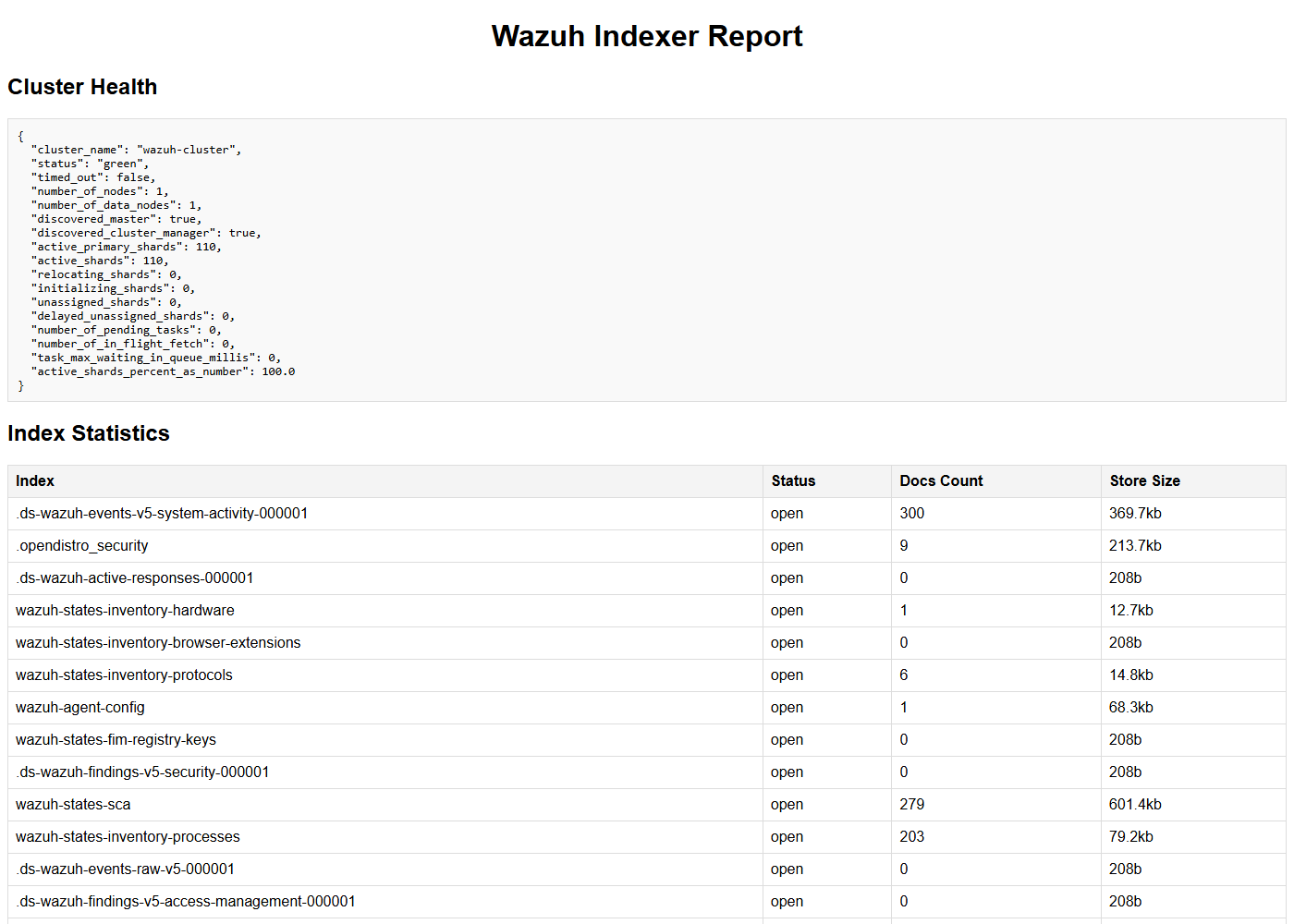
The script creates an HTML report in the current directory with the cluster health and the state of the indexes. Open the file in a web browser to view it. The following image shows an example of the report.
Query vulnerability data
You can also query vulnerability detection data with the Wazuh indexer API. Wazuh stores vulnerability data in the wazuh-states-vulnerabilities index. You can query the index for any vulnerability data. The following example searches for the CVE CVE-2026-98164 to identify any affected monitored endpoint. Run it in Indexer management > Dev Tools:
GET /wazuh-states-vulnerabilities/_search
{
  "query": {
    "term": {
      "vulnerability.id": "CVE-2026-98164"
    }
  }
}
In the query result, the hits.total.value key shows the number of affected endpoints. In the following example, the value 2 means that two (2) monitored endpoints are affected by the CVE. The agent information is in the wazuh.agent fields.
{
  "took": 208,
  "timed_out": false,
  "_shards": {
    "total": 1,
    "successful": 1,
    "skipped": 0,
    "failed": 0
  },
  "hits": {
    "total": {
      "value": 2,
      "relation": "eq"
    },
    "max_score": 1,
    "hits": [
      {
        "_index": "wazuh-states-vulnerabilities",
        "_id": "001_cebe694c1faf499f2be5c4cd4c26056076d1f8e7_CVE-2026-98164",
        "_score": 1,
        "_source": {
          "host": {
            "os": {
              "full": "Ubuntu 24.04.3 LTS (Noble Numbat)",
              "kernel": "6.8.0-86-generic",
              "name": "Ubuntu",
              "platform": "ubuntu",
              "type": "linux",
              "version": "24.04.3"
            }
          },
          "package": {
            "architecture": "amd64",
            "description": "Signed kernel image generic",
            "name": "linux-image-6.8.0-86-generic",
            "path": null,
            "size": 15033344,
            "type": "deb",
            "version": "6.8.0-86.87"
          },
          "state": {
            "document_version": 1
          },
          "vulnerability": {
            "category": "Packages",
            "detected_at": "2026-10-15T14:40:00.704Z",
            "id": "CVE-2026-98164",
            "published_at": "2026-09-29T13:17:53Z",
            "scanner": {
              "condition": "Package default status",
              "reference": "https://cti.wazuh.com/vulnerabilities/cves/CVE-2026-98164",
              "source": "Canonical Security Tracker",
              "vendor": "Wazuh"
            },
            "score": {
              "base": 5.5,
              "version": "3.1"
            },
            "severity": "Medium",
            "under_evaluation": false
          },
          "wazuh": {
            "agent": {
              "groups": [
                "default"
              ],
              "host": {
                "architecture": "x86_64",
                "hostname": "wazuh-VirtualBox",
                "os": {
                  "name": "Ubuntu",
                  "platform": "ubuntu",
                  "type": "linux",
                  "version": "24.04.3 LTS (Noble Numbat)"
                }
              },
              "id": "001",
              "name": "aio-selfagent",
              "version": "v5.0.0"
            },
            "cluster": {
              "name": "wazuh"
            },
            "schema": {
              "version": "1.0.0"
            }
          }
        }
      },
      {
        "_index": "wazuh-states-vulnerabilities",
        "_id": "001_92b0a6df08a7f0a0680de013a157519adc2f428a_CVE-2026-98164",
        "_score": 1,
        "_source": {
          "host": {
            "os": {
              "full": "Ubuntu 24.04.3 LTS (Noble Numbat)",
              "kernel": "6.8.0-86-generic",
              "name": "Ubuntu",
              "platform": "ubuntu",
              "type": "linux",
              "version": "24.04.3"
            }
          },
          "package": {
            "architecture": "amd64",
            "description": "Signed kernel image generic",
            "name": "linux-image-6.8.0-147-generic",
            "path": null,
            "size": 15112192,
            "type": "deb",
            "version": "6.8.0-147.147"
          },
          "state": {
            "document_version": 1
          },
          "vulnerability": {
            "category": "Packages",
            "detected_at": "2026-10-16T06:59:00.871Z",
            "id": "CVE-2026-98164",
            "published_at": "2026-09-29T13:17:53Z",
            "scanner": {
              "condition": "Package default status",
              "reference": "https://cti.wazuh.com/vulnerabilities/cves/CVE-2026-98164",
              "source": "Canonical Security Tracker",
              "vendor": "Wazuh"
            },
            "score": {
              "base": 5.5,
              "version": "3.1"
            },
            "severity": "Medium",
            "under_evaluation": false
          },
          "wazuh": {
            "agent": {
              "groups": [
                "default"
              ],
              "host": {
                "architecture": "x86_64",
                "hostname": "wazuh-VirtualBox",
                "os": {
                  "name": "Ubuntu",
                  "platform": "ubuntu",
                  "type": "linux",
                  "version": "24.04.3 LTS (Noble Numbat)"
                }
              },
              "id": "001",
              "name": "aio-selfagent",
              "version": "v5.0.0"
            },
            "cluster": {
              "name": "wazuh"
            },
            "schema": {
              "version": "1.0.0"
            }
          }
        }
      }
    ]
  }
}
Threat hunting
The Wazuh indexer API is helpful during threat hunting exercises where you have to query external systems. This use case extracts source IP addresses from findings and checks them against AbuseIPDB. You generate a report that shows whether each source IP address has a bad reputation in AbuseIPDB. Follow these steps.
Sign up for a free AbuseIPDB account. After you log in, create an API key in Account > API.
Export your Wazuh indexer credentials and the AbuseIPDB API key as environment variables:
# export WAZUH_INDEXER_USER="<WAZUH_INDEXER_USERNAME>"
# export WAZUH_INDEXER_PASS="<WAZUH_INDEXER_PASSWORD>"
# export ABUSEIPDB_KEY="<ABUSEIPDB_KEY>"
Replace
<WAZUH_INDEXER_USERNAME>and<WAZUH_INDEXER_PASSWORD>with your Wazuh indexer username and password. Replace<ABUSEIPDB_KEY>with the AbuseIPDB API key from step 1.Create a script called
ip_reputation_check.shwith the following content. The script requiresjq:#!/bin/bash # Configuration WAZUH_INDEXER_BASE_URL="https://<WAZUH_INDEXER_IP>:9200" INDEX_NAME="wazuh-findings-v5-*" ABUSEIPDB_API_URL="https://api.abuseipdb.com/api/v2/check" ABUSEIPDB_API_KEY="${ABUSEIPDB_KEY}" USER="${WAZUH_INDEXER_USER}" PASS="${WAZUH_INDEXER_PASS}" DATE=$(date +%Y-%m-%d) OUTPUT_FILE="ip_report_${DATE}.html" # Fetch unique source IP addresses from the Wazuh indexer fetch_source_ips() { curl -s -k -u "$USER:$PASS" -H "Content-Type: application/json" \ -X POST "$WAZUH_INDEXER_BASE_URL/$INDEX_NAME/_search" -d '{ "size": 0, "aggs": { "unique_ips": { "terms": { "field": "source.ip", "size": 100 } } } }' | jq -r '.aggregations.unique_ips.buckets[].key' } # Check an IP address against AbuseIPDB check_ip_abuseipdb() { local ip=$1 curl -s -G "$ABUSEIPDB_API_URL" \ --data-urlencode "ipAddress=$ip" \ -H "Key: $ABUSEIPDB_API_KEY" \ -H "Accept: application/json" } # Generate HTML report generate_html_report() { local ips=("$@") echo "<!DOCTYPE html>" > "$OUTPUT_FILE" echo "<html><head><title>AbuseIPDB Report</title></head><body>" >> "$OUTPUT_FILE" echo "<h1>AbuseIPDB Report for Source IPs</h1>" >> "$OUTPUT_FILE" echo "<table border='1'><tr><th>IP Address</th><th>Abuse Confidence Score</th><th>Last Reported</th><th>Reports</th></tr>" >> "$OUTPUT_FILE" for ip in "${ips[@]}"; do response=$(check_ip_abuseipdb "$ip") confidence_score=$(echo "$response" | jq -r '.data.abuseConfidenceScore // "N/A"') last_reported=$(echo "$response" | jq -r '.data.lastReportedAt // "N/A"') total_reports=$(echo "$response" | jq -r '.data.totalReports // "N/A"') echo "<tr><td>$ip</td><td>$confidence_score</td><td>$last_reported</td><td>$total_reports</td></tr>" >> "$OUTPUT_FILE" done echo "</table></body></html>" >> "$OUTPUT_FILE" } # Main script execution echo "Fetching source IPs from the Wazuh indexer..." source_ips=($(fetch_source_ips)) if [ ${#source_ips[@]} -eq 0 ]; then echo "No source IPs found." exit 1 fi echo "Found ${#source_ips[@]} unique source IPs. Checking them against AbuseIPDB..." generate_html_report "${source_ips[@]}" echo "Report generated: $OUTPUT_FILE"
Run the following command to make the script executable:
# chmod +x ip_reputation_check.sh
Run the
ip_reputation_check.shscript:# ./ip_reputation_check.shIf findings with source IP addresses exist, the script creates a report as shown in the following image. If no finding has a
source.ipvalue, the script printsNo source IPs found.and exits.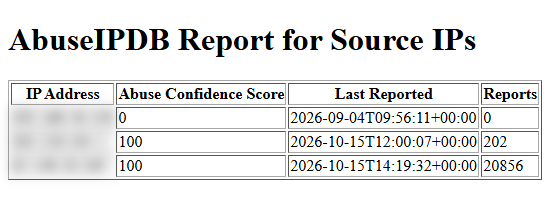
Conclusion
These examples show practical applications of the Wazuh indexer API. Explore the Wazuh indexer API reference to discover the full range of available Wazuh indexer API requests.