Rootkit detection
The Wazuh Rootcheck module detects anomalous and rootkit-like behavior on Wazuh agents by scanning for hidden processes, hidden ports, unusual files and permissions, and promiscuous network interfaces that may indicate malware.
Note
Changes in Wazuh 5.0: Starting in version 5.0, Rootcheck no longer performs signature-based detection of rootkit files and Trojans, nor does it support policy checking capabilities. The Wazuh manager also no longer persists rootcheck data in a database. Rootcheck now operates in a stateless mode, sending real-time events without server-side storage.
For policy and configuration assessment, use the Security Configuration Assessment (SCA) module instead.
How it works
The image below describes the steps Wazuh performs to detect malicious behavior on a monitored endpoint.
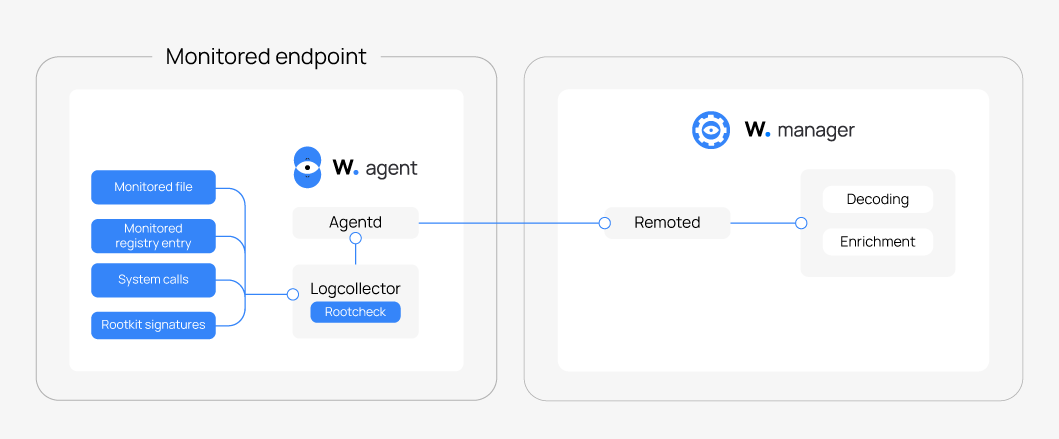
After you install a Wazuh agent on an endpoint, the Wazuh agent runs periodic anomaly checks such as hidden processes/ports, /dev scans, and promiscuous mode scans using the Rootcheck module. The Wazuh manager normalizes events sent by the Wazuh agent, including decoding and enrichment. These normalized events are then forwarded to the Wazuh indexer. When an event matches a rule, the Wazuh indexer creates a finding and stores it in an index.
Rootcheck has the following capabilities:
Periodic scanning: Rootcheck runs at configured intervals, every 12 hours by default.
Anomaly detection: Rootcheck performs system checks based on the enabled options.
Real-time reporting: Sends an event immediately when it detects an anomaly, and Wazuh generates a finding.
Agent-side only: All detection occurs on the Wazuh agent, and the Wazuh manager receives only the events.
Check running processes
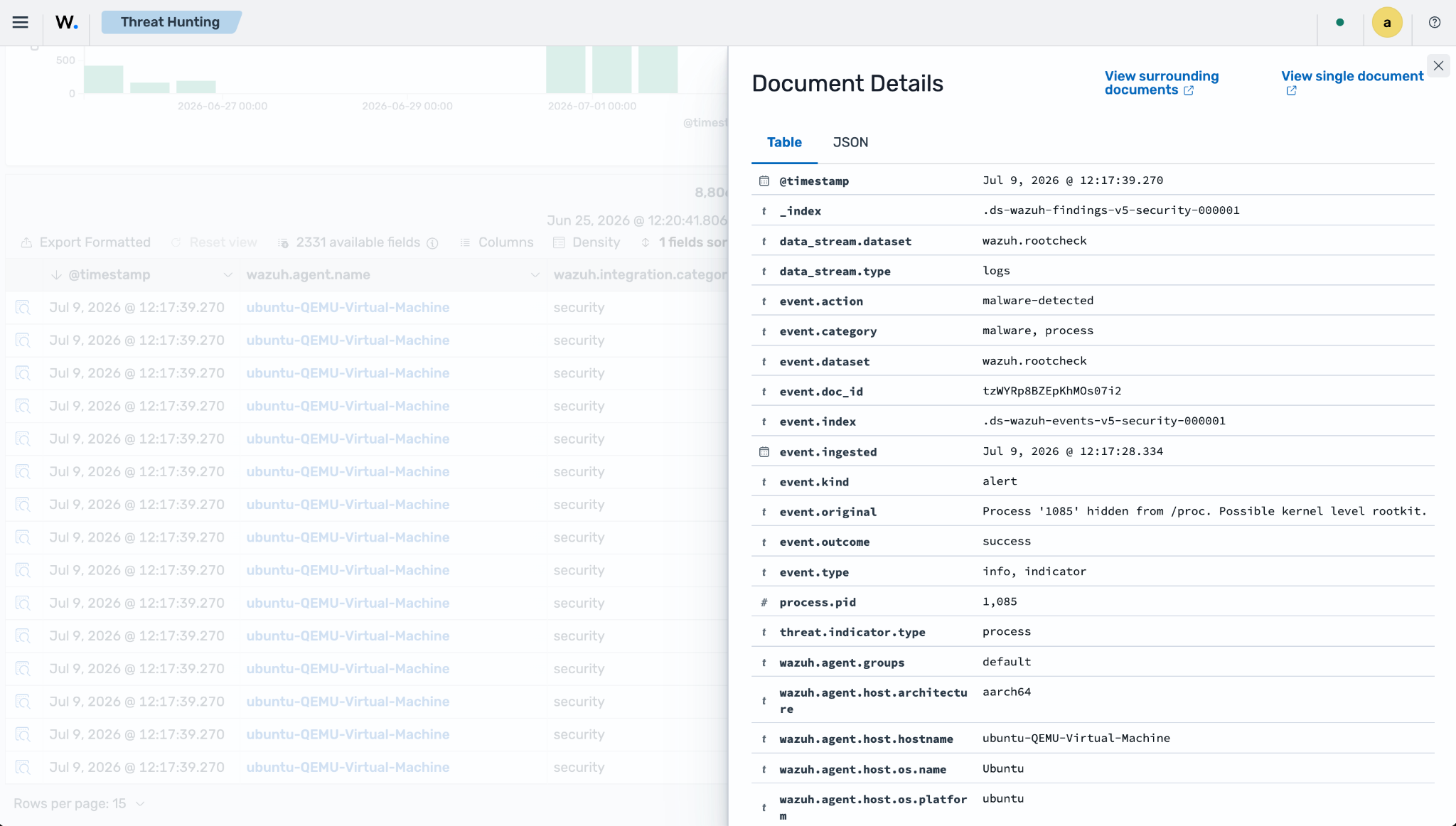
A malicious process can prevent itself from being seen in a system list of running processes, for example, by replacing the ps command with a Trojan version. Rootcheck inspects all process IDs (PIDs), looking for discrepancies using different system calls such as getsid and getpgid.
For example, diamorphine is a kernel-mode rootkit that can hide itself and other processes from the ps command. Suppose you install this rootkit and hide a process. In that case, you get a finding like this:
Check unusual files and permissions
Wazuh scans the entire file system looking for unusual files and permissions. For example, a file owned by the root user might have write permissions for other user accounts. Rootcheck inspects SUID files, hidden directories, and other files for unusual permissions.
Scan the /dev directory
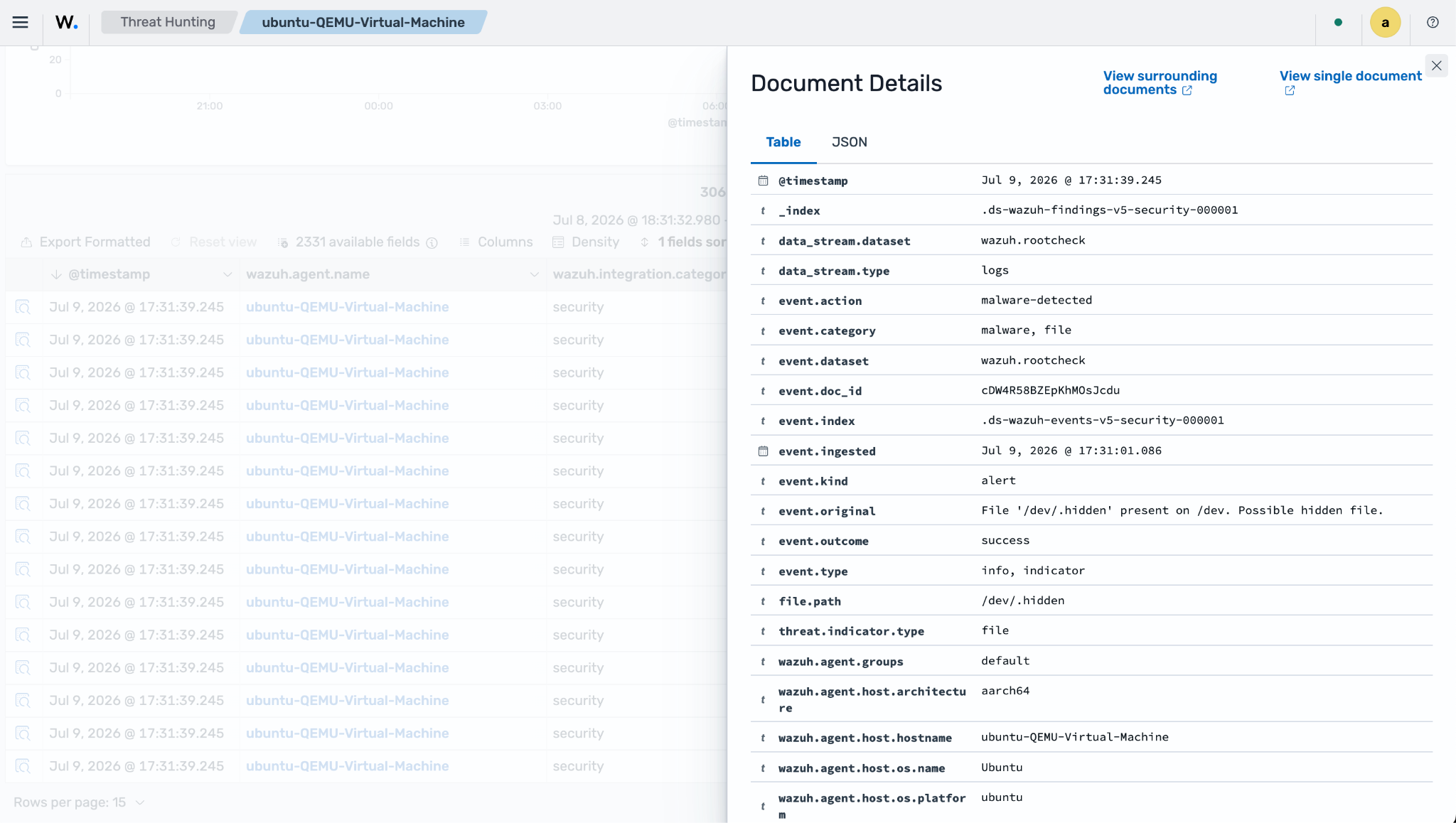
The /dev directory should only contain device-specific files. Wazuh inspects all files in this directory because malware can use this partition to hide files.
For example, if you create a hidden file in the /dev directory, Wazuh triggers a finding because a hidden file is present in a directory that should contain only device-specific files. The following is an example of such a finding:
$ sudo touch /dev/.hidden
Scan network interfaces
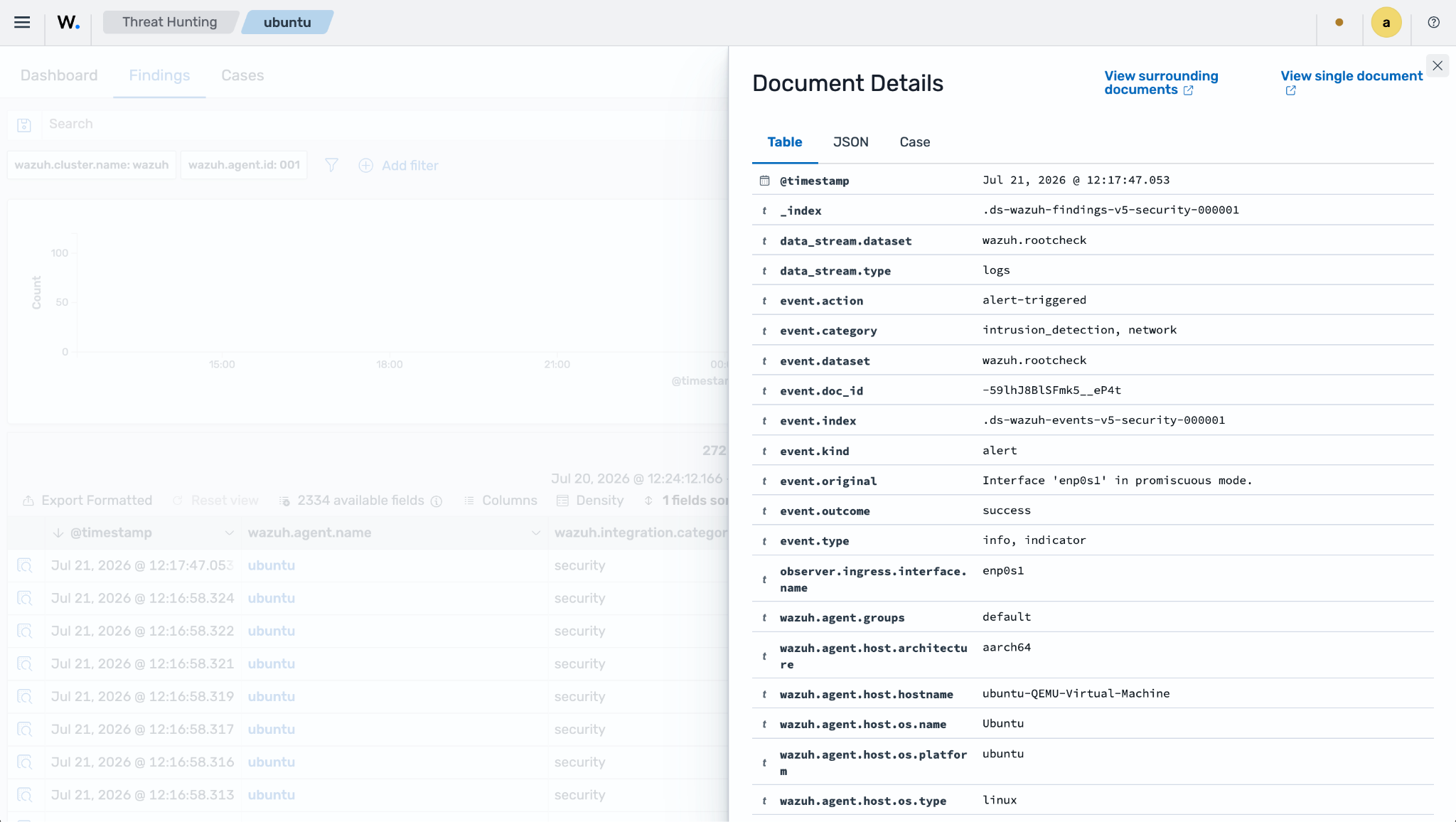
Wazuh scans all network interfaces on a system for promiscuous mode by reading each interface's flags. If an interface is in promiscuous mode, it triggers a finding. A network interface in promiscuous mode might indicate the presence of malware.
Rootcheck configuration
In most deployments, Rootcheck runs with its default behavior, periodically scanning the endpoint for rootkit indicators and anomalous system artifacts without requiring additional configuration.
You can adjust key parameters such as the scan frequency and which checks are enabled by editing the Rootcheck configuration in your Wazuh configuration file and using the frequency and related options documented in the Rootcheck reference.
The following shows the default Wazuh agent rootcheck configuration block:
<!-- Policy monitoring -->
<rootcheck>
  <disabled>no</disabled>
  <check_dev>yes</check_dev>
  <check_sys>yes</check_sys>
  <check_pids>yes</check_pids>
  <check_ports>yes</check_ports>
  <check_if>yes</check_if>

  <!-- Frequency that rootcheck is executed - every 12 hours -->
  <frequency>43200</frequency>

  <skip_nfs>yes</skip_nfs>

  <ignore>/var/lib/containerd</ignore>
  <ignore>/var/lib/docker/overlay2</ignore>
</rootcheck>
Where:
<rootcheck>: Enables and configures the Rootcheck module for host-based anomaly and rootkit behavior detection on the Wazuh agent.
<disabled>: Enables or disables the Rootcheck module on the monitored Wazuh agent; no means Rootcheck is enabled and will run periodic anomaly checks.
<check_dev>: Instructs Rootcheck to scan the /dev directory for hidden or suspicious files that should not exist in a device-only filesystem.
<check_sys>: Enables system-wide anomaly checks for unusual files, permissions, hidden files, and other suspicious artifacts across the default monitored paths.
<check_pids>: Tells Rootcheck to inspect running process IDs using multiple system calls to detect hidden or inconsistent processes that may indicate a rootkit.
<check_ports>: Enables scanning of listening ports to identify ports that appear bound at the kernel level but are not visible in normal networking utilities, suggesting stealthy malware listeners.
<check_if>: Instructs Rootcheck to inspect network interfaces for suspicious configurations, such as interfaces left in promiscuous mode that might be used for packet sniffing.
<frequency>: Sets how often Rootcheck runs its scans in seconds; 43200 corresponds to every 12 hours, which is the default Rootcheck scan interval.
<skip_nfs>: Avoids scanning NFS-mounted filesystems so Rootcheck ignores remote network shares and focuses only on local filesystems.
<ignore>: Specifies filesystem paths that Rootcheck should skip entirely during scans to reduce noise and avoid performance impact on volatile or container-related directories.
<ignore>/var/lib/containerd</ignore>: Excludes containerd data from Rootcheck checks, preventing frequent benign changes in container runtimes from generating findings.
<ignore>/var/lib/docker/overlay2</ignore>: Excludes the Docker overlay filesystem layers from Rootcheck, reducing false positives and overhead caused by ephemeral container files.