Malware detection
Wazuh offers several capabilities that support malware detection. Malware detection in Wazuh uses the following integrations and methods to detect malicious activities on a monitored endpoint:
Threat detection
Wazuh CTI and Key-Value Database (KVDB)
File integrity monitoring and threat intelligence
Wazuh rootcheck
These malware detection components of Wazuh help you comply with the following NIST 800-53 controls:
SI-3 Malicious code protection: "Malicious code protection mechanisms include both signature and non-signature-based technologies. Non-signature-based detection mechanisms include artificial intelligence techniques that use heuristics to detect, analyze, and describe the characteristics or behavior of malicious code and to provide controls against such code for which signatures do not yet exist or for which existing signatures may not be effective. Such malicious code includes polymorphic malicious code (i.e., code that changes signatures when it replicates). Non-signature-based mechanisms also include reputation-based technologies. In addition to the above technologies, pervasive configuration management, comprehensive software integrity controls, and anti-exploitation software may be effective in preventing the execution of unauthorized code. Malicious code may be present in commercial off-the-shelf software as well as custom-built software and could include logic bombs, backdoors, and other types of attacks that could affect organizational mission and business functions."
SI-7 Software, firmware, and information integrity: "Unauthorized changes to software, firmware, and information can occur due to errors or malicious activity. Software includes operating systems (with key internal components, such as kernels or drivers), middleware, and applications. Firmware interfaces include Unified Extensible Firmware Interface (UEFI) and Basic Input/Output System (BIOS). Information includes personally identifiable information and metadata that contains security and privacy attributes associated with information. Integrity-checking mechanisms-including parity checks, cyclic redundancy checks, cryptographic hashes, and associated tools-can automatically monitor the integrity of systems and hosted applications."
The NIST 800-53 controls above require you to have tools and processes to detect malicious code and modified software and firmware. Wazuh supports the detection of suspicious system binaries, malware, and suspicious processes using out-of-the-box rules. In addition, Wazuh also includes a File Integrity Monitoring module that allows users to continuously monitor specific files and paths that malware might use. You can also integrate third-party malware scan solutions such as YARA with Wazuh for custom detections.
Use case
Detect a rootkit hiding processes
Wazuh helps meet the SI-3 Malicious code protection requirement by detecting signs of a kernel-mode rootkit on a monitored endpoint. In this scenario, the Wazuh rootcheck module detects a process that a rootkit hides on an Ubuntu 24.04 endpoint. This rootkit hides from the kernel module list. It also hides selected processes from the ps utility.
The Wazuh rootcheck module is enabled by default in the Wazuh agent configuration file. The rootcheck section explains the options in the rootcheck module.
Switch to the root user and update the packages on the endpoint:
$ sudo su
# apt update
Install the packages required for building the rootkit:
# apt -y install gcc git make linux-headers-$(uname -r)
Set
frequencyto120in the<rootcheck>section of/var/ossec/etc/ossec.conffile of the Wazuh agent to run rootcheck scans every 2 minutes:<rootcheck> <disabled>no</disabled> <check_dev>yes</check_dev> <check_sys>yes</check_sys> <check_pids>yes</check_pids> <check_ports>yes</check_ports> <check_if>yes</check_if> <!-- rootcheck execution frequency - every 12 hours by default --> <frequency>120</frequency> <rootkit_files>etc/shared/rootkit_files.txt</rootkit_files> <rootkit_trojans>etc/shared/rootkit_trojans.txt</rootkit_trojans> <skip_nfs>yes</skip_nfs> </rootcheck>
Restart the Wazuh agent to apply the changes:
# systemctl restart wazuh-agent
Fetch the Diamorphine rootkit source code from GitHub:
# git clone https://github.com/m0nad/Diamorphine
Navigate to the Diamorphine directory and compile the source code:
# cd Diamorphine
# make
Load the rootkit kernel module:
# insmod diamorphine.ko
The kernel-level rootkit "Diamorphine" is now installed on the Ubuntu endpoint.
Note
Depending on the environment, the module sometimes fails to load or function properly. If you receive the error
insmod: ERROR: could not insert module diamorphine.ko: Invalid parametersin the last step, restart the Linux endpoint and try again. Sometimes it takes several tries for it to work. Ifmakefails with'PROC_ROOT_INO' undeclared, your kernel renamed that symbol. Runsed -i 's/PROC_ROOT_INO/PROCFS_ROOT_INO/g' diamorphine.cand runmakeagain.Run the kill signal
63with the PID of a random process running on the Ubuntu endpoint.This unhides the Diamorphine rootkit.
By default, Diamorphine hides itself so you cannot detect it by running the
lsmodcommand. Try it out:# lsmod | grep diamorphine # kill -63 <ANY_PID> # lsmod | grep diamorphine
The command output looks similar to this:
diamorphine 13155 0
The first
lsmodreturns nothing, because Diamorphine hides itself. Thekill -63unhides it, so the secondlsmodreturns the line above. Any kill signal63toggles the Diamorphine kernel module between hidden and visible. The target process does not need to exist.Run the following commands to see how the
rsyslogdprocess is first visible and then no longer visible:# ps auxw | grep rsyslogd | grep -v grep
The command output looks similar to this:
root 732 0.0 0.7 214452 3572 ? Ssl 14:53 0:00 /usr/sbin/rsyslogd -n
# kill -31 <PID_OF_RSYSLOGD>
# ps auxw | grep rsyslog | grep -v grep
Replace
<PID_OF_RSYSLOGD>with the PID retrieved from the previous command.
This rootkit allows you to hide selected processes from the
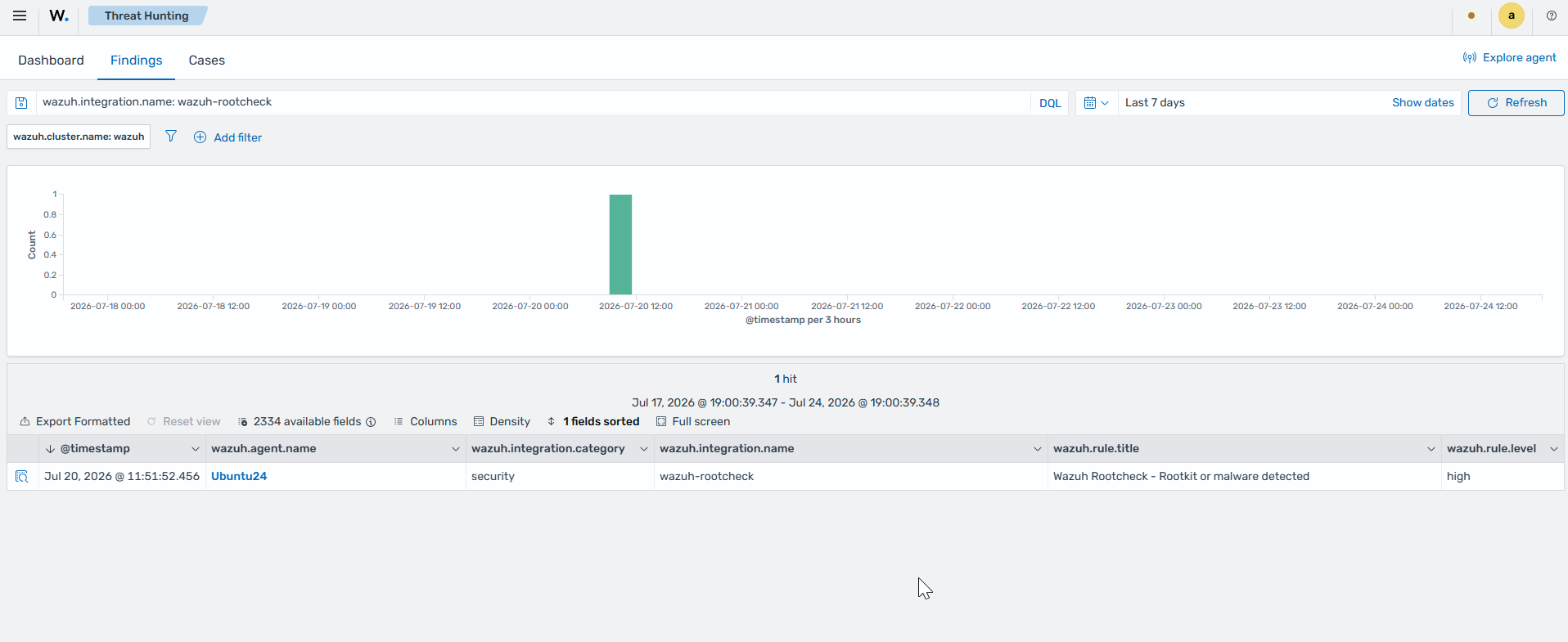
pscommand. A kill signal31hides or unhides any process. When using this last command, you can expect no output. The next rootcheck scan reports the hidden process by its PID, for exampleProcess '845' hidden from /proc. Possible kernel level rootkit.Navigate to Threat intelligence > Threat Hunting and add the following filter in the search bar to query the findings
wazuh.integration.name: wazuh-rootcheck.