Microsoft Intune integration
Microsoft Intune is a cloud-based solution for managing virtual endpoints, physical computers, mobile devices, and IoT devices. Integrating Microsoft Intune with Wazuh provides the following benefits:
It allows Wazuh to retrieve and process audit logs from managed devices using built-in decoders and rules and generate insightful, actionable security findings.
It enhances visibility into all managed endpoint activities, strengthening security monitoring across the organization.
It helps organizations ensure device administration aligns with compliance requirements and supports security policy enforcement.
The Wazuh module for Microsoft Graph in the Wazuh agent handles this integration configuration. You must configure the deviceManagement resource (that is, a specific API endpoint) on the Wazuh agent with the following relationships to enable the integration:
auditEvents: Audit logs include a record of activities that generate a change in Microsoft Intune.managedDevices: List of devices managed by Microsoft Intune.detectedApps: List of applications managed by Microsoft Intune. The results include a list of devices where each app is installed.
Refer to the ms-graph configuration reference documentation for more information.
Configuration
Perform the following steps to integrate Microsoft Intune with Wazuh:
Configure the Microsoft Graph API permissions.
Configure the Wazuh agent.
Configure the Microsoft Graph API permissions
This integration allows Wazuh to pull data from the Microsoft Graph API. Before Wazuh can pull logs and other content from the Microsoft Graph API, it must be authorized and pass through an authentication process. Wazuh must provide the tenant_id, client_id, and secret_value of an authorized application registered in Azure.
This step involves configuring the API permissions required to access Microsoft Intune events via the Microsoft Graph API. The required permissions are:
DeviceManagementApps.Read.All: ReadauditEventsanddetectedAppsrelationship data from your tenant.DeviceManagementManagedDevices.Read.All: ReadauditEventsandmanagedDevicesrelationship data from your tenant.
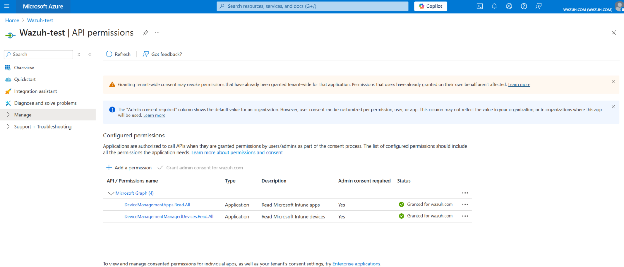
For further information, refer to the Microsoft Graph API setup guide.
Wazuh agent
The relationships auditEvents, managedDevices, and detectedApps need to be configured within the Wazuh module for Microsoft Graph in the Wazuh agent. This configuration enables Wazuh to search for logs created by Microsoft Graph resources and relationships.
In the example below, we search for auditEvents, managedDevices, and detectedApps type events within the deviceManagement resource at an interval of 20m. The logs include only events created after the module started.
Edit the Wazuh agent configuration file
/var/ossec/etc/ossec.confand add the following to enable the Wazuh module for Microsoft Graph with the desired relationships:<ossec_config> <ms-graph> <enabled>yes</enabled> <only_future_events>yes</only_future_events> <curl_max_size>10M</curl_max_size> <run_on_start>yes</run_on_start> <interval>20m</interval> <version>v1.0</version> <api_auth> <tenant_id><YOUR_TENANT_ID></tenant_id> <client_id><YOUR_CLIENT_ID></client_id> <secret_value><YOUR_SECRET_VALUE></secret_value> <api_type>global</api_type> </api_auth> <resource> <name>deviceManagement</name> <relationship>auditEvents</relationship> <relationship>managedDevices</relationship> <relationship>detectedApps</relationship> </resource> </ms-graph> </ossec_config>
Replace:
<YOUR_TENANT_ID>with the tenant ID of the application registered in Azure.<YOUR_CLIENT_ID>with the client ID of the application registered in Azure.<YOUR_SECRET_VALUE>with the secret associated with the application registered in Azure.
Save the changes and restart the Wazuh agent to take effect:
# systemctl restart wazuh-agent
For more configuration details, refer to the ms-graph configuration reference documentation.
Use case
Monitor managed device compliance
Microsoft Intune managed-device records describe the enrollment, compliance, and configuration state of each device under management. Wazuh collects Microsoft Azure managed-device inventory data through the Wazuh module for Microsoft Graph using the deviceManagement resource and managedDevices relationship. It then processes these events using out-of-the-box decoders, KVDBs, and detection rules.
This use case shows a Microsoft Intune-managed device that Wazuh reports as out of compliance, with disk encryption disabled:
The command output looks similar to this:
{
   "scan_id": 1145761535,
   "integration": "ms-graph",
   "ms-graph": {
      "id": "00062d1b-4421-4706-83f0-81e071d839fb",
      "userId": "19cbd805-6d08-4de1-8be0-7a9e8062407c",
      "deviceName": "WINDOWS-11-25H2",
      "managedDeviceOwnerType": "personal",
      "managementState": "managed",
      "enrolledDateTime": "2026-05-27T19:16:06Z",
      "lastSyncDateTime": "2026-05-29T15:37:23Z",
      "operatingSystem": "Windows",
      "complianceState": "noncompliant",
      "jailBroken": "Unknown",
      "managementAgent": "mdm",
      "osVersion": "10.0.26200.8457",
      "easActivated": true,
      "easDeviceId": "6F25F3C7D9677E4A89B85B7049738141",
      "easActivationDateTime": "0001-01-01T00:00:00Z",
      "azureADRegistered": true,
      "deviceEnrollmentType": "windowsAutoEnrollment",
      "activationLockBypassCode": null,
      "emailAddress": "Wazuh",
      "azureADDeviceId": "bbe2c331-f3b8-4da3-be7b-8dbd7f957f61",
      "deviceRegistrationState": "registered",
      "deviceCategoryDisplayName": "Unknown",
      "isSupervised": false,
      "exchangeLastSuccessfulSyncDateTime": "0001-01-01T00:00:00Z",
      "exchangeAccessState": "none",
      "exchangeAccessStateReason": "none",
      "remoteAssistanceSessionUrl": null,
      "remoteAssistanceSessionErrorDetails": null,
      "isEncrypted": false,
      "userPrincipalName": "Wazuh",
      "model": "c5ad.xlarge",
      "manufacturer": "Amazon EC2",
      "imei": "",
      "complianceGracePeriodExpirationDateTime": "2026-06-30T01:08:29Z",
      "serialNumber": "ec20a8b5-6ba0-5f5e-a525-c6174bfe902f",
      "phoneNumber": "",
      "androidSecurityPatchLevel": "",
      "userDisplayName": "Wazuh",
      "configurationManagerClientEnabledFeatures": null,
      "wiFiMacAddress": "",
      "deviceHealthAttestationState": null,
      "subscriberCarrier": "",
      "meid": "",
      "totalStorageSpaceInBytes": 127918931968,
      "freeStorageSpaceInBytes": 92478111744,
      "managedDeviceName": "Wazuh_Windows_5/27/2026_7:16 PM",
      "partnerReportedThreatState": "unknown",
      "requireUserEnrollmentApproval": null,
      "managementCertificateExpirationDate": "2027-05-27T03:38:08Z",
      "iccid": null,
      "udid": null,
      "notes": null,
      "ethernetMacAddress": null,
      "physicalMemoryInBytes": 0,
      "enrollmentProfileName": null,
      "deviceActionResults": [],
      "resource": "deviceManagement",
      "relationship": "managedDevices"
   }
}
The Wazuh agent retrieves the event and sends it to the Wazuh manager. The event is processed by the following decoders:
"decoder/core-wazuh-message/0",
"decoder/ms-graph/0",
"decoder/azure-intune-device/0"
The azure-intune-device decoder normalizes the Microsoft Intune event into the following relevant fields:
The command output looks similar to this:
{
   "data_stream": {
      "dataset": "azure.intune_device",
      "type": "logs"
   },
   "@timestamp": "2026-09-02T08:45:24.412Z",
   "observer": {
      "product": "Microsoft Intune",
      "vendor": "Microsoft"
   },
   "host": {
      "name": "WINDOWS-11-25H2",
      "id": "00062d1b-4421-4706-83f0-81e071d839fb",
      "os": {
         "name": "Windows",
         "version": "10.0.26200.8457",
         "type": "windows"
      }
   },
   "event": {
      "outcome": "failure",
      "kind": "state",
      "dataset": "azure.intune_device",
      "code": "noncompliant",
      "start": "2026-05-29T15:37:23Z",
      "category": [
         "host"
      ],
      "type": [
         "info"
      ],
      "original": "{\"scan_id\":1145761535,\"integration\":\"ms-graph\",\"ms-graph\":{\"id\":\"00062d1b-4421-4706-83f0-81e071d839fb\",\"userId\":\"19cbd805-6d08-4de1-8be0-7a9e8062407c\",\"deviceName\":\"WINDOWS-11-25H2\",\"managedDeviceOwnerType\":\"personal\",\"managementState\":\"managed\",\"enrolledDateTime\":\"2026-05-27T19:16:06Z\",\"lastSyncDateTime\":\"2026-05-29T15:37:23Z\",\"operatingSystem\":\"Windows\",\"complianceState\":\"noncompliant\",\"jailBroken\":\"Unknown\",\"managementAgent\":\"mdm\",\"osVersion\":\"10.0.26200.8457\",\"easActivated\":true,\"easDeviceId\":\"6F25F3C7D9677E4A89B85B7049738141\",\"easActivationDateTime\":\"0001-01-01T00:00:00Z\",\"azureADRegistered\":true,\"deviceEnrollmentType\":\"windowsAutoEnrollment\",\"activationLockBypassCode\":null,\"emailAddress\":\"Wazuh\",\"azureADDeviceId\":\"bbe2c331-f3b8-4da3-be7b-8dbd7f957f61\",\"deviceRegistrationState\":\"registered\",\"deviceCategoryDisplayName\":\"Unknown\",\"isSupervised\":false,\"exchangeLastSuccessfulSyncDateTime\":\"0001-01-01T00:00:00Z\",\"exchangeAccessState\":\"none\",\"exchangeAccessStateReason\":\"none\",\"remoteAssistanceSessionUrl\":null,\"remoteAssistanceSessionErrorDetails\":null,\"isEncrypted\":false,\"userPrincipalName\":\"Wazuh\",\"model\":\"c5ad.xlarge\",\"manufacturer\":\"Amazon EC2\",\"imei\":\"\",\"complianceGracePeriodExpirationDateTime\":\"2026-06-30T01:08:29Z\",\"serialNumber\":\"ec20a8b5-6ba0-5f5e-a525-c6174bfe902f\",\"phoneNumber\":\"\",\"androidSecurityPatchLevel\":\"\",\"userDisplayName\":\"Wazuh\",\"configurationManagerClientEnabledFeatures\":null,\"wiFiMacAddress\":\"\",\"deviceHealthAttestationState\":null,\"subscriberCarrier\":\"\",\"meid\":\"\",\"totalStorageSpaceInBytes\":127918931968,\"freeStorageSpaceInBytes\":92478111744,\"managedDeviceName\":\"Wazuh_Windows_5/27/2026_7:16 PM\",\"partnerReportedThreatState\":\"unknown\",\"requireUserEnrollmentApproval\":null,\"managementCertificateExpirationDate\":\"2027-05-27T03:38:08Z\",\"iccid\":null,\"udid\":null,\"notes\":null,\"ethernetMacAddress\":null,\"physicalMemoryInBytes\":0,\"enrollmentProfileName\":null,\"deviceActionResults\":[],\"resource\":\"deviceManagement\",\"relationship\":\"managedDevices\"}}"
   },
   "cloud": {
      "provider": "azure",
      "service": {
         "name": "Microsoft Intune"
      }
   },
   "wazuh": {
      "protocol": {
         "location": "-",
         "queue": 1
      },
      "event": {
         "id": "49314b83-6262-47c4-9e19-5e554baba029"
      },
      "space": {
         "name": "standard"
      },
      "integration": {
         "decoders": [
            "decoder/core-wazuh-message/0",
            "decoder/ms-graph/0",
            "decoder/azure-intune-device/0"
         ],
         "category": "cloud-services",
         "name": "azure"
      }
   },
   "related": {
      "user": [
         "Wazuh"
      ],
      "hosts": [
         "WINDOWS-11-25H2"
      ]
   },
   "user": {
      "id": "19cbd805-6d08-4de1-8be0-7a9e8062407c",
      "email": "Wazuh",
      "full_name": "Wazuh",
      "name": "Wazuh"
   }
}
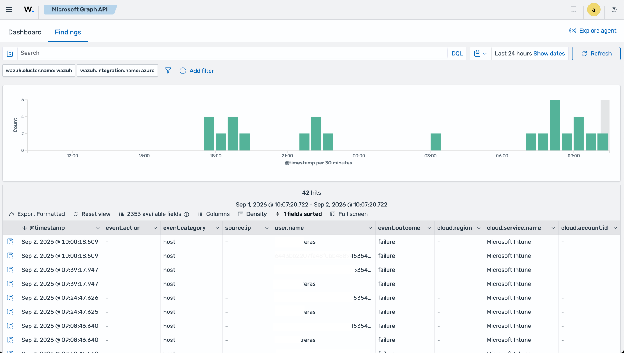
The normalized event matches the built-in ruleset management rule created and generates a finding with the wazuh.rule.title: Intune non-compliant managed device.
You can view the finding on the Wazuh dashboard by navigating to Cloud security > Microsoft Graph API: