How it works
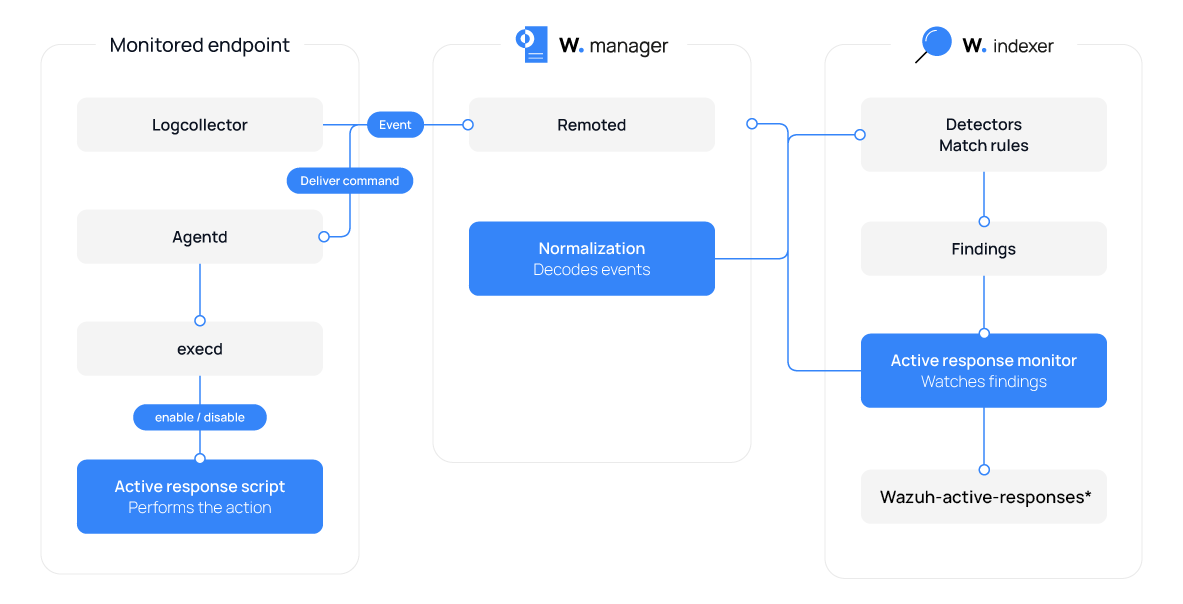
The Wazuh Active Response module works with Alerting monitors to run response actions when security findings meet configured conditions. The process works as follows:
An Alerting monitor periodically evaluates security findings stored in the Wazuh indexer against its configured trigger conditions, such as a specific rule ID.
When a finding matches the defined condition, the trigger fires and initiates the configured active response action.
The active response configuration selects the executable, location, and type.
The Wazuh manager then sends the active response command, together with the relevant finding information, to the selected monitored endpoint.
The Wazuh agent receives the command and executes the specified active response script.
After execution, Wazuh stores the results of each active response in the wazuh-active-responses* index. Each entry includes details such as the command and execution location, which can be reviewed from the Wazuh dashboard. The index data is available for only 3 days. The stream-active-responses-policy ISM policy controls the retention period. Navigate to Indexer Management > Index Management > State management policies and edit the policy if you need to keep active response results for longer.
You can find the results of active response script executions in:
/var/ossec/logs/active-responses.logon Linux endpoints./Library/Ossec/logs/active-responses.logon macOS endpoints.C:\Program Files (x86)\ossec-agent\active-response\active-responses.logon Windows endpoints.
The following diagram shows the active response workflow.
See the Use cases section for examples of configuring an Alerting monitor, trigger, and active response action.