Wazuh indices
The Wazuh indexer stores data using data streams and stateful indices.
Data streams handle continuously generated, time-based data such as events, findings, active response requests, and operational metrics. Each data stream writes to a sequence of backing indices, which Wazuh rolls over and retains according to its lifecycle policy. Wazuh automatically manages data streams using rollover and retention policies to maintain consistent performance as data volume grows.
Stateful indices store the latest known state of monitored endpoints, including inventory, vulnerability, and security-configuration assessment data.
Data streams
A data stream is a logical collection of backing indices that stores continuously generated, time-based data. Wazuh writes data to the stream name while managing the underlying backing indices automatically. Backing indices are the individual indices that sit behind a data stream and hold its actual data.
Each data stream is associated with an index template that defines its mappings and settings and applies its rollover and retention policy.
The following table lists the Wazuh data streams and the type of information each stores:
Data stream |
Description |
|---|---|
|
Stores incoming events before processing and normalization, when raw event indexing is enabled. Raw event indexing is disabled by default. |
|
Stores normalized and categorized events using the Wazuh Common Schema (WCS). |
|
Stores events that could not be assigned to a category. |
|
Stores findings generated when Security Analytics detectors match Sigma rules. |
|
Stores active response execution requests. |
|
Stores operational metrics for monitored endpoints. |
|
Stores Wazuh manager communication and performance metrics for the legacy communication protocol, which Wazuh agents earlier than 5.0.0 use. |
|
Stores metrics about how the Wazuh manager normalizes (decodes) events. |
|
Stores the conversations users have with the AI assistant. |
Event data streams
Events collected from monitored endpoints pass through several stages before becoming searchable security data.
When an event arrives, Wazuh normalizes it according to the Wazuh Common Schema and routes it to the appropriate category-specific data stream. When unclassified event indexing is enabled for the space, events that cannot be categorized go to the unclassified data stream. When raw event indexing is enabled, Wazuh also stores the original event in the raw events data stream. Raw event indexing is disabled by default, and you enable it with the Setup module settings API. The event data streams are wazuh-events-raw-v5, wazuh-events-v5-<category>, and wazuh-events-v5-unclassified.
Findings data streams
The Security Analytics module stores detector findings in category-specific findings data streams.
A finding is generated when an event matches a Sigma detection rule. Each finding contains the detection result, the triggering event, rule metadata, and investigation information such as case status, analyst comments, and tags. Findings are stored using the wazuh-findings-v5-<category> index pattern.
Active response data stream
The active response data stream stores response execution requests generated by Wazuh.
When a rule triggers an active response action, Wazuh creates a document describing the action to perform. The Wazuh manager then reads these documents and distributes the actions to the correct agents.
Each document contains information about:
The event that triggered the response.
The configured response action.
The target agent or agents.
Execution parameters and response state.
Agent and cluster metadata.
This provides a complete audit trail linking response actions to the events that generated them. The template for this data stream is stored at templates/streams/active-responses.json. It matches the wazuh-active-responses* index pattern and is set to priority 1. Its fields follow the Wazuh Common Schema with the following fields included:
Field |
Description |
|---|---|
|
When the document was added to the |
|
Document ID of the matched alert that triggered the active response. |
|
Source index of the matched alert that triggered the active response. |
|
Name of the active response configured in the channel. |
|
Executable configured in the active response channel. |
|
Arguments configured in the channel. |
|
Where to execute the response: local, defined-agent, or all. |
|
Agent configured in the channel. |
|
Response type: stateless or stateful. |
|
Seconds configured in the channel for a stateful response. |
|
Agent metadata. |
|
Cluster information. |
|
Wazuh space or tenant information. |
Stateful indices
Stateful indices store information that changes over time and reflects the current state of monitored endpoints. The wazuh-states-* indices hold Wazuh global state data, which is collected from all monitored endpoints and gives a consolidated view of their current state.
Unlike data streams, stateful information is continuously updated as the monitored environment changes.
The following stateful indices are available:
Index pattern |
Description |
|---|---|
|
Latest configuration that each Wazuh agent reports, per module. |
|
Latest statistics that each Wazuh agent reports, per module. |
|
Security Configuration Assessment results. |
|
File Integrity Monitoring file metadata. |
|
Monitored Windows registry keys. |
|
Monitored Windows registry values. |
|
Vulnerability assessment results. |
|
User account inventory. |
|
Local group inventory. |
|
Installed software inventory. |
|
Running process inventory. |
|
Service inventory. |
|
Open port inventory. |
|
Network address inventory. |
|
Network interface information. |
|
Routing and protocol information. |
|
Hardware inventory. |
|
Operating system and host information. |
|
Installed updates and hotfixes. |
|
Browser extension inventory. |
The following Wazuh capabilities write global state data to the wazuh-states-* indices.
System inventory (IT Hygiene)
System Inventory provides visibility into the hardware, software, network, and operating system information of monitored endpoints. It collects information such as installed software packages, running processes, open ports, network interfaces, users, groups, services, browser extensions, operating system details, and hardware characteristics.
Wazuh agents use the Syscollector module to periodically collect inventory information from monitored endpoints. The collected data is sent to the Wazuh manager, where it is processed and synchronized to the Wazuh indexer. The inventory information is stored as global state data in dedicated wazuh-states-inventory-* indices and can be queried and visualized from the Wazuh dashboard.
Vulnerability detection
Vulnerability detection provides visibility into software vulnerabilities affecting monitored endpoints. It identifies vulnerable packages and applications by correlating endpoint inventory information with vulnerability data from the Wazuh Cyber Threat Intelligence (CTI) service. Security teams use the results to prioritize remediation and monitor their vulnerability posture.
The Wazuh agent collects inventory data such as installed packages, operating system details, and hardware information from monitored endpoints. The collected data is sent to the Wazuh manager, where the wazuh-manager-remoted daemon publishes it to the Router inventory-states topic. The Inventory Sync module synchronizes the inventory state with the Wazuh indexer through the Indexer Connector and triggers the Vulnerability Scanner module.
The Vulnerability Scanner retrieves CVE feeds from the Wazuh indexer through the Content Manager and Indexer Connector. It then correlates the vulnerability information with the inventory data collected from monitored endpoints to identify affected systems and software packages. Vulnerability state information is stored as global state data in the wazuh-states-vulnerabilities index and can be queried and visualized from the Wazuh dashboard.
File integrity monitoring
File Integrity Monitoring (FIM) provides visibility into changes made to monitored files, directories, and Windows registry entries. It helps security teams detect unauthorized modifications, track configuration changes, and monitor critical system files for signs of compromise or policy violations.
Wazuh agents continuously monitor configured files, directories, and registry entries on monitored endpoints. When a change is detected, the file integrity monitoring capability records information about the affected object, including its current state and relevant metadata. This information is synchronized to the Wazuh indexer and stored as Wazuh global state data.
FIM data can be queried and visualized from the Wazuh dashboard, providing centralized visibility into the integrity and status of monitored files and registry objects across the environment.
Security configuration assessment (SCA)
Security Configuration Assessment (SCA) provides visibility into the security and compliance posture of monitored endpoints. It evaluates endpoint configurations against predefined security policies and benchmarks, helping organizations identify misconfigurations, verify compliance requirements, and monitor adherence to security best practices.
Wazuh agents perform SCA scans using policy files that contain security configuration checks. These checks evaluate files, directories, running processes, commands, and Windows registry settings against the defined policy requirements. The scan results are synchronized with the Wazuh manager and stored as Wazuh global state data in the Wazuh indexer.
SCA data can be queried and visualized from the Wazuh dashboard, providing centralized visibility into compliance status and security configuration findings across monitored endpoints.
Data stream lifecycle
Wazuh automatically manages data stream growth through rollover and retention policies.
A rollover occurs when the active backing index reaches a configured size or document count threshold. After rollover, new documents are written to a new backing index while existing data remains searchable.
Each lifecycle policy also sets a minimum age for deletion. Wazuh deletes a backing index only after the data stream rolls over to a new one. The old index must also be older than the minimum age, counted from its creation. This approach keeps storage consumption predictable while maintaining access to the data required for investigation, threat hunting, and compliance activities.
By default, Wazuh rolls over a data stream when either of the following limits is reached:
20 GB primary shard size.
200 million documents.
The wazuh-ai-assistant-sessions data stream also rolls over daily.
The default minimum ages for deletion are shown below. A data stream that never reaches a rollover limit keeps its data until you delete it.
Data stream |
Minimum age for deletion |
|---|---|
|
10 minutes |
|
1 hour |
|
90 days |
|
3 days |
|
30 days |
|
7 days |
The following diagram illustrates the lifecycle of a data stream:

Note
Data stream rollover and retention are managed automatically through Index State Management (ISM) policies. In most deployments, no manual intervention is required.
Each lifecycle policy moves an index through two stages during its lifetime. When an index is first created, it enters the active stage, where it accepts new data. It remains in this stage until one of the configured rollover conditions, such as primary shard size or document count, is met. At that point, Wazuh creates a new active index, and the previous index stops accepting new data.
The previous index moves to the delete stage once it is older than its minimum age for deletion, and Wazuh permanently removes it. If the deletion fails, Wazuh automatically retries the operation up to three times with increasing delays between attempts.
The ISM policy below keeps matching indices in the hot state while they receive data. It rolls them over when they reach 200 million documents or a 20 GB primary shard size. After rollover, once the index is older than the minimum age, the policy moves it to the delete state and removes it. Failed actions are retried up to three times using exponential backoff.
{
  "policy": {
    "policy_id": "<index-name>-policy",
    "description": "<POLICY_DESCRIPTION>",
    "last_updated_time": <UNIX_TIMESTAMP_IN_MILLISECONDS>,
    "schema_version": 1,
    "default_state": "hot",
    "states": [
      {
        "name": "hot",
        "actions": [
          {
            "retry": {
              "count": 3,
              "backoff": "exponential",
              "delay": "1m"
            },
            "rollover": {
              "min_doc_count": 200000000,
              "min_primary_shard_size": "20gb"
            }
          }
        ],
        "transitions": [
          {
            "state_name": "delete",
            "conditions": {
              "min_index_age": "<MINIMUM_AGE_FOR_DELETION>"
            }
          }
        ]
      },
      {
        "name": "delete",
        "actions": [
          {
            "retry": {
              "count": 3,
              "backoff": "exponential",
              "delay": "1m"
            },
            "delete": {}
          }
        ],
        "transitions": []
      }
    ],
    "ism_template": [
      {
        "index_patterns": [
          "wazuh-<pattern>-*"
        ],
        "priority": <PRIORITY_INT>
      }
    ]
  }
}
Enabling unclassified events storage
Wazuh agent collects logs from endpoints and forwards them to the Wazuh manager. The Wazuh manager normalizes, decodes, and enriches events and sends them to the Wazuh indexer for rule matching, indexing, and security analytics. The Wazuh dashboard allows teams to view and investigate findings, search historical events, and manage the platform. Events that match detection rules generate findings. Events that cannot be decoded or classified are stored in the wazuh-events-v5-unclassified index when unclassified event indexing is enabled for the relevant space.
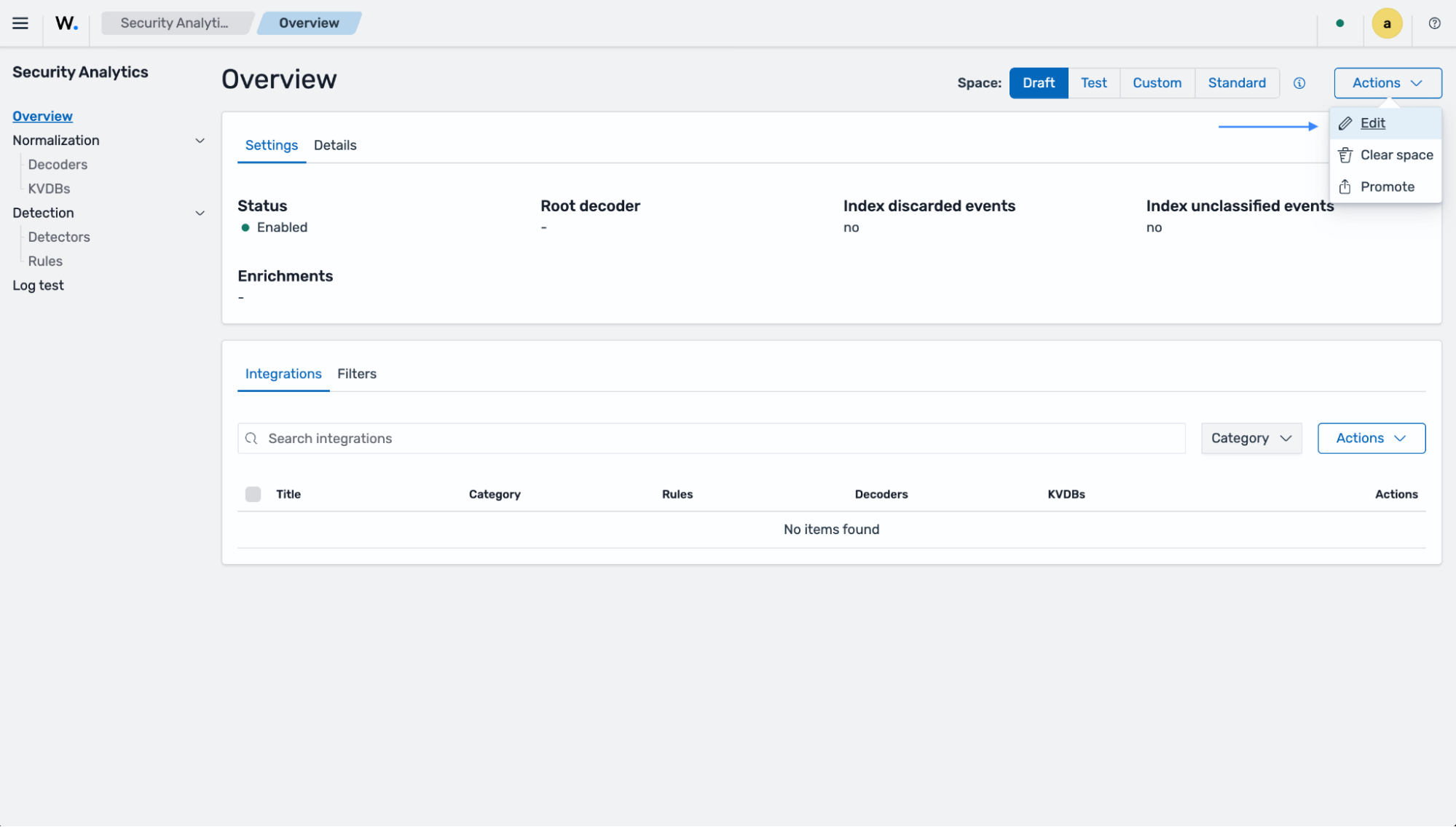
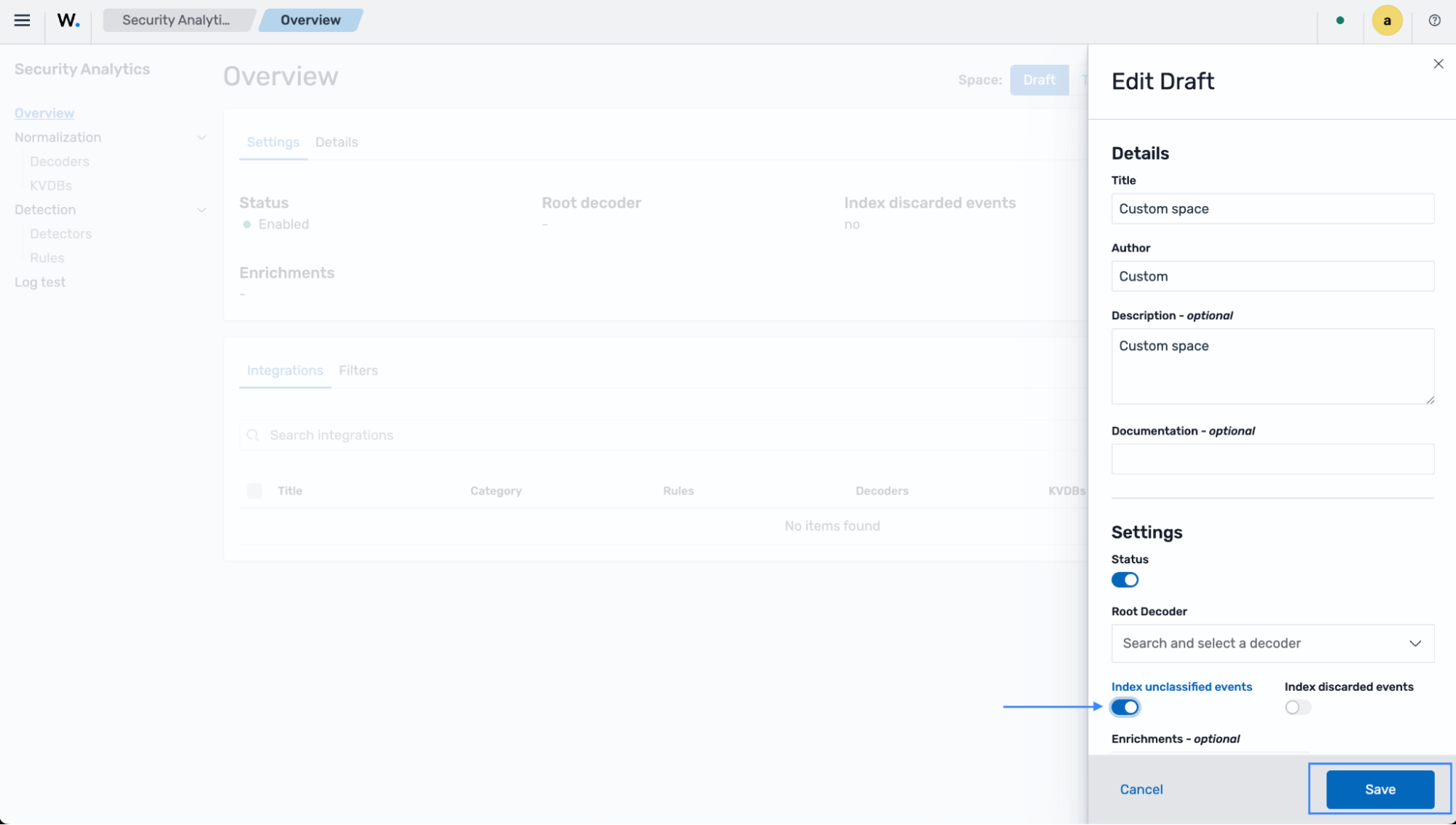
Unclassified event indexing is configured per space. You can enable unclassified event indexing in the Draft or Standard space. Follow the steps below to enable the storage of unclassified events:
Navigate to the Security Analytics dashboard, select the space you want to enable unclassified events for, click the Actions drop-down menu, and select Edit:
Toggle on Index unclassified events, and click Save:
Verifying index templates
Index templates define the mappings, settings, and lifecycle policies applied to Wazuh indices and data streams.
To verify that the Wazuh templates are installed, query the Wazuh indexer from the Wazuh dashboard. Navigate to Indexer management > Dev Tools and run the query below:
GET /_index_template/wazuh-*
The response lists all deployed Wazuh index templates and the index patterns associated with each template.
{
  "index_templates": [
    {
      "name": "wazuh-findings-v5-network-activity-template",
      "index_template": {
        "index_patterns": [
          "wazuh-findings-v5-network-activity*"
        ],
        "template": {
          "settings": {
            "index": {
              "codec": "zstd",
              "mapping": {
                "nested_fields": {
                  "limit": "50"
                },
                "total_fields": {
                  "limit": "1000"
                }
              },
              "refresh_interval": "2s",
              "number_of_shards": "1",
              "auto_expand_replicas": "0-1",
              "plugins": {
                "index_state_management": {
                  "policy_id": "stream-findings-policy"
                }
              },
              "max_docvalue_fields_search": "200",
              "query": {
                "default_field": [
                  "wazuh.agent.host.architecture",
                  "wazuh.agent.id",
                  "wazuh.agent.name",
                  "wazuh.agent.version",
                  "wazuh.cluster.name",
                  "wazuh.cluster.node",
                  "wazuh.schema.version"
                ]
              },
              "number_of_replicas": "0"
            }
          }
        }
      }
    }
    ...