Log data analysis
Log data analysis involves collecting and analyzing logs generated by applications, network devices, endpoints, and cloud services to gain visibility into an IT environment. This visibility supports a range of security and operational use cases, including threat detection, performance monitoring, troubleshooting, compliance auditing, and identifying anomalous activity.
In Wazuh 5.0, log data analysis consists of the following stages:
Log collection: Collecting logs from monitored endpoints, applications, network devices, and cloud services.
Normalization, decoding, and enrichment: Processing collected events and converting them into WCS format.
Rule matching and findings visualization: Analyzing events against detection rules and presenting the resulting findings in the Wazuh dashboard.
Wazuh Log Test
The Wazuh log test tool matches logs against the detection content of your deployment. It helps when writing and debugging custom decoders, rules, and KVDBs.
Navigate to the Log Test page in the Wazuh dashboard and perform a log test using the following sample log:
<Event xmlns='http://schemas.microsoft.com/win/2004/08/events/event'><System><Provider Name='Microsoft-Windows-Windows Defender' Guid='{11cd958a-c507-4ef3-b3f2-5fd9dfbd2c78}'/><EventID>1117</EventID><Version>0</Version><Level>4</Level><Task>0</Task><Opcode>0</Opcode><Keywords>0x8000000000000000</Keywords><TimeCreated SystemTime='2026-08-06T20:39:12.9746442Z'/><EventRecordID>1950</EventRecordID><Correlation ActivityID='{6293b76a-a6ee-46c3-bf56-c71189d7b2c5}'/><Execution ProcessID='3552' ThreadID='6288'/><Channel>Microsoft-Windows-Windows Defender/Operational</Channel><Computer>WIN-DN3Q5IPRSI7</Computer><Security UserID='S-1-5-18'/></System><EventData><Data Name='Product Name'>Microsoft Defender Antivirus</Data><Data Name='Product Version'>4.18.26070.9</Data><Data Name='Detection ID'>{1EF10FB9-2C1B-41E0-8B61-02E68E07DF0A}</Data><Data Name='Detection Time'>2026-08-06T20:38:59.462Z</Data><Data Name='Unused'></Data><Data Name='Unused2'></Data><Data Name='Threat ID'>2147965967</Data><Data Name='Threat Name'>Ransom:Win64/Conti.RS!MTB</Data><Data Name='Severity ID'>5</Data><Data Name='Severity Name'>Severe</Data><Data Name='Category ID'>50</Data><Data Name='Category Name'>Ransomware</Data><Data Name='FWLink'>https://go.microsoft.com/fwlink/?linkid=37020&name=Ransom:Win64/Conti.RS!MTB&threatid=2147965967&enterprise=0</Data><Data Name='Status Code'>3</Data><Data Name='Status Description'></Data><Data Name='State'>2</Data><Data Name='Source ID'>3</Data><Data Name='Source Name'>Real-Time Protection</Data><Data Name='Process Name'>C:\Windows\explorer.exe</Data><Data Name='Detection User'>WIN-DN3Q5IPRSI7\Test</Data><Data Name='Unused3'></Data><Data Name='Path'>file:_C:\Users\Test\Downloads\6d59bb6a9874b9b03ce6ab998def5b93f68dadedccad9b14433840c2c5c3a34e.exe</Data><Data Name='Origin ID'>1</Data><Data Name='Origin Name'>Local machine</Data><Data Name='Execution ID'>1</Data><Data Name='Execution Name'>Suspended</Data><Data Name='Type ID'>0</Data><Data Name='Type Name'>Concrete</Data><Data Name='Pre Execution Status'>0</Data><Data Name='Action ID'>2</Data><Data Name='Action Name'>Quarantine</Data><Data Name='Unused4'></Data><Data Name='Error Code'>0x00000000</Data><Data Name='Error Description'>The operation completed successfully. </Data><Data Name='Unused5'></Data><Data Name='Post Clean Status'>0</Data><Data Name='Additional Actions ID'>0</Data><Data Name='Additional Actions String'>No additional actions required</Data><Data Name='Remediation User'>NT AUTHORITY\SYSTEM</Data><Data Name='Unused6'></Data><Data Name='Security intelligence Version'>AV: 1.457.30.0, AS: 1.457.30.0, NIS: 1.457.30.0</Data><Data Name='Engine Version'>AM: 1.1.26070.7, NIS: 1.1.26070.7</Data></EventData></Event>
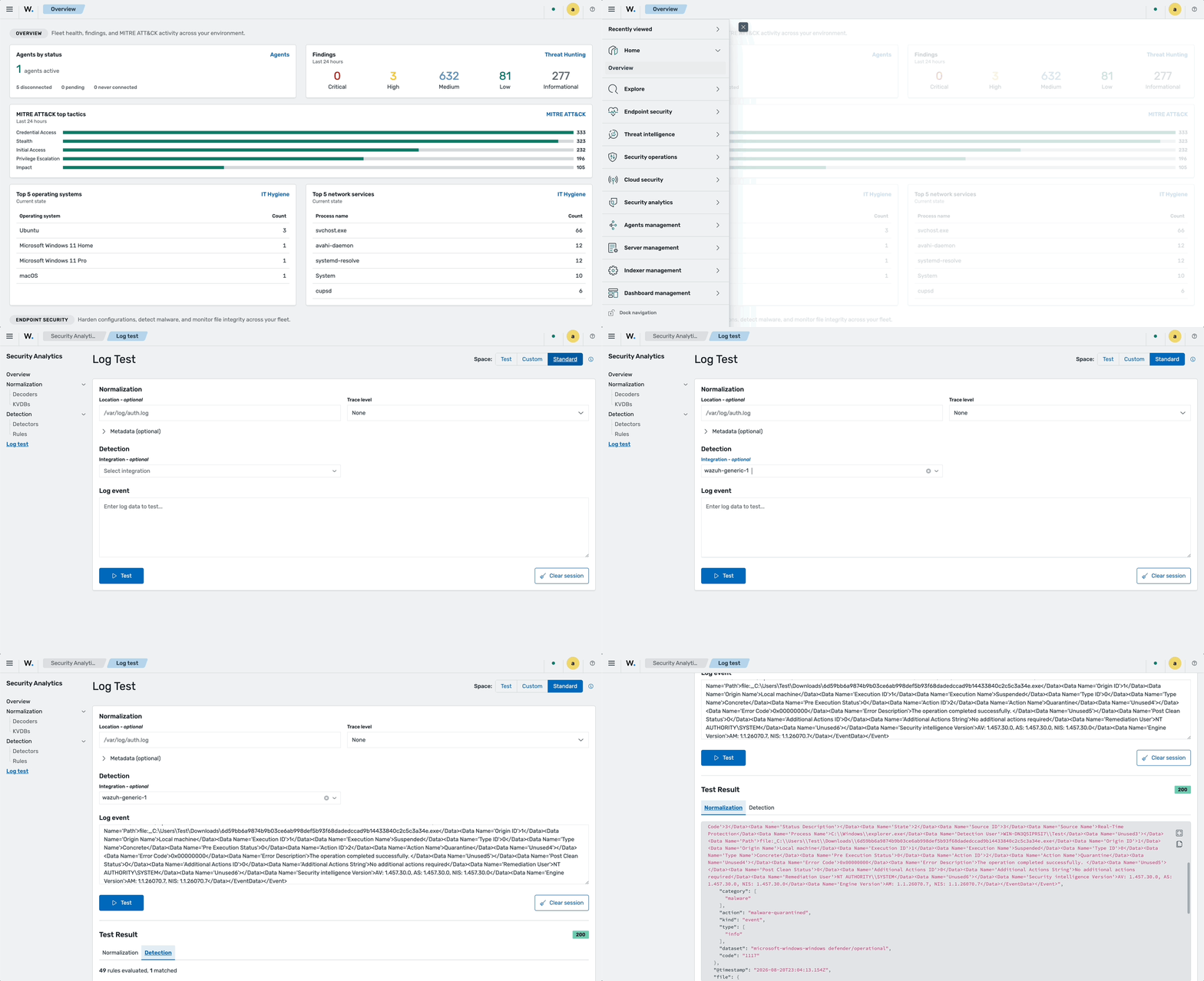
Normalization, decoding, and enrichment
In the decoding phase, the Wazuh manager processes events, where the log analysis engine uses decoders and KVDBs to normalize, enrich, and match incoming log data. For example, the following decoders match the above log sample:
decoder/core-wazuh-message/0decoder/windows-event/0decoder/windows-defender/0
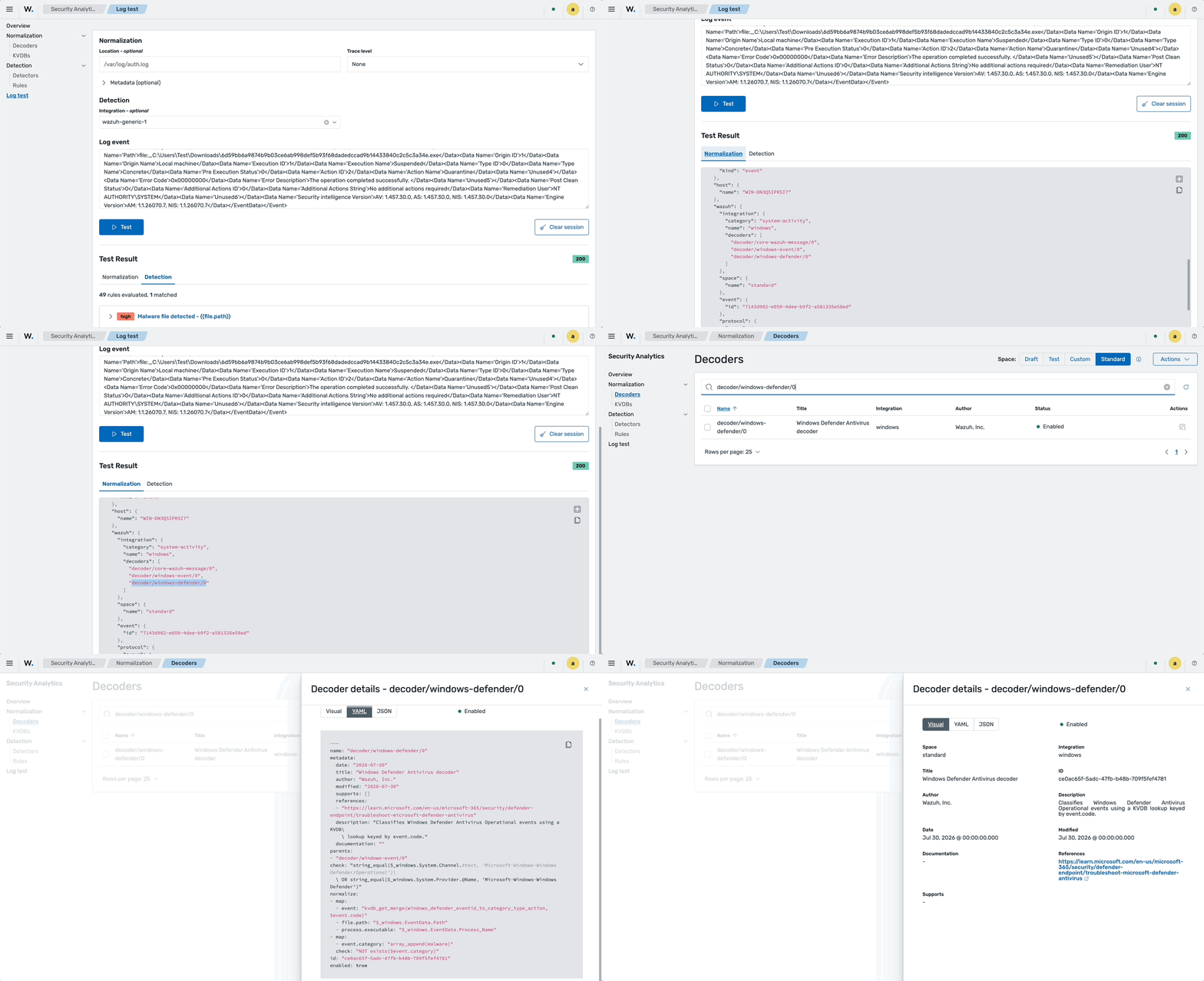
The decoder/core-wazuh-message/0 decoder matches the full event, while the decoder/windows-event/0 decoder matches the type of event. The decoder/windows-defender/0 decoder normalizes the rest of the event; however, this event does not include enrichment data.
You can view a decoder by searching the Decoders page using the decoder name. For example, decoder/windows-defender/0.
{
"event": {
"category": [
"malware"
],
"action": "malware-quarantined",
"outcome": "unknown",
"start": "2026-08-06T20:39:12.9746442Z",
"code": "1117",
"original": "<Event xmlns='http://schemas.microsoft.com/win/2004/08/events/event'><System><Provider Name='Microsoft-Windows-Windows Defender' Guid='{11cd958a-c507-4ef3-b3f2-5fd9dfbd2c78}'/><EventID>1117</EventID><Version>0</Version><Level>4</Level><Task>0</Task><Opcode>0</Opcode><Keywords>0x8000000000000000</Keywords><TimeCreated SystemTime='2026-08-06T20:39:12.9746442Z'/><EventRecordID>1950</EventRecordID><Correlation ActivityID='{6293b76a-a6ee-46c3-bf56-c71189d7b2c5}'/><Execution ProcessID='3552' ThreadID='6288'/><Channel>Microsoft-Windows-Windows Defender/Operational</Channel><Computer>WIN-DN3Q5IPRSI7</Computer><Security UserID='S-1-5-18'/></System><EventData><Data Name='Product Name'>Microsoft Defender Antivirus</Data><Data Name='Product Version'>4.18.26070.9</Data><Data Name='Detection ID'>{1EF10FB9-2C1B-41E0-8B61-02E68E07DF0A}</Data><Data Name='Detection Time'>2026-08-06T20:38:59.462Z</Data><Data Name='Unused'></Data><Data Name='Unused2'></Data><Data Name='Threat ID'>2147965967</Data><Data Name='Threat Name'>Ransom:Win64/Conti.RS!MTB</Data><Data Name='Severity ID'>5</Data><Data Name='Severity Name'>Severe</Data><Data Name='Category ID'>50</Data><Data Name='Category Name'>Ransomware</Data><Data Name='FWLink'>https://go.microsoft.com/fwlink/?linkid=37020&name=Ransom:Win64/Conti.RS!MTB&threatid=2147965967&enterprise=0</Data><Data Name='Status Code'>3</Data><Data Name='Status Description'></Data><Data Name='State'>2</Data><Data Name='Source ID'>3</Data><Data Name='Source Name'>Real-Time Protection</Data><Data Name='Process Name'>C:\\Windows\\explorer.exe</Data><Data Name='Detection User'>WIN-DN3Q5IPRSI7\\Test</Data><Data Name='Unused3'></Data><Data Name='Path'>file:_C:\\Users\\Test\\Downloads\\6d59bb6a9874b9b03ce6ab998def5b93f68dadedccad9b14433840c2c5c3a34e.exe</Data><Data Name='Origin ID'>1</Data><Data Name='Origin Name'>Local machine</Data><Data Name='Execution ID'>1</Data><Data Name='Execution Name'>Suspended</Data><Data Name='Type ID'>0</Data><Data Name='Type Name'>Concrete</Data><Data Name='Pre Execution Status'>0</Data><Data Name='Action ID'>2</Data><Data Name='Action Name'>Quarantine</Data><Data Name='Unused4'></Data><Data Name='Error Code'>0x00000000</Data><Data Name='Error Description'>The operation completed successfully. </Data><Data Name='Unused5'></Data><Data Name='Post Clean Status'>0</Data><Data Name='Additional Actions ID'>0</Data><Data Name='Additional Actions String'>No additional actions required</Data><Data Name='Remediation User'>NT AUTHORITY\\SYSTEM</Data><Data Name='Unused6'></Data><Data Name='Security intelligence Version'>AV: 1.457.30.0, AS: 1.457.30.0, NIS: 1.457.30.0</Data><Data Name='Engine Version'>AM: 1.1.26070.7, NIS: 1.1.26070.7</Data></EventData></Event>",
"kind": "event",
"dataset": "microsoft-windows-windows defender/operational",
"type": [
"info"
]
},
"file": {
"path": "file:_C:\\Users\\Test\\Downloads\\6d59bb6a9874b9b03ce6ab998def5b93f68dadedccad9b14433840c2c5c3a34e.exe"
},
"host": {
"name": "WIN-DN3Q5IPRSI7"
},
"wazuh": {
"event": {
"id": "9169b272-262e-49ac-905c-d286153936e7"
},
"integration": {
"decoders": [
"decoder/core-wazuh-message/0",
"decoder/windows-event/0",
"decoder/windows-defender/0"
],
"name": "windows",
"category": "system-activity"
},
"space": {
"name": "standard"
},
"protocol": {
"queue": 1,
"location": "-"
}
},
"@timestamp": "2026-08-20T22:42:52.267Z",
"log": {
"level": "information"
}
}
To learn more about decoders, see the decoders syntax section.
Rule matching and findings visualization
In this phase, the Wazuh detection engine in the Wazuh indexer compares normalized events against a ruleset and outputs a finding. Each finding combines the matched rule metadata with the normalized event data, providing the context needed to investigate the activity. In the Wazuh dashboard, analysts filter for related findings during triage and can review affected assets, event fields, ATT&CK mappings, and compliance information.
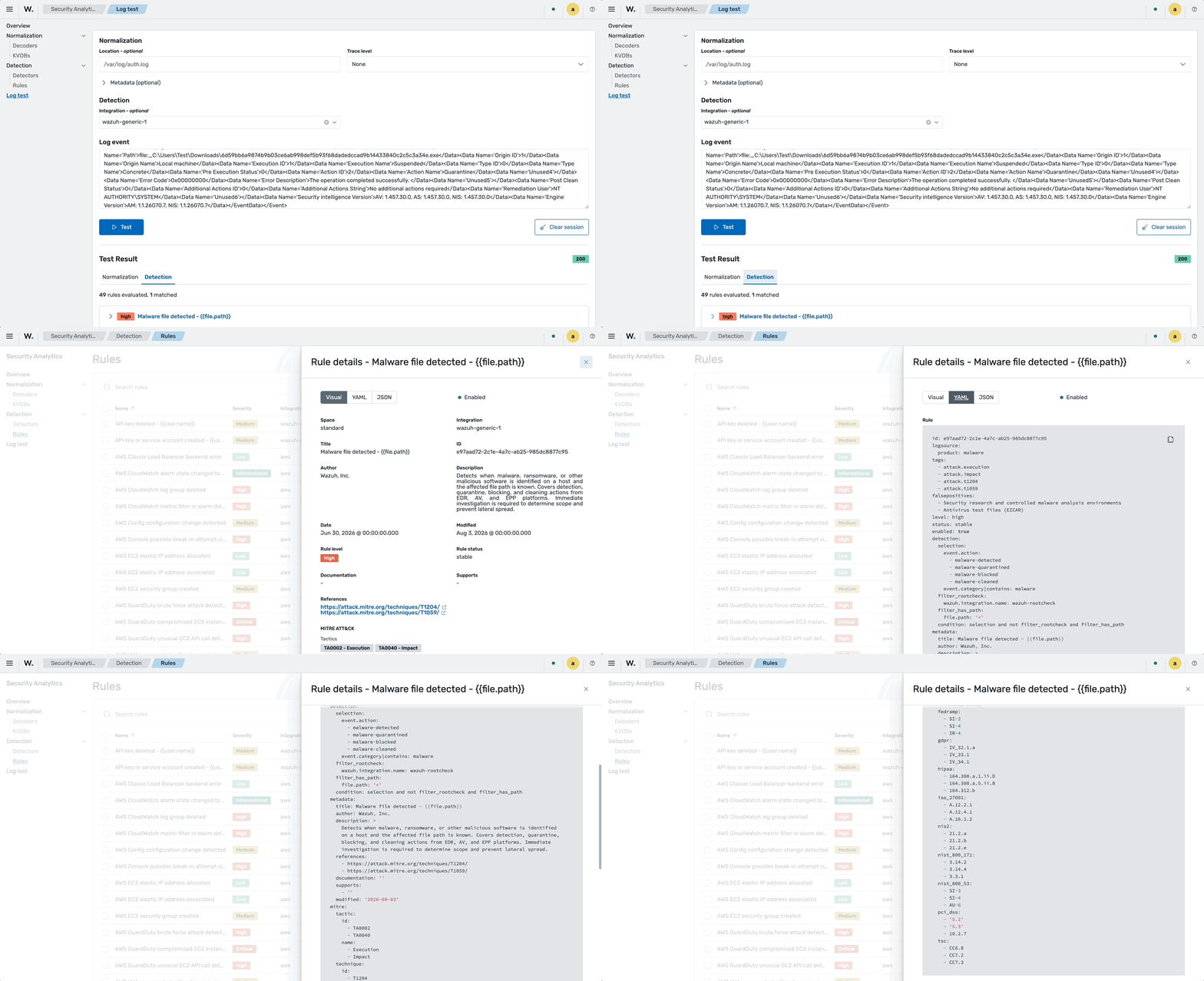
By default, the Wazuh detection engine generates findings with rule severity informational, low, medium, high, and critical. In this scenario, the log triggers a High finding.
Click on the rule to view its details:
YAML:
id: e97aad72-2c1e-4a7c-ab25-985dc8877c95
logsource:
  product: malware
tags:
  - attack.execution
  - attack.impact
  - attack.t1204
  - attack.t1059
falsepositives:
  - Security research and controlled malware analysis environments
  - Antivirus test files (EICAR)
level: high
status: stable
enabled: true
detection:
  selection:
    event.action:
      - malware-detected
      - malware-quarantined
      - malware-blocked
      - malware-cleaned
    event.category|contains: malware
  filter_rootcheck:
    wazuh.integration.name: wazuh-rootcheck
  filter_has_path:
    file.path: '*'
  condition: selection and not filter_rootcheck and filter_has_path
metadata:
  title: Malware file detected - {{file.path}}
  author: Wazuh, Inc.
  description: >
    Detects when malware, ransomware, or other malicious software is identified
    on a host and the affected file path is known. Covers detection, quarantine,
    blocking, and cleaning actions from EDR, AV, and EPP platforms. Immediate
    investigation is required to determine scope and prevent lateral spread.
  references:
    - https://attack.mitre.org/techniques/T1204/
    - https://attack.mitre.org/techniques/T1059/
  documentation: ''
  supports:
    - ''
  modified: '2026-08-03'
mitre:
  tactic:
    id:
      - TA0002
      - TA0040
    name:
      - Execution
      - Impact
  technique:
    id:
      - T1204
      - T1059
    name:
      - User Execution
      - Command and Scripting Interpreter
compliance:
  cmmc:
    - SI.L2-3.14.2
    - SI.L2-3.14.4
    - AU.L2-3.3.1
  fedramp:
    - SI-3
    - SI-4
    - IR-4
  gdpr:
    - IV_32.1.a
    - IV_33.1
    - IV_34.1
  hipaa:
    - 164.308.a.1.ii.D
    - 164.308.a.5.ii.B
    - 164.312.b
  iso_27001:
    - A.12.2.1
    - A.12.4.1
    - A.16.1.2
  nis2:
    - 21.2.a
    - 21.2.b
    - 21.2.e
  nist_800_171:
    - 3.14.2
    - 3.14.4
    - 3.3.1
  nist_800_53:
    - SI-3
    - SI-4
    - AU-6
  pci_dss:
    - '5.2'
    - '5.3'
    - 10.2.7
  tsc:
    - CC6.8
    - CC7.2
    - CC7.3
You can create custom integrations that include decoders, KVDBs, and rules to analyze logs not covered by standard policies. To learn how to create custom rules and decoders, refer to create a security analytics detection workflow.