File integrity monitoring
File integrity monitoring is performed by comparing the cryptographic checksum and other attributes of a known file against those of the modified file.
The Wazuh File Integrity Monitoring (FIM) module stores checksums and other attributes of monitored files in a dedicated database on the monitored endpoint. During scans, it compares the current file checksums and attributes with the previously stored values to identify additions, modifications, and deletions. When changes occur, the Wazuh agent reports them to the Wazuh manager, which processes and forwards them to the Wazuh indexer for rule matching and indexing. If an event matches a detection rule, Wazuh generates a security finding.
The Wazuh FIM module helps to meet the following PCI DSS requirement.
Requirement 11 - Test Security of Systems and Networks Regularly: Vulnerabilities are being discovered continually by malicious individuals and researchers, and being introduced by new software. System components, processes, and bespoke and custom software must be tested frequently to verify that security controls continue to reflect a changing environment.
This requirement aims to verify that systems and networks are regularly tested to confirm their security status. These tests include vulnerability scans and file integrity monitoring. The Wazuh FIM module supports this requirement by detecting modifications and deletions of monitored files. File integrity monitoring helps organizations identify unauthorized changes to critical files and assess whether security controls remain effective.
Use case
Below is a PCI DSS requirement that the Wazuh FIM module can meet.
PCI DSS requirement 11.5.2
This requirement mandates the deployment of a change-detection mechanism such as FIM to alert personnel when critical system, configuration, or content files are modified without authorization. The mechanism must perform critical file comparisons at least weekly.
In the following sections, configure Wazuh to do the following:
Detect changes in a file
For this use case, configure Wazuh to detect changes to files in the /root/credit_cards directory and to record the user who made them. When a file is modified, Wazuh triggers a finding identifying the user and process responsible.
On the agent
Check whether the Audit daemon is installed on your endpoint.
# auditctl -v
In Red Hat-based systems, Auditd is commonly installed by default. If it's not installed, install it using the following command:
# yum install audit
For Debian-based systems, use the following command:
# apt install auditd
For audit version 3.1.1 and later, install the audispd-af_unix plugin and restart the audit service:
# apt-get install audispd-plugins
# service auditd restart
Create the directory to monitor and a file inside it:
# mkdir -p /root/credit_cards
# touch /root/credit_cards/cardholder_data.txt
Add sample data to the
cardholder_data.txtfile and verify its contents:# echo 'User1 = card4' > /root/credit_cards/cardholder_data.txt # cat /root/credit_cards/cardholder_data.txt
The command output looks similar to this:
User1 = card4
Add the following configuration to the
syscheckblock of the agent configuration file (/var/ossec/etc/ossec.conf):<directories whodata="yes">/root/credit_cards</directories>
Restart the Wazuh agent to apply the changes:
# systemctl restart wazuh-agent
Execute the following command to check if the Audit rule for monitoring the selected folder is applied:
# auditctl -l | grep wazuh_fim
Check in the command output that the rule was added:
-w /root/credit_cards -p wa -k wazuh_fim
Modify the file by adding new content using nano:
# nano /root/credit_cards/cardholder_data.txt
You can see a finding indicating that a file in the monitored directory was modified.
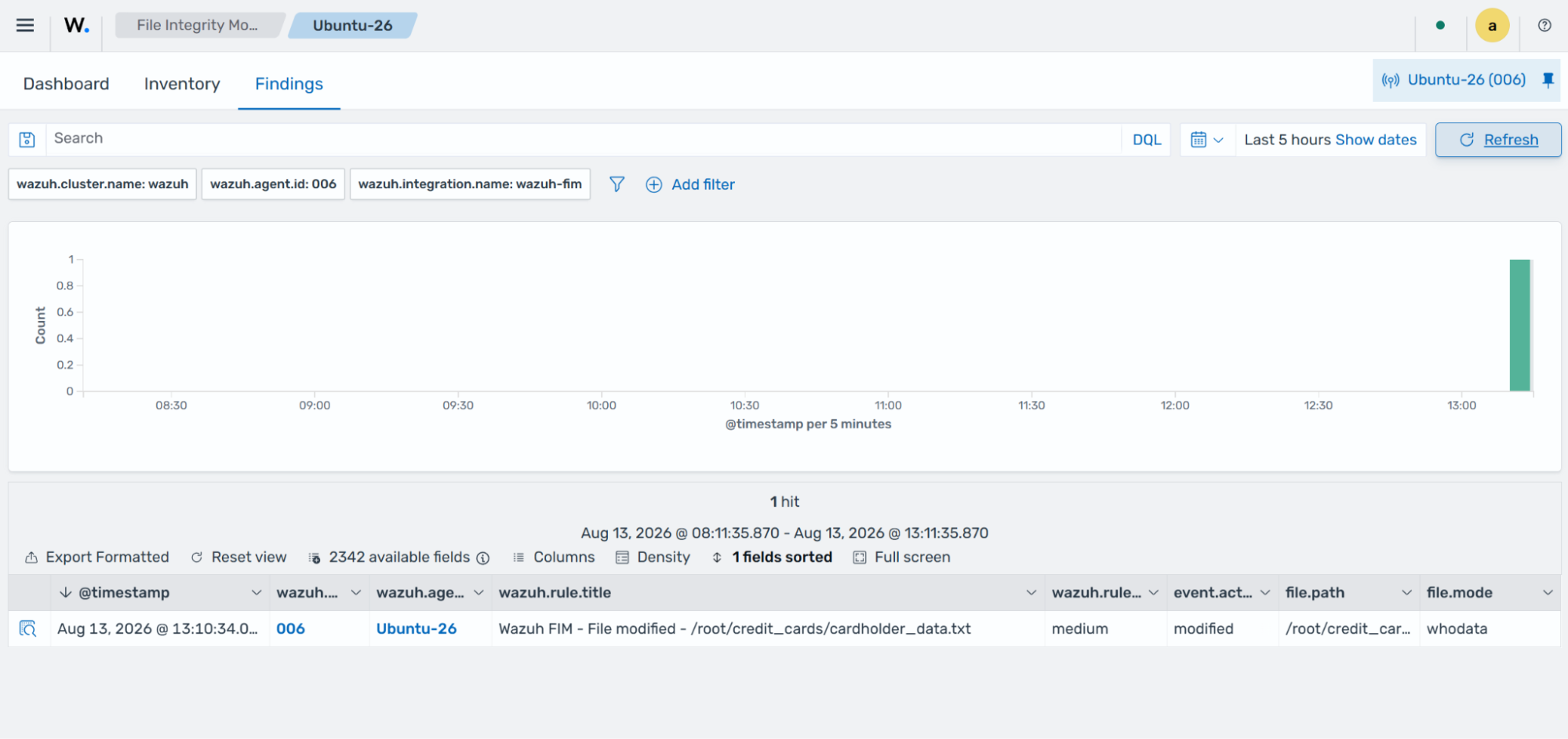
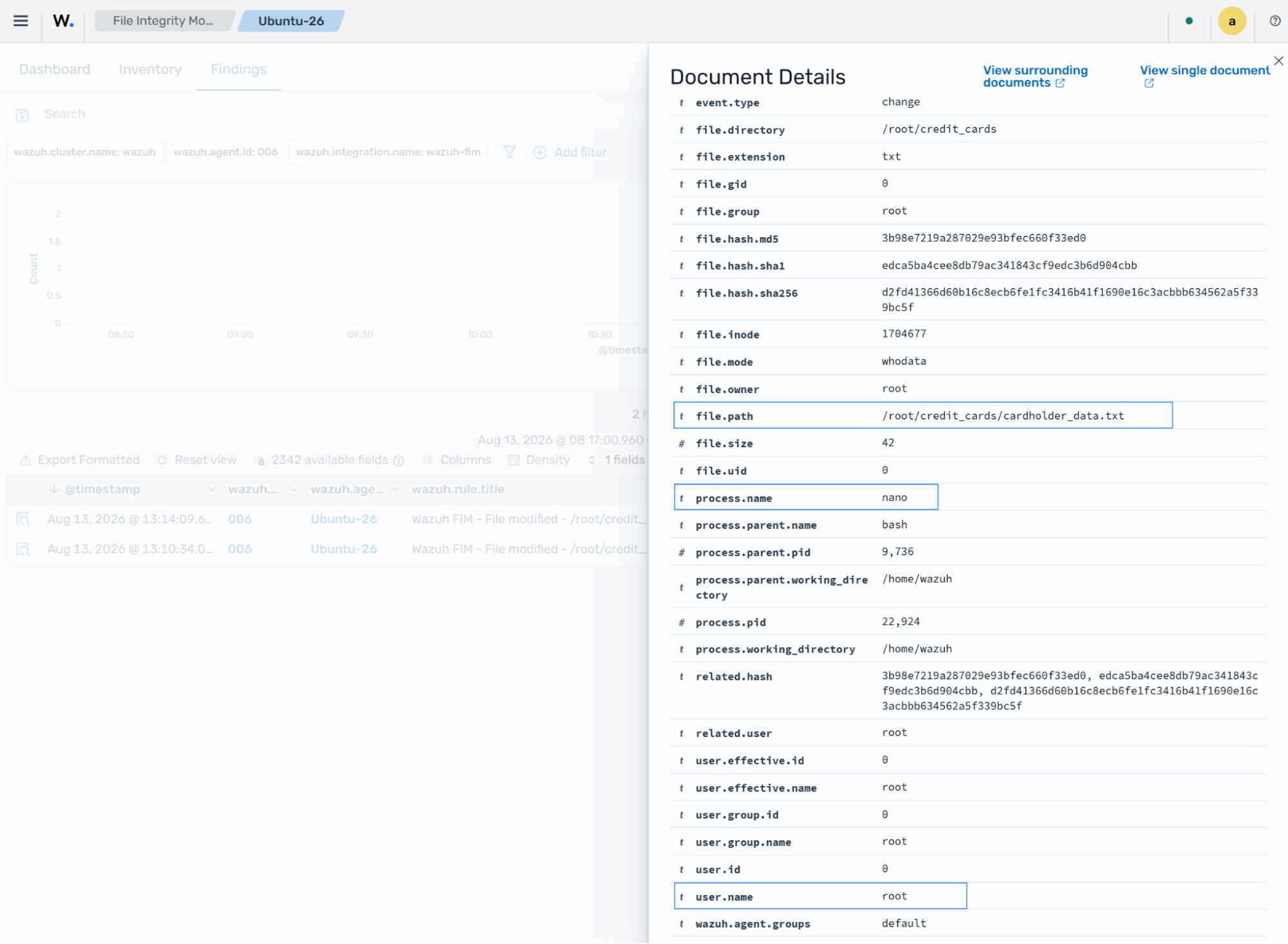
In the expanded finding, you can see that the PCI DSS requirement has been met. The finding shows the differences in the file checksum, the file modified, the modification time, and whodata details identifying the process and user responsible.
Perform critical file comparisons at specified intervals
In this use case, configure the Wazuh FIM module to scan monitored files every hour and report file changes.
Note
The Wazuh FIM module runs scans every 12 hours by default. The scan frequency set applies to all monitored files/directories, except directories with real-time monitoring enabled.
Configure the frequency option carefully. Depending on the number of files and directories configured for scanning, you might observe increased CPU and memory usage.
Content change reporting is currently limited to text files.
On the agent
Create the directory to monitor and a file inside it:
# mkdir -p /root/debit_cards
# touch /root/debit_cards/cardholder_data.txt
Update the frequency option of the
syscheckblock in the agent configuration file (/var/ossec/etc/ossec.conf) to your desired scan interval in seconds:<frequency>3600</frequency>
Add the following configuration to the
syscheckblock of the agent configuration file (/var/ossec/etc/ossec.conf):<directories report_changes="yes">/root/debit_cards/cardholder_data.txt</directories>
Restart the Wazuh agent to apply the changes.
# systemctl restart wazuh-agent
Add sample data to the
cardholder_data.txtfile.# echo 'User5 = card5' > /root/debit_cards/cardholder_data.txt # echo 'User6 = card6' >> /root/debit_cards/cardholder_data.txt
A finding is generated during the next FIM scan to report the file modification.
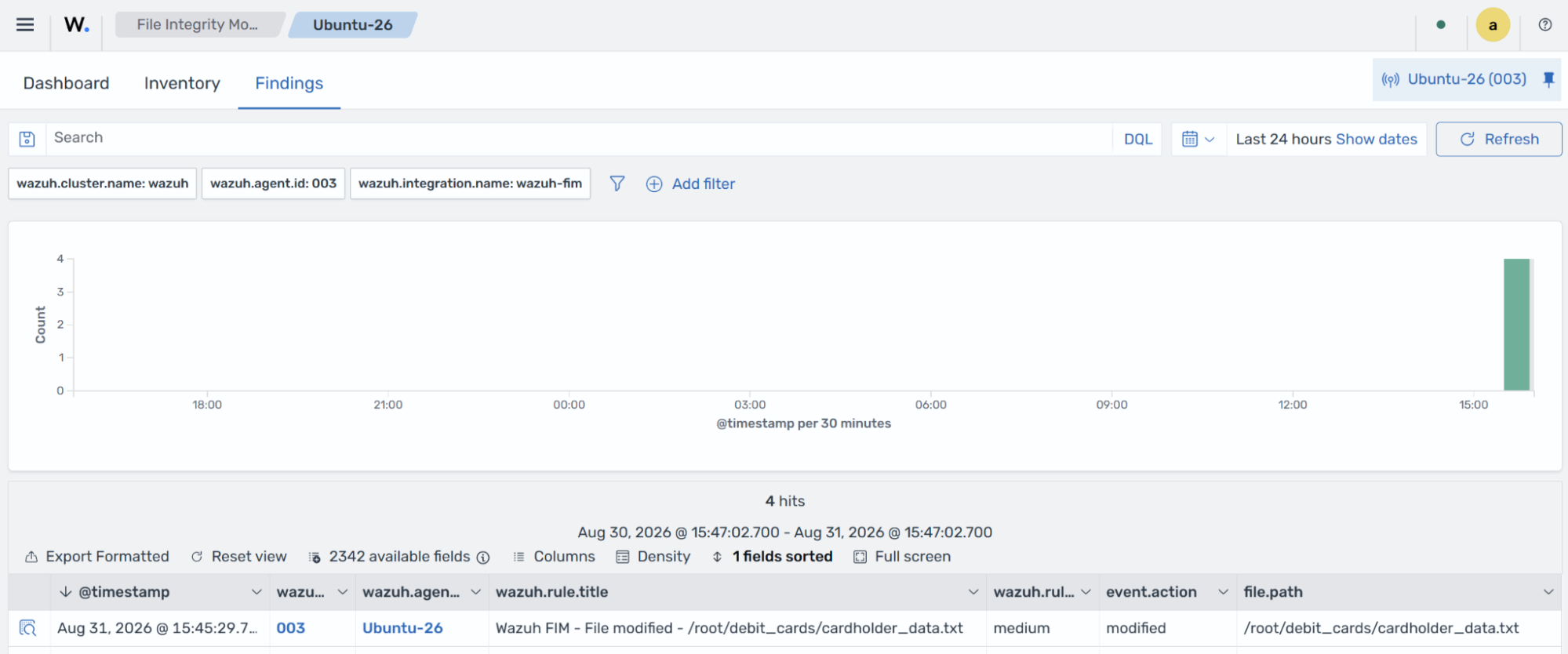
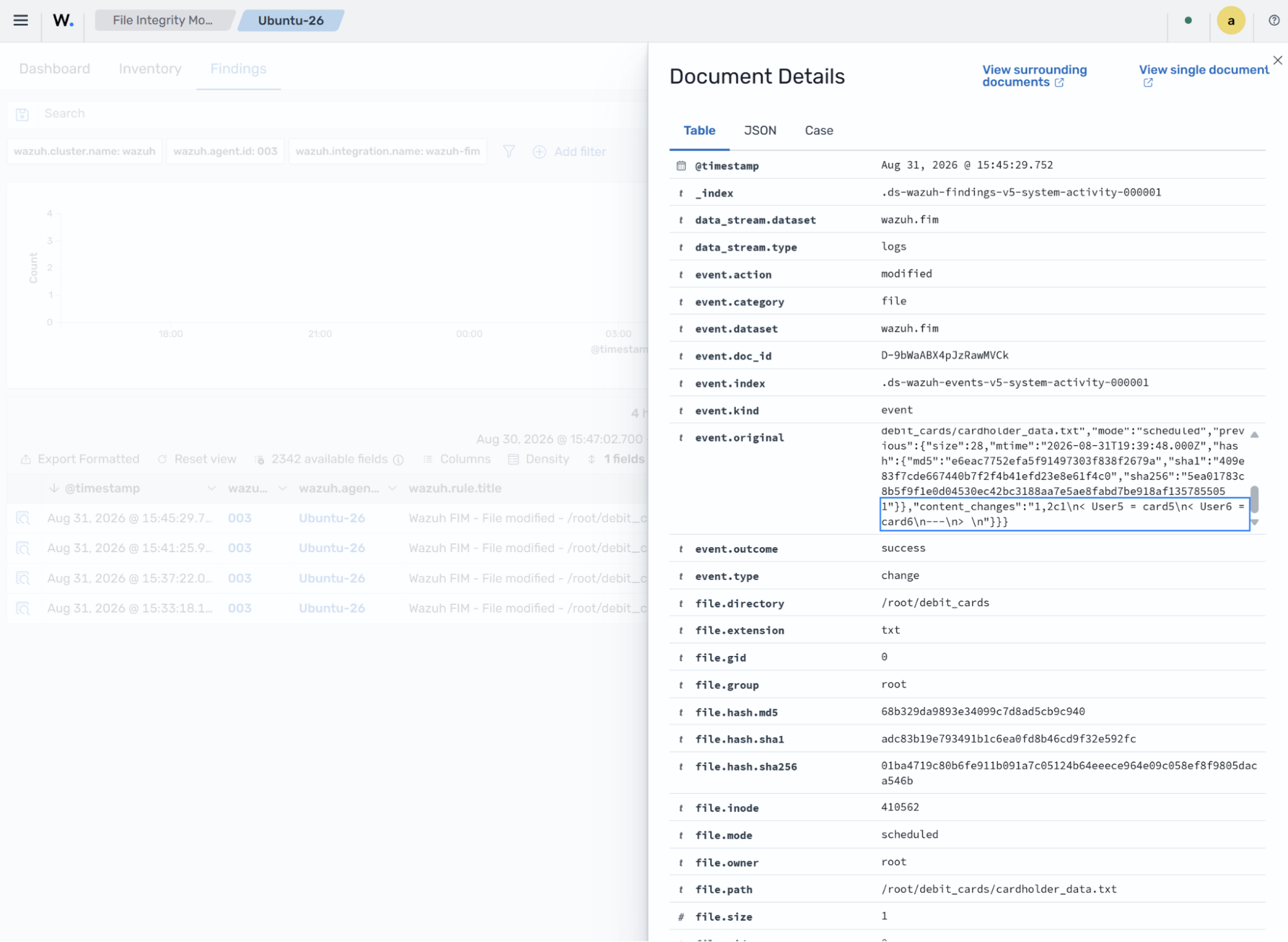
In the expanded finding, you can see the changes made in content_changes, the file modified, and the PCI DSS requirement met. It also includes the differences in the file checksum, the modification time, and other details.
Detect file creation and deletion
In this use case, the Wazuh FIM module detects when a file in a monitored directory is created or deleted. This action triggers a finding with the user and process responsible for the change.
On the agent
Create the
/root/pin_datadirectory to monitor for changes:# mkdir -p /root/pin_data
Add the following whodata configuration to the
syscheckblock of the agent configuration file (/var/ossec/etc/ossec.conf):<directories whodata="yes">/root/pin_data</directories>
Restart the Wazuh agent to apply the changes.
# systemctl restart wazuh-agent
Create and delete the
pin.txtfile in the directory.# touch /root/pin_data/pin.txt # rm /root/pin_data/pin.txt
You can see a finding generated for the deleted file.
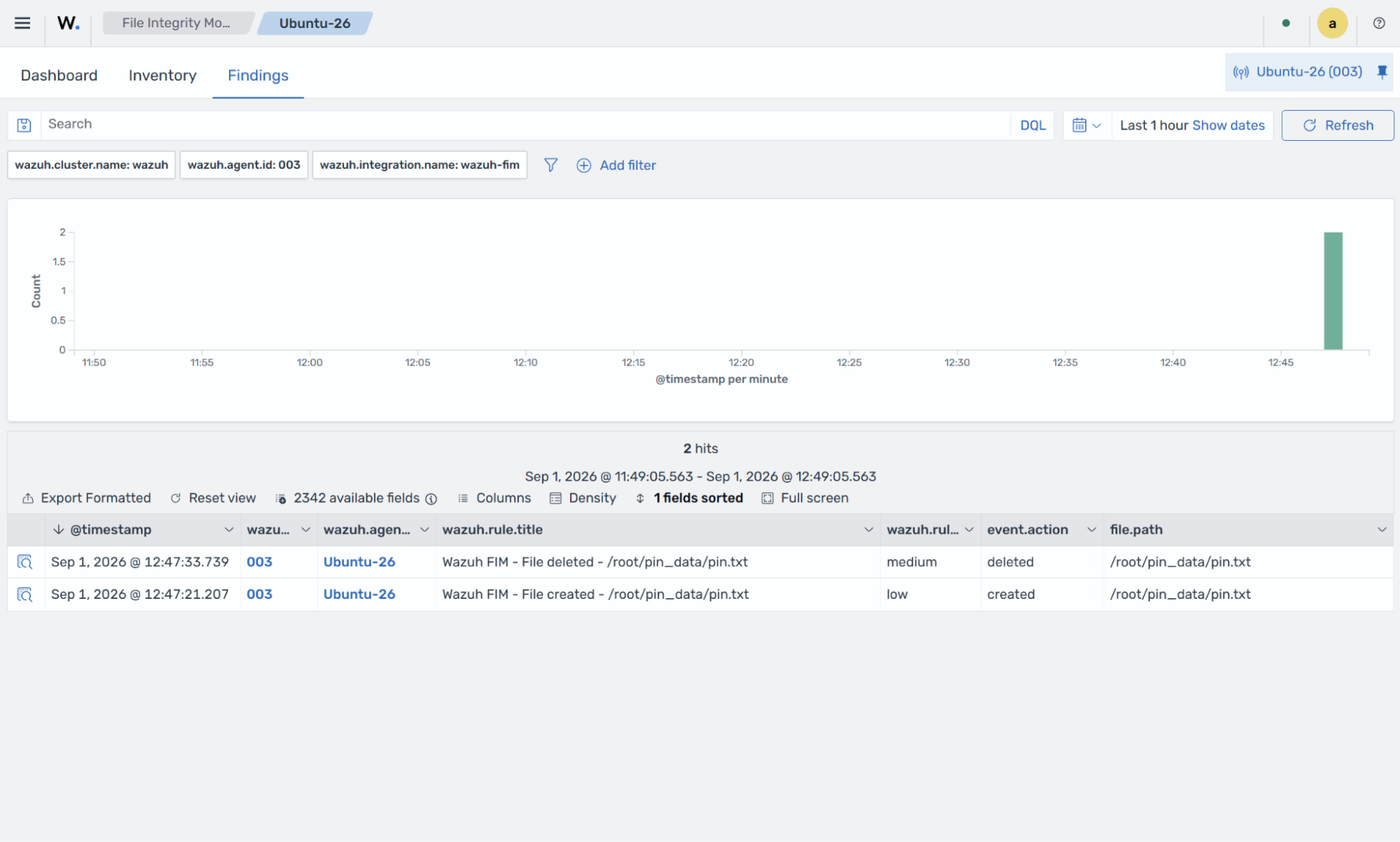
In the finding details, you can see the file deleted, the PCI DSS requirement met, the deletion time, and other details.
You can track these activities from the PCI DSS dashboard. The dashboard shows all activities that trigger a PCI DSS requirement, including FIM changes.