Index templates reference
The Wazuh indexer uses index templates to define the mappings, settings, rollover policies, and retention settings applied to the Wazuh indices.
Templates are automatically created and managed by the Setup module during Wazuh indexer startup.
Event templates
Event templates define the mappings and settings applied to event data streams. All categorized event data streams share a common template structure that includes:
Wazuh Common Schema (WCS) mappings.
Data stream configuration.
Lifecycle policy assignment.
Index settings.
The following example shows a simplified event template:
{
  "index_patterns": [
    "wazuh-events-v5-*"
  ],
  "priority": 1,
  "data_stream": {},
  "template": {
    "settings": {
      "plugins.index_state_management.policy_id": "stream-events-policy"
    }
  }
}
Event template retention
Event data streams retain data for a short period because they primarily serve as an intermediate processing layer.
Data stream |
Default retention |
|---|---|
|
10 minutes |
|
1 hour |
|
1 hour |
Specialized templates
Some workloads require dedicated templates because their mappings or lifecycle requirements differ from standard event data.
Findings template
The findings template manages Security Analytics findings stored in wazuh-findings-v5-*.
The template applies a dedicated lifecycle policy optimized for investigation and threat hunting workflows.
Example:
{
  "index_patterns": [
    "wazuh-findings-v5-*"
  ],
  "priority": 1,
  "data_stream": {},
  "template": {
    "settings": {
      "plugins.index_state_management.policy_id": "stream-findings-policy"
    }
  }
}
Default retention:
Data stream |
Retention |
|---|---|
|
90 days |
Active response template
The active response template manages response execution requests stored in wazuh-active-responses.
The template applies a dedicated lifecycle policy because active response requests are short-lived operational data.
Example:
{
  "index_patterns": [
    "wazuh-active-responses*"
  ],
  "priority": 1,
  "data_stream": {},
  "template": {
    "settings": {
      "plugins.index_state_management.policy_id": "stream-active-responses-policy"
    }
  }
}
Default retention:
Data stream |
Retention |
|---|---|
|
3 days |
Metrics templates
Metrics templates manage operational metrics generated by Wazuh components. Examples include:
wazuh-metrics-agentswazuh-metrics-comms
Metrics templates use dedicated mappings optimized for metric aggregation and visualization.
Index State Management
The Wazuh indexer uses Index State Management (ISM) policies to automate rollover and retention operations. An ISM policy controls:
Rollover conditions.
Retention periods.
Index deletion.
Policy lifecycle
All Wazuh stream policies follow the same lifecycle:
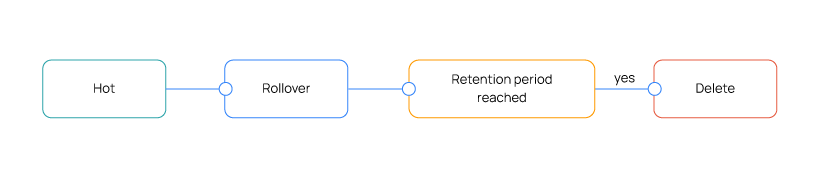
The following example shows a simplified lifecycle policy:
{
  "policy": {
    "default_state": "hot",
    "states": [
      {
        "name": "hot",
        "actions": [
          {
            "rollover": {
              "min_doc_count": 200000000,
              "min_primary_shard_size": "20gb"
            }
          }
        ],
        "transitions": [
          {
            "state_name": "delete",
            "conditions": {
              "min_index_age": "90d"
            }
          }
        ]
      },
      {
        "name": "delete",
        "actions": [
          {
            "delete": {}
          }
        ]
      }
    ]
  }
}
Rollover conditions
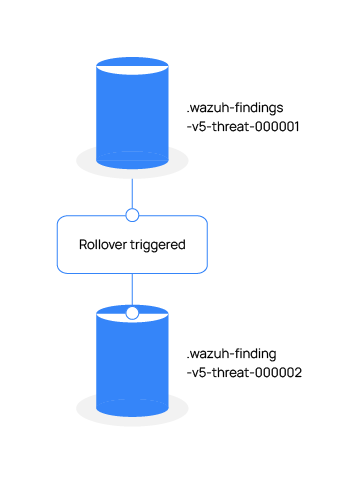
A rollover creates a new backing index and redirects write operations to the new index. By default, Wazuh rolls over a data stream when either of the following limits is reached:
Condition |
Value |
|---|---|
Primary shard size |
20 GB |
Document count |
200 million documents |
The first threshold reached triggers the rollover.
Example rollover sequence:
Template priorities
Template priority determines which template is applied when multiple templates match the same index pattern. The following priorities are used by default:
Template |
Priority |
|---|---|
Active responses |
1 |
Raw events |
1 |
Event streams |
1 |
Findings |
1 |
Metrics |
1 |
Templates with higher priorities override templates with lower priorities.
Note
Custom templates intended to override Wazuh-managed templates should use a higher priority value.
Template generation workflow
During startup, the Setup module automatically deploys the templates and policies required by the Wazuh indexer. The deployment process consists of the following steps:
Load packaged template definitions.
Create or update index templates.
Create or update ISM policies.
Create required data streams.
Apply mappings and lifecycle settings.
The following workflow illustrates the process:

Verifying deployed templates
List all deployed templates:
GET /_index_template/wazuh-*
View a specific template:
GET /_index_template/<template-name>
List lifecycle policies:
GET /_plugins/_ism/policies